Defining What is WebGL for Modern Web Browsers
WebGL (Web Graphics Library) is a cross-platform, royalty-free JavaScript API engineered to render high-performance 2D and 3D graphics within any compatible web browser. Developed and maintained by the Khronos Group, WebGL is an open standard that brings the capabilities of OpenGL ES 2.0—a subset of the OpenGL API specifically designed for embedded systems—directly to the web platform.
The core utility of WebGL lies in its integration. Unlike legacy graphics solutions, it functions without the need for external plug-ins, operating directly within the browser’s Document Object Model (DOM). By interfacing seamlessly with HTML, CSS, and JavaScript, WebGL enables developers to utilize the device’s hardware to execute complex visual calculations. In the landscape of digital growth and infrastructure security, WebGL represents a significant expansion of the attack surface for browser-based tracking, transitioning rendering responsibilities from the CPU to the Graphics Processing Unit (GPU).

The Underlying Mechanics of What is WebGL Technology
To assess the security implications of WebGL, one must understand its low-level interactions with hardware. The technology functions by offloading the heavy mathematical requirements of graphics rendering from the CPU to the GPU, a process known as hardware acceleration.
The Role of Shaders and GLSL
WebGL operations are governed by shaders—specialized programs that execute directly on the GPU. These shaders are written in OpenGL Shading Language (GLSL), a high-level shading language with a syntax similar to C. The rendering pipeline relies on two critical shader types:
- Vertex Shaders: These programs process vertex data (input coordinates and attributes) to calculate the positioning and geometry of shapes in 3D space.
- Fragment Shaders: These programs process fragment data to determine the specific color, texture, and lighting of individual pixels.
By utilizing GLSL to control these elements, WebGL achieves real-time performance that would be impossible via the CPU alone.
Hardware Acceleration and GPU Utilization
While hardware acceleration provides the efficiency required for browser-based games and scientific simulations, it introduces an inherent architectural vulnerability. Because WebGL requires direct communication with the GPU to execute shaders, it exposes specific hardware traits. These traits are not merely software-defined; they are a reflection of the physical components and the firmware governing the device's silicon.
Why WebGL Matters Beyond Graphics
Most people first encounter WebGL as a browser technology for rendering interactive visuals, games, and 3D content. But WebGL matters for more than performance alone. Because it interacts closely with the GPU and browser profile, it can also expose technical details that are relevant to privacy, device recognition, and browser compatibility.
This is why WebGL is often discussed not only in web development, but also in conversations about browser fingerprinting and online tracking.
Why What is WebGL is a Critical Factor in Browser Fingerprinting
In cybersecurity, WebGL is a primary vector for browser fingerprinting. Platforms leverage the API to identify and track users by measuring how their hardware responds to specific rendering instructions.
Identifying Unique Hardware Signatures
Different GPUs, drivers, and browser profiles can produce slightly different rendering results, and these differences may contribute to browser fingerprinting when combined with other signals. These rendering differences can come from a combination of GPU architecture, drivers, browser settings, and graphics processing behavior.When a tracking script sends a set of GLSL instructions to the browser, the resulting image contains slight, measurable differences in pixel color and positioning. These variations form a persistent hardware signature that can track a user even if they rotate IP addresses or clear browser cookies.
The Mechanism of Canvas and WebGL Reporting
Sophisticated anti-fraud systems combine WebGL data with Canvas rendering and metadata—such as supported extensions, maximum texture sizes, and the unmasked renderer string—to create a high-entropy device ID.Because WebGL data is often combined with other browser signals, it can become one part of a broader fingerprinting profile.
Privacy and Practical Risks of WebGL Fingerprinting
WebGL is not only a graphics technology. In some cases, it can also contribute to browser fingerprinting by exposing device- and driver-related rendering differences. When combined with other browser signals, this may make it easier for websites to recognize patterns across sessions.
For everyday users, this usually matters at the privacy level rather than the operational level. For teams that rely on browser-based tools, it highlights the importance of understanding how browser profiles behave and why consistency across sessions can matter.
The key point is simple: WebGL improves graphics performance, but it can also expose technical details that are relevant to privacy, browser identification, and compatibility.
Professional Comparison: Standard Browsers vs. DICloak
The following table contrasts the security posture of standard web browsers with the specialized protective measures of an antidetect solution.
| Feature |
Standard Browser (Chrome/Edge) |
DICloak Antidetect Browser |
| WebGL Signature |
Static; reveals physical hardware traits |
Isolated and customized for each profile |
| Proxy Management |
System-wide or limited extensions |
Bulk integration of HTTP/HTTPS and SOCKS5 |
| Multi-account Capacity |
Limited; prone to profile leaking |
Manages 1,000+ profiles on one device |
| OS Simulation |
Host-dependent (Mac reveals Mac) |
Simulates Windows, Mac, iOS, Android, Linux |
How DICloak Fits into Browser Workflow Management
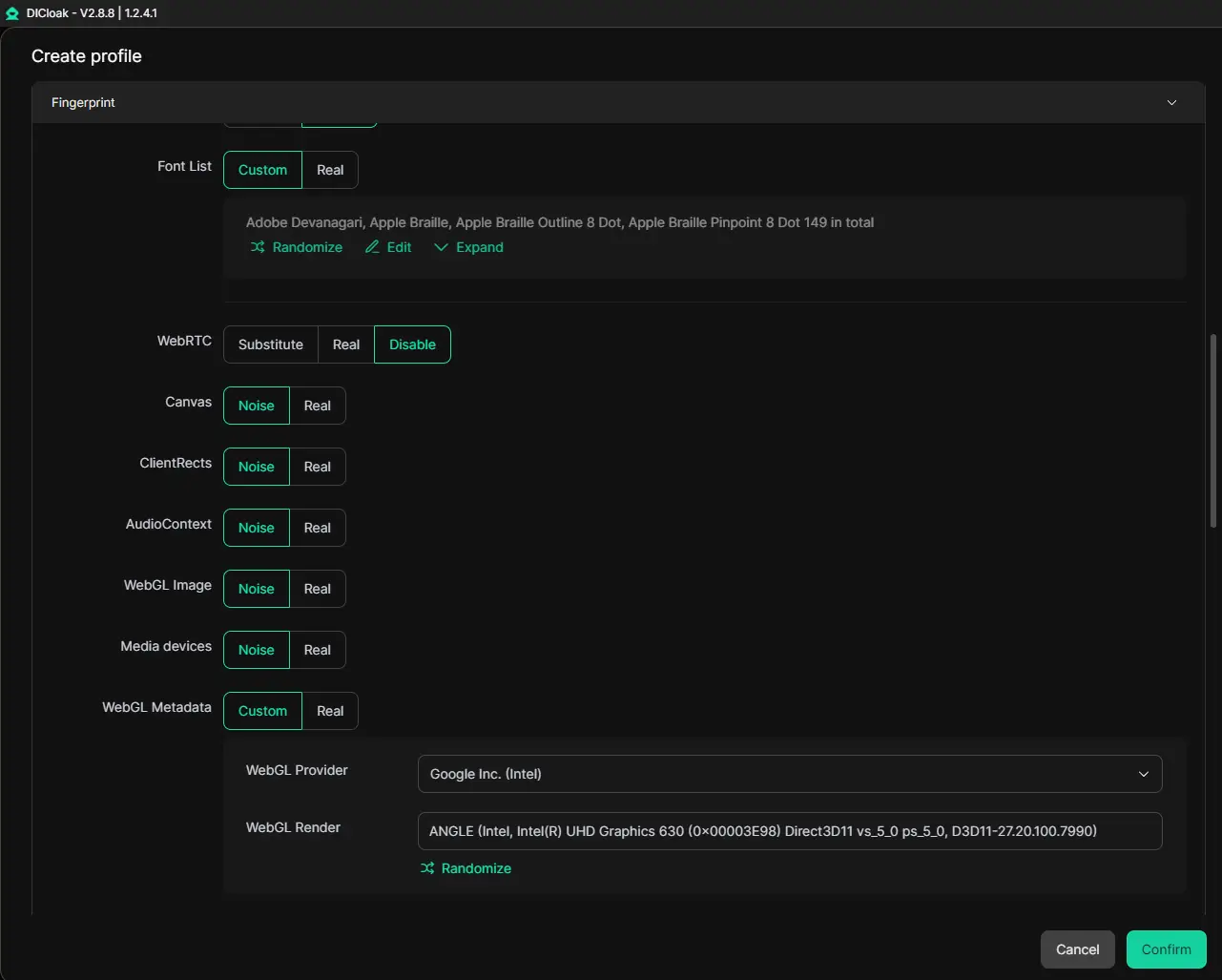
DICloak is more than a browser workflow management tool. It also helps users enhance privacy protection by modifying WebGL fingerprinting and browser profile isolation. By allowing separate browser profiles to carry different fingerprint settings, DICloak can reduce overlap between browser profiles and make online activity less exposed to simple fingerprint-based identification.
At the same time, each profile keeps its own cookies, login state, and local storage, which helps teams separate projects and manage browser-based tasks more clearly. DICloak also supports RPA automation and multi-window synchronization, making repeated browser actions easier to handle.
In this context, DICloak is useful for teams that want stronger browser privacy, better profile separation, and more efficient workflow management.
Advantages and Limitations of Browser Management Tools
Using a browser management tool can help teams organize browser-based work more clearly, especially when many projects, sessions, or workflows need to be handled at the same time.
Advantages:
- clearer browser profile organization
- better separation between different tasks or projects
- easier team collaboration through profile sharing and permission settings
- support for more structured browser workflows
Limitations:
- setup takes time at the beginning
- users still need to understand how profile settings work
- some advanced features may require a paid plan
For most teams, the value of these tools depends on how complex their browser-based workflow really is.
Conclusion
Understanding what is WebGL helps explain both modern browser graphics and the privacy questions connected to browser behavior. WebGL improves web performance, but it can also expose technical details that matter in fingerprinting and browser identification.
For teams that need clearer browser organization and more structured workflows, DICloak is a practical option. With browser profile management and collaboration features, it helps make browser-based work more organized and efficient.
Frequently Asked Questions About What is WebGL
What is WebGL?
WebGL is a JavaScript API used to render interactive 2D and 3D graphics within web browsers without the need for plug-ins. It is an open standard maintained by the Khronos Group and is based on OpenGL ES 2.0.
Can I disable WebGL to stay anonymous?
Disabling WebGL may reduce compatibility with some websites and, in some cases, make a browser setup less typical. That is why it is not always the best privacy solution. Because most modern websites expect WebGL to be enabled for standard rendering, its absence makes your browser appear highly unique and suspicious, often triggering heightened security verification or manual account reviews.
How does WebGL differ from WebGPU?
While WebGL is primarily focused on graphics rendering based on older standards, WebGPU is a newer API designed for modern hardware. WebGPU offers a more efficient interface and supports general compute operations, allowing for more complex data processing directly on the GPU.
How does DICloak relate to WebGL management?
DICloak can help users manage browser profiles and browser-related settings in a more structured way. In practice, its value is stronger in workflow organization, profile separation, and team coordination than in any single privacy feature alone.
 Web Proxy Tools
 Free Tools
 Cookie Plugin
 UA Generator
 MAC Address Generator
 IP Generator
 IP Address List
 2FA Code Generator
 World Clock
 Anonymous Check
 WebRTC Leak Test
 UUID Generator
 Free Web Proxy Site
 Proxy Checker
 FB Ad Checker
 AI Web Scraping
 Free SMM Tools
 Twitter Shadowban Checker
 Instagram Name Checker
 UTM Generator
 Username Generator
 AI Hashtag Generator
 LinkedIn Headline Generator
 Social Media Image Resizer