TikTok has become one of the most popular apps worldwide, but many users face restrictions when trying to access it at school, work, or in certain countries. If you're looking to get tiktok unblocked, you've come to the right place. In this guide, we'll walk you through effective methods to bypass blocks, while also discussing potential risks and how to stay secure online. Whether you're a content creator or just a casual user, this guide will help you regain access to TikTok safely and easily.
Why is TikTok Blocked?
TikTok is one of the most popular social media apps in the world. However, many people find themselves unable to access it in certain places, like schools, workplaces, and even entire countries. The reasons behind TikTok being blocked vary, ranging from concerns over distractions to worries about data privacy. In this section, we will explore the main reasons why TikTok is blocked in different settings and regions, and how you can get tiktok unblocked in these situations.
School and Workplace Restrictions
One of the most common places where TikTok is blocked is in schools and workplaces. Schools, in particular, have strict rules to maintain a focused environment for learning. With TikTok's endless stream of short, engaging videos, students may find it hard to stay focused on their studies. This has led many educational institutions to block the app on their networks.
Moreover, there are concerns over the content shared on TikTok. Schools are worried about inappropriate material, which can sometimes appear on the app. Another concern is privacy: TikTok collects a lot of personal data, such as location and browsing habits, which makes many schools cautious about allowing students to use it on school devices or networks.
For example, some U.S. Public schools have banned TikTok on school Wi-Fi networks. However, students sometimes bypass these restrictions by using their mobile data. Despite these efforts, TikTok remains a distraction for many students.
If you're facing these restrictions, methods to get tiktok unblocked often involve using proxies to bypass school or workplace firewalls.
Geographical Restrictions
TikTok is also blocked in some countries due to concerns over user data privacy and security. While schools and workplaces focus on productivity and content concerns, governments may block TikTok due to the large amount of personal data the app collects from its users.
TikTok collects sensitive information, including location, browsing history, and device data, which raises privacy concerns. In some countries, these privacy concerns have led to government actions to restrict or block access to TikTok in order to safeguard users' personal information. For example, countries like India have imposed a full ban on TikTok due to data privacy issues.
In other countries, TikTok may only be restricted on official or government-issued devices to prevent unauthorized data collection. These restrictions are often driven by concerns about how the app handles user data and whether it meets privacy protection standards.
If you're in a country where TikTok is blocked, there are various ways to get tiktok unblocked, such as using proxy service to access the app from another region.

Methods to Unblock TikTok
If your network blocks TikTok, you still may get tiktok unblocked. Here are several common methods. Use them carefully and responsibly.
Proxy Servers
A proxy server works as a helper between you and TikTok. When you use a proxy, your internet request goes through a different server. Then TikTok sees the proxy server’s address — not yours. This can bypass blocks.
You can set up a proxy on many devices such as phones, computers, even tablets. For example, on Android you go to Wi‑Fi settings → advanced → proxy, and paste proxy details.
Compared with a proxy servers are often simpler and may use less data. But they can be less secure. Free proxies may be slow or unstable; they may leak data or drop connections.
If you want a more stable result and safer privacy, it’s better to use paid or “residential” proxies rather than free public ones.
Changing DNS Settings
Sometimes networks block TikTok by changing or filtering DNS (the system that converts website names to addresses). You may bypass this block by changing DNS on your device.
How to change DNS (basic steps):
- Go to Wi‑Fi or network settings on your device.
- Look for DNS / advanced network settings.
- Enter a public DNS, for instance 1.1.1.1 (Cloudflare) or 8.8.8.8 (Google DNS).
- Save and reconnect.
This method is simple and does not require installing extra apps. It may help you get unblocked TikTok when the network only blocks by DNS.
But if the network uses deep filtering or firewall rules, changing DNS alone might not be enough.
Mobile Hotspots (Use Mobile Data Instead of Wi‑Fi)
If TikTok is blocked on Wi‑Fi (like in a school or workplace), you can try using your phone’s mobile data. For example, turn on your phone’s hotspot and connect your device. This way, you bypass the Wi‑Fi network entirely.
Pros:
- Fast and simple.
- No extra setup needed.
Cons:
- Uses your mobile data quota — may cost money.
- Speeds can vary depending on signal and network traffic.
Even though it's not a technical trick, using mobile data is often the easiest way to get tiktok unblocked when Wi‑Fi is restricted.
Browser‑Based Solutions
If the TikTok app is blocked, sometimes the web version may still work. Web-based proxies can also help. These are websites that forward your traffic via a different server. You enter the TikTok URL into the proxy site.
Some privacy‑focused browsers also offer built-in proxy. They may help if DNS blocking or app blocking is used.
These methods can help you get unblocked TikTok in a pinch. But they tend to be slower. Video playback or uploads may fail.
For users who need extra privacy and control over their TikTok accounts, especially those who manage multiple accounts like social media marketers or content creators, specialized antidetect browsers like DICloak Browser provide an ideal solution.
DICloak enables tiktok unblocked by offering isolated browser profiles with unique fingerprints. Each profile is like a separate device with its own cookies, IP addresses, and browser settings. This makes it easy to manage multiple TikTok accounts without triggering detection or restrictions from TikTok. Whether you’re dealing with school or workplace network filters, DICloak lets you bypass those blocks securely.
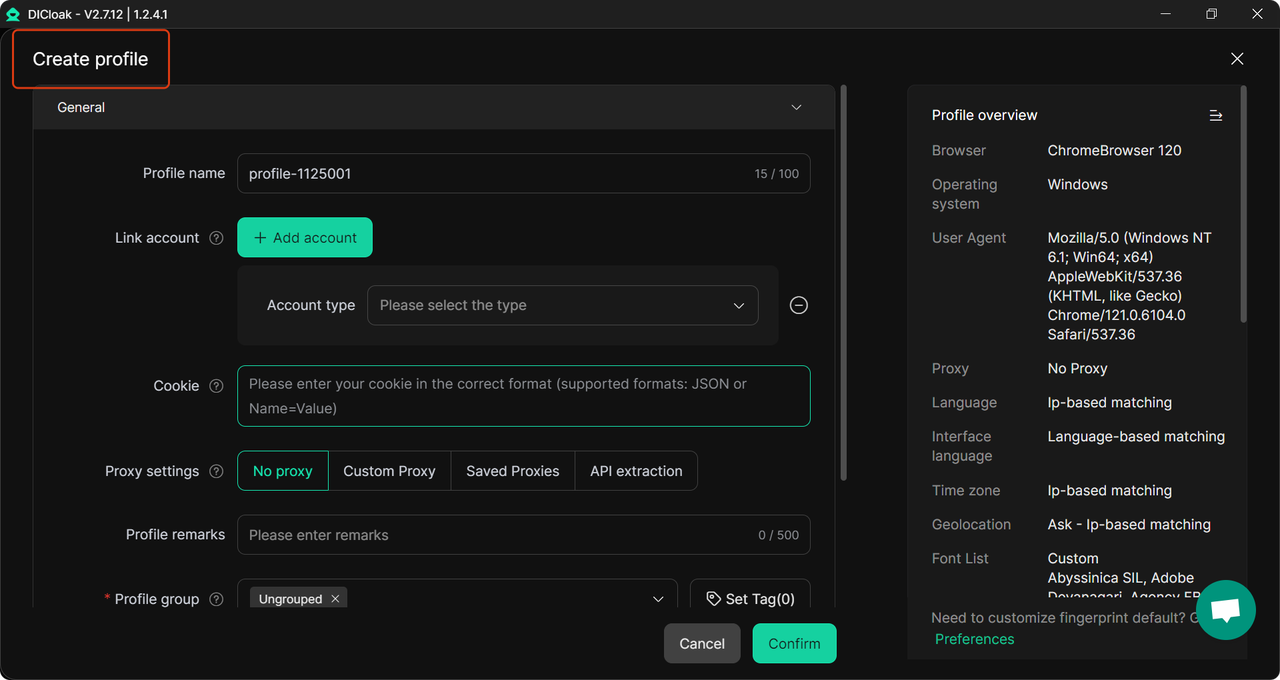
What makes DICloak especially useful for unblocking TikTok is its ability to configure custom proxy settings for each profile. By assigning a unique proxy to every profile, you can make each account appear to come from different regions or locations, thus bypassing geographic restrictions. If TikTok is blocked in your region or on your Wi‑Fi network, DICloak helps you get tiktok unblocked by routing your connection through a proxy that TikTok can’t block.
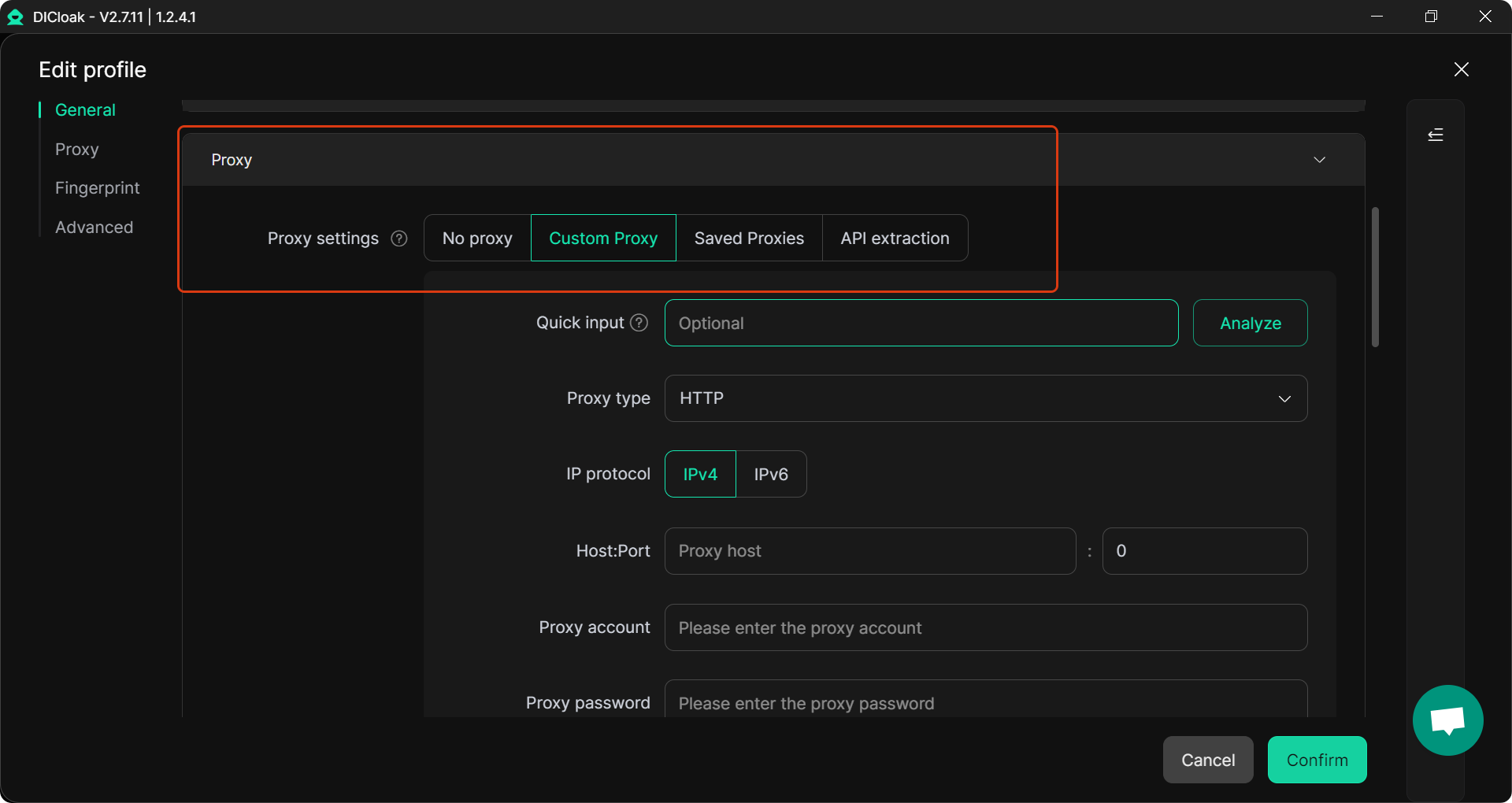
For example, if TikTok is restricted in your country or organization, you can set DICloak to use a proxy server from a different region where TikTok is accessible. This custom configuration ensures your connection remains stable while protecting your privacy and avoiding detection by TikTok’s security systems.
Why DICloak helps with TikTok unblocked:
- It creates isolated profiles, so your TikTok accounts remain undetected even when accessing the app from multiple profiles.
- Custom proxies can be set for each profile, ensuring your connection appears to come from different locations, thus bypassing geographic blocks.
- It works seamlessly on both Windows and macOS devices.
- The profile sharing feature allows you to securely share TikTok accounts without exposing usernames or passwords.
Whether you're managing multiple TikTok accounts for business, marketing, or personal use, DICloak Browser is an advanced tool that ensures tiktok unblocked access with increased privacy, security, and flexibility.
Risks and Security Concerns of unblocking TikTok
When you try to get unblocked TikTok, you should also know there are real risks. Not all methods are safe. Some can hurt your privacy or even your device.
Potential Risks When Unblocking TikTok
If you use a free proxy or a random proxy server, you may expose your data. Many free proxies do not use encryption. That means anything you send — your password, login info, or personal data — can be seen by others. Free proxies may also inject ads or malware. Some research found that many free proxies are unstable, or even host malicious code. If you change DNS settings or use public DNS or untrusted DNS services, you can also face danger. Bad DNS services may redirect you to fake websites. That can lead to phishing, malware, or data theft. Even when you just use the app itself, there are risks. For example, on TikTok users might run into scams, harmful links, or content that tries to trick you into giving personal info.
Also, when you rely on tools to get tiktok unblocked, you may unintentionally break privacy rules. If a tool leaks IP or DNS info, or fails to hide your true identity, then filters or monitoring systems can still detect you.
Importance of Choosing Secure and Reputable Tools
Because of these risks, you must pick safe tools if you try to unblock TikTok or browse securely. For proxy or DNS methods: use paid or well‑reviewed providers. Free public proxies are risky.
If you use a specialized browser or antidetect tool, choose one with good security records. DICloak Antidetect Browser is a great choice for ensuring your privacy while unblocking TikTok. DICloak offers isolated profiles with custom proxy settings, preventing your identity from being exposed or leaked. It also supports strong encryption to keep your data safe from hackers and malicious entities. With DICloak, you can access TikTok securely while bypassing network blocks and maintaining privacy.
When changing DNS settings: pick a trusted DNS provider. Avoid unknown or suspicious DNS servers. A safe DNS helps prevent attacks like DNS hijacking or redirection.
Also, avoid careless behavior on TikTok: don’t click suspicious links, don’t share private info, and don’t reuse weak passwords. This reduces the risk of scams or hacking.
Tips to Avoid Data Breaches and Malware
Here are simple tips to stay safer if you try to use methods to get unblocked TikTok:
- Always use paid or reputable proxy or DNS services. Free proxies are often unsafe.
- Use HTTPS and avoid entering sensitive info (passwords, personal data) when connection is insecure.
- Use a modern browser or security‑focused tool that supports encryption and isolates sessions.
- Keep your device and software updated. Outdated apps or OS can be easier to hack.
- Be careful on TikTok: don’t click unknown links, don’t trust giveaways or private‑message offers, especially from unknown accounts.
- Use strong passwords and enable extra security if available. Avoid simple or repeated passwords.
In short, getting tiktok unblocked may be tempting — but doing it safely matters. If you use the right tools and good habits, you can reduce risks. Always think about privacy, not just access.
Conclusion
In conclusion, there are various ways to get tiktok unblocked, such as using proxy servers, changing DNS settings, or leveraging tools like DICloak Antidetect Browser. However, it’s important to be aware of the potential risks, such as data breaches or malware, when bypassing network restrictions.
To stay safe, always choose secure and reputable tools, like paid proxies or trusted browsers, and follow best practices to protect your data. By doing so, you can access unblocked TikTok safely, whether you're managing multiple accounts or just enjoying the app without restrictions.
FAQ
Why is TikTok Blocked in Schools and Workplaces?
TikTok unblocked can be a challenge in many schools and workplaces. Schools often block TikTok to prevent distractions and protect students from inappropriate content. Workplaces also restrict it to maintain productivity. However, by using methods like proxy servers or mobile hotspots, users can bypass these blocks and get tiktok unblocked.
What Are the Best Methods to Get TikTok Unblocked?
There are several ways to get tiktok unblocked, including using proxy servers, changing DNS settings, or using mobile hotspots. Proxy servers are effective because they can mask your IP and make TikTok think you are accessing it from a different location. Changing DNS settings is another simple method that can help bypass network filters, allowing you to access TikTok freely.
Is It Safe to Use Proxy Servers to Unblock TikTok?
Using proxy servers can help get tiktok unblocked, but not all proxies are secure. Free proxies can expose you to data breaches or malware. It’s important to choose reputable, secure proxies to protect your data and privacy while accessing TikTok safely.
How Can I Use DICloak to Get TikTok Unblocked?
DICloak Antidetect Browser is an advanced tool for users who need extra privacy and control when accessing tiktok unblocked. DICloak allows you to create isolated browser profiles with custom proxy settings, ensuring that TikTok remains unblocked and that your data stays secure while bypassing network filters.
What Are the Risks of Unblocking TikTok?
While getting tiktok unblocked can be tempting, it’s important to be aware of the risks. Using unreliable methods, such as free proxies or unsecured DNS settings, can expose you to data breaches and malware. Always choose secure, reputable tools and follow best practices to protect your privacy and security.
 Web Proxy Tools
 Free Tools
 Cookie Plugin
 UA Generator
 MAC Address Generator
 IP Generator
 IP Address List
 2FA Code Generator
 World Clock
 Anonymous Check
 WebRTC Leak Test
 UUID Generator
 Free Web Proxy Site
 Proxy Checker
 FB Ad Checker
 AI Web Scraping
 Free SMM Tools
 Twitter Shadowban Checker
 Instagram Name Checker
 UTM Generator
 Username Generator
 AI Hashtag Generator
 LinkedIn Headline Generator
 Social Media Image Resizer