Ever found yourself wanting to check TikTok but your phone’s out of reach, dead, or tucked away to avoid distractions? I’ve definitely been there. That’s when I started using TikTok Web Login, and I was seriously impressed by how smooth and capable the experience is. It allows you to browse your For You Page, reply to comments with a real keyboard, and manage your account right from any computer.
In this guide, I’ll take you through everything you need to know—from logging in to exploring the web interface, and most importantly, how to use a powerful tool to securely manage multiple TikTok accounts. Let’s dive in.
What Is TikTok Web Login and Why Should You Use It?
TikTok Web Login lets you access your TikTok account directly through a web browser, meaning you don’t need to have the app installed on your phone or desktop. It’s a simplified, focused version of the platform that still gives you full access to your For You Page, search, comments, likes, and almost all the other features you're used to on the mobile app.
There are clear advantages to using TikTok Web over the mobile app, especially for power users:
- Larger Screen: Watching videos and managing content is much more enjoyable on a larger monitor.
- Keyboard Input: Typing comments, searching for trends, and sending messages is faster and more convenient with a physical keyboard.
- Multitasking: Keep TikTok open in one tab while working on others—something that's harder to do on a mobile device.
For content moderation, social media marketing, or simply staying updated without picking up your phone, TikTok Web Login is a perfect solution.
How to Use TikTok Web Without a Login
The great thing about TikTok Web is that you don’t always need an account to browse and enjoy content. You can explore a lot of what TikTok has to offer without ever needing to sign in.
What You Can Do Without Logging In:
- Browse the For You Page
- Explore trending videos by category (e.g., Sports, Comedy)
- Search for creators or hashtags
- Watch full videos
- Copy video links to share with others
What Requires a TikTok Web Login:
- Liking or commenting on videos
- Following creators
- Uploading your own videos
- Sending private messages
- Accessing your personal profile or saved drafts
- Using the TikTok LIVE feature
While you can enjoy TikTok Web as a passive viewer without logging in, engaging with the community or managing your own content requires a TikTok Web Login. So, to truly interact and unlock all the platform's features, signing in is a must.
A Simple Guide to Your TikTok Web Login
Logging into the TikTok web version is straightforward, with multiple options to suit your preference. The process is fast and consistent across all modern browsers.
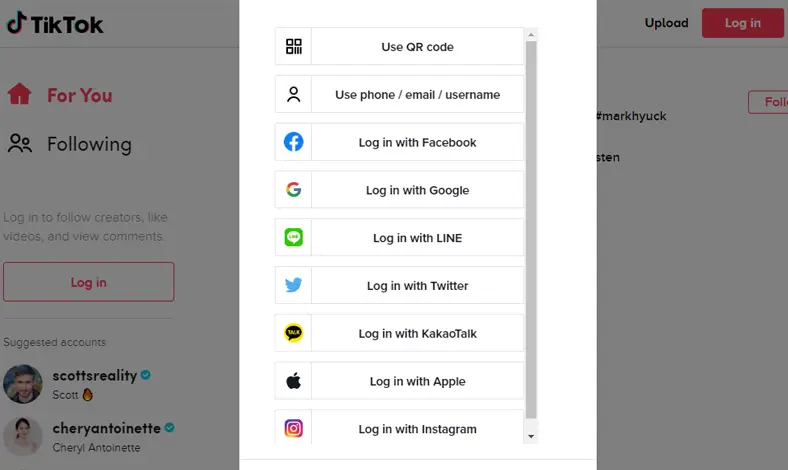
1.Start by visiting tiktok.com/login in your web browser. You will see several ways to sign in.
2.Choose your preferred login method from the list:
- Use QR code
- Use phone/email/username
- Continue with Facebook
- Continue with Google
- Continue with Apple
3.For the QR code method (recommended for speed):
- Select "Use QR code" on the login page.
- Open your phone’s native camera app and point it at the QR code.
- Tap the prompt that appears on your phone’s screen to open TikTok.
- Confirm the login request in the app, and your browser will automatically sign you in.
4.For other login methods, simply select the option for your phone number, email, or a connected social account (Facebook, Google, Apple) and follow the on-screen prompts to enter your credentials.
5.If you don’t have an account yet, click the sign up button at the bottom of the screen to create a new one using your phone, email, or a social media profile.
The entire process works smoothly on modern browsers like Chrome, Firefox, Edge, and Safari.
Exploring the TikTok Web Interface After Your Login
Once you're logged in through TikTok Web Login, the interface will feel very familiar. It's designed to mirror the mobile app but optimized for a desktop experience. A convenient sidebar on the left gives you quick access to key features like For You, Explore, LIVE, and Profile. From here, you can watch videos, scroll through your feed, like, comment, and share just as you would on the mobile app.
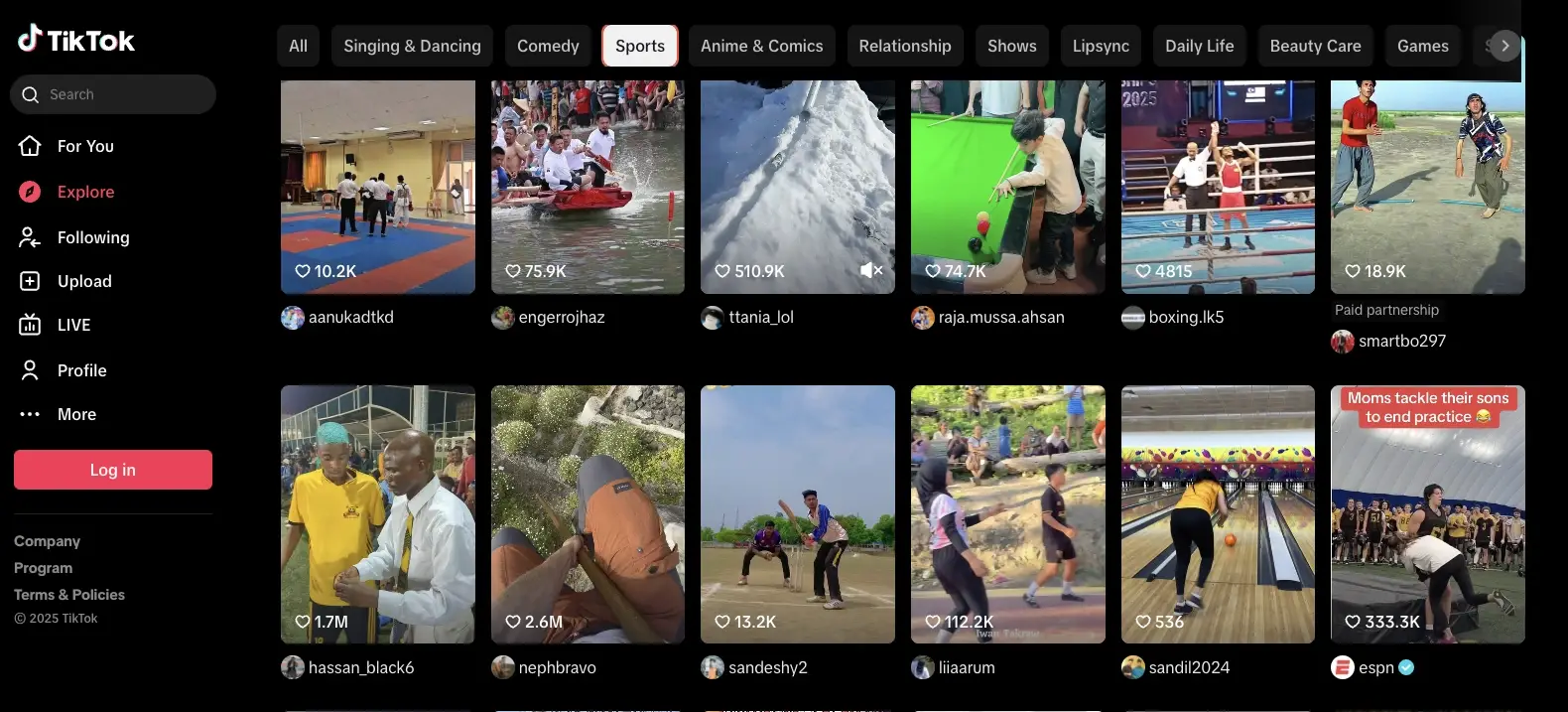
Search for Creators or Hashtags
The search bar at the top of the page is a powerful tool for discovering content. You can use it to find specific creators, trending hashtags, or relevant keywords. This makes it easy to stay on top of popular trends or explore new creators to follow, enhancing your TikTok Web experience.
Go LIVE or Watch Live Streams
With TikTok Web Login, you can both watch and stream live content. Click the LIVE button in the sidebar to explore trending live videos. For eligible creators, the Go LIVE button opens TikTok’s LIVE Studio, a web-based interface where you can customize streams, engage with viewers, and monitor comments—all from the comfort of your desktop.
Upload and Edit Videos Directly
One of the most convenient features of TikTok Web is the ability to upload videos directly from your computer. Simply click the Upload button in the sidebar to open TikTok Studio. From here, you can drag and drop your video, add captions, and manage your content without needing to transfer it from your phone. This is especially useful for creators who edit their videos externally and want a seamless upload process.
By using TikTok Web Login, you unlock these features and much more, making it easier to manage your TikTok content and engage with the community directly from your desktop.
How to Manage Multiple Accounts with a TikTok Web Login Using DICloak
If you’ve ever tried managing more than one TikTok account in a regular browser, you know the frustration. Browsers like Chrome only allow one active session, leading to constant logouts and session conflicts if you try to switch between accounts.
This is where a specialized tool becomes essential. I use DICloak, an antidetect browser built to solve this exact problem. It works by generating a unique digital identity for every account. It spoofs key fingerprint elements like WebGL, WebGPU, and canvas, ensuring each account appears as a completely separate user on a different device. This means that if one account gets flagged, your other accounts are not linked to it and remain safe.
Why Choose DICloak Antidetect Browsers for TikTok Web Login?
⚡The DICloak Antidetect Browser has become a global favorite for its unparalleled ability to efficiently and securely manage multiple accounts. Designed for professionals in social media management, and more, DICloak offers powerful features like RPA automation, bulk operations, and a synchronizer. Additionally, it allows you to customize fingerprints and integrate proxies for each profile, ensuring top-level security and operational efficiency. It’s the ultimate tool for seamless, secure, and scalable operations.

What Makes DICloak Stand Out?
✅ Manage 1,000+ Accounts on One Device: Stop wasting money on extra hardware! DICloak allows you to manage multiple accounts on a single device, cutting costs and boosting efficiency.
✅ Guaranteed Account Safety, No Ban Risks: Every account gets its own isolated browser profile with custom fingerprints and IPs, drastically reducing the risk of bans. Your accounts, your control!
✅ Flexible Proxy Configuration for Maximum Performance: Seamlessly integrate with all major proxy protocols (HTTP/HTTPS, SOCKS5) and manage your proxy pool with bulk operations. No more struggling with IP management—DICloak has you covered.
✅ Streamlined Team Collaboration for Better Results: Easily manage your team with advanced tools like profile sharing, permission settings, data isolation, and operation logs. Your team works smarter, not harder.
✅ Automate the Grind with RPA: DICloak's built-in RPA saves you hours of manual work. Automate repetitive tasks, streamline workflows, and focus on what really matters—growing your business.
✅ Powerful Bulk Tools to Scale Your Operations: Create, import, and launch multiple browser profiles in one click. DICloak makes scaling your business as easy as it gets.
✅ Compatible with All Major Operating Systems: Based on the Chrome core, DICloak supports simulating Windows, Mac, iOS, Android, and Linux operating systems. No matter what platform you need, DICloak has you covered.
🔗 Ready to Get Started?
Visit the DICloak website to explore more details and choose the plan that’s right for you. Start for free today and experience the power of secure, efficient, and scalable multi-account management!
Conclusion:Your Complete TikTok Web Login Toolkit
In 2025, TikTok Web is an incredibly useful tool for enjoying content and managing your account efficiently without being tied to your phone. The larger screen, keyboard, and direct video uploads make it a powerful platform for both casual users and serious creators.
And for those of us managing multiple accounts, DICloak is the essential tool for keeping sessions separate, secure, and scalable. It moves beyond simple multi-account management, offering automation and security features that eliminate technical headaches and let you focus on growing your presence.
Explore what DICloak has to offer and simplify how you access and manage your TikTok presence across every screen you use.
FAQs
1.Can I watch TikTok without logging in?
Yes. You can browse videos on the For You Page, explore content, and search for users without logging in. However, you will need an account to interact by liking, commenting, following, or uploading.
2.Is TikTok Web safe to use?
Yes. TikTok Web uses secure connections to protect your data. For maximum safety, always practice good security hygiene by avoiding logging in on public or shared devices and enabling two-step verification on your account.
3.Can I log into multiple TikTok accounts on the same browser?
Not with a standard browser. A tool like DICloak is required, as it creates completely isolated browser profiles, each with its own unique digital fingerprint, to prevent TikTok from linking the accounts.
4.Can I use a proxy for TikTok?
Yes. DICloak offers flexible proxy configuration and seamlessly integrates with all major proxy protocols, including HTTP/HTTPS and SOCKS5. For the most reliable access, it's best to use paid residential or mobile proxies and ensure the proxy’s country location is consistent with your account’s region.
5.Can I upload videos from TikTok Web?
Yes. The TikTok Studio feature on the web version allows you to upload videos directly from your desktop, add captions, and view basic analytics, making it an ideal workflow for creators who edit content on their computer.
 Web Proxy Tools
 Free Tools
 Cookie Plugin
 UA Generator
 MAC Address Generator
 IP Generator
 IP Address List
 2FA Code Generator
 World Clock
 Anonymous Check
 WebRTC Leak Test
 UUID Generator
 Free Web Proxy Site
 Proxy Checker
 FB Ad Checker
 AI Web Scraping
 Free SMM Tools
 Twitter Shadowban Checker
 Instagram Name Checker
 UTM Generator
 Username Generator
 AI Hashtag Generator
 LinkedIn Headline Generator
 Social Media Image Resizer