Marketers have a unique superpower: doing a hundred things at once without losing the plot. Between running ads, handling multiple client accounts, posting content, and tracking performance across platforms, our hands are always full. And while we have tools for nearly everything, some problems still slip through the cracks—especially when we’re managing accounts at scale.
The reality is, if you’re logging into Meta, Google Ads, LinkedIn, or TikTok with multiple accounts from one device, you already know how messy it can get. One minute you’re optimizing a campaign; the next, you’re hit with a login error, a flagged session, or worse—a suspended account. Sometimes it’s a shared IP address, and other times it’s a fingerprint mismatch. Either way, it brings your work to a halt.
That’s why antidetect browsers are gaining attention. Not because they’re trendy, but because they solve a real problem. These browsers create separate, isolated browsing environments that mimic real users. For us marketers, that means we can safely run multiple accounts without worrying about getting shut down just for doing our jobs.
MarketerBrowser is one of the newer tools on the scene, claiming to be built specifically for marketers. But claims are easy. What really matters is how it performs when you’re deep into a campaign, juggling profiles, and up against the clock. In this review, we’re diving deep into MarketerBrowser to give you the real story from a marketer’s perspective. We’ll explore its strengths, highlight its weak spots, and break down how it stacks up against the demands of a modern marketing team. And if you're contemplating a switch, don't miss DICloak's final mega sale—Save up to 50%! Get 30% Cashback!
What is Marketer Browser?
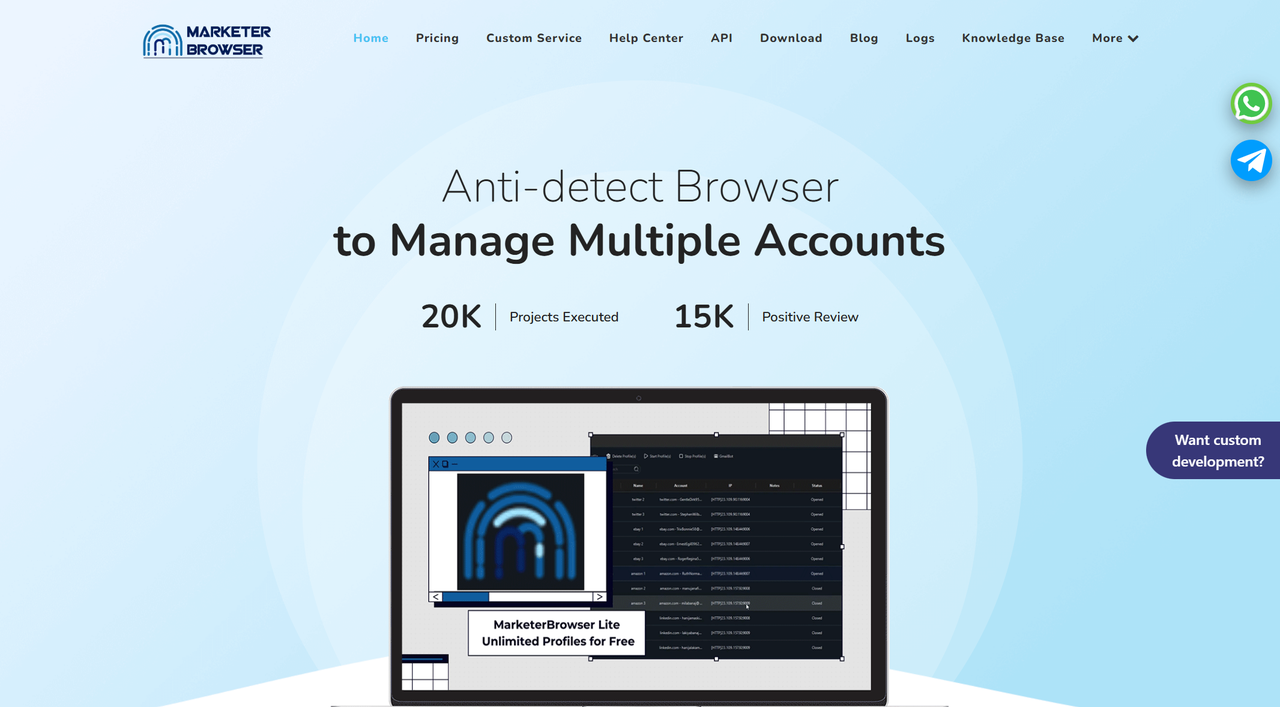
MarketerBrowser positions itself as a professional antidetect browser designed to help digital marketers manage multiple online accounts without detection. It advertises a range of features, including multi-account management, anti-fingerprint technology, anti-tracking, profile management, proxy support, and cloud storage with synchronization.
The core promise is to provide a secure and anonymous environment for various online activities, from social media marketing to e-commerce operations. It works by creating unique digital fingerprints for each browser profile, which is intended to prevent platforms from linking multiple accounts to a single user, thereby reducing the risk of bans and restrictions.
Operating System Limitations of Marketer Browser
Modern marketing teams are diverse, often including members who work on Windows, macOS, and Linux. A truly versatile tool should integrate seamlessly into these mixed environments, ensuring everyone can manage profiles efficiently regardless of their operating system.
MarketerBrowser, however, primarily operates on Windows. This creates a significant problem for teams that don't use Windows exclusively. While there are suggested workarounds for macOS users, such as virtualization, these solutions come with serious drawbacks. Virtualization adds a layer of complexity, requires extra software, degrades performance with slower loading times and reduced responsiveness, and increases the risk of technical problems. For a marketer on a deadline, these inefficiencies translate directly into lost time and productivity. Ultimately, these limitations can hinder team collaboration and restrict a business's ability to scale.
Web Automation Capabilities with Marketer Browser
In digital marketing, automation is fundamental for scaling operations. Marketers rely on it for everything from account warm-up and bulk content posting to sophisticated data scraping. The ability to programmatically control browser actions allows repetitive tasks to be executed at scale, freeing up valuable time for strategy and creative work.
MarketerBrowser offers basic auto-login features on its Pro plan, which can be helpful for simple tasks. However, for marketers looking to implement advanced automation strategies, true scalability requires deep integration with powerful web automation frameworks like Selenium, Playwright, or Puppeteer.
This is where the tool's value proposition gets complicated. MarketerBrowser does offer this capability, but API access for these industry-standard tools is a premium feature, available only on its Ultimate and Full plans. This means that to unlock the essential automation needed for tasks like programmatic profile warm-up or large-scale data collection, marketers must commit to a higher price point. The critique isn't that the feature is missing, but that it's paywalled.
Advanced Fingerprinting in Marketer Browser: A Closer Look
Every major platform has its own way of sniffing out suspicious behavior. A platform like Reddit is sensitive to mobile activity, while TikTok’s detection focuses on how natural your environment feels. LinkedIn, on the other hand, is all about subtle fingerprinting patterns. That’s why a one-size-fits-all approach to fingerprinting just doesn’t work.
MarketerBrowser claims to offer advanced fingerprinting, but the details are thin. There is little transparency around how its technology actually works or how often it is updated to counter new detection methods. This is a significant risk. For a marketer running TikTok campaigns, the lack of a guaranteed, top-tier mobile emulator on plans below $69 is a non-starter. Similarly, the thin details on fingerprint updates mean you're gambling with your clients' LinkedIn accounts.
Real fingerprinting defense needs to spoof everything from Canvas and WebGL to AudioContext and WebRTC, mimicking how real devices behave. If these layers aren't solid, your "separate" profiles start looking like clones, and platforms will catch on fast. Without strong, adaptable fingerprinting, the reliability of the browser remains a major question mark for serious marketers.
Evaluating Marketer Browser: Browser Engines & Mobile Emulation
Not all marketing happens on a desktop. Mobile behavior is huge, especially on platforms like Instagram and TikTok. If an antidetect browser can’t accurately emulate mobile devices, marketers are flying blind.
Good emulation is more than just changing a user-agent string; it means accurately replicating screen sizes, device pixel ratios, and GPU behavior. Ad platforms can easily spot fake emulation. While lower-tier plans offer some basic emulation, a dedicated Android emulator is only available on MarketerBrowser's most expensive Full plan at $69/month.
This paywalled approach means that marketers focused on mobile-first platforms are forced into the highest subscription tier to access what many would consider a core feature. Without it, running campaigns as if viewed from a specific mobile device becomes a guessing game, which is a risk most professionals can't afford.
Team Collaboration Features in Marketer Browser
Modern marketing is a team sport. Agencies and remote teams need to share accounts without stepping on each other's toes. MarketerBrowser offers cloud sync functionality, allowing profiles to be accessed from different devices, but it stops short of providing true team collaboration features.
Here’s what’s missing:
- Granular permissions: The tool lacks the ability to assign specific roles or restrict profile access. This means a junior team member could accidentally alter the proxy on a high-spend client account, leading to immediate suspension and lost revenue.
- Real-time updates: The sync feature is not designed for simultaneous work. If two people access the same profile without proper syncing, you risk data conflicts or even account bans.
- Audit and activity logs: There is no clear system to track who did what and when. Without logs, it’s impossible to perform a post-mortem on a flagged account, leaving the entire team in the dark about what went wrong and how to prevent it.
For serious marketing teams that require coordination and scale, MarketerBrowser's collaboration features are not sufficient.
Proxy Management with Marketer Browser
Proxies are essential for running campaigns in different regions and protecting online identities. A good antidetect browser must manage them well. MarketerBrowser supports standard proxy types—HTTP, HTTPS, and SOCKS5—and includes a helpful built-in proxy checker and DNS/WebRTC leak protection.
However, there are some significant gaps. MarketerBrowser does not offer built-in proxies or native integration with third-party providers. This means marketers must source and configure proxies manually, adding extra steps and time to their workflow. Furthermore, the tool lacks features like automatic proxy rotation or bulk proxy assignment, making it difficult to manage large-scale operations efficiently. This manual effort can slow down marketers who would rather be launching campaigns than troubleshooting settings.
Customer Support for Marketer Browser
Customer support is something you don’t think about until you really need it. When you’re up against a campaign deadline or an account ban, waiting for a support reply can be frustrating.
Currently, MarketerBrowser has only a single review on Trustpilot with a rating of 3.3. While this isn't a large sample size, it hints at a lukewarm user experience. Users have raised concerns about slow replies and limited support channels, such as the lack of a live chat feature. For marketers, fast and knowledgeable support isn’t just a bonus—it’s a critical part of the product. Until its support improves, this remains a weak spot for the tool.
Marketer Browser Pricing Plans
Pricing matters, but value is what truly counts. A cheap tool that costs you time and money in lost ad spend is no bargain.
MarketerBrowser offers four tiered plans:
- Lite (Free) - $0/month: Includes up to 50 profiles, standard fingerprints, support for HTTP/SOCKS proxies, real-time geolocation, cookie saving, and basic import/export options.
- Pro - $29/month: Adds unlimited profiles, advanced fingerprinting, auto-login for 11 popular platforms, browser sorting, and browser extension support.
- Ultimate - $49/month: Includes everything in Pro, plus API access (for Selenium/Puppeteer/Playwright), cloud-based profile storage, and the Master Control Program for synchronized workflows.
- Full - $69/month: Adds built-in analytics and an Android emulator on top of the Ultimate plan features.
On the surface, MarketerBrowser’s pricing seems budget-friendly. But the "catch" is that its most critical features for professional marketers—API automation and a dedicated Android emulator—are locked behind the more expensive $49 and $69 plans. This makes the effective cost for serious use much higher than the entry-level price suggests. When you add the hidden costs of purchasing and manually managing your own proxies, the tool's value proposition becomes less attractive for teams needing to scale efficiently.
Best Alternative to Marketer Browser: DICloak Antidetect Browser
⚡The DICloak Antidetect Browser has become a global favorite for its unparalleled ability to efficiently and securely manage multiple accounts. Designed for professionals in social media management, affiliate marketing, traffic arbitrage, e-commerce, account farming, airdrops, and more, DICloak offers powerful features like RPA automation, bulk operations, and synchronizer. Additionally, it allows you to customize fingerprints and integrate proxies for each profile, ensuring top-level security and operational efficiency. It’s the ultimate tool for seamless, secure, and scalable operations.

What Makes DICloak Stand Out?
✅ Manage 1,000+ Accounts on One Device: Stop wasting money on extra hardware! DICloak allows you to manage multiple accounts on a single device, cutting costs and boosting efficiency.
✅ Guaranteed Account Safety, No Ban Risks: Every account gets its own isolated browser profile with custom fingerprints and IPs, drastically reducing the risk of bans. Your accounts, your control!
✅ Flexible Proxy Configuration for Maximum Performance: Seamlessly integrate with all major proxy protocols (HTTP/HTTPS, SOCKS5) and manage your proxy pool with bulk operations. No more struggling with IP management—DICloak has you covered.
✅ Streamlined Team Collaboration for Better Results: Easily manage your team with advanced tools like profile sharing, permission settings, data isolation, and operation logs. Your team works smarter, not harder.
✅ Automate the Grind with RPA: DICloak's built-in RPA saves you hours of manual work. Automate repetitive tasks, streamline workflows, and focus on what really matters—growing your business.
✅ Powerful Bulk Tools to Scale Your Operations: Create, import, and launch multiple browser profiles in one click. DICloak makes scaling your business as easy as it gets.
✅ Compatible with All Major Operating Systems: Based on the Chrome core, DICloak supports simulating Windows, Mac, iOS, Android, and Linux operating systems. No matter what platform you need, DICloak has you covered.
🔗 Ready to Get Started?
Visit the DICloak website to explore more details and choose the plan that’s right for you. Start for free today and experience the power of secure, efficient, and scalable multi-account management!
Conclusion: Is Marketer Browser the Right Choice in 2025?
MarketerBrowser has potential and is attempting to solve real problems for marketers. However, in its current state, it is best suited for individuals or small-scale operations that are just getting started with antidetect browsers.
It is not ideal for teams managing a high volume of accounts or those who rely heavily on automation, advanced fingerprinting, and collaborative workflows. For serious, full-stack marketing operations, this tool feels a few steps behind its competitors and is likely not a long-term solution. For marketers who need true scalability, reliability, and enterprise-level performance, DICloak remains the stronger and more future-proof choice.
Frequently Asked Questions about Marketer Browser
Q1: Does Marketer Browser work on Mac or Linux?
A: No, it is a Windows-only application. There is no native support for macOS or Linux, and workarounds are complex and can lead to performance issues.
Q2: Does Marketer Browser include built-in proxies?
A: No, you must purchase and configure your own proxies from third-party providers. The tool requires manual setup and lacks features like automatic proxy rotation.
Q3: Can I automate complex marketing tasks with Marketer Browser?
A: Yes, but only on the more expensive plans. Basic auto-login is available on the Pro plan, but full automation via API access for frameworks like Selenium and Puppeteer requires upgrading to the Ultimate (49/month) or Full (69/month) plan.
Q4: Is Marketer Browser a good choice for marketing teams?
A: Not really. It lacks key collaboration features that teams need, such as granular user permissions, real-time profile syncing, and activity logs to track user actions.
Q5: How does Marketer Browser compare to alternatives like DICloak?
A: MarketerBrowser gates essential features like API automation and a dedicated Android emulator behind its most expensive plans and lacks built-in team permissions. In contrast, solutions like DICloak often provide a more comprehensive feature set for professional teams at a competitive value, including more advanced fingerprinting and collaborative tools from the start.
 Web Proxy Tools
 Free Tools
 Cookie Plugin
 UA Generator
 MAC Address Generator
 IP Generator
 IP Address List
 2FA Code Generator
 World Clock
 Anonymous Check
 WebRTC Leak Test
 UUID Generator
 Free Web Proxy Site
 Proxy Checker
 FB Ad Checker
 AI Web Scraping
 Free SMM Tools
 Twitter Shadowban Checker
 Instagram Name Checker
 UTM Generator
 Username Generator
 AI Hashtag Generator
 LinkedIn Headline Generator
 Social Media Image Resizer