For many users, the first encounter with a security vulnerability is the "Not Secure" warning in their browser’s address bar. In 2026, this indicator is more than a minor deterrent; it is a critical diagnostic of a site's infrastructure health. The choice between HTTP and HTTPS is no longer a matter of preference but a non-negotiable baseline for establishing security, user trust, and technical performance. As an architect, I view encryption not as a luxury, but as the foundation of any professional digital presence. This guide will move past the marketing jargon to explain why HTTPS is mandatory for modern web operations and how it fundamentally changes the way data moves between your server and your visitors.
Why the Not Secure warning still matters for your site
Modern browsers have moved from being passive tools to active guardians of user data. This shift reached a critical milestone in July 2018 when Google Chrome and other major browsers began flagging all HTTP sites as "not secure." By 2026, these visual cues have become even more sophisticated, effectively cordoning off insecure sites from the modern web.
The psychological impact of these warnings cannot be overstated. When a browser labels a connection as insecure, it signals to the user that their data—whether it is a login credential, a search query, or personal information—is being transmitted in a way that is visible to any malicious actor on the network path. For a business, this results in an immediate erosion of brand trust and a spike in bounce rates as users are conditioned to seek the security of the "lock" icon before interacting with a platform.
What is the real technical difference between HTTP and HTTPS
At its core, the distinction lies in the visibility and integrity of the data being transmitted.
Understanding HTTP as plain text communication
Hypertext Transfer Protocol (HTTP) is the traditional application layer protocol used for data transfer. Its primary flaw is that it is a "cleartext" protocol. Requests and responses are sent as plain text, making them entirely readable by anyone monitoring the connection, from a rogue Wi-Fi admin to a sophisticated ISP-level monitor. In a professional environment, sending sensitive data via HTTP is equivalent to sending a postcard through the mail; the contents are visible to every handler along the way.
Defining HTTPS as the secure extension
HTTPS (Hypertext Transfer Protocol Secure) is an extension of HTTP that operates over Transport Layer Security (TLS)—the modern successor to SSL. This architecture adds a layer of encryption that wraps standard HTTP requests and responses. By the time the data leaves the server or the browser, it has been transformed into unreadable ciphertext, which can only be decrypted by the intended recipient.
Visualizing the URL distinction
The difference is manifest in the URI scheme itself:
How the TLS handshake protects your data from eavesdropping
The security of HTTPS is established through the TLS handshake, a sophisticated negotiation that occurs before a single byte of application data is sent.
The role of public and private keys in authentication
HTTPS utilizes asymmetric encryption to verify identity. The server possesses a private key (kept secret) and a public key (included in the SSL/TLS certificate). During the handshake, the browser uses the public key to verify the server’s digital signature. This ensures the browser is communicating with the authentic owner of the domain and not an impostor.
How session keys keep browsing private
Asymmetric encryption is robust but computationally expensive for large data transfers. To optimize performance, the handshake uses the public-key exchange only to negotiate a "session key." This is a temporary, symmetric key used for the duration of the browsing session. Once the handshake is complete, all further data is encrypted with this high-speed session key, ensuring that even if an attacker intercepts the traffic, they see nothing but noise.
Why Certificate Authorities act as the internet trust layer
Certificate Authorities (CAs) are the third-party entities responsible for vetting the identity of a domain owner before issuing a certificate. Every modern browser maintains a root store of trusted CAs. If a server presents a certificate not signed by a recognized CA, the browser terminates the connection or issues a severe warning, preventing domain spoofing and ensuring the integrity of the internet’s identity layer.
Why should businesses prioritize HTTPS for SEO and user trust
Beyond basic data protection, HTTPS is a prerequisite for competing in the modern digital economy.
Meeting Google ranking signals and browser requirements
Google officially adopted HTTPS as a ranking signal in 2014, and in 2026, it remains a pillar of SEO. Secure sites receive a clear visibility boost over insecure counterparts. Search engines increasingly deprioritize HTTP-only sites, treating them as legacy infrastructure that is potentially hazardous to users.
Protecting sensitive payment data and bank details
For organizations handling financial data, HTTPS is a regulatory mandate. The PCI Data Security Standard (PCI DSS) explicitly requires the use of strong encryption like TLS for the transmission of cardholder data. Operating without it is not only a security risk but a legal liability.
Enabling modern browser functionality
Browsers now restrict powerful APIs to "Secure Contexts." This is done to prevent man-in-the-middle attackers from injecting malicious scripts that could abuse these features. Functionalities requiring HTTPS include:
- Geolocation: To prevent unauthorized tracking or spoofing of a user's location.
- Progressive Web Applications (PWAs): To ensure the service workers that run in the background haven't been tampered with.
- Push Notifications: To maintain the integrity of the communication channel between the server and the user's OS.
Will switching to a secure protocol slow down my website
The myth that encryption slows down the web is a relic of the past. In 2026, the opposite is true.
The performance boost of HTTP/2, HTTP/3, and reduced latency
Modern performance protocols like HTTP/2 and the UDP-based HTTP/3 (QUIC) require HTTPS. These protocols offer features like multiplexing and header compression that significantly reduce page load times. By staying on HTTP, you are locked out of these advancements, resulting in a slower, less efficient site.
Cost effectiveness of modern SSL certificates
The financial barrier to encryption has vanished. While high-assurance EV certificates still exist, standard domain validation certificates are available at no cost from organizations like Let's Encrypt, Cloudflare, and Amazon. There is no longer a budgetary excuse for failing to secure a domain.
What security risks do you face by staying on HTTP
Infrastructure remaining on HTTP is vulnerable to a range of sophisticated network-level attacks.
Man-in-the-middle and On-path attacks
In a Man-in-the-middle (MITM) attack, an actor intercepts the cleartext HTTP traffic. They can silently read passwords, steal session cookies, or even inject malicious content into the pages the user is viewing.
The threat of DNS hijacking and domain spoofing
While HTTPS does not prevent an attacker from attempting a DNS or BGP hijack, it renders the attack ineffective at the user level. If an attacker redirects your traffic to a fraudulent server, they will not be able to present a valid SSL/TLS certificate for your domain. The browser will immediately alert the user to the mismatch, preventing them from entering credentials into a spoofed site.
How can you successfully transition your site to HTTPS
A professional migration requires a systematic approach to ensure security and maintain SEO equity.
Obtaining and configuring a valid SSL certificate
The first step is acquiring a certificate from a trusted CA. Once obtained, it must be installed on the web server or load balancer. Configuration must prioritize modern TLS versions (1.2 and 1.3) and secure cipher suites to ensure the encryption cannot be easily broken.
Updating internal links and 301 redirect strategies
All internal references to images, scripts, and stylesheets must be updated to use HTTPS to avoid "Mixed Content" warnings. To preserve search engine rankings, implement server-side 301 redirects. This ensures that any legacy traffic or old back-links are automatically and permanently routed to the secure version of the site.
Validation and QA with professional tools
After migration, a validation phase is important for any http vs https upgrade. Teams need to check that HTTPS works correctly across different browsers, regions, and network conditions. A site may look secure in one location, but show mixed content, redirect errors, or missing security headers in another.
This is where DICloak can help with practical testing. With DICloak, administrators can create separate browser profiles with unique fingerprints and custom proxy configurations. This makes it easier to test how the site behaves for users in different regions and browser profiles.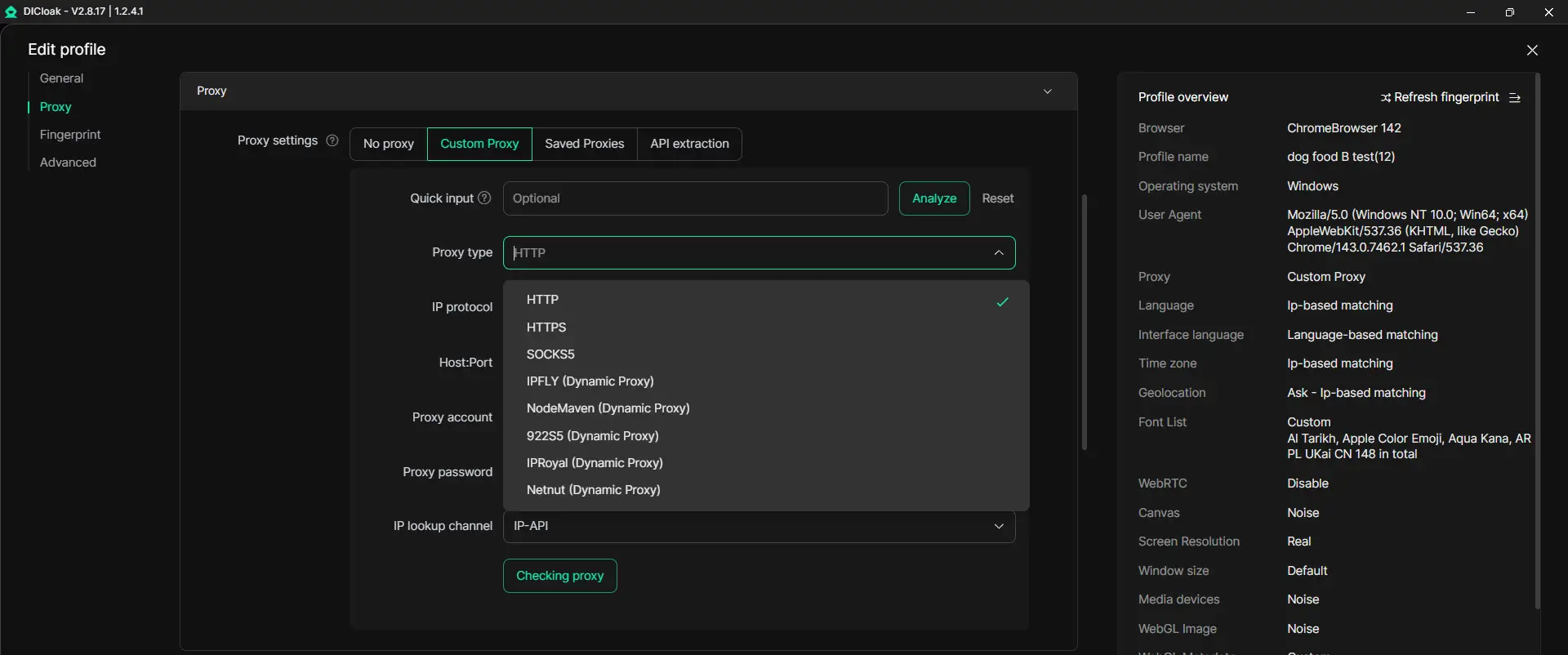
For example, a team can use DICloak to check whether HTTP pages redirect to HTTPS correctly, whether SSL certificates load without warnings, and whether regional proxies affect security headers. Each profile keeps cookies, sessions, and browsing data isolated, so testers can avoid mixed results from previous visits.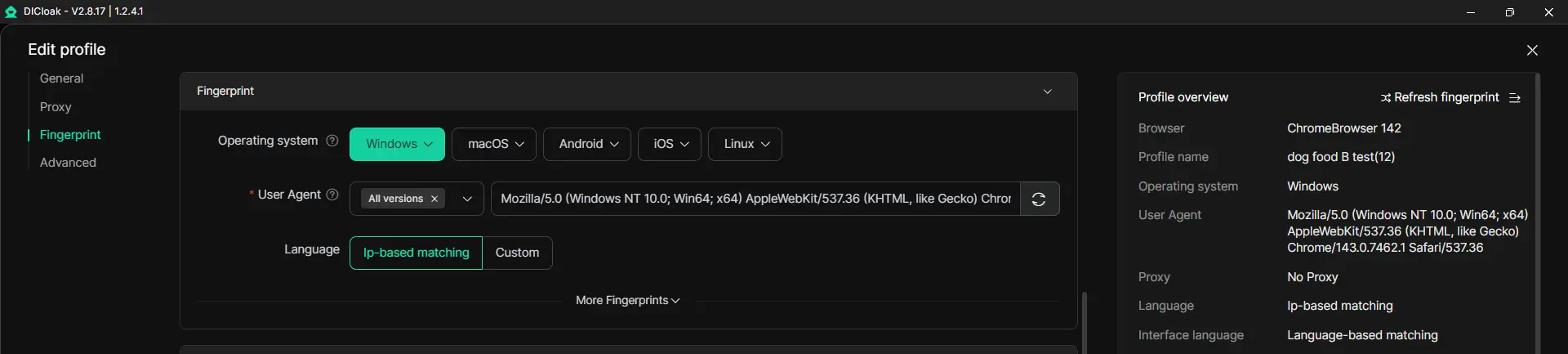
For architects and QA teams, this kind of controlled setup makes http vs https validation clearer. It helps confirm that encryption, redirects, session handling, and cross-site tracking protections work as expected before the migration is fully complete.
What are the common mistakes that break an HTTPS migration
Even seasoned teams can make errors that compromise the migration.
Failure to implement HSTS
One of the most significant oversights is failing to implement HTTP Strict Transport Security (HSTS). HSTS is a security header that tells the browser to only communicate with the site over HTTPS, even if the user types http://. Without HSTS, a site remains vulnerable to protocol downgrade attacks.
Forgetting to update robots.txt and sitemaps
Search engine crawlers need to be told where the new secure content lives. Failure to update robots.txt and XML sitemaps to reference HTTPS URLs can lead to indexing errors and a temporary loss in search visibility.
Ignoring canonical tags and legacy redirects
Canonical tags must point exclusively to the HTTPS version of a page. Additionally, you must audit old redirect chains. If an old link redirects to HTTP and then to HTTPS, it creates a "redirect chain" that increases latency and degrades the user experience.
Conclusion
In 2026, HTTPS is the definitive standard for the global internet. The transition is no longer just about the aesthetic of a "lock" icon; it is about ensuring the integrity of your data, protecting the privacy of your users, and gaining access to the performance benefits of HTTP/3. While the migration requires meticulous attention to HSTS implementation and internal link updates, the dividends in user trust and security are non-negotiable. As a final recommendation, treat encryption as the most critical component of your 2026 technical debt audit—protecting user data is the only way to secure your digital future.
FAQ
Is HTTP still used in 2026?
Yes, HTTP still exists, primarily for internal legacy systems or local development. However, for any public-facing website, it is effectively deprecated, flagged as "not secure" by browsers, and lacks support for modern performance features.
Can I get an SSL certificate for free?
Yes. Trusted organizations such as Let's Encrypt, Cloudflare, and Amazon provide domain validation certificates at no cost, removing any financial barrier to securing your web traffic.
Does HTTPS encrypt everything on the page?
HTTPS encrypts the entire communication channel between the browser and the server. This includes URL paths, query parameters, headers, cookies, and the actual content of the page.
What is the difference between SSL and TLS?
TLS (Transport Layer Security) is the modern, more secure version of the protocol. SSL (Secure Sockets Layer) is the older version and is now technically obsolete, though the term "SSL" is still frequently used in a marketing context to refer to TLS certificates.
Will my SEO rankings drop if I switch to HTTPS?
If you implement 301 redirects and update your canonical tags correctly, your rankings should remain stable or improve. Since HTTPS is a ranking signal, the long-term impact on your SEO strategy is overwhelmingly positive.
 Web Proxy Tools
 Free Tools
 Cookie Plugin
 UA Generator
 MAC Address Generator
 IP Generator
 IP Address List
 2FA Code Generator
 World Clock
 Anonymous Check
 WebRTC Leak Test
 UUID Generator
 Free Web Proxy Site
 Proxy Checker
 FB Ad Checker
 AI Web Scraping
 Free SMM Tools
 Twitter Shadowban Checker
 Instagram Name Checker
 UTM Generator
 Username Generator
 AI Hashtag Generator
 LinkedIn Headline Generator
 Social Media Image Resizer