You spend half an hour tweaking a caption, yet it still falls flat, no likes, no comments, nothing but silence. The real frustration isn’t coming up with words, but figuring out why some posts spark replies and shares, while others sink without a trace. Writing captivating social media captions isn’t just about clever wording or emojis. The real struggle is balancing platform trends, your brand voice, and what actually gets people to stop scrolling and react.
A catchy line might earn a quick like, but it takes more than that to get real engagement. Relying on what worked last year often backfires, algorithms change, user attention spans shrink, and recycled tricks get ignored. Sometimes, the risk is bigger: a misjudged joke or off-brand tone can spark negative feedback, or worse, a silent audience.
The practical challenge isn’t writing a sentence, it’s knowing how to write engaging social media captions that fit real user behavior in 2026. You need a workflow that covers everything from hooks and calls to action, to timing and platform quirks. Miss a step, and you’re stuck editing drafts that never get posted, or watching your reach drop post after post.
Start by pinpointing what gets your audience to pause and react, not just what looks clever on your screen. Here’s what separates posts that get noticed from those that get ignored.
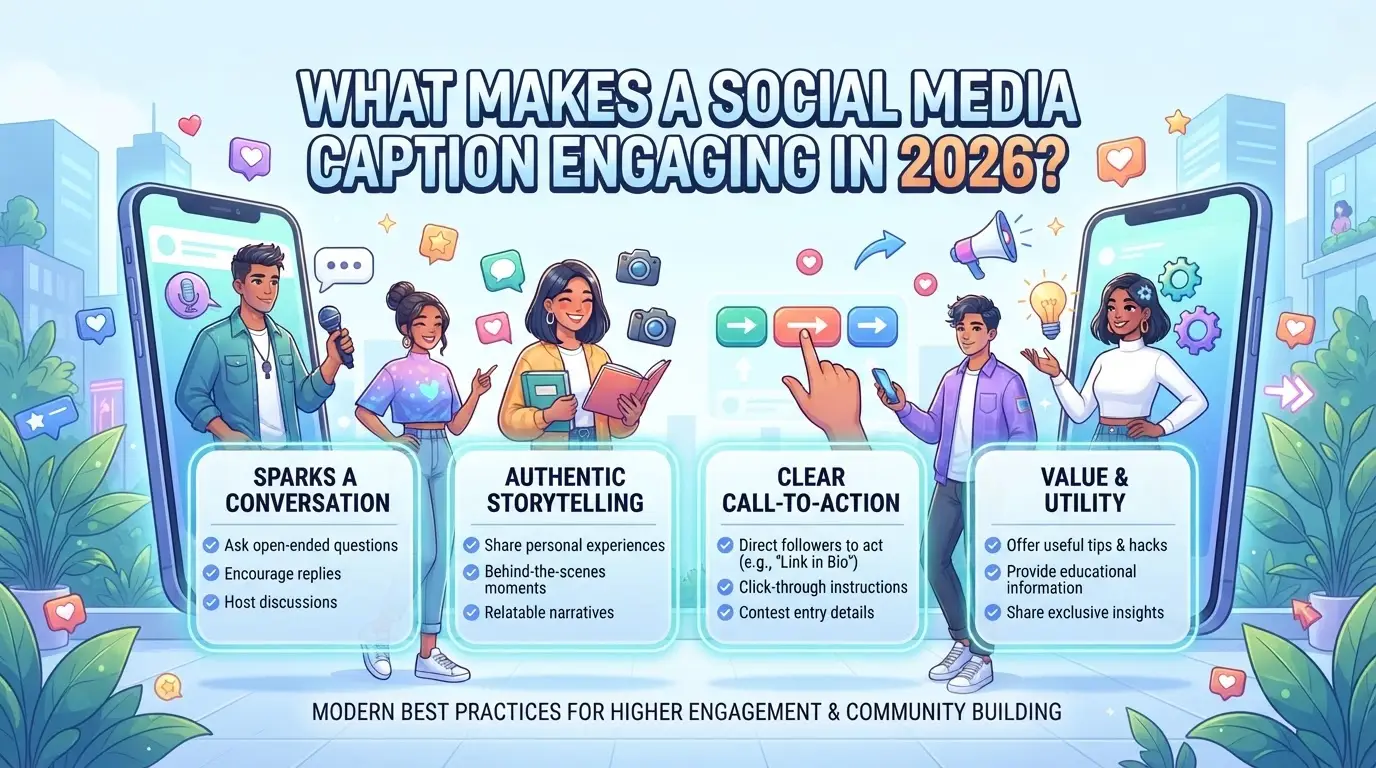
What Makes a Social Media Caption Engaging in 2026?
What actually makes a caption stand out now is simple: real relevance. If your post doesn’t speak to your audience’s current interests or mood, it gets skipped, no clever pun or trendy emoji will save it.
Audience Connection: Why Relevance Matters Most
A caption only works if it feels built for the people reading it. This means understanding what your audience cares about today, not last quarter, and shaping each caption around those interests.
Clarity, Personality, and Value: The Three Pillars
Every scroll-stopping caption balances three things: it’s clear, it sounds like a real person (not a template), and it gives people something, whether that’s a laugh, a tip, or a reason to care. Clarity beats cleverness when users are moving fast; a caption that takes more than a second to “get” might as well not exist. But bland, corporate phrasing kills engagement just as quickly. The trick is holding your brand voice while still sounding direct. For example, a coffee brand could write: “Feeling foggy? Our dark roast is up. Tell us how you’re powering through Friday.” That’s clear, friendly, and invites action, compare it to “Discover our new product and seize your day,” which sounds generic. If you try to pack in too much or use brand jargon, the message gets lost and engagement drops. If you only get one thing right, make sure every caption delivers real value or a clear reason to interact, otherwise, most users won’t even pause.
Engagement Triggers: Calls to Action, Questions, and Storytelling
- Use one strong call to action: “Tag a friend,” “Vote below,” or “Share your go-to playlist.”
- Ask direct questions that fit the moment: “What’s your secret for Mondays?”
- Build quick stories or mini-scenes, just a sentence or two, that tap emotion or curiosity.
When these triggers feel forced or out of sync with the post, engagement tanks. A “what do you think?” tacked onto a sales pitch rarely works. Instead, match your prompt to the post’s tone and content.
The bottom line: engaging captions in 2026 don’t chase every trend or stuff in hashtags, they lock onto what matters to your audience right now and deliver it fast, in a voice that sounds human. The next step is turning these ideas into a repeatable process, so you’re not guessing each time you need a new caption.
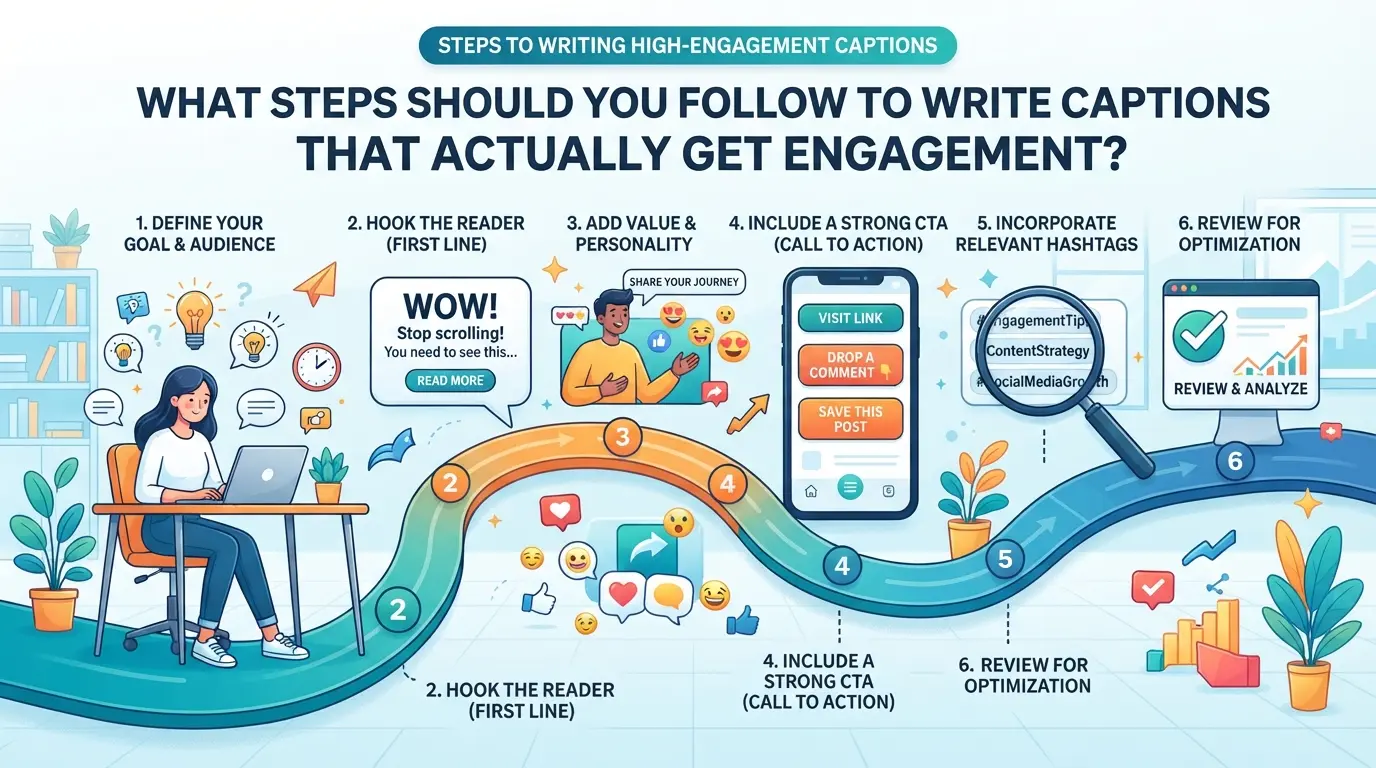
What Steps Should You Follow to Write Captions That Actually Get Engagement?
You need a workflow that works in real use, not just theory. The steps below show exactly how to build captions that people actually respond to, not just scroll past. Miss one, and you’ll see engagement stall or drop. This process works on any major platform in 2026.
Step 1: Define the Caption’s Purpose and Audience
- Decide what you want the caption to do, drive clicks, start a conversation, or build brand trust.
- Choose a single audience segment. Writing for “everyone” usually means you’ll reach no one.
- Check your campaign goal against the audience: if your call to action doesn’t match their interests, rewrite before moving on.
- Skip this, and you’ll waste time on rewrites or end up with captions that get ignored.
Step 2: Craft a Strong Opening Line
- Start with a question, a bold statement, or data, never a generic greeting.
- Tailor the hook for your platform: short and punchy for X/Twitter, more context for Instagram or LinkedIn.
- If your first line could fit any brand or post, it’s too weak, rewrite until it’s specific and scroll-stopping.
Step 3: Add Value and Personality
- Share one clear benefit, tip, or story that fits your brand voice.
- Speak like a real person, ditch buzzwords and stiff phrases.
- If your caption sounds like an ad or a template, people will tune out. Reread aloud: if you’d skip it yourself, revise.
Step 4: Use CTAs, Questions, or Prompts
- End with a clear action: ask for a comment, share, or reaction, not just a vague “let us know.”
- Only use one CTA per caption, multiple asks split attention and sink response rates.
- Use questions when you want replies, but check: if nobody would answer honestly, pick a different prompt.
Step 5: improve for Platform and Audience
- Adjust length: X/Twitter needs 100-150 characters; Instagram can take 2-3 lines; LinkedIn works better with short paragraphs.
- Test timing, post when your target audience is most active; use analytics to confirm.
- Review engagement. If comment rates, shares, or click-throughs drop, tweak your formula and retest, don’t just blame the algorithm.
- The step most people skip is reviewing real results, not just likes. High likes with low comments often means you’re not sparking real conversation.
Next, you’ll see where even careful writers trip up, common caption mistakes and how to fix them fast.
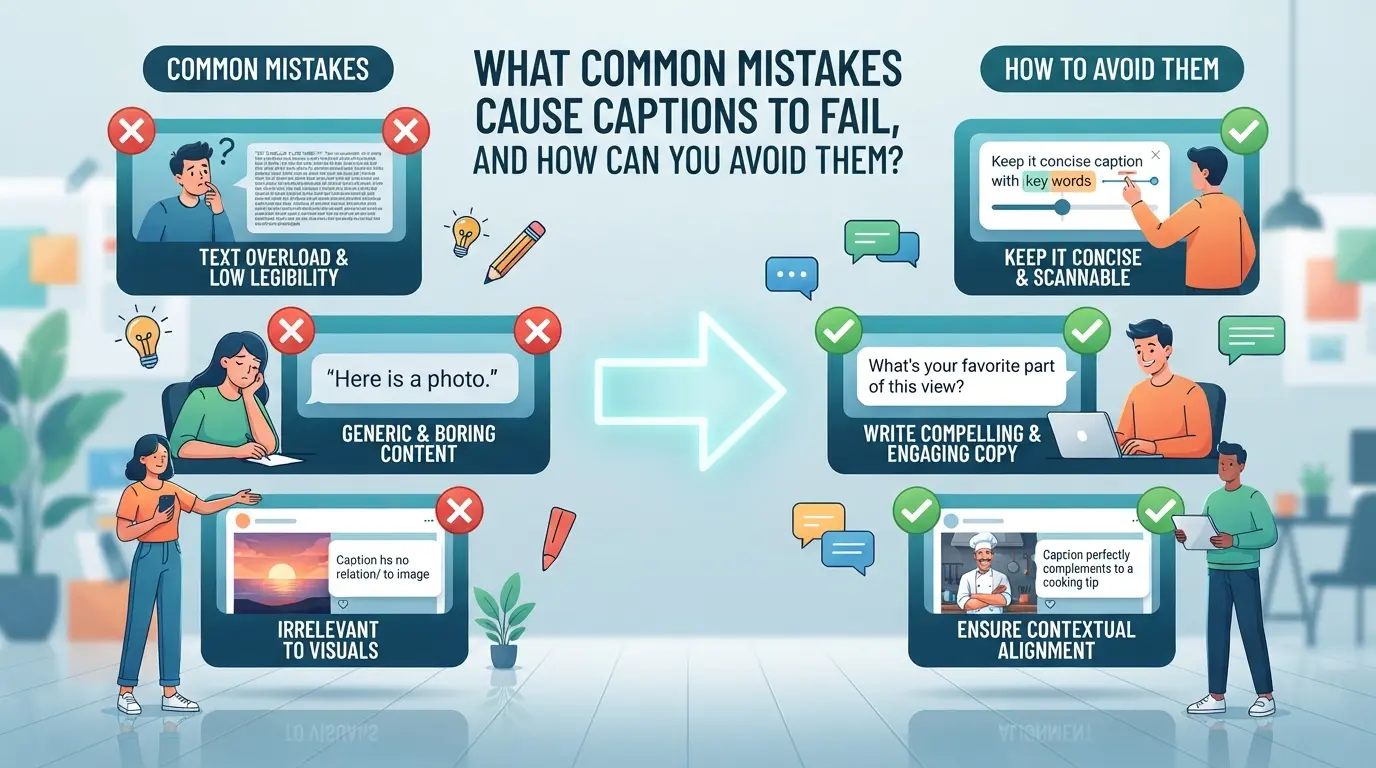
What Common Mistakes Cause Captions to Fail, and How Can You Avoid Them?
Falling into the same caption-writing traps will keep engagement flat, no matter how good the visuals are. If you want your posts noticed, sidestep these common mistakes, each one can kill reach faster than a broken link.
Mistake 1: Writing for Everyone Instead of a Target Audience
Trying to please everyone usually means pleasing no one. Captions that sound generic or “for all” get scrolled past because they don’t speak to anyone in particular. The fix: write with a clear picture of your ideal follower in mind, what do they actually care about, and what words do they use? If your caption could fit any brand, it’s probably too broad.
Mistake 2: Overusing Hashtags, Emojis, or Jargon
- Use no more than 2-3 hashtags that fit the post topic.
- Stick to 1-2 emojis per caption, only if they add meaning.
- Cut insider terms, write in plain language for real people.
Mistake 3: Ignoring Platform-Specific Formatting
A caption that works on Instagram can look broken on LinkedIn or X. Line breaks, link placement, and hashtag visibility all change by platform. Skipping these details makes captions look sloppy or unreadable, adjust formatting for each platform before posting.
Mistake 4: Forgetting to Test and Iterate
If you never test, you’ll keep guessing why posts flop. Even simple tweaks can reveal what works.
- A/B test hooks or calls to action on real posts.
- Check analytics for saves, shares, and click-throughs weekly.
- Update future captions based on what actually got results.
Next, see how caption tactics should shift by platform, what grabs attention on X often flops on Facebook.
How Should You Adapt Your Caption Strategy for Different Social Media Platforms?
The way you write captions has to change depending on the platform, what works on Instagram often flops on LinkedIn, and a catchy X post can feel off on Facebook. Matching your style and length to each site is the difference between grabbing attention and getting scrolled past.
Instagram: Visual Storytelling and Hashtag Use
| Platform |
Optimal Caption Length |
Hashtag Placement & Limits |
| Instagram |
50–150 characters |
Up to 30 tags; after main text |
| Facebook |
40–80 words |
1–2 tags; rarely used mid-text |
Short, punchy captions (under 150 characters) get read more on Instagram. Hashtags should usually go at the end, too many in the main text look spammy and drop engagement. It’s common to see brands hide hashtags in the first comment, but this rarely boosts reach in 2026.
Facebook: Conversational Tone and Community Engagement
Go for a friendlier, conversational tone on Facebook. Use questions or direct calls to action to encourage comments and shares. Avoid overused memes or trends, what works on Instagram can feel out of place here.
LinkedIn: Professional Value and Authority
Posts here need to show expertise, not just personality. Long-form captions (over 100 words) perform better when they share actual lessons, data, or actionable tips. Short captions feel rushed and are easy to ignore, so take the time to add context.
X (Twitter): Brevity, Trends, and Real-Time Engagement
Stay concise. Every word counts with the character limit. Jump on trending topics or use relevant hashtags, but only if your content fits the conversation. Forced or off-topic posts get muted quickly.
Adapting your approach by platform is not just about length or hashtags, the real difference is whether your caption fits the user’s mood and expectations on each site. Sticking to one formula rarely works for long.
How Can Teams Manage Caption Creation More Safely and Efficiently with DICloak?
Adapting captions for different social platforms is only half the battle, when teams handle multiple platform accounts, keeping workflows secure and efficient becomes just as critical as knowing how to write engaging social media captions. For teams or agencies managing several platform accounts, DICloak supports a practical way to separate browser sessions, configure network access, and control user permissions. This setup tackles common risks like accidental account overlap or permission errors without shifting focus away from creative tasks.
Isolate Each Platform Account with Custom Fingerprint Settings
When one team member needs to log into several platform accounts, say, a business Instagram and a client’s Facebook, they can create a separate DICloak browser profile for each account. Each profile’s fingerprint settings (like user agent, language, and time zone) are adjusted in the profile editor, so sessions stay isolated and browser storage never overlaps. This makes account handoff or platform switching less risky for teams sharing devices or rotating members. The scope here covers browser profiles and profile-level signals; it does not touch the connected platform’s internal settings.

User-Provided Proxy Configuration for Assigned Profiles
Some teams need each platform account to appear from a distinct network location. Operators can set a custom proxy for each DICloak profile, entering their proxy details directly or selecting from saved proxies. The built-in proxy check tests if the connection works and displays the detected IP and region before the session starts. Operators choose and test their own proxies, DICloak does not supply or recommend proxy sources. This control stays at the profile and network layer, not at the platform account or content layer.

Team Permissions for Assigned Browser Profiles
Team admins can organize members into groups and assign which browser profiles or actions each group can access in DICloak. For example, editors may only open and edit captions in approved profiles, while managers handle group settings. Admins can also decide which profile list fields are visible to each group, so sensitive fields stay hidden from regular members. These permission controls apply only inside DICloak, they do not change roles or rights inside the connected social platforms.

Teams that master these controls can scale caption creation for many accounts without losing track of who did what or where. The next step is knowing when to expand operations and what new risks appear as you scale up.
When Should You Scale Caption Creation, and What Risks Should You Watch Out For?
Scaling caption creation makes sense when you’re missing posting windows, your backlog keeps growing, or engagement jumps but your team can’t keep up. If you start seeing drafts pile up or your current workflow stalls, it’s time to adjust.
Signs You’re Ready to Scale: Volume, Engagement, and Team Capacity
A sharp increase in posting needs, more comments to respond to, or team members spending too much time editing are all signs your current volume is outgrowing manual methods.
Risks of Scaling: Quality Control, Account Safety, and Workflow Overload
Pushing out more captions without checks often leads to rushed, off-brand posts or repeated mistakes. The biggest risk isn’t just weak engagement, it’s publishing something that gets your account flagged or damages trust, especially if you skip review cycles.
Practical Tips for Safe Scaling
- Batch captions by campaign and schedule review before posting.
- Assign a clear review step, not just auto-approve.
- Use workflow tools to track who did what and when, even one missed step can mean an avoidable public mistake.
What Tools and Automation Can simplify Caption Writing Without Sacrificing Quality?
Editorial calendars and idea generators keep your caption pipeline full and organized, no more last-minute scrambling. With clear deadlines and a pool of prompts, you avoid dry spells and spot gaps in your posting plan before they go public.
Content Planning Tools: Editorial Calendars and Idea Generators
A team running three Instagram pages uses Trello to map out a month of posts and combines it with an AI prompt tool to spark caption ideas. This combo keeps drafts moving and prevents the “blank page” freeze when it’s time to write.
Caption Writing and Editing Apps
Picture a small brand using Google Docs for writing, with tracked changes so every edit is documented. A copywriter drops in a draft, the social lead tweaks the call to action, and a manager final-checks tone, all in one thread. Version history lets you roll back if a new edit goes off-brand. The real win: you always have proof of what changed, who changed it, and why.
Automation and Workflow Management Platforms
Automation platforms handle batch scheduling and recurring tasks, like posting captions at set times or flagging drafts needing review. With repeat work off your plate, your team can focus more on the creative side.
Frequently Asked Questions About how to write engaging social media captions
How long should a social media caption be for maximum engagement?
Optimal caption length depends on the platform and audience. Instagram posts often perform well with 100–150 characters, while Twitter limits captions to 280 characters. Facebook users engage with posts under 80 words. Short, direct captions grab attention, but longer ones can tell stories. Test different lengths to see what your audience likes best.
Should I use hashtags in every social media caption?
Use hashtags when they help your post reach more people or connect with trends. On Instagram, 3–5 relevant hashtags boost visibility. Too many hashtags on Twitter or Facebook can look spammy and lower engagement. Choose hashtags that match your message and avoid overloading captions, especially on platforms where hashtags aren’t common.
How can I maintain brand consistency across multiple platforms?
Set clear brand guidelines for tone, voice, and messaging. Adjust your style to fit each platform, be casual on Instagram, more professional on LinkedIn. Use the same core messages and visual elements everywhere. Review captions before posting to make sure they reflect your brand and fit the platform’s culture.
What are the best ways to encourage audience interaction in captions?
Add call-to-action prompts like “Comment below,” “Share your thoughts,” or “Tag a friend.” Ask questions about topics your followers care about. Use polls, quizzes, or challenges to spark replies. Personal greetings and humor also invite engagement. Following a social media caption writing guide helps you craft interactive captions.
Can automation tools help with caption writing without losing authenticity?
Automation tools can speed up scheduling and brainstorming, but always personalize your captions. Edit automated suggestions to match your brand’s voice. Avoid generic templates, add real stories, humor, or questions. Use automation for workflow efficiency while keeping your captions genuine and engaging for followers.
Take a moment to experiment with different tones, questions, or calls-to-action in your next few posts, and pay attention to the responses they generate. Testing and refining your approach will help you discover what resonates most with your audience. Try DICloak For Free
 Web Proxy Tools
 Free Tools
 Cookie Plugin
 UA Generator
 MAC Address Generator
 IP Generator
 IP Address List
 2FA Code Generator
 World Clock
 Anonymous Check
 WebRTC Leak Test
 UUID Generator
 Free Web Proxy Site
 Proxy Checker
 FB Ad Checker
 AI Web Scraping
 Free SMM Tools
 Twitter Shadowban Checker
 Instagram Name Checker
 UTM Generator
 Username Generator
 AI Hashtag Generator
 LinkedIn Headline Generator
 Social Media Image Resizer