TikTok is everywhere. A friend sends you a funny clip, a creator shares a useful tip, or a trend starts showing up across social media. Then one small problem appears: you do not want to install the app. Maybe your phone is low on space. Maybe you prefer using a laptop. Maybe you just want a quick way to watch one video and move on. That is why so many people now search for how to watch TikTok without app.
The good news is that there are simple ways to do it. In many cases, you can still watch public TikTok videos online, use the web version, and even discover new content without downloading anything. But not every method works the same way. Some are easy and safe, while others have limits or need extra care. If you have also wondered about how to watch TikTok after ban, it becomes even more important to know which options are practical and which ones are risky.
This guide will walk you through the easiest methods, the common problems, and the safest ways to enjoy TikTok content online. Whether you are a casual viewer, a creator, or someone who manages more than one account, you will find a clearer and smarter way to access TikTok without the app.
Methods to Watch TikTok Without the App
If you are wondering how to watch TikTok without app, the good news is that you have more than one option. Some methods are simple and official, while others work better for special cases. Below are three common ways people use to watch TikTok videos without installing the app.
1. Using the Official TikTok Website
The easiest answer to how to watch TikTok without app is to use TikTok’s official website in your browser. TikTok’s own help pages show that some TikTok features work on the web, and TikTok also supports posting from a web browser, which confirms that the browser version is an official part of the platform experience. TikTok also says some creator tools in TikTok Studio can be accessed in a web browser.
To start, open TikTok in your browser. Then search for a creator, hashtag, or video link. In many cases, you can watch public videos without installing the app. This is the best first step for readers asking how to watch TikTok without app, because it is simple, direct, and does not require extra software. For example, if a friend sends you a TikTok link in a group chat, opening that link in your desktop browser is often enough to watch the clip right away. TikTok’s support pages also include a help topic called “Using TikTok without an account,” which shows that some viewing can happen before you sign in.
There are also clear benefits to using the official site. First, it is safer than random viewer pages because you stay inside TikTok’s own system. Second, it is easier to manage on a bigger screen. Third, official web access works well when you only want to watch a few videos, check a profile, or open a shared link from search or social media. A simple real-life case is a marketer who reviews a creator’s public clips on a laptop before a campaign meeting. That is faster than unlocking a phone, opening the app, and switching accounts. TikTok’s developer pages also show that TikTok videos can be displayed on websites through official embeds and APIs, which supports the idea that browser-based viewing is a normal and supported use case.
2. Exploring Third-Party Tools
Some people try third-party tools when they search how to watch TikTok without app, especially if they want a cleaner page, fewer pop-ups, or a quick preview of a public video. These tools may include web viewers, embed pages, blog posts with TikTok clips, or sites that pull in public TikTok video links. The main thing to remember is this: not every third-party site is safe. If a page asks for your TikTok password, pushes a surprise download, or looks strange, leave it right away. Security guidance from Google, the FTC, and CISA all warns users to protect passwords, watch for phishing, and avoid giving credentials to suspicious third-party pages.
A safer way to use third-party tools is to stick to pages that only show public content and do not ask you to log in. For example, if a news article embeds a public TikTok video, that is usually much lower risk than a random “free TikTok viewer” site that asks for account access. TikTok’s developer platform officially supports video embeds and display tools, so public TikTok content can appear on other websites in approved ways. That gives readers a useful rule: viewing public TikTok clips through trusted embeds is very different from typing your login into an unofficial tool.
It is also smart to think about legal and policy limits. Public viewing is one thing. Downloading, reusing, or scraping content in ways that break platform rules, copyright rules, or local law is another. That matters even more when people search how to watch TikTok after ban. If “ban” means your account was restricted, TikTok’s official support says users can review account status for issues such as restricted login. In that case, the better path is to check account status and follow platform rules, not to trust shady tools that promise secret access. If “ban” means a local or regional restriction, users should follow local law and use official, lawful access options only.
3. Finding TikTok Videos on Social Media Platforms
Another practical answer to how to watch TikTok without app is to find TikTok content outside TikTok. Many creators repost short clips to Instagram Reels, YouTube Shorts, X, blogs, and news sites. TikTok itself says videos can be shared through other social media platforms, and its developer tools support showing TikTok videos and creator profiles on outside websites. That means some of the TikTok content you want may already be available in places you use every day.
This method is useful when you remember the creator but not the exact TikTok link. For example, if a cooking creator posts the same short recipe video on TikTok, Instagram, and YouTube, you may be able to watch that clip on Instagram or YouTube without opening TikTok at all. This is one reason cross-platform discovery works well for casual viewers, parents checking what a creator shares publicly, or researchers tracking how a trend moves across platforms. TikTok’s own newsroom has also highlighted how widely content is shared and discussed across entertainment communities, which shows how often TikTok content travels beyond the app itself.
There is one more advantage here: it feels more natural for many users. You do not need to install another app, create another habit, or sign in just to watch one clip. So if someone asks how to watch TikTok after ban because they can no longer use the app in the usual way, watching reposted or officially embedded public content on other platforms may still be the simplest lawful option. It will not replace every TikTok feature, but for basic viewing, it often does the job in a fast and low-stress way.
Step-by-Step Guides
Now that you know the main methods, let’s make them easier to follow. If you are still asking how to watch TikTok without app, these simple steps can help you start quickly and avoid common problems.
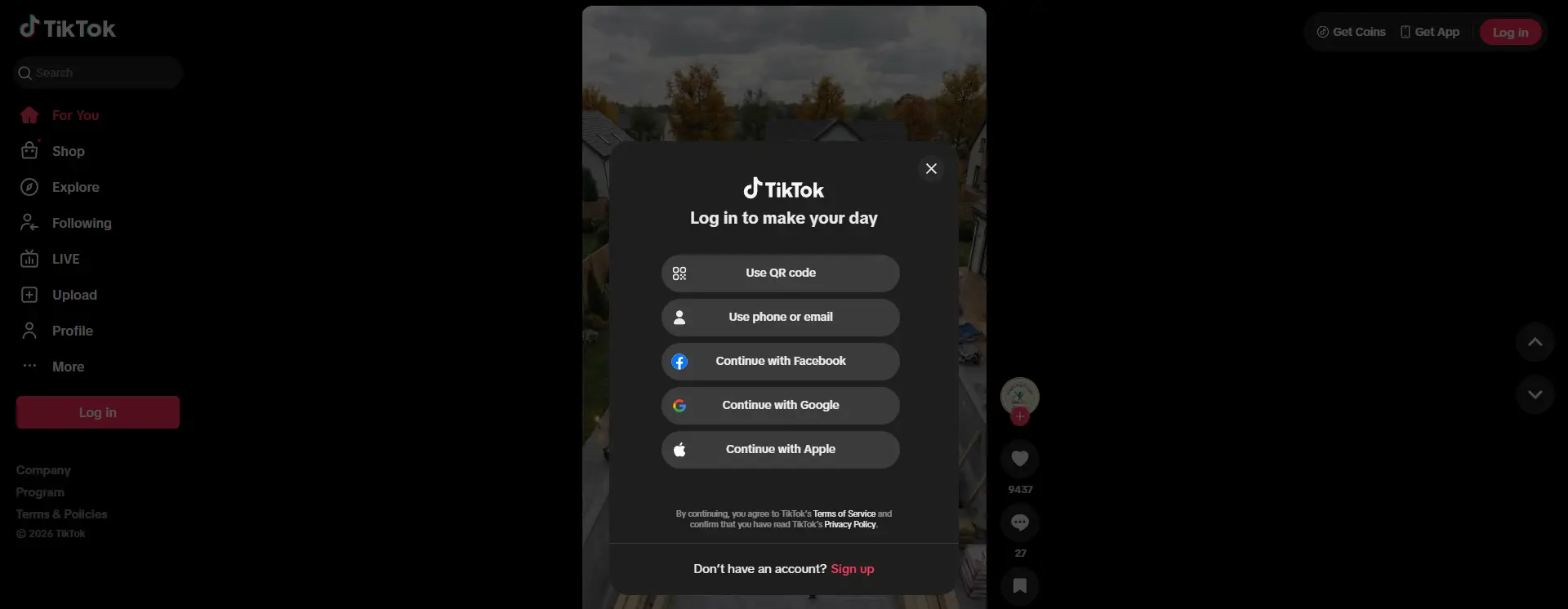
Accessing TikTok on the Official Website
The easiest way is to use TikTok’s official website. Open your browser, go to TikTok, and search for a creator, hashtag, or video link. In many cases, you can watch public videos without installing the app. TikTok’s support pages also show that some features work on the web, which confirms that browser access is an official option.
If you already have a video link, paste it into the address bar. That is usually the fastest way to open a clip. If not, use the search bar to find the content you want. You can also open a creator’s profile and browse more videos from there. This is a simple answer to how to watch TikTok without app, especially for people who only want to watch a few clips on a computer.
To get a better viewing experience, use a full browser window and keep your internet connection stable. If a video does not load, refresh the page or reopen the direct link. If TikTok asks you to sign in, you can log in through the official page if needed. For readers searching how to watch TikTok after ban, the safer option is still to check TikTok’s official account status and help pages, not random bypass sites.
Using Third-Party Tools Effectively
Some people use third-party tools to watch public TikTok videos outside the app. These may include blog posts, news pages, or websites with TikTok embeds. This can work well, but you should be careful. If a page asks for your TikTok password, pushes an unknown download, or looks suspicious, leave it right away.
A safer method is to use trusted pages that only show public content. For example, if a news article embeds a TikTok clip, you can usually watch it there or open the original TikTok link in your browser. If the video does not play, the easiest fix is to click through to the original source or search for the same creator on TikTok, YouTube Shorts, or Instagram Reels.
This is helpful for people looking up how to watch TikTok without app, but it is not a real fix for account problems. If someone searches how to watch TikTok after ban, third-party viewers may only help with public content. They cannot safely solve login restrictions or account limits. For that, official TikTok support is still the better path.
Limitations and Considerations
These methods are useful, but they also have limits. If you want to know how to watch TikTok without app, it helps to understand what guest mode cannot do and why some third-party tools may be risky.
Guest Mode Limitations
Guest mode is good for basic viewing, but it is not the same as using a full account. Many account, safety, and personalized features depend on being signed in.
In simple terms, you may still watch public videos and open shared links, but the experience is more limited. Your feed may feel less personal, and some actions may not work unless you log in. So while guest mode is a simple answer to how to watch TikTok without app, it works best for light viewing, not full use.
This also matters for people searching how to watch TikTok after ban. Watching public content may still be possible in some cases, but it does not solve account restrictions. If the problem is with the account itself, the safer path is still to use TikTok’s official help and appeal options.
Legal and Safety Concerns
Third-party tools need more caution. Some only show public TikTok content, but others may ask for your password or push unsafe downloads. That is where users need to be careful.
For example, if a TikTok viewer asks for your login details outside TikTok’s official system, it is better not to trust it. It is usually much safer to open a public TikTok link from a blog or news page than to sign in on an unknown website.
There is also a legal side to consider. Viewing public content is very different from using tools to bypass rules or restrictions. So if someone searches how to watch TikTok after ban, the safer choice is to follow TikTok’s official support process instead of relying on risky shortcut tools.
Troubleshooting Common Issues
Even if you already know how to watch TikTok without app, a few small problems can still happen. The good news is that most of them are easy to fix if you check them one step at a time.
When a TikTok Link Opens the App Store
A common issue is that a TikTok link sends you to the app store instead of the video. When this happens, do not open the link inside a chat app or social app. Instead, copy the link and paste it directly into a regular browser window. This often works better for users trying to learn how to watch TikTok without app.
If that still does not work, open TikTok’s homepage first and search for the creator name, hashtag, or video topic. In many cases, this is an easy way to find the same public video without using the app.
How to Fix Web Playback Problems
If a video does not load well on the web, start with the basics. Refresh the page, check your internet connection, and close extra tabs. If the problem stays, try opening the direct video link again or search for the same creator on TikTok.
Sometimes the issue is not your browser. The video may have been removed, or the outside page may be too old. For example, if you open a TikTok clip from an old blog post and it will not play, going back to the original TikTok page is usually the better fix.
Stay Safe While Fixing Problems
It is also important to stay careful during troubleshooting. If a page asks you to download unknown software or enter your TikTok password outside TikTok’s official system, it is better to leave that page.
This also relates to how to watch TikTok after ban. If the real problem is an account restriction, normal playback fixes will not help much. In that case, TikTok’s official support is still the safer option.
Enhancing User Experience and Engagement
Once the basic issues are solved, the next step is making the web version easier and more enjoyable to use. If you want a smoother answer to how to watch TikTok without app, a few simple habits can help you navigate better and discover more content.
Better Navigation on the Web Version
A good place to start is the search bar. Instead of waiting for random videos to appear, you can search for a creator name, a topic, or a hashtag. This makes the web version feel much easier to use, especially when you already know what kind of content you want to watch.
It also helps to open creator profiles instead of watching only one shared link at a time. For example, if you find one funny cooking video, you can click the creator’s profile and quickly view more videos from the same account. This saves time and makes the experience feel more natural on a computer.
Another small tip is to keep the browser window full size. A larger screen makes captions, comments, and profile details easier to read. If you open TikTok on a laptop during work or study breaks, this can make viewing much more comfortable.
Discovering New Content Without the App
If you want to find new videos without installing TikTok, hashtags are very useful. Searching a hashtag can lead you to many public videos on the same topic. For instance, if you search a travel hashtag, you may quickly find clips from different creators without using the app at all.
You can also discover TikTok content outside TikTok itself. Many public videos appear in blog posts, news pages, and other websites through embeds or shared links. This is helpful for readers learning how to watch TikTok without app, because discovery does not always need to begin inside the platform.
Another smart way is to follow topics, not just creators. For example, if you often search for fitness, recipes, or beauty tips, it becomes easier to find similar public videos again later. This gives you a simpler way to enjoy TikTok content on the web, even without the full app experience.
A Practical Option for Limited Access Situations
This also helps readers searching how to watch TikTok after ban. If the app is not part of your normal routine right now, you can still find public TikTok content through browser search, creator pages, hashtags, and trusted outside links. It is not exactly the same as full app use, but for basic viewing and discovery, it can still work well.
For casual users, learning how to watch TikTok without app may be enough. But for agencies, sellers, creators, and social media managers, web access is only the beginning. When several TikTok accounts are involved, the real challenge is keeping each session separate, staying organized, and reducing mistakes during daily work.
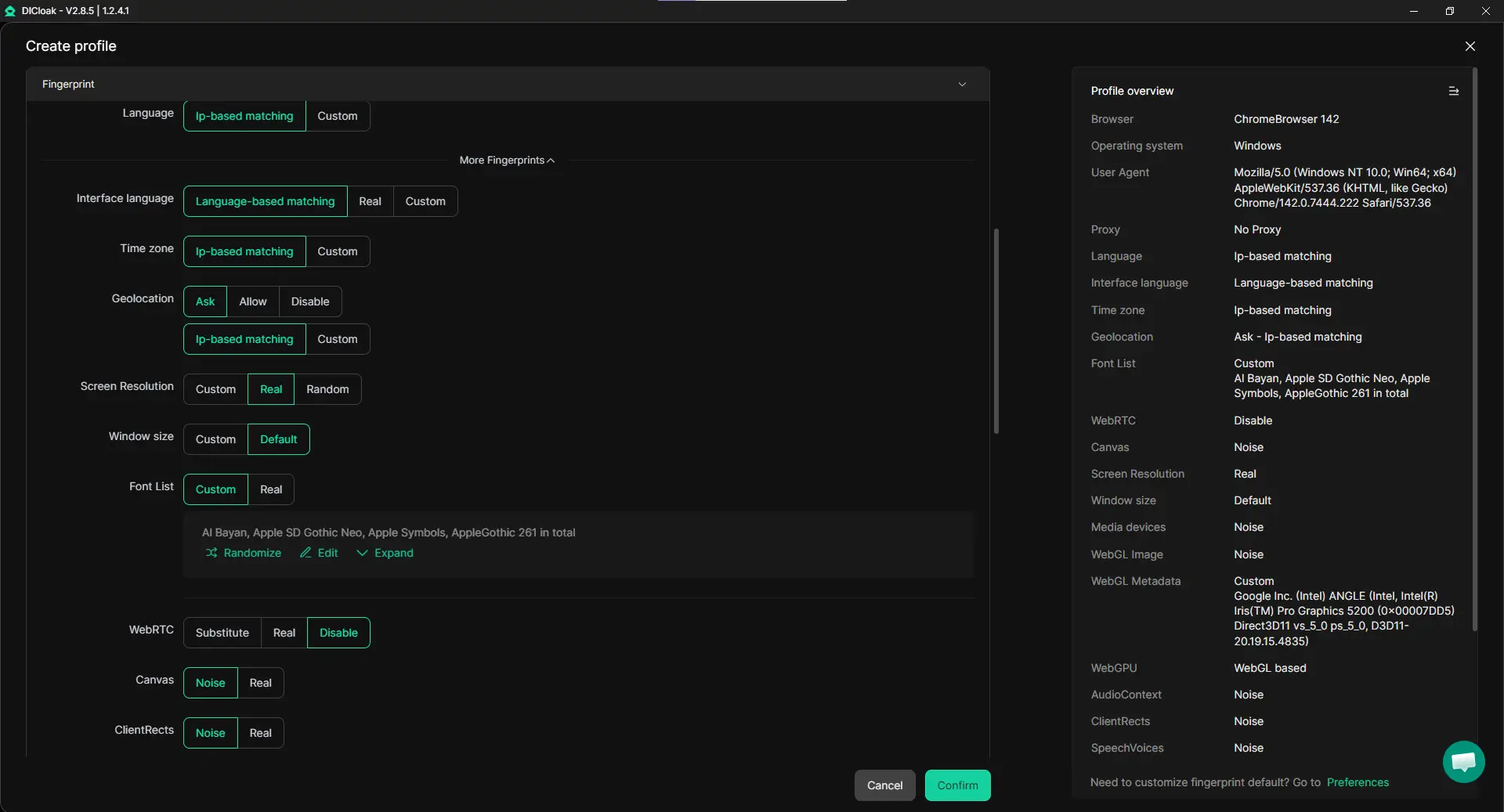
Keep Accounts in Separate Browser Profiles
A safer way to handle multiple TikTok accounts is to place each one in its own browser profile. Separate profiles help isolate cookies, local storage, fingerprints, and login sessions, which makes account switching cleaner and easier to manage. This is useful for teams handling client accounts, backup accounts, or regional TikTok pages on one device.
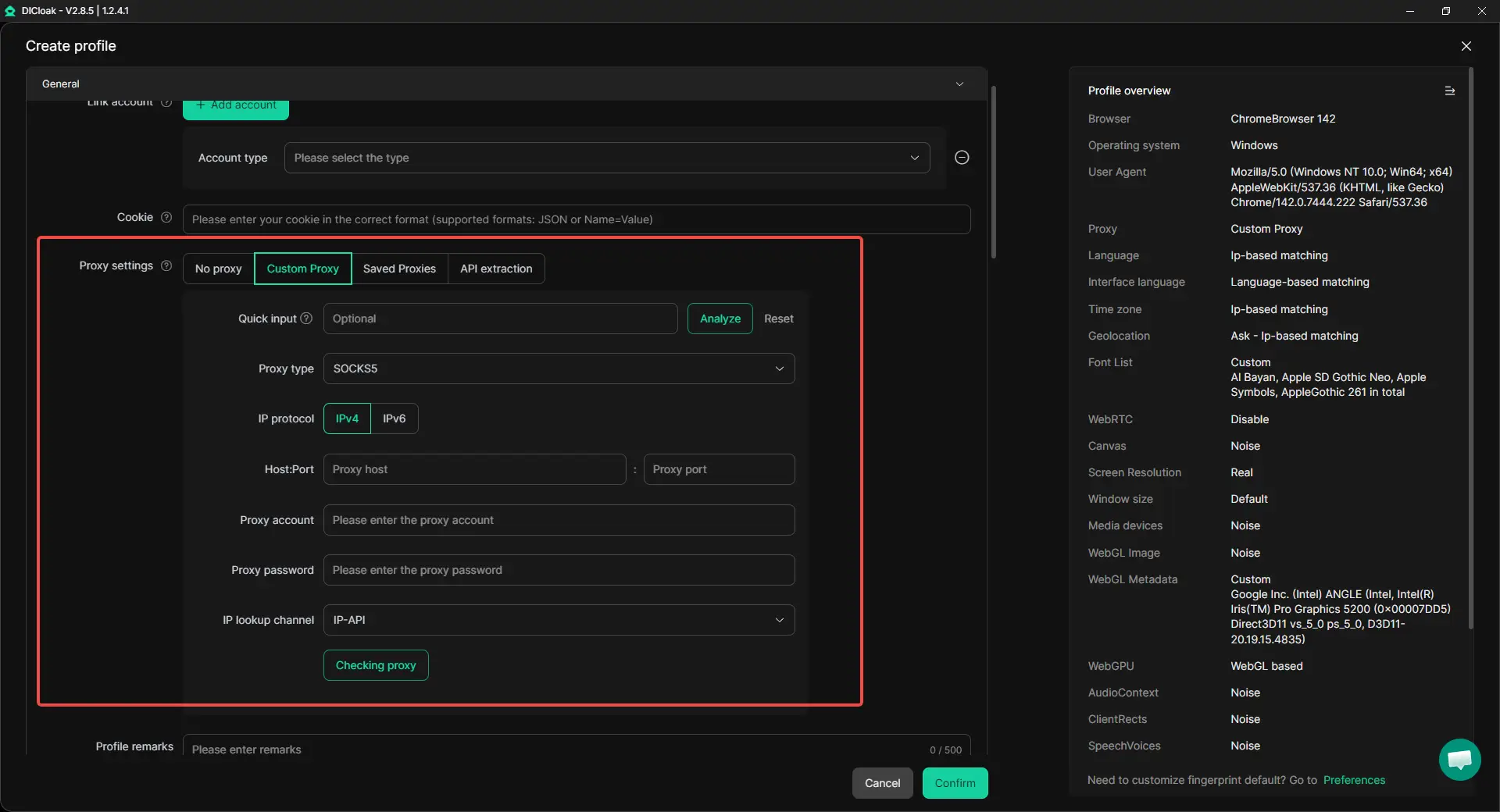
Use a Different Proxy for Each Account
For better account separation, each profile can be matched with its own proxy by users. This gives each TikTok account a more independent network environment and makes multi-account work more structured. For example, a team managing several market-specific TikTok accounts can keep each one in a different profile with a different proxy instead of mixing everything in one normal browser.
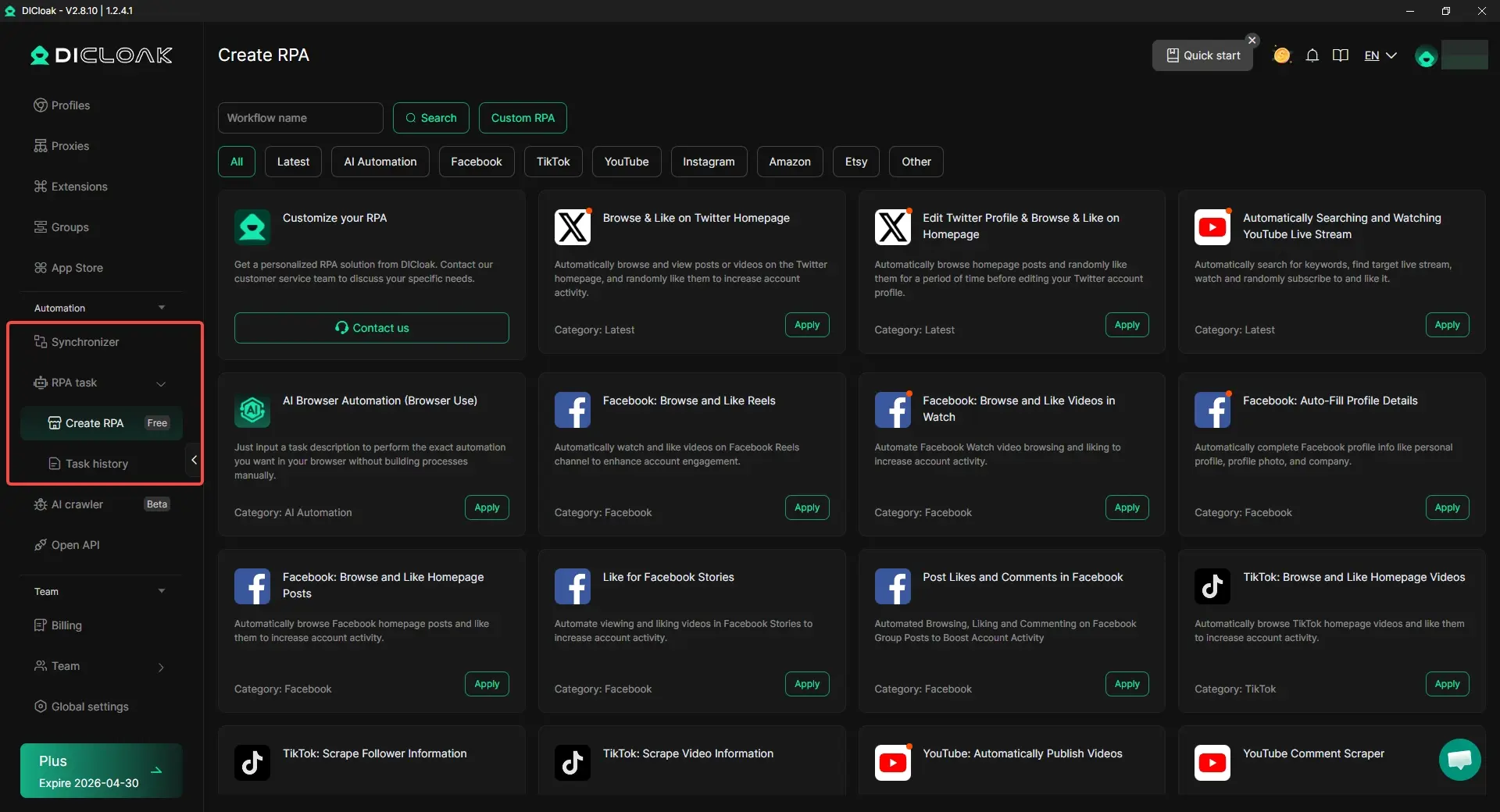
When the same actions need to be repeated across many accounts, built-in RPA tools can reduce manual work. Repeated steps like opening pages, browsering content, or handling routine browser tasks become much easier to manage.
The Synchronizer is also helpful for multi-account work. It allows the same clicks and typing to be mirrored across multiple browser profiles at the same time. For example, several TikTok pages can be opened together, and the same browsing steps can be repeated across different profiles without switching windows one by one.
A Better Fit for Teams
For readers who start with how to watch TikTok without app but later need to manage more than one account, this kind of setup is much more practical than a standard browser. Isolated profiles, custom proxy settings, RPA, and synchronized windows can help teams work more safely, more clearly, and with less repeated effort.

Conclusion
In short, how to watch TikTok without app is easier than many people expect. For most users, the best option is the official TikTok website. It lets people open public videos, search for creators, and watch shared links in a browser without installing the app. This is simple, fast, and works well for basic viewing.
Still, the web version has limits. Guest mode is useful for light use, but it does not offer the full experience. Some features work better only when you log in. Third-party tools may also help in some cases, but users should be careful and avoid suspicious pages, downloads, or requests for login details.
If problems happen, most of them are easy to fix. Opening links in a regular browser, refreshing the page, or going back to the original TikTok source usually helps. For readers searching how to watch TikTok after ban, it is also important to know that watching public videos is different from fixing an account restriction. In the end, the safest and easiest choice is still to use official web access whenever possible.
FAQs
How to watch TikTok without app on a phone or computer?
The easiest way to learn how to watch TikTok without app is to open TikTok in a regular web browser and use a direct video link, creator profile, or search. TikTok also supports some creator and reporting features on the web, which shows that browser access is an official part of the platform experience.
Can I watch TikTok without app and without an account?
Yes, in many cases you can watch public TikTok content without installing the app and without signing in. But guest access is more limited than a full account, so some features, safety tools, and personalized settings may not be available until you log in.
Why does a TikTok link open the App Store instead of the video when I try to watch TikTok without app?
This often happens when the link is opened inside another app instead of a normal browser. A simple fix is to copy the TikTok link and paste it directly into Chrome, Safari, Edge, or another browser. If that still does not work, search for the creator or topic on TikTok’s website and open the public video from there. This matches TikTok’s general troubleshooting guidance, which starts with basic access and connection checks.
Is it safe to use third-party sites for how to watch TikTok without app?
It can be safe only when the site is showing public TikTok content through normal links or embeds. It is not safe to enter your TikTok password on unknown pages or install suspicious downloads. TikTok has official developer products for approved integrations, and TikTok plus U.S. consumer safety guidance both warn users to protect account access and avoid phishing.
How to watch TikTok after ban without using the app?
It depends on what “ban” means. If your account is restricted, watching some public content on the web may still be possible, but it will not fix the account issue. TikTok says users should check Account Status, and TikTok also warns that trying to avoid a restriction or ban by using another account can lead to more enforcement.
 Web Proxy Tools
 Free Tools
 Cookie Plugin
 UA Generator
 MAC Address Generator
 IP Generator
 IP Address List
 2FA Code Generator
 World Clock
 Anonymous Check
 WebRTC Leak Test
 UUID Generator
 Free Web Proxy Site
 Proxy Checker
 FB Ad Checker
 AI Web Scraping
 Free SMM Tools
 Twitter Shadowban Checker
 Instagram Name Checker
 UTM Generator
 Username Generator
 AI Hashtag Generator
 LinkedIn Headline Generator
 Social Media Image Resizer