Using multiple Roblox accounts on one device is something many players, creators, and testers want to do in 2026. Some people use one account for normal gameplay and another for building, testing, or playing with different groups of friends. But while this setup can be useful, it also brings questions about safety, performance, account rules, and the best tools to use. In this guide, we will look at why people use multiple Roblox accounts, what risks to watch for, and how to manage them in a safer and more organized way.
What is Roblox?
Roblox is an online platform where users can play games, create their own experiences, and interact with others around the world. Instead of being just one game, Roblox is a large library of user-created games built with its own engine called Roblox Studio. Players can explore different worlds, join multiplayer games, and customize their avatars, while creators can design games, build communities, and even earn money from their creations. Because of this mix of gaming, creativity, and social features, Roblox has become popular with both casual players and developers of all skill levels.
Why Would You Need Multiple Roblox Accounts?
Using multiple Roblox accounts on one device is more common than many people think. Some players want a main account for regular play and a second account for testing, building, or playing with different friends. Roblox also now supports account switching, and its Account Switcher lets users add up to five accounts on one device, with those switched accounts stored only on that device.
Common scenarios for using multiple accounts
A simple example is a player who keeps one account for normal gameplay and another for trying new experiences, private test servers, or early game ideas. A creator may also want one account for building and one for playing as a regular user, so their testing does not affect their main profile. For families, separate accounts are also safer than sharing one login, since Roblox says accounts are free to make and does not encourage account sharing.
Benefits of managing multiple accounts for gameplay
When multiple Roblox accounts are managed in a clear way, gameplay can feel more organized. For example, one account can hold your main items, friends list, and progress, while another can be used for testing settings, learning a game, or checking how an experience looks to a new player. This can be especially useful for developers and advanced players. Roblox’s session tools also make it easier to review where an account is logged in and sign out of sessions that look suspicious, which helps when you are handling more than one account.
Risks of account suspension or bans
The biggest mistake is thinking that a second account removes platform rules. It does not. Roblox’s Terms say that if a user breaks the rules, Roblox may suspend or terminate the account and may also suspend or terminate alternate accounts created by that user. Roblox also warns that repeated chat violations can grow into longer restrictions and may lead to suspensions or bans, and some experiences can ban an account directly with Error Code 600. If moderation happens, Roblox says users can appeal, but appeals must be filed within 30 days.
A real-world lesson here is simple: using multiple Roblox accounts can help with testing, organization, or separate play styles, but it should never be used to dodge rules, spam, or risky behavior. It is also smart to protect each account with a verified email and 2-Step Verification, since Roblox notes that login prompts, password reset banners, and other security checks can appear when suspicious activity is detected.
Is It Safe to Use Multiple Roblox Accounts?
In many cases, yes. Using multiple Roblox accounts is not automatically unsafe. Roblox even has an official Account Switcher for users age 13+ on the web, and it lets eligible users add and switch between up to five accounts on the same device. That shows Roblox recognizes that some users do have more than one account. But safety depends on how you use them. If you use multiple Roblox accounts for normal play, testing, or separate game styles, the risk is very different from using them to break rules, spam, or get around moderation.
Roblox’s terms of service regarding multiple accounts
Roblox’s Terms do not say that simply having more than one account is banned. The bigger rule is about behavior. Roblox says that if you violate its Terms or Community Standards, it can suspend or terminate your account, including any alternate account(s) you created. The same Terms also say users are responsible for what happens on their accounts, must keep credentials secure, and must not buy, sell, or misuse accounts. In other words, multiple Roblox accounts are not the main problem. Rule-breaking across those accounts is.
How to avoid detection and account restrictions
The safest approach is not to “hide.” It is to act in a normal, rule-following way. For example, use each account for a clear purpose, keep your login details private, add your own email, and turn on 2-Step Verification. Roblox’s safety guidance specifically warns users not to share passwords, cookies, 2SV codes, or backup codes, and recommends 2-Step Verification to protect accounts. A simple real-life example: if one account is your main play account and another is for testing a game you are building, that is much safer than using extra accounts for spam, fake reports, or ban evasion.
Common misconceptions about account safety
One common myth is that a second account gives you a clean reset if your first account gets in trouble. Roblox’s Terms say otherwise, because alternate accounts can also be suspended or terminated after a violation. Another myth is that sharing an account with friends is safer than making another account. Roblox does not encourage account sharing and notes that accounts are free to create, while shared access can expose sensitive account information. A third myth is that account safety only depends on the password. In practice, Roblox also recommends email verification, 2-Step Verification, and careful login habits to lower the chance of account loss or restrictions.
Methods to Run Multiple Roblox Instances on One Device
If you want to use multiple Roblox accounts on one device, there are a few common methods people try. But they do not all work the same way. Some are simple and low-risk. Others are unofficial and less stable. The best choice depends on whether you only need to switch accounts or you want several Roblox sessions open at the same time. Roblox officially supports web-based account switching for eligible users, but that is different from running several active game clients at once.
Using browser-based login tricks
The safest starting point is not really a “trick.” It is just using Roblox’s official Account Switcher on the web. Roblox says users aged 13+ can add up to five accounts, and those saved switched accounts stay private on that device only. This is useful if you mainly need fast switching between multiple Roblox accounts for checking messages, changing settings, or moving between creator and player accounts. A simple example is a developer who uses one account to build and another to test how the game looks to normal players.
Setting up Roblox Account Manager tools
Some users also use third-party Roblox Account Manager tools. These tools are not official Roblox products. One active open-source project on GitHub says it is made for managing multiple Roblox accounts, supports multi-account game launch, and includes a “Multi Roblox” feature. But it also clearly says users are responsible for following Roblox’s Terms. In real use, this means the tool may help with organization or launching accounts, but it can also break after Roblox updates, trigger security friction, or create trust issues if you install unknown builds. For most readers, this is a more advanced option, not the first one to try.
Running multiple instances via emulators
Emulators are another method people talk about, especially when they want several mobile-style Roblox sessions on one computer. But this is the least reliable path. Roblox’s anti-cheat help page says emulator use is not allowed for accounts without place edit access, and users may be told to switch to a real phone or tablet instead. That means emulators may work in limited testing cases, but they are not a stable general solution for normal gameplay across multiple Roblox accounts. A practical example is a creator testing their own experience with edit access versus a regular player trying to grind on several emulator windows. The first case may have a narrow use case. The second is much more likely to run into problems.
For most users, the safest path is simple: use official account switching if you only need multiple Roblox accounts on one device, and be careful with unofficial tools that promise true multi-instance play. They may sound powerful, but they usually come with more setup trouble and more account risk.
Troubleshooting Issues with Multiple Roblox Accounts
Running multiple Roblox accounts on one device can save time, but it can also create small problems fast. One account may load fine while another gets stuck, crashes, or slows your whole PC down. In most cases, the issue is not “multiple roblox” by itself. It is usually a mix of device limits, bad installs, blocked connections, or security checks. Roblox’s own support articles point to graphics problems, broken files, firewall blocks, and background software as common causes.
Why Roblox crashes when running multiple instances
A common reason is that your computer runs out of graphics or system resources. Roblox says crashes can happen when the graphics card driver is outdated, the GPU does not support the needed DirectX feature level, or graphics settings have changed in a bad way. Another cause is software conflict. Roblox also warns that incompatible software, modified Roblox versions, emulators, or unsupported virtual machines can trigger crashes or anti-cheat messages. A simple example is a low-end laptop trying to open one main account in the Roblox app, another test account in a second setup, and several browser tabs at the same time. That can push the system too far and cause one or both sessions to fail.
Fixing login errors across accounts
If one account logs in but another keeps failing, start with the simple checks. Roblox recommends restarting the computer, clearing temporary internet files, checking firewall settings, and reinstalling Roblox if files may be corrupted. If the problem looks account-specific, check the Security tab and review “Where you’re logged in” to sign out suspicious or old sessions. This is useful when you switch between multiple Roblox accounts and forget where one account is still active. If Roblox asks for a password reset or a 2-Step Verification code, take that seriously. Roblox says password-change banners can appear after suspicious activity is detected, and 2-Step Verification codes expire after 15 minutes.
Resolving performance issues on low-end PCs
On weaker computers, the best fix is usually reducing the workload. Roblox says you can lower Graphics Quality inside the in-game settings by turning Graphics Mode to Manual and moving the slider lower for better performance. Roblox also recommends closing other high-power apps, because background programs can take the memory and processing power Roblox needs. In real use, this means if you are trying to manage multiple Roblox accounts for testing or gameplay on an older PC, you should keep only the windows you need open, lower graphics first, and avoid extra tools running in the background. If performance is still poor after that, Roblox says the device may simply need an upgrade or a stronger machine.
A good rule is this: if multiple Roblox accounts suddenly stop working well, do not assume the accounts are the problem first. Check the device, the install, and the security prompts before you try anything more advanced. That approach is usually faster, and much safer for your accounts too.
Advanced Tips for Low-End PCs Running Multiple Roblox Accounts
If your computer is weak, running multiple Roblox accounts can feel rough very fast. One window may load, while the second starts lagging, freezing, or crashing. The good news is that some small changes can help. Roblox’s own help pages recommend lowering graphics quality, checking for blocked connections, and reinstalling the client if needed. These simple fixes often matter more than trying complicated tools.
Optimizing system settings for better performance
Start with the settings inside Roblox. Roblox says you can switch Graphics Mode to Manual and lower Graphics Quality for better performance on slower devices. This is one of the easiest ways to make multiple Roblox accounts run more smoothly on one device. A simple example is a player using one account for normal play and another for testing. If both windows are open, lowering graphics on both can reduce stutter right away. Roblox also recommends basic desktop fixes like rebooting the PC, clearing temporary internet files, checking the firewall, and reinstalling Roblox if files may be damaged. On a low-end PC, these small steps can make a bigger difference than people expect.
Using lightweight emulators for resource efficiency
Some users look at emulators when they want multiple Roblox accounts on one device, especially on weaker computers. But this is not a great long-term solution. Roblox’s anti-cheat guidance says emulator use is not allowed for accounts without place edit access, which means emulators are not a safe general method for normal multi-account gameplay. In practice, that also means even a “lightweight” emulator may still create more trouble than it saves. For most readers, it is better to reduce Roblox graphics settings, close background apps, and keep fewer active sessions open instead of relying on emulators. That path is usually more stable and much lower risk.
A practical takeaway is this: if you are using multiple Roblox accounts on a low-end PC, focus on reducing system load first. That gives you a better chance of stable play than pushing the device with extra layers of software.
Comparing Tools for Managing Multiple Roblox Accounts
If you want to handle multiple Roblox accounts on one device, not every tool does the same job. Some tools help you switch accounts faster. Some help you launch more than one session. Some add more setup work than real value. The best choice depends on your goal, your computer, and how much risk you are willing to take. Roblox officially supports Account Switching on the web for eligible users, but that is not the same as full multi-launch gameplay.
Features to look for account management tools
A good tool should make account use easier, not messier. Look for clear account switching, simple login management, session control, and low system load. Security also matters. Roblox recommends adding an email, enabling 2-Step Verification, and never sharing passwords, cookies, or backup codes, so any tool that encourages unsafe sharing is a bad choice. For many readers, the best tool is the one that keeps multiple Roblox accounts organized without adding extra account risk.
Pros and cons of popular tools for Roblox multi-launch
The first option is Roblox’s own Account Switcher. Its biggest strength is trust. It is official, simple, and built for fast switching between accounts on the web. The downside is that it is not a true multi-launch tool for running several active Roblox game clients at once.
The second option is a third-party Roblox Account Manager tool. One well-known open-source project on GitHub is built for managing multiple accounts and includes multi-launch features. The good side is convenience. It can save time for users who manage many logins. The bad side is that it is not official Roblox software, so it may break after updates, create stability problems, or add trust and security concerns if you download the wrong build.
The third option is using emulators or virtual machines. These may sound flexible, but they are usually the weakest choice for normal users. Roblox’s anti-cheat help page says virtual machines are not supported unless they use GPU passthrough, and Roblox also restricts emulator use for accounts without place edit access. That makes this path harder, heavier on system resources, and less reliable for everyday multi-account gameplay.
How to choose the best tool for your needs
A simple rule works well here. If you only need to move between multiple Roblox accounts for normal use, the official Account Switcher is the safest and easiest choice. If you are an advanced user testing games or managing many logins, a third-party account manager may save time, but you need to accept the extra setup and stability risk. If you use a low-end PC, avoid heavy setups like emulators or VMs unless you have a very specific testing reason, because they usually add more performance problems than benefits. For most people, the best tool is the lightest tool that matches the real job.
How to Set Up and Manage Multiple Roblox Accounts Efficiently
Using multiple Roblox accounts can be simple if you stay organized from the start. The goal is not just to make extra accounts. The real goal is to keep each account easy to access, easy to protect, and hard to mix up. Roblox officially supports account switching on the web for eligible users, and it allows up to five accounts in the Account Switcher on one device.
Step-by-step guide to creating multiple accounts
First, create each account one at a time and give each one a clear purpose. For example, you might use one for normal play, one for testing games, and one for a different friend group. After creating an account, add and verify your own email address right away. Roblox says adding an email helps with password resets, 2-Step Verification, and account recovery. Then turn on 2-Step Verification before you start using the account heavily. If you are 13 or older and using eligible accounts, you can add up to five accounts to Roblox’s web Account Switcher to move between them faster on the same device.
Tips for organizing account credentials securely
The safest habit is to treat every account like a separate account, not like copies of the same one. Roblox says you should use a unique password for every account, never share your password, cookies, 2SV codes, or backup codes, and always log out when you are done, especially on a shared computer. A practical example is using a password manager or a private notes system to label accounts by purpose, like “main play,” “build test,” or “alt for events,” instead of trying to remember everything by memory. That makes multiple Roblox accounts much easier to manage without mixing up logins.
Avoiding common mistakes when managing accounts
The biggest mistake is using multiple Roblox accounts in a messy way. Do not reuse the same weak password across accounts. Do not add someone else’s email to your account. Do not share one account with friends just because it feels faster. Roblox says it does not encourage account sharing, and anyone with access to your account can change the password, spend currency, or change important settings. Another common mistake is assuming one account can protect another if rules are broken. Roblox says it may take action on different accounts it determines belong to the same user after a standards violation.
A simple rule helps here: keep each account separate, secure, and easy to understand. That makes using multiple Roblox accounts much smoother, and it lowers the chance of login problems, lost access, or avoidable account restrictions.
Enhance Multiple Roblox Account Management with DICloak
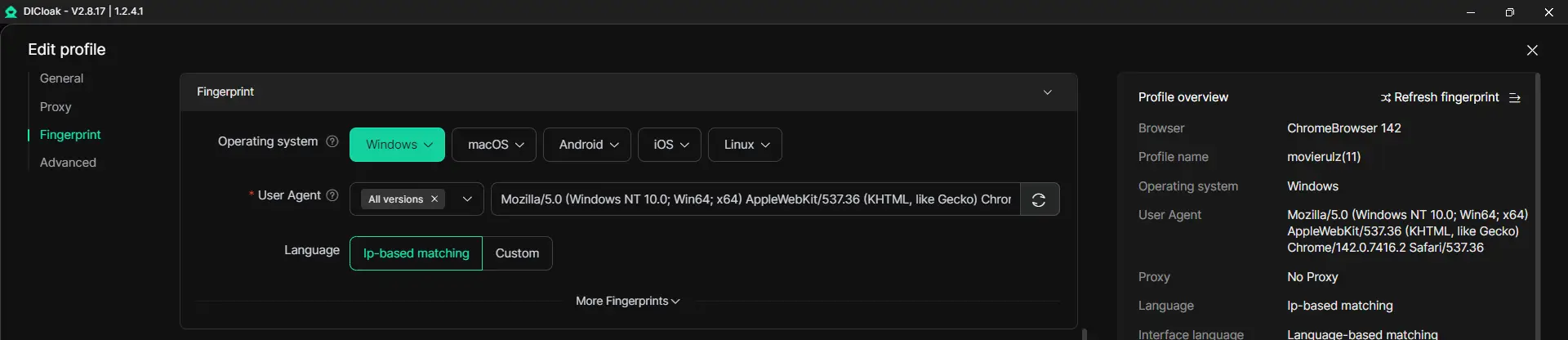
If you need a cleaner way to handle multiple Roblox accounts, DICloak can help keep them more organized. Instead of mixing logins and browser data in one place, you can place each account in a separate profile for easier management.
Securely Manage Accounts with Unique Digital Fingerprints
When several accounts are used in the same browser space, cookies, sessions, and account data can become messy. DICloak solves this by giving each profile its own isolated browser profile and unique digital fingerprint.
Automate Bulk Operations for Efficient Gameplay
If you are managing more than two or three accounts, small repeated actions can start taking a lot of time. DICloak supports bulk operations, RPA, and a Multi-Window Synchronizer that can help automate repetitive actions and reduce manual work. For a Roblox user, that can mean faster switching between prepared profiles, cleaner repeated setup steps, and less time wasted opening and organizing accounts one by one. This does not change Roblox’s rules, but it can make the daily management side more efficient.
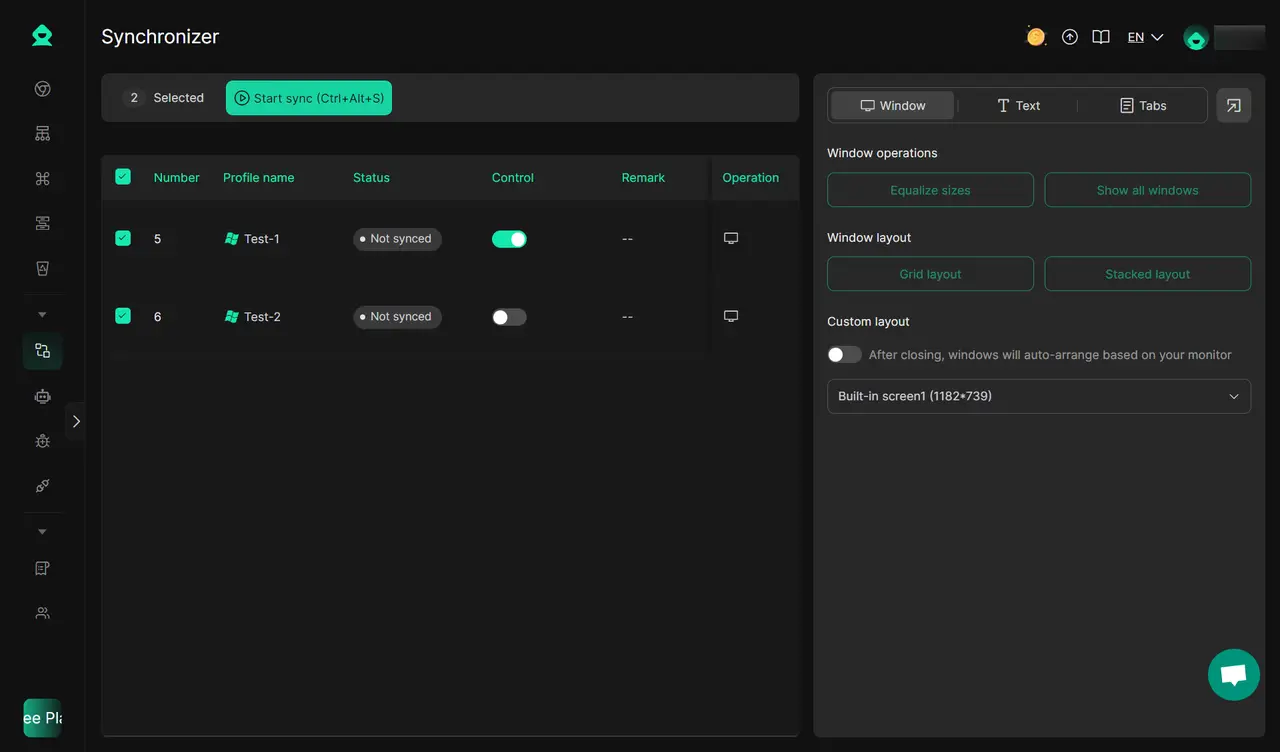
Collaborate and Synchronize Profiles Across Devices
DICloak also supports profile sharing, team permissions, and synced profile management. This is useful when multiple people need to manage accounts in a more organized way.
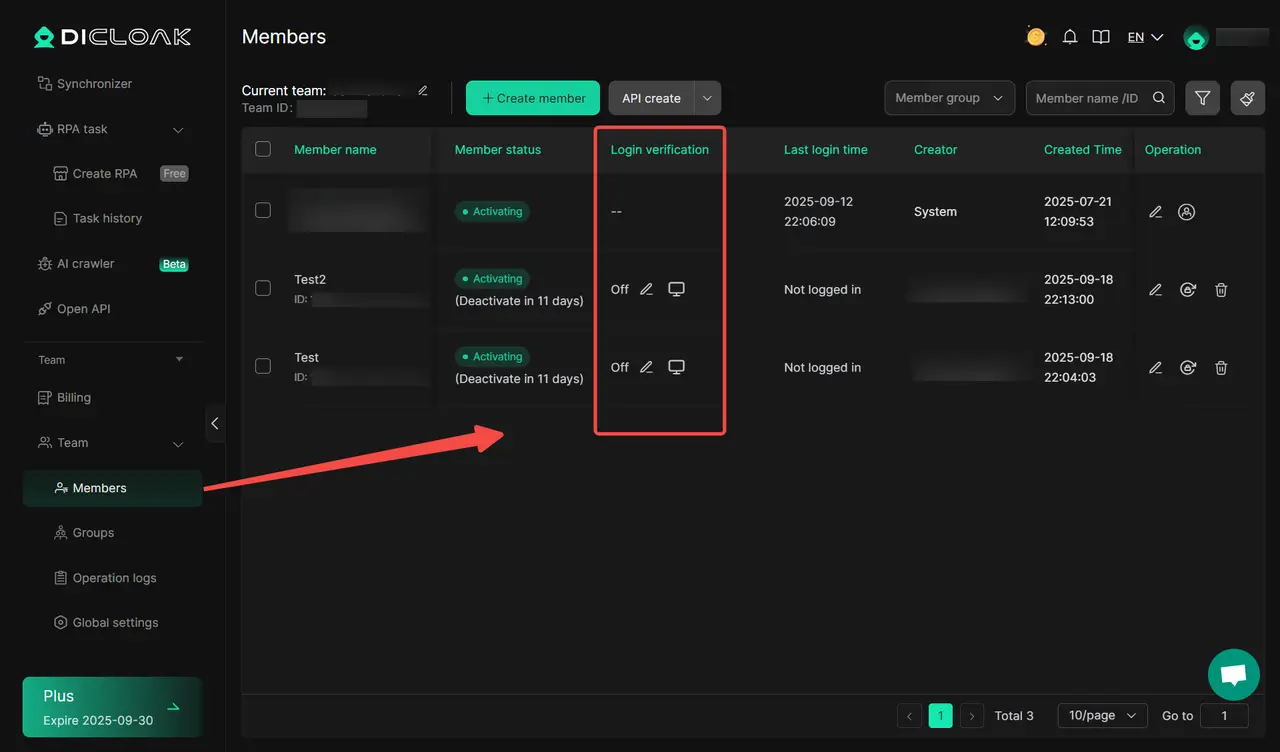
FAQ About Multiple Roblox Accounts
Can I use multiple accounts on different devices simultaneously?
Yes, you can use multiple Roblox accounts on different devices, but Roblox’s built-in Account Switcher does not sync those switched accounts across devices. Roblox says switched accounts are stored only on the device where you added them, so account access on one device does not automatically appear on another.
Is there a limit to how many Roblox accounts I can create?
In the official sources I checked, Roblox does not state a general platform-wide limit on how many accounts one person can create. What Roblox does clearly state is that the web Account Switcher can store up to five accounts on one device for eligible users. That is a limit for switching convenience, not necessarily a universal account-creation cap.
What happens if Roblox detects multiple accounts on one IP?
Roblox does not say that sharing one IP automatically causes a ban. The bigger issue is behavior. Roblox says that if a user violates Community Standards, it may take action on different accounts it determines belong to the same user. So the risk is not simply “same IP,” but whether the accounts appear tied to the same person during a rule violation or abuse case.
Are third-party tools for multi-account management safe?
They can add risk. Roblox warns users not to share passwords, cookies, 2SV codes, or backup codes, and says any program or extension from an untrusted source can compromise an account. Roblox also notes that there are no official Roblox browser extensions. So third-party multi-account tools may be useful to some advanced users, but they are never as trustworthy as Roblox’s own account tools, and they should be treated carefully.
Can I recover a banned account used in multi-instance setups?
Sometimes, yes. Roblox says users can appeal account or content moderation, and a standard appeal must be submitted within 30 days of the moderation action. But recovery is not guaranteed. If the case involves a ban from a specific experience, Roblox says that kind of ban is controlled by the experience creator, not Roblox Support, so you may need to contact the creator directly instead.
Conclusion
Using multiple Roblox accounts can be helpful when it is done for the right reasons and managed carefully. The key is to stay organized, protect each account, follow Roblox’s rules, and choose the method that fits your device and needs. For simple switching, Roblox’s own tools may be enough. For users who want more structure, profile separation, and easier account management, other solutions can help. In the end, the safest setup is the one that keeps your accounts clear, secure, and easy to control.
 Web Proxy Tools
 Free Tools
 Cookie Plugin
 UA Generator
 MAC Address Generator
 IP Generator
 IP Address List
 2FA Code Generator
 World Clock
 Anonymous Check
 WebRTC Leak Test
 UUID Generator
 Free Web Proxy Site
 Proxy Checker
 FB Ad Checker
 AI Web Scraping
 Free SMM Tools
 Twitter Shadowban Checker
 Instagram Name Checker
 UTM Generator
 Username Generator
 AI Hashtag Generator
 LinkedIn Headline Generator
 Social Media Image Resizer