Creating an account on X (formerly Twitter) usually requires two things: an email address and a password. But many people do not want to use their personal email every time they sign up for a new account. Sharing your main inbox with many websites can lead to spam, privacy concerns, and unnecessary exposure of your personal information.
This is where a temp email password generator for X account becomes useful. By combining a temporary email service with a strong password generator, you can quickly create secure login details without revealing your real email address. Many users rely on this method when testing features, exploring communities, or setting up secondary accounts while keeping their main inbox clean.
In this guide, you will learn how to use a temp email password generator for X account step by step, discover recommended tools, understand possible risks, and find practical tips for managing accounts safely. Whether you are a casual user, a researcher, or someone managing multiple accounts, this guide will help you create X accounts more securely and efficiently.
Understanding Temp Email Services
Temporary email tools have become more common as people try to protect their privacy online. Many websites require an email address during registration, but not everyone wants to share their real inbox with every platform. Temp email services offer a simple solution. They provide a short-term email address that can receive verification messages without exposing your personal email. When combined with a password generator, they create a fast and secure way to sign up for services like X.
What is a Temp Email Service?
A temporary email service, often called a temp email or disposable email address (DEA), is a short-term email account that you use instead of your real one. You visit a temp email website, and it instantly generates an address such as user123@tempmail.io. You can use this address to receive verification codes or confirmation links. After some time, the address and messages disappear automatically.
This system is designed for quick sign-ups. You do not need to create an account or share personal details. The email address is created instantly, and the inbox appears directly on the page. Once a website sends a message, you can read it in the temporary inbox within seconds.
For example, imagine you want to create a new X account just to test a feature or explore a community. Instead of using your personal Gmail, you open a temp email service and copy the generated address. You paste it into the signup form and receive the verification code in the temporary inbox.
This simple process becomes even more useful when combined with a temp email password generator for X account. The temporary email protects your identity, while the password generator creates a strong password at the same time. Together, they make account creation both faster and safer.
Benefits of Using Temp Email for Online Accounts
Disposable email services are popular because they solve several everyday problems people face online. They help reduce spam, improve privacy, and simplify account creation.
Reduce spam and inbox clutter
One of the biggest reasons people use temp email services is to avoid spam. When you sign up for websites using your real email address, you may later receive newsletters, marketing emails, and promotional messages. Studies estimate that almost 45% of global email traffic is spam or marketing content, which can quickly fill your inbox.
A temporary email prevents this problem. Since the address is short-term, you can use it once and let it expire. Your real inbox stays clean and organized.
For instance, a software tester might create several accounts when testing a new tool. Using temporary emails allows them to receive verification messages without flooding their main email account.
Protect personal privacy
Another benefit is privacy. Disposable email addresses separate your identity from online services. If a website stores or shares email data, your real inbox remains protected.
Many users now rely on temp email services when trying new apps, joining communities, or accessing free trials. By keeping their main email private, they reduce the chance of data exposure or unwanted contact.
Fast and simple registration
Temp email tools are also very convenient. Most services generate a working email address instantly. You simply copy the address and use it in the signup form.
This speed is especially helpful for people who create multiple accounts for testing, research, or marketing purposes. Instead of setting up many permanent email accounts, they can use temporary ones that disappear after use.
Why Use a Temp Email Password Generator for X Account?
When creating an account on X (formerly Twitter), you usually need two things: an email address and a secure password. A temp email password generator for X account helps you handle both steps quickly.
- Protects your identity. If you use your personal email address for every registration, many platforms can link that address to your activity. A temporary email keeps your main inbox separate and reduces tracking.
- Improves security. Password generators create strong passwords that are difficult to guess. Instead of simple passwords like “twitter123,” a generator might produce something like:
T9!g4K#2zPq7. Security experts widely recommend using long, random passwords because they are much harder to crack.
- Saves time. Using a Free temp email password generator for X account means you can generate both the disposable email and the secure password at the same time. This makes the signup process quick and efficient. Many users follow this method when creating secondary accounts, running tests, or exploring new communities on X.
For example, a social media researcher studying trending topics might create a temporary account to observe conversations without linking the activity to their main profile. By using a temp email and generated password, they can register quickly while protecting their personal identity.
Once the task is finished, the temporary email expires automatically. There is nothing to delete or manage later. This combination of convenience, privacy, and security is why many users rely on a temp email password generator for X account when setting up new accounts online.
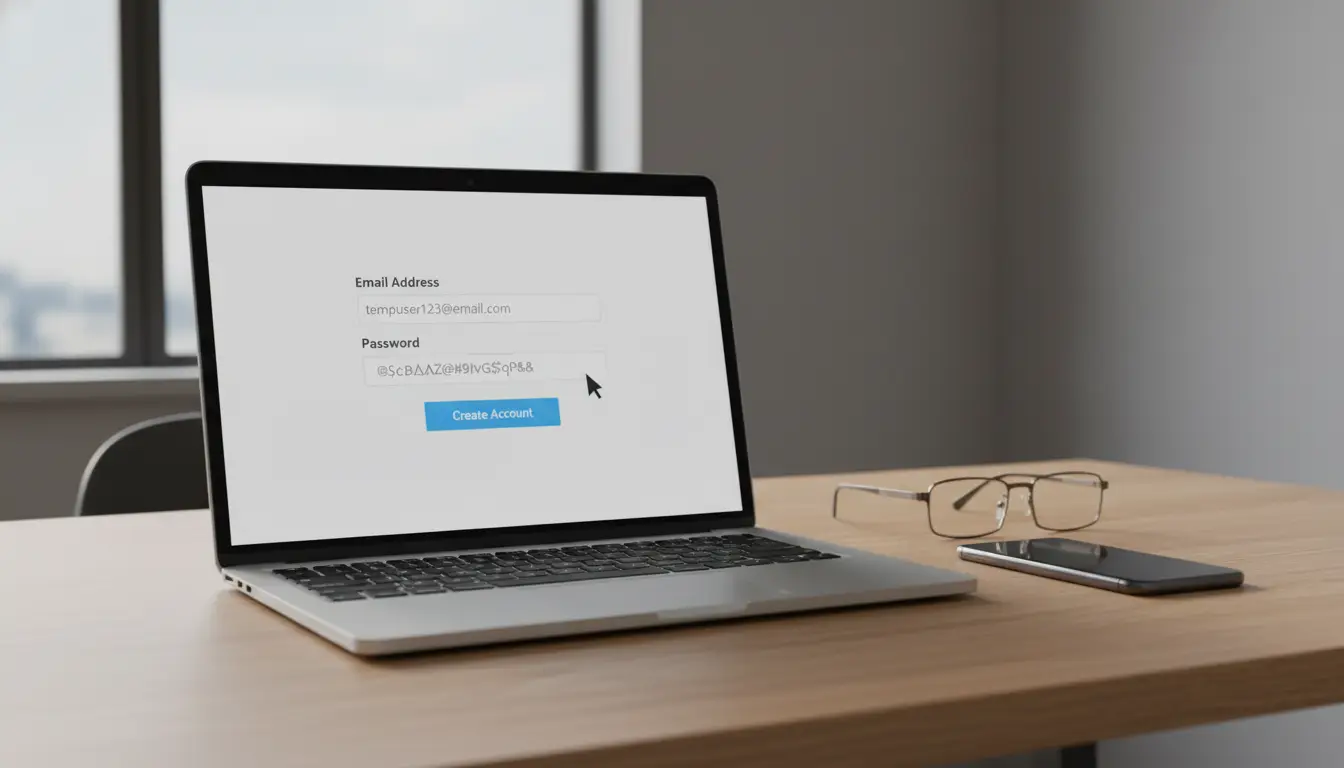
How to Use a Temp Email Password Generator for X Account: Step-by-Step
Now that you understand how temporary email services work and why people use them, the next step is learning how to actually use a temp email password generator for X account in practice. The process is simple. Most people can complete it in just a few minutes. You only need a temporary email service and a password generator.
Below is a practical step-by-step guide that many users follow when creating an account safely.
Step 1: Open a Temporary Email Service
The first step is to generate a disposable email address. Visit a trusted temp email website and open the homepage. Most services automatically create a new email address as soon as the page loads.
For example, you might see an address like: user4821@tempmail.io. You can copy this email address and keep the inbox page open. When X sends a verification message later, it will appear in this temporary inbox. People often use this method when they want to create a new account quickly without connecting it to their personal email.
Step 2: Generate a Strong Password
Next, create a secure password using a password generator. This step is important because weak passwords are one of the most common causes of account breaches.
A password generator produces long and random combinations of letters, numbers, and symbols, like K9#tA7!mQ2pL. Passwords like this are much harder to guess than simple ones such as “twitter123”.
Many users prefer a Free temp email password generator for X account because it creates both the email and the password in one place. This saves time and ensures the password is strong from the start.
Step 3: Register Your X Account
After you have your temporary email and password ready, go to the X signup page.
During registration:
- Enter the temporary email address
- Create a username
- Paste the generated password
X will then send a verification code to confirm that the email address is valid.
Because you are using a temp email password generator for X account, the verification message will appear directly in the temporary inbox you opened earlier.
Step 4: Verify the Email Address
Return to the temp email inbox and look for the message from X. It usually arrives within a few seconds.
Open the message and copy the verification code. Then paste it into the confirmation field on the X signup page.
Once this step is complete, your X account will be activated.
For example, a digital marketer who manages several test accounts may repeat this process several times when testing different content strategies or automation tools.
Step 5: Store Your Login Information Safely
Even if you use a temporary email address, it is still important to store your login details.
Write down or save:
- the username
- the generated password
Some users store these details in a password manager so they do not lose access later. If the temporary email expires, password recovery may become difficult. Because of this, many people switch to a permanent email address after the account is fully set up.
For example, a social media analyst who wants to study how new accounts interact with trending topics on X. Instead of using their personal email address, they use a temp email password generator for X account to create a separate login.
Within a few minutes, they have:
- a disposable email address
- a strong password
- a verified X account
They can observe trends or test features without linking the activity to their primary identity. This practical workflow shows why many people rely on a Free temp email password generator for X account. It simplifies account creation while helping protect privacy and security at the same time.
Recommended Temp Email Services and Password Generators
In the previous section, we explained how to create and verify an X account using a temp email password generator for X account. The next step is choosing reliable tools. Not all temp email services or password generators offer the same level of privacy, speed, or security.
Some tools focus on quick disposable inboxes. Others combine email masking, password generation, and identity protection. According to security experts and tech reviewers in recent product tests, several services stand out for their usability and privacy features in 2025.
Below are commonly recommended tools that users rely on when creating accounts safely with a Free temp email password generator for X account.
Top Temp Email Providers for X Accounts
Several modern privacy tools now provide disposable email addresses or email aliases that can be used when signing up for platforms like X. These services help reduce spam and prevent your main inbox from being exposed.
IronVest
IronVest is a privacy-focused tool designed for people who manage many online accounts. It allows users to generate masked email addresses that forward messages to a secure inbox.
For example, an online marketer creating several X accounts for campaign testing might use IronVest to generate different email identities while keeping their real email private. The service also includes password protection and payment masking features. Pricing typically starts around $39 per year.
Cloaked
Cloaked focuses on identity protection and integrates well with password managers. It creates unique email identities that can be used when registering accounts.
A professional researcher studying social media trends may use Cloaked to create separate identities for different research projects. This helps prevent data overlap between accounts. Cloaked plans usually begin at about $96 per year.
SimpleLogin
SimpleLogin is popular among technical users because it is open-source and offers strong privacy controls. It allows users to create email aliases that forward messages to their real inbox. The platform also supports two-factor authentication (2FA) for additional security.
Developers or cybersecurity researchers often choose SimpleLogin when they want more control over their email privacy. Pricing starts around $30 per year.
StartMail
StartMail focuses on security and encryption. It provides email aliases and strong encryption to protect messages. Users who care about data privacy often choose this service because it helps prevent tracking and protects communication.
StartMail subscriptions usually start at about $59.95 per year.
Bulc Club
Bulc Club is a lightweight and free privacy tool that allows users to create multiple email aliases. These aliases can be used to sign up for services without exposing the real email address.
For example, someone experimenting with new X features might create several aliases to test different profiles without sharing their primary email.
Burner Mail
Burner Mail is designed for people who spend most of their time online in browsers. Its browser extension allows users to create disposable email addresses instantly when filling out sign-up forms.
This quick workflow is useful for anyone using a temp email password generator for X account, because it reduces the time required to create a new identity. Plans start around $29.99 per year, though a free tier is also available.
ManyMe
ManyMe is a simple and completely free privacy tool that allows unlimited email aliases. It forwards emails to your real inbox while hiding your primary address. Users who want a basic solution for managing multiple sign-ups often choose ManyMe because it is easy to use and does not require a subscription.
These services can all be part of the workflow when using a Free temp email password generator for X account, helping users register accounts while keeping their real inbox protected.
Best Password Generation Tools for Enhanced Security
While temporary emails protect your identity, strong passwords protect the account itself. Security experts recommend using long, unique passwords instead of reusing simple ones.
Password generators help create secure combinations of letters, numbers, and symbols automatically.
Bitwarden Password Generator
Bitwarden provides an open-source password generator that can create highly secure passwords. Users can control the length and complexity of the password. For example, the generator might create a password like:L8#tQ4!mR2xP9. Such passwords are much harder for attackers to guess or crack.
NordPass Password Generator
NordPass offers a browser-based password generator that allows users to quickly create random passwords during account registration. A social media analyst who creates several test accounts might generate a different password for each account to avoid reuse.
LastPass Password Generator
LastPass provides another widely used password generator. It creates secure passwords instantly and can store them safely in a password manager. When paired with a temporary email service, tools like these support the full workflow of a temp email password generator for X account.
Comparing Features and Usability of Temp Email Services
Not all temp email tools offer the same experience. Some are designed for speed, while others focus on flexibility or privacy. Here are a few key features that users often compare.
- Speed of email delivery: The best temp email services deliver messages quickly. When signing up for X, verification codes often arrive within a few seconds. Services like Temp-Mail are known for fast delivery. If the email arrives slowly, it can delay the signup process.
- Email expiration time: Some services delete emails after a short period. For example, 10 Minute Mail removes the inbox quickly, while others allow longer access. If you plan to complete account verification right away, short expiration times work well.
- Ease of use: A good temp email tool should be simple. Most users prefer services where the email address appears instantly and the inbox refreshes automatically. For instance, a digital marketer creating several campaign test accounts may open multiple browser tabs with temporary inboxes. This allows them to verify each account quickly.
- Security support: When a temp email service is combined with a password generator, the process becomes safer. This is why many people look for platforms that support the full workflow of a temp email password generator for X account. For example, a researcher analyzing social media trends might create several X accounts using disposable emails and strong passwords. By using a Free temp email password generator for X account, they can protect their main identity while still completing their research tasks.
In practice, the best approach is simple: choose a reliable temp email provider and pair it with a strong password generator. This combination helps you register accounts faster, reduce spam, and improve your online security.
Risks and Considerations When Using Temp Emails
Using a temp email password generator for X account can improve privacy and speed up account creation. However, it is not a perfect solution. Temporary email services are designed for short-term use, so they come with certain risks and limits.
Before relying on a Free temp email password generator for X account, it is important to understand how these tools work and what problems may appear later. Knowing these risks helps you use temp email tools safely while protecting your X accounts.
Potential Issues with Temp Email Services
Temporary email services are convenient, but they can create practical problems during account management.
- Inbox expiration: Most disposable inboxes delete messages automatically after a short time. Some services remove emails within minutes, while others keep them for a few hours. If you lose access to the inbox, you may not receive password reset emails later. For example, imagine someone creates an X account using a temp email password generator for X account and forgets the password a week later. If the temporary inbox has already expired, the reset email cannot be received. This makes account recovery very difficult.
- Public or shared inboxes: Some temp email services use shared inbox systems. If another user generates the same email address or knows the inbox name, they may be able to see the messages inside. This means verification codes or login links could become visible to other users. Although this does not happen on every service, it is a risk users should understand before relying on disposable email accounts.
- Blocked disposable domains: Another common issue is domain blocking. Many websites maintain lists of known disposable email domains to prevent spam or automated registrations. If a temp email domain appears on these lists, the platform may reject the email address during signup. In some cases, the account might be created but later fail to receive important notifications.
Because of this, users often test several services when using a Free temp email password generator for X account to find a domain that works reliably.
Security Implications of Using Disposable Addresses
Disposable emails help protect your main inbox, but they do not always guarantee strong security.
- Credential attacks remain common: Cybersecurity reports continue to show that stolen passwords are one of the biggest causes of account takeovers. Attackers often use a technique called credential stuffing, where they try large lists of leaked usernames and passwords across many websites. If users reuse the same password on different accounts, attackers may gain access quickly. This is why security experts recommend pairing a temporary email with a strong password generator when using a temp email password generator for X account.
- Use unique passwords: Password generators create long and random passwords that are harder to guess, like
Q8!tR3#pL7mX. A password like this is far more secure than common passwords such as “password123”.
- Enable multi-factor authentication: Another important security step is multi-factor authentication (MFA). MFA adds an extra verification step, such as a code from an authenticator app. Security studies show that MFA can stop most automated account takeover attempts. When possible, users should enable MFA immediately after creating an X account with a Free temp email password generator for X account.
Best Practices for Managing Multiple X Accounts
Many professionals use temporary emails when creating multiple accounts for testing or research. However, managing several accounts requires good organization and security habits.
Keep login information organized
When creating multiple accounts quickly, it is easy to forget usernames or passwords. Storing credentials in a password manager helps prevent this problem. For example, a digital marketing team might create several X accounts to test different advertising campaigns. By storing login details securely, they can access each account later without confusion.
Use unique passwords for every account
Each account should have a different password. If one account becomes compromised, the others will remain safe. A temp email password generator for X account helps achieve this because it automatically generates new passwords for every registration.
Use temp emails for short-term projects
Temporary email services work best for short-term tasks, such as testing features, research, or creating trial accounts. For long-term use, it is often better to switch the account to a permanent email address. This allows you to receive security alerts, login notifications, and password recovery messages.
Balance privacy and control
A practical approach is to combine both tools. Use a Free temp email password generator for X account during the initial signup process, then update the account with a secure permanent email later. This method allows users to protect their identity during registration while keeping full control over the account in the long term.
By understanding these risks and following good security practices, users can safely use temporary email tools while maintaining strong protection for their X accounts.
Safely Managing Multiple X Accounts with DICloak
Using a temp email password generator for X account is a smart first step for protecting your privacy when creating new profiles. It helps hide your real email address and keeps your main inbox clean. However, when you start managing several accounts at the same time—such as for research, marketing, or testing—you may need additional protection.
Platforms like X monitor many signals to detect linked accounts. These signals can include IP address, browser fingerprint, cookies, and device information. If several accounts share the same environment, they may appear connected. In some cases, this can lead to security checks or account restrictions.
To reduce these risks, many professionals use an antidetect browser so each account runs in its own isolated space. This is where DICloak can help support a safer workflow when using a temp email password generator for X account.
Below are several ways users can combine DICloak with temporary email tools to manage multiple X accounts more securely and efficiently.
Profile Isolation for Independent Account Environments
When creating accounts with a Free temp email password generator for X account, each account should appear as if it is being used from a different device.
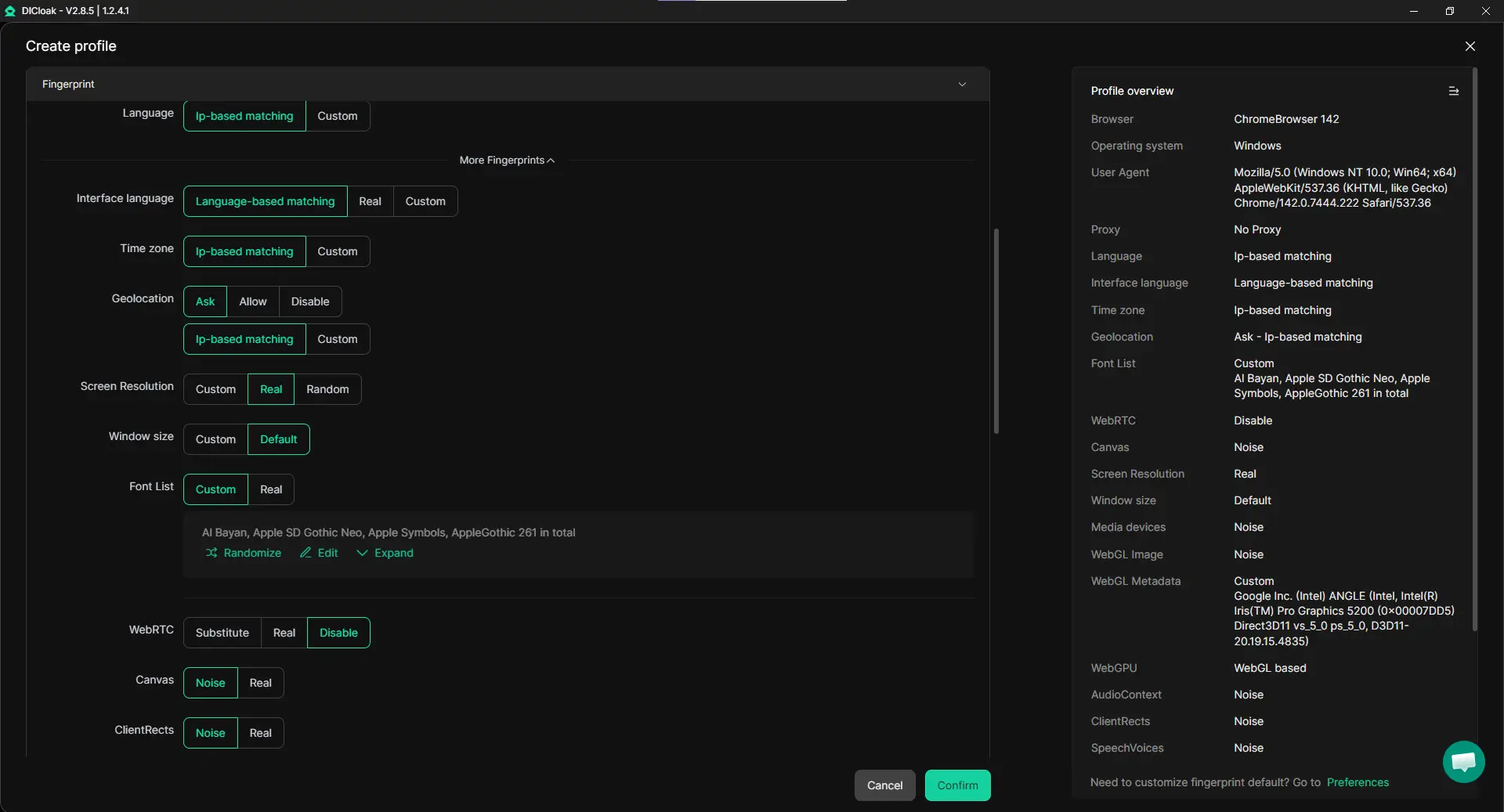
With DICloak, users can create separate browser profiles for every account. Each profile has its own:
- browser fingerprint
- cookies and storage data
- device parameters
- browsing environment
This means one account’s activity does not interfere with another. For example, a social media analyst studying trends on X can run several accounts at once without mixing login data or session information. By keeping profiles isolated, accounts behave like they are running on completely different devices.
Custom Proxy Configuration for Location Control
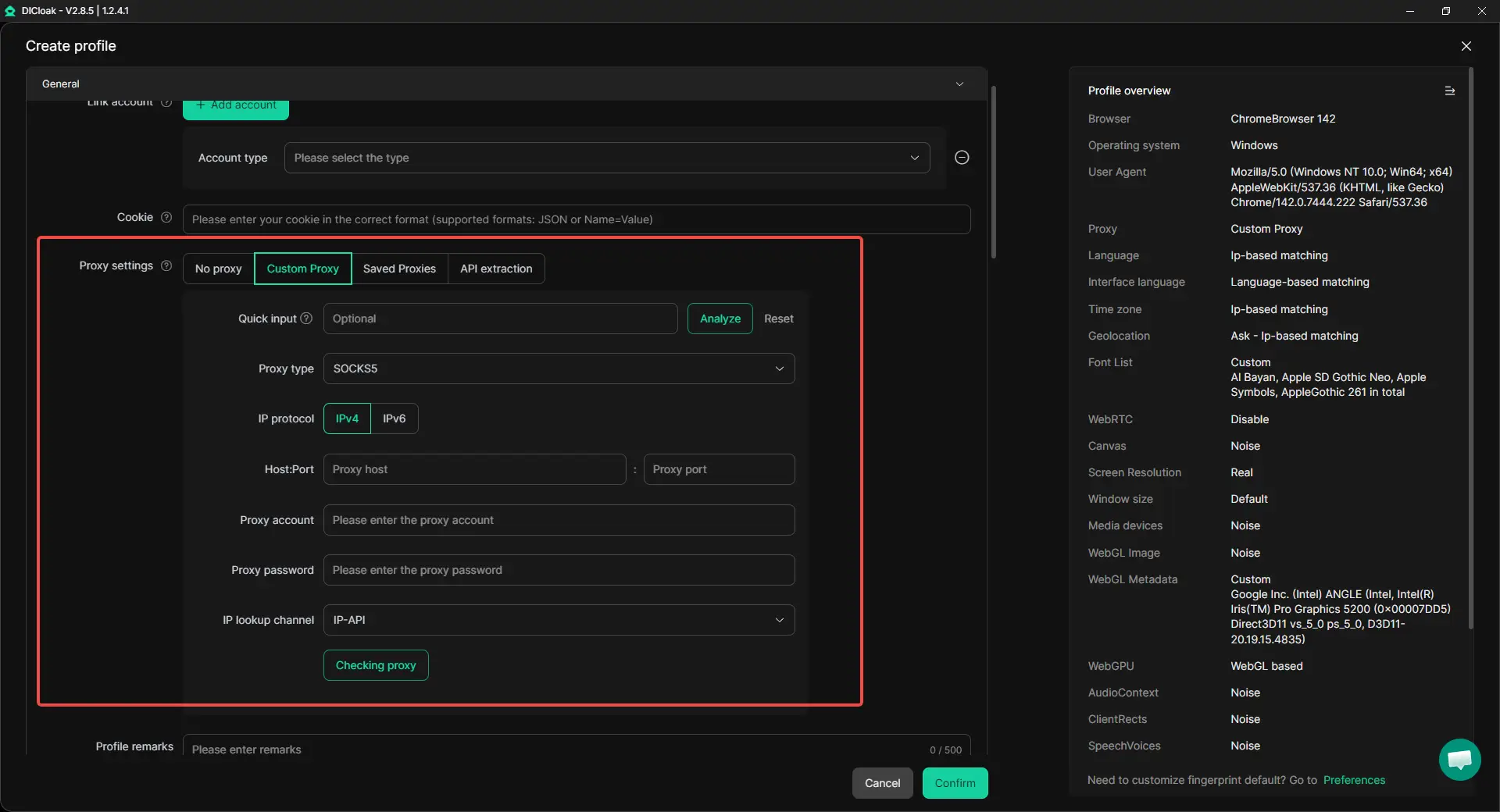
Another factor that platforms analyze is IP address and location. If several accounts log in from the same IP, it may raise suspicion.
With DICloak, users can configure individual proxy connections for each browser profile, including HTTP proxies, HTTPS proxies and SOCKS5 proxies. This lets each X account connect from a different network location. For example, a marketer testing audience engagement in different regions might assign a unique proxy to each account.
When combined with a temp email password generator for X account, this setup helps create a more natural and independent environment for every profile.
Automation for Efficient Multi-Account Operations (Synchronizer + RPA)
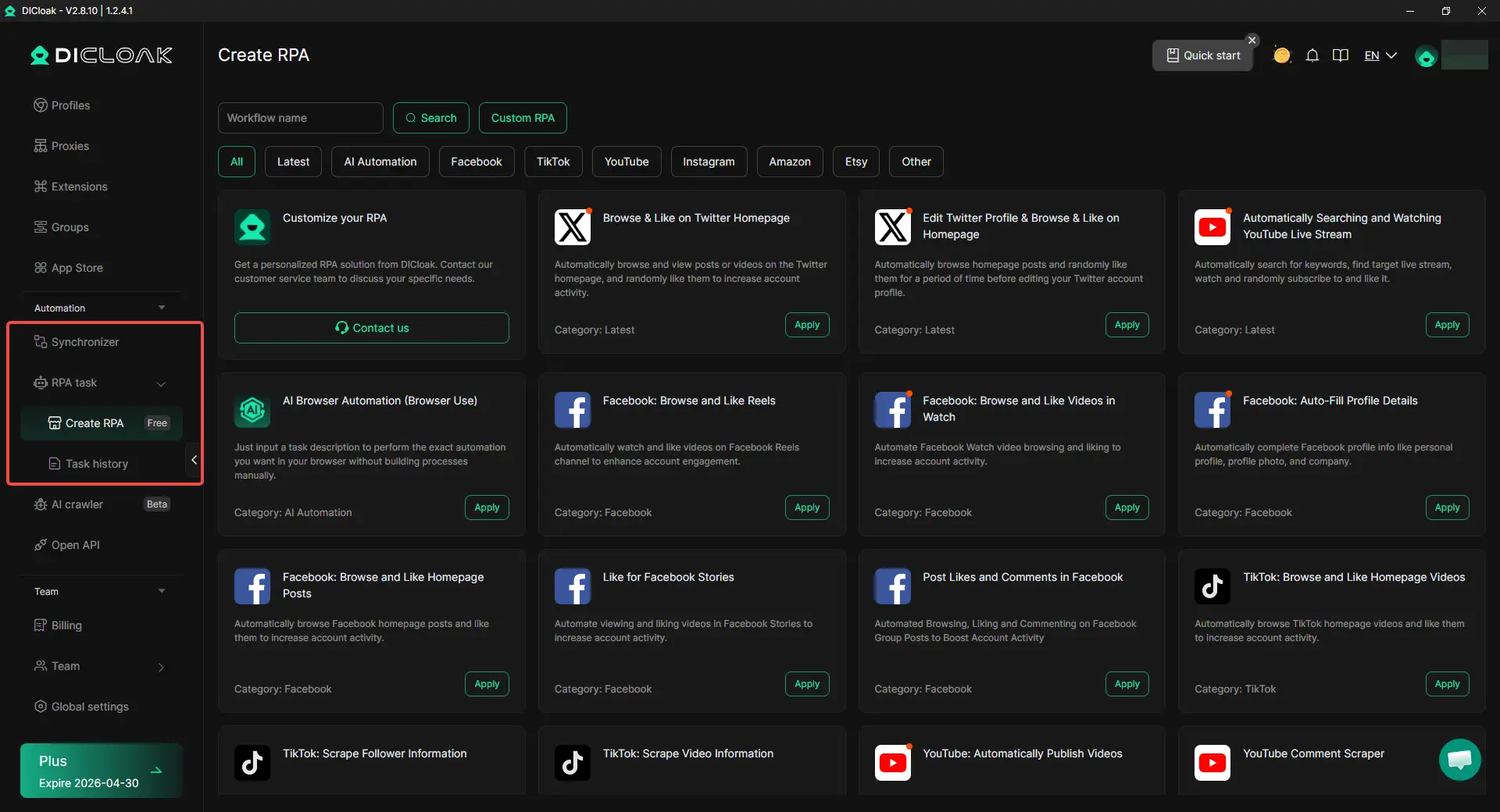
Managing many X accounts by hand takes time. With Synchronizer, the same action you do in one window can be mirrored across multiple profiles. This works well for tasks you want to control in real time, like logging in, opening the same page, or updating simple settings across accounts.
For repetitive “warm-up” work, RPA templates can run a fixed flow for you. For example, a task can automatically browse the X homepage, view posts, and randomly like content to simulate natural activity—without you clicking each step.
Together, this automation setup helps teams run campaigns or tests faster, while keeping each profile’s work consistent and organized.
Secure Team Collaboration for Account Management
Managing multiple X accounts is often a team effort. Marketing agencies, research groups, and social media teams frequently need to share account access safely.
DICloak provides collaboration features such as:
- profile sharing between team members
- permission and role management
- operation logs and activity records
- data isolation between team users
For example, a social media team may assign different members to manage different X accounts while keeping login credentials protected. Each member can access the assigned browser profile without seeing sensitive information from other accounts.

Combining Temp Email Tools with Secure Browser Profiles
Using a temp email password generator for X account helps during the account creation stage. It protects your email identity and allows quick registration.
For long-term management of multiple accounts, combining temporary email tools with a secure browser profile can provide additional protection and organization.
With features like profile isolation, proxy configuration, synchronizer tools, and team collaboration, DICloak helps users manage many accounts efficiently while keeping their digital environments separated.
For professionals working in areas like social media management, affiliate marketing, traffic operations, or online research, this combination creates a safer and more scalable workflow when handling multiple X accounts.
Conclusion
Using a temp email password generator for X account is a simple way to create new accounts while protecting your privacy. Temporary email services provide disposable inboxes that receive verification messages without exposing your real email address. When combined with a password generator, they help you create strong, secure passwords and complete the X signup process quickly. This approach is useful for testing features, exploring communities, or creating secondary accounts without filling your main inbox with spam.
However, temporary emails are best used for short-term tasks. Some disposable inboxes expire quickly, and losing access to them can make account recovery difficult. That is why users should store their login information safely and consider updating the account to a permanent email later if it will be used long term.
Overall, a Free temp email password generator for X account offers a fast and privacy-friendly way to register accounts. When paired with good security habits—such as strong passwords and organized account management—it helps users create and manage X accounts more safely and efficiently.
Frequently Asked Questions (FAQs)
What is a temp email password generator for X account?
A temp email password generator for X account is a combination of two tools: a temporary email service and a password generator. The temp email provides a disposable inbox that receives verification messages during signup, while the password generator creates a strong, random password for the account. Using both together helps protect your real email address and improves account security during registration on X.
Is it safe to use a temp email password generator for X account?
Using a temp email password generator for X account can be safe if it is used correctly. It helps hide your personal email address and prevents spam from reaching your main inbox. However, temporary emails are short-term tools. If the inbox expires, you may lose access to password reset emails. For long-term accounts, it is usually better to switch to a permanent email address after the account is created.
Can I create multiple X accounts with a Free temp email password generator for X account?
Yes, many users create multiple X accounts using a Free temp email password generator for X account. Each account needs a unique email address and a strong password. Temporary email tools make it easier to generate different inboxes quickly. However, it is important to follow platform rules and keep each account secure with unique passwords and proper account management.
Why should I use a password generator when creating an X account?
A password generator creates long, random passwords that are harder for attackers to guess. When combined with a temp email password generator for X account, it ensures that every account uses a strong and unique password. This reduces the risk of hacking, especially when managing several accounts or testing new profiles.
What should I do if I lose access to the temporary email inbox?
If you lose access to the inbox used during registration, recovering the account may become difficult. This is a common limitation of using a temp email password generator for X account. To avoid this problem, store your login information safely and consider updating the account to a permanent email address once the account setup is complete.
 Web Proxy Tools
 Free Tools
 Cookie Plugin
 UA Generator
 MAC Address Generator
 IP Generator
 IP Address List
 2FA Code Generator
 World Clock
 Anonymous Check
 WebRTC Leak Test
 UUID Generator
 Free Web Proxy Site
 Proxy Checker
 FB Ad Checker
 AI Web Scraping
 Free SMM Tools
 Twitter Shadowban Checker
 Instagram Name Checker
 UTM Generator
 Username Generator
 AI Hashtag Generator
 LinkedIn Headline Generator
 Social Media Image Resizer