You make a great TikTok video. Then you download it, open it again, and there it is—the moving TikTok logo and username bouncing around the screen. It may seem small, but it can quickly make a clean video feel less polished, especially when you want to repost it on Instagram Reels, YouTube Shorts, Facebook, or your own website.
That is why so many creators search for ways to remove TikTok watermark. Some want a cleaner look. Some want more space for captions, product text, or branding. Others simply want their own videos to feel more natural on other platforms. The good news is that there is more than one way to do it, and you do not need to be a professional editor to get good results.
In this guide, you will learn what a TikTok watermark is, why people remove it, and six proven ways to do it. We will also look at the legal side, common mistakes to avoid, and simple tips to help you choose the best method for your workflow. Whether you want a fast fix or a higher-quality result, this guide will help you find the right way to remove TikTok watermark from your own videos.
What Is a TikTok Watermark?
A TikTok watermark is the moving mark you see on many downloaded TikTok videos. It usually includes the TikTok logo and the creator’s @username. Instead of staying in one place, it shifts around the screen. That is why many users notice it right away. TikTok also explains that when a third-party app is allowed to access public TikTok content for sharing, those posts will contain a watermark.
This watermark is not there by accident. It has a clear purpose. First, it helps credit the original creator. When a short video gets shared in a group chat, reposted on another social platform, or passed from one person to another, the watermark still points back to the creator. Second, it keeps the TikTok brand attached to the clip. Third, it makes mass reposting a little harder, because the video still carries TikTok’s label after it leaves the app. TikTok also gives creators control over whether others can download their videos, which shows that downloaded content is still closely tied to creator settings and platform sharing rules.
Why Remove TikTok Watermarks?
There are many normal and valid reasons to remove TikTok watermark from your own content. Many creators do this not to hide the source, but to make their videos cleaner, more flexible, and easier to reuse across platforms. Here are some of the most common reasons:
- Content repurposing: A creator may post a short video on TikTok first, then reuse the same clip on Instagram Reels, YouTube Shorts, Facebook, a product page, or a brand website. In this case, a clean version often looks more polished and more professional.
- Better control over the frame: The moving TikTok logo and username can cover an important corner of the video. This may be the same area where a creator wants to place subtitles, product text, or a call-to-action button. That is one reason people search how to remove TikTok watermark or look for a reliable TikTok watermark remover.
- Cleaner visuals: The watermark can distract viewers, especially in short videos where every part of the screen matters. It may block product shots, text overlays, or key moments in the clip. This is a common problem in tutorials, beauty demos, montage edits, and before-and-after videos.
- Stronger brand consistency: Agencies, small businesses, and creators often want all their videos to match across platforms. A TikTok-branded video may not fit the rest of a polished social media feed or a brand campaign.
- Better fit for other platforms: Instagram’s official creator guidance says creators should avoid visibly recycled content and should not post Reels with watermarks. That helps explain why so many creators want to remove TikTok watermark before reposting their own videos elsewhere.
- Privacy in approved editing work: Sometimes a freelancer or editor works on a client’s original video with permission. In that case, removing the old TikTok handle can help the final version better match the client’s current brand identity.
Still, there is one important rule. Only remove a watermark from videos you made yourself, or from videos you have clear permission to edit and reuse. Using a TikTok watermark remover on someone else’s content without permission can create copyright problems and damage trust.
6 Effective Methods to Remove TikTok Watermark
Now that we have covered why creators want to remove TikTok watermark from their own videos, the next step is choosing the right method. The best option depends on your goal. Some methods are fast and simple. Others take more time but give you better control over quality. A good rule is this: start with the cleanest source you can get, then move to editing tools only when needed. TikTok itself recommends saving your video to your device before posting if you want an offline copy, which is often the easiest way to keep a clean original from the start.
1. Download TikTok Videos Without the Watermark
This is usually the easiest method if you are working with your own content. Instead of trying to erase a moving logo later, you try to start with a cleaner file first. That gives you a better chance of keeping the video sharp and natural.
Using TikTok’s Save to Device Option
If you created the video yourself, TikTok says you can save a copy before posting. On the Post screen, tap More options, then turn on Save to device. TikTok also says you can tap Save on the side panel while editing to download a single photo or video post. This is the safest first step for creators who want to know how to remove TikTok watermark without losing quality, because a saved original often means less editing later.
Here is a simple example. A small bakery films a cupcake decorating video for TikTok. Before posting it, the owner saves the video to her phone. Later, she uses that clean file for Instagram Reels and her website banner. In this case, she does not need a heavy TikTok watermark remover workflow at all. She just starts with a better source file.
Using Third-Party Websites
Some people use third-party download sites like SnapTik, SSSTikTok, or SaveTT. These services say you paste a TikTok link into the page and download a version without the watermark. SnapTik says it can download TikTok videos without a watermark and does not require software installation. SSSTikTok and SaveTT make similar claims on their sites.
The steps are usually simple:
- Open TikTok and copy the link to your video.
- Go to the downloader site.
- Paste the link into the input box.
- Tap the download button.
- Save the new file to your device.
This method is fast, but it has trade-offs. These sites are third-party tools, not TikTok tools. Their speed, privacy, and reliability can change over time. So if you use them, use them only for your own videos or videos you have permission to edit.
2. Crop the Video to Remove the Watermark
Cropping is one of the oldest ways to remove TikTok watermark. It works by cutting off the edge of the frame where the watermark appears. If the logo sits in a corner and your subject is centered, this can work well.
How Cropping Works
In practice, you open the video in an editor and trim the outer edges until the watermark is gone. Adobe explains that in Premiere Pro you can apply the Crop effect from Video Effects > Transform > Crop. That makes cropping a simple option for creators who want a fast fix.
A basic workflow looks like this:
- Import the video into your editor.
- Find the corner where the watermark appears.
- Apply the crop tool or pinch to crop on mobile.
- Adjust the frame until the watermark is outside the visible area.
- Export the video.
Limitations of Cropping
The downside is easy to see. You lose part of the frame. If the video already has text near the edge, cropping may cut off subtitles, product shots, or hand movements. It can also make the video look too zoomed in. This is why cropping works best for talking-head clips, simple demos, or centered shots. It works less well for dance videos, wide scenes, or tutorials with text near the bottom.
For example, if a beauty creator records a close-up makeup tutorial, cropping may remove the watermark with little damage. But if the same creator posts a full-body fashion clip, cropping may cut off shoes, hands, or outfit details. In that case, another method will usually look better.
3. Blur or Cover the Watermark
If cropping removes too much of the video, blurring or covering the watermark is often the next best option. This method does not erase the corner of the frame. Instead, it hides the mark with an effect or graphic.
Using Blur Tools
Blur tools work well when the watermark sits over a plain background. Adobe explains that Premiere Pro gives users blur effects and masks, which lets you blur only one part of the frame instead of the whole video. CyberLink also shows that PowerDirector includes blur and mask tools for targeted editing.
A simple blur workflow looks like this:
- Import the video into your editor.
- Add a blur, mosaic, or pixel effect.
- Place the blur over the watermark area.
- Resize it so it covers only the logo and username.
- If the watermark moves, use tracking or keyframes to follow it.
- Export the new video.
CyberLink’s current guidance for PowerDirector says users can go to Effects > Mosaic & Blur, place the effect over the TikTok watermark, and export the result.
Adding Overlays or Borders
Sometimes a blur still looks obvious. In that case, you can cover the watermark with a sticker, text box, logo, lower-third, or border. This works well for branded content. For example, a coach reposting a workout clip can place her own small brand tag or CTA box in the lower corner. That covers the old watermark and gives the frame a more planned look.
This is one of the most natural ways to remove TikTok watermark without making the corner look damaged. It is especially useful for product videos, client work, and short ads.
4. Use Apps Designed for Watermark Removal
If you edit on your phone, dedicated apps are often the easiest choice. They save time and usually have built-in tools for blur, overlays, or AI cleanup.
Top Apps for Removing TikTok Watermarks
A few common examples are CapCut, PowerDirector, and general-purpose watermark remover apps. CapCut says its video editor includes an AI remove feature that lets users brush over a watermark area and click Remove. CyberLink says PowerDirector offers mosaic and blur tools, plus AI features on current versions for both mobile and desktop.
These apps are useful because they give you more than one option. If AI removal does not look clean, you can switch to blur. If blur looks messy, you can add text or a sticker. That flexibility matters when you are testing how to remove TikTok watermark on different kinds of clips.
Step-by-Step Guide for Using These Apps
Here is a simple phone-friendly workflow:
- Open the app and create a new project.
- Import your TikTok video.
- Try the app’s AI remove, blur, or mosaic tool.
- Brush over or place the effect on the watermark area.
- Check the preview carefully, especially where the watermark moves.
- Export the video in the highest quality available.
For example, CapCut says users can go to Video > Basic > AI remove, adjust the brush size, paint over the watermark, and click Remove.
5. Remove TikTok Watermarks Online
Online tools are helpful when you do not want to install software. They are also useful on shared devices or when you only need a quick one-time fix.
Best Online Tools
Two common examples are SaveTT and WatermarkRemover.io. SaveTT says it can download TikTok videos without watermarks in MP4 format. WatermarkRemover.io says its video tool uses AI to erase logos, timestamps, and overlays from uploaded videos.
These tools usually fall into two groups:
- Downloader-style tools that pull a no-watermark version from a TikTok link.
- Upload-and-edit tools that ask you to upload the file and then remove the watermark with AI.
How to Use Online Tools
For downloader-style tools:
- Copy the TikTok link.
- Paste it into the site.
- Download the processed video.
For upload-and-edit tools:
- Upload the video file from your device.
- Select the watermark area.
- Let the AI remove or clean that section.
- Preview the output.
- Download the edited file.
Online tools are convenient, but be careful with important client work. Uploading videos to a third-party service means your file leaves your device. So this option is best for non-sensitive content that you own and can legally edit.
6. Use Professional Video Editing Software
If you want the cleanest result, professional software is often the best method. It takes more time, but it also gives you the most control.
Advanced Tools for Watermark Removal
Two strong examples are Adobe Premiere Pro and VideoProc Converter AI. Adobe provides official guides for cropping and masking in Premiere Pro, and explains that users can apply targeted blur effects and masks in post-production. VideoProc says its software offers crop, trim, and watermark tools for logo removal on Windows and Mac.
This kind of software is best for creators, agencies, and editors who need better quality control. It is also the better choice when the watermark moves over a busy area, because you can fine-tune each frame more carefully.
Step-by-Step Guide
A simple Premiere Pro workflow can look like this:
- Import the video into a new project.
- Put the clip on the timeline.
- Choose the best approach: crop, blur, or mask.
- If you crop, apply Crop from the Effects panel.
- If you blur, add a blur effect and use a mask over the watermark area.
- If the watermark shifts, animate the mask or track the object.
- Export the final video.
A real example helps here. Say an agency has a client’s original TikTok ad, but the saved version still has a visible moving watermark. The ad includes product text in one corner, so cropping would hurt the layout. In Premiere Pro, the editor can mask and blur only the watermark zone, then adjust the mask as it moves. That takes longer, but the final result usually looks much cleaner than a quick crop.
No single method works best for every clip. If you want speed, start with a clean saved file or a download tool. If you want the best visual result, use an editor with masking, blur, or AI cleanup. In most cases, the smartest workflow is simple: use the least destructive option first, and only move to a heavier TikTok watermark remover method when the easier fix does not hold up.
Legal and Ethical Considerations
After learning how to remove TikTok watermark, it is important to understand the rules too. A tool may make editing easy, but that does not always make it safe. In most cases, it is safest to remove a watermark only from videos you made yourself or from videos you have clear permission to edit. TikTok says its rules do not allow content that violates another person’s copyright or other intellectual property rights.
Is It Legal to Remove TikTok Watermarks?
The main legal issue is not the watermark alone. It is the ownership of the video. If the video is your own, using a TikTok watermark remover is usually just part of editing and reposting your content. But if the video belongs to someone else, removing the watermark can create copyright problems, especially if you repost it like it is your own work. TikTok also says repeated violations can lead to content removal or account penalties.
For example, if a small business owner edits her own TikTok product video for Instagram Reels, that is very different from downloading another creator’s viral clip, removing the username, and posting it on a brand page. One is normal reuse. The other can lead to takedowns, complaints, and lost trust.
Ethical Guidelines for Removing Watermarks
The ethical rule is simple: only remove TikTok watermark from content you own or have permission to use. A watermark shows where a video came from and who made it. Removing that mark from someone else’s content can hide credit and mislead viewers.
A good example is client work. If a fitness coach hires an editor to reuse her own TikTok video in an ad, watermark removal is part of the job. But if the editor takes another creator’s clip and removes the handle without permission, that is not smart editing. It is risky and unfair. So when people ask how to remove TikTok watermark, the best answer is simple: use the tool only on the right content.
Download and Manage TikTok Videos More Efficiently with DICloak Antidetect Browser
Before users remove TikTok watermark, they usually need to download the video first. For one clip, this is easy. But for creators, agencies, and social media teams handling many TikTok accounts, downloading videos one by one can quickly become slow and repetitive. This is where a more organized workflow helps.
Instead of opening the same TikTok pages again and again in a regular browser, users can work more efficiently with DICloak Antidetect Browser. When multiple TikTok accounts need to be managed at the same time, separate browser profiles can keep each account independent, while built-in automation tools can make batch downloading and repeated actions much faster.
Save Time on Repetitive TikTok Tasks with RPA
When people search how to remove TikTok watermark, they often focus only on the editing step. But in real work, downloading the videos is the first bottleneck. In real workflows, many teams do not download every video they see. They first need to find the right videos, check performance, and decide which ones are worth saving and editing.
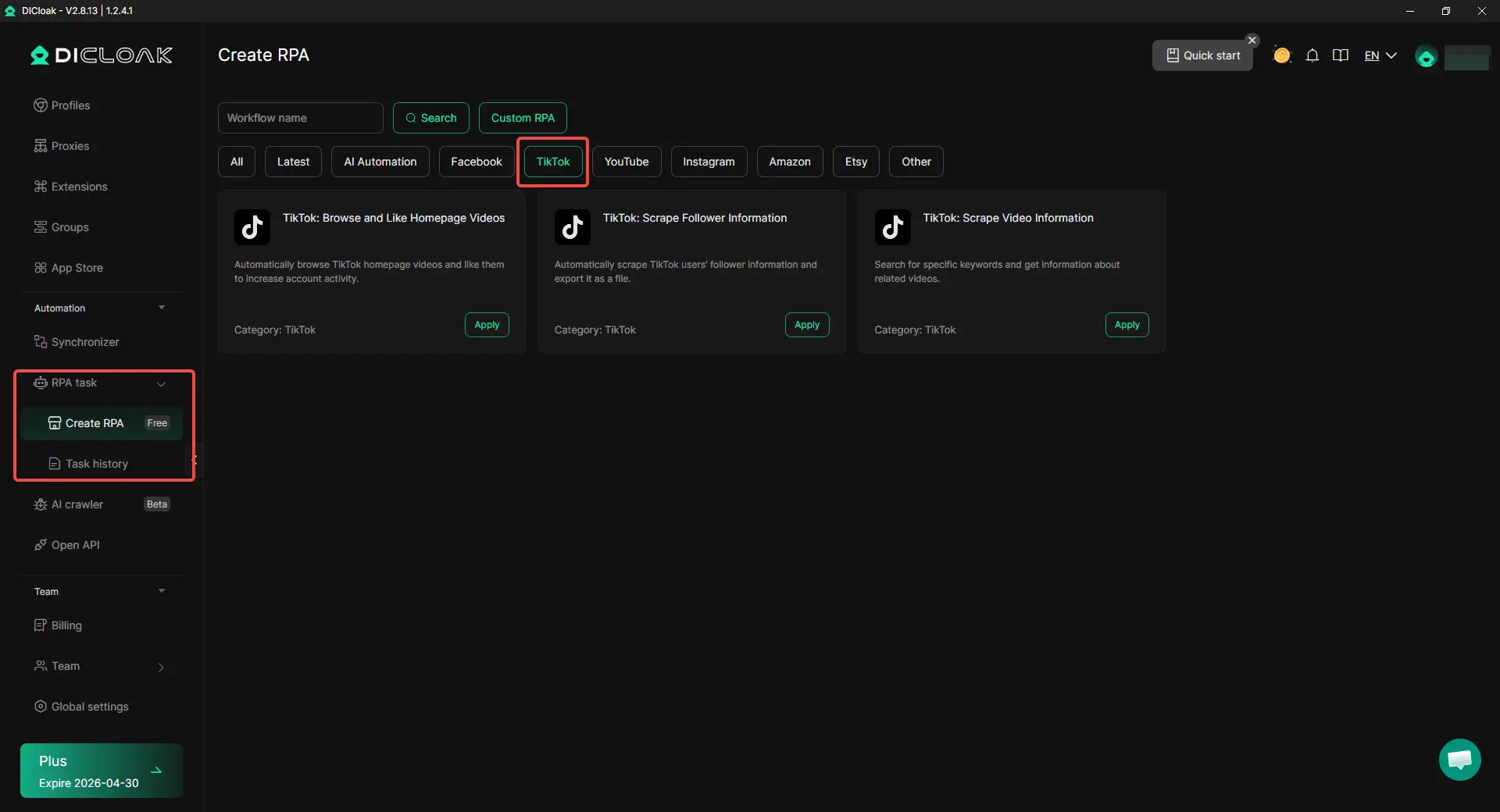
For this kind of work, users can rely on built-in RPA automation to reduce manual steps and improve accuracy. Instead of opening TikTok, searching manually, and checking videos one by one, users can automate early-stage tasks such as:
- searching videos by keywords
- collecting video information (views, likes, publish time)
- scraping follower data from specific accounts
- filtering content before deciding what to download
For example, a content team planning to repurpose TikTok clips may first use RPA to scan videos under a specific keyword, then export key data and identify which videos perform best. After that, they only download selected videos and move forward to remove TikTok watermark and reuse them.
This makes the workflow much more efficient. Instead of downloading everything and sorting later, users can filter first, download second, edit last.
Batch Download TikTok Videos with Synchronizer
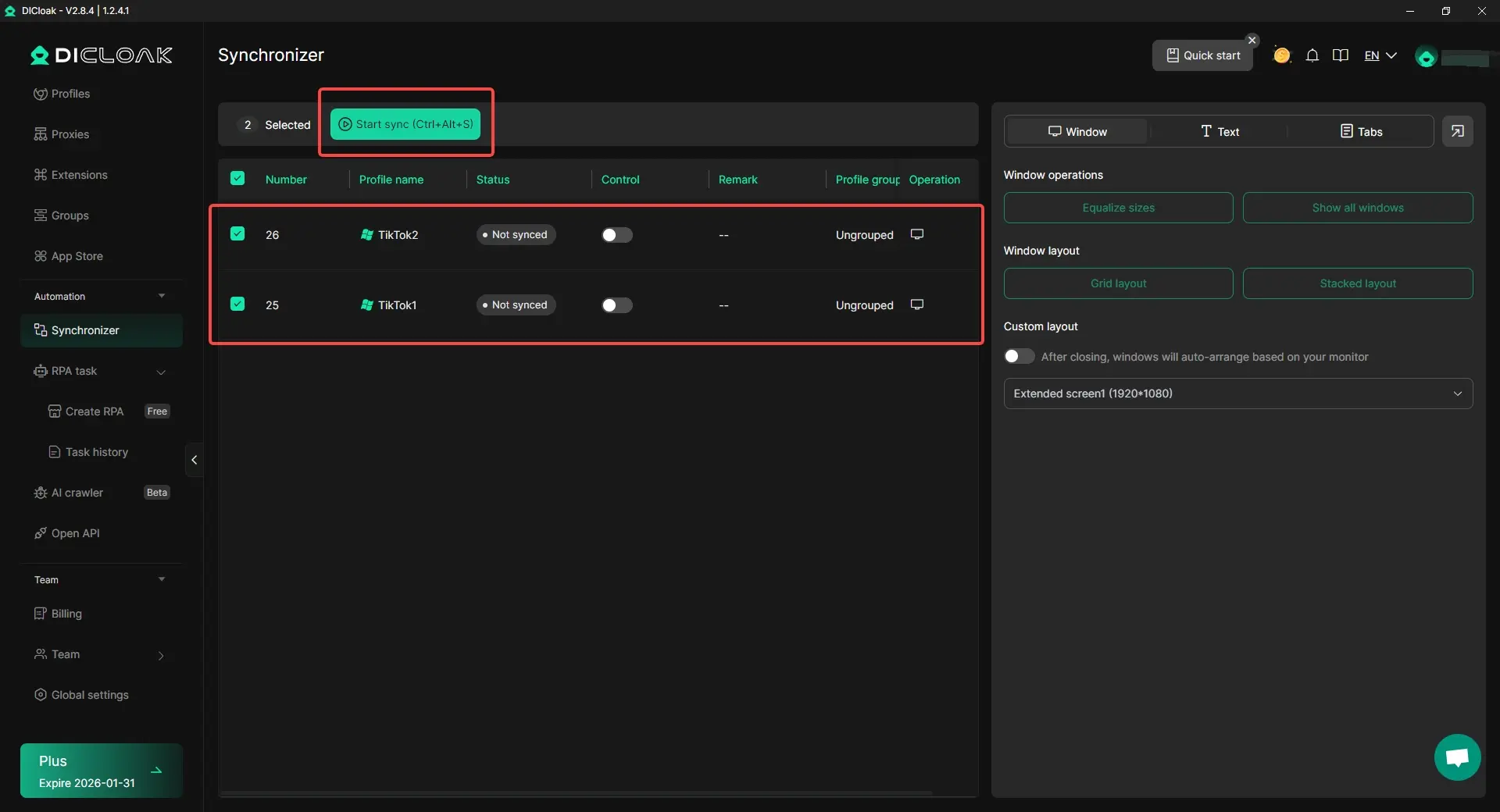
If a creator or team needs to save videos from many TikTok accounts, repeating the same steps in each window wastes a lot of time. In this case, users can use DICloak’s Synchronizer to open multiple browser profiles at the same time and mirror the same actions across them. That means users can log into several TikTok accounts, open the same pages, and perform repeated download steps across multiple windows together instead of doing everything one by one.
For example, if a content team needs to save original TikTok videos from several creator accounts before using a TikTok watermark remover, the Synchronizer can help them load those accounts and repeat the same download flow much faster. This makes the whole watermark-removal workflow more efficient from the very first step.
Keep Each TikTok Account in a Separate Profile
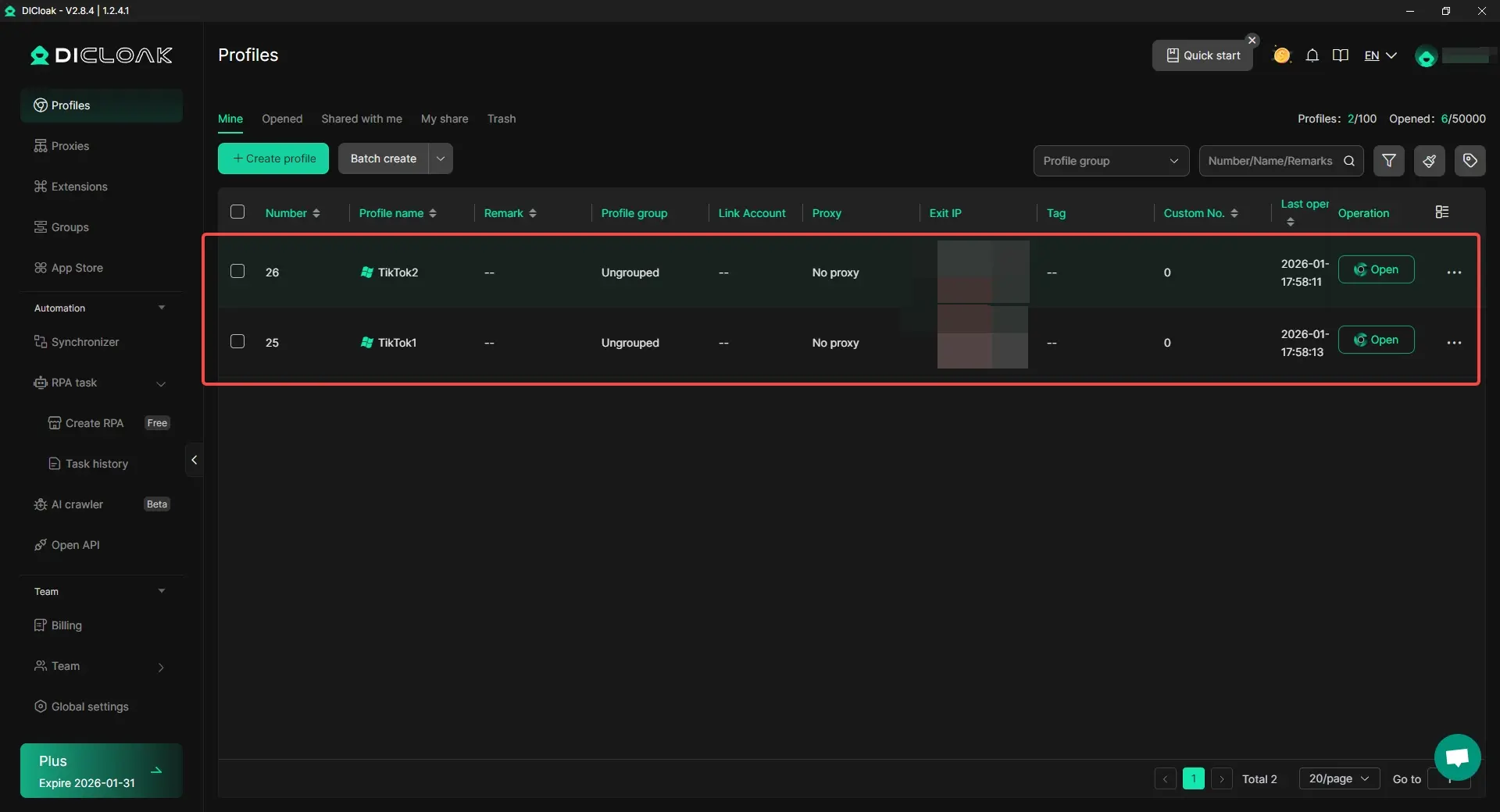
When multiple TikTok accounts are used in the same normal browser, sessions, cookies, and login states can easily get mixed up. That creates unnecessary risk and confusion, especially for teams that manage client accounts or brand accounts.
To reduce the risk, users can keep each TikTok account in its own isolated browser profile. With DICloak, every profile can run as a separate environment with its own fingerprint settings and browsing data. This helps users keep accounts independent while handling downloading, editing, and reposting tasks across many accounts.
That setup is useful for social media managers, agencies, and sellers who often need to download videos before they remove TikTok watermark and repurpose the clips for other platforms.
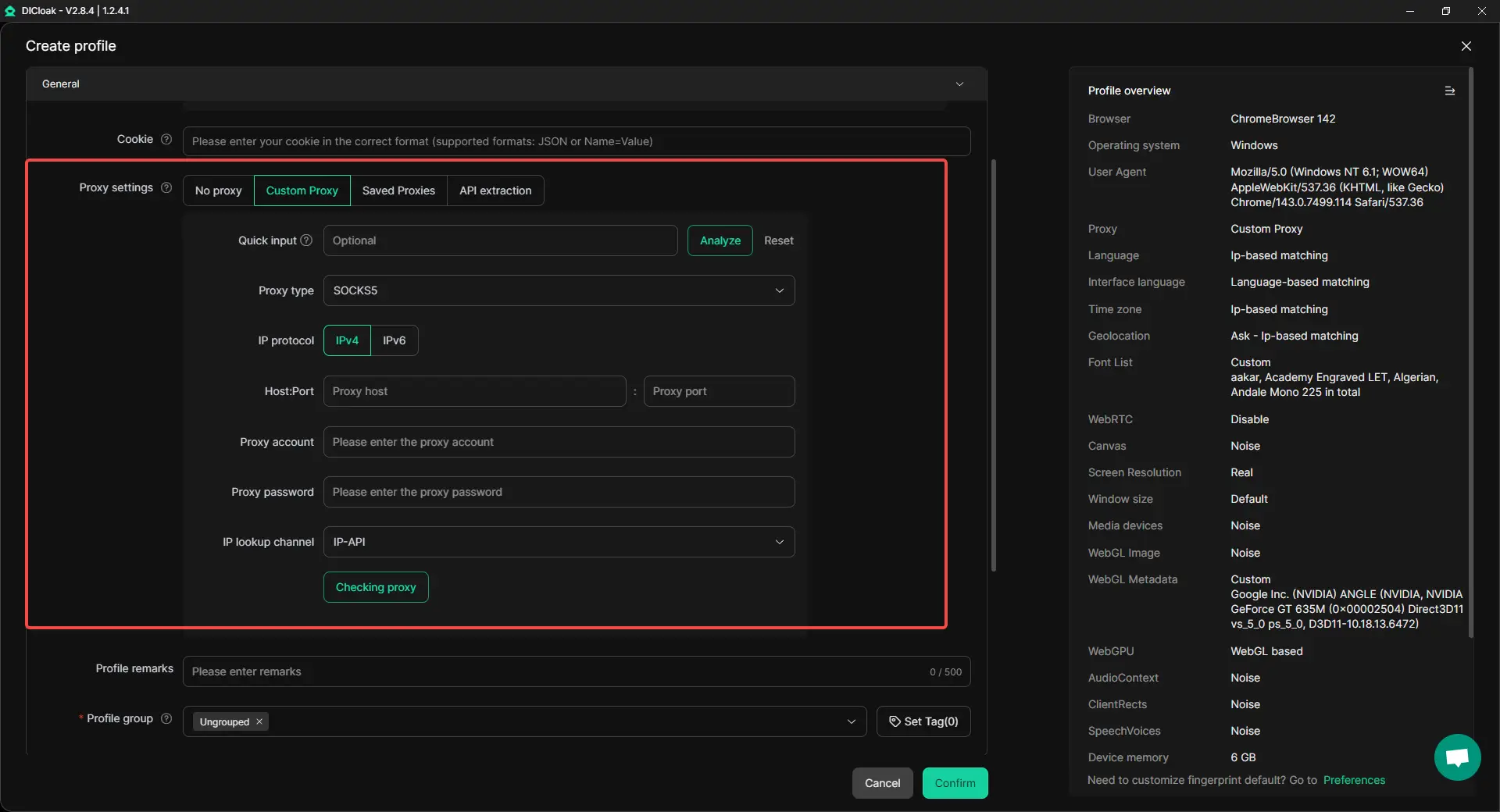
Assign Custom Proxies to Different Profiles
For teams working with many accounts, connection settings matter too. Instead of running every account through the same network setup, users can assign different proxies to different browser profiles.
This gives users more control when managing multiple TikTok accounts, especially when they need a cleaner and more stable account environment for repeated work. Users can assign different proxy types such as HTTP, HTTPS, and SOCKS5 to separate browser profiles, making it easier to match the right proxy setup for each account.
In practice, this means a team can keep each account’s environment more consistent while downloading videos, preparing files, and handling content workflows across multiple TikTok accounts.
Make Team Collaboration Easier During Content Work
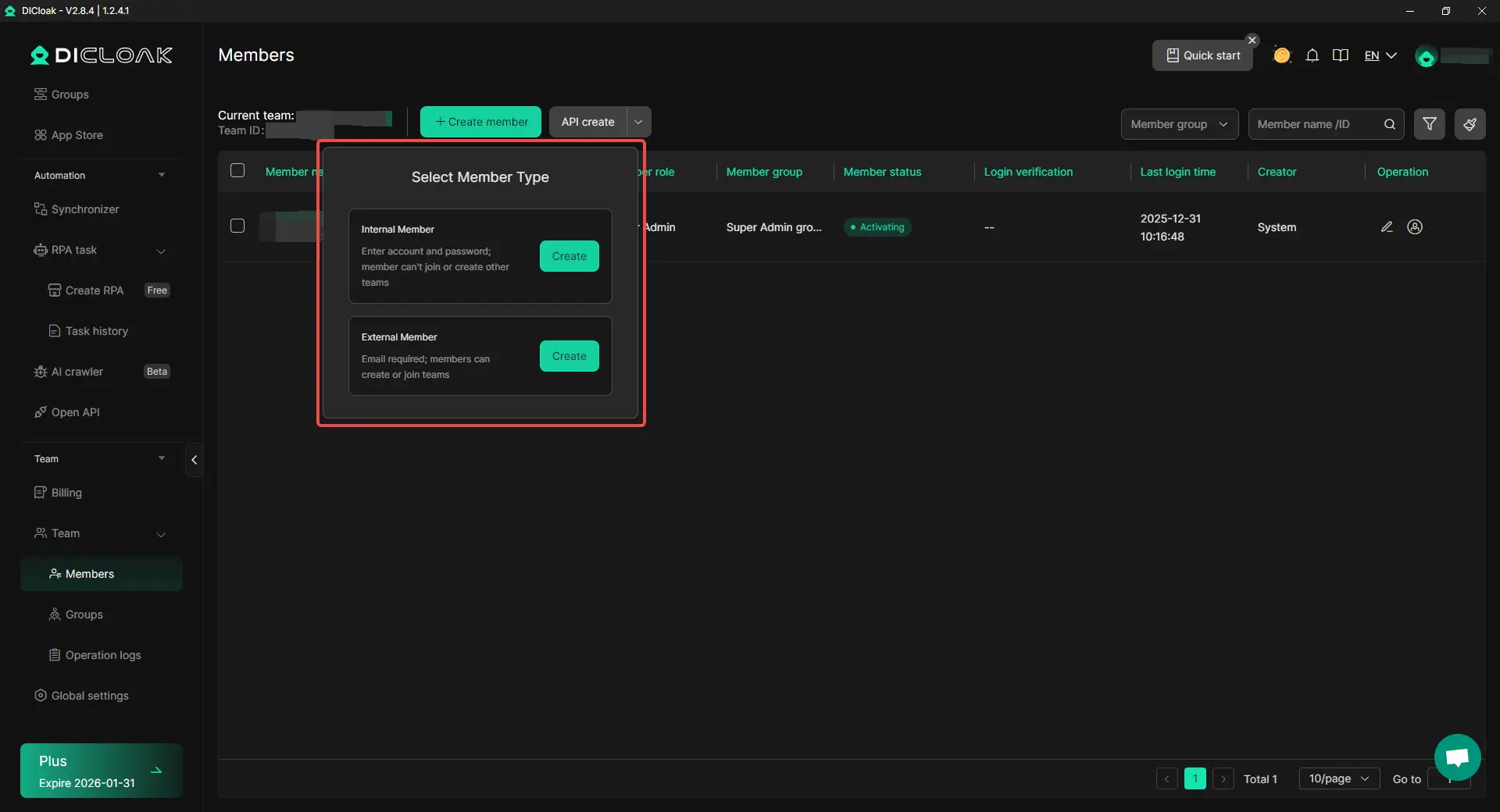
In many cases, TikTok content work is shared across a team. One person may download the videos, another may edit them, and another may review the final files before reposting. Once the workflow grows, account access and task assignment can become messy.
To make this easier, users can organize profile access with team collaboration features such as profile sharing, permission settings, and operation logs. This helps different team members work on the same content pipeline without passing accounts around in an unsafe or confusing way.
For example, one team member can handle downloading original TikTok videos, another can process the files to remove TikTok watermark, and a manager can review the work inside a more structured setup.
Conclusion
Learning how to remove TikTok watermark is useful when you want your own videos to look cleaner, more professional, and ready for reuse on other platforms. In this guide, we looked at what the TikTok watermark is, why it appears, and why many creators choose to remove it from their own content. We also covered six practical methods, from saving a cleaner file first to cropping, blurring, using apps, online tools, and professional editing software.
The best way to remove TikTok watermark depends on your goal. If you want speed, a simple app or online tool may be enough. If you want better quality, editing tools with masking, blur, or overlays often work better. The most important rule is to use these methods only on videos you own or have permission to edit. That keeps your workflow safe, ethical, and professional.
For users handling more than a few clips, the full process often involves more than just editing. Downloading videos, sorting files, managing multiple TikTok accounts, and working with a team can all take time. That is why a more organized setup can help. With the right workflow, it becomes easier to manage content, prepare videos, and remove TikTok watermark more efficiently at scale.
FAQs About Removing TikTok Watermarks
What is the easiest way to remove TikTok watermark?
The easiest way to remove TikTok watermark is to start with the cleanest file possible. If the video is your own, saving the original version before posting is often the best option. If that is not possible, many users try a TikTok watermark remover website, a mobile editing app, or simple crop and blur tools.
Can I remove TikTok watermark without losing video quality?
Yes, but the result depends on the method you use. If you crop the video, you may lose part of the frame. If you blur or cover the watermark, the full frame stays, but the corner may look edited. The best way to remove TikTok watermark without hurting quality is to use the original saved file or a professional editor with masking and blur tools.
Is it legal to remove TikTok watermark from any video?
No. You should only remove TikTok watermark from videos you created yourself or from videos you have clear permission to edit. Using a TikTok watermark remover on someone else’s content without permission can lead to copyright issues and platform complaints.
What is the best TikTok watermark remover for beginners?
For beginners, the best TikTok watermark remover is usually a simple online tool or a mobile editing app with blur, crop, or AI remove features. These options are easier to use than professional editing software and work well for basic TikTok video editing tasks.
How do I remove TikTok watermark for reposting on Instagram Reels or YouTube Shorts?
To remove TikTok watermark for reposting, first download or save the cleanest version of your own video. Then use one of the methods in this guide, such as cropping, blurring, overlaying, or using a TikTok watermark remover app. This helps make the video look cleaner and more natural on Reels, Shorts, and other platforms.
 Web Proxy Tools
 Free Tools
 Cookie Plugin
 UA Generator
 MAC Address Generator
 IP Generator
 IP Address List
 2FA Code Generator
 World Clock
 Anonymous Check
 WebRTC Leak Test
 UUID Generator
 Free Web Proxy Site
 Proxy Checker
 FB Ad Checker
 AI Web Scraping
 Free SMM Tools
 Twitter Shadowban Checker
 Instagram Name Checker
 UTM Generator
 Username Generator
 AI Hashtag Generator
 LinkedIn Headline Generator
 Social Media Image Resizer