The question how can I create multiple Instagram accounts without number usually comes up after the first few accounts start failing. Instagram may allow email sign-up, but problems often appear later. Accounts hit checkpoints. Sessions stop holding. Some profiles get limited without clear warnings. Many people blame the missing phone number, but that is rarely the real issue.
What breaks most setups is overlap. When multiple accounts share the same device signals, browser data, or network patterns, Instagram may treat them as one identity. In the past, people tried to solve this by buying more physical phones. But that approach is expensive, slow, and hard to scale.
Instead of stacking hardware, the more stable solution is profile isolation. If you are asking how can I create multiple Instagram accounts without number, the real answer is structural separation. Each account needs its own isolated browser profile so cookies, login sessions, and device signals do not mix. With tools like DICloak, you can create independent profiles where each account operates separately and stays more consistent over time.
The Hidden Mechanics Behind Account Linking
To understand how can i create multiple instagram accounts without number in a more stable way, you also need to know how accounts get linked. Instagram does not only look at your email or cookies. It also watches repeated technical patterns across logins. That is why clearing cookies or using incognito mode often does not fix the real problem.
A common mistake is logging into several Instagram accounts inside the same browser profile. Even if you use different emails, the same profile data and network setup can leave similar signals behind. Over time, those similarities can cause accounts to be connected in the background, which leads to checkpoints or sudden session resets.
So the real goal is simple: stop overlap before it starts. Each Instagram account needs its own profile with its own stored session and its own network settings, so logins stay separated day after day. That is exactly where a practical isolation setup becomes necessary—because doing this manually is hard once you manage more than a few accounts.
Implementing Isolation with DICloak for Managing Multiple Instagram Accounts
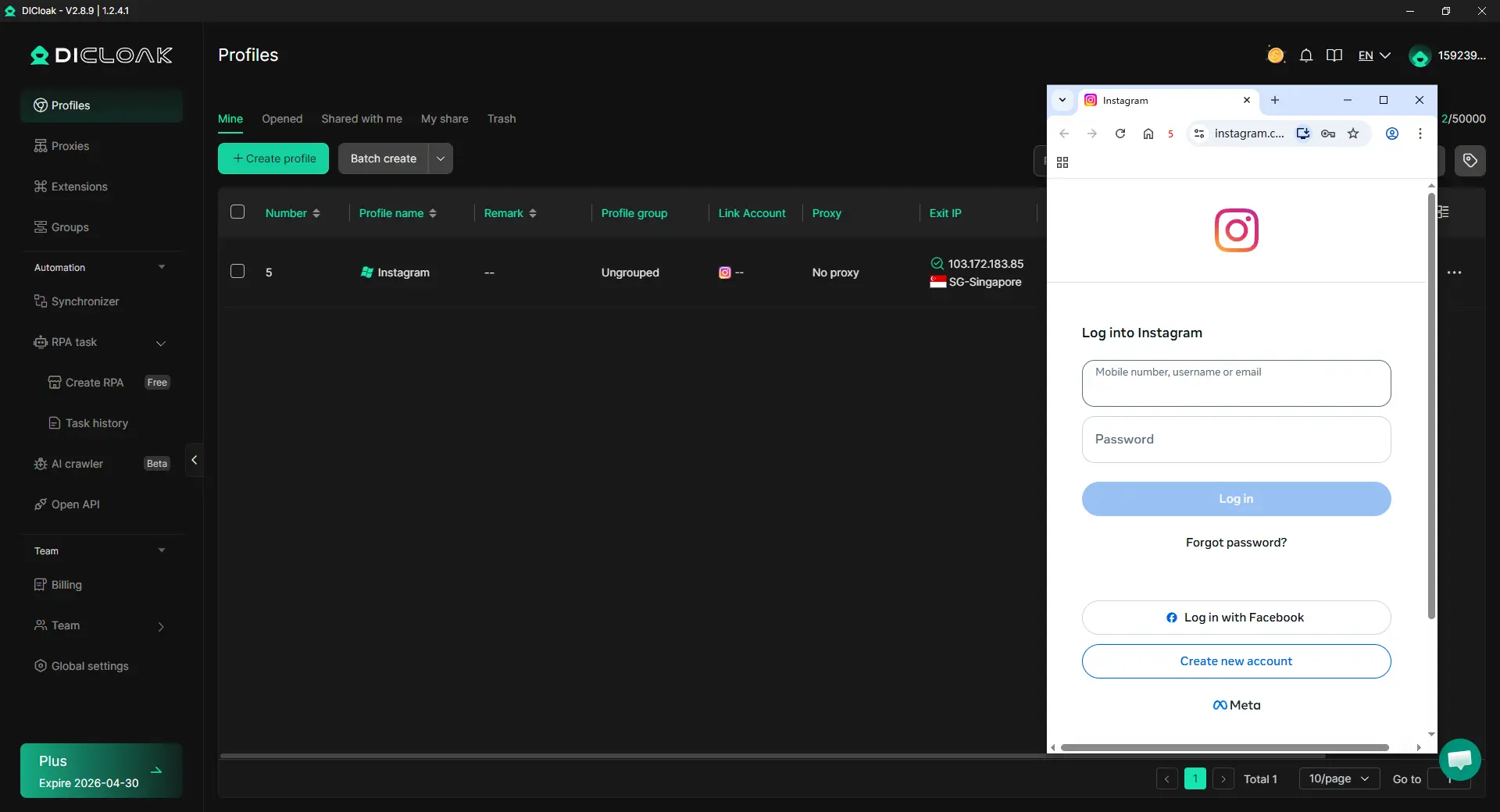
To prevent the overlap mentioned above, you need more than just logging out between accounts. You need a structure that keeps each account locked inside its own isolated profile over time. With DICloak, you can create isolated browser profiles so every Instagram account runs inside its own stable container. Each profile stores its own cookies, cache, and local data. Nothing leaks across accounts.
Create a separate email account inside each DICloak profile
Each DICloak profile behaves like a separate browser identity with its own storage, cookies, and session history. When you launch a new profile, you are working inside a clean, independent profile that does not share data with other profiles.
Inside that profile, you can create a new Gmail account and keep it stored there. The email account stays tied to that single profile and is not reused elsewhere. When the profile is closed and reopened, the Gmail session can remain consistent, so you do not have to rebuild the identity every time.
The rule is simple and strict that is one DICloak profile equals one email identity. This prevents email accounts from leaking into other profiles and reduces structural overlap between profiles.
Use email-based registration when supported by Instagram
Instagram supports email-based verification during account creation. When each Gmail account is created and used inside its own profile, that email can be used for exactly one Instagram account.
Each Gmail account should be attached to a single Instagram account and never reused. This removes the pressure to recycle phone numbers and avoids the friction that often appears when accounts start sharing identifiers.
DICloak does not bypass Instagram rules or remove verification requirements. Instead, it keeps identities separated through profile isolation so the sessions behind those accounts stay cleaner over time. The separation is structural, not a shortcut.
Create the Instagram account in the same DICloak profile
Once the Gmail account exists inside the profile, the next step is to register the Instagram account in that same profile. Do not switch devices, and do not mix logins across profiles. Registration is done using the Gmail account created earlier, without introducing shared browser sessions that can connect accounts.
Instagram and Gmail stay together inside one persistent profile. Cookies, cache, and login state are saved between sessions, so the account behaves more consistently each time it is accessed.
The result is a complete identity contained in one place. Email, login data, and session history all remain tied to a single DICloak profile, which is what helps Instagram accounts created without phone numbers stay more stable and reusable over time.
How Can I Create Multiple Instagram Accounts Using DICloak RPA and Bulk Operations
Manual setup is the primary bottleneck in digital growth. Professional workflows incorporate RPA (Robotic Process Automation) to automate repetitive operational tasks within already created profiles.
Automated Bio-Optimization and Registration
RPA can be configured to automate the grind, including structured setup steps inside isolated profiles. By using bulk profile creation, an analyst can launch multiple isolated profiles efficiently, each with its own customized fingerprint. This allows for rapid scaling while maintaining the "one account, one profile" rule. Automated workflows can also handle bio-optimization, ensuring that each account is populated with unique descriptions and profile pictures to maintain variation across profiles.
The Synchronizer for High-Volume Management
For operations managing hundreds of accounts, the Synchronizer feature is essential. It allows an operator to control multiple profiles from a single main control window. Actions can be organized more efficiently while each profile continues to operate with independent fingerprint and proxy configurations. This improves workflow efficiency without merging technical identities.
Pros and Cons of Using Professional Isolation to Create Multiple Instagram Accounts
Every setup has trade-offs. If your goal is how can i create multiple instagram accounts without number, profile isolation can help, but it is not free or effortless.
Pros:
- More stable separation: Each account stays in its own profile, which lowers the chance of accounts getting linked.
- Easier to scale: You can manage many profiles from one computer instead of buying more devices.
- More control: You can tune each profile’s fingerprint and proxy settings to keep profiles consistent.
- Less manual work: Multiple profile creation and workflow automation reduce repetitive setup tasks.
Cons:
- Learning curve: You need basic knowledge of profiles, proxies, and keeping one account per profile.
- Ongoing cost: Professional isolation tools and stable proxy resources can add recurring expenses.
FAQ: How Can I Create Multiple Instagram Accounts Without Number
Is email-based registration still a reliable long-term strategy?
Yes, but only if the profile separation is maintained. Instagram evaluates patterns across login sessions, not only account details. If you create an account via email inside a dedicated Android Cloud Phone or a uniquely fingerprinted browser profile, it is far more likely to remain stable than an account created on a shared device.
Why does Instagram trigger a phone verification after 24 hours?
This is typically a result of heuristic detection. If the platform identifies that your browser fingerprint or IP address has been associated with other accounts, it triggers a "checkpoint" to verify you are a real user. By using professional isolation tools and unique IP protection, you reduce overlapping profile similarities, thereby reducing the frequency of these verification requests.
How can i create multiple instagram accounts using different OS types?
By using a tool like DICloak, you can choose to simulate different operating systems—such as iOS, Android, or macOS—within the browser core. This ensures that your "batch" of accounts does not look like a batch at all, but rather a diverse group of users on different devices, which helps create more varied profile configurations.
How can i create multiple instagram accounts without number and manage them across a team?
The most efficient method is using a dashboard that supports profile sharing. This allows you to delegate accounts to different specialists without sharing passwords. Because the session and cookie data are stored in the cloud profile, the team member can log in instantly from their own location while keeping sessions consistent across authorized team access from Instagram.
 Web Proxy Tools
 Free Tools
 Cookie Plugin
 UA Generator
 MAC Address Generator
 IP Generator
 IP Address List
 2FA Code Generator
 World Clock
 Anonymous Check
 WebRTC Leak Test
 UUID Generator
 Free Web Proxy Site
 Proxy Checker
 FB Ad Checker
 AI Web Scraping
 Free SMM Tools
 Twitter Shadowban Checker
 Instagram Name Checker
 UTM Generator
 Username Generator
 AI Hashtag Generator
 LinkedIn Headline Generator
 Social Media Image Resizer





