Running Instagram through a proxy sounds easy, just set the proxy in your browser or app and log in. But many users hit a wall when their accounts get flagged, even though the IP looks right on every test. The real trouble often hides in something most people don’t check: a dns leak when using instagram with a proxy. DNS leaks happen when your device asks for Instagram’s address using your real internet connection, not the proxy. Instagram can spot the mismatch between your proxy IP and your DNS request location, which usually means your accounts look suspicious or get restricted.
This risk isn’t just for new users or cheap proxies. Even high-end setups can leak if the operating system, browser, or automation tool sends DNS requests outside your intended route. You might think a proxy is enough, but a single DNS leak can expose your real region, put all your accounts under review, or ruin an entire batch of warm-ups. Fixing an instagram dns leak with proxy issues isn’t just about toggling a setting; you need to check DNS resolution at the system and browser level, and know how to monitor for leaks before they trigger blocks.
The real edge comes from using workflows that catch leaks early and set up checks you can repeat every time you add a new account. Here’s how experienced operators check for leaks, fix DNS exposure, and build safer routines for Instagram proxy management.
Why DNS Leaks Matter When Using Instagram with a Proxy
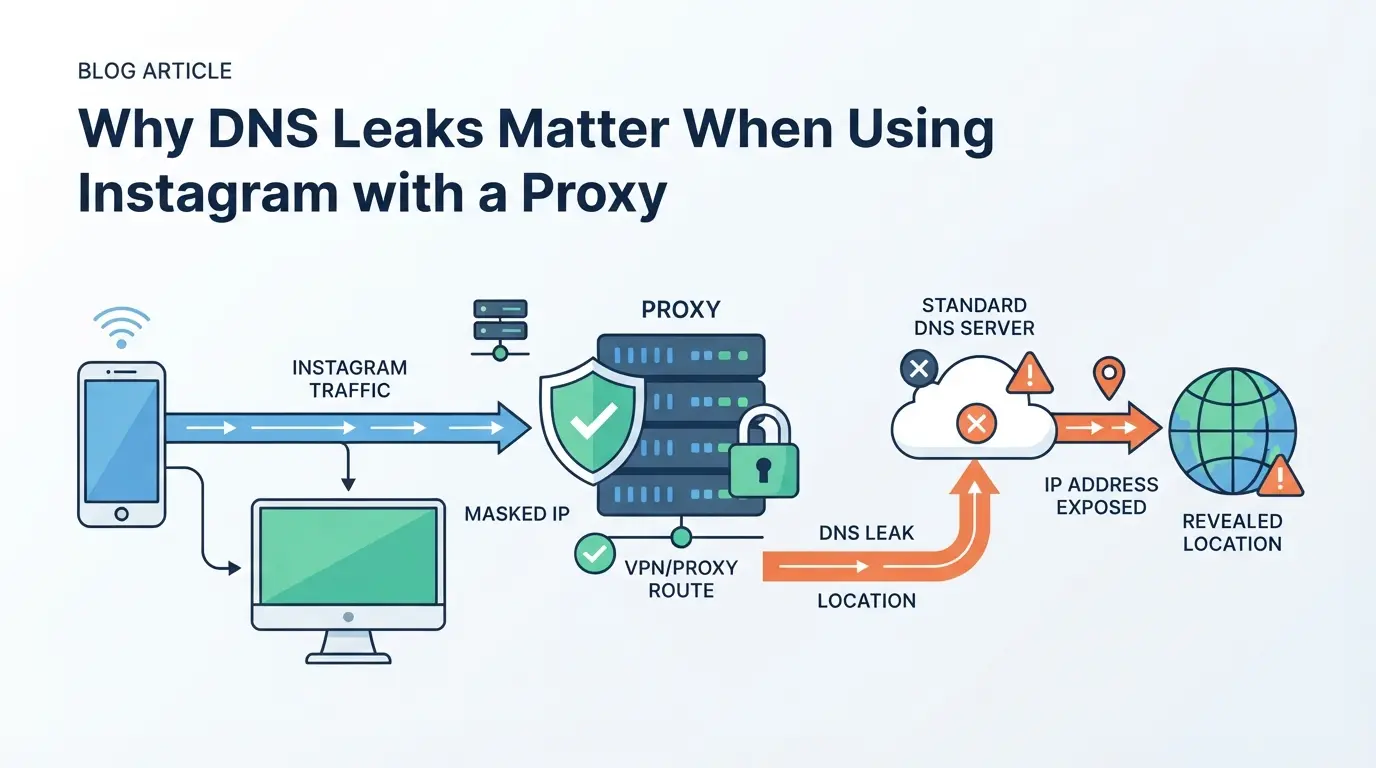
Even if you set up a proxy for Instagram, a DNS leak can undo all your privacy work in seconds. Instagram sees where your DNS requests come from, if those requests reveal your real location, the platform can link your activity to your true identity or region, not the proxy you meant to use.
How DNS Requests Work with Proxies
When you use a proxy, web traffic routes through a different IP, but DNS queries, the requests that turn website names into IP addresses, can slip through your normal internet connection. If your device or browser asks a DNS server directly, instead of through the proxy, you’ve got a leak.
What Instagram Can Detect from a DNS Leak
A DNS leak hands Instagram a direct line to your actual IP and location. Even if you run every Instagram action through a proxy, a single DNS request from your real network exposes where you really are. This is how accounts get flagged in practice: you might be using a US proxy, but a DNS query reveals you’re in Singapore. Instagram’s risk engine will see this mismatch and may restrict or review your account, sometimes even before you finish your session. In my experience, teams running multiple accounts see whole batches flagged if just one system leaks DNS, since Instagram links access patterns across fingerprints and IPs. If you’re warming up new accounts, a DNS leak makes the proxy almost pointless, since Instagram can group your accounts by actual region or ISP. The risk is highest when running automated tools or browser sessions, since the OS or app might not respect the proxy settings for DNS, leaving you exposed even if everything else looks right.
Common Scenarios Where DNS Leaks Happen
- The browser ignores the proxy for DNS, using the system’s default resolver.
- The operating system keeps a cached DNS setting or fallback that bypasses your proxy.
- An automation tool spawns sub-processes or headless browsers that skip proxy rules.
Even one of these can sink your privacy setup, fixing the leak means checking every layer, not just your browser’s settings.
Ready to check if you’re leaking? The next section shows how to spot a DNS leak before Instagram does.
How to Detect a DNS Leak When Using Instagram with a Proxy
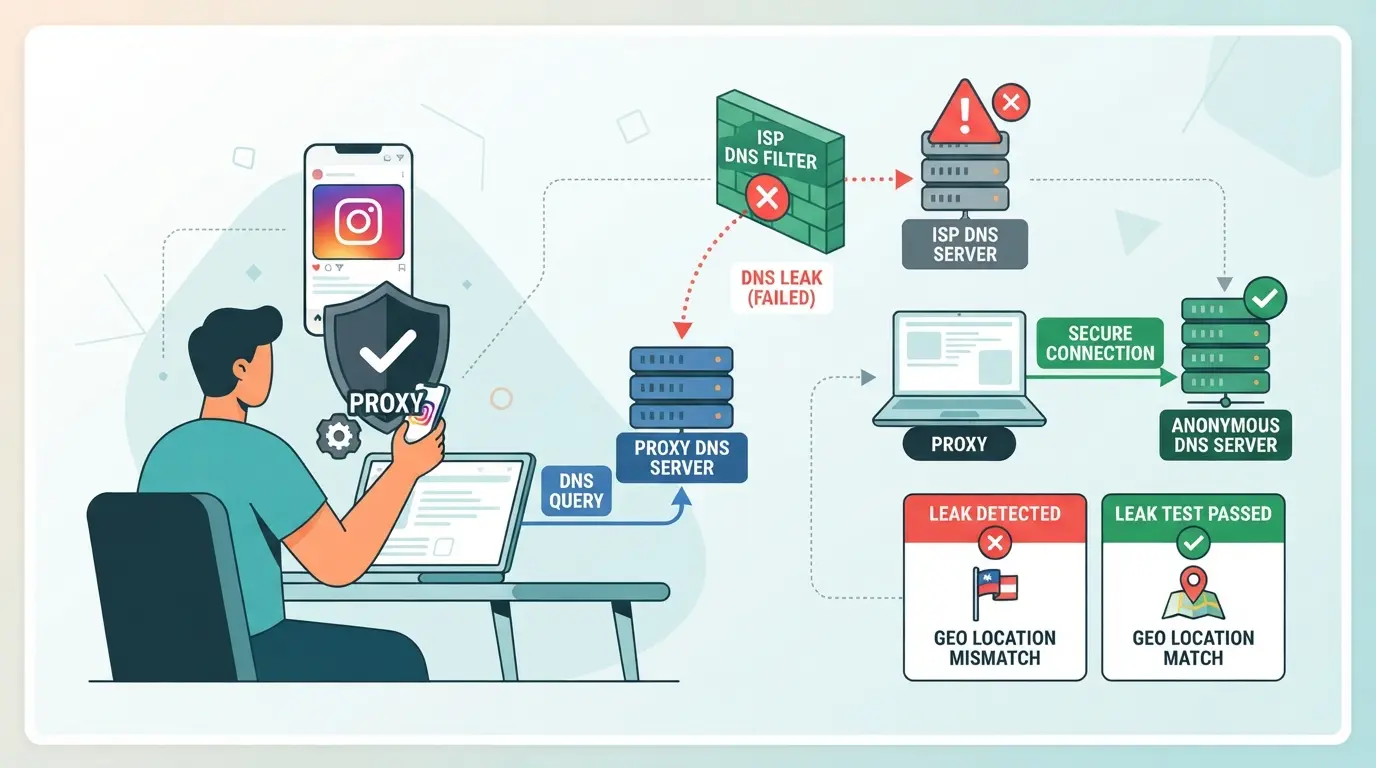
To check if your DNS is leaking while using Instagram with a proxy, you need to run real tests, don’t guess based on proxy status alone. Even if your IP looks right, a DNS leak can still reveal your real network to Instagram’s systems. Use these steps to spot leaks before they get your accounts flagged.
Testing DNS Leaks in Your Browser
- Open the browser where you run Instagram through your proxy.
- Visit a trusted DNS leak test site, like dnsleaktest.com or ipleak.net.
- Run the standard or extended test.
- Check the DNS server list. If you see your ISP or local country, you have a leak, anything other than your proxy or intended DNS is a problem.
If you spot your real location or provider, your proxy setup isn’t covering DNS. Close all tabs, double-check proxy settings, and retest. A clean result shows only the DNS you expect, anything else means Instagram can see more than you want.
Checking DNS Leaks on Mobile Apps
- Connect your mobile device to the same proxy or Wi-Fi you use for Instagram.
- Download a network tool like Network Analyzer or use built-in diagnostics to check DNS servers.
- Open Instagram and keep it running in the background.
- Run a DNS leak test using the tool. If you see DNS servers from your home ISP, even though a proxy is active, you have a leak.
Mobile apps often ignore system proxy settings and may use local DNS directly. If your test shows this, switching proxies or changing DNS at the system level won’t solve the leak, app behavior is the issue.
Interpreting DNS Leak Test Results for Instagram Safety
- If your DNS test only shows servers from your proxy location, you’re safe, Instagram sees your intended region.
- If your real ISP or geographic location appears, that’s a DNS leak. This can make Instagram trust scores drop and trigger extra verification or blocks.
- Mixed results (some proxy, some real) mean partial leaks. These are just as risky; Instagram may connect the session to your real identity.
- Re-test after any proxy or device change. A config that passed one day can fail after an update or OS patch.
The main takeaway: catching leaks early gives you a fighting chance to fix your setup before Instagram flags your account, not after. If you ignore mixed or failed DNS tests, you risk linking all your accounts to your real IP, one slip is enough to ruin a batch. The next section breaks down why Instagram still flags accounts even when you use a proxy.
Why Instagram Accounts Get Flagged Despite Using a Proxy
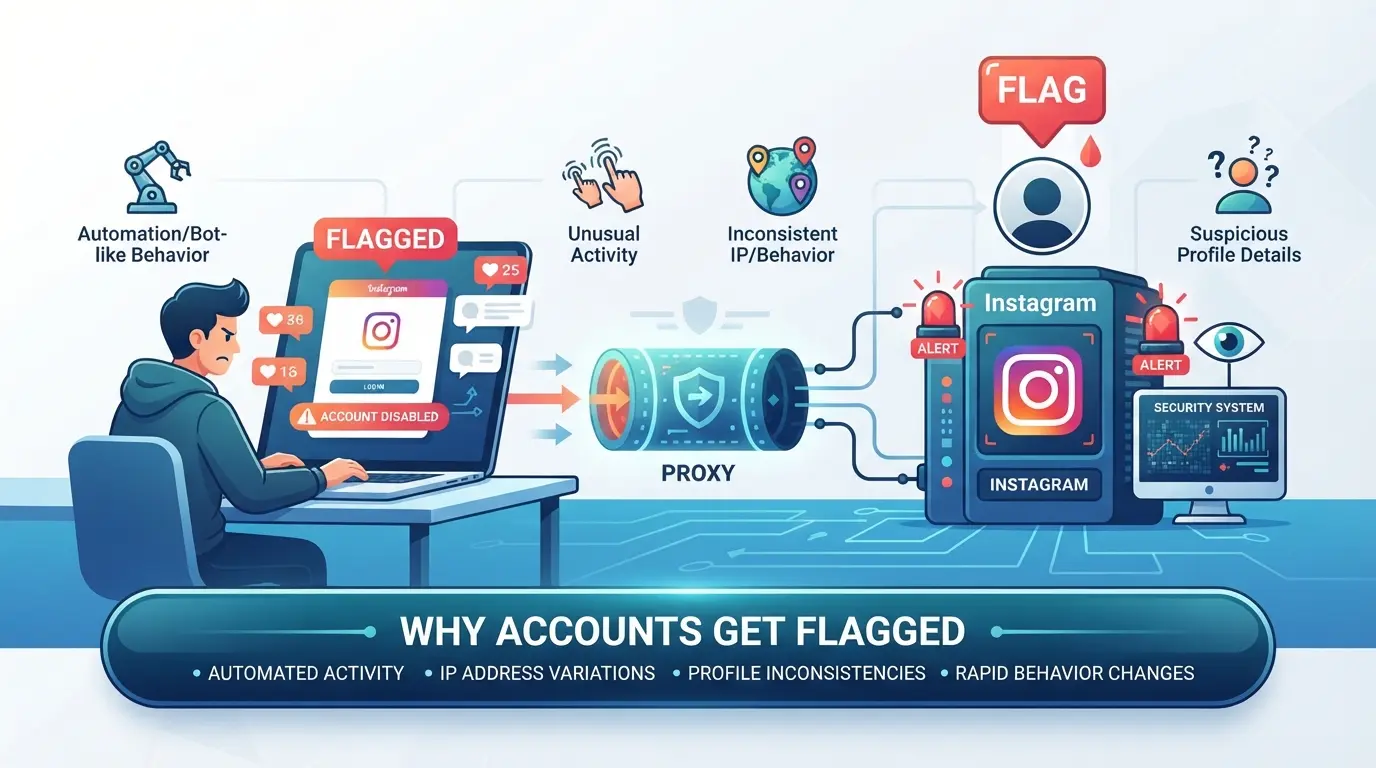
Changing your IP address with a proxy does not hide everything from Instagram, accounts still get flagged because the platform checks more than just your IP. Even a small leak or mismatch tips them off. Here’s why a proxy alone fails to keep accounts safe.
DNS Leaks vs. Other Tracking Methods
Instagram tracks more than your connection’s IP. It cross-checks DNS requests, browser fingerprints, and device details. If you use a proxy but your DNS still goes through your real provider, Instagram can spot the real region, making the proxy look fake.
Typical Mistakes That Lead to Detection
Many people miss that hiding an IP is only part of the job. If you log into Instagram with a proxy but your system or browser leaks DNS requests, the platform sees both your masked IP and your real location. This mismatch is a red flag. Another common slip, running one account through a proxy and another through your regular connection on the same device. Instagram’s detection systems link those sessions by shared device fingerprints, browser profiles, or cookies. Even switching proxies between sessions can backfire if you don’t fully isolate browser data or forget about lingering cookies. Failing to separate each account’s technical footprint is the main reason even careful operators get flagged or restricted. For example, if you use an antidetect browser but forget to set up unique profiles for each Instagram account, a single browser fingerprint leak can tie all your accounts together, making them all vulnerable if one is reviewed.
Real-World Examples of Account Restrictions
- A user switches proxies, but misses a DNS leak; Instagram spots a sudden region change and flags the account for suspicious activity.
- Two Instagram accounts log in from the same computer, one with a proxy, one without; both accounts get restricted after a browser fingerprint match.
- All accounts in a batch warm-up get temporarily blocked after one session leaks a real DNS request, linking the group to a “bad” region.
Catch these mistakes early, otherwise, fixing a flagged account is much harder than preventing issues in the first place. Next, you’ll see how to fix and prevent DNS leaks before Instagram can catch you.
How to Fix and Prevent DNS Leaks When Using a Proxy for Instagram
Solving a DNS leak when using Instagram with a proxy comes down to controlling where your DNS requests go, leaks happen when your real DNS server answers requests outside your proxy tunnel. If you don’t block these leaks, Instagram can see your true location even if your web traffic goes through a proxy.
Configuring Your Device and Browser for DNS Leak Prevention
Start by changing your system’s DNS settings. Set your device to use a privacy-focused DNS server (like 1.1.1.1 or 8.8.8.8) instead of your ISP’s default. This step matters, because some proxies only route web traffic, not DNS, if your OS keeps using its default DNS, Instagram can detect mismatches.
Many browsers let you force DNS over HTTPS (DoH) or DNS over TLS. Turn these on so DNS requests go through encrypted channels. Install browser extensions like “SmartProxy” or “DNS Leak Test” to help monitor DNS traffic. If you automate, check that your script or tool doesn’t bypass proxy settings for DNS lookups.
Choosing the Right Proxy Type and Setup
- Use SOCKS5 proxies for Instagram, they forward DNS requests by default, while HTTP/HTTPS often do not.
- Check if your proxy provider supports remote DNS resolution and confirm this feature is active.
- Avoid free or poorly documented proxies; they are more likely to leak DNS or fail under load.
Testing After Each Change
Don’t assume your fix worked, test it. Open a new browser profile or incognito window and run a DNS leak test at sites like dnsleaktest.com. If you see your real ISP or home IP, the leak isn’t fixed yet.
- Run a DNS leak test after each setup change.
- If you spot a leak, roll back and apply one fix at a time until the test passes.
- For automation, script DNS leak tests into your workflow before running Instagram sessions.
Even a single missed DNS setting can expose your real network and get accounts flagged. The next step is isolating account sessions and proxy settings, if you skip this, leaks often come back when switching profiles.
How to Separate Instagram Account Sessions and Proxy Settings with DICloak
After fixing obvious DNS leak risks, the next step for operators handling several Instagram accounts is making sure each login session and proxy stays fully separate. Relying on one browser or a single proxy setup often leads to cross-account leaks, this is where an antidetect browser workflow matters.
Creating Isolated Browser Profiles and Configuring Fingerprints
Operators can create a new browser profile in DICloak for each Instagram account, keeping storage, cookies, and browsing history separate from other sessions. Inside each profile, fingerprint settings, such as user agent, time zone, and WebRTC handling, can be configured to match the expected environment of the assigned proxy. This means each profile reports its own device details, reducing the chance of cross-account signals. The setup only changes the browser profile; it does not affect the Instagram account or guarantee acceptance during platform checks.

Assigning and Testing User-Owned Proxies in Each Profile
For every profile, operators add and test their own proxy settings before starting an Instagram session. DICloak supports manual entry of proxy details and offers a built-in test to confirm if the exit IP and region match your needs. Assigning a proxy at the profile level means DNS requests are sent through the selected connection, not the base device. The proxy choice and reliability are up to the operator; DICloak does not supply or recommend proxies.

This layered setup reduces the risk of accidental DNS leaks between Instagram sessions. Next, watch out for mistakes that can still cause leaks, even with good tools.
Common Mistakes That Still Cause DNS Leaks with Proxies in 2026
Even with better tools, people still miss key steps and get hit by DNS leaks using proxies for Instagram. If you think just setting a proxy is enough, you’re risking exposure, your real IP can leak through DNS and put every connected account at risk.
Relying Only on Proxy Settings Without DNS Checks
Setting a proxy isn’t the finish line, if you skip DNS leak tests, you can still expose your home IP. Most leaks happen when browsers or apps use the system’s default DNS instead of the proxy’s. The fastest way to catch this is running a DNS leak test right after proxy setup; if you see your real ISP in the results, your proxy isn’t covering DNS traffic.
Using Multiple Apps or Devices with Inconsistent Settings
Cross-device setups make leaks easier to miss. Even if you configure a proxy in one browser, a second app or device can use different DNS settings and reveal your true location.
- Logging into Instagram from both desktop and phone, if only one uses the proxy, can trigger a mismatch alert and account review.
- Always apply the same DNS and proxy settings across all apps and devices you use for Instagram, missing just one can wipe out your privacy work in seconds.
When a Safer Workflow Matters: Multi-Account Instagram Management and DNS Leak Risks
Solo users running one or two Instagram accounts often get by with a basic proxy. But when you manage several accounts, especially for business or team operations, weak session and DNS separation quickly become a real risk. A dns leak when using instagram with a proxy means any slip can tie all profiles to your real location, which can trigger bans or lockouts across the group.
Personal Use vs. Team or Business Accounts
| Use Case |
Typical Risks |
When Isolation Is Needed |
| Solo (1-2) |
Accidental region mismatch |
Only if account value is high |
| Team or SMB |
Linked bans, mass detection |
Always, across all sessions |
| Agency (10+) |
Chain blocks, client loss |
Strict isolation, per account |
If you’re running a team, or managing client accounts, never reuse browsers, proxies, or login sessions across Instagram profiles, one DNS leak can take out everything at once.
Signs Your Current Setup Isn’t Enough
Seeing multiple accounts restricted at once, login challenges that appear after you add new proxies, or losing access right after account handover usually points to session or DNS leaks. If these show up, it’s time to upgrade your workflow or move to tools that support full isolation.
If you only run personal accounts, most of these strict steps aren’t needed. But once you scale past three accounts, ignoring DNS and session isolation is gambling with your whole batch.
Frequently Asked Questions About dns leak when using instagram with a proxy
Can Instagram detect my real location if I use a proxy but have a DNS leak?
Yes, a dns leak when using instagram with a proxy can reveal your real location. Even if your proxy hides your IP address, leaked DNS requests use your internet provider’s servers. Instagram could see these requests and match them to your true location. Always test for DNS leaks after setting up a proxy.
How do I know if my proxy setup for Instagram is leaking DNS requests?
To check for a dns leak when using instagram with a proxy, run a DNS leak test in your browser. Compare the DNS servers listed in the results with the location of your proxy. If the servers belong to your local internet provider or country, your setup is leaking DNS requests.
Are mobile Instagram apps more likely to leak DNS than browsers?
Mobile apps often bypass proxy settings, leading to more DNS leaks. Unless you configure your entire device to use the proxy, the Instagram app may send DNS requests directly from your phone’s network. Browsers usually respect system proxy settings, so leaks are less common there.
Does using a SOCKS5 proxy prevent all DNS leaks on Instagram?
A SOCKS5 proxy can help, but it does not always fix dns leaks on Instagram. Some apps do not route DNS requests through SOCKS5, especially if they use hardcoded DNS servers. You must configure your device and apps carefully to avoid leaks.
What should I do if I still see DNS leaks after setting up a proxy for Instagram?
Check your device and browser DNS settings to see if they use your proxy’s DNS. Try switching to another proxy type like HTTPS or proxy, which may handle DNS differently. After making changes, run another DNS leak test to confirm the leaks are fixed.
If maintaining your privacy while browsing Instagram is a priority, it’s worth evaluating whether your current proxy setup truly protects your DNS queries. Consider switching to a more solid privacy tool that effectively prevents leaks and keeps your online activity secure. Try DICloak For Free
 Web Proxy Tools
 Free Tools
 Cookie Plugin
 UA Generator
 MAC Address Generator
 IP Generator
 IP Address List
 2FA Code Generator
 World Clock
 Anonymous Check
 WebRTC Leak Test
 UUID Generator
 Free Web Proxy Site
 Proxy Checker
 FB Ad Checker
 AI Web Scraping
 Free SMM Tools
 Twitter Shadowban Checker
 Instagram Name Checker
 UTM Generator
 Username Generator
 AI Hashtag Generator
 LinkedIn Headline Generator
 Social Media Image Resizer