Shopee remains the largest e-commerce platform in Southeast Asia, holding more than half of the region's platform e-commerce market and processing billions of orders every year. As competition grows and more sellers expand into new markets, product categories, and business models, managing multiple Shopee stores has become a common strategy rather than an exception.
But opening multiple stores is usually the easy part. The harder challenge is keeping those stores organized and independent enough to avoid operational confusion, repeated verification checks, or account-linking concerns. Many sellers start with different emails and store names, only to realize later that browser profiles, network setups, team access, and daily operating habits can create overlap across stores. In this guide, you'll learn why Shopee stores may appear connected, how to recognize early warning signs, and the practical ways sellers use to manage multiple Shopee stores more cleanly in 2026.
Why Do Sellers Want Multiple Shopee Stores?
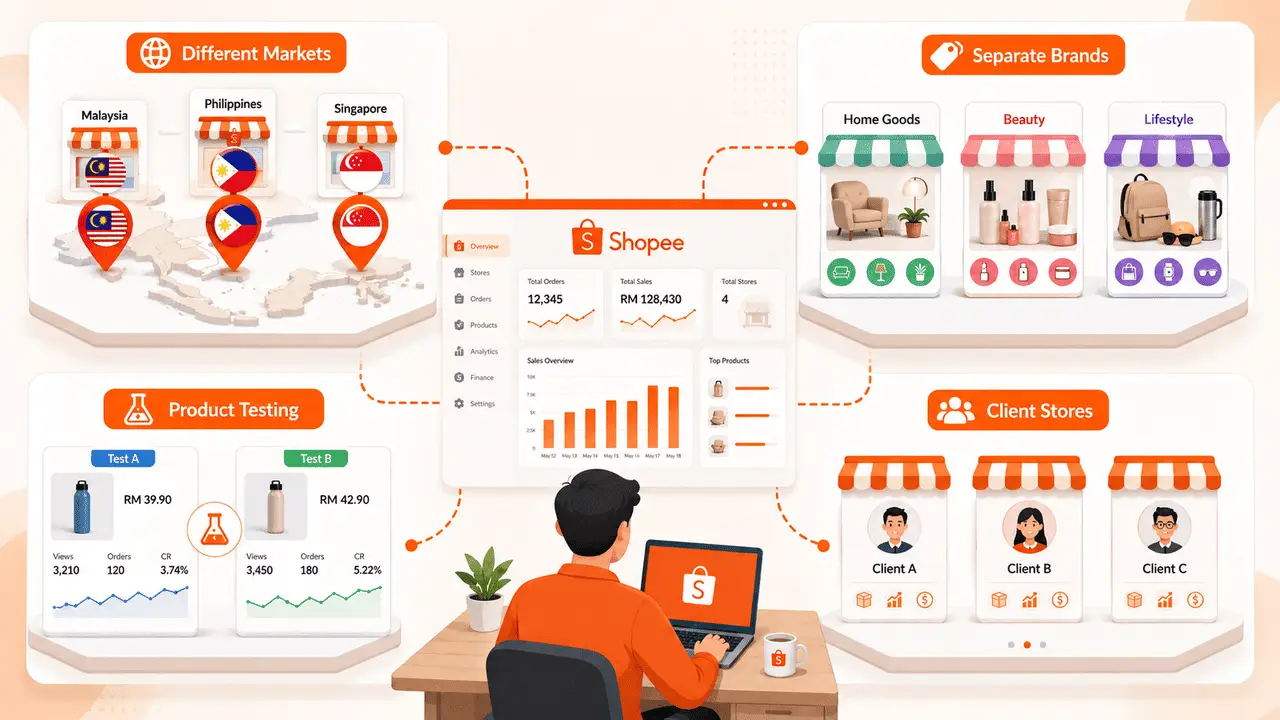
Sellers usually manage multiple Shopee stores to reach different markets, separate product lines, test new ideas, or serve clients. The goal is not always to hide activity. In many cases, it is about keeping business operations clear as the seller grows. Common reasons sellers manage more than one Shopee store include:
- Selling in different Shopee markets: A seller may run one store for Shopee Malaysia, another for Shopee Philippines, and another for Shopee Singapore. Each market can have different buyer habits, languages, shipping rules, product demand, and local campaigns. Putting every market under one store setup can make pricing, promotion, and customer service harder to manage.
- Keeping brands or product lines separate: One store may focus on budget home goods, while another sells beauty products or higher-end lifestyle items. Mixing very different product lines in one shop can confuse buyers and weaken the store's positioning. Separate stores make it easier to build different shop images, product pages, reviews, and buyer expectations.
- Testing products without confusing store data: Sellers often test new categories, price points, or bundles before investing more stock. A separate test store can help them see whether a product has real demand without mixing the results with their main store. This is useful when the seller wants to compare ads, conversion rate, buyer messages, and return issues more cleanly.
- Managing client stores for other sellers: Agencies, e-commerce service teams, and virtual assistants may manage Shopee stores for several clients. In this case, each store needs clear access, clean records, and a separate daily routine. One wrong login, one mixed-up chat reply, or one copied product setup can create problems for more than one client.
For most sellers, the real challenge is not simply having more Shopee stores. The harder part is keeping each store's purpose, access, data, and daily operation separate enough that the business stays manageable.
Why Do Shopee Stores Get Linked?
Shopee stores are usually linked through a combination of signals, not one single action. Using different emails or shop names may help separate accounts, but if the stores share the same login environment, network patterns, or operating habits, they can still appear related.
Different Emails and Shop Names Are Not Always Enough
Many sellers assume that creating a new email address and a different shop name is enough to separate stores. In practice, those details are only one part of the picture. If two stores are regularly accessed from the same setup, they may still look connected even when the account information is different.
A common example is a seller opening a second store for a new product category. The new store has a different email, logo, and shop name, but both stores are managed from the same computer and browser every day. From an operational perspective, the stores may still look closely related.
Logging Into Every Store From the Same Browser Can Leave Traces
Browsers store information such as cookies, login sessions, site preferences, and browsing data. When several Shopee stores are opened and managed from the same browser profile, it becomes easier for activity from one store to overlap with another.
This is why many multi-store sellers avoid treating browser tabs as separate workspaces. Logging into Store A, Store B, and Store C from the same browser may be convenient, but it also creates more chances for sessions, saved data, or account activity to become mixed over time.
Using the Same Wi-Fi, Proxy, or Location Pattern Adds Risk
Network patterns can also make stores appear related. This does not mean that every store using the same Wi-Fi will automatically be linked. The issue is usually the overall pattern created by repeated access from the same network setup.
For example, if multiple stores are consistently accessed from the same location, using the same network route, at similar times every day, those signals can start to build a connection. The more overlap that exists across stores, the easier it becomes for them to look like they are managed by the same operator.
Repeating the Same Listings, Prices, and Daily Actions Looks Coordinated
Store behavior matters too. If several stores publish the same products, use nearly identical descriptions, follow the same pricing strategy, and perform actions at the same time, they can begin to look coordinated rather than independent.
This often happens when sellers quickly duplicate a successful store. They copy listings, reuse product images, launch promotions on the same schedule, and manage all stores with the same routine. While this may save time, it also reduces the differences between stores and makes them look more closely connected.
For most Shopee sellers, account linking is not caused by one mistake. It usually happens when account details, browser profiles, network patterns, and store behavior all start to overlap. The more signals that look the same, the harder it becomes for stores to appear independent.
How Can You Tell When Shopee Starts Treating Your Stores as Related?
You may see possible store-linking risk when several Shopee stores start showing similar login checks, access limits, or account reviews around the same time. One warning sign does not prove the stores are linked, but repeated issues across stores mean you should review your setup.
- More Login Checks Than Usual: Extra login checks can happen after a new device, new location, or unusual access pattern. It becomes more concerning when several stores ask for similar checks in a short period.
- Similar Restrictions Across Several Stores: If one store has a listing, chat, ads, or access issue, it may be a normal review. If the same type of issue appears across stores with similar login setups or repeated actions, the shared setup should be checked.
- One Store Issue Starts Affecting Daily Work Elsewhere: A store issue can slow down the whole team when nobody knows which login, device, or routine caused the problem. This often happens when stores are managed from the same browser, same network, or unclear access records.
- Orders, Ads, Chats, or Payouts Get Interrupted: The real risk is not only account access. Linked-store concerns can affect order handling, ad campaigns, buyer replies, product updates, and payout reviews. If several stores depend on the same setup, one issue can interrupt more than one shop.
| Warning sign |
What to check first |
| Several stores ask for login verification |
Device, browser, IP, proxy, and login location |
| Similar restrictions appear across stores |
Shared browser sessions, repeated actions, and copied listings |
| Staff are unsure which store caused the issue |
Access records, store ownership, and login routine |
| Orders, ads, chats, or payouts slow down |
Whether affected stores share the same setup or operating pattern |
If the same checks or restrictions appear across multiple stores, do not rush to open more accounts. Review which stores share the same device, browser, network, staff access, product data, or daily routine before scaling further.
What Are the Main Ways to Manage Multiple Shopee Stores?
The main ways to manage multiple Shopee stores are official Shopee account tools, ERP systems, separate devices, and separate browser profiles. Each method fits a different part of store management, so sellers can combine them based on store size, team needs, risk level, and daily workload.
Shopee Main Account and Sub-Accounts for Staff Roles and Chat Control
Shopee Main Account and Sub-Accounts are useful when a seller needs to manage staff access across shops. They can help assign roles, manage chat handling, and reduce the need to share the main shop login with every team member.
This is helpful for daily store work. For example, a customer service member may only need chat access, while a finance member may need order or payment-related access. Clear roles reduce mistakes and make store work easier to control.
But official account tools are mainly for permission and task management. They do not replace a clean login setup for every store. If several shops are still opened from the same browser, same device, or same network pattern, sellers should review that setup separately.
ERP Tools for Orders, Inventory, and Store Operations
ERP tools are useful for backend work such as inventory updates, order processing, product management, and shipping tasks. They help sellers avoid manual work when several stores are selling similar products or sharing stock.
For example, a seller running stores in different Shopee markets may use an ERP to track stock, update product data, and process orders from one dashboard. This saves time and reduces operational mistakes, especially when order volume grows.
Still, an ERP is not the same as account separation. It can organize store operations, but it does not automatically make each store's login environment, browser data, or network setup different. Sellers should treat ERP tools as operation tools, not as a full multi-account protection setup.
Separate Devices for High-Value or Sensitive Stores
Using separate devices can make sense for high-value stores, older stores, or stores that handle important campaigns. A dedicated laptop or phone keeps daily access simple and reduces the chance of mixing browser sessions across shops.
The downside is cost and management. If a seller has two stores, separate devices may be easy enough. If they manage ten stores, buying and maintaining ten devices quickly becomes heavy and hard to track.
Separate devices work best when the store is important enough to justify the cost. For larger store groups, sellers often need a more scalable way to keep store environments apart without turning the office into a pile of laptops.
Separate Browser Profiles for Daily Store Login
Separate browser profiles are often the more practical option for daily multi-store login. Each store can have its own browser profile, cookies, session data, and saved login environment, instead of opening every store from the same browser.
This setup is useful when sellers need to manage several stores from one computer without mixing store sessions. It also makes daily work easier because the seller can open the right store environment instead of logging in and out from the same browser again and again.
For teams, profile sharing and permissions can also make daily work easier. A store owner can share the right profile with the right team member instead of asking staff to rebuild the setup on another device. Access records can also help teams review who opened which store profile, which is useful when several people manage the same store group.
How to Manage Multiple Shopee Stores More Cleanly with DICloak?
With DICloak, sellers can organize multiple Shopee stores using separate browser profiles, user-configured proxies, profile sharing, and operation logs. This helps keep store access cleaner as the number of stores and team members grows.
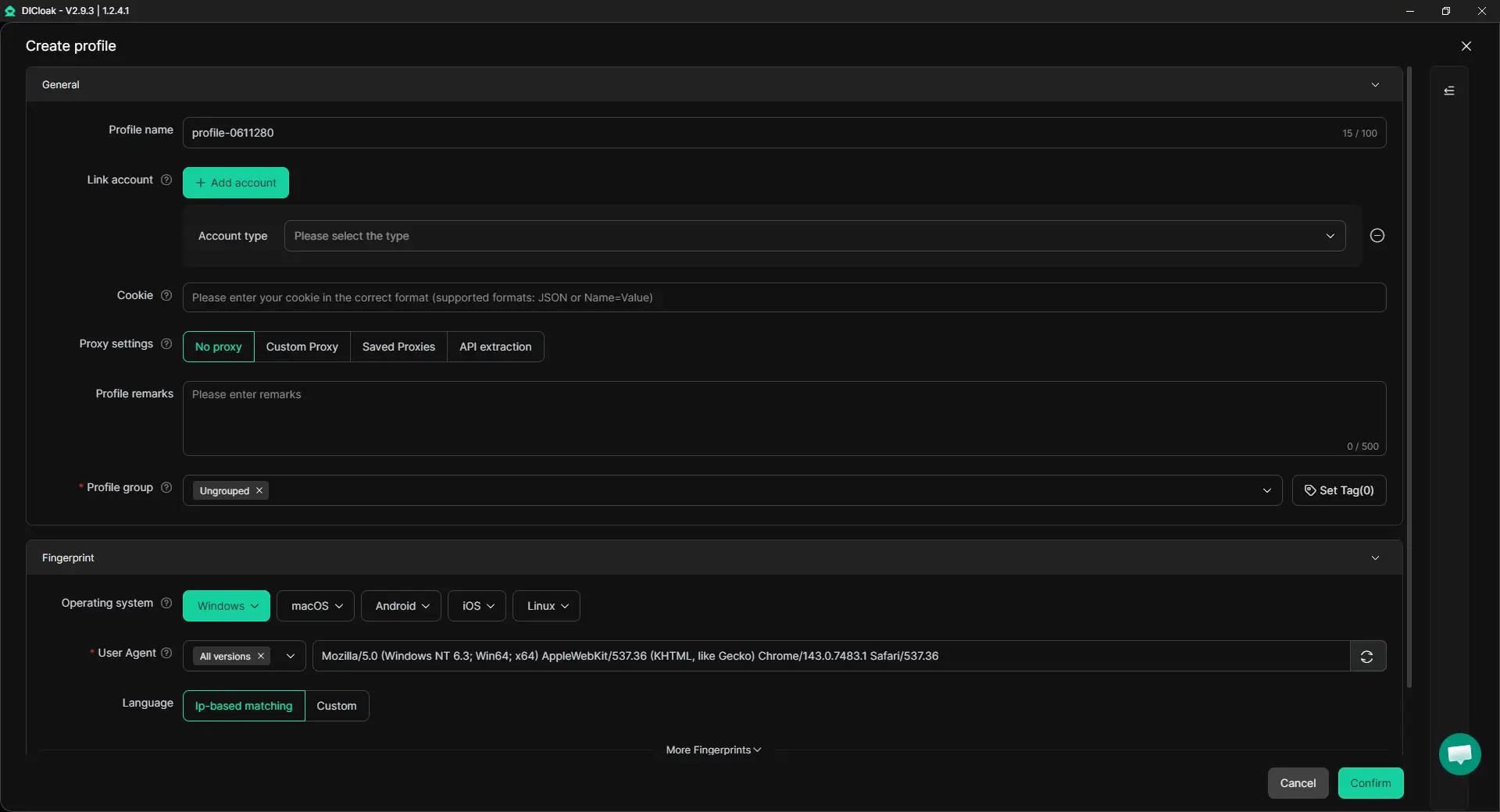
1. Create a Profile for Each Shopee Store
Create one browser profile for each Shopee store and give it a clear name. When setting up the profile, configure the browser profile and fingerprint settings, such as operating system, timezone, language, and WebRTC settings. Once the profile is ready, use it only for that store. This makes it easier to keep store environments organized and reduces the chance of mixing browser sessions across accounts.
2. Configure a Proxy for the Store Region
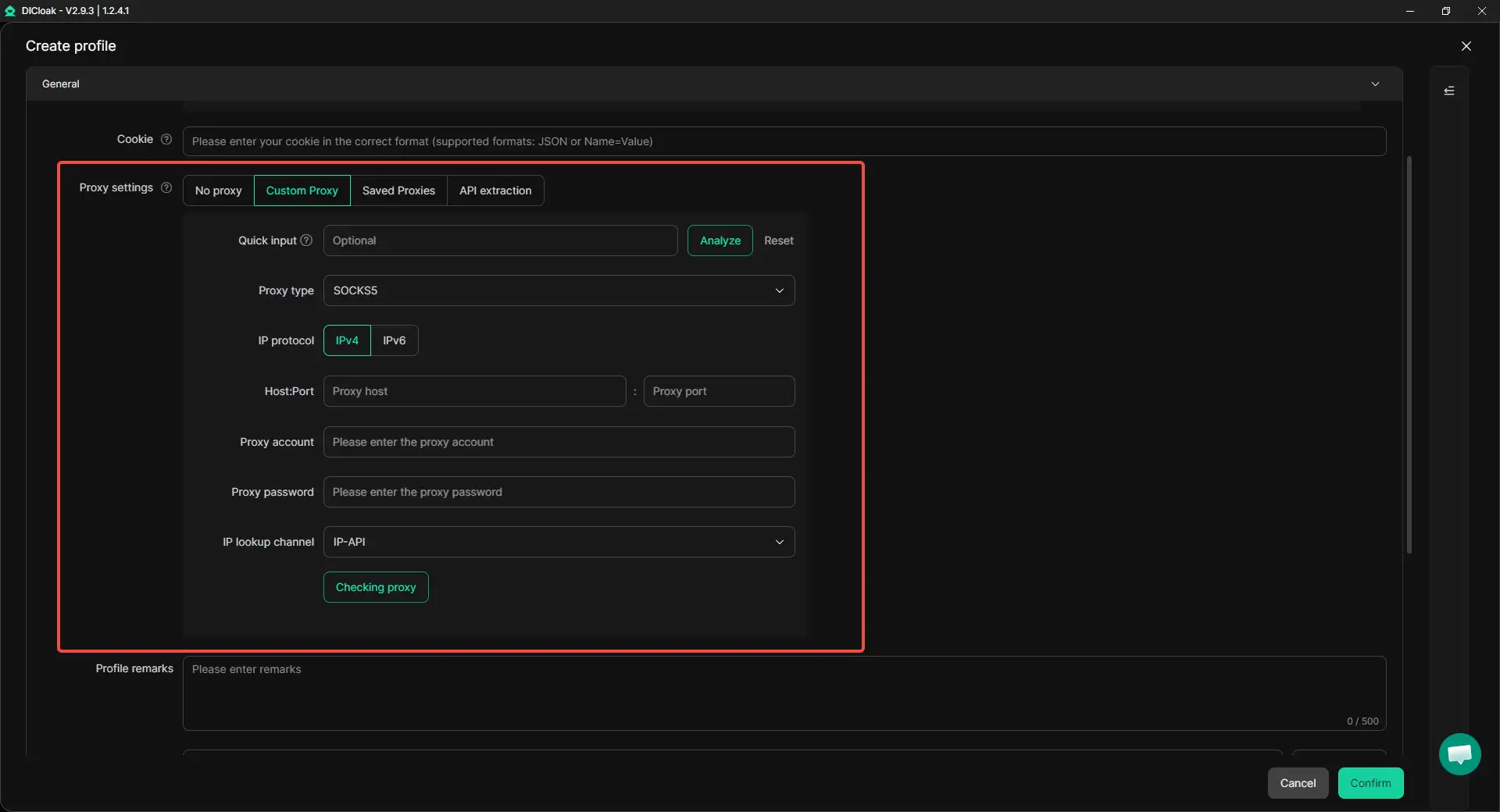
Add a proxy to each profile based on the store's target market and network plan. For example, a Shopee Malaysia store and a Shopee Philippines store can use different proxy configurations. After configuring the proxy, run a proxy check before opening the profile. This allows sellers to verify the connection and review the detected IP and location, helping keep each store environment consistent.
3. Set Team Permissions Before Sharing Profiles
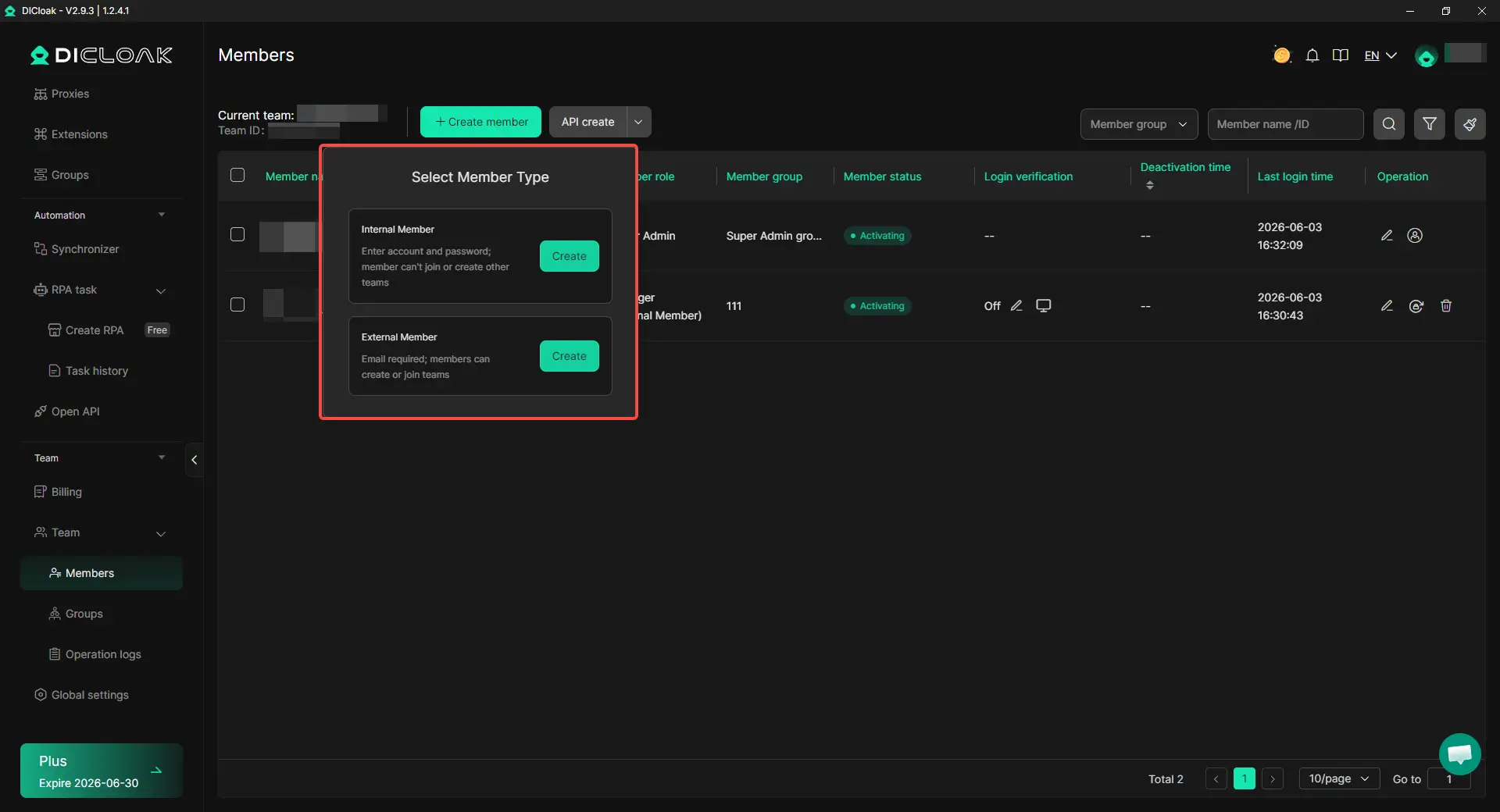
If multiple people manage Shopee stores, assign permissions before sharing profiles. Different team members can be given access based on their role instead of sharing the same account information. Profile sharing also makes handovers easier. A new operator can use the existing store profile without rebuilding the browser setup from the beginning.
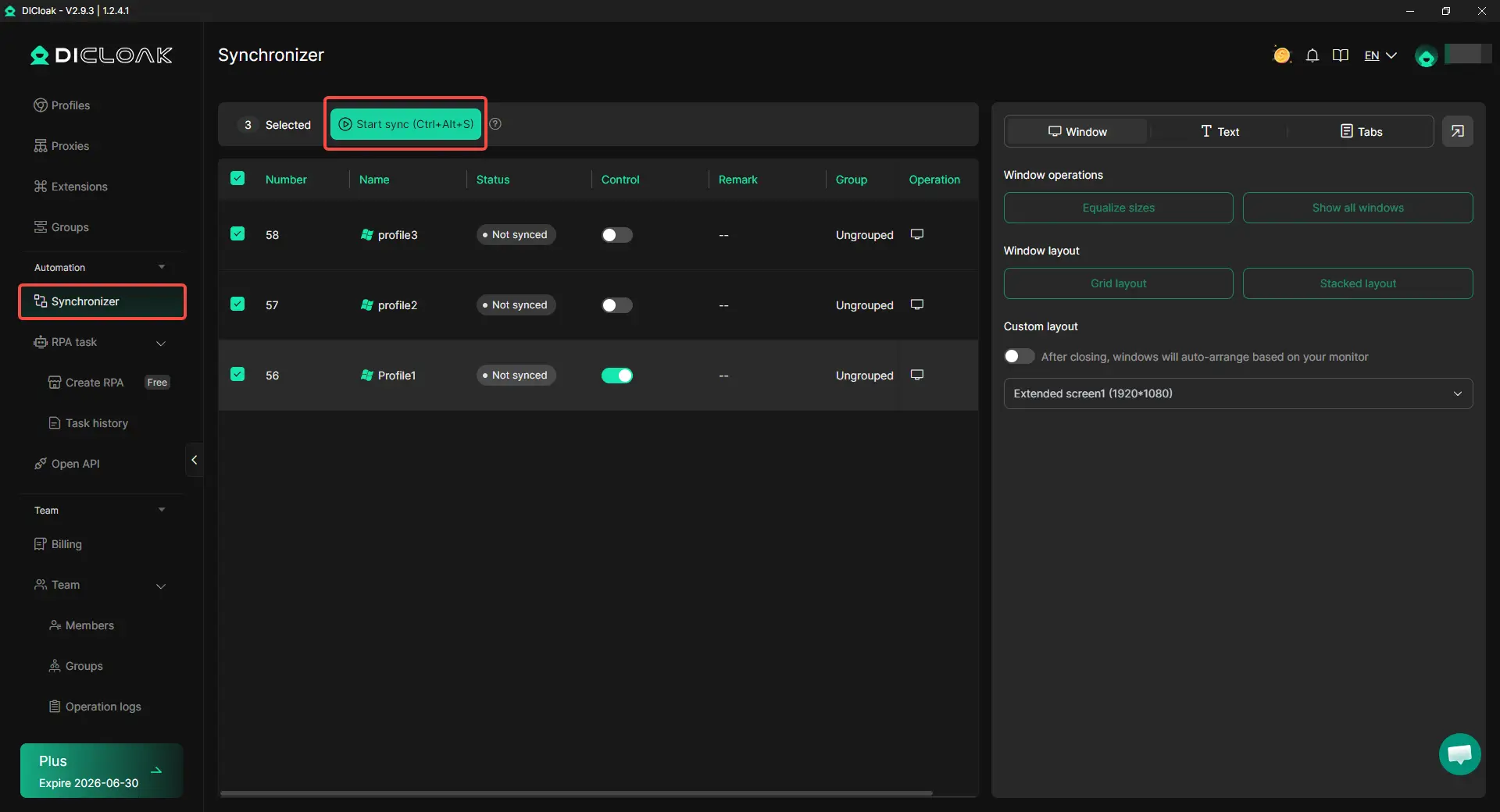
4. Use the Synchronizer for Routine Checks
The Synchronizer can help teams review pages or compare store status across multiple profiles. This saves time when the same basic check needs to be repeated. For Shopee stores, it is better suited for simple reviews than bulk changes. Sensitive actions should still be handled separately for each store.
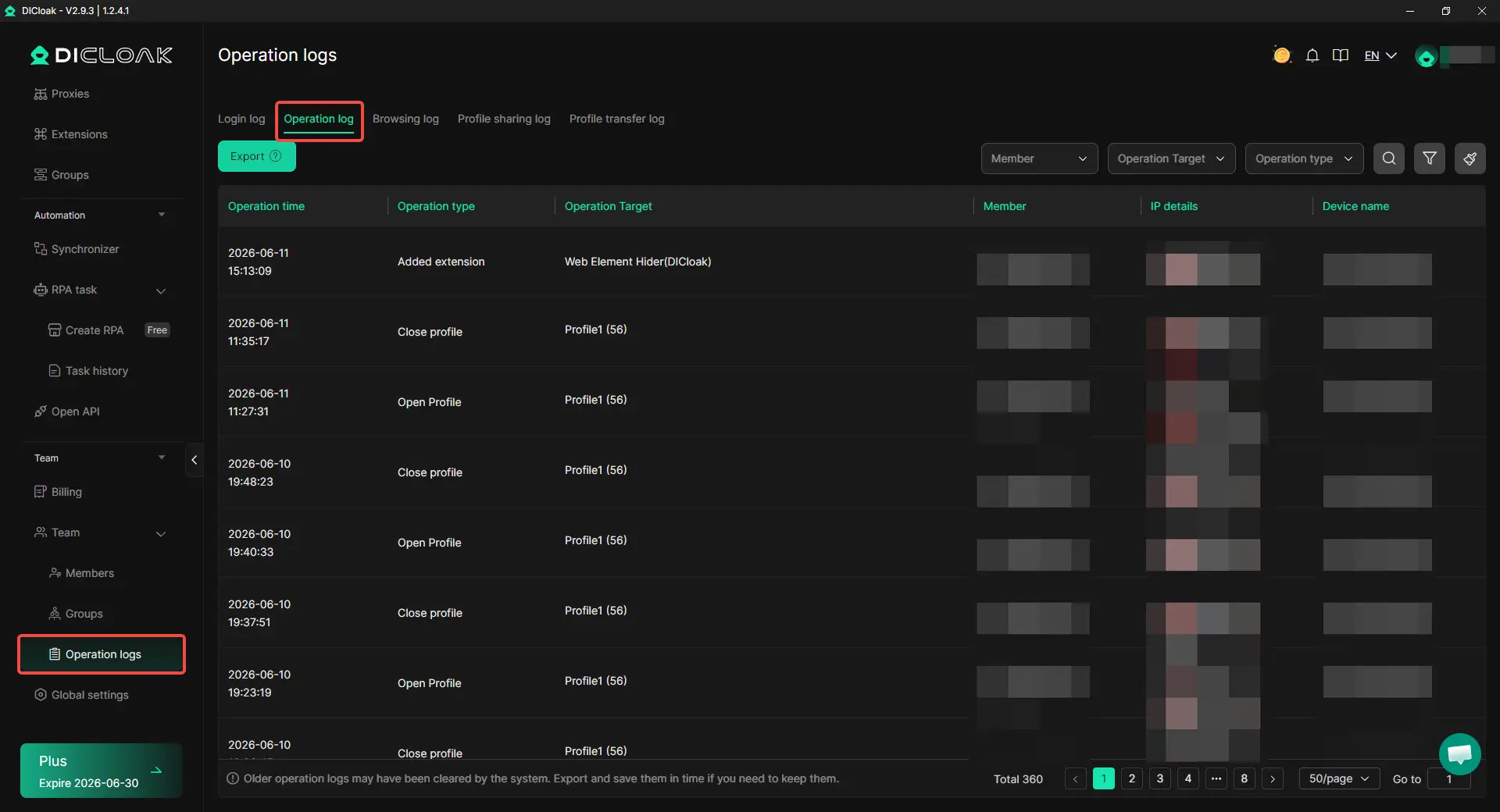
5. Review Operation Logs When Problems Appear
Operation logs help track who accessed a profile and when it was used. This is useful when a store shows a login issue or an unexpected change. For teams managing multiple stores, logs provide a simple way to review profile activity and trace mistakes more quickly.
Frequently Asked Questions About Managing Multiple Shopee Stores
Can I manage multiple Shopee stores from the same computer?
Yes, many sellers manage multiple Shopee stores from one computer, but each store should have a clearly separated login environment. If every store is opened from the same browser, with the same cookies, sessions, and network setup, the stores may become harder to manage cleanly. Many sellers use an antidetect browser like DICloak to create separate browser profiles for different Shopee stores, so each store has its own workspace instead of sharing one browser.
Is using different emails enough to keep Shopee stores separate?
No, different emails and shop names are not enough by themselves. Shopee store linking risk can come from several overlapping signals, including browser profile, device setup, network pattern, recovery details, and repeated store activity. Sellers should treat email separation as only one part of a cleaner multi-store setup.
Do I need a different proxy for every Shopee store?
Many multi-store sellers prefer using a separate proxy setup for each Shopee store, especially when managing stores in different regions. This can make each store environment easier to track and review. With DICloak, sellers can add their own proxies to individual browser profiles, so a Shopee Malaysia store and a Shopee Philippines store do not need to share the same network configuration.
What is the biggest mistake sellers make when managing multiple Shopee stores?
One common mistake is treating every store like a copy of the same account. Sellers may reuse the same browser, copy the same listings, follow the same pricing pattern, and log in to all stores at the same time. The risk often comes from repeated overlap across stores, so sellers should separate store setup, content, access, and daily routines as the number of stores grows.
How can a team manage multiple Shopee stores without sharing passwords?
A team can manage multiple Shopee stores more cleanly by using role-based access, shared store profiles, and activity records instead of passing passwords around. With DICloak, store owners can share specific browser profiles with authorized team members, set team permissions, and review operation logs when needed. This helps agencies, virtual assistants, and cross-border e-commerce teams reduce confusion when several people manage different stores.
Conclusion
Managing multiple Shopee stores without getting them linked in 2026 requires more than using different emails or shop names. Sellers need to keep each store's login environment, browser data, network setup, store activity, and team access clearly separated. Shopee stores may look related when the same device, browser, Wi-Fi, proxy pattern, product listings, pricing routine, or staff access is reused across several stores.
The safest way to manage multiple Shopee stores is to match each method to the right job. Shopee Main Account and Sub-Accounts help with staff roles and chat control. ERP tools help with orders, inventory, and backend work. Separate browser profiles, user-configured proxies, clear team permissions, and operation logs help sellers keep daily store access cleaner and easier to review as they scale.
 Web Proxy Tools
 Free Tools
 Cookie Plugin
 UA Generator
 MAC Address Generator
 IP Generator
 IP Address List
 2FA Code Generator
 World Clock
 Anonymous Check
 WebRTC Leak Test
 UUID Generator
 Free Web Proxy Site
 Proxy Checker
 FB Ad Checker
 AI Web Scraping
 Free SMM Tools
 Twitter Shadowban Checker
 Instagram Name Checker
 UTM Generator
 Username Generator
 AI Hashtag Generator
 LinkedIn Headline Generator
 Social Media Image Resizer