Changing your proxy while managing Facebook accounts can trigger a frustrating identity check cycle. You log in, Facebook asks for verification, you complete it, but the process repeats, sometimes locking you out with every new proxy. This facebook verification loop after changing proxy hits both solo users and teams, especially when switching between residential and datacenter proxies or rotating IPs for account safety. The loop isn't random; Facebook spots mismatched login fingerprints and flags the session, thinking it's suspicious. That means even if you’ve set up your proxies right, you can still get stuck in a facebook stuck in verification loop after proxy change, or find yourself caught in a facebook login loop proxy switch that wastes hours and risks account bans.
Many people try clearing cookies, swapping devices, or re-confirming identity, but the cycle keeps coming back. The real issue is Facebook's layered checks: it looks at browser fingerprints, device IDs, and login timing, not just IP address. If your proxy switch is too abrupt or your profile data doesn’t match past activity, Facebook’s system treats the login as a possible takeover or bot.
Solving this isn’t about just picking a new proxy or following generic advice. You need a step-by-step approach: check what triggers the loop, fix profile mismatches, and test risk before logging in again. If you skip the fingerprint and profile step, you may get locked out for longer, or risk triggering extra reviews that delay recovery.
Start with identifying the exact trigger, here’s what operators are checking first.
Why Does Facebook Trigger a Verification Loop After You Change Proxy?
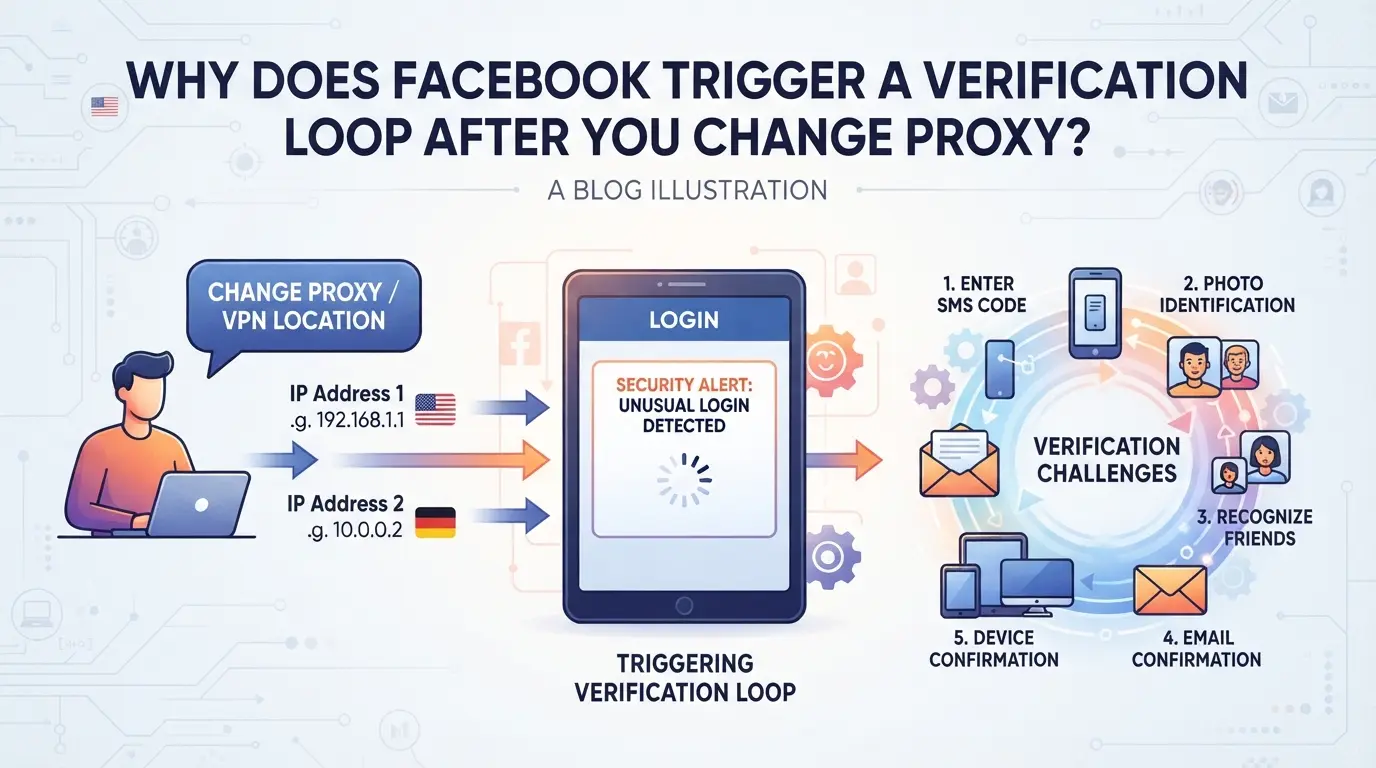
If you land in the facebook verification loop after changing proxy, it’s usually because Facebook’s backend sees your login as risky. This reaction isn’t random , Facebook tracks how you connect, what your device says, and how your account has acted before. When you switch proxies, especially if you do it quickly or without matching your browser fingerprint, Facebook treats the login like a possible hack or bot takeover. The loop is a defense mechanism and can get worse if your login history is inconsistent or your device profile doesn’t match what Facebook expects.
How Facebook Detects Unusual Login Signals
Facebook flags proxy changes by cross-checking several signals:
- IP address changes: If your login jumps to a new country, city, or ISP, Facebook often asks for verification.
- geolocation mismatches: When your device’s local time, browser language, or GPS data don’t line up with your IP location, it triggers extra checks.
- Browser fingerprint inconsistencies: If your browser profile, cookies, or installed fonts suddenly change, Facebook reads this as a new device.
Even if your password stays the same, these signals can push your account into a verification loop.
What Triggers the 'Confirm Your Identity' Loop
Session conflicts and device trust signals play a bigger role than most operators expect. If you log in from a new proxy but leave behind old browser cookies, or if your browser fingerprint changes while your device ID stays similar, Facebook’s system sees the login as suspicious. The platform uses layered trust signals: device history, login timing, and session tokens. When one signal shifts but others stay the same, Facebook can’t tell if you’re the real owner or someone trying to hijack the account.
Rapid proxy switching, especially logging in from two proxies within minutes, raises a red flag. For example, if you run a Facebook account from a residential proxy in California, then switch to a datacenter proxy in Singapore without adjusting your browser fingerprint or clearing session data, Facebook is likely to trigger the confirm identity loop. Sometimes, even a slow switch triggers the loop if your device’s language or timezone doesn’t match the new IP.
Here’s where the failure mode gets rough: after a few failed identity confirmations, Facebook starts locking the account for longer, or even flags it for manual review, which can take days. If you try logging in with another proxy or device during this window, you risk stacking verification requests and extending the lockout. The easiest way to make the loop worse is to keep switching proxies and devices without fixing the underlying profile mismatch.
Operators who skip the profile check often end up stuck in the facebook login loop proxy switch cycle. The fastest way out is to pause, review which signals changed, and test a login from the original trusted setup before attempting further fixes. This sets up the next step: checking what risks are present before switching proxies, so you don’t trigger another lockout on recovery.
What Risks Should You Check Before Changing Proxies for Facebook Accounts?
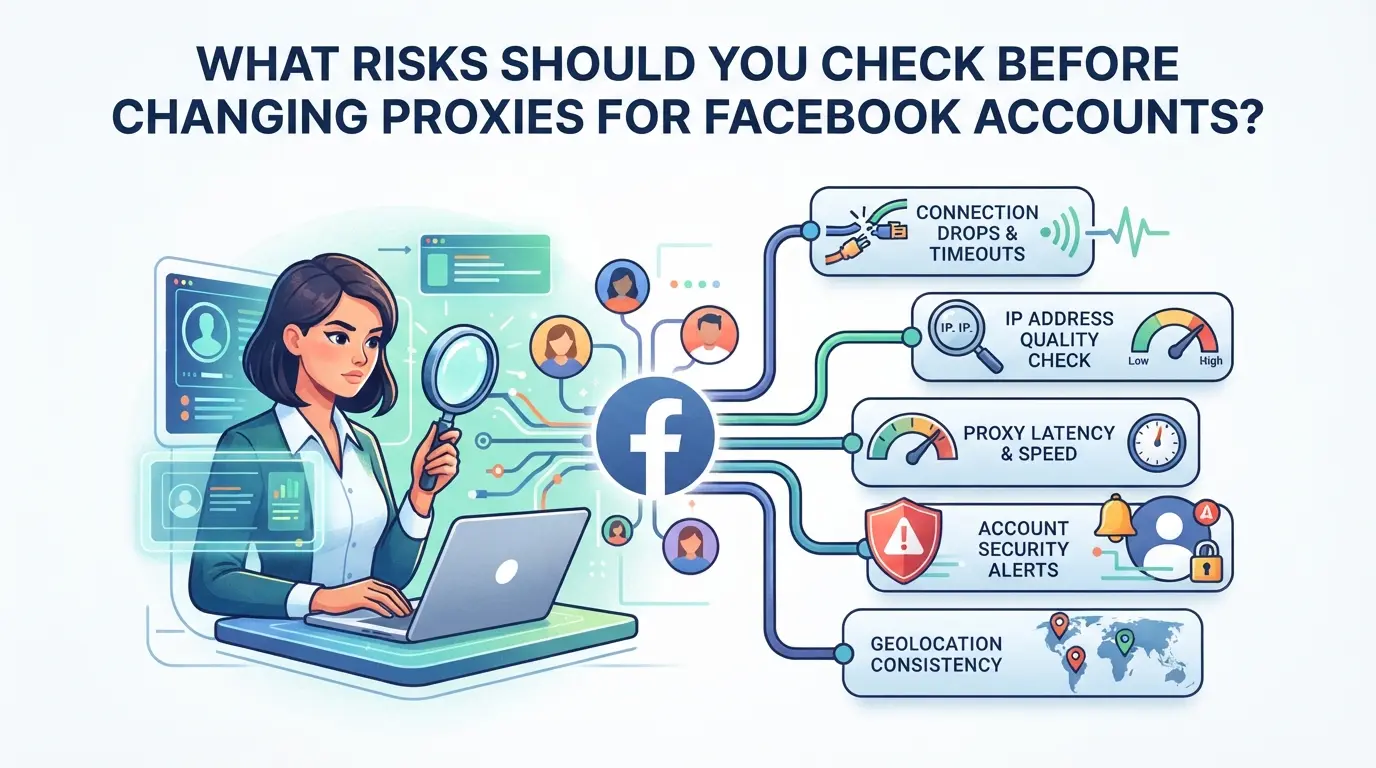
Operators who swap proxies on Facebook accounts without checking key signals risk getting locked into a facebook verification loop after changing proxy. To avoid extra reviews or login blocks, you need to catch mismatches before the switch, missing one detail can trigger hours or days of stuck logins.
Consistency of Browser Environment and Fingerprint Signals
If your browser fingerprint changes too much, Facebook treats the login like a stranger just picked up your phone. Matching time zone, language, and device settings is non-negotiable, change one, and you’re flagged. If your device ID shifts, or your screen resolution suddenly changes, the system will force a re-confirmation. The hardest part is getting all signals to match your past logins. Checking every fingerprint detail, especially time zone and language, before proxy switching cuts lockouts by half.
Proxy Quality and Location Risks
Low-quality proxies and unstable locations are the fastest way to trigger a facebook login loop proxy switch. Most bans happen when the account jumps between cities or countries without warning. Here’s what operators check first:
- Confirm the proxy’s IP location matches your usual login region.
- Use only reputable proxy providers with stable connection history.
- Avoid rotating proxies or frequent location changes within a single session.
Session and Cookie Handling
Session data and cookies are the silent saboteurs, skip careful handling, and you’ll contaminate other accounts or trigger forced verification. Even a leftover session from another login can set off a facebook confirm identity loop proxy.
- Clear all sessions and cookies tied to the account before changing proxies.
- Never share browser profiles or cookies across different Facebook accounts.
- Always restart your browser after proxy switch to isolate fresh login data.
If you cut corners here, expect Facebook to demand extra identity checks or throw your account into a permanent loop. Fixing these issues often takes longer than the login itself.
Once you know the main triggers and handle them up front, you’re ready for the next step: fixing the loop when it hits.
Step-by-Step: How to Fix the Facebook Verification Loop After Changing Proxy
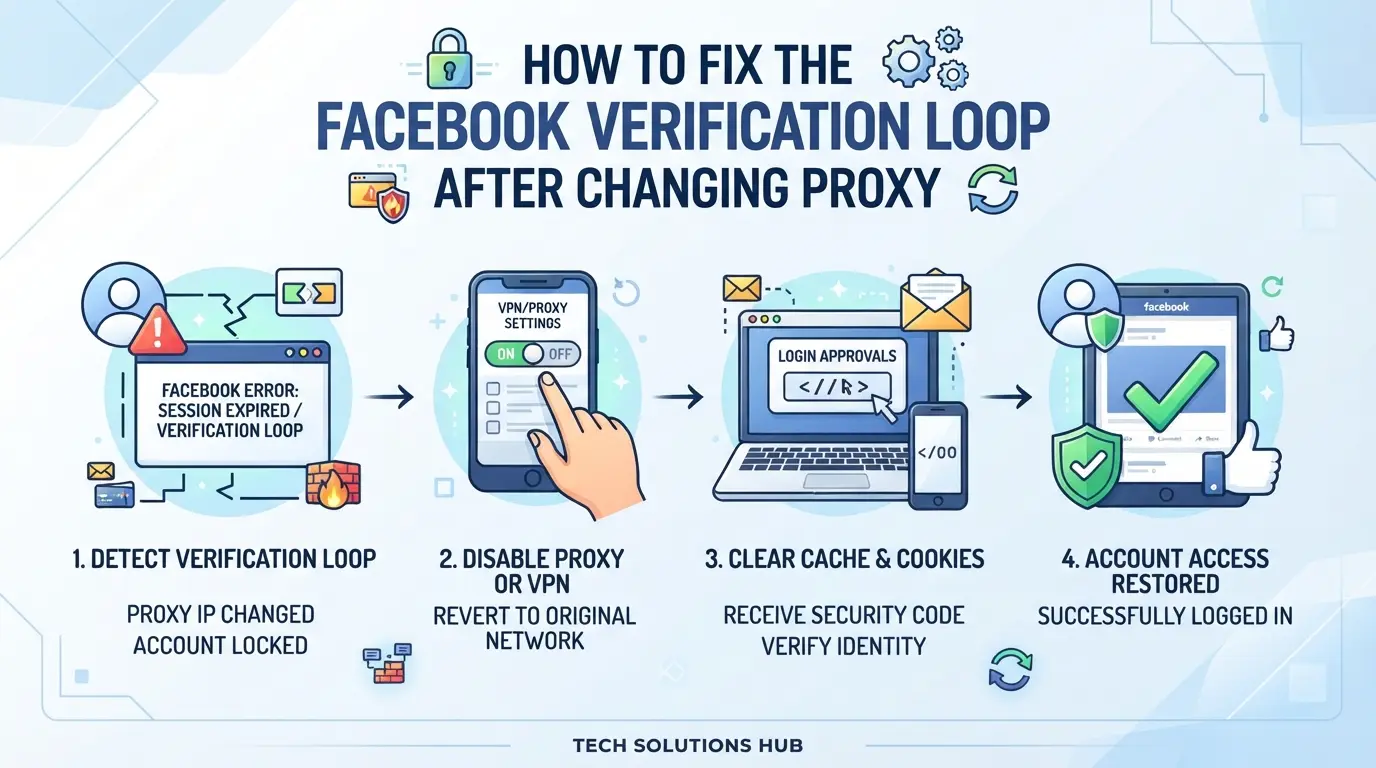
If you’re stuck in the facebook verification loop after changing proxy, the fastest way out is to reset your login signals to match past activity, check proxy stability, and clear session traces before retrying. Jumping straight to cookie clearing or random proxy swaps usually makes things worse, Facebook flags mismatched browser fingerprints and unstable IPs as takeover attempts. Here’s the order operators use to break the loop and regain access.
Check and Restore Consistent Browser Signals
- Review your last successful login. Open your previous browser profile or device where Facebook didn’t trigger extra checks.
- Compare fingerprint settings, focus on User-Agent, screen size, fonts, and device type. If you changed devices or browsers, restore these to match your last login.
- Test environment consistency. Log in to a test site (like a webmail or non-Facebook social account) with these settings. If you see unexpected prompts, your fingerprint is mismatched, fix before logging into Facebook.
- Avoid quick swaps. Don’t change multiple settings at once; Facebook often flags two or more sudden changes as suspicious, which can lock out the account and trigger extra review cycles.
Select and Test a Stable Proxy
- Choose a proxy located in the same region as your last Facebook login. For accounts with history in one city, pick an IP from that city, country-level switches often trigger the facebook login loop proxy switch.
- Verify proxy IP stability. Use an IP checker tool (such as ipinfo.io) to confirm there’s no rotation or dropouts. If your proxy provider rotates IPs, switch to a static option before logging in.
- Run a connectivity check. Open several major sites through the proxy to ensure speed and consistency. If you notice intermittent failures, Facebook may treat your session as bot or automation, which leads to repeated verification requests.
Clear Session Data and Retry Login
- Safely clear browser cookies and cache for Facebook only. Don’t wipe all browser data, this removes needed signals for other accounts, which can trigger new verification loops.
- Close all browser windows and restart. This ensures hidden sessions or cookies aren’t lingering in the background, which sometimes keeps Facebook stuck in verification loop after proxy change.
- Retry Facebook login from your restored profile and stable proxy. Use the same device as your last successful login if possible.
- If Facebook still asks for identity confirmation, pause and check for mismatches, don’t keep retrying. Multiple failed attempts often lead to temporary locks or forced review, pushing recovery time from hours to days.
If you skip the fingerprint alignment or use a proxy that doesn’t match your account’s history, you’ll likely get stuck in a confirm identity loop. Next, operators need to watch for mistakes that can make the verification cycle even harder to escape, missing these details is why so many accounts get flagged or delayed.
Common Mistakes That Make the Facebook Verification Loop Worse
The fastest way to get stuck in a Facebook verification loop after changing proxy is to repeat the same risky behaviors that triggered the review in the first place. If you keep changing settings or devices without thinking through the consequences, the loop gets harder to break.
Rapid Switching Between Multiple Proxies
Jumping between IP addresses day after day makes Facebook's system see your account as unstable or hijacked. The risk spikes if you switch proxies just to "see if it works", every failed login adds to your risk score. Cool down between switches, and only change proxy once you’ve fixed browser and profile mismatches.
Using Shared Devices or Browsers Without Isolation
Relying on the same device or browser for every account is the fastest way to cross-contaminate fingerprints.
- Logins from shared profiles can trigger "confirm identity" checks for all connected accounts.
- To avoid this, use a separate browser profile or container for each Facebook account, never mix them, even on the same machine.
Skipping isolation might save time at first, but it usually means accounts fall into repeat loops or get flagged together. If you notice multiple accounts stuck in review at the same time, this is the first setup to fix.
How Multi-Account Operators Can Reduce Facebook Verification Loop Risk with DICloak
Operators managing several Facebook accounts see one pattern over and over: the more accounts run on the same device or browser, the higher the chance of a new verification loop after each proxy change. The real problem isn’t only the proxy switch, it’s signal overlap and inconsistent fingerprints across sessions. Instead of patching the login script or swapping proxies at random, the smarter move is to separate browser profiles and keep signals consistent for each account. This is where DICloak fits for multi-account users who need to control browser profiles and proxies for Facebook at scale.
Creating Isolated Browser Profiles and Configuring Fingerprints in DICloak
Operators can create a separate browser profile in DICloak for each Facebook account and configure fingerprint settings that match their past login signals. This means storing the OS, browser version, time zone, language, and screen size for each profile so that Facebook sees a consistent environment each time, instead of mixing signals across accounts. If you’ve ever been stuck in a facebook verification loop after changing proxy, chances are your browser session or fingerprint didn’t match what Facebook expected from that account. The isolation layer in DICloak keeps account activities separated, reducing the kind of overlap that usually triggers extra checks. The scope is limited to browser-profile setup; it does not manage Facebook account recovery or verification stages.

Configuring User-Owned Proxies for Each Profile in DICloak
Once each Facebook account has its own browser profile, operators can assign a specific proxy to each profile in DICloak. This helps keep the network signal stable and consistent with previous logins, sudden changes in IP location or proxy type often trigger a confirm identity loop on Facebook. Operators enter their own proxy details, test the connection, and check that the detected exit IP and location match what they expect before logging in. DICloak does not sell proxies or set connection rules; users are responsible for proxy quality and compliance. The proxy is only attached to the browser profile, not to any Facebook account or platform setting.

If these steps still leave an account locked or in review, the next move is to look at recovery and support options.
When to Seek Help: Account Recovery and Support Options
If you’ve tried every self-fix and Facebook still locks you in a verification loop after changing proxy, it’s time to escalate. Waiting and retrying the same steps often wastes hours, move on to recovery or support if you see repeat failures or “identity not confirmed” errors.
Contacting Facebook Support
- Go to the Facebook Help Center and select “Login and Password.”
- Prepare screenshots of failed attempts and error messages.
- Write down recent changes: proxy switch date, devices used, and any profile edits.
Using Account Recovery Tools
Try password reset first, if your email or phone is linked, you’ll get a reset link. Where this fails, upload a clear photo ID matching your profile name. Having trusted contacts is the fastest backup, use them if Facebook asks for friends to confirm your identity.
Checklist: Safe Practices for Facebook Proxy Switching in 2026
A few habits can sharply cut the risk of getting stuck in a facebook verification loop after changing proxy. Most account locks come from obvious environment mismatches, not just the IP change, so focus on what Facebook actually looks for.
Proxy Switching Safety Checklist
- Match browser fingerprint, time zone, and OS to your old setup before logging in, one mismatch is enough to trigger identity review.
- Test your proxy by checking the IP’s city and reputation with a public lookup before login. If the location or ASN shifts too far from your last session, expect extra checks.
- Always clear session cookies and cached data before switching. Mixing old tokens with a new proxy can land you in a facebook confirm identity loop even if the location looks safe.
Frequently Asked Questions About facebook verification loop after changing proxy
Why does Facebook keep asking me to verify my identity after I change proxies?
Facebook triggers security checks if it spots unusual login signals, like a sudden change in your IP address or browser fingerprint. If you switch proxies, Facebook might think someone else is trying to access your account, which can cause the facebook verification loop after changing proxy. This is meant to protect your account from unauthorized access.
Can changing proxies cause my Facebook account to get locked?
Yes, switching proxies can lock your account, especially if the new proxy location is very different from your usual one or if device fingerprints don’t match. Facebook may freeze access and ask for ID verification or other steps. Users often see this with rapid proxy changes or when logging in from different cities or countries.
How can I avoid the Facebook verification loop when managing multiple accounts?
To prevent getting stuck in a facebook login loop proxy switch, use a separate browser profile and proxy for each account. Keep the same IP address and browser fingerprint for each login session. This makes your activity look more consistent to Facebook and reduces the chance of triggering security checks or loops.
What should I do if I can't fix the verification loop myself?
If your account is stuck, try Facebook’s account recovery tools like password reset, verifying via email or phone, or uploading an ID. If you’re still in a facebook confirm identity loop proxy issue, contact Facebook support directly. They can help review your case and restore access if you prove ownership.
Is it safe to use proxies with Facebook in 2026?
Proxies can help protect privacy, but they must be high-quality and used correctly. If you use inconsistent proxies or change them too often, Facebook could flag your account or lock you out. Always pair proxies with stable device settings to keep your account safe and avoid unnecessary verification requests.
If repeated verification requests are slowing you down, consider adopting solutions that mask your location changes more effectively and simplify your login experience. Testing out a purpose-built privacy tool can help you avoid unnecessary interruptions and maintain smooth access to your accounts. Try DICloak For Free
 Web Proxy Tools
 Free Tools
 Cookie Plugin
 UA Generator
 MAC Address Generator
 IP Generator
 IP Address List
 2FA Code Generator
 World Clock
 Anonymous Check
 WebRTC Leak Test
 UUID Generator
 Free Web Proxy Site
 Proxy Checker
 FB Ad Checker
 AI Web Scraping
 Free SMM Tools
 Twitter Shadowban Checker
 Instagram Name Checker
 UTM Generator
 Username Generator
 AI Hashtag Generator
 LinkedIn Headline Generator
 Social Media Image Resizer