Trying to create bulk Facebook accounts in 2026 is nowhere as simple as opening a few tabs and filling out sign-up forms. Facebook’s detection systems now flag repeated patterns, shared device fingerprints, and even slight overlaps in browser profiles. If you skip the details, accounts start getting restricted or banned after just a handful of actions.
But the real headache isn’t just losing accounts, it’s wasting time and resources on accounts that never become usable. Using the same proxy, copy-pasting browser cookies, or letting automation get sloppy can get your whole batch burned. Even if you get past the initial verification, Facebook’s algorithms still catch farmed accounts that act too similar or share digital traces.
People who succeed with bulk Facebook account creation don’t just rely on luck or cheap tricks. They use isolated browser profiles, diversify device fingerprints, and automate activity in ways that mimic real user behavior. Skipping any of these steps almost always leads to mass bans or wasted setups. The difference between a working farm and a graveyard of dead accounts comes down to how carefully you separate, warm up, and manage each profile, especially if you’re running ads, managing groups, or handling social campaigns at scale.
So, before starting your next batch, know where the real risks hide and which steps matter most. Here’s what you need to watch out for first.
What Makes Bulk Facebook Account Creation Risky in 2026?
Trying to create bulk Facebook accounts in 2026 runs into stronger detection than ever, Facebook now flags suspicious setups almost instantly. Getting past registration is only the start; even tiny overlaps in device, timing, or behavior make entire batches disposable. If you don’t break the patterns Facebook expects, your accounts rarely last long enough to use.
How Facebook Detects Bulk Account Creation
- Device and browser fingerprinting: Facebook collects detailed device info (screen size, OS, browser settings, graphics card, fonts) to spot linked accounts even if you clear cookies or use private browsing.
- IP and location patterns: Repeated use of the same IP addresses or proxies in the same subnet, especially from data centers, triggers review. Sudden jumps between distant locations also raise red flags.
- Behavioral signals and activity timing: Identical or robotic actions, like signing up several accounts in a row, logging in at the same second, or repeating the same steps, often get flagged as automated behavior.
What Triggers Immediate Restrictions or Bans
Facebook’s system doesn’t just look for obvious spam. A single device logging dozens of new accounts, or even just reusing the same fingerprint, can land the whole batch in a review queue before you finish setup. One common failure is opening five new accounts from a “fresh” proxy, only to have Facebook ask for phone verification on all of them, then freeze any that can’t pass. Even mixing up IPs isn’t enough if the browser fingerprints match or the timing gives you away. Too many accounts created within minutes from the same network, or a pattern of sending out friend requests and messages right after signup, signals automation to Facebook’s algorithms. These triggers don’t just cause temporary locks; they often mark your entire device or subnet as risky, making future attempts even harder. Missing just one layer of separation, like reusing a browser profile or proxy, can mean you lose every account in the batch.
If you’re aiming for accounts that last, the real risk isn’t just getting caught at signup. It’s making a single mistake that connects your whole operation, letting Facebook wipe out weeks of work. Before you start, make sure you’re not repeating the same patterns that get most bulk accounts banned before they even warm up. The next step is knowing exactly what to check before you try again.
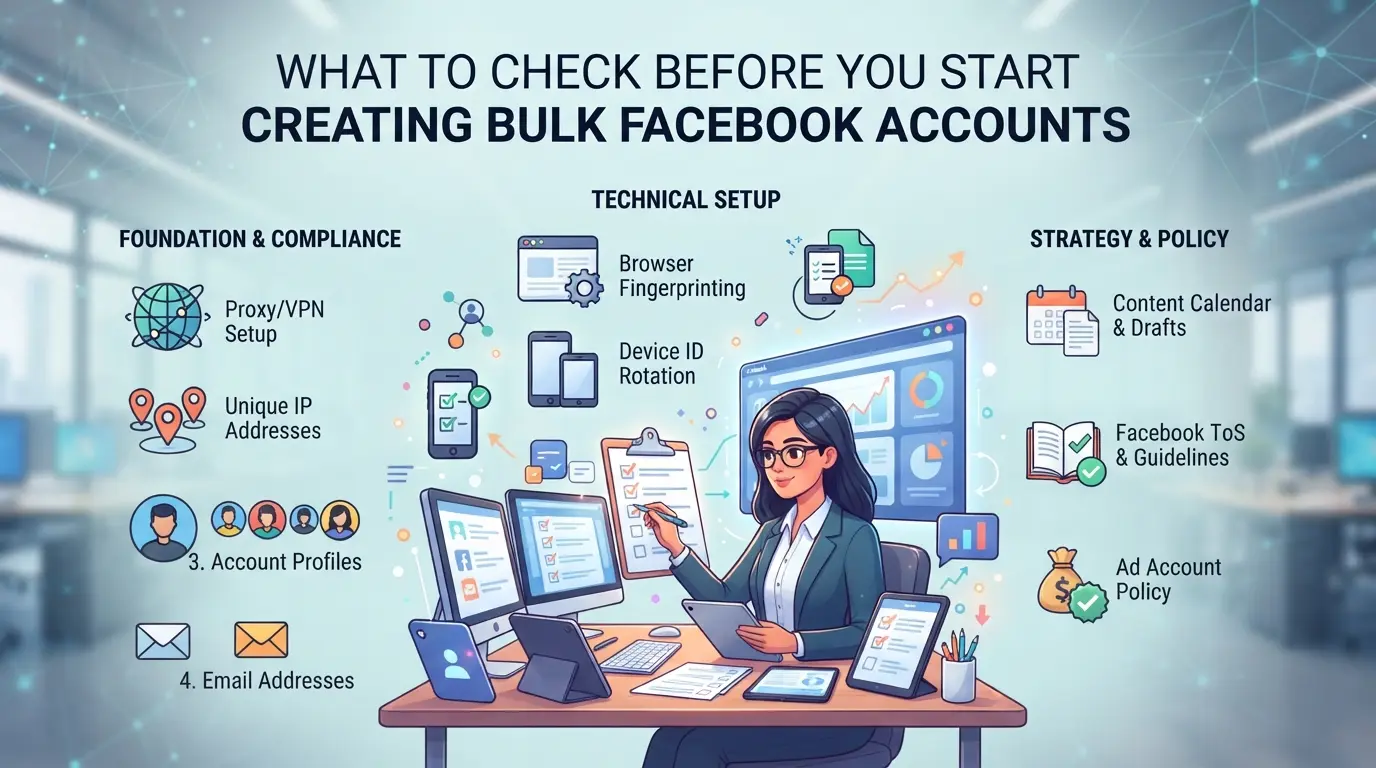
What to Check Before You Start Creating Bulk Facebook Accounts
Jumping into bulk Facebook account creation without prep is a fast way to lose time and resources. The real difference between accounts that last and those that get flagged in hours is what you check upfront, especially as Facebook’s detection keeps tightening. Before you even open a browser, make sure these key requirements are covered.
Account Limit Rules and Compliance in 2026
Facebook’s public policy still limits one account per real person, but enforcement is stricter now. If you try to make more than one account per device, browser fingerprint, or IP address, you’re almost certain to trigger review or immediate restrictions. Automated systems link accounts by checking browser metadata, reused device IDs, and shared connection patterns. Don’t assume you can “just try a few” without being noticed, mass bans have become routine for farms that skip isolation or mix login sources. If your setup reuses any digital trace, expect most accounts to be flagged before they even finish warming up.
What You Need: Emails, Phone Numbers, Devices
Missing a single piece of info can stall your whole run. Before you start, check:
- Use fresh email addresses (avoid reusing Gmail or Outlook inboxes; catchalls can get flagged quickly).
- Secure phone numbers from reliable SMS providers, one per account, not shared or recycled.
- Prepare clean devices or browser profiles (never reuse old ones from previous batches).
Why Environment Isolation Matters
Reusing browsers or devices, even once, lets Facebook link your accounts in minutes. This is the top reason for instant bans in bulk account creation. Isolating every environment is what keeps your accounts from all falling at once. Here’s what to actually check:
- Assign a unique browser profile and device fingerprint to each account.
- Route each account through a different proxy or clean residential IP.
- Store cookies, cache, and login data separately; never import or export between accounts.
Skipping any step above can turn a whole batch into dead weight, accounts may all get flagged together, or you’ll face identity checks that can’t be passed. Prepping these basics isn’t just routine; it’s the difference between a working farm and a quick ban. With these checks in place, you’re ready to move to the actual bulk creation process.
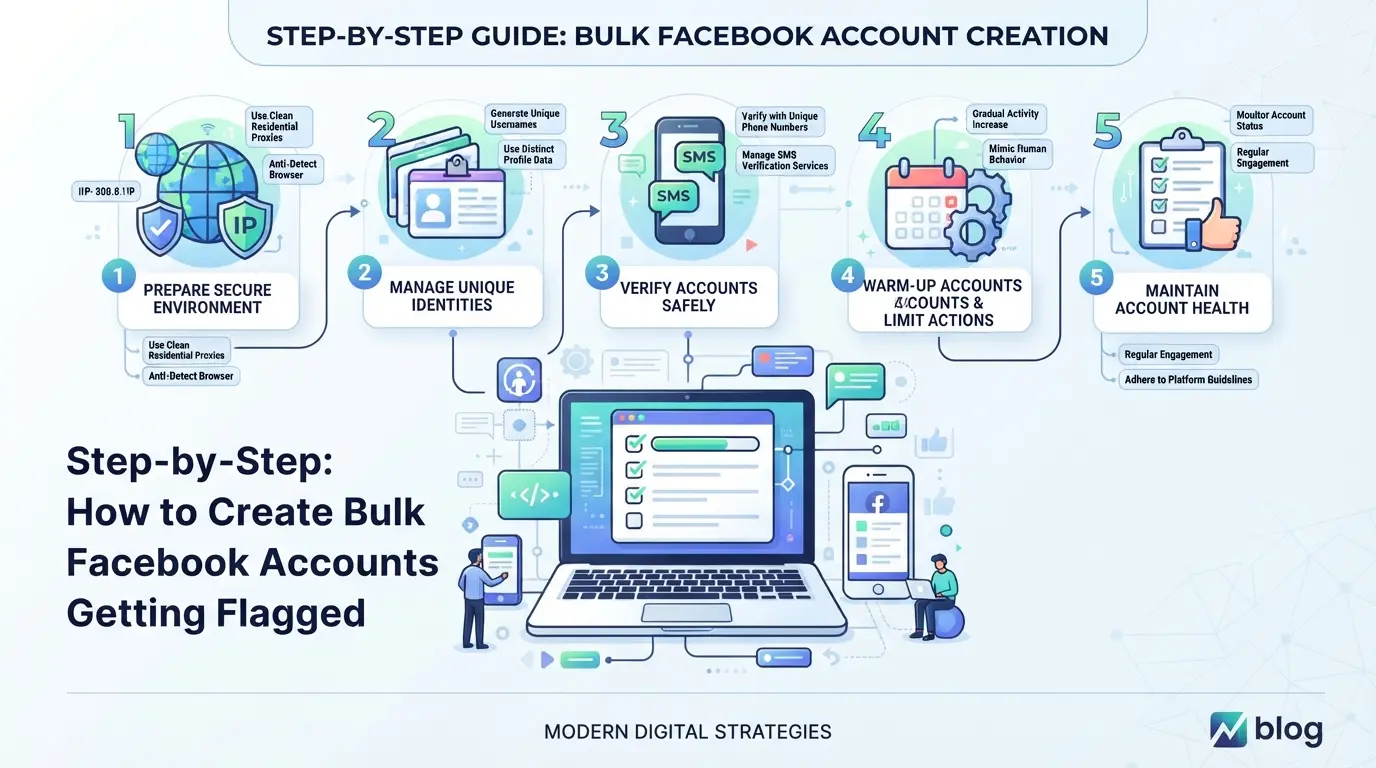
Step-by-Step: How to Create Bulk Facebook Accounts Without Getting Flagged
Anyone can mass-register Facebook accounts, but keeping them alive past the first week is a different game. If you want accounts that actually last, you need to get every step right, from environment prep to first activity. Here’s the safest workflow for 2026.
Step 1: Prepare Unique Environments for Each Account
- Set up a separate browser profile or use a different device for every account.
- Assign each one a unique fingerprint and residential proxy. If two accounts share a browser or IP, Facebook links them fast, your whole batch can get flagged within hours.
- Keep timezone and system settings consistent with the target region.
Step 2: Register Accounts with Realistic Details
- Use names that match the target country, not random strings.
- Pick birthdays that fit a normal age range, avoid patterns like all “January 1.”
- Add a real-looking profile photo. Sticking to stock images or leaving blank profiles makes accounts look fake.
- Change detail formats every few accounts. Facebook’s AI spots repeated inputs even across batches.
Step 3: Email and Phone Verification Best Practices
- Buy SMS and email verifications from providers with fresh, non-recycled numbers.
- Never re-use the same phone or email across accounts; Facebook tracks these links.
- Test your provider: if you see “number already used” errors, switch sources, recycled credentials get flagged fast.
Step 4: Initial Activity and Warm-Up
- Spend 5-10 minutes on each account browsing the feed, liking posts, or joining a group, avoid posting or adding friends right away.
- Wait at least 24 hours before sending friend requests, and never add more than 5-10 per day in the first week.
- Delay any automation until the account survives its first 72 hours. Early bot-like actions almost always trigger reviews.
Step 5: Tracking and Organizing Bulk Accounts
- Log every account’s details (email, phone, IP, device) in a spreadsheet or management tool.
- Group accounts by batch and label them with creation date and environment.
- Update records after every change, if Facebook starts flagging a group, you can trace exactly what went wrong.
Miss a step, and you’ll often see your new accounts locked or disabled, sometimes before you even finish setup. Next, you’ll see why most bulk accounts don’t survive long, and what actually triggers bans.
Why Most Bulk Facebook Accounts Get Restricted or Banned Fast
Most bulk Facebook accounts get banned because simple shortcuts, like copying device setups or using the same IP, leave obvious footprints. Facebook’s system is trained to spot these patterns fast, so even a few slip-ups can wipe out your whole batch before you start scaling.
Top Mistakes That Trigger Facebook’s Security Systems
Reusing the same IP or device fingerprint for multiple accounts is the quickest way to get flagged. If you link too many accounts to one phone, email, or pattern of activity, Facebook spots the connection and blocks them in one sweep. Unnatural activity, like sending too many friend requests or posting immediately, almost always leads to restrictions.
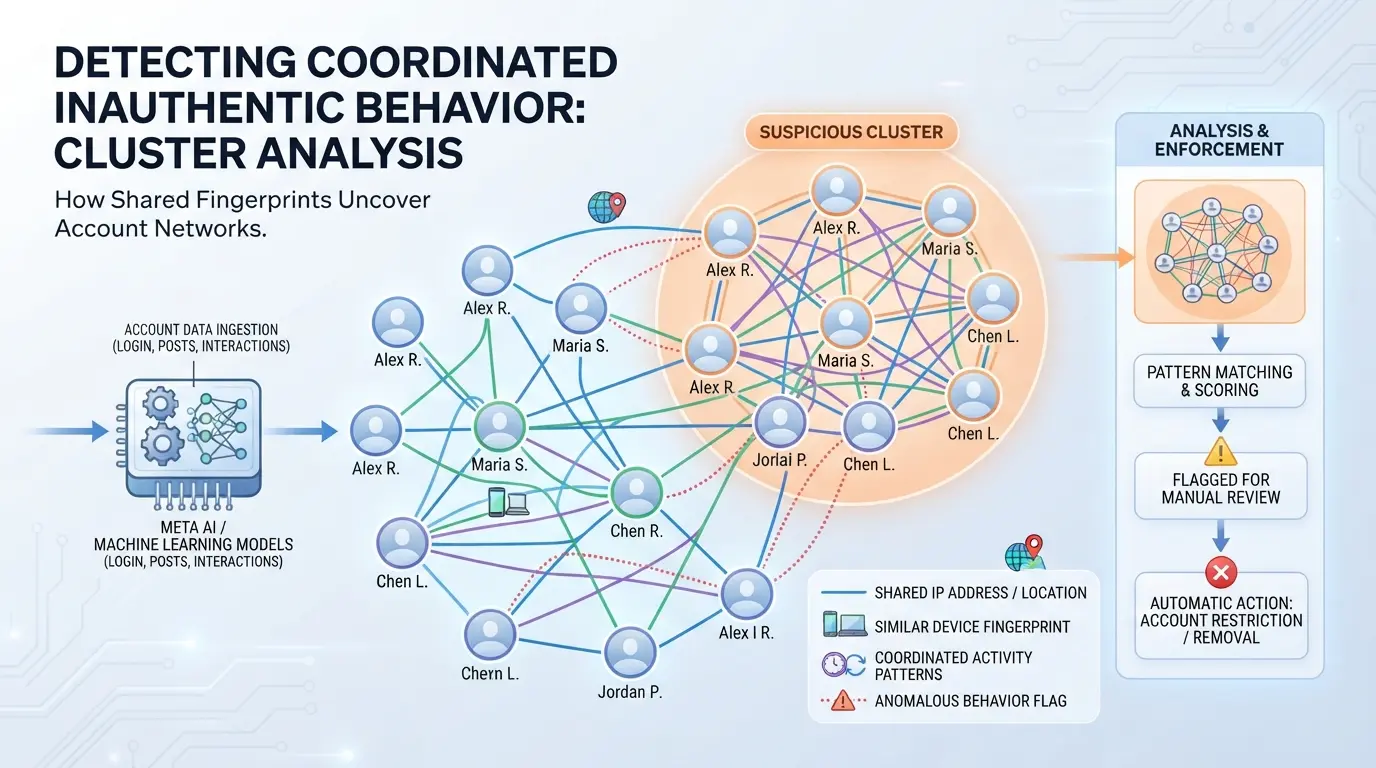
How Facebook’s AI Detects Suspicious Behavior in 2026
Facebook’s AI watches for login patterns and clumps of accounts acting the same.
- If you log in from different accounts using the same network or device, the system groups them for review, expect mass blocks.
- The only safe move is to separate fingerprints and stagger actions as if each account was a real person. Using random timing isn’t enough; you need real isolation, or the algorithm will catch you even if the accounts look unique.
Using DICloak to Separate Environments and Set Up Proxies for Bulk Facebook Account Operations
Once you see how fast accounts can get linked and restricted, the next priority is setting up both the browser profile and the network path so each Facebook account acts and connects like a real, separate user. Even a single slip, logging in two accounts from the same browser session or IP, can undo hours of setup and make every account you touch easier to trace. DICloak gives operators a way to handle these steps at the browser-profile and connection layer, so each login, session, and stored setting stays isolated. The scope is limited to browser-profile and proxy control; it does not touch the Facebook accounts themselves or guarantee any platform outcome.
How to Set Up Separate Browser Profiles and Fingerprints in DICloak
Bulk account management only works if every Facebook login gets its own browser profile, anything less, and shared cookies or local storage will leave evidence that links accounts together. In DICloak, operators can create a new profile for each Facebook account, customizing the reported operating system, browser version, language, and time zone. For example, you might set one profile to appear as a Windows user in Berlin with German language, and another as a Mac user in Singapore with English. Each profile stores its own cookies and local storage, so nothing leaks between sessions. If you use the same profile for two accounts even once, Facebook’s systems may spot the overlap and trigger extra review or lockouts. Operators can also tune fingerprint signals like canvas, WebGL, and hardware concurrency, these tweaks make sure browser-level clues don’t repeat across accounts. The boundary here is clear: DICloak handles browser profile separation and fingerprint settings, but it does not interact with the Facebook account itself. 
How to Configure User-Provided Proxies for Each Profile
A separate browser profile is only half the fix; every profile also needs a controlled network path so Facebook’s servers see a credible, consistent IP and region for each account. In DICloak, operators can assign a user-owned proxy to each profile, this could be a residential, mobile, or datacenter proxy, depending on what you source. You enter the proxy details (host, port, username, password) in the profile’s Proxy Settings, then use the built-in test to check connection quality and see the exit IP, location, and time zone before launching the session. If the proxy is down, mismatched, or showing a flagged location, you can catch it before risking the account. Note that DICloak never provides proxies; you must supply and vet your own. Operators decide which proxy to use, how often to rotate IPs, and when to avoid reusing an address. The environment stays isolated at the browser and network layer, but results still depend on your proxy source and usage. 
Getting these isolation steps right sets the stage for safer bulk Facebook account management. The real test comes right after account creation, when small mistakes in profile or proxy setup often show up as new restrictions, so the next section covers what to adjust immediately after your accounts go live.
What to Change Right After Creating Bulk Facebook Accounts
Right after setup, you need to move fast, Facebook flags fresh accounts that look empty or have weak security. Skipping these first changes usually gets new accounts filtered before they even age.
Update Profile Details and Security Settings
Start by adding a real-looking profile photo and short bio. Set up two-factor authentication with a unique phone or authenticator app. This makes the account look less disposable and stops easy hijack attempts. Update contact email to one you control. If you skip security steps here, Facebook’s system often marks the account as low trust, which can trigger review or restriction within hours.
Initial Activity: What to Post and What to Avoid
- Post a simple personal update, no links or sales.
- Like or comment on 2–3 public posts.
- Avoid friend requests for 48 hours.
How to Monitor for Early Restrictions
Watch alerts and account status for warnings. If flagged, pause all actions immediately.
- Check for "Confirm Identity" or review prompts.
- If restricted, stop automation and change IP.
- Log results for each new profile.
When Bulk Account Creation Stops Making Sense: Safer Alternatives for Growth
Even if you know every trick to keep new Facebook accounts alive, there’s a point where bulk creation just turns into a losing game. If bans and recycled numbers start eating your entire budget, or if Facebook’s compliance checks get sharper, you’re risking time and money for accounts that barely last a week.
When Bulk Creation Is Too Risky or Inefficient
| Scenario |
What Happens |
Why It Fails |
| High Ban Rates |
Accounts die in days or less |
Facebook patterns out fake behaviors |
| Legal/Compliance |
Accounts flagged, fines risk |
Terms breach, KYC checks trigger |
| Resource Drain |
Time/money wasted on churn |
More effort than growth returns |
If you’re spending hours to create bulk Facebook accounts but only a handful stay live, the real problem isn’t your setup, it’s that the risk outweighs the reward.
Safer Alternatives: Organic Growth, Pages, and Ads
Building up a real Facebook Page or group, running ads, or using Business Manager tools may take longer, but these methods sidestep mass bans and compliance headaches. For most growth goals, focusing on one solid brand asset beats managing an endless cycle of throwaway accounts.
Use bulk creation only for testing or short-term needs. For anything long-term, organic and paid strategies stay safer and more reliable.
Frequently Asked Questions About create bulk Facebook accounts
Is it legal to create bulk Facebook accounts in 2026?
Creating bulk Facebook accounts is usually against Facebook’s terms of service. Most countries’ laws also discourage or ban fake or automated account creation. Before you try to create bulk Facebook accounts, carefully read Facebook’s current rules and check your local laws. Breaking these rules can lead to bans or even legal action.
How many Facebook accounts can I safely create per device or IP?
Most users can safely create only one Facebook account per device or IP address. If you try to make more, Facebook may block or limit your accounts. In 2026, Facebook often uses device fingerprints and IP tracking, so using the same setup for multiple accounts quickly triggers restrictions.
What are the best proxies for bulk Facebook account creation?
High-quality residential or mobile proxies work best for bulk Facebook account creation. These proxies use real home or mobile IP addresses and are less likely to get flagged or banned. Avoid free or datacenter proxies, as Facebook can detect and block them easily. Always choose reputable proxy providers for safer results.
Can I automate the creation of bulk Facebook accounts?
Automation tools can speed things up, but they also increase the risk of getting accounts banned. Facebook detects bots and scripts quickly. If you must automate, mix in manual steps and set up unique devices and environments for every account. This helps your accounts appear more real and last longer.
What should I do if my bulk Facebook accounts get restricted?
First, pause all activity on the restricted accounts. Check if your device fingerprints, cookies, or IP addresses overlap across accounts. Try to remove any links between them. If Facebook offers an appeal, follow their instructions and provide requested info honestly. Fix technical issues before creating new accounts.
Consider the tools and safeguards you need to simplify your account creation process while staying compliant with platform policies. Assess your specific requirements and choose a solution that balances efficiency with reliability. Try DICloak For Free
 Web Proxy Tools
 Free Tools
 Cookie Plugin
 UA Generator
 MAC Address Generator
 IP Generator
 IP Address List
 2FA Code Generator
 World Clock
 Anonymous Check
 WebRTC Leak Test
 UUID Generator
 Free Web Proxy Site
 Proxy Checker
 FB Ad Checker
 AI Web Scraping
 Free SMM Tools
 Twitter Shadowban Checker
 Instagram Name Checker
 UTM Generator
 Username Generator
 AI Hashtag Generator
 LinkedIn Headline Generator
 Social Media Image Resizer