Most people expect creating a Ticketmaster account to be simple, but the process can get tricky if you’re aiming to avoid common mistakes or hidden restrictions. It’s easy to miss small details, like registration email formatting or password requirements, that can lock you out or trigger extra verification. Even seasoned users sometimes run into blocked signups, recycled phone numbers, or accounts that never receive confirmation emails.
The real catch is not just the form itself. Problems often show up after you submit, such as delayed activation, forced phone number rechecks, or sign-up attempts getting flagged as suspicious. If you plan to use your Ticketmaster account for high-demand events or multiple device access, skipping the right setup steps can leave you stuck at the login screen or scrambling for support.
Getting through the ticketmaster create account process isn’t about speed, it’s about knowing which steps trip up new accounts, what details matter for Ticketmaster registration, and how to avoid common pitfalls. The guide below breaks down the Ticketmaster sign up guide into clear steps, flags the avoidable issues, and explains how to handle account creation for stable access. If you want your Ticketmaster registration to stick on the first try, start by checking what matters before you click submit.
What to Prepare Before Creating a Ticketmaster Account in 2026
Before starting the Ticketmaster sign up guide, check your info, your device, and your network, missing one of these is what usually causes delays or instant blocks. Make sure everything below is in place, or you risk getting stuck halfway.
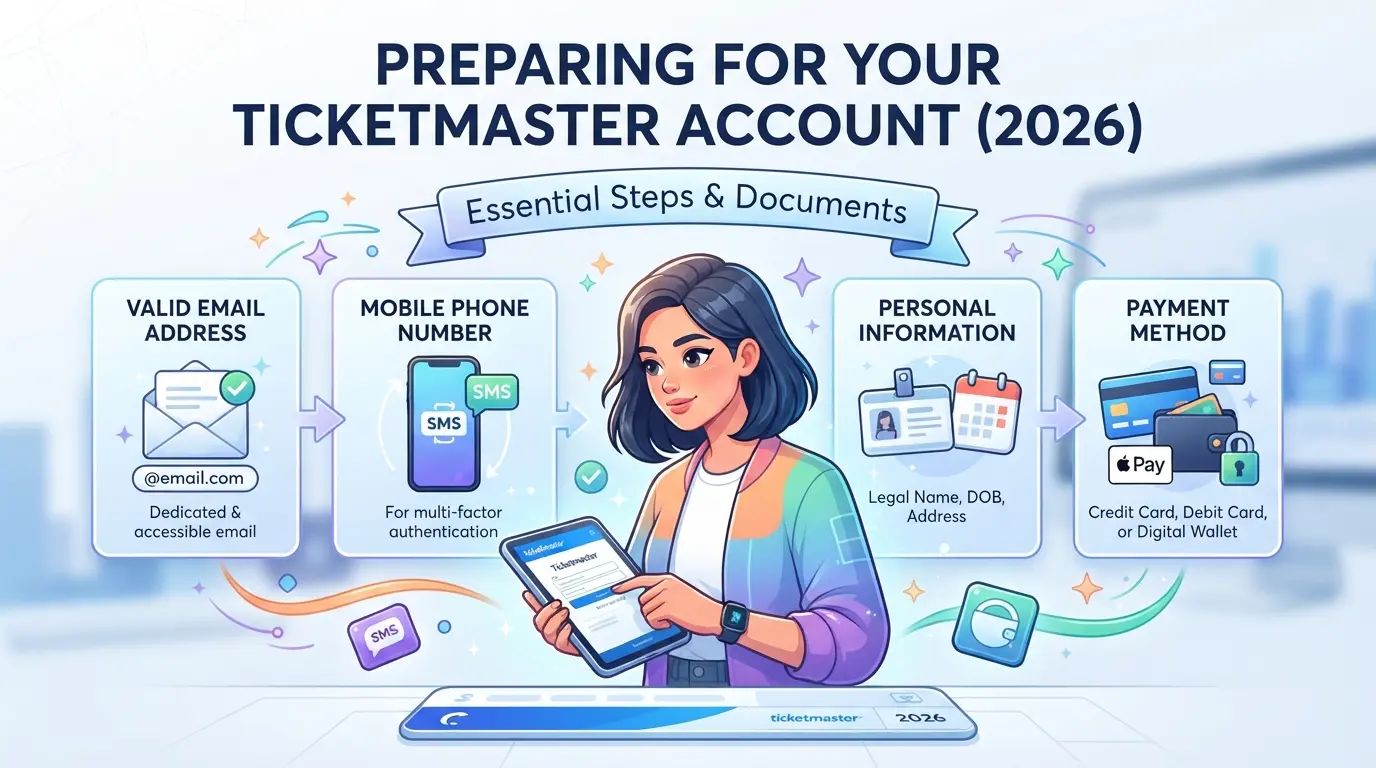
Required Personal Information and Documents
You’ll need a working email address that’s not already tied to any Ticketmaster account. That means you can’t reuse your main email if you’ve ever registered before. A mobile phone number is required for verification, prepaid numbers or virtual SMS services often fail, so use a regular carrier line. If Ticketmaster flags your sign-up as suspicious, you may be asked to scan a government-issued ID. This usually happens if you trigger extra checks by using mismatched details or logging in from outside your home country. Having a unique, real phone and email ready is what lets you recover your account if you lose access later.
Device and Browser Setup for Smooth Registration
Some device-browser setups get flagged or break the form. Avoid those headaches by checking these:
- Use a laptop or phone that hasn’t already signed up for Ticketmaster.
- Stick with Chrome, Firefox, or Safari, off-brand browsers can break forms.
- Clear cookies or use a fresh private/incognito window to avoid detection.
Network and Location Considerations
Ticketmaster tracks your IP and blocks many public or “dirty” proxies. If you try to create an account from a flagged address, you’ll often get blocked before finishing registration.
- Connect from your normal home internet, public Wi-Fi triggers more checks.
- Turn off location spoofing tools; they can cause instant restrictions.
- If you’re traveling, wait until you’re back home, or your account may get locked for location mismatch.
Once you’ve checked these boxes, the actual Ticketmaster registration steps go faster and with far fewer errors. Next, you’ll see how to create your account without hitting common blockers or triggering the usual instant restrictions.
Step-by-Step: How to Create a Ticketmaster Account Without Common Errors
If you follow the right Ticketmaster registration steps, you can avoid the typical problems that lock out new users, like verification failures or email issues, before you ever reach the checkout for your first event.
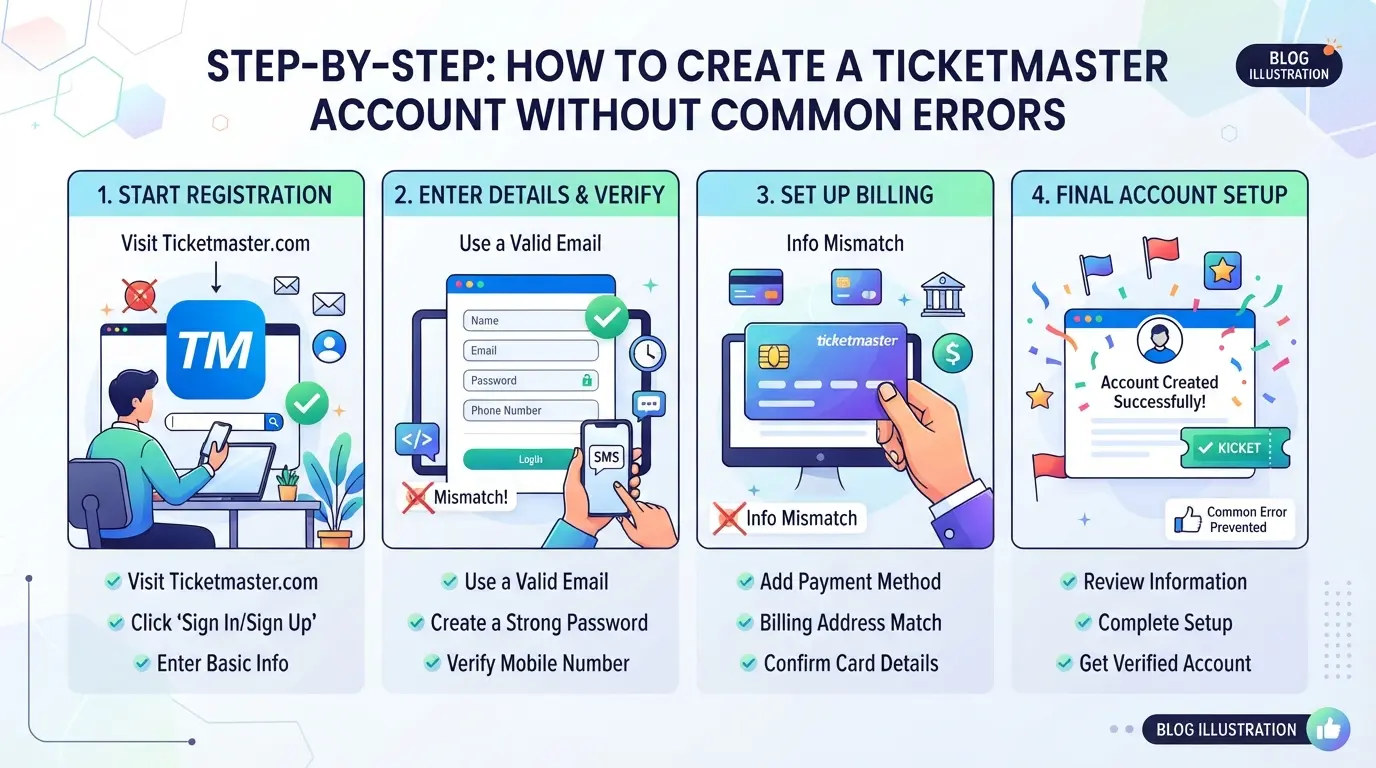
Starting the Registration Process
- Go to https://ticketmaster.com directly, don’t trust links in ads or forums. Fake sites often copy the design but steal your info.
- Check for the padlock icon in your browser’s address bar. If you see a security warning or the URL looks strange, stop and retype the address.
- Use a desktop or a well-updated mobile browser. Old app versions or mobile browsers sometimes glitch and lose your form data.
Filling Out the Registration Form Correctly
- Enter a personal email address that you control long-term. Work or school emails often cause problems later if you lose access.
- Pick a password at least 12 characters long using a mix of letters and numbers. If you reuse a password from a leaked site, your account could get flagged or even locked.
- Double-check your name and birthday. Typos can trigger extra ID checks or stop ticket transfers.
- Add your real phone number if prompted. Some events require SMS verification, using a temporary number here will block you from certain tickets.
Confirming Your Account and First Login
- Right after submitting, check your email (and spam folder) for a confirmation link. Some messages land in “Promotions” or “Junk” tabs and get missed.
- If you don’t get the email within 5 minutes, try resending or use the “Help” link on the login page. Repeatedly requesting new codes in a short window can actually lock your account out for up to 24 hours.
- When you click the confirmation link, make sure you’re still logged in on the same device and browser. Switching devices mid-process sometimes fails the activation.
- On your first login, set up a backup recovery method if offered. Missing this step means you’ll be stuck if you forget your password or lose phone access later.
Messing up the basics here, like using an unreliable email or skipping verification, sets you up for trouble before you even buy your first ticket. Next, you’ll see why some accounts get restricted or blocked right after creation, and what actually triggers those flags.
Why Some Ticketmaster Accounts Get Restricted or Blocked Right After Creation
New Ticketmaster accounts often get restricted or blocked within minutes because the system flags patterns that look risky or fake. The triggers aren’t random, most bans trace back to repeated registration details, odd device signals, or network issues that stand out during sign up.
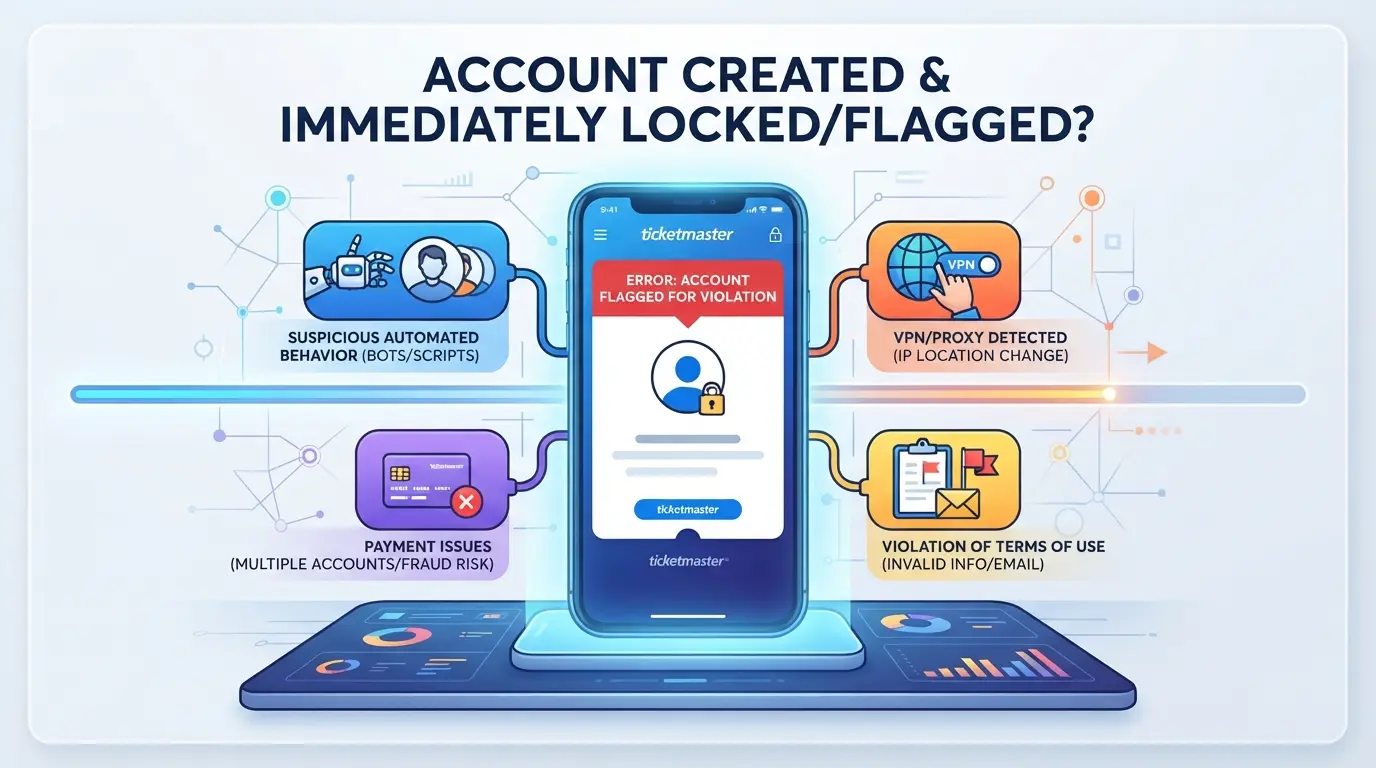
Frequent Causes of Instant Restrictions
Ticketmaster’s filters work fast. Accounts get blocked if you:
- Reuse an email, phone number, or device that’s already tied to another account.
- Register from an IP address with a known history of bans or mass sign-ups. These two mistakes alone explain most instant blocks, especially if you’re trying to create several accounts from the same location.
How Ticketmaster Detects Suspicious Behavior
Ticketmaster uses browser fingerprinting and device checks to spot duplicate or risky sign-ups. If your device looks too similar to others (same browser settings, language, plug-ins, or time zone), or if you’re registering from a proxy IP linked to flagged behavior, the system will often restrict access or require extra verification. For example, creating five accounts using Chrome on the same laptop, without changing anything, usually gets all of them blocked. The system also scans for unusual location jumps. If you sign up in New York, then log in from London five minutes later, the account will likely need phone or email confirmation. Most users get caught because they don’t realize how much data Ticketmaster collects during registration. Even simple things like copying browser cookies or using public Wi-Fi make your session look suspicious. The easiest way to avoid instant restrictions is to use clean device setups and unique credentials for every account.
What to Do If Your Account Is Flagged
If your account gets restricted right after creation, act quickly:
- Try the built-in appeal or verification links, these work best if you haven’t reused info.
- Check whether the block is permanent or just a cooldown; many triggers last 24 hours.
- If the restriction won’t lift, start over with a new email, phone number, and device, not just a new browser tab.
Most users waste time retrying with minor tweaks. If Ticketmaster’s system flags your setup, change everything before your next attempt.
How to Secure Your Ticketmaster Account Against Hacks and Takeovers
Even if you follow every Ticketmaster registration step, a weak setup can still expose your new account to takeovers or lockouts. Start with security basics right after creating your account, this is what actually keeps your tickets and profile out of someone else’s hands.
Enabling Two-Factor Authentication (2FA)
Turn on 2FA as soon as you log in for the first time. Go to your account settings, find “Security,” and enable 2FA using your phone or an authenticator app. This extra step blocks most hacks even if someone guesses your password.
Recognizing and Avoiding Phishing Attempts
- Only use links directly from ticketmaster.com, never trust login pages sent in email or SMS.
- Check sender addresses for slight misspellings or extra characters.
- If a message pressures you to reset your password “immediately” for security, treat it as suspicious and verify on the official site.
Best Practices for Password Management
Set a password that’s different from every other account you have and avoid anything tied to your birthday or name. A password manager makes this much easier and lets you use truly random passwords for every login.
- Use at least 12 characters with a mix of letters, numbers, and symbols.
- Never reuse passwords from other sites.
- Store your password in a trusted password manager, not in a notes app or email.
Skipping these steps often leads to losing access, either to a hacker or when you get locked out after a reset. Next up: managing more than one Ticketmaster account safely means you’ll need to handle extra risks and not just repeat this checklist.
How to Manage Multiple Ticketmaster Accounts Safely (and When It’s Risky)
Managing more than one Ticketmaster account is possible, but the platform sets limits. If you skip account separation steps, you risk every account, even your main one, getting locked after a single mistake.
Ticketmaster’s Policies on Multiple Accounts
Ticketmaster’s 2026 rules state that each person should have only one account per identity. Creating or operating several accounts tied to the same user, device, or payment details often breaks their terms. Violations lead to bans, loss of all linked tickets, and sometimes blacklisting of your email or device.
Risks of Multi-Account Management
Ticketmaster spots linked accounts by tracking IP addresses, browser fingerprints, and reused device or payment info. If you switch between accounts on the same browser or device, or reuse the same payment card, their system usually flags the profiles. A single flagged login from a shared device can trigger restrictions on every connected account. For example, if you run two accounts from the same laptop and one is flagged in a fraud sweep, both can be locked, even if only one actually broke the rules.
Safer Ways to Separate and Operate Multiple Accounts
- Use a different browser profile or device for each account, never mix logins in the same session.
- Assign a unique proxy (one per account) so IP addresses never overlap.
- Clear cookies and browser data between sessions, or use isolation tools that keep profiles fully separated.
Even with these steps, Ticketmaster can update detection methods at any time. The most reliable way to keep accounts safe is to treat each one as if it belongs to a different person, mixing details or shortcuts usually comes back to bite you. This approach is what powers advanced multi-account setups for marketers and teams.
How Teams Use DICloak to Separate Platform Accounts and Sessions
Handling multiple platform accounts, like Ticketmaster or social media logins, goes wrong when browser profiles overlap. Operators who want to avoid linkage or restriction need a setup that keeps every session completely separate. DICloak gives teams a way to build and manage these isolated environments before any account sign-up or login happens. The real trick isn’t just using different browsers, but making sure each profile stores its own browser signals and network settings from the start. If you skip this, cross-session leaks can flag accounts during registration or later activity.
Profile Isolation and Fingerprint Configuration for Each Account
Operators can create a separate browser profile for every platform account they manage. This means each session gets its own browser storage, operating system report, User Agent string, screen size, language, and time zone, never shared between accounts. The team configures fingerprint settings per profile so logins don’t overlap browser-identification signals. Keeping every account in its own browser profile stops the most common linkage mistakes during team work. 
Configuring Proxies for Network Separation
For advanced workflows, users assign a unique proxy to each browser profile, entering host, port, username, and password. DICloak stores and applies these proxy settings, so every account session runs on its own network identity. Operators test the proxy connection before starting any account task, confirming the detected exit IP and region. The scope is limited to browser-profile access; it does not change the connected platform. 
If you run into issues with account creation or access, the next section covers what to check and how to recover.
What to Do If You Can’t Create or Access Your Ticketmaster Account
If you’re stuck during Ticketmaster sign up or can’t log in after registration, the fix is rarely just changing your password. Most issues come down to reused info, browser glitches, or failed verification. Here’s what works:
Common Registration Problems and Fixes
- If your email or phone shows “already in use,” try password recovery, someone may have registered it before.
- When verification codes don’t arrive, check spam folders and confirm your phone carrier isn’t blocking short codes.
- Avoid using public WiFi, some networks block Ticketmaster emails completely.
Account Recovery and Support Options
- Use the “Forgot Password” link, if the reset email doesn’t show within 5 minutes, retry with a different browser.
- If recovery fails, contact Ticketmaster support through their help page, live chat is faster than email.
When to Try Again or Use a Different Device
- Clear browser cookies and cache first, old data can block account creation.
- Switch devices or networks if you keep getting errors. Mobile and desktop often trigger different registration checks.
Key Takeaways: Creating and Managing Ticketmaster Accounts Safely in 2026
Summary of Must-Do Steps
Start account creation with a clean device, a fresh email, and a phone number not used on other Ticketmaster profiles. Use a strong, unique password and enable two-factor authentication, these steps cut down on lockouts and unauthorized access.
Common Mistakes to Avoid
Skipping these details leads to most failed sign-ups or future bans:
- Reusing an email or phone tied to any old or banned Ticketmaster account
- Submitting inconsistent information (name, region, date of birth)
- Ignoring password security or leaving two-factor authentication off
Frequently Asked Questions About ticketmaster create account
Can I use the same email or phone number for multiple Ticketmaster accounts?
Ticketmaster requires each account to have a unique email address and phone number. Reusing contact info can block you from registering or cause login issues. If the same details are linked to several accounts, Ticketmaster may suspend or delete those profiles. Always use a new email and phone for each Ticketmaster account you create.
Is it safe to use a proxy when creating a Ticketmaster account?
Using a proxy can help keep your location private or manage several accounts. However, Ticketmaster may block accounts that use suspicious or blacklisted proxies. Always use trusted proxy services, avoid free or public proxies, and follow Ticketmaster’s terms. Violating their rules may result in a ban or loss of tickets.
How do I know if my Ticketmaster account is restricted or banned?
Common signs include being unable to log in, getting error messages, or not being able to buy tickets. You might also get an email from Ticketmaster about a restriction. If you see these signs, try resetting your password. If you’re still locked out, contact Ticketmaster support for help.
What should I do if I never receive the verification email or SMS from Ticketmaster?
First, check your spam or junk folder for the verification email. Make sure your phone number or email is entered correctly. Try resending the code or using a different email address or phone. If nothing arrives, contact Ticketmaster customer support to resolve the problem.
Are there tools to help manage multiple Ticketmaster or social media accounts securely?
Yes, browser profile managers are tools that help you keep different accounts separate and secure. These tools manage cookies, logins, and browsing data for each profile. This helps avoid conflicts and keeps your Ticketmaster registration steps organized, especially if you work with multiple accounts for business or events.Once your account is set up, you're ready to browse upcoming events and secure tickets with ease. Consider enhancing your online security as you manage your ticket purchases and personal information. Try DICloak For Free
 Web Proxy Tools
 Free Tools
 Cookie Plugin
 UA Generator
 MAC Address Generator
 IP Generator
 IP Address List
 2FA Code Generator
 World Clock
 Anonymous Check
 WebRTC Leak Test
 UUID Generator
 Free Web Proxy Site
 Proxy Checker
 FB Ad Checker
 AI Web Scraping
 Free SMM Tools
 Twitter Shadowban Checker
 Instagram Name Checker
 UTM Generator
 Username Generator
 AI Hashtag Generator
 LinkedIn Headline Generator
 Social Media Image Resizer