In 2026, Gmail remains one of the most widely used email services in the world, processing over 30% of global email traffic and serving more than 2.5 billion users.
According to Google’s official Help Center, there is no fixed limit on how many personal accounts one individual can create. However, Google continues to strengthen its verification systems. As a result, many users encounter phone verification during registration—even though it is not formally mandatory.
This guide explains why phone verification appears, how to create a google account without phone, and how to choose a sustainable approach based on your use case.
Why Google Account Without Phone Registration Often Triggers Phone Verification
From a policy perspective, Google does not require a phone number for every account.
In practice, phone verification is triggered when Google’s systems detect higher-risk signals, such as:
- Multiple account registrations in a short period
- Repeated attempts from the same browser profile
- Sudden IP or location changes
- Device fingerprints linked to previous violations
When these signals appear, Google adds verification steps to confirm legitimate human activity rather than automated or abusive behavior.
Is A Google Account Without Phone Still Possible In 2026?
Yes. Creating a google account without phone is still possible in 2026.
In some registration flows, users may see a “Skip” option on the phone number step. This option appears dynamically and depends on Google’s internal risk assessment.
It is important to understand that verification can still appear randomly. When that happens, waiting several hours or retrying on another day often improves the outcome.
Fast Path: Try These High-Success Options First
Before testing advanced methods, most users should start with the simplest and highest-success paths:
- Mobile app registration
- Skipping the phone step when available
- Using a clean browser session
For many personal users, these options are sufficient and do not require additional tools or configuration.
Google Account Without Phone: Desktop Step-By-Step Registration Guide
- Open the Google account creation page
- Choose the option without email or phone (if shown)
- Fill in basic personal information
- Add a recovery email (recommended)
- Click Skip on the phone step if available
- Complete the remaining setup
Google Account Without Phone: Mobile Step-By-Step Registration Guide (Android And iOS)
Android
- Register directly through the Gmail app
- Set the birth year to reflect an age between 13–15
- Select Skip when prompted for a phone number
iOS
- If the “Create account” option is temporarily unavailable, wait 24–48 hours
- Other steps mirror the Android process
8 Practical Ways To Create A Google Account Without Phone
Method 1: Use The “Skip” Option On The Phone Step
Some users will see a Skip button instead of a required phone field. Its appearance depends on IP reputation, browser profile history, and device signals.
Method 2: Use The Gmail Mobile App (Android And iOS)
The Gmail mobile app often applies less aggressive verification rules than desktop browsers, making it one of the most reliable options for personal use.
Method 3: Use Incognito Mode To Reduce Profile Signals
Incognito mode limits stored cookies and session data, making the registration appear as a new browser profile. Best suited for one or two accounts.
Method 4: Choose “No Email Or Phone” When The Option Appears
In some flows, Google allows registration without contact details. This may lead directly to password creation or trigger a QR-based flow without phone binding.
Method 5: Start Registration From YouTube Or Google Drive
Some Google services apply slightly different verification logic during account creation. This method is inconsistent but can work in certain cases.
Method 6: Space Out Attempts To Lower Verification Risk
Creating multiple accounts in a short time from similar profiles is a common trigger for verification. Spacing attempts across hours or days improves consistency.
Method 7: Use A Clean IP Region Strategy (Avoid Shared IP)
IP regions with lower SMS enforcement sometimes trigger fewer phone checks. Avoid low-quality or heavily shared IP, which often increase verification risk.
Method 8: Use Separate Browser Profiles For Consistent Signals (DICloak Option)
For users managing multiple google accounts without phone, browser-level repetition becomes the main limitation.
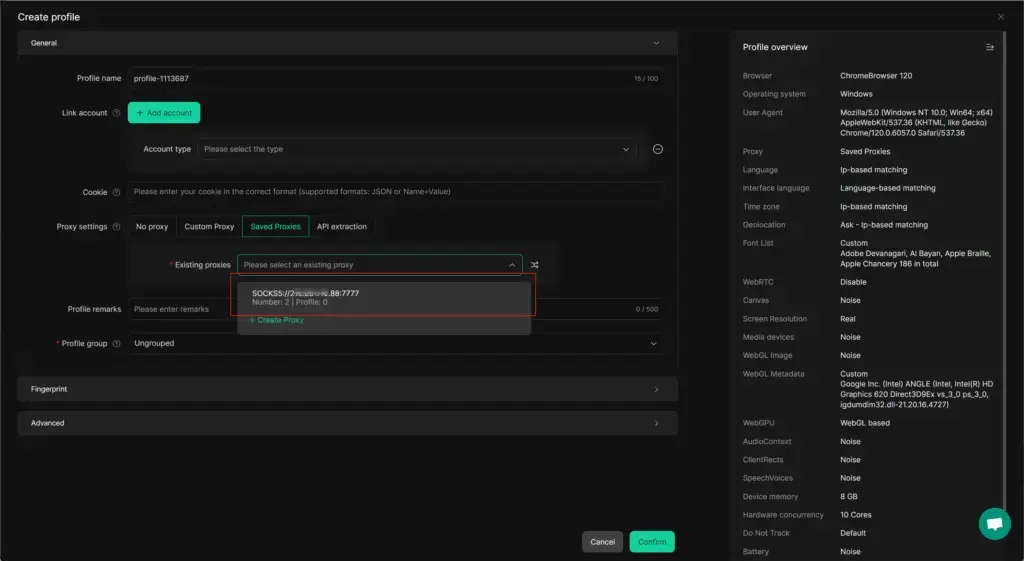
An anti-detect browser such as DICloak allows each registration to run in a separate browser profile, helping maintain consistent and realistic signals.
Each profile:
- Stores independent cookies, cache, and local data
- Presents unique fingerprint attributes (system type, language, timezone, browser parameters)
- Can be paired with a dedicated proxy
- Can be reused later to avoid repeated “new device” prompts
DICloak does not bypass Google’s systems. It helps reduce conflicting signals during registration and long-term account use.
What To Do If Phone Verification Appears When Creating A Google Account Without Phone
If phone verification is triggered despite using the methods above:
- Pause registration for 24 hours
- Change browser profile or IP
- Retry using mobile registration
- Use temporary SMS options only for non-critical accounts
Best Use Cases For A Google Account Without Phone
- Personal use: Gmail mobile app + Skip option
- Small-scale needs: Incognito mode + spaced registration
- Professional workflows: Independent browser profiles with long-term consistency
- After registration: Set recovery options early to reduce future verification
Google Account Without Phone: FAQs And Common Issues
Will a google account without phone be blocked later?
It may be asked to verify in the future. Reusing the same browser profile reduces friction.
Can Google detect anti-detect browsers?
High-quality tools aim to replicate realistic browser behavior, but verification can still occur.
Conclusion: A Technical Perspective On Creating A Google Account Without Phone
From a technical standpoint, creating a google account without phone in 2026 is not about a single trick, but about how consistently browser- and network-level signals are presented over time.
Google evaluates factors such as browser profile continuity, session behavior, IP reputation, and registration frequency. When these signals align with normal human usage patterns, phone verification is less likely to be enforced—both during registration and future logins.
For occasional users, mobile-based registration paths are often sufficient. For users operating multiple accounts, long-term stability depends on profile isolation, signal consistency, and disciplined timing, rather than attempts to bypass verification entirely. Tools like DICloak can support this approach by running each account in an independent browser profile with separate session storage and configurable fingerprint parameters. When profiles are reused consistently for the same accounts, teams can reduce “new device” friction and maintain cleaner operational separation over time.
Approached this way, maintaining a google account without phone remains technically feasible in 2026, even as Google’s risk models continue to evolve
 Web Proxy Tools
 Free Tools
 Cookie Plugin
 UA Generator
 MAC Address Generator
 IP Generator
 IP Address List
 2FA Code Generator
 World Clock
 Anonymous Check
 WebRTC Leak Test
 UUID Generator
 Free Web Proxy Site
 Proxy Checker
 FB Ad Checker
 AI Web Scraping
 Free SMM Tools
 Twitter Shadowban Checker
 Instagram Name Checker
 UTM Generator
 Username Generator
 AI Hashtag Generator
 LinkedIn Headline Generator
 Social Media Image Resizer