If Facebook asks you to complete a video selfie, it can feel confusing, stressful, and even unfair. Many users do not know why it appears, why it fails, or what to do next. Some people start searching for how to bypass Facebook video selfie, while others look through forums like how to bypass Facebook video selfie Reddit for quick answers. But in most cases, the real problem is not “how to bypass video selfie Facebook.” It is understanding why Facebook triggered the check in the first place and how to complete it in a cleaner, safer way.
This guide explains the common reasons Facebook video selfie verification fails, what mistakes users often make, why Facebook may reject a submission, and what steps can help improve the result. It also looks at what to do if your account gets locked, how to appeal a rejection, and how a more stable browser profile can support account management. The goal is simple: help you understand the process, reduce avoidable mistakes, and protect your account over time.
What Is Facebook Video Selfie Verification?
Facebook video selfie verification is a security check that asks a user to record a short video of their face to help confirm that a real person is using the account. Meta says it uses the video to help confirm identity and to detect fake videos or impersonation attempts. Meta also says it sometimes uses facial recognition technology to automate identity checks when a user submits a selfie.
Many users search terms like how to bypass facebook video selfie, how to bypass facebook video selfie reddit, or how to bypass video selfie facebook because this step can feel stressful and confusing. But the feature itself is meant to protect accounts, not just slow users down. In simple terms, Facebook uses it when normal signals are not enough and the platform wants stronger proof that the person on screen matches the account. Facebook’s help pages also show that video selfie checks are part of its broader identity-confirmation process, alongside other options such as document-based verification in some cases.
So, before looking for how to bypass facebook video selfie, it helps to understand what the feature is actually for. It is a verification tool designed to confirm identity, reduce fake account abuse, and add another layer of account protection when Facebook thinks a standard login is not enough.
Why Facebook Video Selfie Verification Fails
Many users search for how to bypass facebook video selfie because the verification step feels confusing, slow, or unfair. Some people also search how to bypass facebook video selfie reddit or how to bypass video selfie facebook when they cannot get through the process. But in many cases, the real problem is not how to bypass it. The real problem is that the video selfie was unclear, the setup was poor, or the submission did not match what Facebook expected.
Common Mistakes Users Make During Verification
- One common mistake is rushing through the process. Users may move too fast, hold the phone at a bad angle, or fail to follow the on-screen steps.
- Another common issue is mismatch. For example, the account name, profile details, or other identity signals may not line up well with what Facebook is trying to confirm.
This is one reason some users think they need how to bypass facebook video selfie, when the better next step is often to review the setup and submit more carefully. A simple real-life example helps here. Imagine a user starts the video selfie in a hurry, uses a shaky front camera, and does it in a dim room. The face may not be captured clearly enough. The user then assumes Facebook rejected them for no reason. In reality, the problem may be technical and fixable, not personal.
How Lighting and Background Affect Verification
Lighting and background can make a big difference. If the room is too dark, too bright, or full of visual clutter, the face can be harder to read clearly. Meta’s help guidance on rejected identity submissions says content may be rejected when the picture is not clear or is missing important information. While that page talks about ID rejection, the same basic quality rule helps explain why selfie-based checks can also fail when the face is hard to capture well.
- A clean setup usually works better,including:
- steady camera position
- even light on the face
- a simple background without strong shadows or distractions.
Users in public discussions often describe problems when the camera freezes, the app glitches, or the face is not captured well, which shows that environment and device conditions can affect the result. That is why many people who search how to bypass video selfie facebook are often dealing with a failed capture problem first, not a true need for a bypass.
Why Facebook Rejects Your Video Selfie
In the last section, we looked at why Facebook video selfie verification can fail during the recording step. The next question is just as important: why does Facebook reject a submission even after the video is sent? Many users start searching how to bypass facebook video selfie, how to bypass facebook video selfie reddit, or how to bypass video selfie facebook when this happens. But in many cases, the rejection is not about needing a bypass. It is about quality, mismatch, or missing trust signals in the review process. Meta’s help pages explain that identity submissions can be rejected when the image is not clear enough, when key details are missing, or when the information does not match what Facebook expects for verification.
Facebook may reject a video selfie for three broad reasons.:
- the video itself may be unclear.
- the account information may not line up well enough.
- the overall risk signals around the account may still make the platform uncertain.
One common reason is poor visual quality. If the face is too dark, too blurry, partly covered, or recorded in a messy background, the system may not get a clear enough view to complete the check. This connects directly to the problems we covered earlier, such as bad lighting, shaky camera movement, and weak background setup. A simple example is someone recording in a dim bedroom at night with the phone moving the whole time. The user may feel the video “looks fine,” but the system may not be able to confirm the face well enough.
Another reason is mismatch. Facebook may compare the selfie process with account details, profile information, or other identity signals. Meta’s business help pages say verification can fail when the submitted information does not match expected details, and its identity help pages show that verification is part of a broader identity-confirmation process. In plain words, even a clear video can still be rejected if the account looks inconsistent. For example, a user may have one name on the account, a different public identity pattern, and activity that makes the review less certain. In that kind of case, the problem is not always the camera. It can also be the account context around the submission.
There is also the issue of risk review. Meta says video selfie verification is used to help confirm identity and detect fake videos or impersonation attempts. That means the review is not only about whether a face appears on screen. It is also about whether the submission looks trustworthy in the full account-security process. This is why some people look for how to bypass facebook video selfie reddit discussions after a rejection, even though the better next step is often to improve the environment, follow the instructions more carefully, and make sure the account details are consistent.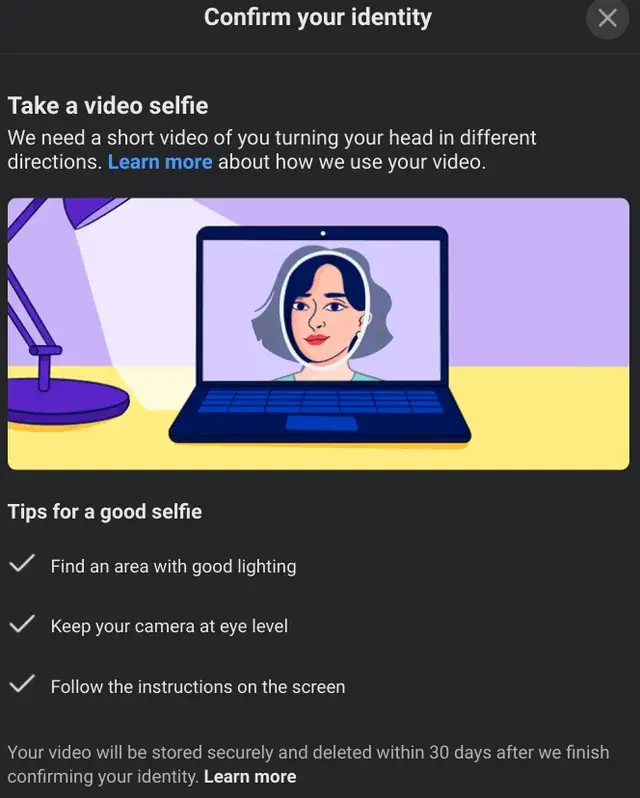
Deciding Whether to Bypass or Comply Facebook Video Selfie
After a rejected video selfie, many users feel stuck. That is why searches like how to bypass facebook video selfie, how to bypass facebook video selfie reddit, and how to bypass video selfie facebook become so common. But before trying to avoid the check, it is important to step back and look at what Facebook is trying to do. Meta says video selfies help confirm identity and detect fake videos or impersonation attempts. In simple words, the system is there to protect account access and reduce abuse, even if the process feels frustrating to real users.
Benefits of Complying with Verification
In many cases, complying with verification is the safer and more stable choice. If the request is real and comes through Facebook’s official app or website, completing the process the right way gives the platform a direct path to review your identity. .
A simple example is an account that triggered a security review after an unusual login. A user may be tempted to look for how to bypass facebook video selfie, but a careful resubmission with better lighting, a stable camera, and consistent account details is usually more sustainable than trying to avoid the step. If the goal is to keep the account for the long term, working with the official review process often gives a better chance of restoring trust.
Risks of Bypassing Facebook Video Selfie
Before thinking about bypassing, it helps to understand the trade-offs. A bypass attempt is not just a technical shortcut. It can create larger account, privacy, and legal problems.
Potential Account Suspension or Ban
Meta’s Transparency Center says it does not allow inauthentic behavior, fake accounts, or accounts created or used by scripted or other inauthentic means. Meta also says it may suspend accounts when it finds that the account or activity may not follow its Community Standards. That means trying to avoid or fake a verification step can raise the risk of more restrictions instead of solving the problem.
A good way to think about it is this: a failed selfie is often a review problem, but a bypass attempt can turn it into an account integrity problem. That is a much harder issue to fix later.
Privacy Concerns and Data Security
Privacy is another big concern. Meta says it sometimes uses facial recognition technology to automate identity verification when a selfie is submitted. Because face data is sensitive, many users already feel cautious about this step. But using unofficial third-party tools or random advice from how to bypass facebook video selfie reddit threads can create even more privacy risk, because you may end up sharing account access, device data, or personal images with unknown services.
In real life, this can be worse than the original problem. A user who is only trying to regain account access may end up exposing personal data to an untrusted site or seller. So even if Facebook’s review process feels uncomfortable, random bypass offers can be riskier.
Legal Implications of Bypassing Verification
The legal side can also matter. The exact rules depend on your country and situation, but using fake identity material, impersonation methods, or deceptive verification practices can create legal problems beyond the platform itself. At a minimum, it can put you in conflict with Meta’s platform rules and account authenticity standards. Meta’s policies stress authenticity and prohibit misrepresentation on its platforms.
This does not mean every failed attempt becomes a legal case. But it does mean that trying to fake identity checks is not a harmless shortcut. For many users, the risk is much bigger than the possible reward.
Factors to Consider Before Bypassing
Before acting, ask a few simple questions. Is the request coming from Facebook’s official app or website? Did your first submission fail because of bad lighting, motion, or unclear capture? Are your account details consistent enough to support a clean review? And most importantly, is your real goal fast access today, or long-term account stability?
For most users, that answer points in the same direction. If the account matters, the safer path is to improve the submission, use official support or recovery flows, and reduce the signals that caused the review in the first place. Many people search how to bypass video selfie facebook because they want a quick fix. But when account safety, privacy, and long-term use matter, compliance is usually the stronger choice.
Long-term Implications of Bypassing
Many users search how to bypass facebook video selfie, how to bypass facebook video selfie reddit, or how to bypass video selfie facebook because they want a quick fix, but the long-term results are often more risky than they expect.
- Lower account trust over time If Facebook already sees an account as risky, avoiding official verification can make the account look even less trustworthy in the future.
- More reviews and restrictions later A bypass attempt may not solve the real issue. It can lead to more checks, more limits, or repeated verification requests later on.
- Harder account recovery If the account gets flagged again, future recovery can become more difficult because Facebook may ask for stronger proof or longer review steps.
- More privacy risk Users who rely on random tools, unknown services, or forum tips may end up sharing personal photos, account access, or device information with untrusted third parties.
- Less control over your own data A short-term shortcut can create a long-term problem if sensitive account or identity details are exposed during the process.
- More stress and confusion in the long run Instead of fixing the problem once, bypassing can create a cycle of repeated flags, failed recovery attempts, and unstable account access.
So,for users who care about keeping the account, protecting personal information, and reducing future problems, compliance is usually more stable than trying to bypass the system.
How to Bypass Facebook Video Selfie Verification Safely
Using AI to pass Facebook video verification
- Firstly, you need to download OBS Studio. Make OBS the main camera in anti-detection.
- Next, enter the search bar: chrome://settings/content/camera, and then switch to OBS at the top. Important: If you installed OBS after launching your profile in anti-detection, the camera may not be available. To fix this, you need to restart your browser.
- The next step is to create a portrait of any person in a 3D generator (we recommend Krea 3D or Tripo3 generators). Now you need to set up the face demonstration in the OBS camera. You can test the camera using Webcamtests. Go through the verification process on Facebook. Turn your head as instructed by the application.
Using DICloak’s Video Stream Spoofing
With DICloak’s Video Stream Spoofing, handling Facebook selfie verification becomes simple and stress-free. Here’s how it works:
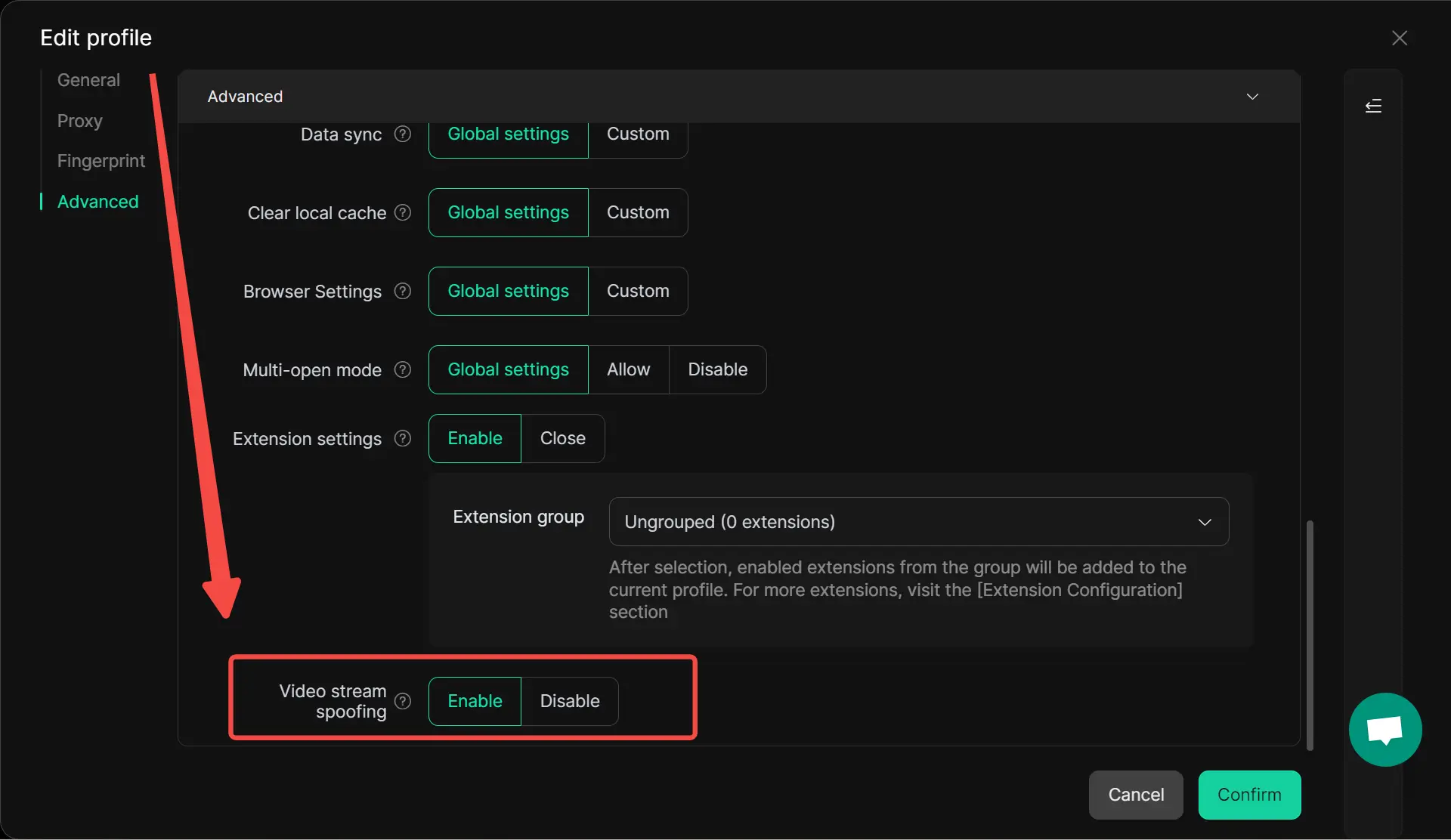
- Step 1: Enable Video Stream Spoofing:Go to Edit Profile/Create Profile – Advanced in DICloak and toggle on Video Stream Spoofing.
- Step 2: Prepare Your Video:Prepare a pre-recorded MP4 verification video that meets Facebook’s selfie verification requirements. The video should show a clear, front-facing view of your face, include natural movements like turning your head so that Facebook’s system can accurately verify your identity.
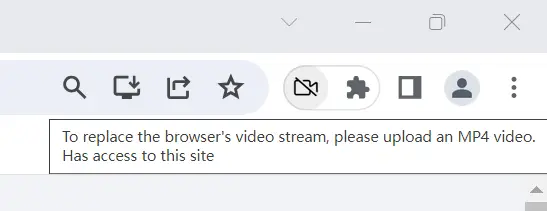
- Step 3: Open the Target Profile:Open the corresponding profile that enables Video Stream Spoofing in DICloak, and click the “Camera Disabled” icon in the top-right corner (as shown above).
- Step 4: Upload the Verification Video:Upload the prepared video. DICloak will stream it as if it’s a live selfie check, allowing Facebook to accept the verification.
It may not work the first time, so you may need to retake the video. It is worth adding that this method is actually effective, and in most cases, users have successfully passed the video verification with a “fake face.” As practice has shown, this is best done using the Krea 3D generator.
What affects the likelihood of successfully passing the video verification?
As certain cases show, it is purely random. Sometimes it may work on the first try, and sometimes Facebook will not let you pass even after ten attempts.However, keep in mind that in this case, Facebook’s work can be somewhat random. And the success of your video verification depends on this.
How to Verify and Handle after Bypass Failure
After looking at the risks and long-term problems of trying to avoid Facebook’s checks, the next step is more practical: what should you do if the attempt fails and the account becomes harder to access? Many users search how to bypass facebook video selfie, how to bypass facebook video selfie reddit, or how to bypass video selfie facebook because they want a fast answer. But once a failed attempt leads to a locked account or another rejection, the smarter path is usually to work through Facebook’s official recovery flow. Facebook’s Help Center says locked accounts can often be unlocked by opening Facebook, selecting Get started, and following the on-screen steps, and it notes that Facebook may ask you to confirm your identity during this process.
Steps to Take If Your Account Is Locked
If your account is locked, start with the official unlock process instead of trying random fixes. Facebook says users should open Facebook, choose Get started, and follow the instructions to unlock the account, and the platform may ask for identity confirmation as part of that review. In some security-check cases, Facebook also says users may need to wait 24 hours before logging in again, even after finishing the security check.
A simple example is a user who keeps retrying login and verification steps too quickly after a rejection. That can create even more confusion and make the situation feel worse. If the account is locked, it is better to stop, use the official unlock path, and let the review process work. Facebook also says that if you choose not to confirm your identity with a video selfie in some cases, you may not be able to log back into your account, which shows why official identity steps matter once access is limited.
How to Appeal a Verification Rejection
If Facebook rejects the verification, the first thing to do is check why the submission may have failed. Facebook’s Help Center says identity submissions may be rejected when the picture is not clear enough or when important information is missing. It also provides an official Confirm Your Identity contact flow where users can submit an approved document, such as a passport, driver’s license, or other government ID, when identity confirmation is needed.
In real use, this means a rejection is not always the end. For example, a user may submit a poor-quality selfie first, then later move to a clearer identity-confirmation route if Facebook offers it. Facebook’s accepted-ID guidance also notes that the ID should include a face photo and birth date, which helps explain why the next appeal should focus on clarity and matching information instead of trying shortcuts. So, even if someone originally searched how to bypass facebook video selfie reddit, the stronger next move after a rejection is usually to give Facebook a clearer, more complete review path.
Rebuilding Trust with Facebook After a Failed Attempt
After a failed attempt, rebuilding trust is usually about consistency. Facebook’s video selfie help page says the feature is used to help confirm identity and detect fake videos or impersonation attempts. That means the platform is not only looking at one clip. It is also looking at whether the account and the recovery process feel authentic enough to trust.
A practical way to rebuild trust is to slow down, use the official app or website, keep your account information consistent, and avoid repeated rushed attempts. For example, if a user changes devices, networks, and login patterns again and again right after a rejection, that can make the recovery flow feel less stable. On the other hand, using the official confirmation path, submitting clearer material, and waiting through the review window gives the account a more consistent recovery trail. For users still searching how to bypass video selfie facebook, this is usually the more realistic long-term path: fewer rushed retries, cleaner verification steps, and more patience with the official review process.
How a Cleaner Browser Environment Can Support Facebook Verification
When a verification bypass fails, fixing the immediate problem is only one part of the process. Many users focus on unlocking the account or submitting another appeal, but the real issue is often the browsing environment behind the attempt. If the login session, cookies, device signals, or account setup keep changing, Facebook may continue to treat future actions as risky. That is why, after dealing with a failed attempt, it also makes sense to look at how to create a cleaner and more stable account environment before trying again.
Using DICloak for More Stable Facebook Account Management
For users dealing with repeated Facebook account checks, login reviews, or recovery steps, a cleaner browser setup can make account handling easier and more organized. This is where DICloak can help. Instead of managing everything in one regular browser, DICloak gives users a more structured way to separate account environments, reduce session overlap, and keep Facebook-related workflows more stable.
How DICloak Helps Keep Browser Environments More Consistent
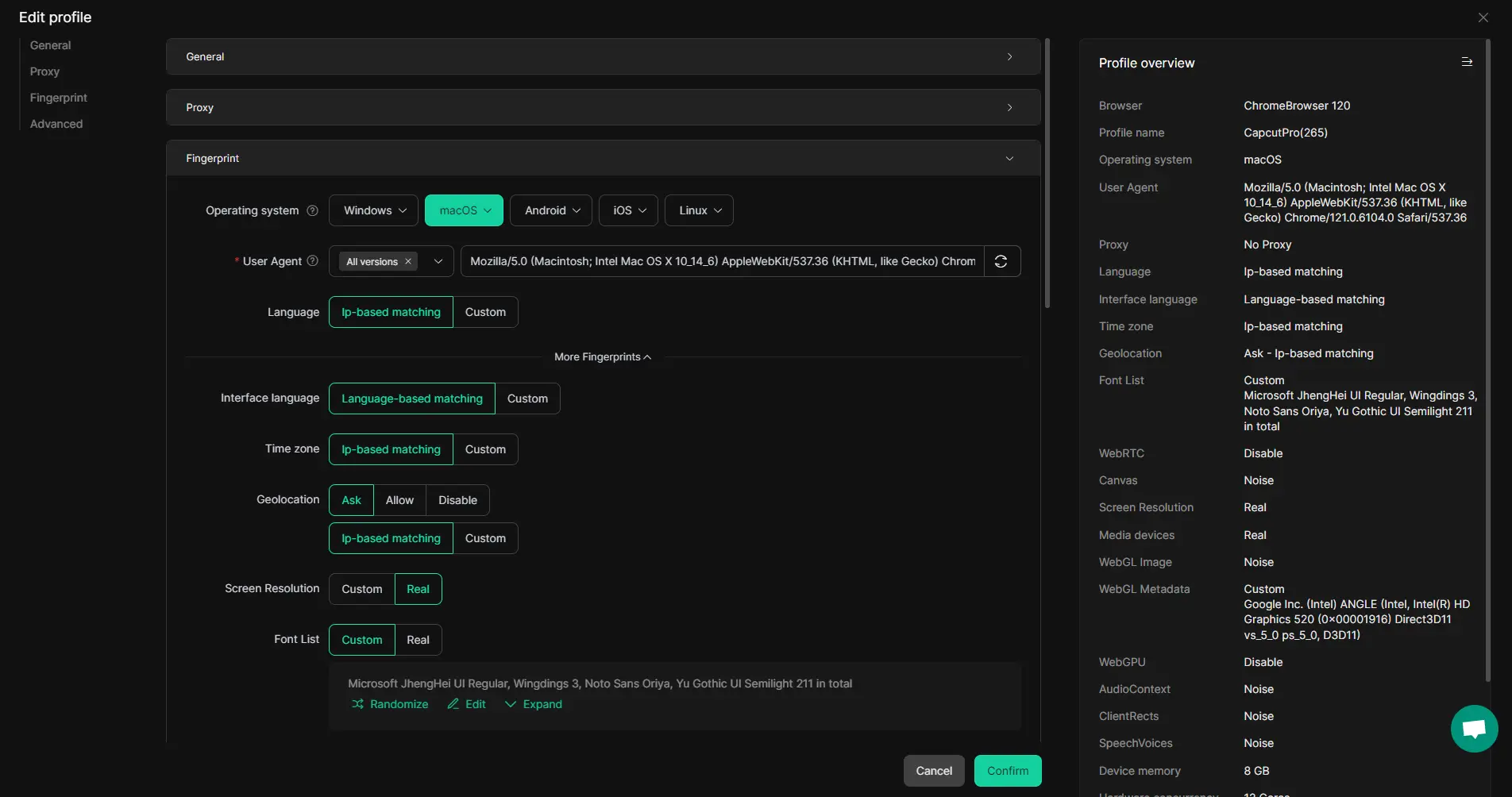
DICloak lets users create separate browser profiles for different Facebook accounts or tasks. Each profile can keep its own cookies, session data, fingerprint settings, and proxy configuration. This helps users avoid mixing browsing environments, which is especially useful when handling repeated Facebook account actions, account recovery steps, or verification-related workflows.
Managing Multiple Facebook Accounts More Clearly with DICloak
For users who manage more than one Facebook account, DICloak offers a more organized setup. Instead of switching between accounts in one browser, users can keep each Facebook account in its own isolated profile. This makes Facebook account management clearer, helps reduce confusion between sessions, and gives teams a better way to handle shared account work through features like profile sharing, permission controls, and operation logs.
Using DICloak’s RPA Tools for Repetitive Account Tasks
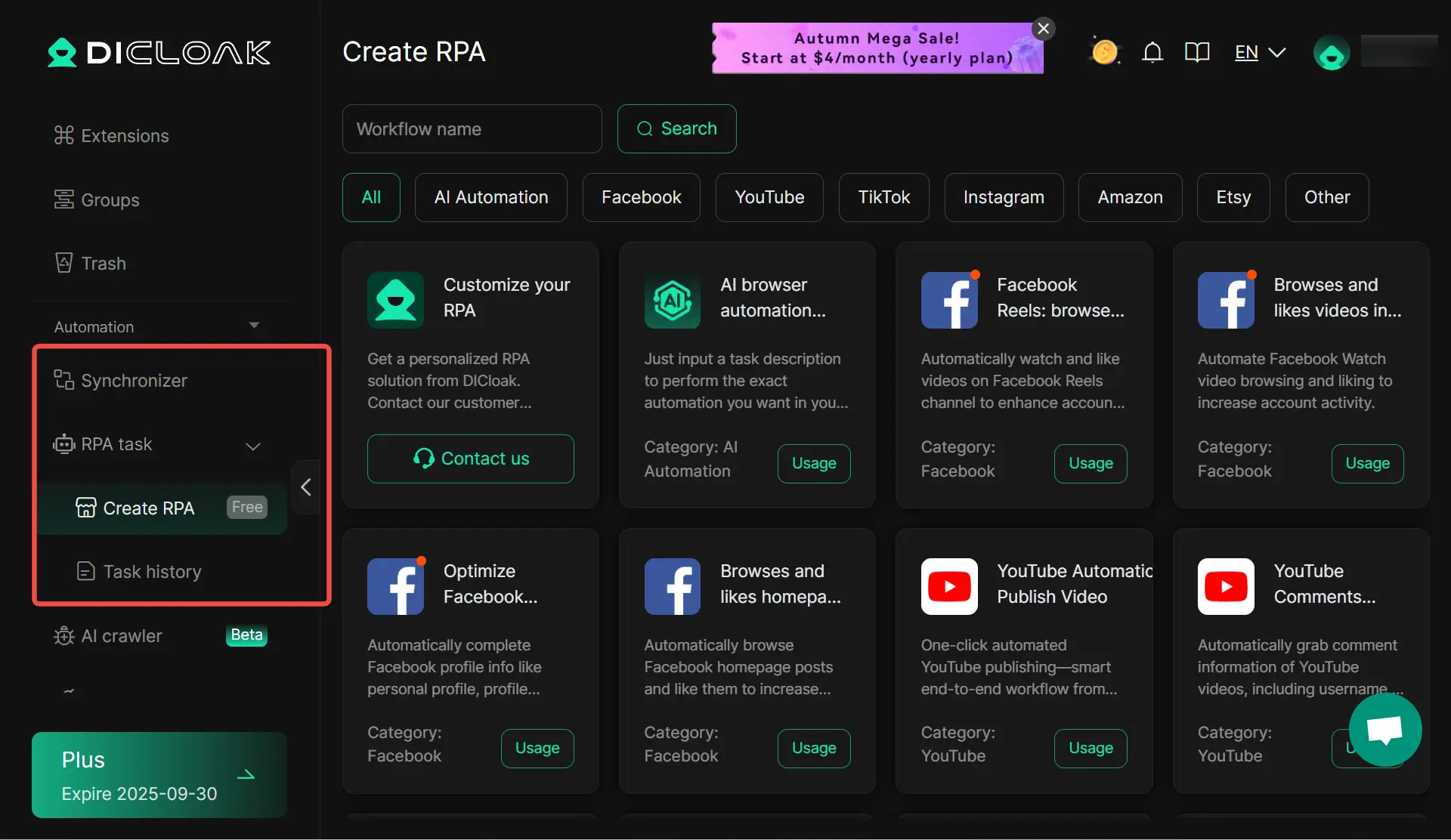
DICloak also includes RPA tools, bulk operations, and synchronizer features that can help users handle repetitive Facebook account tasks more efficiently. For users working with large numbers of profiles or repeated account actions, this can save time and make daily workflows easier to manage. Instead of repeating the same browser actions again and again by hand, users can build a more efficient and scalable Facebook account workflow.
FAQ About Bypass Facebook Video Selfie
Q1:Can You Use How to Bypass Facebook Video Selfie Without Tools?
Most users who search how to bypass facebook video selfie are looking for a shortcut, but the safer answer is to follow Facebook’s official verification flow. Meta says video selfies are used to confirm identity and detect fake videos or impersonation attempts.
Q2:What Happens If You Ignore Facebook’s Verification Request After Searching How to Bypass Facebook Video Selfie?
If you ignore the request, you may lose access to some features or may not be able to log back into your account. Meta says that in some cases, if you choose not to confirm your identity with a video selfie, you may not be able to log in again.
Q3:Is It Legal to Try How to Bypass Facebook Video Selfie Verification?
The bigger issue is usually platform policy, account safety, and authenticity rules. Trying to avoid identity checks can put your account at risk, while using Facebook’s official process is the safer option for long-term account access.
Q4:How Long Does Facebook Take to Review a Video Selfie When You Search How to Bypass Facebook Video Selfie?
Meta says the review process may take up to two business days in some video selfie flows. That means waiting for review is often part of the normal process, even if users start by searching how to bypass facebook video selfie reddit or how to bypass video selfie facebook.
Q5:What Are the Alternatives to How to Bypass Facebook Video Selfie Verification?
Facebook may offer other official identity confirmation options in some cases, such as uploading an approved ID. Meta’s Help Center also lists accepted ID types and official identity-confirmation forms
Conclusion
Many users search how to bypass facebook video selfie because the process feels stressful, confusing, or unfair. But in most cases, the smarter path is not to look for shortcuts. It is to understand why Facebook triggered the check, improve the quality of your next attempt, and use the official recovery and appeal steps when needed. As this guide shows, problems with lighting, camera stability, unclear account details, and inconsistent login behavior often explain more than any so-called bypass method.
If your account matters in the long run, trust, consistency, and a clean setup matter more than a quick workaround. A safer approach is to slow down, follow Facebook’s official process, and make your browser and account environment more stable over time. For users who manage multiple account workflows, tools like DICloak can also help keep profiles, sessions, and account activity more organized. In the end, the real answer to how to bypass facebook video selfie is usually not bypassing it at all, but handling verification in a clearer, safer, and more sustainable way.
 Web Proxy Tools
 Free Tools
 Cookie Plugin
 UA Generator
 MAC Address Generator
 IP Generator
 IP Address List
 2FA Code Generator
 World Clock
 Anonymous Check
 WebRTC Leak Test
 UUID Generator
 Free Web Proxy Site
 Proxy Checker
 FB Ad Checker
 AI Web Scraping
 Free SMM Tools
 Twitter Shadowban Checker
 Instagram Name Checker
 UTM Generator
 Username Generator
 AI Hashtag Generator
 LinkedIn Headline Generator
 Social Media Image Resizer