Most people bulk create MetaMask wallets to grab airdrops, manage crypto farming, or run cross-platform operations. The real challenge isn’t just generating hundreds of wallets , it’s keeping each wallet separate, safe from detection, and avoiding mistakes that get accounts flagged or banned. If you try to mass generate MetaMask wallets using basic scripts or copy-paste setups, you’ll run into problems fast: browser fingerprints overlap, session data leaks, and wallet addresses get linked by exchanges and DeFi platforms.
The biggest risk? One slip and all your wallets get tied together. Platforms like Binance or Uniswap often track device signatures, cookies, and IPs. If your bulk wallet creation leaves traces, you’re not just wasting effort , you could lose access, rewards, or even funds. Simple automation isn’t enough; you need to control browser profiles, proxy settings, and wallet seed generation so every wallet looks truly independent.
What actually works is a step-by-step process that covers profile isolation, safe automation, and manual checkpoints. You need to know why skipping a fingerprint reset lets exchanges see your whole batch, or why using one proxy for mass wallet creation means every address gets grouped. The guide below breaks down each step , from setup to testing , so you can bulk create MetaMask wallets without getting caught or blocked.
Start with the right browser setup , this is where most people slip.
What to Prepare Before Bulk Creating MetaMask Wallets
If you miss the basics at setup, every wallet you generate can end up flagged or even locked together. Before you even click to mass create MetaMask wallets, make sure your device, browser, and storage plan are actually clean , not just convenient.
Choosing the Right Device and Browser Environment
Most people think any browser will do, but reusing your daily driver PC or browser profile almost always leaves fingerprints that get you grouped. The point is to look like a real, unrelated user every time , not a bot farm. If you run bulk wallet creation from a single machine or browser, sites and blockchains can match your hardware, extensions, and browsing history. This is where even skilled operators get tripped up: forgetting that a clean OS install and a fresh browser profile are not the same thing. The real mistake is assuming incognito mode is enough , it isn’t.
Short answer: Only use fresh, isolated browser profiles on a clean device. Never reuse an environment tied to your identity or previous wallets.
Managing Seed Phrases and Private Keys Securely
Exporting seeds and keys is where accidents turn into losses. If you copy a seed to the clipboard or leave it in a cloud note, one slip and you leak every wallet you just made. You want a storage process that never touches shared, synced, or cloud-linked folders , and never leaves keys in plain text.
Checklist before you start:
- Use an offline password manager or encrypted USB drive to store seed phrases.
- Confirm clipboard history and cloud sync are disabled during wallet generation.
- Prepare a naming or tagging system, so you can track which seed belongs to which browser profile without mixing them up.
Skipping even one of these checks means you might as well hand out your new wallets on a public forum. The next section breaks down how small setup errors turn into major risks.
Why Bulk Creating MetaMask Wallets Gets Risky Fast
Platforms don’t just watch for obvious spam, they use fingerprints, timing, and network clues to group and restrict wallets. If you rush through mass wallet creation, you’ll likely trigger the very patterns that exchanges and DeFi projects are built to spot. The real risk isn’t just getting caught; it’s losing future access or rewards because your “new” wallets are all linked behind the scenes.
How Platforms Detect Bulk Wallet Creation
Even without direct wallet bans, detection is built into most platforms. Here’s where most operators slip up:
- Browser fingerprints repeat: If you use the same browser profile or automation script, tiny details, like user agent or canvas data, stay identical across wallets, making them easy to cluster.
- IP addresses overlap: Running creation or login sessions from the same IP, datacenter range, or proxy subnet draws a straight line between otherwise “independent” wallets.
- Action timing patterns: Fast, regular, or identical creation times (like 20 wallets in 3 minutes) flag your batch for review, especially if you use automation without random delays.
Common Mistakes That Lead to Wallet Linking or Bans
Most failures come from shortcuts that seem harmless. Operators often reuse a browser profile to speed up the process, thinking clearing cookies or switching accounts is enough. In practice, the browser’s fingerprint, plugins, fonts, screen size, and even hardware IDs, remains the same. This means every MetaMask wallet you create looks like it came from one device, even if you swap proxies.
Another risky move is copy-pasting a seed phrase or using a script to mass-generate wallets without proper entropy. Exchanges and DeFi projects sometimes track wallet creation patterns or check for reused seeds. If your wallets show up with predictable or repeated characteristics, they might all get rejected for airdrops or blocked from farming pools. For example, a team tried to mass generate MetaMask wallets for an airdrop by running headless Chrome with a simple script. The result? All 50 wallets were flagged and disqualified, and several lost their farming rewards weeks later.
The key tradeoff is speed versus stealth. If you cut corners on browser isolation or randomness, you save time up front but risk losing every wallet in your batch, sometimes long after you think you’re safe. That’s why experienced operators build in isolation at every step, even if it means a slower workflow.
Ready to see how bulk wallet creation actually works? The next section gives a clear, step-by-step approach you can test, without falling into these traps.
How to Bulk Create MetaMask Wallets: Step-by-Step Methods
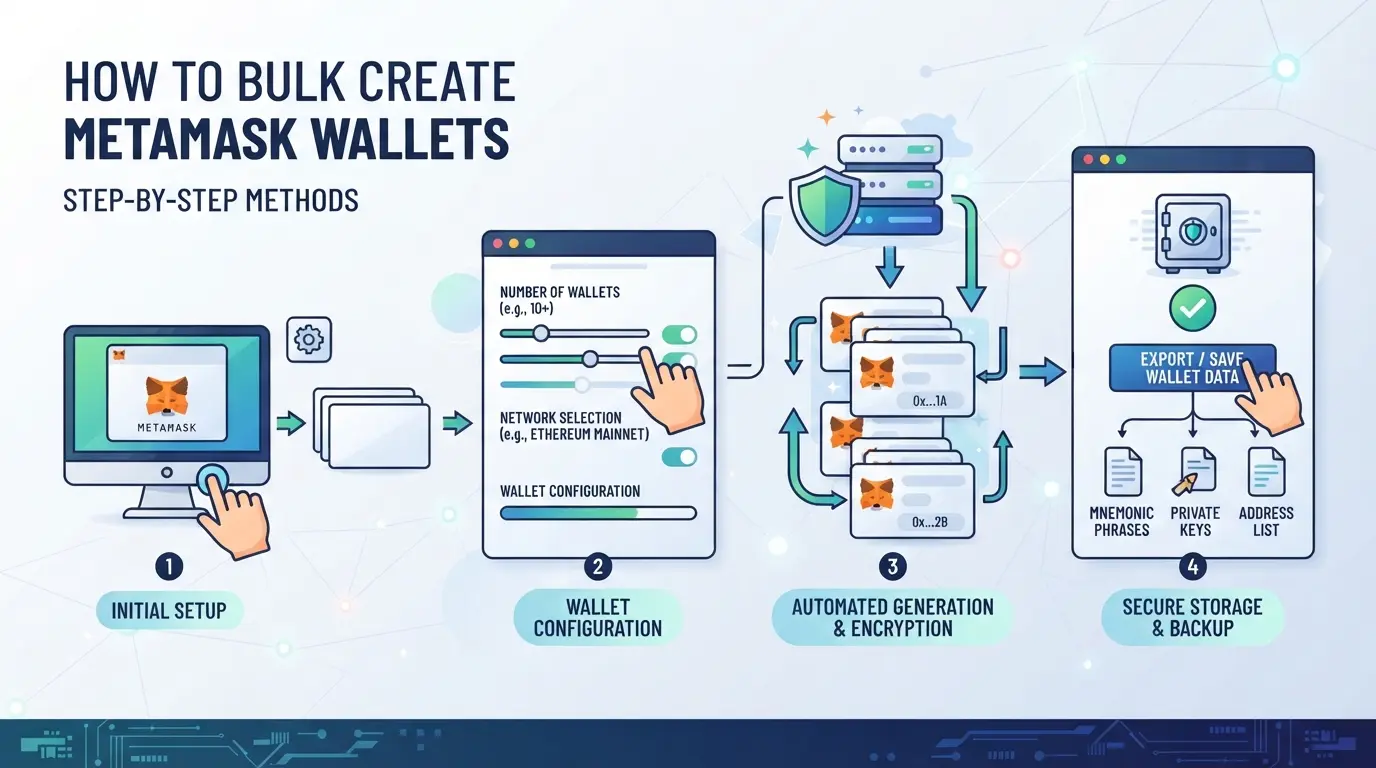
Getting mass wallet creation right means controlling fingerprints, proxies, and seeds every time. The wrong process leaves tracks that get you flagged. Here’s how to handle both manual and automated methods for safe, efficient wallet generation, without tripping risk alerts.
Manual Creation: When and How to Use It
Manual methods make sense for small batches (under 10 wallets) or when every wallet needs unique, hands-on setup.
- Open a new browser profile or incognito window for each wallet, never reuse a profile or cookies.
- Install MetaMask, create a new wallet, and record the seed phrase and password. If you skip the record, you’ll lose access.
- Change your proxy or network each time, using the same IP groups all wallets.
- Save each wallet’s seed in a secure, offline file. If you mistype, you can’t recover the funds.
This approach is slow, but it keeps each wallet clean and avoids accidental links.
Automated Scripts and Tools for Bulk Wallet Generation
Automation makes sense above 10 wallets, but only if you check for leaks at every step.
- Use trusted open-source scripts (like web3.py, ethers.js) that can generate wallet seeds offline. Modify scripts to set a unique proxy and user-agent per run.
- Run scripts in isolated containers, not on your everyday machine. If your script runs in one OS session, browser fingerprints will match.
- Store seeds, private keys, and addresses in encrypted CSV or JSON. If you skip encryption, a single breach exposes all wallets.
- Test a random sample, import 2-3 wallets into MetaMask to confirm they load and connect as expected.
If the script reuses proxy, user-agent, or system-level cookies, expect linkages across all generated wallets.
Importing and Exporting Wallets in Bulk
Getting wallets into MetaMask or another manager in bulk needs careful format handling.
- Prepare your wallets in CSV or JSON, each row should have an address, private key, and optional label.
- Use MetaMask’s “Import Account” with private keys, not seeds. MetaMask doesn’t support seed import for multiples at once.
- For bulk import tools, check the format matches (lowercase hex for private keys, no extra whitespace).
- If you see import errors, like “Invalid private key” or skipped rows, recheck for hidden line breaks or unsupported characters.
One wrong character in your CSV can block the whole batch, so always test with a small file first before scaling up.
Before moving forward, it’s worth seeing what usually causes bulk wallet operations to break, and how to catch those errors early.
What Makes Bulk Wallet Operations Fail: Real-World Errors and Fixes
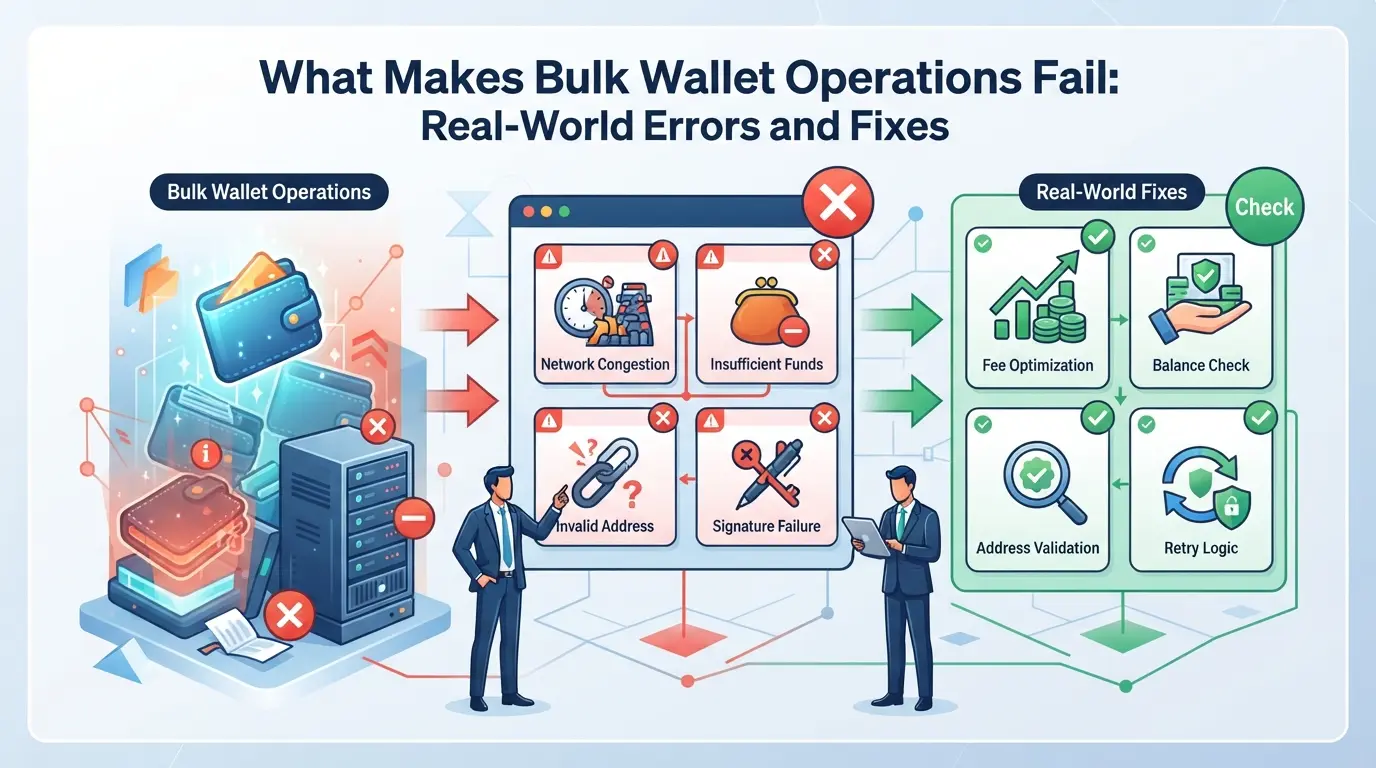
Even with the right tools, bulk wallet creation can trip up for reasons that don’t show up until accounts get flagged, grouped, or lost. Knowing these failure points saves you hours , and sometimes the wallets themselves.
Seed Phrase Collisions and Duplicates
Using weak scripts or shortcuts to generate wallets can create seed phrase duplicates. If two wallets share a seed, both addresses are exposed if one leaks. Run a uniqueness check on every new phrase , if any match, scrap the batch and start over.
Browser Profile and Proxy Misconfiguration
A single wrong setting in your browser profile or proxy setup can link all your wallets together.
- If every profile uses the same proxy or fingerprint, exchanges can spot patterns and cluster your wallets.
- The safer path: test each profile with a fingerprint checker and verify IP diversity before bulk creation.
Import/Export Format Issues
Importing or exporting wallet lists as CSV or JSON is quick, but one wrong delimiter or a missing field can corrupt dozens of addresses. If you see import errors or missing wallets, check for line breaks, misplaced commas, or format mismatches. Always validate a sample before running a full batch.
How Teams Can Manage Bulk MetaMask Wallets More Safely with DICloak
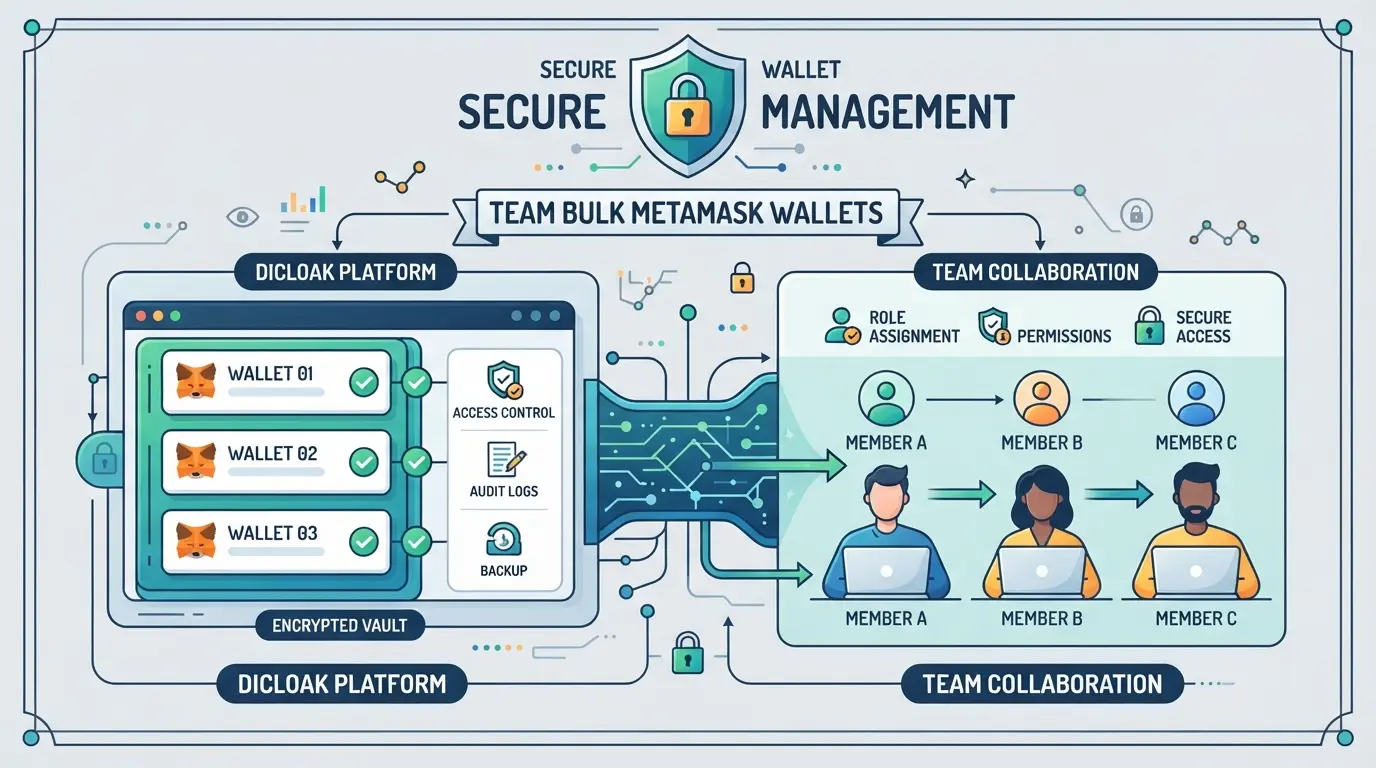
If your team handles dozens or hundreds of MetaMask wallets, keeping each session separated is non-negotiable. The biggest risk is accidental overlap, one mistake with browser storage or IP reuse and all your wallets could get flagged as a group. For operators who create or run bulk wallets, using a tool like DICloak helps keep workflows clean by isolating browser profiles, assigning proxies, and automating repetitive tasks. This doesn’t create or manage wallets for you; it handles the environment and session layer, so your team avoids the most common operational mistakes.
Separating Wallet Sessions with Profile Isolation and Fingerprint Configuration
Teams can create a new browser profile in DICloak for every wallet operation or assigned operator. Each profile stores its own session data, browser settings, and fingerprint signals, like User Agent, time zone, and screen size, so sessions don’t leak across accounts. For example, when a team member needs to run 20 wallets, they set up 20 browser profiles with different configurations. This keeps session storage, cookies, and browser identification separate. The scope stays at the environment layer; it does not change the wallet or MetaMask extension itself.

User-Provided Proxy Configuration for Assigned Profiles
Operators can add a custom proxy to each browser profile in DICloak. Before opening a wallet session, you can test the proxy, check the exit IP, and confirm the region matches your plan. This step matters when managing large batches, since relying on a single network connection risks linking sessions. Proxy selection and quality are up to the team, DICloak only stores and applies what you enter. No proxy is included or sold, and operators must check that their proxy setup fits the rules for the target platform.

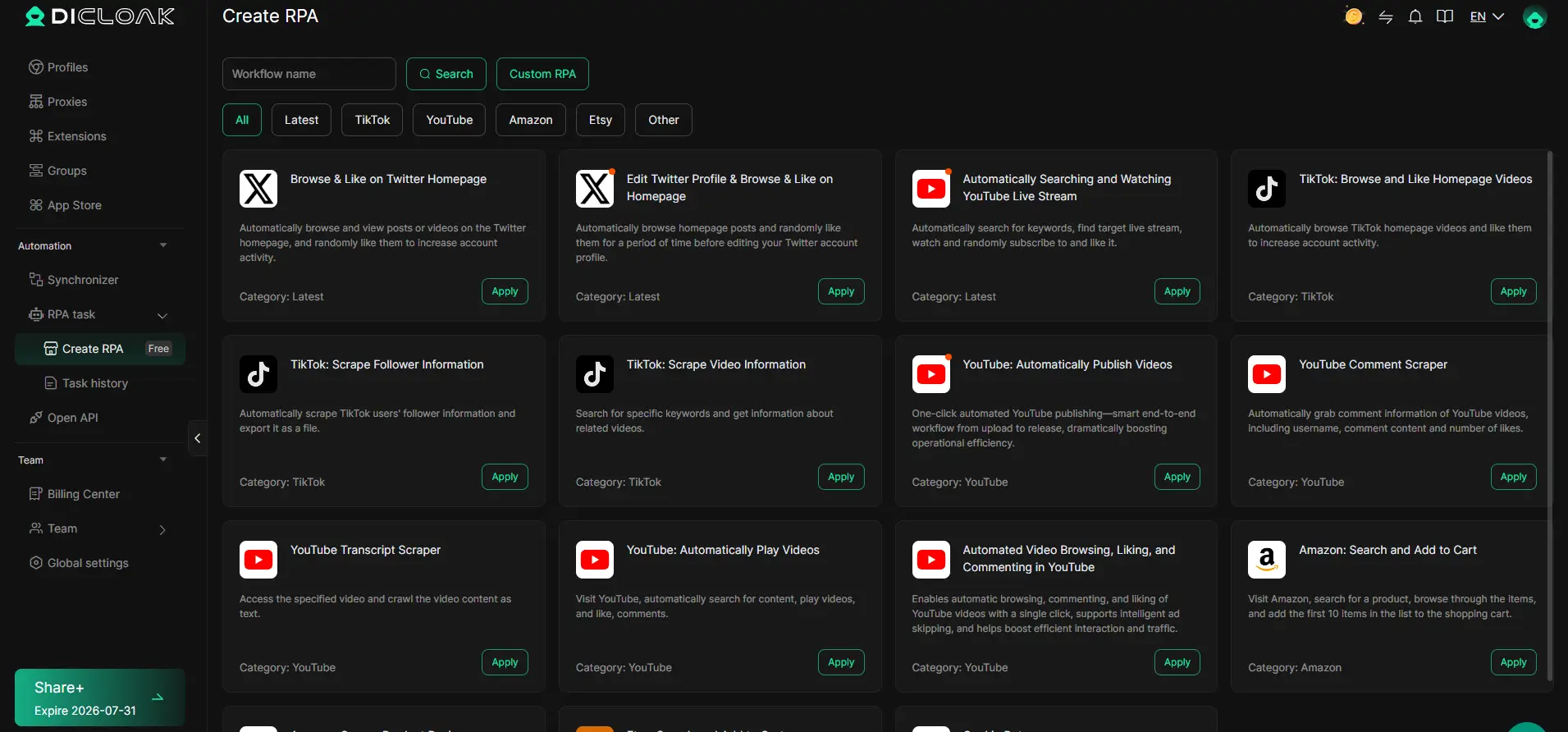
Automating Repetitive Wallet Tasks with RPA
Manual wallet tasks, like opening MetaMask, importing a seed, or running test transactions, waste hours when repeated across profiles. Teams can configure an RPA task in DICloak, pick the profiles to include, and run the workflow. Execution logs and live status help you catch failures or outliers fast. The team defines what actions are permitted, reviews every step, and decides when to re-run or adjust the workflow. This keeps automation under operator control and avoids blind spots that simple scripts often miss.
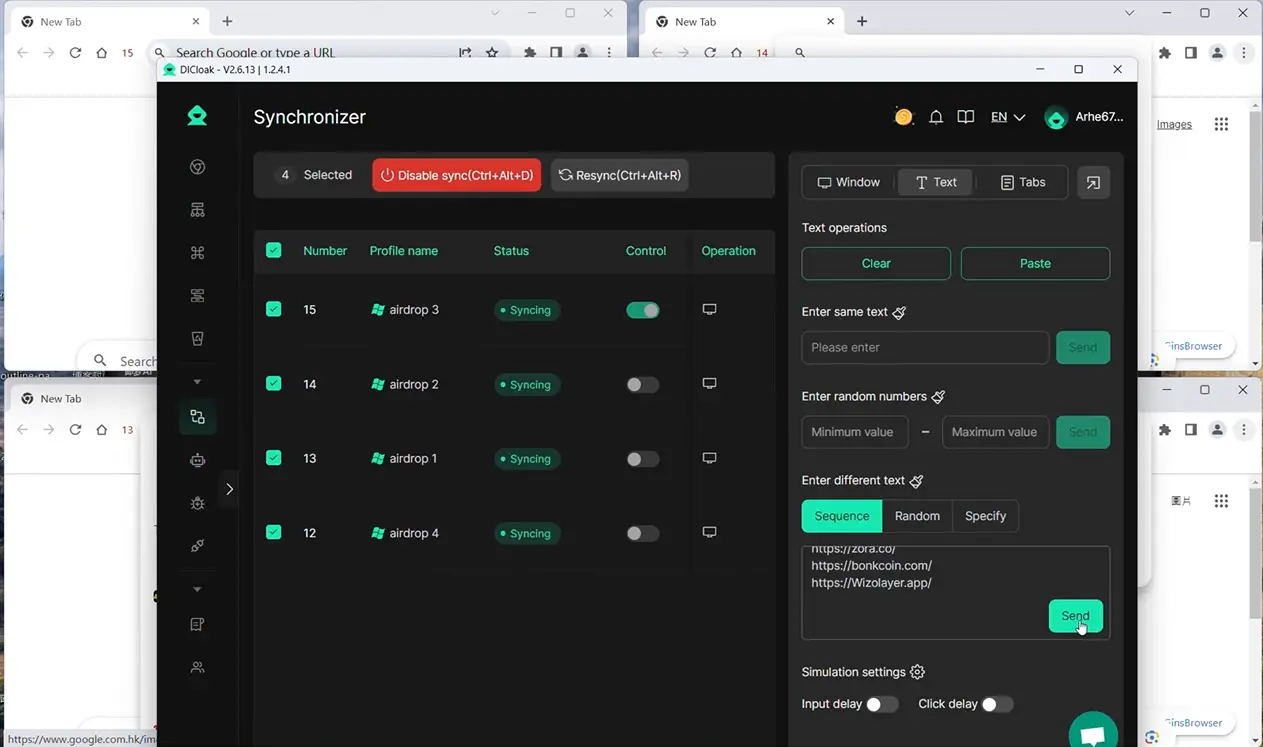
Synchronizing Actions Across Multiple Wallet Profiles
Coordinating actions across open wallet profiles is a pain without live synchronization. With DICloak’s Synchronizer, an operator can act in a master window and mirror clicks, keystrokes, or scrolling across selected wallet profiles in real time. This works well for tasks that need simultaneous input, like batch signing or entering data, while still allowing the team to supervise each session. The feature only mirrors live, supervised actions, it does not run jobs unattended or claim to imitate human use.
If managing bulk wallet sessions starts to feel riskier than the reward, it’s worth considering whether a different structure would serve your team better.
When Bulk Wallet Creation Is the Wrong Choice: Safer Alternatives
Bulk creating MetaMask wallets works for some farming and testnet tasks, but it’s a mistake when platform rules, airdrop eligibility, or compliance risks are involved. If you ignore these limits, you’re not just risking bans , you could lose rewards or get flagged for fraud.
Risks vs. Rewards: When Bulk Creation Backfires
The main problem isn’t technical. It’s about what platforms check after wallet creation. Bulk wallet batches can trigger review algorithms, especially when farming airdrops or using the same device, proxy, or browser fingerprint.
| Scenario |
Bulk Creation Outcome |
Safer Alternative |
| Airdrop Farming |
High ban risk |
Organic wallet growth |
| Platform Compliance Check |
Disqualification |
Team account setup |
| Exchange Withdrawal |
Account freeze |
Individual wallets |
If your goal is airdrop farming, creating wallets in bulk can actually lower your payout. Platforms like Binance and OKX often disqualify batches that look linked.
Alternatives: Organic Wallet Growth and Team-Based Management
For high-value or compliance-sensitive tasks, organic wallet creation is safer. Creating wallets over time, using separate devices and profiles, or setting up wallets for individual team members reduces detection. The fastest way to avoid mass bans is to skip bulk wallet creation and focus on organic or team-based management.
If you’re tempted to automate MetaMask wallet creation just to save time, consider the fallout , losing access, rewards, or even funds. Sometimes, manual steps and spread-out creation are the only way to keep your wallets safe.
Bulk creation isn’t always the smartest move. When rewards, compliance, or platform review are at stake, switching to organic or team-based methods protects your assets and keeps your accounts under the radar.
How to Audit and Maintain Bulk-Created MetaMask Wallets Over Time
Bulk-created wallets don’t stay safe or usable on autopilot. You need a schedule and a checklist, otherwise, stale keys or missed policy shifts will catch up fast.
Regular Security Audits and Key Management
Run quarterly checks on who has wallet access, reviewing device and location logs. Rotate private keys at least once per year and after any suspected leak. Backups should be stored offline and tested by restoring to a clean device. Missing even one audit cycle can leave your funds exposed long before you notice.
Monitoring for Platform Policy Changes
MetaMask and exchanges update detection rules without warning. Ignoring these shifts means a whole wallet batch can get flagged or blocked overnight.
- Subscribe to official MetaMask and exchange update channels
- Review airdrop and farming policy changes monthly
- Test a sample of wallets after each update before bulk actions
Frequently Asked Questions About bulk creating metamask wallets
Is bulk creating MetaMask wallets legal in 2026?
Bulk creating MetaMask wallets can be legal or illegal, depending on your country and what you plan to do with the wallets. Some regions restrict automated wallet creation or mass account use. Always check your local laws and review MetaMask’s terms of service before you proceed to avoid legal trouble.
Can MetaMask detect if I create multiple wallets from one device?
MetaMask itself does not track how many wallets you create on one device. However, platforms you interact with may spot patterns, like using the same browser fingerprint or IP address. Exchanges and dApps can flag or restrict accounts if they see signs of mass creation or automation.
What is the safest way to store bulk-generated seed phrases?
The best way to store many seed phrases is offline in an encrypted file, such as a password manager set to offline mode or encrypted USB drive. Never keep seed phrases in cloud storage, email, or on shared computers. If possible, print them out and store in a safe place only you can access.
How many MetaMask wallets can I create before triggering risk?
There’s no official wallet creation limit in MetaMask. However, if you bulk create MetaMask wallets using the same device, browser, or network, you increase the chance of detection by platforms. Unique device setups and IP addresses lower this risk, but nothing makes you completely invisible.
Can I use proxies to avoid linking my MetaMask wallets?
Using proxies can help separate wallet sessions and mask your IP address. For the best results, combine proxies with unique browser profiles and clear cookies each time you create or use a wallet. This makes it harder for platforms to connect your wallets through digital fingerprints.
Before proceeding, assess your specific requirements and security considerations to determine the most efficient method for generating and managing multiple wallets. Streamlining this process can save significant time while reducing manual errors. Try DICloak For Free
 Web Proxy Tools
 Free Tools
 Cookie Plugin
 UA Generator
 MAC Address Generator
 IP Generator
 IP Address List
 2FA Code Generator
 World Clock
 Anonymous Check
 WebRTC Leak Test
 UUID Generator
 Free Web Proxy Site
 Proxy Checker
 FB Ad Checker
 AI Web Scraping
 Free SMM Tools
 Twitter Shadowban Checker
 Instagram Name Checker
 UTM Generator
 Username Generator
 AI Hashtag Generator
 LinkedIn Headline Generator
 Social Media Image Resizer