You open your school computer, type Roblox, and wait. Then the screen shows an error. No loading. No login. This moment is familiar to many students. That is why searches for roblox unblocked for school keep growing every year. Roblox is fun, creative, and social, but at school it often feels just out of reach.
This guide is here to help you understand what is really happening and what you can do next. We will explain why Roblox is blocked, whether unblocking it is safe and legal, and how students try how to play roblox on a school computer in smart and responsible ways. Most importantly, we focus on safety, school rules, and simple tips you can trust. If you want clear answers without confusion, you are in the right place.
Understanding the Need for Roblox Unblocked for School
Many students enjoy Roblox at home, but face problems at school. You open a school computer, click Roblox, and see an error. The page does not load. Sometimes you cannot log in at all. This is why so many students search for roblox unblocked for school. It is not always about gaming. For many students, it is about relaxing during breaks or staying connected with friends after a long class.
What Is Roblox?
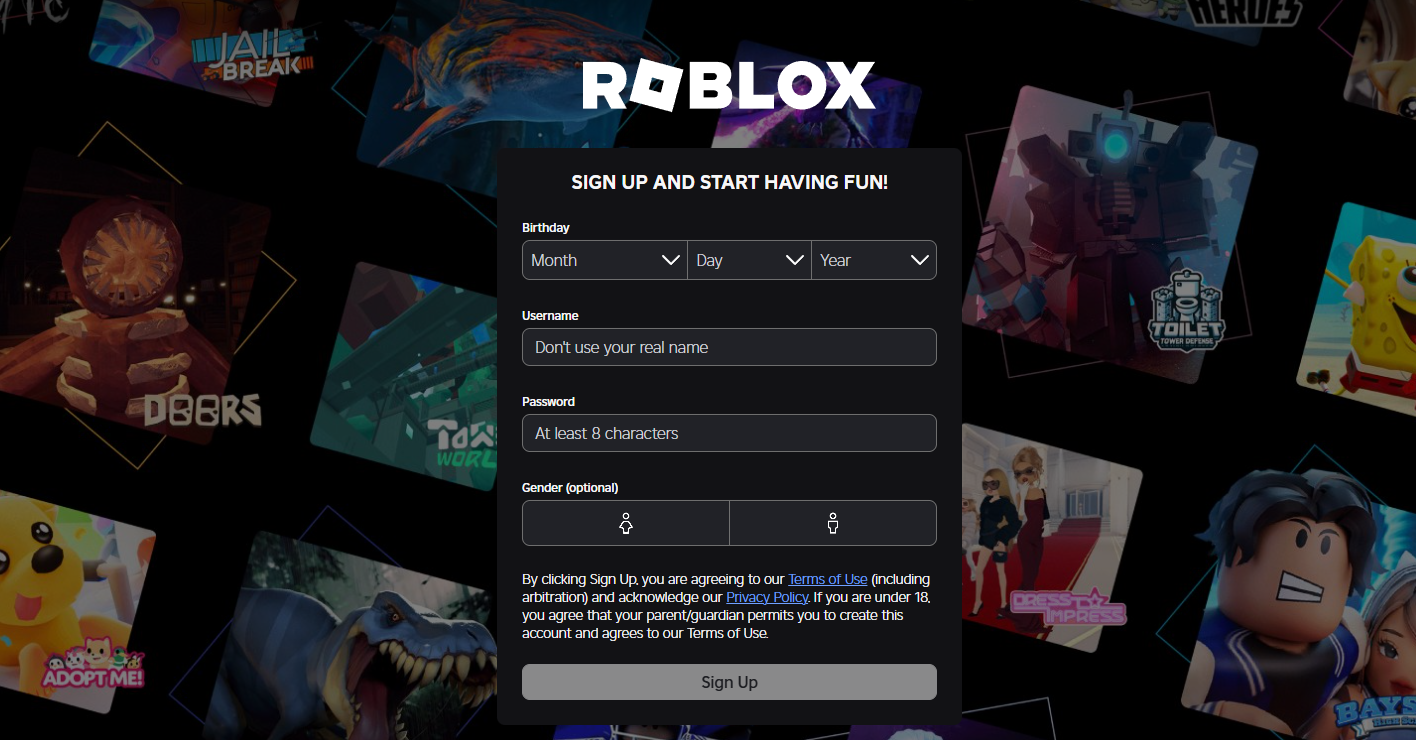
Roblox is not just one game. It is a platform where users can create and share many different games, also called experiences. On Roblox, you can build worlds, race cars, solve puzzles, or role-play with others. Some users even design their own games and share them with the community.
Roblox is also social. Players can chat, add friends, and join groups. This social side is one reason Roblox is so popular with students. During school breaks, some students just want to log in, check messages, or join friends for a short game. When Roblox fails to load on a school computer, many students start looking up how to play roblox on a school computer to understand what went wrong.
Why Roblox Is Blocked at School?
Most schools block Roblox for several clear reasons. These reasons are not random. They are based on learning goals, safety, and network limits.
- It Can Cause Distraction: Roblox is fun and engaging. A short game can quickly turn into a long session. Schools worry that students may lose focus on classes, homework, or exams.
- Concerns About Online Safety: Roblox includes chat, friends, and user-made content. Even with safety settings, schools often choose to block platforms with open social features to reduce risk.
- High Internet Data Usage: Online games use more data than normal websites. If many students try to play at the same time, the school network may slow down. This can affect online lessons, tests, and learning tools.
- School Network Policies: Many school computers and Wi-Fi systems block gaming sites by default. When Roblox fails to load or shows a login error, it is usually the school network, not the device itself.
Because of these reasons, Roblox is often blocked by school Wi-Fi or school devices. But does that mean Roblox access is always impossible? Not necessarily. In the next sections, we will explore safe and responsible ways to approach roblox unblocked for school, while respecting school rules and protecting your account.
Is It Safe and Legal to Unblock Roblox for School?
Using the right tools, roblox unblocked for school can be safe in some cases. Playing Roblox is legal as long as you do not hack the school network or break laws. The real concern is school rules, not legality.
Some schools allow limited personal use during breaks. Others ban all unblocking tools. If you get caught, you may lose computer or Wi-Fi access. That is why students searching how to play roblox on a school computer should always check school policies first.
Methods that do not harm the network or steal data are usually low risk legally. Still, breaking school rules can cause problems. Be responsible, play only during breaks, and put studies first. Used wisely, roblox unblocked for school can be a simple and harmless break.
Methods to Access Roblox Unblocked for School
After checking school rules, students often want clear and practical options. Below are common methods people use for roblox unblocked for school. Each method works in different situations. Some are easier. Some need more setup. Always choose responsibly.
1. Browser-Based Solutions
Some schools block Roblox only on the default browser. In some cases, using a different browser can help. A student may open Roblox in another browser during break time and find it loads normally. Light browser extensions can sometimes help with site access or session handling. These tools do not install software on the system. This is why some students trying how to play roblox on a school computer start with browser-based options first.
Pros
- No download needed
- Easy to try
- Works on many school computers
Cons
- Often blocked by strict school systems
- Not reliable long-term
2. Proxy Servers as a Solution
A proxy server sits between your browser and Roblox. It makes the request on your behalf. This can sometimes bypass basic website blocks. Simple web proxies are often used for quick access. For example, a student may paste the Roblox URL into a proxy site and try to load it during lunch.
Pros
- No installation
- Works on Chromebooks
- Fast to test
Cons
- Many proxies are blocked
- Can be slow
- Weak data protection
3. Cloud Gaming Platforms
Cloud gaming runs Roblox on a remote server. The school computer only streams the game. Nothing is installed locally. Some platforms allow Roblox to run fully in a browser. This makes cloud gaming one of the easiest ways to try roblox unblocked for school with no download.
Pros
- No installation needed
- Works on locked devices
- Easy to use
Cons
- Needs fast internet
- Game lag on weak networks
- Some platforms require payment
4. Portable Browsers via USB Drives
A portable browser runs from a USB drive. You plug it in and open the browser directly from the drive. This keeps data off the school computer. In some cases, it avoids browser-level restrictions.
Pros
- No system install
- Saves login data on USB
- Leaves fewer traces
Cons
- Many schools block USB ports
- Easy to lose the USB
- Not allowed on some campuses
5. Use Hotspot from Personal Devices
Using a phone hotspot connects the computer to mobile data instead of school Wi-Fi. For example, a student may use a hotspot during free time to access Roblox.
Pros
- Bypasses school Wi-Fi filters
- No extra tools needed
Cons
- Uses mobile data
- Slower speeds
- Some schools ban hotspots
6. Use DICloak for Roblox Unblocked for School in a More Stable Way
DICloak is an antidetect browser that creates isolated browser profiles. Each profile looks like a separate device with its own environment. This helps avoid session conflicts and strict browser-based limits.
For advanced users, DICloak offers better control when normal browsers fail. It is often used by people who need stable access without mixing data. For roblox unblocked for school, this method should only be used carefully and in line with school rules.
Here’s how you can use DICloak step by step:
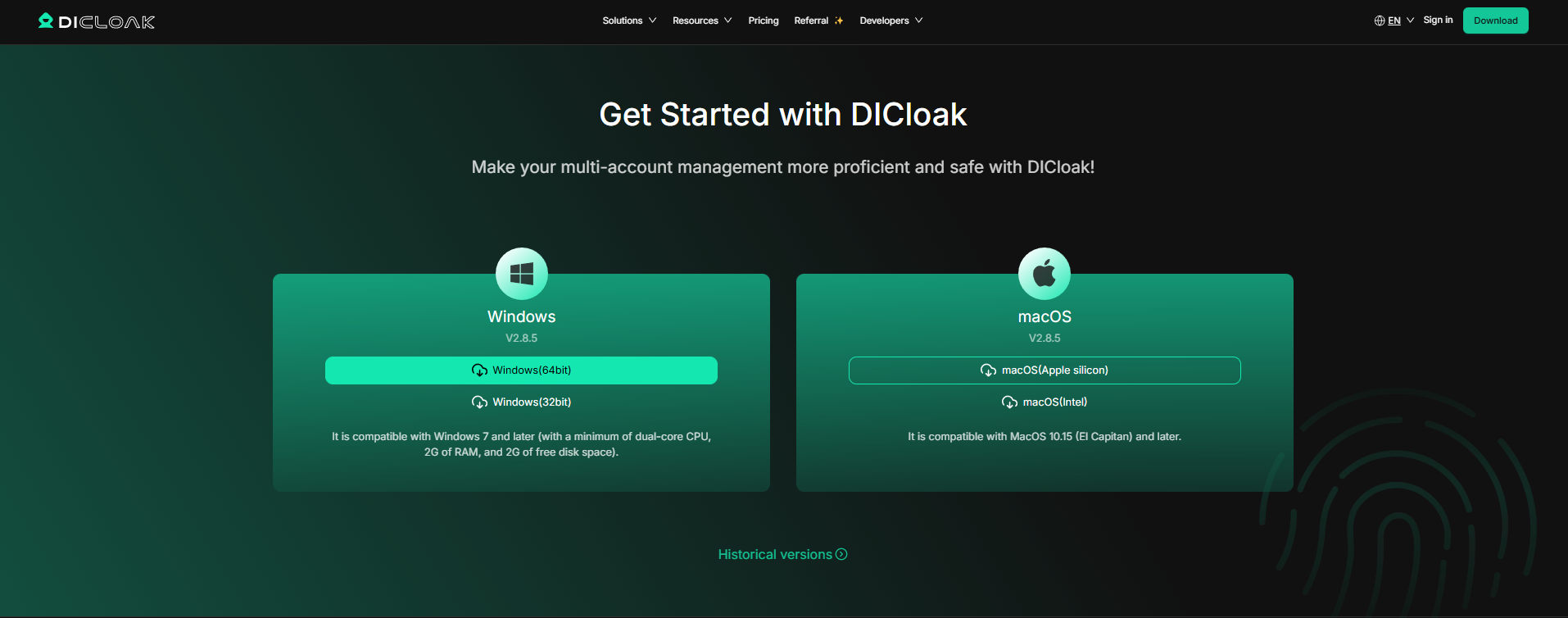
Step 1: Install DICloak. Download DICloak Antidetect Browser on your personal device. Sign in and open the app.
Step 2: Create a New Profile. Inside DICloak, make a new browser profile. This profile will act like a separate device with unique settings.
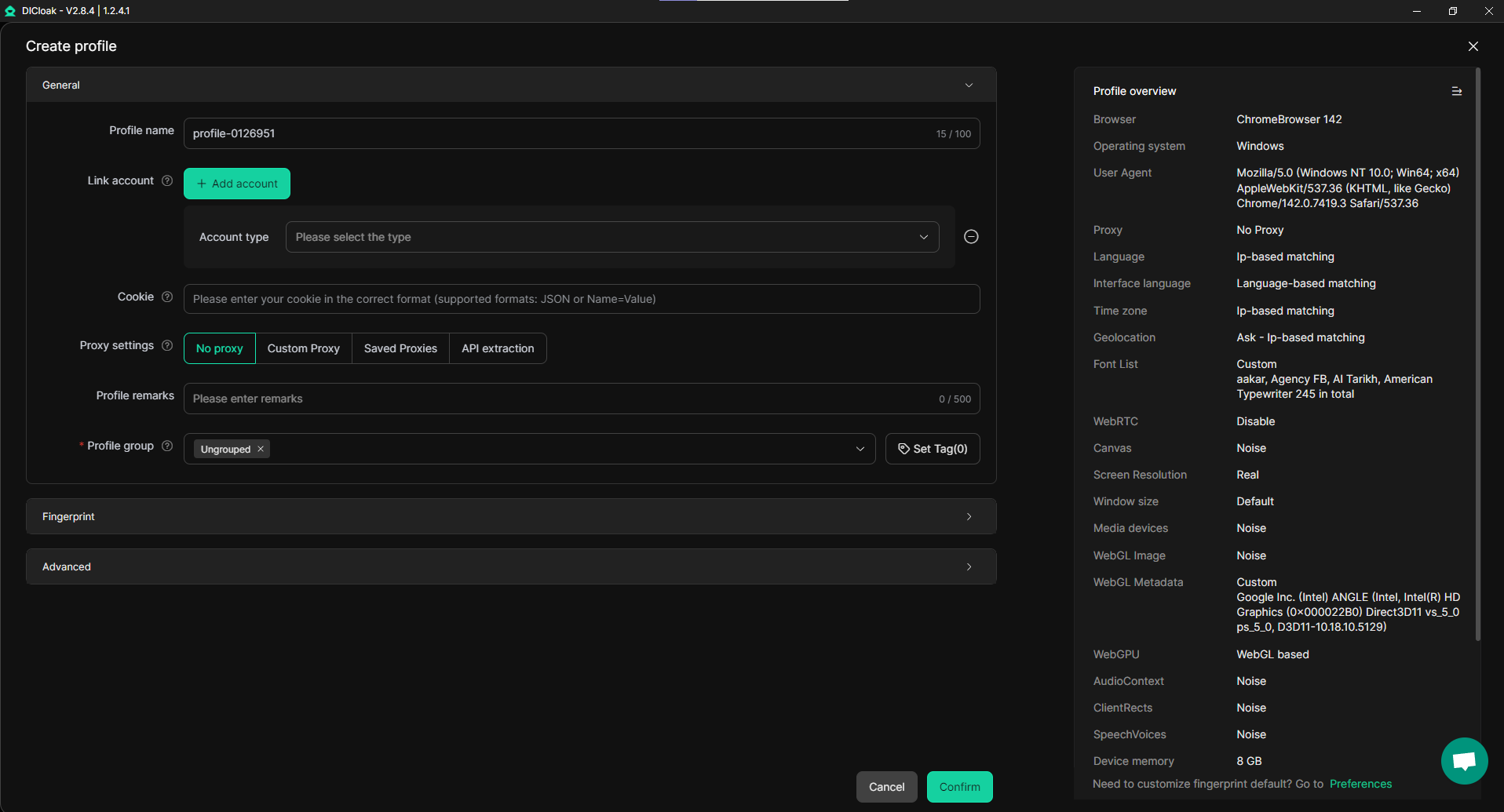
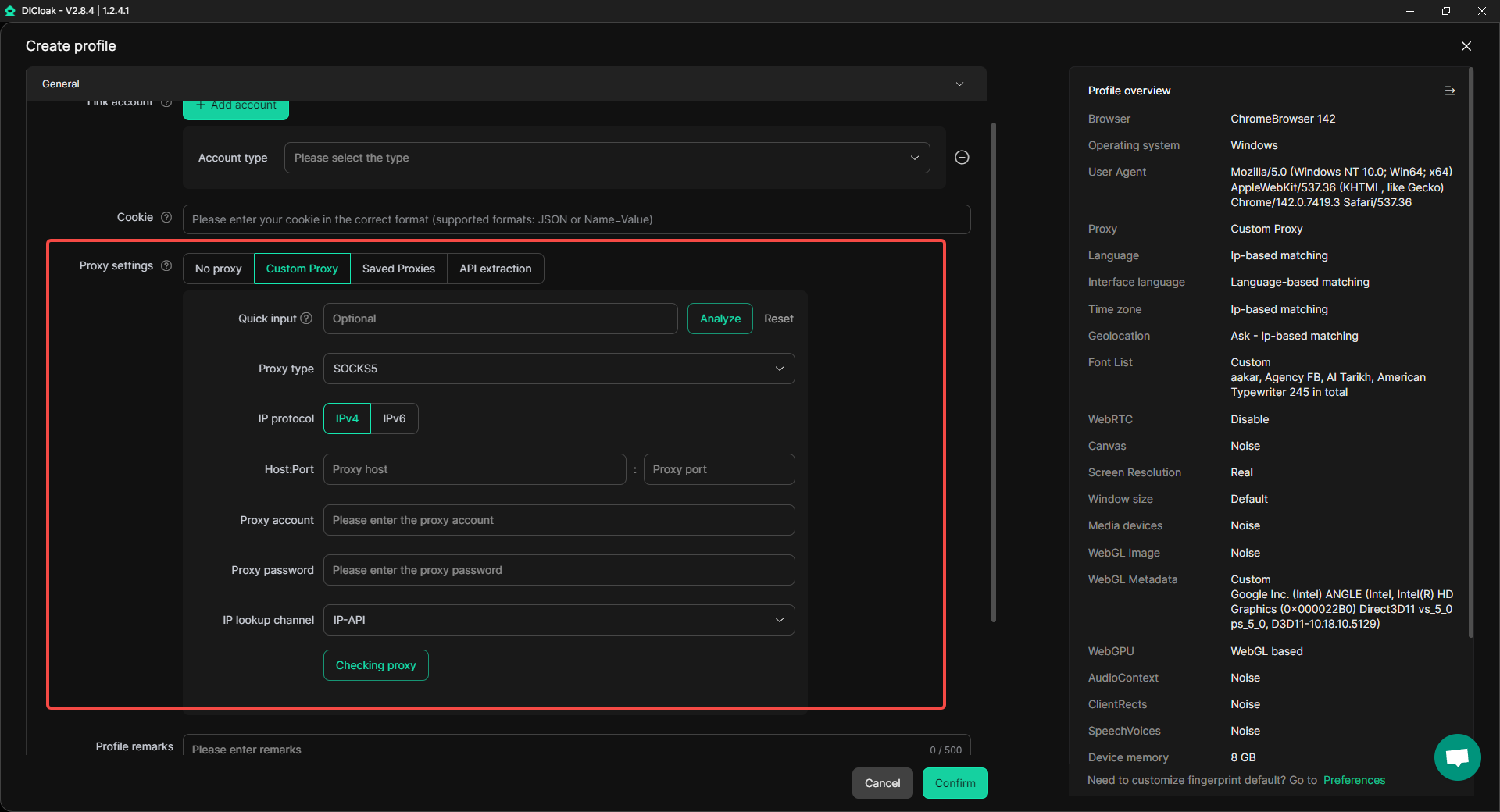
Step 3: Add Proxy or IP Settings. You can add a custom proxy or different IP settings to the profile. This makes the profile appear to come from a different network. Proxies help with privacy and avoid simple network blocks.
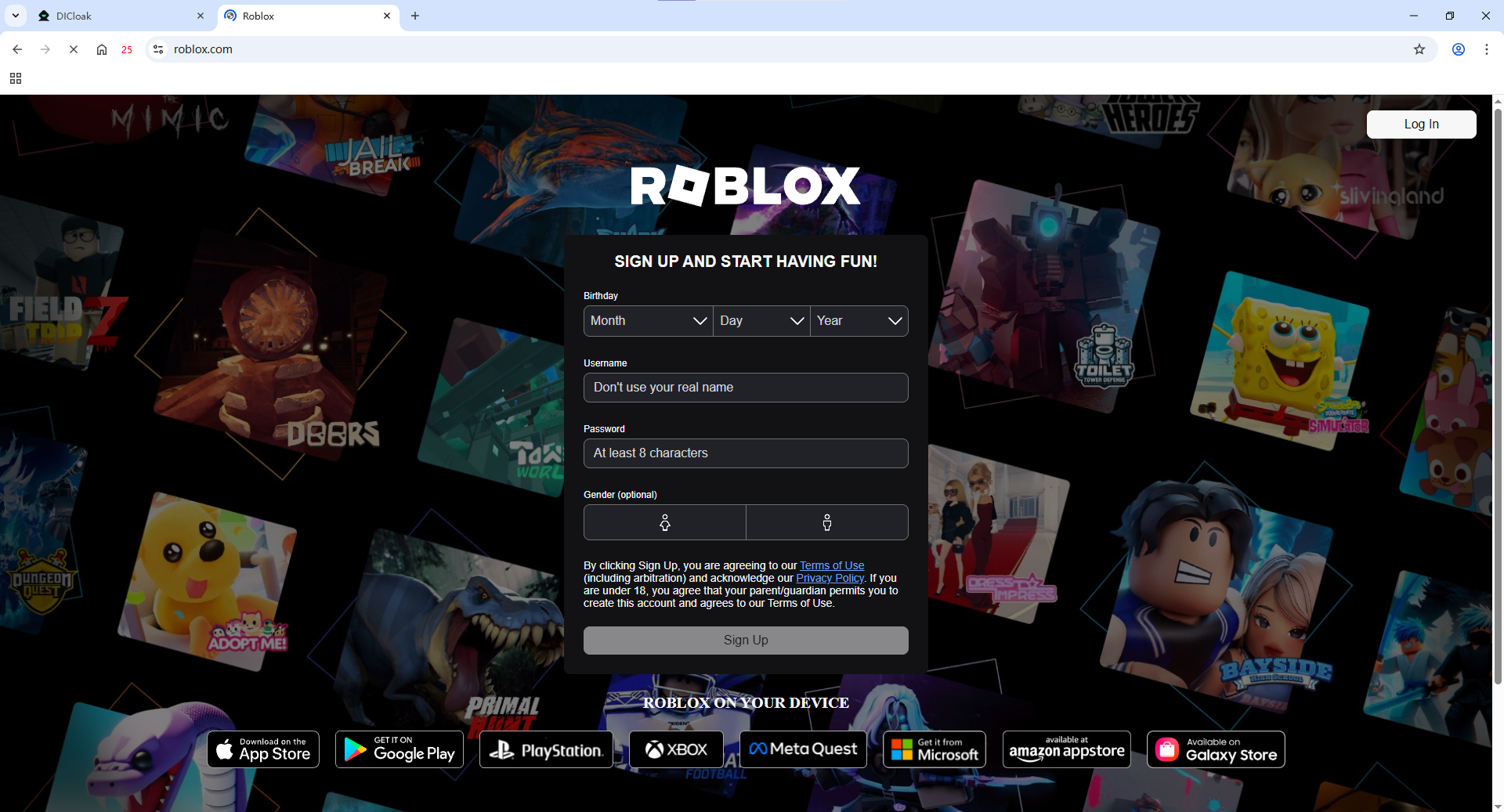
Step 4: Link to Roblox. Enter the Roblox website inside that profile. Log in with your account. Because this profile looks unique, Roblox may load without being blocked by simple browser filters.
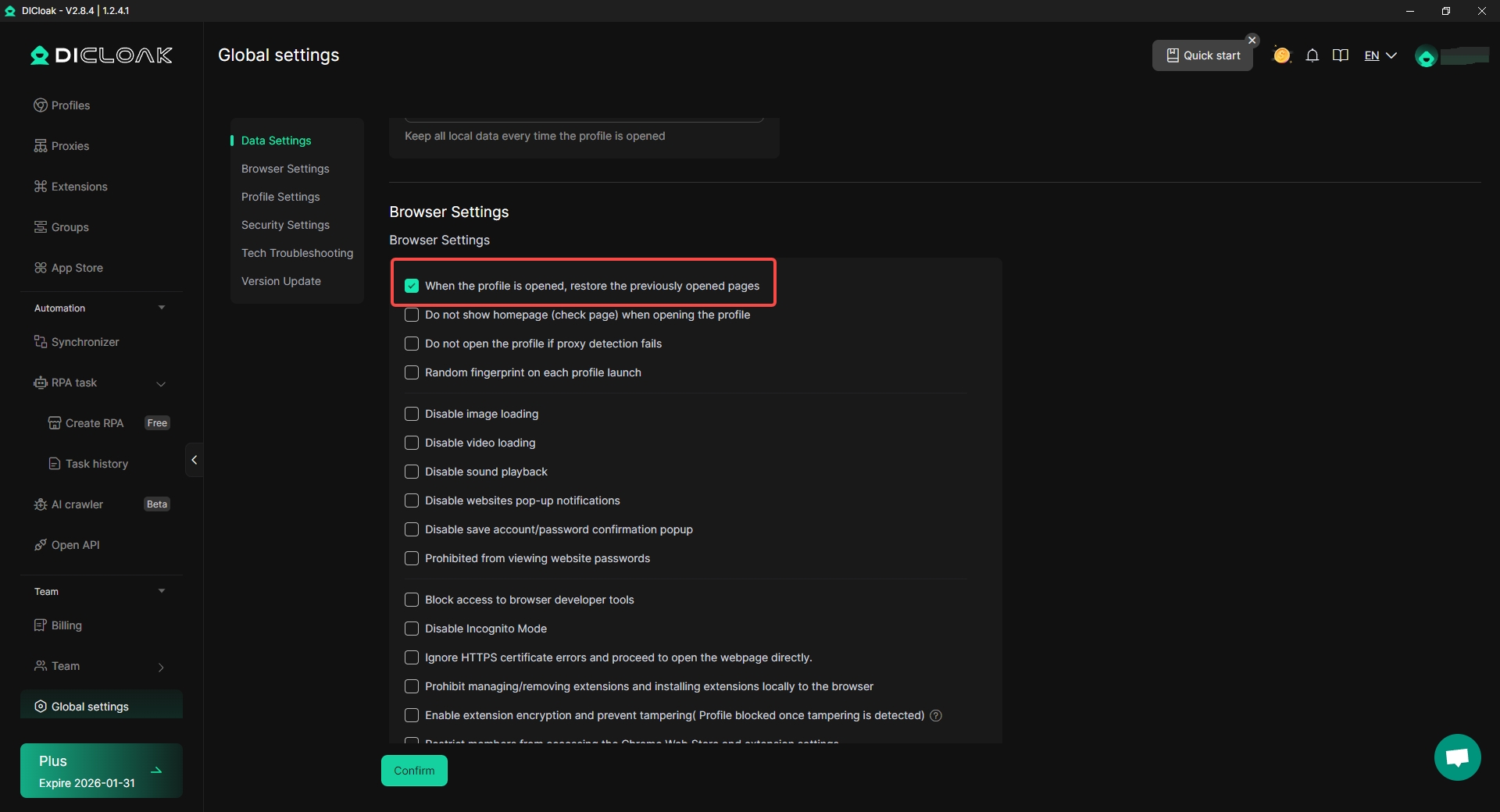
Step 5: Save and Use. After confirming the profile works, open Global Settings in DICloak and switch to Browser Settings. Turn on “When the profile is opened, restore the previously opened pages.” This helps that Roblox opens automatically the next time you start the profile, so you can continue using it without repeating the setup.
Pros
- Strong profile isolation
- Better session control
- Higher stability
Comparison Table: How to Access Roblox Unblocked for School?
| Method |
How It Works |
Ease of Use |
Main Pros |
Main Cons |
Best For |
| Browser-Based Solutions |
Use a different browser or browser tools to open Roblox |
Easy |
No download, quick to try |
Often blocked by strict school systems |
Students testing how to play roblox on a school computer quickly |
| Web Proxy Servers |
Visit Roblox through a proxy website |
Easy |
Free, no install, works on Chromebooks |
Slow speed, weak privacy, many proxies blocked |
Short-term access during breaks |
| Cloud Gaming Platforms |
Stream Roblox from a remote server in the browser |
Very Easy |
No download, works on locked devices |
Needs fast internet, possible cost |
Most popular way to try roblox unblocked for school |
| Portable Browsers (USB) |
Run a browser directly from a USB drive |
Medium |
No install, keeps data off school PC |
USB ports often blocked |
Schools with relaxed device controls |
| Personal Mobile Hotspot |
Use phone data instead of school Wi-Fi |
Easy |
Bypasses school network filters |
Uses mobile data, may be restricted |
Playing during free time |
| DICloak Antidetect Browser |
Use isolated browser profiles with unique fingerprints |
Medium–Advanced |
High stability, strong session control |
Takes time to learn |
Users needing a stable solution for roblox unblocked for school |
How to Read This Table (Quick Tip)
- If you want no download, cloud gaming is usually the easiest.
- If school Wi-Fi is the main issue, a personal hotspot often works.
- If normal browsers fail and you want more control, DICloak offers a more stable environment.
- Always check school rules before choosing any method.
In the next section, we will focus on safety tips and best practices to help protect your Roblox account and avoid trouble while accessing Roblox at school.
Safety Tips and Best Practices When Using Roblox Unblocked for School
Before using roblox unblocked for school, it is important to remember why Roblox is blocked in the first place. Safety, focus, and network limits all matter. Following these tips can help you avoid problems and protect your account.
Protecting Your Privacy and Security
When learning how to play roblox on a school computer, always protect your personal data.
- Do not share private information. Roblox lets you chat with many people. Never share your real name, school, phone number, or passwords.
- Use trusted and secure tools only. Avoid unknown sites or tools that ask for your Roblox login. Safe tools focus on privacy, not data collection.
- Log out after each session. Always sign out when you finish. If possible, use a private tab or clear browsing data on shared computers.
A common mistake is staying logged in after lunch. This can let others access your account. Logging out takes seconds and prevents big issues.
Respecting School Policies While Gaming
School rules come first, even if roblox unblocked for school works.
- Check school rules before trying anything. Some schools ban unblocking tools completely. If they are not allowed, do not use them.
- Play only during breaks or free time. Never play during class.
- Keep it quiet. Do not show others how you accessed Roblox or encourage rule-breaking.
Students who respect rules are less likely to lose computer or Wi-Fi access.
Avoiding Common Risks Associated with Unblocking
Unblocking Roblox can bring risks if done carelessly.
- Respect the school network. Do not download large files or streams for long periods. This can slow the internet for everyone.
- Avoid risky sites and pop-ups. Fake “unblock” pages often contain ads, trackers, or scams.
- Manage your play time. Roblox can be hard to stop playing. Set a timer and take breaks. Too much gaming can affect health and schoolwork.
Used responsibly, roblox unblocked for school can be a short and harmless break. Smart habits help you stay safe, avoid trouble, and enjoy Roblox without stress.
Conclusion
Getting roblox unblocked for school is a common issue for students, but it should always be handled with care. Schools block Roblox to protect focus, safety, and network performance, so understanding these reasons is important.
If you are looking for how to play roblox on a school computer, always check school rules first and choose safe, responsible methods. Play only during breaks, protect your account, and avoid risky tools. When used wisely, roblox unblocked for school can be a simple and harmless way to relax without causing trouble.
Frequently Asked Questions (FAQs)
Is Roblox unblocked for school legal?
Playing Roblox itself is legal. The key issue is school rules. Roblox unblocked for school is allowed only if it does not break your school’s internet policy. Hacking or damaging the school network is never allowed.
Why does Roblox work at home but not at school?
Schools use filters to block games and social sites. That is why roblox unblocked for school becomes a problem on school Wi-Fi, even though Roblox works fine on home networks.
How to play Roblox on a school computer safely?
If you want to know how to play roblox on a school computer, start with safe options. Play only during breaks, log out after use, and never share your login. Always follow school rules first.
What is the safest way to try Roblox unblocked for school?
The safest ways are those that do not install software or harm the network. Cloud gaming platforms and approved personal hotspots are often safer than risky tools or unknown sites when trying roblox unblocked for school.
Can using Roblox unblocked for school get my account banned?
Roblox usually does not ban accounts just for where you log in. Problems happen when users share accounts, click scam links, or use unsafe tools. Use official Roblox logins and safety settings when accessing roblox unblocked for school.
 Web Proxy Tools
 Free Tools
 Cookie Plugin
 UA Generator
 MAC Address Generator
 IP Generator
 IP Address List
 2FA Code Generator
 World Clock
 Anonymous Check
 WebRTC Leak Test
 UUID Generator
 Free Web Proxy Site
 Proxy Checker
 FB Ad Checker
 AI Web Scraping
 Free SMM Tools
 Twitter Shadowban Checker
 Instagram Name Checker
 UTM Generator
 Username Generator
 AI Hashtag Generator
 LinkedIn Headline Generator
 Social Media Image Resizer