You can build a Shopify store, but what actually happens after a customer clicks Buy? Shopify provides the technology needed to display products, collect order details, accept payments, and manage the store from one dashboard. Customers get a place to browse and complete checkout, while sellers get tools for organizing products, orders, inventory data, and payments.
So, how does Shopify work beyond the storefront? Shopify runs the technical selling system, but the seller still chooses the products, attracts customers, manages stock, arranges fulfillment, and supports buyers. This guide follows an order through the full process. It explains what Shopify handles, how sellers get paid, who stores and ships products, what operating a store costs, and how growing teams can organize several Shopify stores.
What Is Shopify and What Does It Actually Do?
So, what is Shopify? It is a hosted commerce platform that provides the system businesses use to create and operate an online store. Shopify supplies the core technology and hosting, while the seller controls the business decisions.
What Shopify Handles for the Seller
Shopify provides the technical infrastructure behind the store. Customers get a storefront with product pages, a shopping cart, and checkout. Sellers get payment connections, shipping settings, sales channels, and basic analytics.
The Shopify admin records and organizes products, customers, and orders. Sellers can add products, review orders, check payment and fulfillment status, update settings, and monitor performance from one place. Connected sales channels can also send product and order information back to the admin.
Shopify can track inventory quantities and adjustments, but the seller or a connected system must provide accurate stock data. Payment options depend on the seller’s country, plan, store setup, and provider.
What the Seller Still Has to Handle
The seller still operates the business. Shopify does not choose products, make them, select suppliers, set prices, create product information, or attract customers.
The seller also decides where physical inventory is stored and who ships each order. Suppliers and fulfillment services can be connected, but the seller must choose and configure the workflow. After a sale, the seller remains responsible for customer service, returns, product quality, expenses, and profitability.
| Responsibility |
What Shopify Provides |
What the Seller or Partner Handles |
| Storefront |
Website and product-page system |
Branding, product content, and store decisions |
| Checkout |
Cart, checkout, and payment integrations |
Payment setup, pricing, and policies |
| Products |
Product-management tools |
Products, suppliers, and product quality |
| Traffic |
Marketing integrations and SEO settings |
Customer acquisition and promotion |
| Inventory |
Inventory-tracking system |
Accurate stock data and physical storage |
| Shipping |
Shipping settings and fulfillment integrations |
Packing, delivery, or fulfillment partner |
| Customer service |
Order and customer information |
Questions, returns, refunds, and disputes |
The easiest way to see how these parts connect is to follow one order from product setup to customer support.
How Does Shopify Work Step by Step?
The easiest way to understand how Shopify works is to follow one order through the full process. It begins before the customer reaches the store.
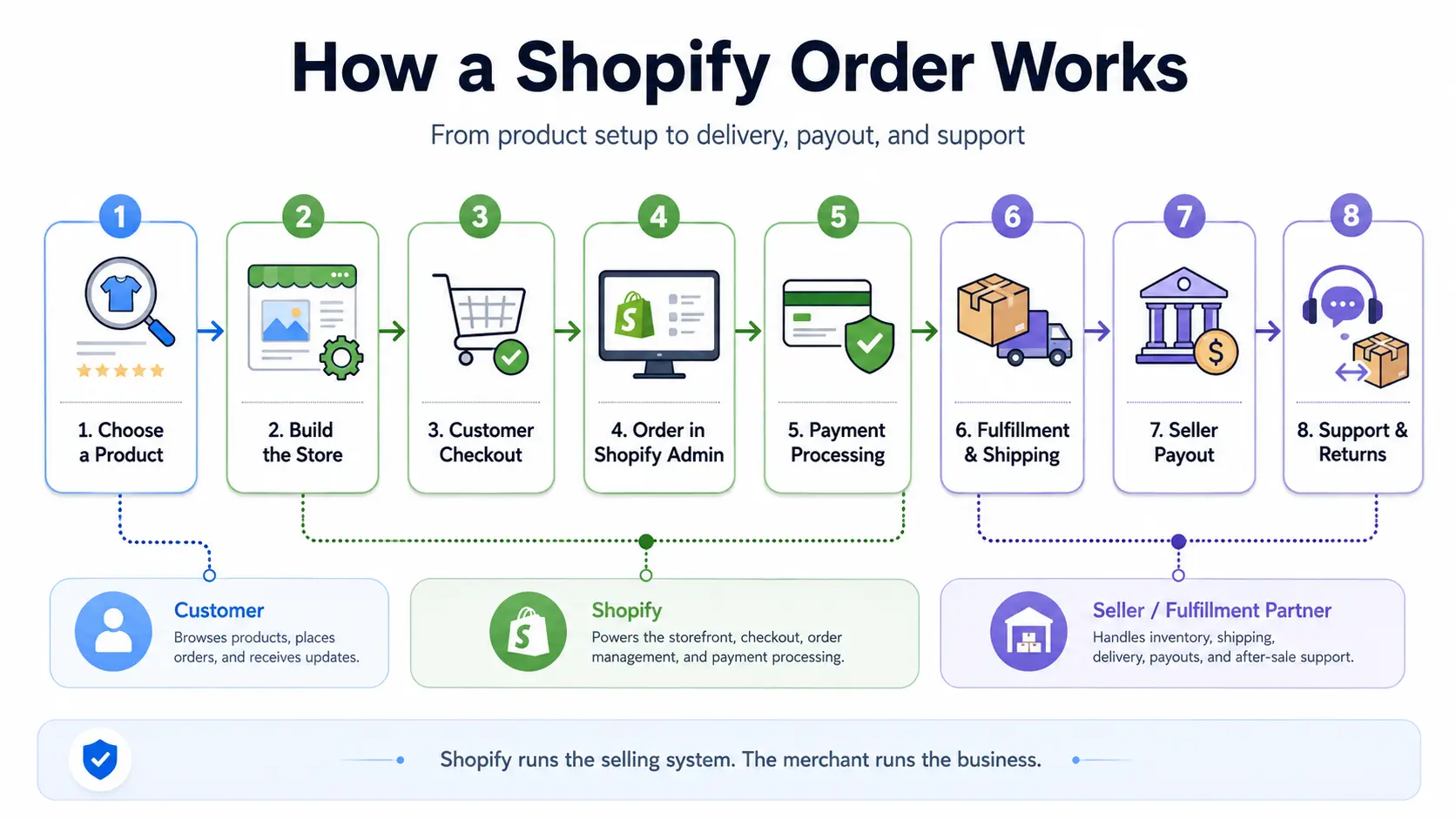
Step 1: Choose What You Want to Sell
The seller first chooses a product or service. Options include original products, wholesale inventory, dropshipping, print on demand, digital products, and services.
Shopify provides the selling platform, not the product. Before listing an offer, the seller should check demand, supplier quality, total costs, and expected profit. The choice also affects later inventory and fulfillment decisions.
Step 2: Build Your Shopify Store
The seller creates a Shopify account, chooses a theme, adds branding and contact details, connects a domain, and creates essential store and policy pages.
Learning how to use Shopify does not require coding for every change. Many basic layout, font, color, image, and content settings can be adjusted through the theme editor. The store should make the business and products easy to understand.
Step 3: Add Products and Set Inventory
Each product normally needs a title, description, images, price, relevant variants, inventory details, and shipping information.
Shopify’s inventory tools can track available quantities and update stock as orders are processed. However, the data must come from the seller or a connected system. Incorrect records can cause overselling or show unavailable items as in stock. Digital products and services may not need physical inventory tracking.
Step 4: Configure Payments, Taxes, and Shipping
Before taking orders, the seller sets payment methods, payout information, store currency, tax settings, shipping regions, and shipping rates.
So, how does Shopify Payments work? Shopify shows the activated methods at checkout, while Shopify Payments or a third-party provider processes the transaction. Availability and fees depend on the seller’s country, plan, payment method, and store setup.
Shopify provides tax tools, but the seller remains responsible for applicable tax duties. Shipping settings control where orders can go and what customers pay. Incorrect settings can block checkout or reduce profit.
Step 5: A Customer Visits the Store and Places an Order
The customer follows this path:
Product page → Cart → Checkout → Payment → Order confirmation
Visitors may arrive through search, ads, social media, email, or direct links. At checkout, the customer enters contact and delivery details, selects an available shipping method, and submits payment.
Shopify creates the order and confirmation. Some payments finish immediately, while others may remain pending or require review.
Step 6: The Order Appears in Shopify Admin
The new order appears in the Shopify admin with customer details, products and quantities, the shipping address, charges, discounts, payment status, fulfillment status, and notes.
Payment status shows whether the transaction has been processed or needs attention. Fulfillment status shows whether the products have been prepared and sent. Keeping them separate helps sellers find orders that still need action.
Step 7: The Order Is Fulfilled and Shipped
Fulfillment means preparing and sending the order. The seller or a fulfillment partner performs the physical work.
So, how does Shopify shipping work? Shopify manages order, fulfillment, shipping, and tracking information. Another party selects the item, packs it, creates the shipment, and gives it to the carrier. Tracking can then be added for the customer.
Step 8: The Seller Receives the Payout
Customer payment and seller payout are separate events. The customer submits payment, the provider processes it, applicable fees may be deducted, and the remaining funds enter the provider’s payout schedule.
The money is then sent to the seller’s connected account. Timing depends on the provider, country, payment method, bank, currency, weekends, holidays, and account status. Refunds, disputes, chargebacks, or reviews may affect the balance. No single payout schedule applies to every seller. Shopify explains these differences in its payout timing guide.
Step 9: The Seller Handles Support, Returns, and Refunds
The seller remains responsible after shipping. This includes customer questions, tracking problems, returns, refunds, damaged or incorrect products, and payment disputes.
Shopify provides the order and customer information needed to manage these tasks. The seller creates the policies, communicates with buyers, and decides how each issue is resolved. Clear shipping, return, and refund policies help set expectations before purchase.
These nine steps connect product setup, checkout, payment, order management, fulfillment, payout, and support. The physical side of the order still depends on who stores, packs, and ships the product.
Who Stores and Ships Products Sold Through Shopify?
Who handles the product depends on the fulfillment model. Does Shopify ship for you? Normally, no. Shopify manages order and fulfillment information, while the seller, a supplier, a print-on-demand provider, or a warehouse handles the physical item.
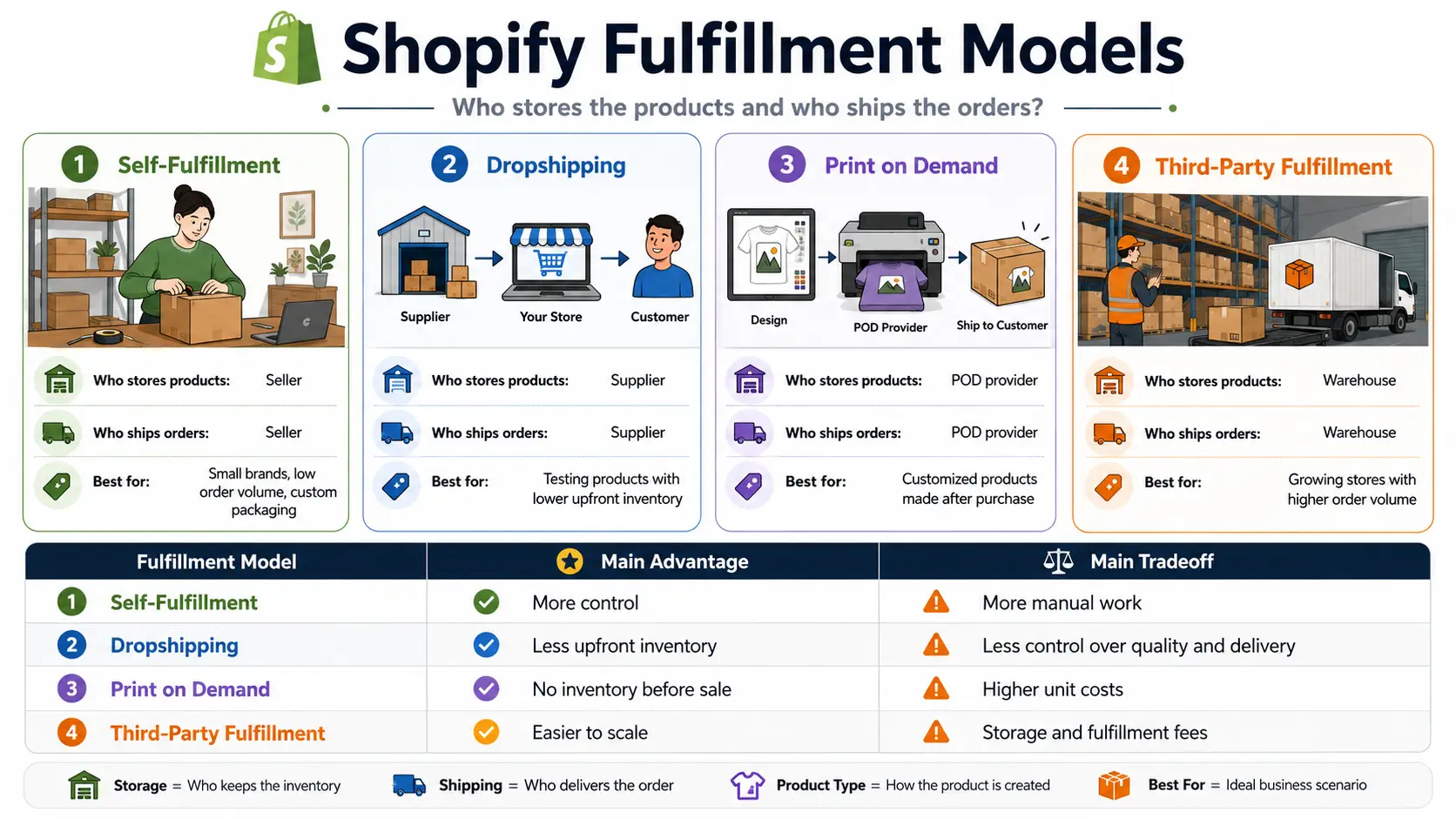
Self-Fulfillment
With self-fulfillment, the seller stores, packs, and ships the products. Inventory may be kept at home, in an office, or in a small warehouse.
When an order appears in Shopify, the seller prepares the item, creates a label, and gives the package to a carrier. Tracking can be added to the order. The seller controls stock accuracy, packaging, and quality checks.
This model may suit small stores, lower order volumes, and brands that want custom packaging. The tradeoff is more time, storage space, and manual work.
Dropshipping and Print on Demand
With dropshipping and print on demand, another company normally handles the physical product.
In dropshipping, the seller lists a supplier’s product. After a customer orders, the details go to the supplier manually or through a configured connection. The supplier packs and ships the item.
With print on demand, the provider makes the item after purchase, then packs and ships it. Shopify is not the supplier, and order transfer is not always automatic.
The seller still chooses products and suppliers, sets prices, communicates with customers, and manages refunds. Product quality, delivery times, tracking, packaging, and return terms should be checked before selling.
Third-Party Fulfillment
Third-party fulfillment means the seller owns the inventory but stores it in an outside warehouse. The seller sends stock to the fulfillment center, where it is received and stored.
Order details are shared through a connected system. Warehouse staff pick, pack, and ship the product, and tracking may return to Shopify.
This model may suit stores with higher order volume, several sales regions, or limited warehouse capacity. Tradeoffs include storage and fulfillment fees, less direct control over packaging, and the need for accurate inventory synchronization. Mismatched records can delay orders or create stock errors.
| Fulfillment Model |
Who Stores Products? |
Who Packs and Ships? |
Best For |
Main Tradeoff |
| Self-fulfillment |
Seller |
Seller |
Small stores and custom packaging |
More manual work |
| Dropshipping |
Supplier |
Supplier |
Testing products with less inventory |
Less control over quality and delivery |
| Print on demand |
POD provider |
POD provider |
Customized products |
Higher unit costs |
| Third-party fulfillment |
Warehouse |
Warehouse |
Growing order volume |
Storage and fulfillment fees |
Which Fulfillment Model Should You Choose?
The best choice depends on the product, budget, order volume, storage space, packaging control, delivery speed, profit margin, and partner reliability.
Choose self-fulfillment when you want control and can manage the volume. Consider dropshipping to test products without buying large amounts of stock. Print on demand may fit customized items. Third-party fulfillment can help when internal packing becomes difficult.
No model is automatically easier or more profitable. Compare product, storage, packaging, shipping, return, and support costs before choosing.
Shopify organizes the order record, but another party handles the physical work. The store must also attract interested visitors.
Does Shopify Bring Customers to Your Store?
Does Shopify bring customers? Not automatically. Shopify provides selling and marketing tools, but the seller must create demand and attract people who are likely to buy.
What Shopify Provides for Marketing
Shopify supports promotion through search engine fields, social and sales channel connections, discount codes, email features, advertising integrations, and analytics.
These tools help sellers publish offers, run campaigns, and measure performance. They do not create demand by themselves. Publishing products does not guarantee search rankings, social reach, profitable ads, or sales. Connected channel data can help with measurement, but the offer and promotion still determine whether people respond.
What the Seller Must Do to Attract Visitors
The seller chooses and manages traffic sources that fit the product and audience. Options may include SEO, social media content, Google Ads, Meta Ads, TikTok Ads, email, influencer partnerships, and affiliate marketing.
The seller should know who the target customer is, where that person spends time, why the product is worth buying, and how much the business can afford to spend to gain a customer.
More traffic is not always better. Visitors who do not match the target audience are less likely to buy.
Why a Shopify Store May Get Traffic but No Sales
Traffic does not guarantee conversions. Common causes include weak demand, unsuitable pricing, unclear product information, high shipping costs, a confusing mobile experience, or missing contact and return information.
The traffic may also come from people who were never likely to buy. Sellers should review the full buying path instead of assuming Shopify itself is not working. Analytics can show which channels bring visitors and where they leave, but the seller must decide what to improve.
Attracting visitors may require spending on content, advertising, tools, or outside support. Those expenses affect the total cost of running the store.
How Much Does It Cost to Run a Shopify Store?
So, how much does Shopify cost? The subscription is only one part of the total expense. Actual costs depend on the plan, payment setup, products, marketing, and fulfillment model.
Core Shopify Costs
The main platform costs are the Shopify subscription, payment processing fees, possible third-party transaction fees, and a domain.
As of July 2026, the official US Shopify pricing page lists monthly billing at $39 USD for Basic, $105 USD for Grow, and $399 USD for Advanced. Annual billing has lower effective monthly prices. Prices vary by country, currency, billing term, and promotion.
Payment costs depend on the plan, country, method, and provider. Shopify Payments is available only in supported locations and still has processing fees. Third-party transaction fees may apply when another provider is used, depending on the payment method and store setup. See Shopify’s payment fee guidance and transaction fee guide.
Optional Business Costs
Many expenses come from operating the business rather than Shopify. These may include paid themes, Shopify apps, advertising, inventory, samples, packaging, shipping, returns, photography, content, and staff or contractors.
A store can launch without every optional item. Costs rise as the business adds products, tools, traffic sources, and team members. Advertising and inventory may cost more than the subscription.
Separate fixed monthly charges from costs that increase with orders or sales. This shows which expenses stay stable and which grow with the business.
How to Estimate Your Real Monthly Cost
Group expenses into fixed, variable, and growth costs. Fixed costs include the plan, domain, and regular subscriptions. Variable costs include payment fees, products, packaging, shipping, and returns. Growth costs include advertising, content, contractors, and extra tools.
Add all three groups before estimating profit. Looking only at the selling price minus the product cost can hide major operating expenses.
Apps are one of the easiest costs to add without noticing their combined effect.
Do You Need Shopify Apps?
Most stores can begin with Shopify’s built-in tools. Add Shopify apps only when the store has a clear need those tools cannot meet.
What Shopify Apps Can Add
Shopify apps can add reviews, email marketing, subscriptions, loyalty programs, customer support, fulfillment connections, shipping tools, and advanced analytics. Some improve the customer experience, while others support internal work or connect an outside service.
An app should solve a defined problem rather than being installed because it is popular.
Why You Should Start With Fewer Apps
Too many apps can raise costs, slow the store, duplicate features, complicate settings, cause compatibility problems, and increase third-party access to store data.
Check Shopify’s built-in tools first. Review installed apps and remove those that no longer provide useful value.
Install an app only when it solves a clear problem that Shopify’s built-in features cannot handle.
Is Shopify Right for Your Business?
Is Shopify right for your business? The answer depends on your budget, business model, technical needs, and preferred level of control.
When Shopify Is a Good Fit
Shopify may fit sellers who want to launch an independent store quickly without maintaining hosting or servers. It provides a hosted storefront, checkout, and order system.
It can also suit businesses that want to connect sales channels, expand their catalog, or handle more orders. Shopify is practical for sellers who prefer built-in commerce tools and an app ecosystem instead of maintaining a custom platform.
When Another Option May Fit Better
Another option may fit better if the business only needs a simple payment page or wants to minimize ongoing platform costs.
Shopify may also be less suitable for companies that need a highly customized back end, rely mainly on marketplace traffic, or already have custom commerce infrastructure. These needs point to a different balance of control, cost, and technical work.
| Option |
Best For |
Main Tradeoff |
| Shopify |
Sellers wanting a hosted store with simpler setup |
Ongoing platform and app costs |
| WooCommerce |
Businesses wanting more control over a WordPress store |
More technical maintenance |
| Online marketplaces |
Sellers wanting access to existing marketplace traffic |
Less control over branding and customer relationships |
| Custom-built store |
Businesses with complex technical needs and development resources |
Higher development and maintenance costs |
Managing one store is different from coordinating several brands, clients, regions, or team members. That work needs clearer separation and access control.
How You Can Manage Multiple Shopify Stores With DICloak
Managing several Shopify stores becomes confusing when similar dashboards, saved sessions, connected tools, and team members are mixed in one browser. Separate Browser Profiles and controlled access make each store easier to identify, operate, and hand over.
Prevent Wrong-Store Actions Across Brands or Clients
Create a separate Browser Profile for each Shopify store. Each Profile keeps independent cookies, login sessions, and browser data, giving every brand or client its own workspace.
Name and organize Profiles by client, brand, region, or store. Profile groups, tags, and filters help the team find the correct workspace. Keep each store’s Shopify admin, advertising account, supplier portal, and support tools inside the same Profile.
This separation can reduce product edits, discounts, refunds, or client work completed in the wrong dashboard.
Give Each Team Member the Right Store Workspace
Shopify permissions control what a user can do inside the store, while DICloak Profile assignments help control which store workspace that person opens.
Each member should use an authorized Shopify login. Employees can receive suitable Shopify roles, while agencies, developers, and Shopify Partners can use authorized collaborator access when appropriate.
DICloak can assign the related Profile to the responsible person. Each member can return to the saved session for their authorized login, reducing account switching and unnecessary credential handling. Sessions may still expire or require verification.
Profile access can be assigned, revoked, or transferred as responsibilities change. Operation logs help teams review Profile activity. This supports client-store assignments, limited support access, temporary developer access, and regional store ownership.
Keep Shopify workspaces organized, reduce wrong-store actions, and give the right people access to the right stores.

FAQ about how does Shopify work
These answers cover common practical questions beginners still have about how Shopify works.
Does Shopify Ship Products for You?
No. Shopify normally does not store, pack, or ship products. The seller, supplier, print-on-demand provider, or warehouse handles the physical order, while Shopify manages order, fulfillment, shipping, and tracking information.
Do You Need to Keep Shopify Inventory at Home?
No. Sellers may use a home, office, warehouse, dropshipping supplier, print-on-demand provider, or third-party fulfillment center. The right choice depends on the product, available space, and order volume.
Can You Use Shopify for Dropshipping?
Yes. Shopify can connect with dropshipping services. The seller still chooses products, suppliers, prices, policies, and the customer service process. Shopify provides the storefront and order system rather than supplying the products.
How Do Shopify Sellers Get Paid?
Customers pay through an activated method. The provider processes the payment, deducts applicable fees, and sends the remaining funds according to its payout schedule. Timing varies by provider, country, bank, currency, payment method, and account status.
Does Shopify Bring Customers to Your Store?
No. Shopify does not automatically send customers to a new store. Sellers must attract visitors through search, social media, advertising, email, or partnerships, then give them a clear reason to buy.
Managing several Shopify stores is not only about creating more stores. Mixing sessions, dashboards, brands, clients, or team access can lead to wrong-store actions.
You can use DICloak to run each store in its own isolated browser Profile, keep cookies and login sessions separate, organize Profiles by brand, client, or region, and assign access to the right team members for clearer team workflows.Try DICloak for Free.
 Web Proxy Tools
 Free Tools
 Cookie Plugin
 UA Generator
 MAC Address Generator
 IP Generator
 IP Address List
 2FA Code Generator
 World Clock
 Anonymous Check
 WebRTC Leak Test
 UUID Generator
 Free Web Proxy Site
 Proxy Checker
 FB Ad Checker
 AI Web Scraping
 Free SMM Tools
 Twitter Shadowban Checker
 Instagram Name Checker
 UTM Generator
 Username Generator
 AI Hashtag Generator
 LinkedIn Headline Generator
 Social Media Image Resizer