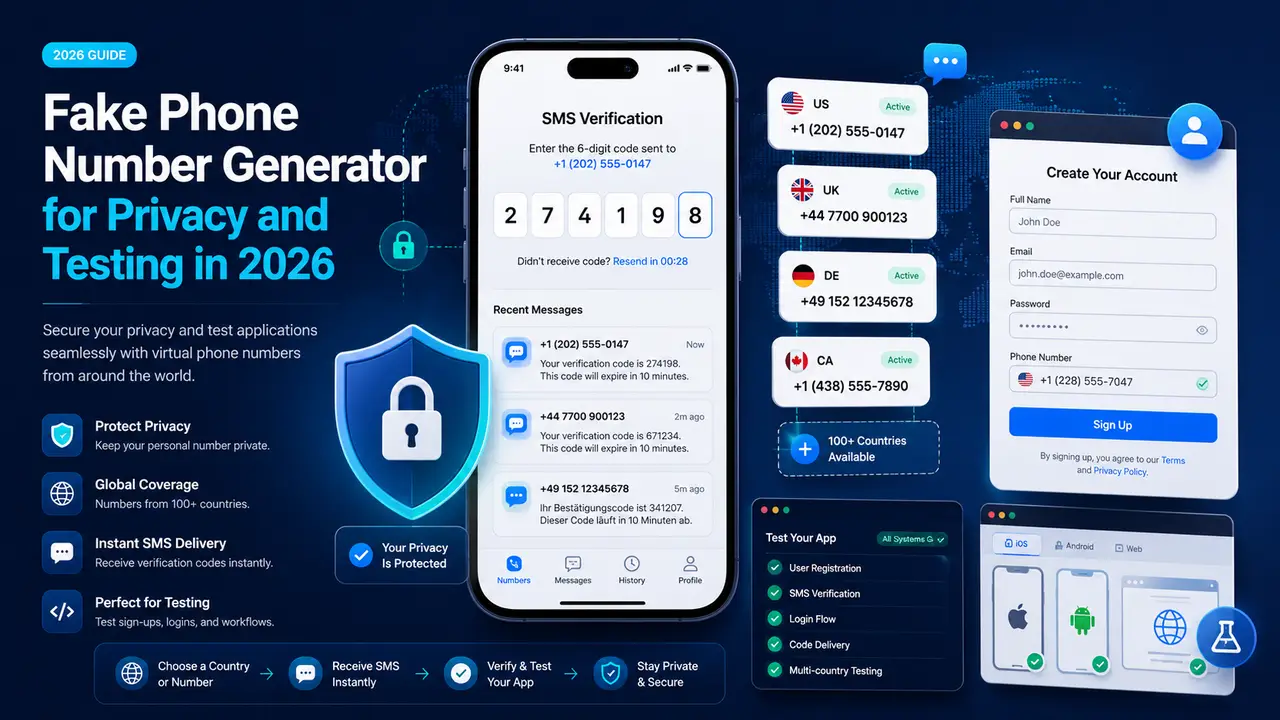
A fake phone number generator can help when you want to protect your personal number or test how a website handles phone data. Still, the word “fake” often causes confusion. Some tools create a random number in the correct format, but the number cannot receive calls or texts. Other services provide a working temporary phone number or virtual phone number for SMS, calls, or both. The available features depend on the country, provider, and number type.
The right choice depends on the task. A developer may use a phone number generator for testing to check whether a sign-up form accepts numbers from several countries. Google Firebase, for example, lets developers create fictional phone numbers and fixed verification codes for development. This helps teams test phone login flows without sending a real SMS each time. A user who wants to keep a personal number private may instead need a real virtual number that can receive SMS online.
However, not every fake phone number works for verification, and a short-term number may be unsafe for account recovery. This guide explains the main number types, their best uses, common verification problems, and how to choose a safer option for privacy or app testing.
What Is a Fake Phone Number Generator?
That difference is the key to understanding a fake phone number generator. The term can describe several tools, but they do not all provide the same result. Some create sample data for software testing. Others give you access to a working number for a limited time. Before using one, check whether you need a realistic format, an SMS inbox, or a number that can also take calls.
Random, Temporary, and Virtual Phone Numbers
A random phone number generator creates a number that follows a selected country format. It is useful for testing form fields, layouts, and validation rules. However, the number may not be active or assigned to anyone.
For example, a developer may need to check whether an app accepts a US number with the +1 country code. Google Firebase supports fictional phone numbers for testing phone authentication. These test numbers must use a valid format, but Firebase does not send a real text message. Instead, the developer sets a fixed test code.
A temporary phone number is usually available for a short period. It may receive texts or calls, depending on the service. A virtual phone number is a real cloud-based number assigned to an account rather than a physical SIM card. Providers can offer local, mobile, national, or toll-free virtual numbers for messaging and voice services.
Which Fake Phone Numbers Can Receive SMS?
Only an active, SMS-enabled number can receive a real text message. A random formatted number cannot receive SMS online because it is only test data.
A working temporary phone number for SMS or virtual number may receive messages when the provider supports inbound SMS for that number. This ability is not automatic. One virtual number may support voice only, while another supports SMS, voice, or both. Vonage and Twilio both advise users to check a number’s available communication features before choosing it.
For this reason, never assume that every fake phone number shown by a tool has a live inbox. Check the number type and its listed SMS capability first.
Why Do People Use Fake Phone Numbers?
Once you know which number types can receive messages, the next question is why people use them. Most valid uses fall into three groups: protecting a real number, testing software, and handling short-term communication. The best option depends on whether you need privacy, test data, or a working line.
Protecting a Personal Phone Number
People often use a fake phone number or masked number when they do not want to share their main mobile number with a stranger. This can be useful on a marketplace, delivery app, or local service platform.
For example, a customer may need to speak with a delivery driver. Both people need a way to call or text, but neither person needs the other’s private number. A masked phone service places a third number between them and forwards the communication. Twilio describes this setup as a way to hide both participants’ real numbers during a temporary conversation.
This does not stop every unwanted call. However, it limits where your main number is shared.
Testing Forms, Apps, and Sign-Up Flows
Developers and QA teams use a phone number for app testing to check sign-up pages, country codes, error messages, and SMS login steps.
Imagine that a travel app accepts users from the United States and the United Kingdom. The test team may enter different number formats to confirm that both work correctly. It may also test what happens when a number is too short or has the wrong country code.
Firebase lets developers use fictional numbers and fixed codes for phone authentication tests. No real SMS is sent. Teams can repeat the same test without using normal SMS quota or triggering message limits.
Temporary Calls and Short-Term Projects
A working temporary phone number can also support a project that has a clear end date. Examples include a local event, a short advertising campaign, a property listing, or customer interviews for a new product.
A project manager can publish the temporary number instead of a personal line. Calls and messages stay linked to the project. When the work ends, the number can be removed or reassigned. Twilio Proxy uses temporary number sessions for communication between people who only need contact for a limited period.
How to Choose the Right Fake Phone Number
The earlier examples show that people use these numbers for very different reasons. A developer testing a form does not need the same number as a project manager receiving customer texts. Start with one question: must the number only look valid, or must it receive a real message?
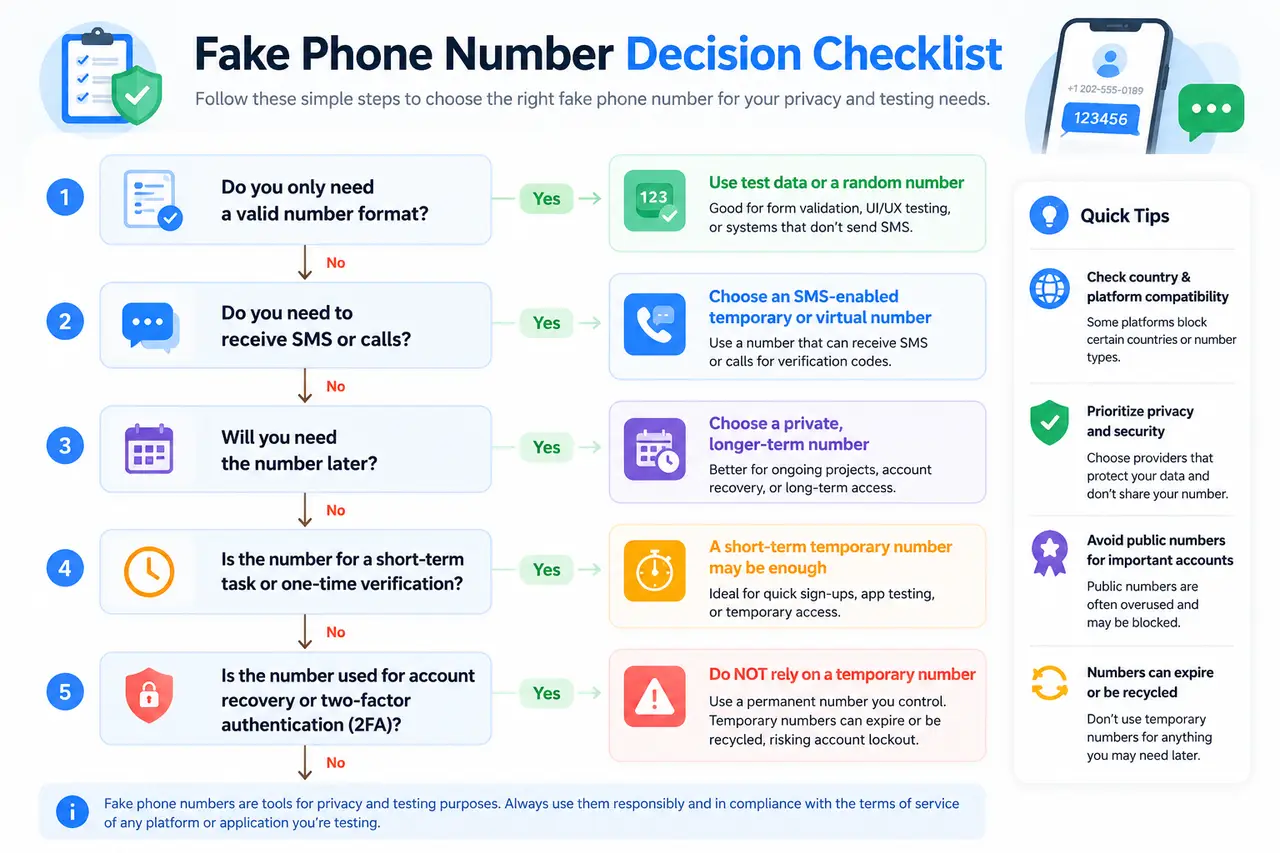
Generate a Formatted Number for Testing
Choose a generated number when you only need realistic test data. This works well for phone number format testing, database fields, error messages, and page layouts.
For example, a checkout form may need to accept US, French, and Japanese numbers. A phone number generator for testing can create sample values for each region. Google’s libphonenumber library can parse, format, and validate international phone numbers. However, a number that passes a format check is not proof that the number is active or belongs to a user.
For authentication tests, use tools made for development. Firebase allows fictional numbers with fixed test codes. These numbers follow normal format rules, but no real SMS is sent.
Choose a Temporary Number for SMS
You need an active temporary phone number for SMS when the test includes message delivery. Check the provider’s listed capabilities before using the number.
A virtual phone number may support voice, SMS, MMS, or only one of these services. Twilio’s number catalog lists capabilities, location, regulatory requirements, and pricing for each available number.
Suppose a team is testing an appointment reminder. A formatted sample number is not enough. The team needs an SMS-enabled number and access to its inbox. It should also confirm whether replies are supported.
Check Country and Platform Compatibility
Choose a country-specific phone number that matches the market you are testing. Then check whether the target platform accepts that number type.
Country code alone is not enough. A local number may be mobile, landline, toll-free, or VoIP. Its features can also vary by country. In some markets, separate numbers may be needed for voice and SMS.
Platform rules matter too. A fake phone number for verification may fail even when it can receive normal texts. Before starting a test, review the platform’s current phone requirements and use an approved test environment when one is available. This simple check can save hours of failed sign-up tests.
Free vs. Paid Fake Phone Number Generators
After choosing the right number type, decide how much control the task needs. A free tool may be enough for sample data or a quick, low-risk test. A paid service is usually better when the number must stay private, receive messages over time, or remain linked to one project.
Public vs. Private Phone Numbers
A free fake phone number generator may provide either a formatted sample number or access to a shared SMS inbox. These are not the same service.
A free public phone number can often be used by many visitors. The inbox may also be visible to everyone. For example, one public SMS app states that all its numbers and received messages are public. Anyone using the same number may be able to read the incoming code or message. Research into public SMS gateways has also found that exposed messages can contain links and personal data.
A private phone number is assigned to one customer or account during the rental period. Twilio, for example, lets customers provision available numbers to their own accounts. This gives the customer more control over the inbox, settings, and release date.
Differences in Privacy, Reliability, and Duration
Free public numbers are useful for simple tests that do not involve sensitive data. However, they may disappear, change, or become unavailable without notice. One free public SMS service explains that its displayed numbers become inactive after some time.
A paid number is easier to keep for a planned period. Providers normally charge a recurring number fee, plus possible SMS or call fees. Twilio displays a monthly fee before a number is purchased, while Telnyx lists some US virtual numbers from $1 per month. Actual costs vary by country and number type.
When a Paid Phone Number Is Worth It
A paid virtual phone number is worth considering when a team needs a private inbox, repeat testing, incoming replies, or the same number for several weeks.
For example, a QA team testing appointment reminders should keep one number through the full test cycle. A public number may change before the team finishes. A paid number gives better control, but it still does not guarantee that every platform will accept it.
Risks and Common Verification Problems
Paying for a private number gives you more control, but it does not guarantee successful verification. An SMS verification code can still fail because of the number, carrier, platform, or account activity. Before using any number, think about both today’s sign-up and future account recovery.
Why SMS Verification Codes May Not Arrive
A fake phone number for verification may receive normal texts but still fail to receive a platform code. Some platforms limit how many accounts can use one number. Google, for example, limits how often a phone number can be used for account verification.
Delivery can also fail because the number is invalid, inactive, or unable to receive SMS. The phone may be unavailable on the carrier network. A carrier or messaging provider may also filter the message for security, policy, or spam reasons. Twilio lists invalid numbers, unreachable devices, and carrier filtering among common causes of failed SMS delivery.
For example, a QA tester may request five codes within a few minutes. The first code arrives, but later attempts are blocked or delayed. The tester should check the number format, inbox access, request limits, and delivery logs before changing the whole test setup.
Risks of Recycled, Public, and Blocked Numbers
A recycled phone number had a previous owner before it was assigned again. That number may still be linked to old contacts, messages, or online accounts. The US Reassigned Numbers Database exists to help organizations check whether a number has changed owners.
A public number creates another problem. Other visitors may see incoming messages or use the same number. This makes it a poor choice for private codes, customer data, or any account you plan to keep.
A number may also be blocked after heavy use or suspicious activity. Verification providers can stop delivery attempts when a destination is linked to possible fraud or security risk.
Account Recovery and Two-Factor Authentication Risks
Do not use a temporary phone number for two-factor authentication on an important or long-term account. When the rental ends, you may lose access to future login and recovery codes.
Google explains that a recovery phone can receive a code to help reset a password. It also recommends backup codes for times when you lose a phone or change a number. NIST treats authentication through the public telephone network as a restricted method and requires services to offer an alternative authenticator.
For long-term accounts, use an authenticator app, passkey, security key, or saved backup codes when the platform supports them.
How DICloak Supports Registration and App Testing
A phone number is only one part of a registration test. Teams must also manage browser sessions, test regions, account access, and repeated form actions. DICloak does not provide phone numbers or proxy IPs. Instead, it helps teams organize these parts inside one testing workspace.
This is useful when several testers work on different user types, countries, or sign-up paths. Each test case can keep its own browser data, network settings, assigned tester, and activity record.
Build Separate Test Environments for Each Region
DICloak lets teams create separate browser profiles for different accounts, regions, and test cases. Each browser profile can keep its own cookies, login session, browser storage, fingerprint settings, and proxy configuration.
For example, a team may need to test registration in the United States, the United Kingdom, and Germany. It can create one Profile for each region. The team can then add the matching browser language, time zone, geolocation settings, test data, and phone number. DICloak supports custom language, time zone, and location settings for each Profile.
The team can also connect each Profile to a proxy from its own proxy provider. DICloak supports individual and batch proxy configuration, but it does not provide proxy services. Users must enter proxy information obtained from another provider.
This setup supports test account isolation. It reduces session mix-ups and helps the team return to the same regional test environment when an issue needs to be checked again.
Control Tester Access With Team Permissions
A test environment becomes harder to manage when several people use it. One tester may only need to open Profiles. A QA manager may need to edit proxy settings, review results, or assign new test environments.
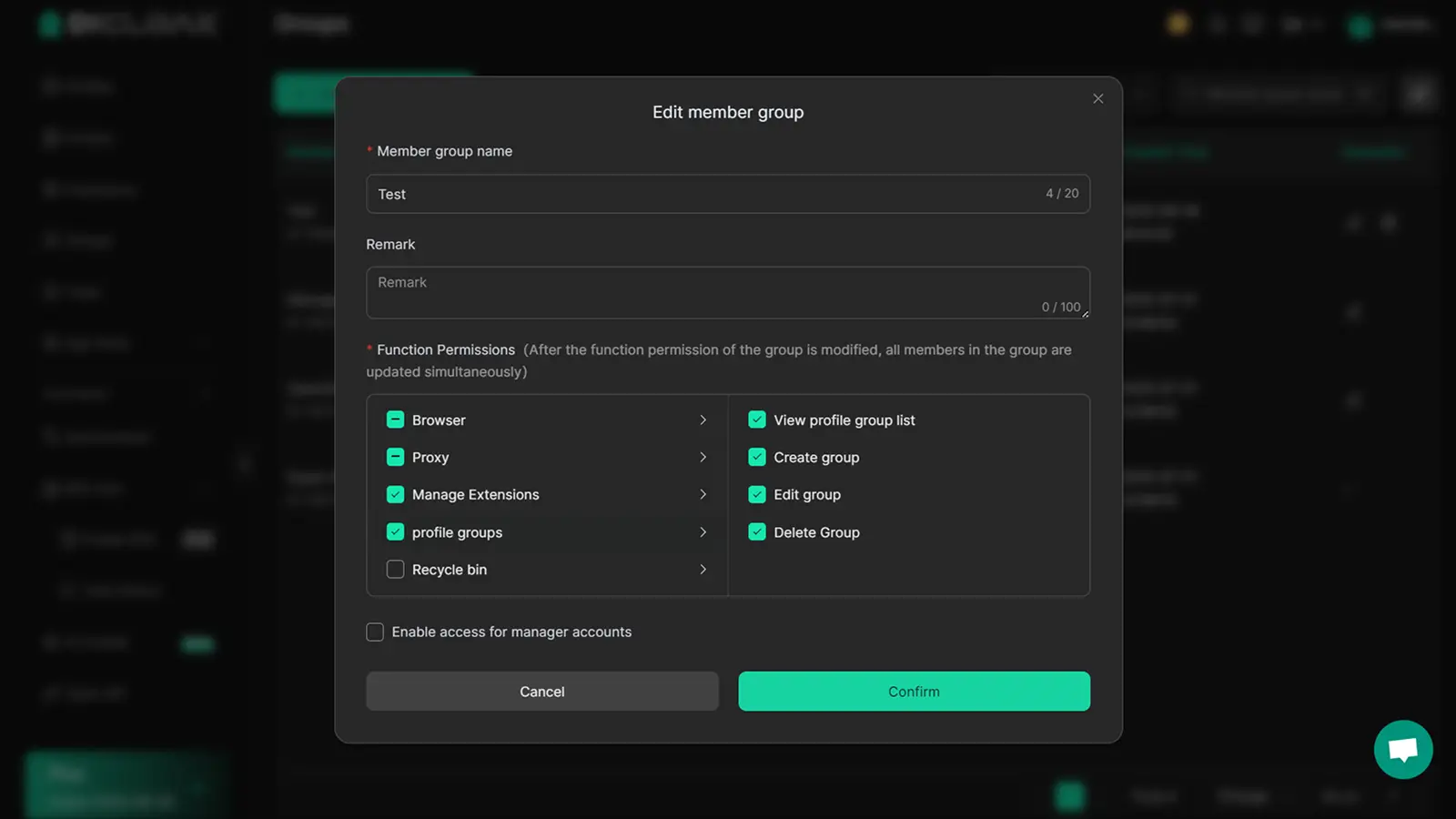
DICloak allows administrators to create member groups and choose which functions each group can use. For example, regular testers can receive permission to view and open Profiles without being allowed to change proxies, extensions, or other settings.
Administrators can also assign Profile Groups to specific members. A tester responsible for US registration may only see the approved US Profiles. Another tester can work with UK or German Profiles.
Profile field visibility can also be limited. Operation Logs help administrators review who used each Profile and what actions were taken. Temporary member accounts can be set to expire when a short testing project ends.
Automate Repetitive Form Testing With RPA
Registration testing often repeats the same actions. A tester opens a page, enters sample data, submits the form, and records the result. Doing this across many Profiles can take hours and lead to small input mistakes.
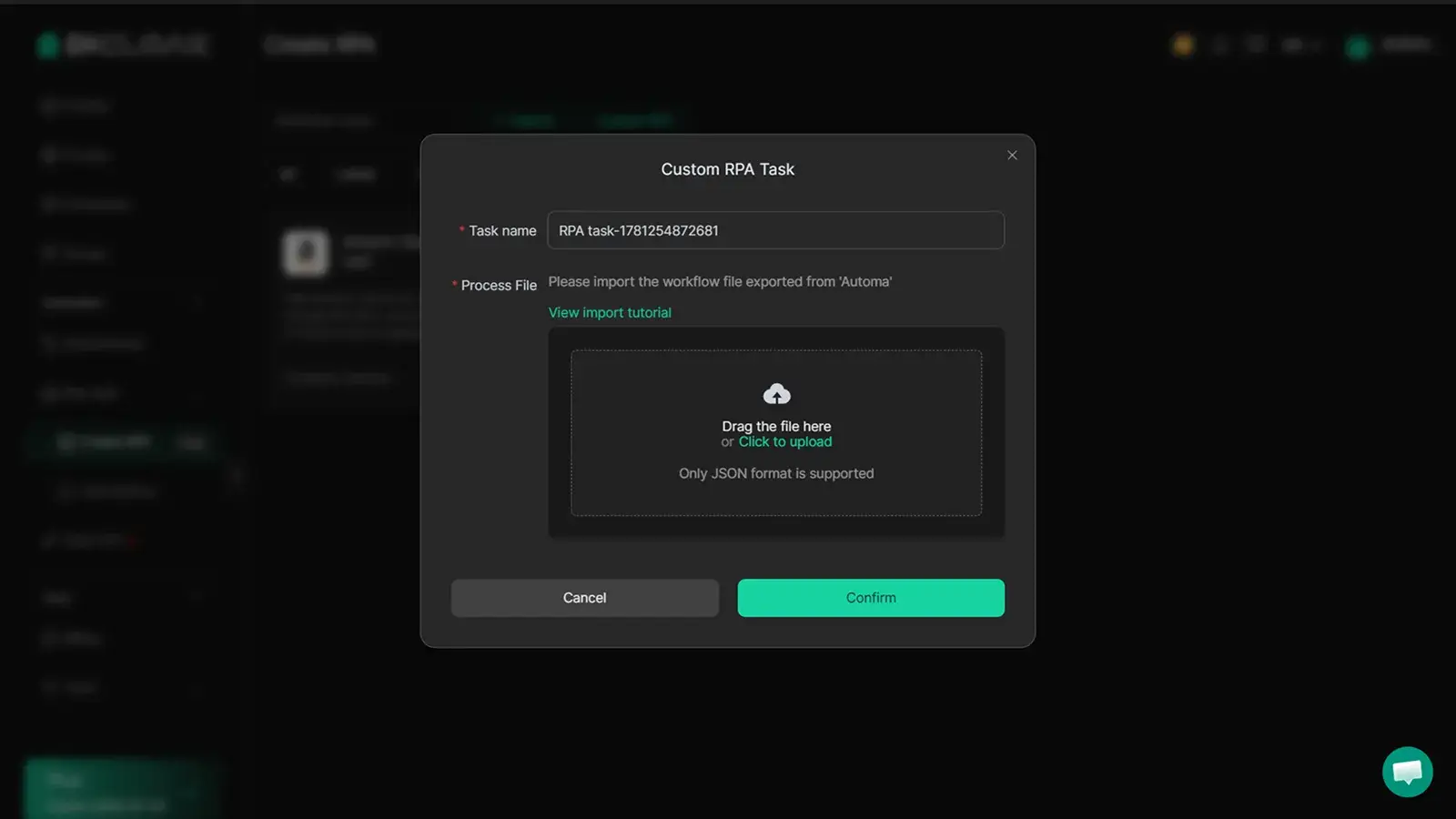
DICloak provides RPA automation with ready-made workflows and customizable scripts. Tasks can run once, several times, or on a repeating schedule.
Teams can use automated form testing for approved QA cases, such as entering different phone formats or checking several regional sign-up pages. RPA handles repeated actions, while testers review SMS delivery, error messages, and unexpected page behavior.
Frequently Asked Questions About Fake Phone Number Generators
What Is the Difference Between a Fake and Temporary Phone Number?
A Fake Phone Number Generator may create a number that only follows a valid format. This type of number is useful for testing forms, but it may not be active. A temporary phone number is usually a working number that can receive calls, SMS, or both for a limited period. Always check the listed features. A number that looks valid is not proof that it has an active inbox.
Can Fake Phone Numbers Work With WhatsApp or Telegram?
Some working virtual or temporary numbers may receive registration codes, but success is not guaranteed. WhatsApp requires an active number that can receive an SMS or phone call. It also states that some number types, including certain VoIP, landline, and toll-free numbers, are unsupported. Telegram also links each account to a phone number. Platform rules and accepted number types can change, so check the current requirements before using a Fake Phone Number Generator for registration.
Are Fake Phone Numbers Traceable?
A fake or virtual number should not be treated as fully anonymous. A phone service may collect account, payment, device, or identity data when it assigns a number. Twilio, for example, classifies a phone number as personal data and may require identity or address documents for some countries. The website or app receiving the number may also keep its own activity records. Use a Fake Phone Number Generator for lawful privacy and testing needs, not to hide harmful activity.
How Long Do Temporary Phone Numbers Last?
The duration depends on the provider and plan. A free public number may change or disappear after a short time. A rented private number may remain assigned for days, months, or as long as the user continues paying for it. Some providers release a number when the account closes or the user removes it. Released numbers may later be assigned to someone else, which is why they should not be used for long-term recovery.
Should I Use a Temporary Phone Number for Two-Factor Authentication?
A temporary number is not a good choice for two-factor authentication on an important account. You may lose the number when the rental ends. If the platform later sends a login or recovery code, you may not receive it. The number could also be reassigned to another person. NIST treats authentication through the public telephone network as a restricted method and recommends offering other options. Use a passkey, authenticator app, security key, or backup codes when available.
Choosing the right fake phone number is only part of the testing process. Keeping each test account, regional setup, and registration session separate matters even more when your team checks multiple sign-up flows.
You can use DICloak to run each test account in its own isolated browser profile, keep cookies and login sessions separate, assign Profile access to the right team members, and automate repetitive form testing with RPA.Try DICloak for Free.
 Web Proxy Tools
 Free Tools
 Cookie Plugin
 UA Generator
 MAC Address Generator
 IP Generator
 IP Address List
 2FA Code Generator
 World Clock
 Anonymous Check
 WebRTC Leak Test
 UUID Generator
 Free Web Proxy Site
 Proxy Checker
 FB Ad Checker
 AI Web Scraping
 Free SMM Tools
 Twitter Shadowban Checker
 Instagram Name Checker
 UTM Generator
 Username Generator
 AI Hashtag Generator
 LinkedIn Headline Generator
 Social Media Image Resizer