Losing access to your Facebook account can be stressful and confusing. Many users wake up to see a facebook account disabled message and wonder what went wrong. Whether it’s due to security alerts, reporting, or policy violations, understanding the reasons behind account restrictions is the first step to getting back online. In this guide, we break down the most common causes, how to check your account status, steps for recovery, and best practices to prevent future issues. You’ll also learn how organized workflows and tools like isolated browser profiles can help protect your accounts.
What Are the Most Common Reasons for Facebook Account Disabling?
Many people ask “Why is my Facebook account disabled?” when they suddenly lose access. A disabled Facebook account can feel scary and confusing. Facebook sends a message like “Your account has been disabled” when it thinks rules were broken or a problem was found.
Violations of Facebook’s Community Standards
Facebook has rules called Community Standards to keep the platform safe. If you post hate speech, violence, sexual content, or harmful posts, Facebook may disable your account. For example, one user reported their account was suddenly disabled for “violating community standards,” even though they didn’t post anything clearly wrong — but the system flagged something they shared. Rules also cover misinformation and harassment. Breaking these rules can lead to a facebook account disabled message when you try to log in.
Suspicious Login or Account Activity
Facebook watches how you log in. If you log in from a new country, use a VPN, or suddenly change devices, the system may think your account is hacked. Many users have seen their accounts disabled after logging in from another location or device that looked unfamiliar. This suspicious activity can trigger Facebook to lock or disable access for safety reasons.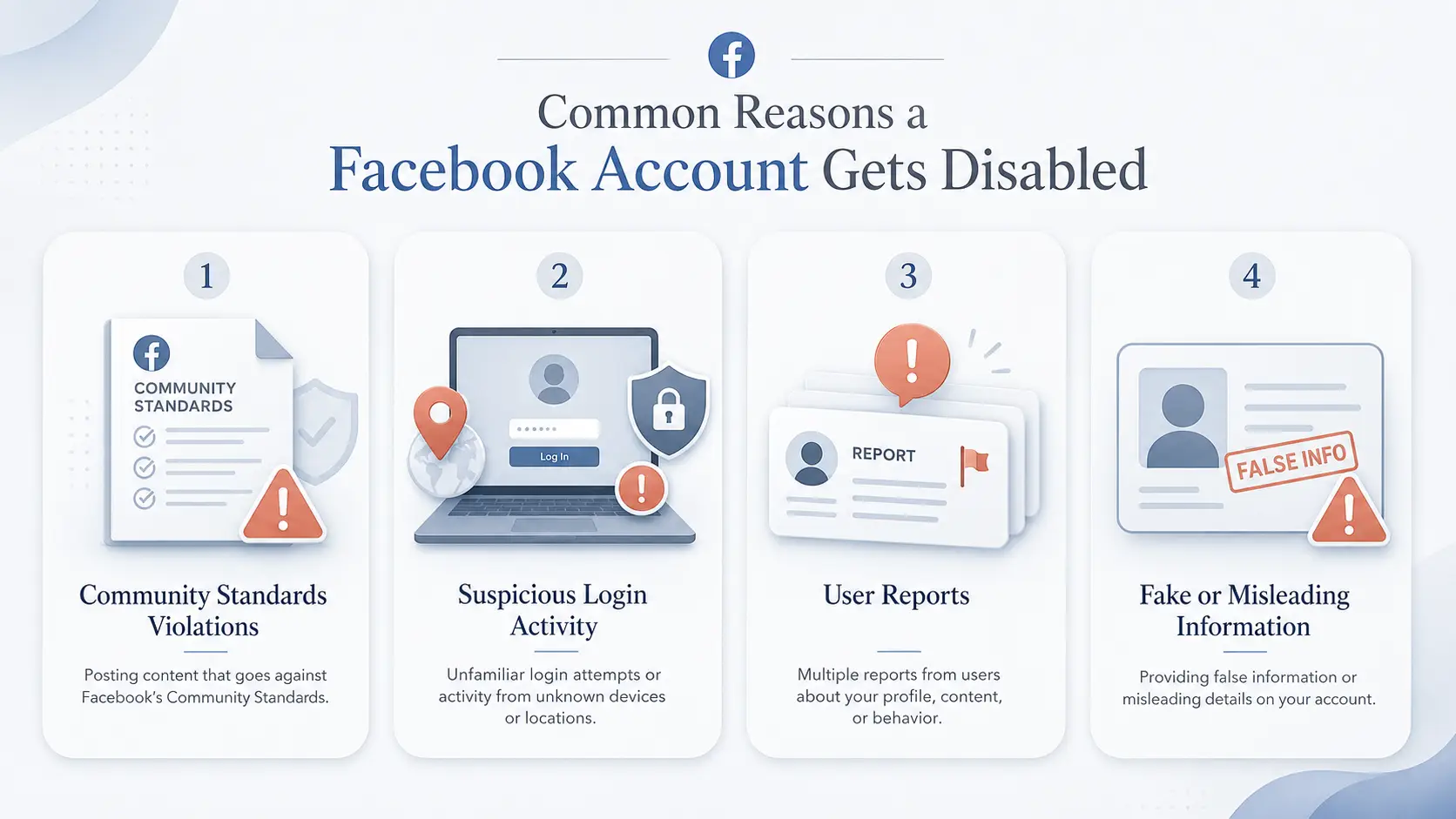
Reporting or Complaints from Other Users
If other users report your profile or posts, Facebook may review your account. Multiple reports can make Facebook automatically disable a profile. For instance, if a post gets reported many times in a short time, the system might assume it’s harmful or spam and disable your account to stop problems before human review.
Use of Fake or Misleading Information
Facebook wants real names and real people. Accounts with fake names, false information, or that impersonate another person are often disabled. A disabled Facebook account message for fake info can happen even if you didn’t mean harm — sometimes users create a nickname or joke account, and Facebook flags it as fake.
Each of these causes may result in “Facebook disabled my account” notices. Knowing these reasons can help you prevent future problems and understand what might have happened if your facebook account disabled message appears.
How to Check If Your Facebook Account Has Been Disabled
After you know common reasons why Facebook disabled my account, the next step is to confirm if your facebook account disabled message is real. Many people feel confused or scared when they lose access. Knowing the signs helps you act fast and correctly.
Signs That Your Account Has Been Disabled by Facebook
One clear sign of a disabled Facebook account is what you see when you try to log in. Instead of asking for your password, Facebook may show a message like “Your account has been disabled” or “We’ve disabled your account” on the login screen. This message is official and comes from Facebook itself. In some real cases, users said they were suddenly logged out while using Facebook, then saw the disabled notice when trying to log in again. This means the system stopped access entirely.
Another sign is that your profile disappears to your friends or family when they search for you. If they can’t find your name, profile pic, posts, or older messages, this could also mean your account is disabled, not just logged out.
How to Log In and Confirm the Account Status
To confirm your account status, try logging in from a browser or the Facebook app with your normal email/phone and password. If you get a disabled message, that means Facebook has blocked access. Sometimes Facebook also shows a message that you can appeal within a certain time if you think it was a mistake. If you see this, you have a chance to get your account back.
Another step is to check Account Status inside Facebook settings if you can still open the app. Go to your profile picture → Help & support → Account status. This screen shows any strikes or warnings about rule violations that might have led to your account being disabled and helps you see exactly what Facebook has flagged.
Understanding Facebook’s Notification Messages
When Facebook disables an account, they may also send a notification email to the email linked to your account. This email usually says that your account is disabled or suspended and gives a short reason or link to learn more. If you got this email, check your inbox and your spam folder carefully.
Be careful of fake “disabled” pop‑ups or emails that ask for your password or personal info. Scammers often use fake “We’ve disabled your Facebook account” alerts to trick people into giving up their login details. Always check the sender and do not click links in suspicious messages.
By watching for these signs, you can know with confidence whether your Facebook account was truly disabled. This helps you avoid worry and take the right next step if you want to try to get your account restored.
Steps to Recover a Disabled Facebook Account
If you see a facebook account disabled message, you might still be able to get it back. Many people feel worried or lost when Facebook disabled my account suddenly. But Facebook has a system to review and restore accounts if you act quickly and correctly.
| Step |
What to Do |
Important Tip |
| 1. Log in |
Check the disabled notice on Facebook |
Use your normal email or phone number |
| 2. Request review |
Click Appeal or Request Review |
Keep the explanation short and honest |
| 3. Upload ID |
Provide government-issued ID if requested |
Make sure the name matches your account |
| 4. Wait for response |
Check email and Help Center updates |
Avoid sending repeated appeals too quickly |
| 5. Follow up carefully |
Submit more proof only if Facebook allows it |
Stay calm and factual |
How to Submit an Appeal to Facebook
The first thing you must do is appeal. When you log in and see the disabled notice, look for a link or button like “Appeal” or “Request Review” on the screen or in the email Facebook sent you. If you click that, you go to the official appeal form. Facebook asks you to enter your name, email or phone, and explain why you think your facebook account disabled notice is wrong. A simple, honest explanation works best. For example, one user did this and saw their account restored after a few days because the review showed no serious violations.
What Documents You Need for Verification
Sometimes Facebook will ask you to prove your identity. This is common with disabled accounts that may look like fake or hacked accounts. You might be asked to upload a government‑issued ID like a driver’s license or passport. Make sure the name you upload matches the name on your account exactly. Some people also take a selfie while holding the same ID and upload that if Facebook requests it. The clearer and real the documents look, the better chance you have of recovery.
How to Track the Status of Your Appeal
After you submit the appeal and any required documents, Facebook will send updates by email or show status messages if you can still access the Help Center. Many people get a reply in a few days, but it can take longer. Some users report waiting a week or more before hearing back. Don’t submit “multiple appeals” too quickly — Facebook might automatically ignore repeat requests and slow the process. As one experienced user noted, patience and following official steps usually works better than repeatedly submitting the same appeal.
Recovering a disabled account often depends on proving who you are and why the disable was a mistake. Acting fast and providing clear info gives you the best chance to get your facebook account disabled message reversed.
Why Facebook Might Reject Your Appeal and What to Do Next
Even after you appeal and follow all the steps, sometimes Facebook still says your facebook account disabled appeal was not successful. This can be very upsetting, especially if your account holds years of photos, messages, or work contacts. Knowing why this happens and what you can do next gives you real options instead of feeling stuck.
Common Mistakes Users Make During the Appeal Process
One reason Facebook rejects an appeal is missing or unclear information in the appeal form. Many users submit the appeal without explaining clearly why the disable was a mistake. For example, if someone writes “I didn’t break rules” without specifics, Facebook’s automated review may dismiss it quickly. Others try submitting multiple appeals too fast, but that can make Facebook ignore them or flag them as spam. Some people also upload blurry or mismatched ID photos, so the verification fails and the appeal is denied.
Another common mistake is confusing appeal for a disabled account with other issues like login locks or two‑factor problems. If your account is locked for security reasons and you try the wrong appeal form, Facebook may reject it because it isn’t the right process for your situation.
| Mistake |
Why It Hurts Your Appeal |
Better Approach |
| Sending many appeals too quickly |
May look like spam |
Submit one clear appeal and wait |
| Writing an angry message |
Makes the case less clear |
Use calm, factual wording |
| Uploading blurry ID |
Facebook may fail to verify you |
Upload a clear, readable document |
| Using the wrong form |
The issue may not be reviewed correctly |
Make sure it is for disabled accounts |
| Giving vague explanations |
Automated review may dismiss it |
Explain what happened and why it was a mistake |
How to Strengthen Your Case for a Successful Appeal
To improve your appeal, write a clear and calm explanation. Say what happened, why you believe Facebook disabled my account in error, and how you will follow the rules in the future. Use simple sentences and avoid angry messages — clear facts work best. If Facebook asks for ID, make sure the photo is sharp and all text is legible. Many users reported that careful, accurate ID uploads helped their disabled account appeal finally succeed after an initial rejection.
You can also wait for Facebook to ask for more verification instead of sending many appeals at once. Cases where users patiently provided the exact documentation and waited earned positive responses even after a first denial.
Alternative Options if Your Appeal Fails
If Facebook still rejects your appeal, you still have a couple of options. One is to download your information if the disabled screen offers it — this can save your photos and data even if you can’t recover the account. Some users also try creating a new account with correct information and then link it to Meta Verified support to see if that opens up direct support channels.
Some users share that reaching out to Facebook’s Oversight Board for specific policy decisions can work in rare cases, but this applies only to some content decisions — not all account disablements.
Remember, recovery is not guaranteed, but understanding the reasons an appeal gets rejected and strengthening your appeal with clear facts and good verification gives you the best shot at getting your facebook account disabled message reversed.
How Long Does It Take to Recover a Disabled Facebook Account?
After you send an appeal, the hardest part is waiting. A facebook account disabled case does not have one fixed review time. Facebook says you can appeal a suspension within 180 days. If you do not appeal in time, or if the appeal fails, the account may be permanently disabled.
Average Processing Times for Appeals in 2026
Some users get a reply in a few days. Others wait one or two weeks. Complex cases may take longer, especially if Facebook needs ID review. For example, if your disabled Facebook account was flagged after a strange login, the review may be faster once you confirm your identity. But if the case involves Community Standards, fake identity, or repeated reports, it may need deeper review.
Factors That Can Delay the Recovery Process
Your appeal may take longer if your ID photo is blurry, your account name does not match your document, or you submit the same appeal many times. It can also slow down if you used the wrong form. A person searching “how do I disable my Facebook account” or “how to disable my Facebook account” may land on deactivation help, which is different from a facebook account disabled appeal.
What to Do If You Haven’t Heard Back from Facebook
If you have not heard back, check your email, spam folder, and login screen again. Do not send angry messages. Instead, wait, then submit one clear follow-up if Facebook gives you that option. Write calmly: “Facebook disabled my account, but I believe this was a mistake. I have uploaded clear ID and can provide more proof.” This is better than asking how to disable your Facebook account, because recovery and self-disable are different actions.
How to Prevent Your Facebook Account from Being Disabled Again
Once you get your facebook account disabled message reversed, you want to keep it safe. Nothing feels worse than fixing a disabled account only to face the same problem again. Many users who recovered their accounts share simple steps that help keep Facebook happy and protect your access in the years ahead.
Best Practices for Following Facebook’s Guidelines
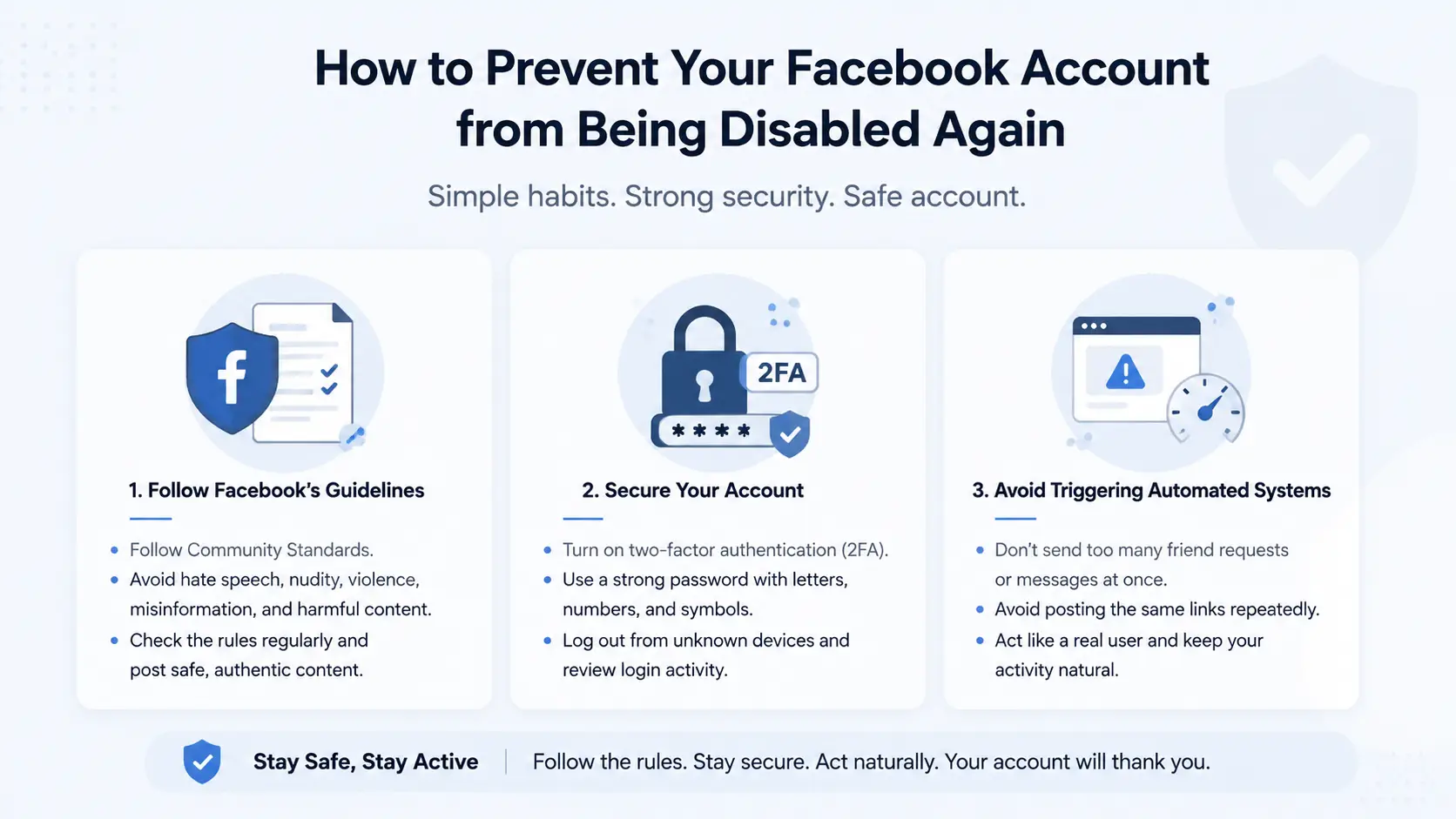
Follow Facebook’s rules closely. Do not post hate speech, nudity, violence, or misleading health claims. For example, one user shared a meme that contained a banned symbol. Facebook flagged it as a rule break and later disabled the account. After that user read the Community Standards and only posted safe content, there were no more issues. Check Facebook’s standards page often so you stay updated on what is allowed.
How to Secure Your Account Against Unauthorized Access
Security problems often cause a disabled facebook account event. Turn on two‑factor authentication (2FA) in settings. This helps stop hackers. Use a strong password with letters, numbers, and symbols. If Facebook sees strange login attempts, it may think your account is hacked and disable it. Securing your account lowers that risk. Many users who had Facebook disabled my account due to unusual login activity said 2FA helped prevent future blocks.
Avoiding Behaviors That Trigger Facebook’s Automated Systems
Facebook uses automated systems to spot strange behavior. Rapid friend requests, too many messages in a short time, or posting the same link everywhere can make the system think your account is spam. Some users learned this after their accounts got disabled for spam‑like actions even when they did not mean harm. Slow down and follow normal, human‑like activity. This makes it less likely your account will be flagged again.
Using these simple steps helps protect you from another disabled event and keeps your Facebook experience safe and smooth.
What to Do If Your Business Facebook Account Is Disabled
When a facebook account disabled affects your business, the impact can be serious. You may lose access to ads, messages, and customer pages that make your business work every day. Many business owners have faced this once or more — some were left without access to ad campaigns or client communication for days.(turn0search1)
Key Differences Between Personal and Business Account Recovery
Business accounts are linked to Business Manager and Pages, so you must recover both the personal profile and business access. If your personal account is disabled, Facebook disabled my account can stop Page admin access too. One user lost admin rights to three pages when Facebook disabled the personal profile that managed them, and only regained access after using Meta Verified support through an Instagram connection.
How to Contact Facebook Business Support
Business customers may have access to special support tools through Meta Business Suite. Go to the Facebook Business Support page and look for Contact Support or Chat with Support options. This can open a support chat where you explain your problem and submit verification for business details like licenses or tax IDs. If you can’t see support options, try logging in through the Account Quality dashboard to find “Request Review” for disabled assets.
Steps to Minimize Business Disruption During Recovery
While you wait for recovery, protect what you can. If your Page still exists but you can’t edit it, make sure clients have other ways to reach you — like email, your website, or Instagram. Update your business contacts everywhere with temporary info so customers know you’re still active. Some businesses also assign multiple admins once access is restored, so losing one profile won’t lock everyone out again. Keeping business documentation and proof of ownership ready makes future recovery faster.
A disabled business account doesn’t have to be the end of your online presence. With the right steps, communication, and backup plans, you can reduce disruption and work toward getting your facebook account disabled message cleared and business running again.
After recovering a disabled Facebook account, many users focus on preventing the same issue from happening again. While no tool can guarantee that an account will never be disabled, creating a more stable and organized account environment can help reduce unnecessary risks.
Secure Multi-Account Management for Reduced Risk
If you manage multiple Facebook Pages, ad accounts, or client profiles, keeping them separated is important. You can use DICloak to create independent browser profiles for different accounts. Each profile can have its own cookies, fingerprint settings, and proxy configuration, helping keep account activities isolated and easier to manage.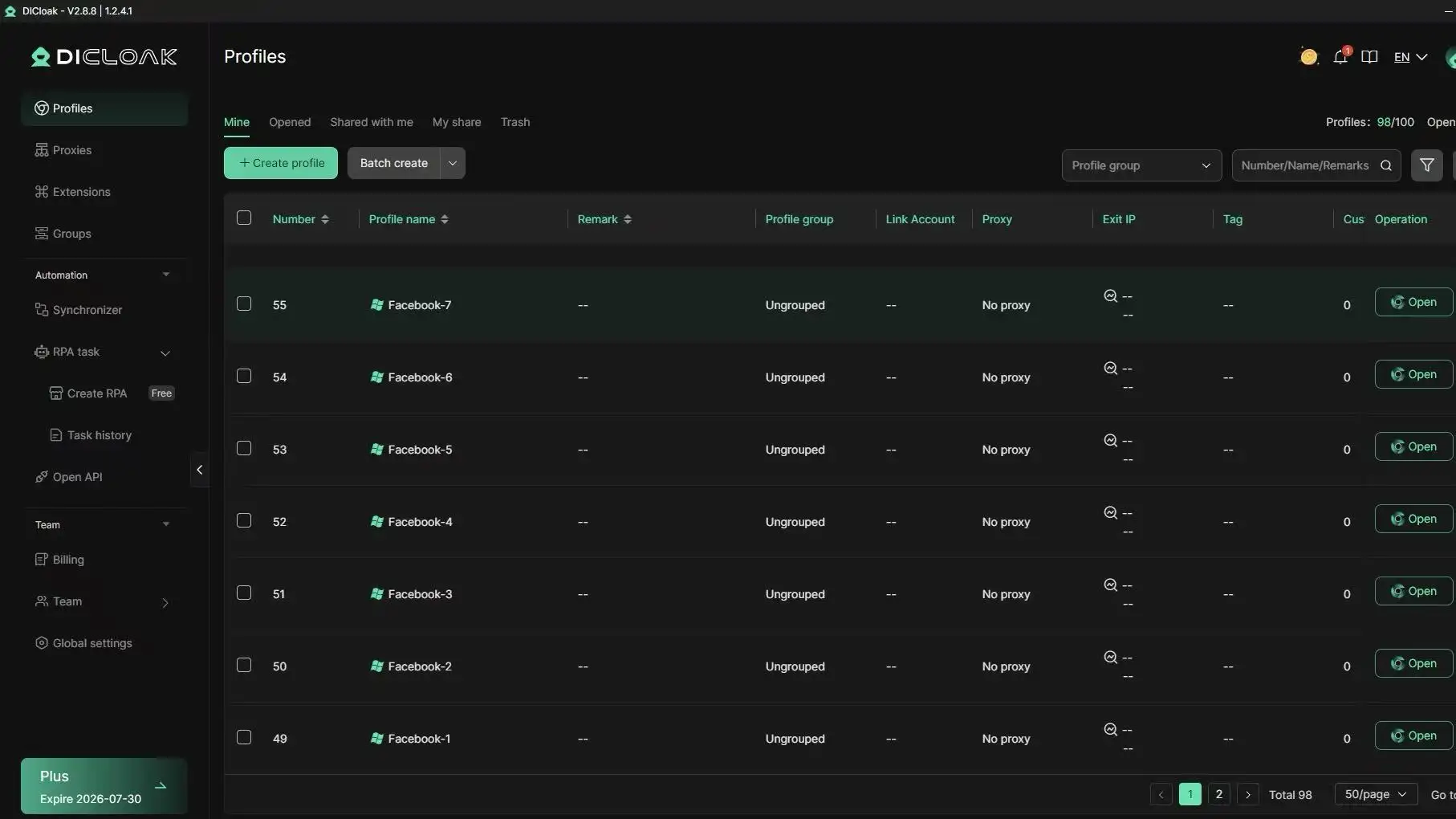
Isolated Browser Profiles for Consistent Access
Facebook reviews signals such as login history, browser settings, and device information. Frequent changes can sometimes trigger additional security checks. With DICloak, you can maintain separate browser profiles for different accounts, helping create more consistent login conditions and reducing accidental account crossover.
Automation Tools to Prevent Suspicious Activity
Repetitive actions across multiple accounts can be time-consuming and may increase the chance of mistakes. You can use DICloak's built-in tools, including RPA automation, bulk operations, and the Multi-Window Synchronizer, to streamline routine tasks. For larger teams, these tools can help improve efficiency while keeping account management workflows more organized.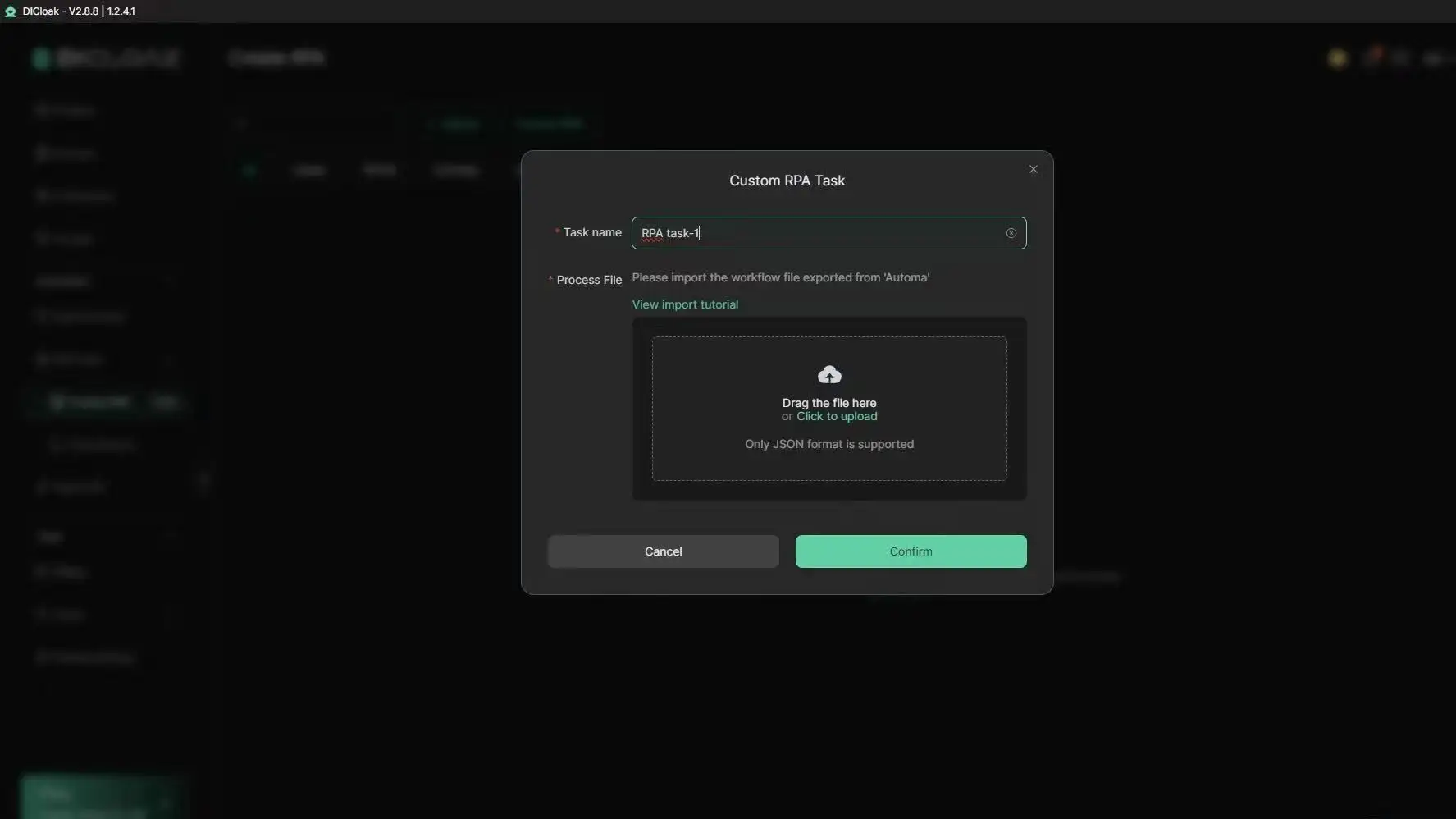
Whether you work in social media management, affiliate marketing, e-commerce, or digital advertising, using structured browser profiles and better workflow management can help support long-term account security and operational stability.
Frequently Asked Questions About Disabled Facebook Accounts
Can I recover my Facebook account if it was disabled?
Yes, in many cases a facebook account disabled notice can be reversed. You need to submit an appeal through Facebook’s official form. Provide a clear explanation and, if requested, upload verification documents like a government-issued ID. Following the appeal instructions carefully improves the chance of recovery.
What should I do immediately after my Facebook account is disabled?
When you see a facebook account disabled message, avoid logging in repeatedly or using multiple devices. Check your email for notifications from Facebook and submit an appeal as instructed. Keeping calm and following official procedures prevents further flags or automatic restrictions.
How long does it take to recover a disabled Facebook account?
Recovery times for a facebook account disabled vary. Some users receive a response in a few days, while more complex cases, like repeated reports or verification requests, may take one to two weeks or longer. Ensure your appeal includes clear explanations and accurate documents to avoid delays.
Can I create a new account if my old Facebook account was disabled?
Technically you can create a new account, but be cautious. A facebook account disabled due to repeated violations or suspicious activity may affect new accounts if Facebook links them by device, IP, or fingerprint. Using proper separation of devices and following guidelines helps reduce the risk of being disabled again.
What happens to my data when my Facebook account is disabled?
When your facebook account disabled, your data is still stored on Facebook servers. You may be able to download information like photos, messages, and posts if the appeal process allows. For business accounts, it is important to back up important content to prevent loss during the disabled period.
Conclusion
A facebook account disabled notice doesn’t have to mean the end of your online presence. By understanding the common causes, carefully submitting appeals, and following best practices for account security, you can recover access and reduce the risk of future problems. Using structured workflows, separate browser profiles, and automation tools can further protect your accounts while streamlining daily operations. Stay informed, act quickly, and keep your Facebook experience secure and consistent.
 Web Proxy Tools
 Free Tools
 Cookie Plugin
 UA Generator
 MAC Address Generator
 IP Generator
 IP Address List
 2FA Code Generator
 World Clock
 Anonymous Check
 WebRTC Leak Test
 UUID Generator
 Free Web Proxy Site
 Proxy Checker
 FB Ad Checker
 AI Web Scraping
 Free SMM Tools
 Twitter Shadowban Checker
 Instagram Name Checker
 UTM Generator
 Username Generator
 AI Hashtag Generator
 LinkedIn Headline Generator
 Social Media Image Resizer