Have you ever wondered if you can watch multiple Twitch streams for drops and get rewards faster? Twitch Drops are one of the most exciting ways to earn exclusive digital rewards just by watching your favorite live streams. From cosmetics to in-game bonuses, these campaigns give viewers a chance to collect unique items without spending a dime. But many users get frustrated when progress seems slow or Twitch drops not happening, and questions about shortcuts and multi-account strategies keep popping up.
In this guide, we’ll break down everything you need to know about Twitch Drops—from how they work and the official rules to safe multi-account management and expert tips for maximizing your rewards. Whether you’re a casual viewer or a dedicated streamer fan, this guide will show you proven strategies to make every minute of watch time count and help you collect as many Drops as possible.
Understanding Twitch Drops
Twitch Drops are a reward system on Twitch that encourages viewers to watch live streams. Developers and publishers use Drops to promote events, updates, or special campaigns. In return, viewers can receive digital rewards simply by watching streams that have Drops enabled.
Before asking can I watch multiple Twitch streams for drops, it helps to understand how the system actually works. Many users who think Twitch drops not happening often misunderstand the basic rules behind the Drops system. Learning the mechanics can save a lot of time and frustration.
What Are Twitch Drops?
Twitch Drops are promotional rewards given to viewers who watch participating live streams. These rewards are usually provided by developers or publishers who partner with Twitch during a campaign or event.
The idea is simple. Instead of buying an item or completing a task in a game, viewers earn rewards by watching a stream for a certain amount of time. These rewards are often cosmetic items, digital bonuses, or other account-based content connected to the campaign.
Drops campaigns usually have clear rules. They often include:
- specific streams that participate in the campaign
- a required watch time to unlock rewards
- a campaign period with a start and end date
For example, a campaign may require viewers to watch a participating stream for 30 minutes to unlock the first reward and longer to unlock more rewards. The goal is to encourage viewers to stay engaged during the event.
Because rewards depend on watch time, many viewers look for shortcuts. A common question is can I watch multiple Twitch streams for drops to speed up progress. Understanding the system rules is important before trying different viewing methods.
How Do Twitch Drops Work?
The Twitch Drops system works through watch-time tracking and account linking. Once everything is set up correctly, the platform automatically tracks your progress while you watch a participating stream.
The process usually works like this:
- Watch Time Accumulation: Viewers must watch a stream that has Drops enabled. As the stream plays, Twitch tracks how long the viewer watches. Progress builds slowly toward the required time for each reward.
- Claiming Rewards: When the watch-time requirement is completed, the reward becomes available to claim. Viewers can claim it directly on the stream page or in the Drops Inventory section of their Twitch account.
- Linked Accounts: To receive the final reward, viewers must connect their Twitch account with the publisher’s account related to the campaign. Without this link, the reward cannot be delivered.
- Campaign Timing: Most Drops only work during specific campaigns. Each campaign has a start time and end time. Once the campaign ends, viewers can no longer earn progress for that reward.
Another very important rule from Twitch guidelines is that progress can only be earned from one channel at a time. Even if a viewer opens several streams at once, Twitch will not count watch time from multiple channels. This rule is one reason many people search for answers when Twitch drops not happening or when they try different ways to earn rewards faster.
Types of Twitch Drops Available
Drops campaigns are not all the same. Developers can choose different reward systems depending on their event or promotion. Understanding these types helps viewers know how progress works.
- Time-Based Drops: This is the most common type. Rewards unlock after a viewer watches a stream for a certain amount of time. The longer you watch, the more rewards you can unlock during the campaign.
- Tiered Drops Campaigns: Some campaigns use multiple reward levels. A viewer must unlock and claim one reward before progress begins for the next level. This system encourages viewers to keep watching over a longer period.
- Event-Based Drops: Some Drops only appear during special broadcasts, announcements, or community events. These rewards are often limited and only available during the event window.
- Inventory Claim Drops: In many campaigns, rewards must be claimed manually through the Drops Inventory page. If a reward is not claimed, progress toward the next reward may not start.
These different campaign types explain why the system sometimes feels confusing. Many viewers try different strategies and ask can I watch multiple Twitch streams for drops to increase their chances. When the rules are not clear, people may also believe Twitch drops not happening, even though the system is simply following its normal tracking rules.
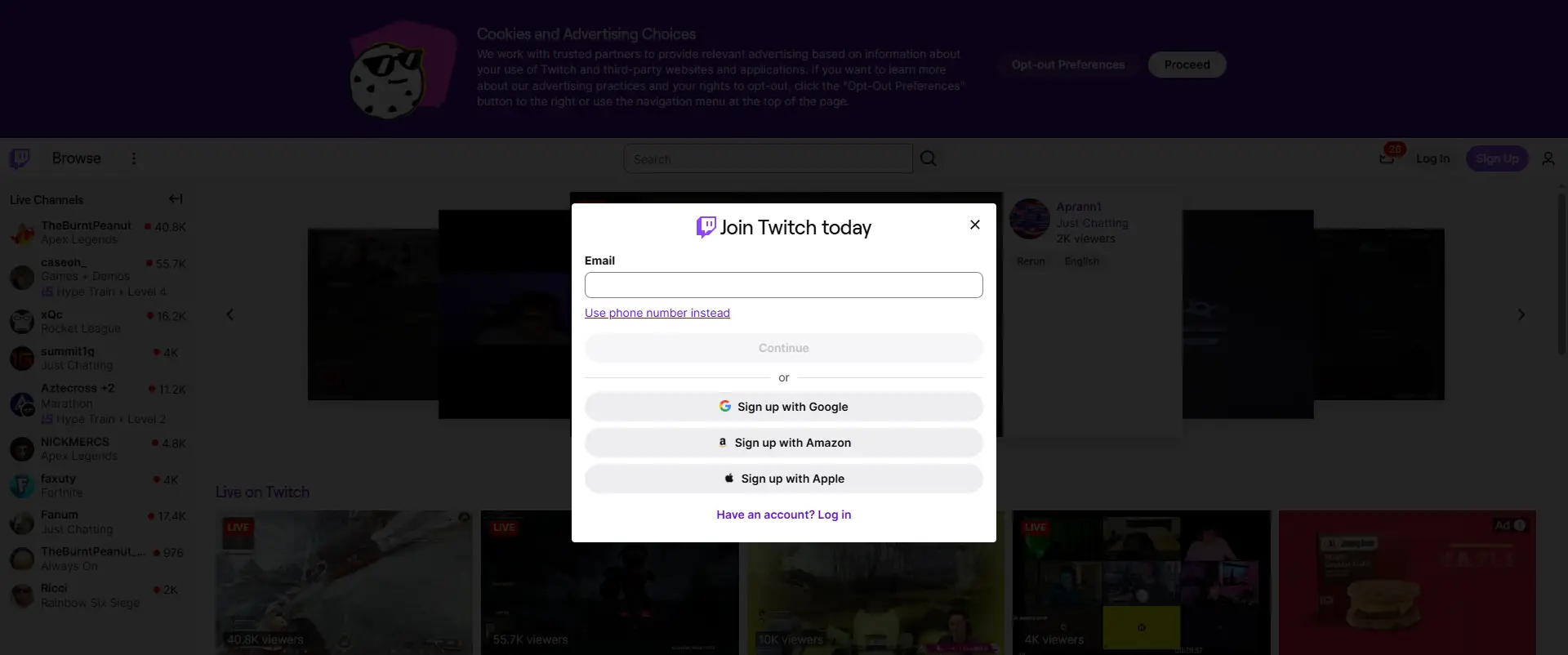
Official Policies on Watching Multiple Streams for Drops
After learning how Drops campaigns work, many viewers want to know one thing: can I watch multiple Twitch streams for drops and unlock rewards faster. It sounds like a simple trick. Just open several streams and let them run at the same time.
However, the rules from Twitch are very clear. The Drops system was designed to track engagement from a single viewing session per account. Because of this rule, opening multiple streams with the same account will not speed up rewards.
Understanding this policy is important. Many viewers think Twitch drops not happening when the progress bar does not move, but the real reason is often related to how Twitch tracks watch time.
Twitch's Official Stance on Multiple Streams for Drops
The official answer to the question can I watch multiple Twitch streams for drops is simple: No, not with one account.
Twitch tracks watch time from only one active stream per account. If you open several streams at the same time—whether in different browser tabs or on different devices—the system will only count watch time from one of them.
For example, imagine a Drops campaign that requires 60 minutes of watch time. A viewer opens five streams at once and leaves them running. Even after one hour, the viewer will still earn only one reward because the system counted watch time from a single stream.
This rule is part of the platform’s design. Twitch uses it to protect the integrity of Drops campaigns and prevent large-scale abuse.
There are several reasons why this policy exists.
- Fairness for Viewers: Drops are meant to reward real viewers who watch streams during an event. If multiple streams counted at once, some users could earn rewards much faster than others.
- Server and System Stability: Tracking hundreds of streams per user would create unnecessary load on the system. Limiting progress to one stream helps manage resources efficiently.
- Anti-Abuse Protection: The rule discourages bots and automated tools that try to farm rewards by opening many streams.
Sometimes people report unusual cases where they received more than one reward at the same time. In most situations, these cases are caused by temporary bugs or special campaign settings. These issues are usually fixed quickly by Twitch, so relying on them is not a reliable strategy.
Common Myths and Misconceptions
Because Drops campaigns are popular, many myths spread across online communities. These misunderstandings often lead to frustration and searches for answers like Twitch drops not happening.
One common myth is that opening multiple browser tabs will multiply watch progress. Some viewers run five or ten streams at once and believe they are earning rewards faster. In reality, the system still counts only one stream.
Another misconception is that watching streams on different devices will work. For example, a viewer might open one stream on a phone and another on a laptop using the same account. The system still counts only one stream for watch time.
Some viewers also believe that switching between streams quickly can increase the reward speed. But constant switching may actually slow progress because the watch timer may reset or pause while the stream loads.
These misunderstandings explain why many people think the system is broken when their progress does not change.
Clarifying the Reality of Drops Awarding
To earn Drops successfully, viewers should follow a simple approach. Watch one eligible stream and allow the watch time to build normally. Trying to watch several streams at the same time will not help.
However, some users manage multiple accounts when participating in large Drops campaigns. In this case, specialized browser tools can help organize separate sessions safely.
For example, tools like DICloak provide features designed for managing multiple browser profiles. These tools do not change Twitch rules, but they can help users manage multiple accounts more efficiently when used responsibly.
Some helpful features include:
- Independent Browser Profiles: Each account runs in its own isolated browser profile. This prevents accounts from interfering with each other.
- Digital Fingerprint Isolation: Each profile has its own browser fingerprint. This helps keep sessions separate when managing multiple accounts.
- Proxy and IP Management: Different profiles can use different IP addresses. This helps maintain stable connections when running multiple sessions.
- Parallel Session Management: Users can organize several accounts in one dashboard and monitor their progress more easily.
When used correctly, tools like this help manage multiple viewing sessions across separate accounts. But it is important to remember that one Twitch account can still earn Drops from only one stream at a time.
For most viewers, the easiest method remains simple: watch one participating stream, keep the session active, and claim rewards when they appear. This approach avoids confusion and prevents situations where people believe Twitch drops not happening, even though the system is working exactly as designed.
Multi-Account Management Strategies with DICloak to Answer Can I Watch Multiple Twitch Streams for Drops
After understanding Twitch’s rules for Drops, some viewers may consider using multiple accounts to maximize rewards. While one account can only earn from one stream at a time, operating multiple accounts safely can allow viewers to earn more Drops across campaigns. The key is using proper strategies and tools to keep each account secure and independent.
With the right setup, viewers can manage multiple Twitch accounts without triggering errors or thinking Twitch drops not happening, while still respecting Twitch’s policies.
Safe Practices for Managing Multiple Accounts
When managing several accounts, safety and isolation are essential:
- Keep accounts separate: Each Twitch account should have a unique login and email. Never use the same account for multiple streams.
- Use isolated browser profiles: Each account should run in its own browser session with separate cookies, cache, and local storage. This prevents conflicts and ensures progress is tracked properly.
- Watch one stream per account: Each account should focus on a single active stream to make sure Drops progress correctly.
- Claim rewards regularly: Unclaimed Drops may pause further progress, so check each account’s inventory frequently.
Following these practices avoids common issues and ensures all accounts can safely earn rewards.
Recommended Tools for Multi-Account Management
To make managing multiple accounts easier, viewers can use advanced anti-detect browsers. For instance, with a tool like DICloak, users can safely operate multiple Twitch accounts with powerful features designed for multi-account management:
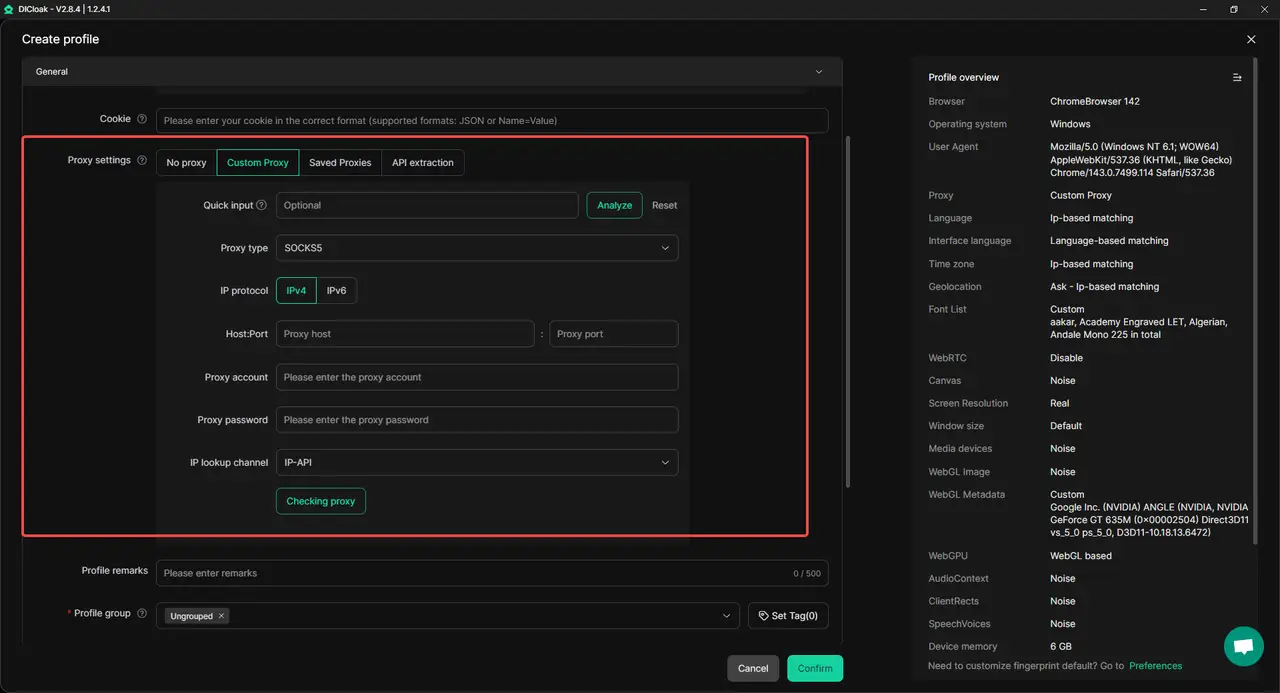
- Isolated Browser Profiles: Each account runs in its own environment, keeping cookies, cache, and local storage separate. This reduces the risk of interference between accounts and keeps Drops progress counts correctly.

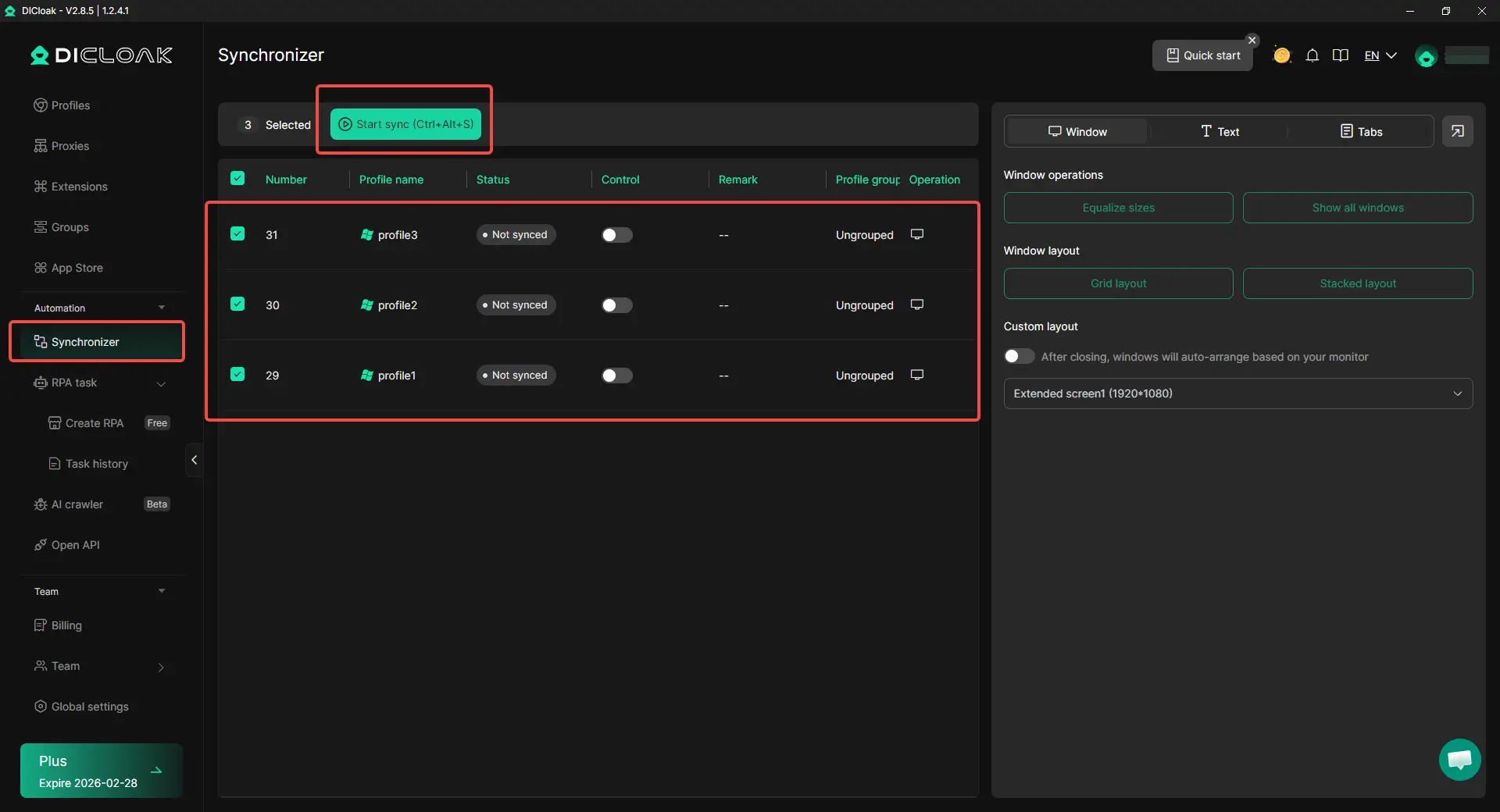
- Synchronizer: Run multiple accounts in parallel with synchronized windows. This allows users to monitor and manage several streams efficiently, reducing manual switching between accounts.
- Bulk Account Management: Launch, monitor, and operate many accounts from a single device. This makes it possible to maximize rewards from multiple campaigns without extra hardware.
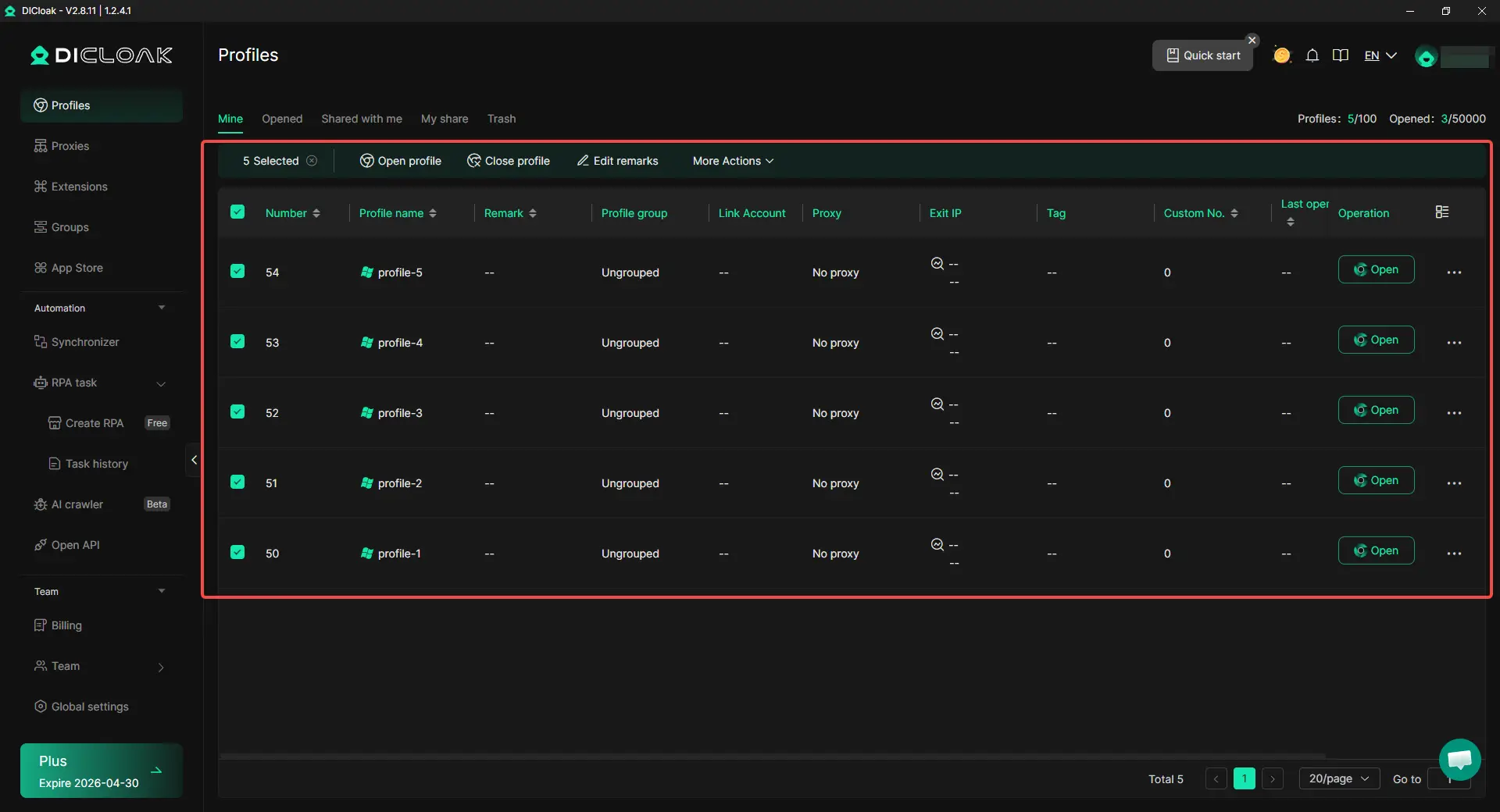
By leveraging these features, viewers can run multiple Twitch accounts in parallel, each watching a different stream and progressing toward its own Drops. This significantly increases the chance of earning more rewards while following Twitch’s rules.
Proper planning, isolation, and using tools like DICloak help mitigate these risks. By following safe practices, viewers can efficiently manage multiple Twitch accounts and increase their rewards without breaking platform rules. This approach provides a secure, scalable, and efficient way to participate in multiple Drops campaigns simultaneously, while avoiding the frustration of progress errors or untracked watch time.
Best Practices for Maximizing Your Drops Collection Efficiently
After setting up multiple accounts safely with tools like DICloak, it’s important to follow best practices to maximize your Twitch Drops. Proper habits help prevent common problems like Twitch drops not happening and answer questions such as can I watch multiple Twitch streams for drops effectively and safely.
Linking Your Accounts Correctly
Before starting, make sure every Twitch account is linked properly to the game or campaign account. Without this step, watch time will not count, and rewards will not be delivered.
For example, viewers sometimes watch for hours only to realize their account was not linked correctly. This creates frustration and wasted time.
To avoid issues:
- Verify that each Twitch account is connected to the correct game or campaign account.
- Double-check the connection in both Twitch and the game or campaign’s account settings.
- Claim rewards promptly to prevent progress from stalling.
Correct linking ensures that every minute you spend watching contributes to your Drops collection.
Choosing the Right Streamers
Not all streams give Drops, so selecting the right ones is critical.
- Look for streams labeled “Drops Enabled”.
- Stick to active campaigns with clear start and end dates.
- Avoid switching between ineligible streams, as this can pause watch time and slow progress.
For example, watching streams outside the campaign may appear normal, but Twitch will not track the watch time. This is a common reason users believe Twitch drops not happening.
Monitoring Your Watch Time Effectively
Keeping track of watch time ensures your efforts pay off:
- Use the Drops & Rewards page on Twitch to see which rewards are ready to claim.
- For multiple accounts, tools like DICloak can help monitor all sessions. Its Synchronizer feature allows you to run multiple streams in parallel and track progress efficiently.
- Avoid idle streams. Ensure your browser windows are active so watch time continues to count.
Additional Best Practices for Multi-Account Management
To maximize rewards while keeping accounts safe, consider these strategies inspired by professional multi-account management techniques:
- Use high-quality proxies: Assign a unique residential or mobile proxy to each account. This makes each session appear as a legitimate, separate user.
- Vary viewing behavior: Avoid robotic patterns. Occasionally interact in chat, switch streams naturally, or pause and resume viewing to mimic human activity.
- Limit account numbers: Start with a manageable number of accounts, then scale up gradually as you become familiar with the process.
- Monitor account health: Regularly check each account for unusual activity or warnings.
- Avoid suspicious activities: Never use bots, spam, or anything that violates Twitch’s rules. Safe, human-like usage prevents bans and ensures long-term account security.
By combining DICloak’s features—isolated profiles, custom proxy configurations, and synchronized windows—with these best practices, you can create a sustainable strategy for earning more Drops. This approach allows you to participate in multiple campaigns, collect more rewards, and enjoy a smoother Twitch experience without the frustration of Twitch drops not happening.
Conclusion: Can I Watch Multiple Twitch Streams for Drops Safely
Twitch Drops let viewers earn rewards by watching live streams, but many ask can I watch multiple Twitch streams for drops to get rewards faster. The key is understanding that a single account can only track watch time from one stream at a time. Opening multiple streams on one account will not speed up progress and is a common reason for Twitch drops not happening.
Using multiple accounts safely can help earn more rewards. Tools like DICloak allow each account to run in an isolated browser profile with customizable proxy configurations and window synchronization, so each account appears independent and watch time is tracked correctly. Following best practices—linking accounts properly, focusing on Drops-enabled streams, monitoring watch time, and avoiding robotic behaviors—ensures safe and efficient Drops collection.
By combining proper multi-account management with careful monitoring, viewers can maximize rewards across campaigns without violating Twitch rules. This approach prevents lost progress, reduces frustration, and provides a secure and scalable way to earn more Drops efficiently.
Frequently Asked Questions (FAQs)
Can I watch multiple Twitch streams for drops at the same time?
No. Twitch only tracks watch time from one stream per account at a time. Opening multiple streams with the same account will not increase your Drops progress. To maximize rewards, focus on watching one eligible stream per account and ensure your account is linked correctly.
Can I use multiple accounts to watch multiple Twitch streams for drops?
Yes. Using separate accounts allows you to earn Drops from different streams simultaneously. Tools like DICloak can help manage multiple accounts safely by providing isolated browser profiles, customizable proxy configurations, and Synchronizer, so each account appears independent and progress is tracked correctly.
Why am I not receiving Twitch Drops even though I watch streams?
Many viewers ask this when Twitch drops not happening. Common reasons include: your Twitch account is not linked to the campaign, the stream does not have Drops enabled, or you are trying to watch multiple streams with one account. Following best practices like checking account linking, picking Drops-enabled streams, and monitoring watch time solves most issues.
How do I track watch time when using multiple Twitch accounts?
You can track each account’s progress on the Drops & Rewards page on Twitch. When managing multiple accounts, using tools like DICloak’s Synchronizer allows you to monitor multiple streams in parallel, ensuring each account’s watch time counts and you don’t miss rewards.
Can I speed up earning Twitch Drops by opening several streams at once?
No. Watching several streams simultaneously on a single account does not increase Drops progress. The correct way to earn faster is to use multiple separate accounts safely, with proper isolation and proxies for each, while keeping one active stream per account. This approach aligns with Twitch rules and prevents issues like Twitch drops not happening.
 Web Proxy Tools
 Free Tools
 Cookie Plugin
 UA Generator
 MAC Address Generator
 IP Generator
 IP Address List
 2FA Code Generator
 World Clock
 Anonymous Check
 WebRTC Leak Test
 UUID Generator
 Free Web Proxy Site
 Proxy Checker
 FB Ad Checker
 AI Web Scraping
 Free SMM Tools
 Twitter Shadowban Checker
 Instagram Name Checker
 UTM Generator
 Username Generator
 AI Hashtag Generator
 LinkedIn Headline Generator
 Social Media Image Resizer