Dropshipping is still one of the easiest ways to start selling online, but it is not easy to run well. In 2026, sellers need to move faster, make fewer mistakes, and handle more moving parts at once. Product research, supplier sourcing, stock updates, order routing, customer support, and creative testing can quickly become hard to manage by hand. That is why the right dropshipping tools matter so much.
In this guide, we will break down the best dropshipping tools for each major part of the business, from product research and fulfillment to customer support, marketing, and team operations. The goal is simple: help you find tools that solve real bottlenecks, fit your store size, and support steady ecommerce growth in 2026.
Why Dropshipping Sellers Need the Right Tools in 2026?
Dropshipping still looks simple from the outside. You find products, list them in your store, and send orders to suppliers. But once a store starts getting traffic and sales, the work becomes much more complex. Sellers have to track product trends, watch supplier stock, update prices, process orders, answer customer messages, and test new offers at the same time. That is why the right dropshipping tools matter so much in 2026.
What problems can the best dropshipping tools solve?
The best dropshipping tools solve one main problem: they reduce manual work in places where mistakes cost money. For example, if a supplier changes a product price or runs out of stock, a good tool can sync that change before you keep selling the item at the wrong price. If orders come in from multiple products at once, automation tools can help route them faster instead of making you copy order details by hand.
Some tools solve research problems. Others solve operations problems. A dropshipping spy tool helps sellers study ads, trends, and creative patterns before they commit to a product. BigSpy describes itself as an ad spy platform with a very large ad database across major channels, and its own educational content explains how sellers use ad analysis to spot winning products and study competitor campaigns. That makes these tools useful before a product is even added to a store. Instead of guessing what may sell, sellers can look for patterns in ads that are already running and getting repeated attention.
Which parts of a dropshipping business need tool support most?
The biggest need for tool support usually appears in four areas:
- product research,
- sourcing and fulfillment,
- customer support,
- creative work.
Product research matters because a bad product choice can waste ad spend before the store has a fair chance to grow. Shopify’s product research and sourcing guides both stress that research helps confirm demand, while sourcing tools help stores connect with suppliers and create listings more efficiently. In other words, the first part of growth is often not “sell more.” It is “choose better and source better.”
The next area is daily operations. Order routing, stock checks, supplier updates, and store management become harder as volume grows. This is where dropship tools and automation apps start saving real time.If you are doing those jobs by hand every day, your store will usually hit a speed limit long before demand runs out.
Customer support is another major pressure point. Fast replies and clear service matter because online buyers can leave quickly when they do not get answers. Zendesk’s 2026 ecommerce customer service guidance says that if customers cannot easily reach support, they may go to a competitor just as quickly. Zendesk also highlights AI, omnichannel ticketing, analytics, and automation as key parts of modern support tools. This is why support software is no longer optional for many stores. It protects both the customer experience and the team’s time.
How to tell if your current tool stack is slowing growth?
A weak tool stack usually shows itself in small problems first. You may notice that product research takes too long, supplier checks happen too late, or customer replies pile up during busy hours. You may also find that your team repeats the same tasks every day with no clear system. Those are strong signs that your current dropshipping tools are no longer enough for the stage your store is in. Shopify’s AI and automation content both point toward the same trend: sellers are adding smarter tools because manual work does not scale well.
Another sign is when your store has data, but you still make decisions by guesswork. If you are not using a dropshipping spy tool to study ad trends, not using supplier tools to track stock and pricing, and not testing ai dropshipping tools where they can actually save time, your growth may slow even if your products are solid. The problem is not always effort. Sometimes it is the lack of the right system. The best stores do not just work harder. They build a stack that helps them move faster with fewer mistakes.
How to Choose the Best Dropshipping Tools for Your Store?
Once you know that better systems can remove bottlenecks, the next step is choosing the right ones. This is where many sellers get stuck. The market is full of dropshipping tools, but not every tool fits every store. Some are built for product research. Some focus on sourcing and fulfillment using a shipping and fulfillment platform. Others are made for support, automation, or creative work. So, how to choose the Best Dropshipping Tools?the best setup depends on what part of the business is slowing you down right now.
Pick tools based on your biggest bottleneck
A smart way to choose dropshipping tools is to start with your biggest problem, not with the longest feature list. If your store struggles to find products worth testing, then product research comes first. If orders are late or stock changes keep causing mistakes, then sourcing and fulfillment tools matter more. If customer messages are piling up, your weak point may be support, not product discovery.
For example, a new seller may think they need a full stack on day one, but that usually adds cost and confusion. In many cases, one good research tool and one good fulfillment tool are enough to start. A store that is already getting orders may benefit more from support software or better automation rules than from more research apps. This is also where ai dropshipping tools can help.
Check platform integrations before you commit
Even a strong tool can become a bad choice if it does not connect well with your store. Before paying for anything, check whether the tool works with your ecommerce platform, marketplaces, or support stack. This sounds basic, but it saves a lot of trouble.
A simple way to judge this is to ask: will this tool fit into the systems I already use, or will my team need extra manual work just to keep it running? Many dropship tools look strong on paper, but weak integrations often turn them into more work, not less. That is why platform fit should come before feature hype.
Balance features, pricing, and ease of use
It is easy to overbuy software in dropshipping. A tool may have smart automation, AI functions, deep analytics, and cross-channel support, but that does not mean you need all of it right now. Good tool selection is about balance. Shopify’s app marketplace shows both free and paid dropshipping and automation apps, which is useful because it reminds sellers that there is no single “best” choice for every budget or store stage. A good example is a seller comparing a full automation platform with a simpler app. The larger tool may save more time later, but the smaller one may be easier to learn and cheaper to test now.
Ease of use matters just as much as features. In other words, powerful software only helps when your team can learn it and use it consistently. The best dropshipping tools are not just feature-rich. They are tools your store will actually adopt, understand, and keep using as the business grows.
Best Dropshipping Tools for Product Research
If you want better product choices, this is the category to watch first. Many sellers waste time testing items that never had real demand in the first place. Good dropshipping tools can lower that risk. They help you spot trends earlier, study competitors, and check whether a product has enough market proof before you add it to your store. Some are built as all-in-one research platforms. Others work more like a dropshipping spy tool for ads and competitor tracking. In 2026, this part of the stack matters even more because sellers now combine classic research with ai dropshipping tools to move faster and cut more guesswork.
Sell The Trend
Sell The Trend is one of the most complete dropship tools for product research. It is built for sellers who want research, ad discovery, and some store automation in one place. Its pricing page highlights NEXUS AI product discovery, Facebook ads finding, store intelligence, niche spy features, and automated order fulfillment. That makes it a strong option for people who do not want to patch together several separate research apps.
Key features:
- NEXUS AI product discovery
- Facebook Ads Finder
- Store Intelligence Spy Tool
- Niche Spy
- 1-click product push to store
- Automated order fulfillment
- Trend explorers for AliExpress, Amazon, and CJdropshipping
Best for:
- Sellers who want product research and basic automation in one platform
- Store owners testing many products over time
- Users looking for ai dropshipping tools instead of only manual research
Platform compatibility:
- Sell The Trend’s pricing page lists support for Shopify, Amazon, eBay, WooCommerce, Wix, and TikTok.
Pricing:
- Lite: $29.97/month
- Essential: $49.97/month
- Pro: $99.97/month
- Yearly billing options are also listed at lower monthly rates, and the site offers a free trial start.
BigSpy
BigSpy is a strong choice if your main goal is ad research. It works more like a dropshipping spy tool than a full sourcing platform. The company describes it as a multi-platform ad intelligence tool with competitor tracking, niche market research, and a large creative library. If you often ask, “Are people already pushing this product hard?” or “What kind of creative angle is working right now?” BigSpy is designed for that exact job.
Key features:
- Multi-platform ad library
- Competitor ad tracking and analysis
- Niche market research
- Creative library with trending ads
- Audience and targeting insights
- Coverage across major ad platforms and ecommerce sites
Best for:
- Sellers who validate products through ad activity
- Marketers looking for creative inspiration before launching campaigns
- Teams that want a dedicated dropshipping spy tool for competitor research
Platform compatibility:
- BigSpy says it covers 10 major social platforms, including Facebook, Instagram, TikTok, and YouTube, and also tracks ads and creatives tied to ecommerce environments like Shopify and Amazon.
Pricing:
- BigSpy offers a free entry point on its main site.
- Its pricing page also states that BigSpy Pro has a 3-day full-access trial for $1, which then converts into a paid subscription unless canceled. The public pricing page shown here does not clearly display the full paid tier breakdown in the visible text, so I would avoid quoting exact monthly plan numbers without checking directly on the live pricing screen.
Niche Scraper is a classic product research tool focused on helping sellers find products that already show signs of demand. Its site describes it as a product research bot that lets users spy on Shopify stores and find products proven to sell. It also includes product scraping, store analysis, hand-picked products, ad spy functions, and a video maker for testing product ads. That makes it one of the more focused dropshipping tools for sellers who care most about product validation.
Key features:
- Product scraper for AliExpress and Shopify
- Store analysis for top Shopify stores
- Hand-picked winning products
- Ad spy features
- Video maker for product ads
- Supplier search tools
- Profit margin examples inside product pages
Best for:
- Beginners who want a research-first tool
- Sellers who like to study existing Shopify stores
- Users who want product data, ad clues, and simple validation in one place
Platform compatibility:
- Niche Scraper’s visible public pages strongly center on Shopify store analysis and Shopify product spying. Its scraper pages also show AliExpress product research. Based on the public text I found, Shopify is the clearest confirmed platform fit.
Pricing:
- Niche Scraper’s FAQ says there is a free trial with a few free searches in each category and no credit card required.
- Its public pages clearly mention free access and member-only full access, but the exact paid plan pricing was not clearly shown in the official pages I found, so I would not state a firm monthly price without checking their live upgrade flow directly.
Best Dropshipping Tools for Supplier Sourcing and Order Fulfillment
Product research helps you find what to sell, but sourcing and fulfillment decide whether your store can actually run well day after day. This is where many sellers start to feel real pressure. You need reliable suppliers, fresh stock data, fast imports, and fewer order mistakes. That is why sourcing-focused dropshipping tools are so important. While ai dropshipping tools and every dropshipping spy tool can help with research, these platforms handle the part of the business that keeps orders moving after a product is chosen.
CJdropshipping
CJdropshipping is one of the best-known dropship tools for sellers who want supplier access and fulfillment support in one place. CJ positions itself as a platform for sourcing products from manufacturers and suppliers, and its own guides emphasize pay-as-you-go access instead of monthly subscription fees for core use. It is especially useful for sellers who want flexible sourcing, global warehouse options, and direct store connection.
Key features:
- Product sourcing from manufacturers and suppliers
- Product sourcing requests for items not yet listed
- Automated order fulfillment
- Global warehousing and shipping support
- Print-on-demand services
- Chrome extension and store integration tools
Best for:
- Sellers expanding product range
- Stores that want sourcing and fulfillment in one platform
- Budget-conscious sellers who prefer pay-as-you-go pricing instead of a fixed monthly subscription
Platform compatibility:
- CJ’s official content confirms integrations or support paths for Shopify and WooCommerce, and CJ’s newer guides also describe support for marketplaces and channels such as eBay, Amazon, Wix, and custom API-based connections. A CJ blog post also notes BigCommerce can be connected through manual import or custom API rather than a native app.
Pricing:
- CJdropshipping says core access is free to use, with no monthly subscription fee for the main platform.
- Costs mainly come from product cost, shipping, and optional service fees tied to warehousing or fulfillment services.
Syncee
Syncee is a strong option for sellers who want a marketplace-style sourcing platform with built-in automation. Its site describes it as a premium dropshipping and wholesale marketplace where stores from multiple ecommerce platforms connect and sell each other’s products. Syncee also says it keeps product data fresh and automates order and tracking synchronization, which makes it one of the more structured dropshipping tools for supplier discovery and daily fulfillment support.
Key features:
- Marketplace for dropshipping and wholesale products
- Fresh product data sync
- Automated order synchronization
- Automated tracking synchronization
- Supplier contact access on paid plans
- Syncee AI Agent on its pricing plans
Best for:
- Sellers who want to work with trusted brands and suppliers
- Stores that need cleaner supplier relationships across multiple platforms
- Users interested in structured sourcing with some ai dropshipping tools built in
Platform compatibility:
- Syncee’s official materials say it works with multiple ecommerce platforms, including Shopify, Wix, WooCommerce, BigCommerce, Squarespace, Ecwid by Lightspeed, Jumpseller, EKM, Shoprenter, and KMO Shops.
Pricing:
- Free plan: $0/month
- Basic: $39.99/month
- Pro: $59.99/month
- Business: $99.99/month
- Syncee’s pricing page also advertises a 3-day free trial and $1 for 30 days on Shopify.
AutoDS
AutoDS is one of the most popular all-in-one dropshipping tools for stores that want stronger automation after products are selected. Its site highlights automated fulfillment, tracking updates, reports, and auto-optimized pricing. AutoDS also supports product discovery tools, including an ads spy feature, so it can sit between sourcing, automation, and research. That makes it useful for sellers who want fewer separate apps in their stack.
Key features:
- Automated order fulfillment
- Automatic tracking updates
- Price and stock monitoring
- Reports and workflow tools
- Product finding hub with trending products and ads spy features
- VA access add-on for team support
Best for:
- Sellers scaling across multiple stores or channels
- Teams that want automation for pricing, fulfillment, and tracking
- Users who want sourcing support plus a built-in dropshipping spy tool layer for research
Platform compatibility:
- AutoDS officially supports multiple selling channels, and its help center specifically documents support for channels such as Shopify and Amazon. The platform also states that users who register through the official AutoDS website can connect multiple selling channels from one account.
Pricing:
- AutoDS publicly advertises a “Try for $1” entry offer on its pricing and homepage.
- Its official pricing page does not clearly expose full plan names and prices in the readable page text I found, but an AutoDS comparison article published by the company in December 2025 lists pricing bands starting around $19.90–$26.90/month for Import, $29.90–$39.90/month for Starter, and $49.90–$66.90+/month for Advanced, depending on plan size and billing. Because that breakdown comes from a company blog article rather than the main pricing page text, I would treat the exact tiers as subject to change.
Best Dropshipping Tools for Store Automation and Daily Operations
Once your store starts getting regular orders, daily work becomes the real challenge. You need to keep product data updated, place orders faster, manage several stores, and cut down on repetitive tasks. This is where automation-focused dropshipping tools become essential. While a dropshipping spy tool helps with product and ad research, these platforms help you run the store after products are already live. In 2026, many sellers also look at ai dropshipping tools and automation features together because the goal is the same: save time, reduce mistakes, and make daily operations easier to manage.
DSers
DSers is one of the most recognized dropship tools for sellers who want stronger order processing and AliExpress-based automation. Its official site says DSers helps users place hundreds of AliExpress orders in seconds, manage multiple stores in one place, and apply automatic pricing rules to products. That makes it a practical choice for sellers who want faster day-to-day store operations without building a very complex stack.
Key features:
- Fast AliExpress order placement
- Multi-store management
- Automatic pricing rules
- Product and order management from one dashboard
- Support for managing store operations across connected ecommerce stores
Best for:
- Sellers using AliExpress as a main supplier source
- Stores that need faster order processing
- Users who want simple automation for daily operations instead of a full research suite
Platform compatibility:
- DSers officially lists integrations with Shopify, WooCommerce, and Wix. Its homepage also says it supports multi-store management across ecommerce platforms such as Shopify, WooCommerce, Wix, and more.
Pricing:
- Basic: Free
- Advanced: $19.9/month
- Pro: $49.9/month
- Enterprise: $499/month
- DSers also says paid plans come with a 14-day free trial and no credit card required.
AutoDS
AutoDS is one of the more complete dropshipping tools for automation. Its official site says it helps sellers with all-in-one automation, including price and stock monitoring, automatic fulfillment, and product finding tools. AutoDS also includes research-oriented functions like ads spy and product-finding hubs, so it sits between daily operations and product discovery. That makes it useful for sellers who want fewer separate tools in their stack.
Key features:
- Price and stock monitoring
- Automatic order fulfillment
- Tracking updates
- Product-finding tools and ads spy support
- Support for multiple selling channels
- Workflow automation settings across supported stores
Best for:
- Growing stores that want more automation in one system
- Sellers managing more than one store or channel
- Users who want a mix of automation and ai dropshipping tools or research support in one platform
Platform compatibility:
- AutoDS says it supports major marketplaces like eBay, Amazon, and Etsy, as well as store platforms such as Shopify, Wix, and WooCommerce.
Pricing:
- AutoDS publicly advertises a “Start now for $1” entry offer on its pricing page.
- The visible official pricing page text does not clearly show a full public plan table, so I would treat exact monthly package pricing as subject to change unless checked inside the live checkout flow.
Yakkyofy
Yakkyofy is a good fit for sellers who want automation plus sourcing support in the same workflow. Its features page says the platform helps automate operations and reduce manual work, while its help center explains that users can connect stores, import products, and manage selling through direct integrations and API options. Yakkyofy also positions itself as a sourcing and fulfillment partner, which makes it useful for sellers who want daily operations help without separating sourcing from automation.
Key features:
- Store integration and product import
- Order and operations automation
- Sourcing support
- API integration for stores not listed in direct integrations
- Private labeling and custom packaging on higher plans
- Free start option for new users
Best for:
- Sellers who want automation plus sourcing in one workflow
- Stores that need more supply chain support as they grow
- Teams that want a platform with fulfillment and operations support together
Platform compatibility:
- Yakkyofy’s help center says it directly integrates with Shopify, WooCommerce, CommerceHQ, and Storeden, and it also offers API integration for shops not on that list.
Pricing:
- Yakkyofy says it offers a Free tier, plus Premium and Premium+ subscription levels.
- The public page text I found confirms the plan structure but does not clearly show exact monthly prices in readable form, so exact pricing should be checked on the live subscription page before publishing a fixed number
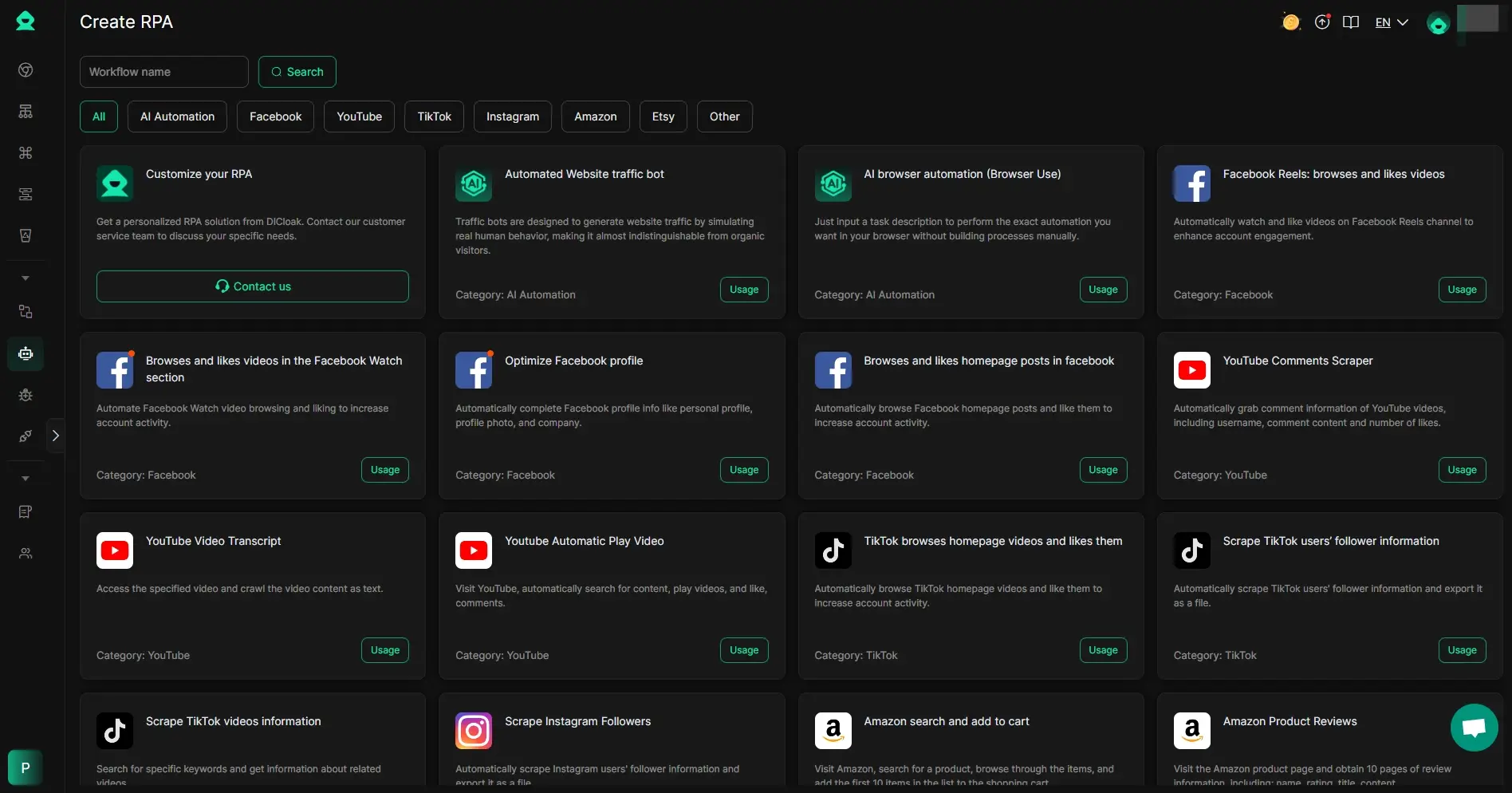
DICloak can also help dropshipping teams reduce manual work through built-in browser automation. Instead of repeating the same actions across stores, supplier pages, ad accounts, or research tasks, teams can use its automation tools to handle routine work faster and with less effort. For sellers managing multiple workflows at once, this makes DICloak useful not just for account access, but also for daily execution.
Key features:
- Built-in RPA tools for automating repeated browser tasks without coding
- AI Browser Automation that lets users automate actions by typing a simple instruction
- Window Synchronizer for repeating the same actions across multiple browser windows at once
- AI Crawling for collecting and structuring web data automatically
- Ready-to-use automation templates for common browser tasks
- Traffic Bot for traffic simulation, testing, and marketing-related workflows
Best for:
- Dropshipping teams handling repetitive browser tasks every day
- Sellers who want to save time on manual operations
- Users who need no-code automation instead of building scripts from scratch
- Teams managing repeated workflows across multiple accounts or store tasks
Platform compatibility:
- Works inside DICloak’s browser workflow
- Suitable for web-based ecommerce, supplier, ad, and research tasks
- No extra plugins or coding setup required for core automation use
Pricing:
- Free: $0/month, with 1 member, 5 profiles, and 15 daily open times
- Base: $8/month, or $4.8/month billed yearly ($57.6 annually)
- Plus: $28.8/month, or $17.28/month billed yearly ($207.36 annually)
- Share+: $138/month, or $82.8/month billed yearly ($993.6 annually)
- DICloak’s pricing page also highlights that Plus supports RPA automation and window synchronizer.
Best Dropshipping Tools for Customer Service and Store Support
Customer support is easy to ignore when a store is new, but it becomes critical once orders start coming in every day. Buyers want quick answers about shipping, refunds, delays, and product details. If support is slow, trust drops fast. That is why support-focused dropshipping tools matter just as much as sourcing or fulfillment software. A dropshipping spy tool can help you find products, and ai dropshipping tools can speed up research, but customer service platforms help protect the part of the business that keeps buyers coming back.
Tidio is a strong choice for small and mid-size stores that want live chat, chatbot help, and simple ecommerce support in one tool. Tidio’s Shopify integration page highlights multichannel communication automation, live chat, video calls, and ticketing, while its help docs show that Shopify users can view and manage orders inside the Tidio panel, including canceling orders, submitting refunds, and changing shipping addresses. That makes Tidio one of the more practical dropship tools for stores that want faster support without adding too much complexity.
Key features:
- Live chat and chatbot support
- Multichannel communication automation
- Ticketing system
- Shopify order management inside the Tidio panel
- Product recommendations and product sharing for Shopify stores
- AI support features in paid plans
Best for:
- Small and mid-size ecommerce stores
- Shopify sellers who want chat and order support in one place
- Teams looking for lighter ai dropshipping tools for support workflows rather than a heavy enterprise helpdesk
Platform compatibility:
- Tidio has ecommerce integrations for Shopify, BigCommerce, Ecwid, and Adobe Commerce, and its help center also documents Shopify-specific setup and WooCommerce-related support features.
Pricing:
- Free: $0/month
- Starter: $24.17/month
- Growth: starts at $49.17/month
- Plus: starts at $749/month
- Premium: contact sales
Zendesk
Zendesk is a better fit for sellers who want a more mature support system with ticketing, messaging, analytics, and broader ecommerce integrations. Zendesk’s ecommerce pages focus on connecting support channels, bringing order information into the agent workspace, and using integrations like Shopify, Magento, and Narvar to handle common retail questions more efficiently. This makes Zendesk one of the more scalable dropshipping tools for stores that are growing past basic chat support.
Key features:
- Ticketing and messaging
- Live chat and help center tools
- AI agents and AI add-ons
- Reporting and analytics
- Ecommerce integrations for order context and post-purchase support
- Support across web, social, and mobile channels
Best for:
- Growing stores with larger support volume
- Teams that need omnichannel support and structured workflows
- Merchants who want support software that can scale with more agents and more customer channels
Platform compatibility:
- Zendesk officially highlights Shopify integration and ecommerce app connections such as Magento and Narvar, and its marketplace also includes a broader retail and ecommerce app collection.
Pricing:
- Zendesk’s official pricing starts from $19/month.
- AI and workforce add-ons are priced separately, including Copilot at $50 per agent/month billed annually and Workforce Management at $25 per agent/month billed annually.
Gorgias
Gorgias is one of the most ecommerce-focused support platforms on the market. Its homepage and Shopify pages position it as a helpdesk built for ecommerce merchants, with AI support, Shopify order actions inside the helpdesk, and a strong focus on turning support into a revenue channel. Gorgias also says it serves 15,000 brands and highlights deep Shopify support, which is why it is often seen as a top fit for direct-to-consumer stores.
Key features:
- AI-powered helpdesk for ecommerce
- Shopify order actions inside the helpdesk
- Macros, rules, and AI Agent support
- FAQ and chat tools
- Unified customer and order view
- Real-time WooCommerce data sync on its WooCommerce integration page
Best for:
- Shopify-first brands
- Ecommerce teams that want support and sales workflows in one place
- Stores that need a stronger ecommerce-native system than a basic chat tool
Platform compatibility:
- Gorgias officially highlights deep Shopify integration and also has a dedicated WooCommerce integration page. Its own product pages also describe integrations with Shopify and other ecommerce tools.
Pricing:
- Starter: from $10/month for 50 tickets/month
- Basic: from $50/month for 300 tickets/month
- Pro: from $300/month for 2,000 tickets/month
- Advanced: from $750/month for 5,000 tickets/month
- Enterprise: custom volume
Best Dropshipping Tools for Marketing and Creative Work
Good products and reliable suppliers are not enough on their own. You still need strong images, clear ads, and fast content production if you want your store to grow. That is why marketing-focused dropshipping tools matter so much. Some help you improve product photos. Some make ad creation easier. Others work like a dropshipping spy tool so you can study what competitors are already testing. In 2026, this category also overlaps with ai dropshipping tools, because many sellers now use AI to speed up visual editing, ad research, and creative production.
Claid.ai
Claid.ai is a strong option for sellers who need better product images without doing heavy manual editing. Its site presents it as an AI product photography and editing suite for ecommerce, with tools for automatic image checks, background work, brand-style visuals, and fast catalog-ready edits. That makes it one of the more useful ai dropshipping tools for stores that want cleaner product pages and ad creatives.
Key features:
- AI product photo generation and editing
- Automatic image checks and platform-ready formatting
- Brand-style image creation
- Background and shadow tools
- API access for ecommerce image workflows
Best for:
- Sellers who want better product photos fast
- Stores with many SKUs that need visual consistency
- Teams that want AI-powered creative support instead of manual editing only
Platform compatibility:
- Claid strongly positions itself around ecommerce workflows and also offers API-based use for broader integration. The public pages I checked focus more on ecommerce use cases and APIs than on named app-store integrations.
Pricing:
- Free trial plan with 50 credits
- Business plan: custom pricing
- Separate API pricing is available by credit usage on the API pricing page
Canva
Canva is one of the easiest dropship tools for everyday creative work. It is not a dropshipping-specific app, but it is very useful for making product graphics, ad images, store banners, email visuals, and social content. Canva’s official pages highlight templates, premium assets, brand tools, and more than 25 AI-powered features in Canva Pro, while its newer Canva Business rollout targets small teams that need marketing and brand tools in one place.
Key features:
- Drag-and-drop design editor
- Templates for social posts, ads, banners, and presentations
- Brand Kit and premium content
- Background Remover
- 25+ AI-powered design features in Canva Pro
- Team collaboration tools in Canva Business
Best for:
- Beginners who want fast, simple creative production
- Small stores that need low-friction marketing design
- Teams creating social, email, and ad content at scale
Platform compatibility:
- Canva is a web-based design platform used across business teams and content workflows, rather than a store-specific dropshipping integration. Its value comes from flexible use across marketing tasks.
Pricing:
- Canva Free is available for individuals
- Canva Pro is the paid upgrade with premium and AI features
- Canva Business launched at US$20 per person per month for new team sign-ups and upgrades, with no seat minimum according to Canva’s newsroom announcement from October 2025.
AdSpy or BigSpy for ad inspiration
If your biggest challenge is ad ideas, this is where a dedicated dropshipping spy tool becomes useful. AdSpy and BigSpy both focus on ad intelligence. They help you search large ad libraries, study competitor creatives, and look for patterns before you spend money on testing. That makes them valuable dropshipping tools for sellers who want better ad direction, not just better product sourcing.
Key features:
- Large searchable ad databases
- Competitor ad research
- Creative inspiration for new campaigns
- Multi-platform ad coverage
- Filters for finding ads by platform, niche, or creative pattern
Best for:
- Sellers validating products through ad activity
- Marketers who want better creative ideas before launch
- Teams using a dropshipping spy tool to cut guesswork in ad testing
Platform compatibility:
- AdSpy focuses on searchable ad intelligence from major paid social environments on its main site.
- BigSpy says its database covers 10 major channels, including Facebook, Instagram, Google, YouTube, TikTok, Twitter, Yahoo, Pinterest, and Unity.
Pricing:
- AdSpy publicly lists virtually unlimited usage for $149 per month on its homepage.
- BigSpy offers a free entry point on its site. Its main public pages I checked did not clearly show a full readable plan table, so exact paid-tier pricing should be checked on the live pricing flow before publishing fixed numbers.
Best Dropshipping Tool for Multi-Account Management and Team Work
As a dropshipping store grows, daily work often spreads across more than one account, platform, or team member. Sellers may need separate logins for supplier platforms, ad accounts, ecommerce stores, and customer service tools. At that stage, normal browsers can start to feel messy. Sessions overlap, cookies mix together, and teams can lose track of which account is being used. That is why some sellers add a separate browser profile to their workflow. In this part of the stack, DICloak stands out as one of the more practical dropshipping tools for multi-account management and team operations.
Why some sellers need a separate browser profile
For many sellers, the problem is not product research anymore. It is operational control. A store owner may be switching between supplier dashboards, multiple stores, ad accounts, and team logins in the same workday. When everything runs inside one regular browser, it becomes easier to open the wrong account, mix sessions, or create confusion across tasks. This is especially common in fast-moving teams and stores working across several marketplaces or ad channels. In that kind of setup, a separate browser profile gives each workflow more structure. It does not replace other dropship tools, but it supports the part of the business that keeps teams organized behind the scenes.
How DICloak helps manage multiple accounts more securely
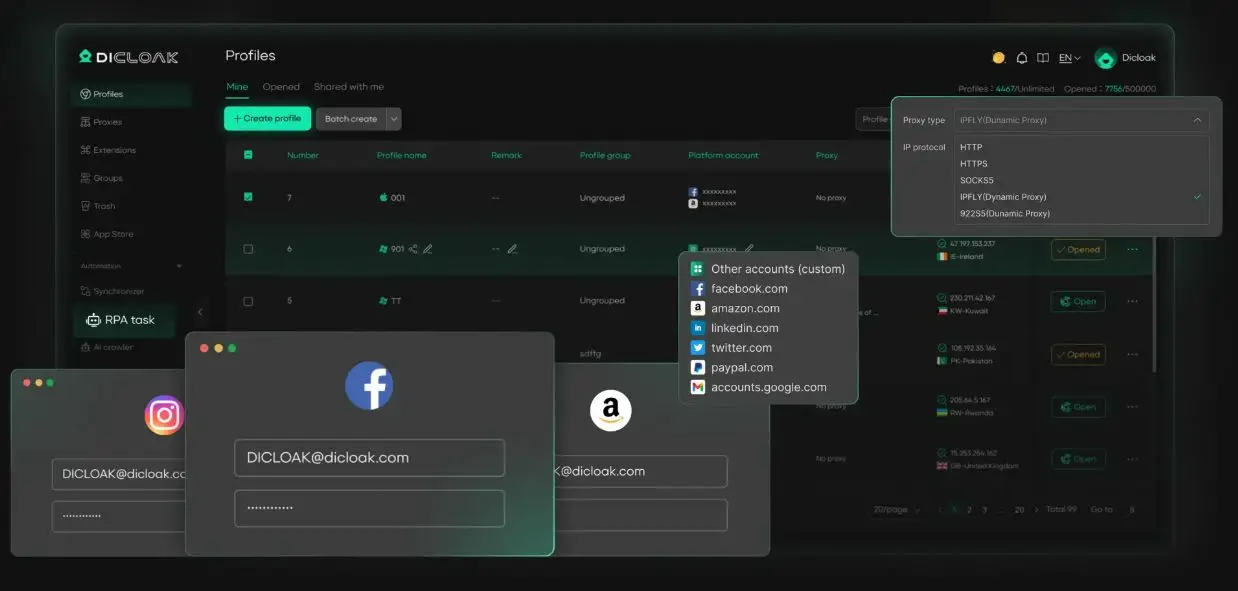
DICloak is built around isolated browser profiles. Each profile can run as its own browser profile, with separate cookies, cache, and fingerprint settings. That makes it easier to keep different accounts apart instead of managing everything in one shared browser state. For dropshipping sellers, this matters when handling multiple stores, supplier logins, ad accounts, or team workflows that should stay clearly separated. DICloak also supports custom fingerprint settings and user-configured proxy integration, which gives sellers more control over how each profile is set up. In practical terms, it helps make account access cleaner, more stable, and easier to manage across a growing operation.
Useful DICloak features for dropshipping teams
Key features:
- Isolated browser profiles for separate account environments
- Custom fingerprint settings for each profile
- Flexible proxy configuration with support for major proxy types
- Bulk profile creation, import, and launch
- Team collaboration tools with permission settings
- Profile sharing, data isolation, and operation logs
- RPA automation for repetitive tasks
- Synchronizer for repeated actions across profiles
Best for:
- Dropshipping sellers managing multiple stores, supplier accounts, or ad accounts
- Teams that need cleaner account separation in daily operations
- Businesses that want more control over permissions, sharing, and workflow management
- Sellers looking for structured multi-account support beyond standard browsers
Platform compatibility:
- Based on Chrome core
- Supports simulated environments across Windows, Mac, iOS, Android, and Linux
- Works as a browser profile layer for web-based ecommerce, supplier, ad, and support platforms
Pricing:
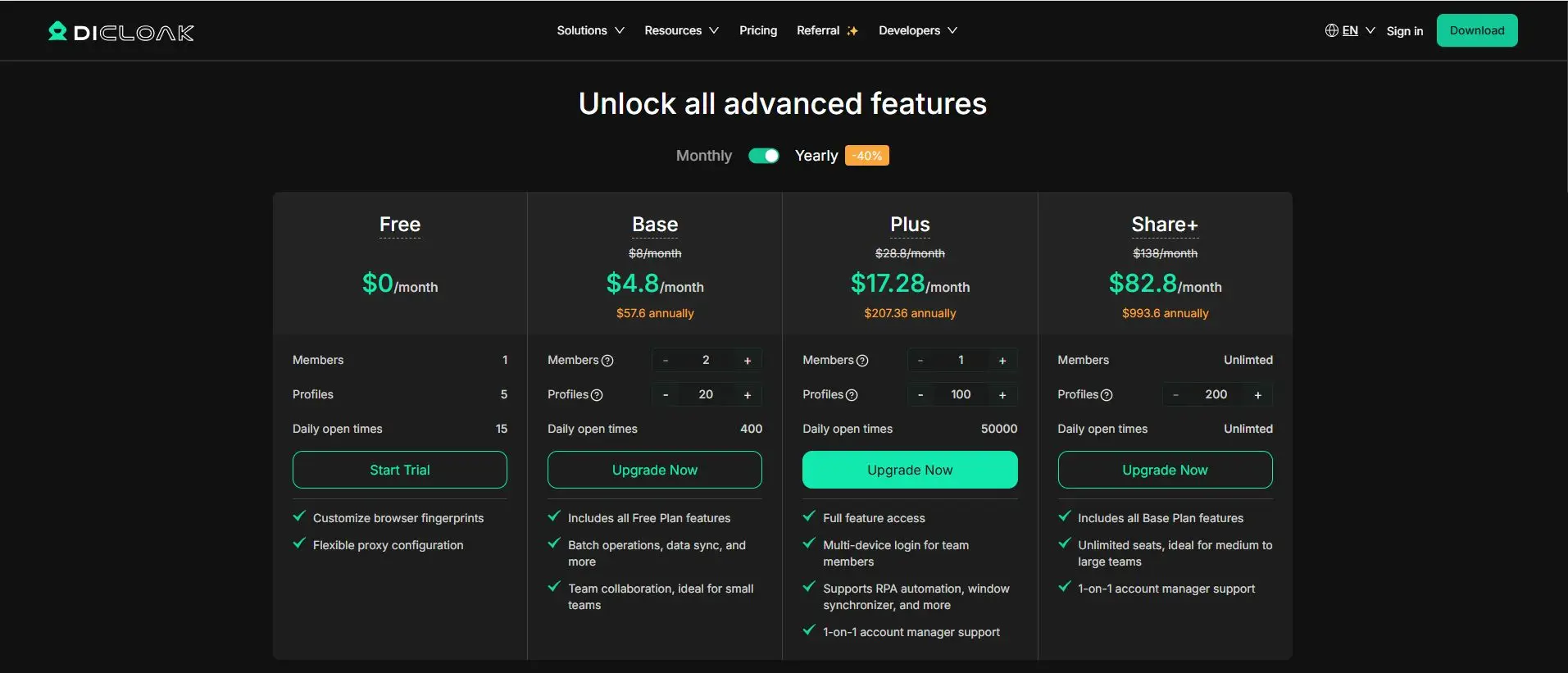
- Free: $0/month; 1 member, 5 profiles, 15 daily open times
- Base: $8/month, or $4.8/month billed yearly ($57.6/year); includes all Free features, 400 daily open times, and adds batch operations, data sync, and team collaboration for small teams
- Plus: $28.8/month, or $17.28/month billed yearly ($207.36/year); 50,000 daily open times, full feature access, multi-device login for team members, and support for RPA automation and window synchronizer
- Share+: $138/month, or $82.8/month billed yearly ($993.6/year); unlimited members, unlimited daily open times, and all Base plan features for medium to large teams
FAQ About the Best Dropshipping Tools
Q1:What are the best dropshipping tools for beginners?
The best dropshipping tools for beginners are simple tools for product research, supplier sourcing, and order automation. New sellers usually do better with a small tool stack first.
Q2:Which dropshipping tools help find winning products?
Product research platforms and ad research tools are some of the best dropshipping tools for finding winning products. They help you spot trends, study ads, and check market demand.
Q3:What dropshipping tools help with supplier vetting?
The best dropshipping tools for supplier vetting are sourcing and fulfillment platforms. They help you compare suppliers, review product data, and check shipping and stock details.
Q4:Can dropshipping tools work across multiple sales channels?
Yes, many dropshipping tools support multiple sales channels like Shopify, WooCommerce, Amazon, and eBay. It depends on the tool, so always check integrations first.
Q5:How often should you update your dropshipping tools?
You should review your dropshipping tools whenever your store grows, your workflow changes, or your current setup stops saving time. Most sellers only need to update tools when they no longer fit the business.
Conclusion
The right dropshipping tools can make a big difference in how fast and how well your store grows. In 2026, sellers need more than just product ideas. They need better systems for research, sourcing, fulfillment, automation, customer support, creative work, and team operations. The goal is not to use the most tools. It is to use the right ones for the stage your business is in.
For most sellers, the best approach is simple. Start with the tools that solve your biggest bottleneck first. Then build your stack step by step as your store grows. A good product research tool can help you find better items to test. A strong fulfillment tool can reduce delays and stock problems. Support and creative tools can improve the customer experience and help your brand look stronger. If your business runs across many accounts or team members, a tool like DICloak can also help keep daily work more organized.
In the end, the best dropshipping tools are the ones that save time, reduce mistakes, and help you scale with less stress. Choose tools that fit your workflow, match your budget, and support the way you actually run your store. That is how a simple store setup becomes a stronger ecommerce business.
 Web Proxy Tools
 Free Tools
 Cookie Plugin
 UA Generator
 MAC Address Generator
 IP Generator
 IP Address List
 2FA Code Generator
 World Clock
 Anonymous Check
 WebRTC Leak Test
 UUID Generator
 Free Web Proxy Site
 Proxy Checker
 FB Ad Checker
 AI Web Scraping
 Free SMM Tools
 Twitter Shadowban Checker
 Instagram Name Checker
 UTM Generator
 Username Generator
 AI Hashtag Generator
 LinkedIn Headline Generator
 Social Media Image Resizer