Chromium browsers are everywhere in 2026, even if many users do not notice it at first. Some of the most popular browsers today are built on Chromium because it offers strong speed, wide extension support, and good website compatibility. But not all chromium browsers feel the same in real use. Some focus more on privacy. Some give you more control. Others are better for work, streaming, or managing multiple accounts. That is why choosing the right one matters. In this guide, we will look at what makes Chromium browsers so popular, how they compare, and which ones are worth trying based on your needs.

What Are Chromium Browsers?
To understand chromium browsers, it helps to start with Chromium itself. Chromium is an open-source browser project. In simple terms, it is the base code that many browsers build on. The Chromium project says it includes the source code behind Chrome and other browsers. That is why many well-known chromium based browsers share a similar feel when you open websites, use tabs, or install extensions.
What does Chromium mean in a web browser?
In a web browser, Chromium means the browser is built on the Chromium open-source project. This usually gives it a strong web engine, good site compatibility, and support for many modern web features. A simple example is Microsoft Edge. Microsoft says Edge adopts nearly all of the Chromium project’s web platform changes, which helps with compatibility and performance. That is one big reason many users feel that Chromium browsers load modern websites smoothly and work well with web apps.
How are Chromium browsers different from Google Chrome?
This is where many readers get confused. Google Chrome is one browser made from Chromium, but it is not the same thing as Chromium itself. Chromium is the open-source base. Chrome is Google’s own product built on top of that base, with extra Google features, services, and release support. In real life, this means two browsers can both be Chromium-based but still offer different privacy tools, interface choices, sync features, or update styles. So when people compare chromium browsers, they are not comparing copies of Chrome. They are comparing different browsers that share the same foundation.
Why do so many popular browsers use Chromium?
The short answer is practical value. Chromium gives browser makers a strong starting point. It supports wide extension compatibility, modern site support, and a familiar browsing experience. Microsoft’s extension documentation explains that Chromium-based browsers make it easier to target more extension stores and more users with less extra work. That matters because people want browsers that work with the tools they already use. For example, if a user moves from Chrome to Edge or another Chromium-based option, many websites and extensions still feel familiar. That makes switching easier, and it helps explain why so many popular browsers use Chromium today.
Why Do People Choose Chromium Browsers?
After understanding what chromium browsers are, the next question is easy to ask: why do so many people use them every day? The answer is simple. These browsers are usually fast, familiar, and easy to work with. They also support many of the same websites, apps, and extensions people already use. That is a big reason chromium based browsers have become such a common choice in 2026.
Are Chromium browsers fast and easy to use?
In many cases, yes. One reason is that Chromium gives browser makers a strong base for modern web performance and site compatibility. On top of that, some Chromium browsers add their own speed and memory tools. For example, Microsoft Edge includes features like Sleeping Tabs, which put inactive tabs to sleep to free up resources for the tabs and apps you are using right now. That kind of feature helps explain why many users feel Chromium browsers stay smooth even during busy work sessions.
How do Chromium browsers handle extensions and compatibility?
This is one of their biggest strengths. Because many chromium browsers share the same foundation, they often support a similar extension system and strong website compatibility. Microsoft says Chromium-based browsers make extension support easier across browsers, and Brave says extensions from the Chrome Web Store also work in Brave. A simple example is switching from Chrome to Brave or Edge. Many users can keep using familiar tools like password managers, note-taking extensions, or SEO helpers without changing their whole setup.
Why do users like Chromium for daily browsing?
A big reason is comfort. Chromium browsers usually feel familiar right away. Tabs, settings, extensions, and website behavior often work in a way users already understand. That lowers the learning curve. At the same time, different browsers can still add their own style. For example, Brave keeps Chromium compatibility while adding privacy-focused features, and Edge adds performance tools for lighter resource use. So users get the comfort of a shared browser base, but they can still choose the version that fits their daily needs best.
What Should You Look for When Comparing Chromium Browsers?
Once you know why so many people use chromium browsers, the next step is choosing the right one. That is where many users get stuck. Most browsers built on Chromium can open the same sites and support similar extensions, but they do not always feel the same in daily use. Some focus more on privacy. Some focus more on speed. Others are better for work, customization, or low-resource devices. That is why comparing chromium based browsers should start with your real needs, not just brand names.
Which features matter most for privacy, speed, and usability?
The most important features usually fall into three groups: privacy tools, performance tools, and ease of use. For privacy, built-in protections can make a big difference. For example, Brave says its browser blocks ads, trackers, cross-site cookies, and fingerprinting by default. For speed and usability, some browsers add tools that help performance without much setup. Microsoft Edge, for example, offers features like tab sleeping and other performance controls that can reduce resource use during normal browsing. A simple example is this: if you keep many tabs open for work, a browser with stronger memory-saving tools may feel better than one that only looks fast in simple tests.
How important are updates and security support?
They are very important. A browser can feel fast and clean, but if it does not get steady updates, it becomes a weaker choice over time. The Chromium project has a dedicated security team, and Microsoft says security and servicing updates for Edge are available only on the latest Stable and Beta releases. In simple terms, regular updates are not a small detail. They are part of what keeps a browser safe, stable, and compatible with the modern web. That means users comparing chromium browsers should pay attention not only to features, but also to how well the browser is maintained.
What makes one Chromium browser better for one user than another?
The best browser often depends on how you use it. A privacy-focused user may prefer a browser with strong blocking tools built in. A work user may care more about extension support, stability, and resource control. Someone who likes to customize every detail may want a browser with more flexible settings instead of the most basic interface. That is why there is no single “best” option for everyone. The smarter way to compare chromium based browsers is to ask what matters most to you each day: privacy, speed, simplicity, or specialized use. Once that is clear, the right choice becomes much easier.
Best Chromium Browsers to Try in 2026
Now that we have covered how to compare chromium browsers, it helps to look at a few strong picks. There is no single best option for everyone. The right choice depends on what you care about most each day, such as ease of use, privacy, customization, or lighter resource use.
Best Chromium browser for everyday use
For everyday use, Microsoft Edge is a strong choice. It offers good website compatibility and helpful performance tools like Sleeping Tabs, which can free up resources from inactive tabs. That makes it a practical option for work, study, and general browsing.
Best Chromium browser for privacy
For privacy, Brave stands out. Brave says its Shields block trackers, cross-site cookie tracking, and fingerprinting by default. This makes it a good fit for users who want stronger privacy without spending time on many manual settings.
Best Chromium browser for customization
For customization, Vivaldi is one of the best-known options. Vivaldi lets users change much more of the browser interface than most rivals, including themes, toolbars, Workspaces, and Tab Stacks. A simple example is a user who wants different tab groups for work, shopping, and research all in one browser.
Best Chromium browser for low-resource devices
For low-resource devices, Opera GX is worth a look because it includes GX Control, which lets users limit RAM, CPU, and network usage. That can help people keep browsing smoother on devices with tighter system resources.
What Are the Main Risks or Limitations of Chromium Browsers?
Chromium browsers are popular for good reasons, but they are not all strong in the same areas. Some are better for privacy. Some are better for speed. Some look similar on the surface but make very different choices behind the scenes. That is why users should look past the browser name and check what protections and trade-offs each one actually offers.
Do all Chromium browsers protect privacy in the same way?
No. Even though many chromium based browsers share the same core, their privacy defaults can be very different. Brave says it blocks trackers, cross-site cookies, and fingerprinting by default, while Vivaldi highlights built-in ad and tracking protection as a user choice. So the shared Chromium base does not mean the same privacy experience across browsers.
Can too many extensions hurt speed or security?
Yes. Extensions can be useful, but they can also add risk. Brave’s guide on browser extensions warns that extensions may create privacy and security problems, especially if users install too many or do not check what permissions they ask for. In daily use, extra extensions can also slow the browser down and add more background activity.
What problems should users watch for over time?
The biggest long-term issue is poor maintenance. A browser that does not keep up with updates can become less secure and less reliable over time. Chromium’s security team continues to ship security work, and Microsoft says Edge security and servicing updates are supported on current release channels. In simple terms, even a good browser can become a weak choice if it falls behind on updates, privacy controls, or extension hygiene.
How to Optimize Chromium Browsers for Better Performance
Even the best chromium browsers can start to feel slow if they are not managed well. The good news is that small changes can make a real difference. In most cases, better performance comes from three things: the right settings, lower background load, and cleaner browsing habits.
Which settings can improve speed?
A few built-in settings can help right away. In Chrome, Memory Saver can deactivate inactive tabs to free memory, and Preload pages can make browsing and search feel faster. In Edge, Sleeping Tabs and Energy Saver can reduce background resource use and improve smoothness during normal browsing. A simple example is a user who keeps many tabs open all day. Turning on these features can make the active tabs feel faster without changing browsers.
How can you reduce memory and CPU usage?
The easiest way is to cut background load. Google recommends closing unused tabs, turning off unwanted extensions, and using Chrome’s Task Manager to find heavy tasks by memory usage. Edge also says Sleeping Tabs reduce CPU usage and free resources for active tabs and other apps. In short, fewer active tabs and fewer unnecessary extensions usually mean better speed.
What habits help keep a Chromium browser fast and stable?
The best habits are simple. Keep the browser updated, do not overload it with extensions, and review which sites or tabs really need to stay active. Google says Chrome works best on the latest version, and both Chrome and Edge offer performance settings that are easier to use when the browser is kept clean and current. For most users, long-term speed is less about one magic fix and more about regular upkeep.
Which Chromium Browser Fits Different Use Cases Best?
At this point, the best choice comes down to how you use your browser each day. Some chromium browsers are better for office tasks and tab-heavy work. Others are better for gaming, streaming, or managing many accounts at once. So instead of asking for one perfect browser, it is more useful to ask which one fits your routine best.
Which Chromium browser is best for work and productivity?
For work and productivity, Microsoft Edge is a strong pick. It includes features like Sleeping Tabs to free resources from inactive tabs, and Microsoft also highlights tools that help with performance and everyday workflow. In simple terms, Edge works well for users who keep many tabs open and want a browser that feels stable during long work sessions.
Which one is best for streaming, gaming, or casual use?
For streaming, gaming, or casual browsing, Opera GX stands out. Opera calls it a browser built for gamers, and its GX Control lets users limit RAM, CPU, and network usage. It also includes Twitch integration and other features made for entertainment-heavy use. A simple example is a user who wants to watch streams, keep social apps open, and play games without the browser eating too many system resources.
Which browser is best for multi-account management?
For multi-account work, DICloak is the more specialized choice. Unlike general-purpose chromium based browsers, it is built around isolated browser profiles, separate fingerprints, and proxy management for handling many accounts more cleanly. DICloak also highlights bulk profile actions, automation, and team access controls, which makes it a better fit for users who manage social media, e-commerce, or client accounts at scale.
Overall, the best browser depends on the job. Edge is a smart choice for work, Opera GX fits entertainment-heavy use, and DICloak is better when multi-account management is the real priority.
How DICloak Helps with Multi-Account Management
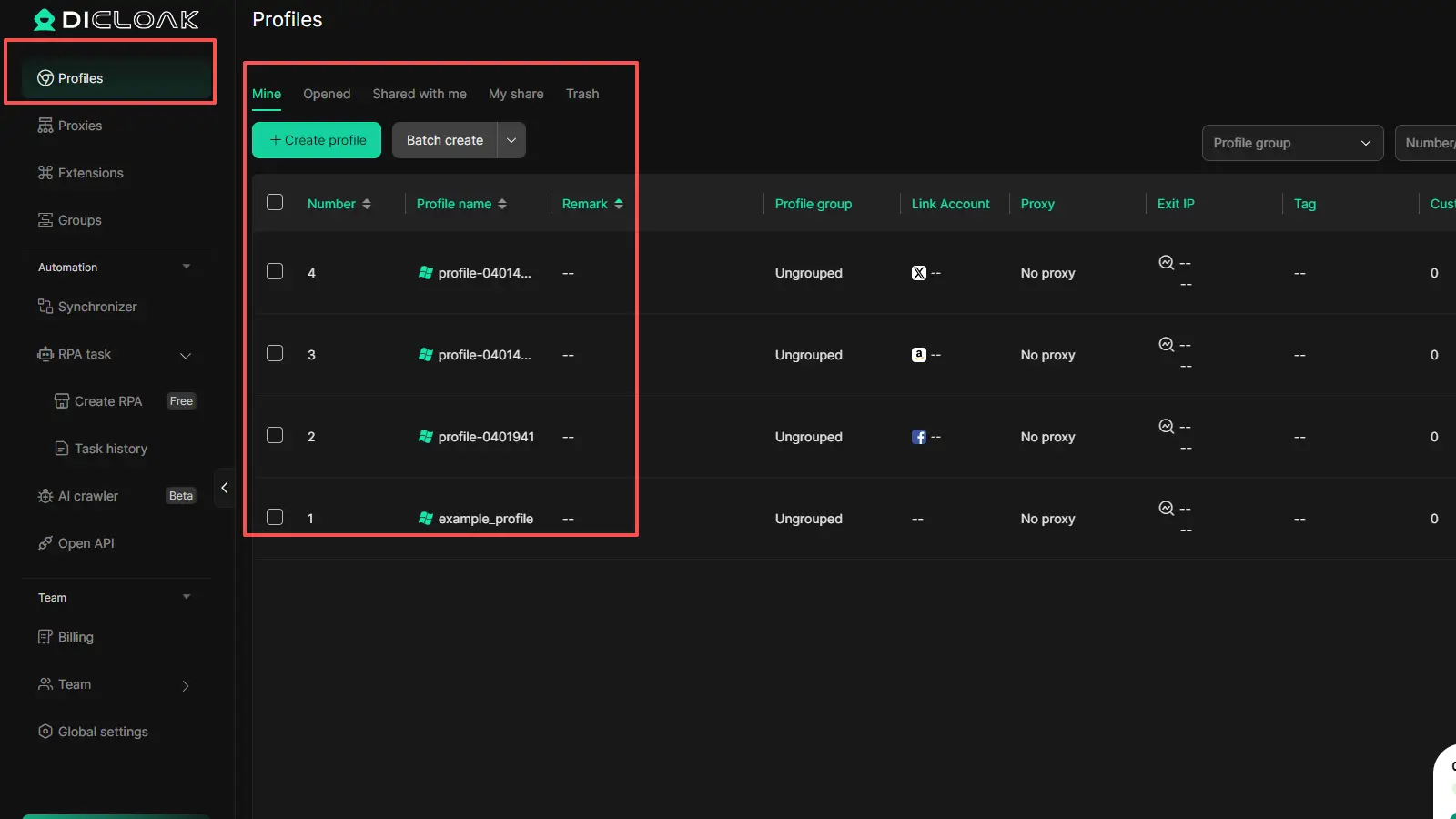
For users who need more than a regular browser, DICloak is a more specialized choice among chromium browsers. Based on your document, it is built for multi-account work, with isolated browser profiles, custom fingerprint settings, proxy support, and team management tools. That makes it a practical fit for account-heavy tasks like social media and e-commerce.
Running Multiple Accounts in Isolated Browser Profiles
DICloak lets each account run in its own browser profile. This helps keep cookies, browser data, and account settings separate, instead of mixing everything in one session. The document also notes bulk profile actions and support for large-scale account management, which is useful for users who handle many accounts at once.
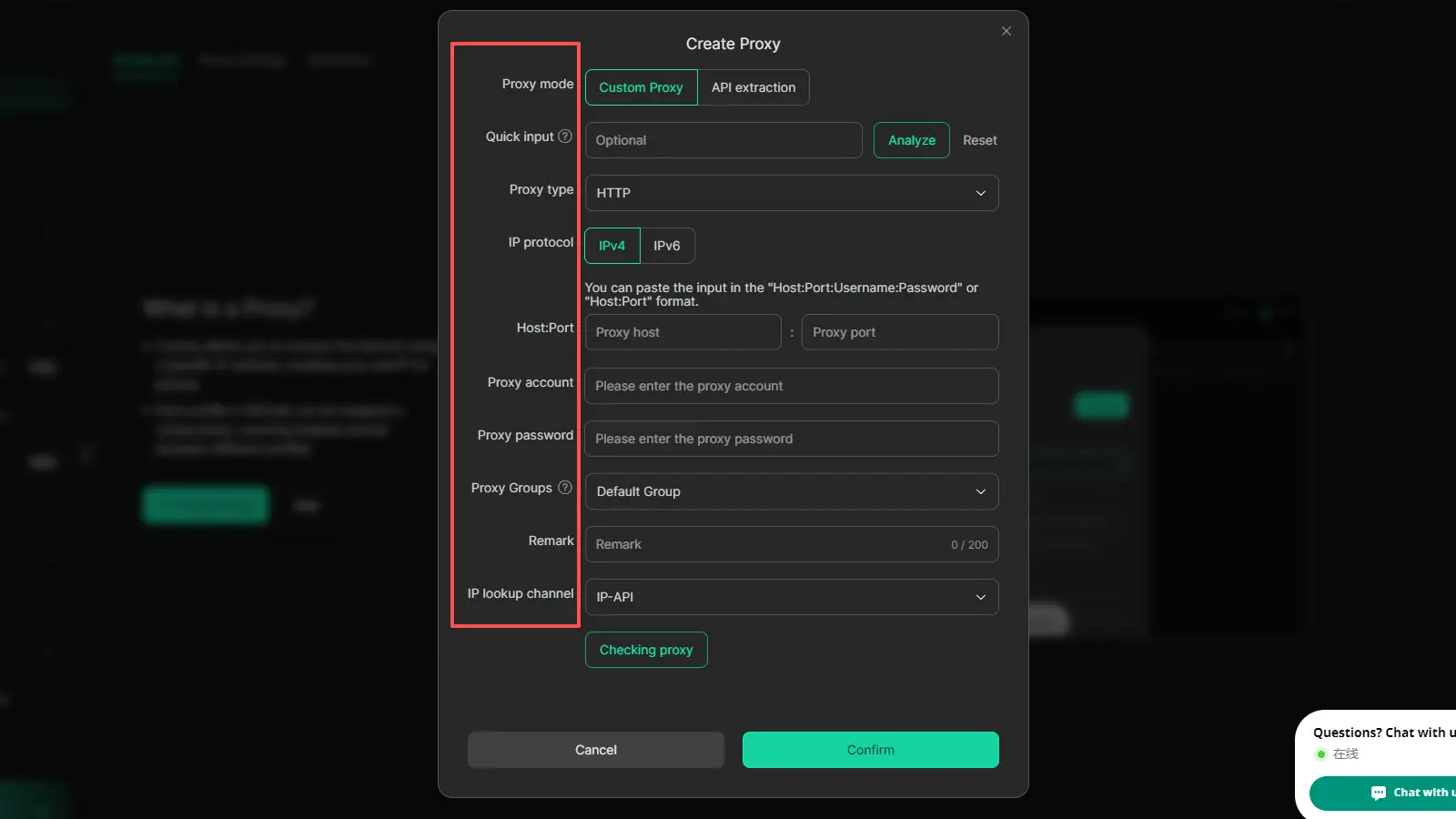
Reducing Cookie Conflicts and Account Crossover
A common problem in multi-account work is cookie mixing and account crossover. DICloak helps reduce that risk by keeping each profile isolated and supporting user separate proxy setups. This gives users a cleaner and more controlled browser profile for different account tasks.
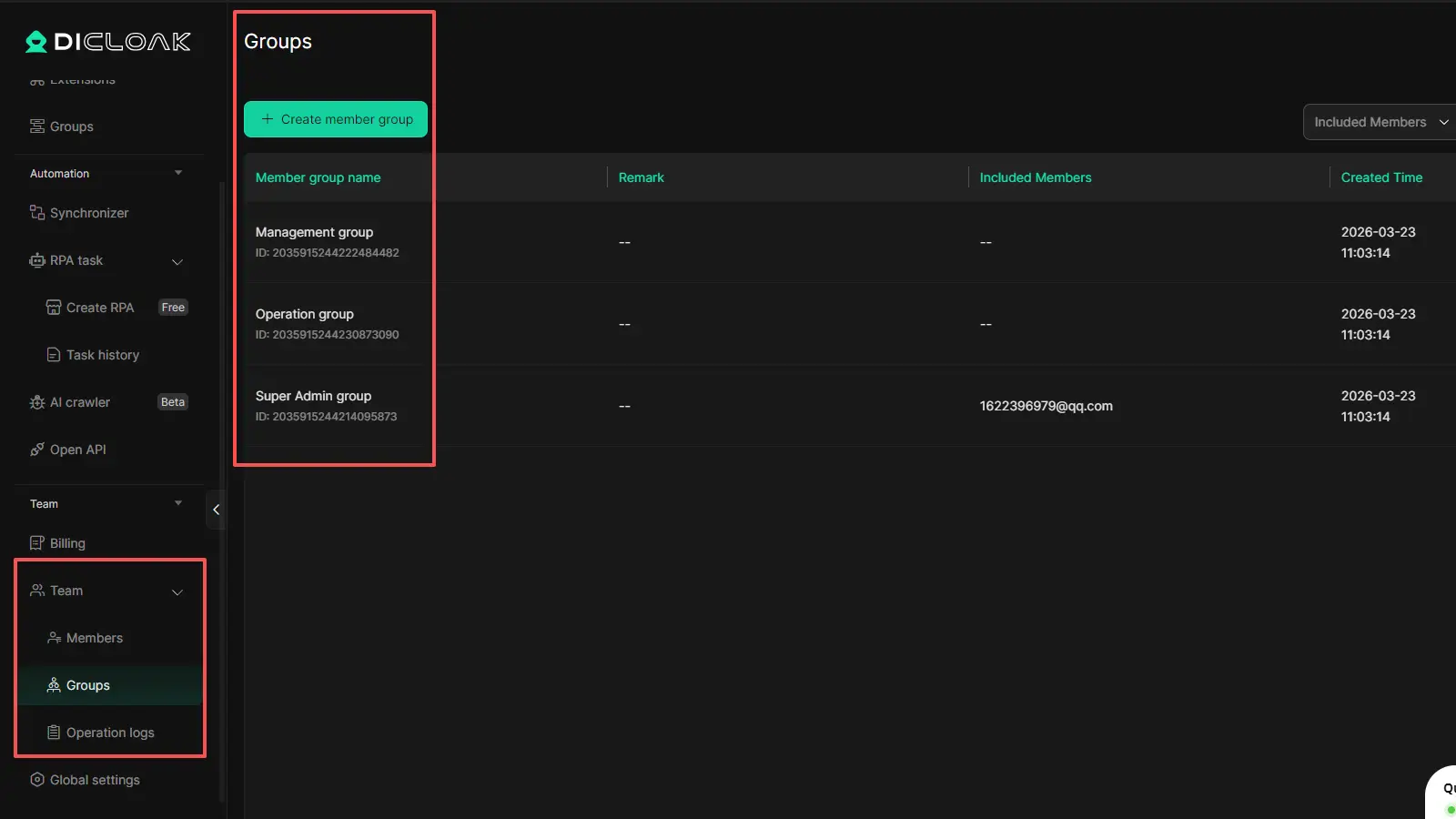
Supporting Team Collaboration with Permissions and Shared Access
DICloak also supports team-based work. Your document mentions profile sharing, member permissions, and operation logs, which can help teams manage shared access in a more organized way. Features like website access restrictions and security protection mode add more control for collaborative account work.
FAQs About Chromium Browsers
Q1: Are chromium browsers free to use?
Most chromium browsers are free to download and use. Chromium itself is an open-source project, and many browsers built on it, such as Chrome, Edge, Brave, and Vivaldi, are available at no cost to regular users.
Q2: Are chromium browsers safe?
Chromium browsers can be very safe, but they are not all equal. Safety depends on how well the browser is maintained, how quickly it gets security updates, and what privacy or security features it includes. The Chromium project has a dedicated security team, but users should still choose a browser with regular update support.
Q3: Can chromium browsers run Chrome extensions?
Many chromium browsers can run Chrome extensions, because they share the same Chromium foundation. For example, Brave says extensions from the Chrome Web Store work in Brave, and Microsoft also provides support for extensions in Chromium-based Edge. That is one reason chromium based browsers are so popular with users who rely on browser tools every day.
Q4: Are chromium browsers available on mobile?
Yes, many chromium browsers are available on mobile devices, including Android and iPhone. For example, Microsoft Edge, Brave, Opera, and Vivaldi all offer mobile versions, although features may differ from desktop versions.
Q5: How often should you update a chromium browser?
You should update chromium browsers as soon as new stable updates are available. Regular updates help fix security issues, improve site compatibility, and keep the browser running smoothly. In simple terms, delaying updates is one of the easiest ways to make a good browser less safe over time.
Conclusion
Chromium browsers remain a smart choice for many users in 2026 because they offer strong website compatibility, wide extension support, and flexible options for different needs. But the best browser is not the same for everyone. Some users care most about privacy, while others focus on speed, customization, or multi-account work. That is why it helps to compare features based on real use cases instead of choosing only by brand name. Once you understand how different Chromium browsers work, it becomes much easier to find the one that fits your daily browsing style.
 Web Proxy Tools
 Free Tools
 Cookie Plugin
 UA Generator
 MAC Address Generator
 IP Generator
 IP Address List
 2FA Code Generator
 World Clock
 Anonymous Check
 WebRTC Leak Test
 UUID Generator
 Free Web Proxy Site
 Proxy Checker
 FB Ad Checker
 AI Web Scraping
 Free SMM Tools
 Twitter Shadowban Checker
 Instagram Name Checker
 UTM Generator
 Username Generator
 AI Hashtag Generator
 LinkedIn Headline Generator
 Social Media Image Resizer