YouTube monetization matters because it turns a channel from a simple content page into a real business opportunity. For many creators, it is the first sign that their work is starting to grow. For marketers and brands, it can show how established a channel is. And for regular viewers, it can help explain how creators make money from videos, Shorts, livestreams, and community support.
That is where a YouTube monetization checker becomes useful. It gives people a simple way to understand whether a channel or video may be monetized, what signs to look for, and what that status may mean. Instead of guessing from views or subscriber count alone, readers can use a YouTube monetization checker to better understand channel status, monetization signals, and possible next steps.
This guide is for content creators who want to grow, marketers who want to research channels more carefully, and curious viewers who want to understand how YouTube monetization works. If you want a clear and practical explanation without confusing language, this guide will help you read monetization status with more confidence.
What is a YouTube Monetization Checker?
If you want to know whether a channel or video can earn money on YouTube, this is one of the first things you need to understand. A YouTube monetization checker helps people read monetization signals more clearly and avoid wrong guesses.
Definition and Purpose
A YouTube monetization checker is a tool or method people use to see whether a YouTube channel or video can make money. In simple words, it helps answer a common question: “Is this content monetized or not?” Some people use a third-party YouTube monetize checker online. Others check the status inside YouTube Studio, which is the more reliable source for channel owners. YouTube says creators can view their channel monetization status in YouTube Studio > Earn. For videos, creators can also check monetization icons in the Content area.
A good YouTube monetization check is not just about seeing a green dollar sign. It also helps you understand what stage a channel is in. For example, YouTube now has an expanded Partner Program path at 500 subscribers, 3 valid public uploads in 90 days, and either 3,000 valid public watch hours in 12 months or 3 million valid public Shorts views in 90 days. Full ad revenue sharing unlocks later, at 1,000 subscribers plus 4,000 valid public watch hours in 12 months or 10 million valid public Shorts views in 90 days.
This is why the term YouTube monetization checker matters. Many people think monetization is only a simple yes-or-no result. But in real life, a channel may be eligible to apply, waiting for review, fully monetized, or limited on some videos. A proper check helps people see the difference.
For example, imagine a small creator with 620 subscribers, 3 recent uploads, and 3,400 valid watch hours. A third-party YouTube monetize checker may show that the channel looks ready. But the real answer still depends on YouTube Studio, policy compliance, region availability, 2-Step Verification, and a linked AdSense for YouTube account. So the checker is useful, but YouTube’s own system gives the final answer.
Who Can Benefit from Using It?
Different people use a YouTube monetization checker for different reasons. It is not only for creators. Advertisers, agencies, and even regular viewers may also use it to better understand a channel’s status.
- Content creators benefit the most. A YouTube monetization check helps them see how close they are to monetization and whether something is missing. For example, a creator may think, “My numbers are high enough, so ads should already be on.” But after checking more carefully, they may find that the channel is still under review, missing an AdSense step, or facing a policy issue. This can save time and reduce stress.
- Advertisers and agencies can benefit too. They often want to know whether a creator is already in the YouTube Partner Program. That can help them understand whether the channel is more established and whether it has access to features like ads, memberships, or other monetization tools.
- Viewers can also use a YouTube monetize checker out of curiosity. For example, someone may watch a review channel, a gaming livestream, or a Shorts account and want to know if that content is earning money. They may also notice memberships, shopping links, or Super Chat and want to understand what those signs mean.
So, a YouTube monetization checker is a simple but useful tool. It helps creators track progress, helps brands evaluate channels, and helps viewers understand how YouTube channels make money.
Why Should You Check YouTube Monetization Status?
Now that you know what a YouTube monetization checker does, the next question is simple: why does this check matter so much? A good YouTube monetization check can help you avoid mistakes, understand a channel more clearly, and spot better growth opportunities.
Ensuring Compliance with YouTube Partner Program (YPP) Policies
One major reason to use a YouTube monetization checker is to make sure a channel is aligned with YouTube Partner Program rules. Monetization is not based on views alone. YouTube says creators must meet eligibility thresholds, follow channel monetization policies, and complete steps such as review and account setup before they can earn. This means a channel may have strong numbers and still not be ready to make money.
This matters because policy issues can block or limit earnings even after a creator joins YPP. YouTube’s official policy pages explain that channels must follow monetization rules across the whole channel, not just on one popular video. It also explains that some videos may show limited or no ads, which means monetization is turned on but advertisers may avoid that content. A YouTube monetize checker can help creators notice these warning signs early, before they keep repeating the same mistake.
For example, imagine a commentary creator whose channel has already been accepted into YPP. The creator assumes every upload is safe for ads. But after doing a YouTube monetization check, they notice several new videos have yellow icons. That does not always mean the whole channel lost monetization. It may mean those videos are limited because of ad suitability concerns. Catching that early can help the creator review the content style, edit future videos more carefully, and request review when needed.
Competitive Analysis
A YouTube monetization checker is also useful for competitive research. If you are a creator, agency, or brand, checking monetization signals can help you understand where another channel stands. It can show whether a creator is likely in the Partner Program, whether they have fan funding features, or whether their content appears advertiser-friendly. This gives a better picture than subscriber count alone.
This is helpful because not all large channels are in the same business stage. One channel may have ads, memberships, and shopping features, while another may have a similar audience size but fewer active monetization tools. YouTube says YPP gives access to revenue sources such as ads, YouTube Premium revenue, fan funding, and shopping-related earnings. So when brands compare influencers, a YouTube monetize checker can support smarter decisions about who looks more established and better prepared for long-term partnerships.
Here is a simple case. A skincare brand wants to work with two beauty creators. Both channels have around 80,000 subscribers. At first, they look similar. But one creator has channel memberships, Super Thanks, and clear monetization signals, while the other does not. That does not prove one creator is better, but it does suggest a difference in channel maturity, revenue setup, and content systems. A YouTube monetization check helps the brand see that difference before spending money on a campaign.
Identifying Revenue Opportunities
Another reason to use a YouTube monetization checker is to find missed revenue opportunities. Many creators only think about ads, but YouTube offers more than one way to earn. Depending on the channel’s status and region, creators may also gain access to YouTube Premium revenue, fan funding tools, Super Chat, Super Thanks, memberships, and shopping features. When you check monetization status carefully, you can see not only what is active now, but also what may be unlocked next.
This can change content strategy in a very practical way. For example, a Shorts creator may focus only on views, then realize through a YouTube monetization checker that the channel is closer to fan funding eligibility than to full ad revenue sharing. In that case, the creator may decide to build a stronger community, use more livestreams, or create content that encourages direct audience support. A long-form creator, on the other hand, may notice that certain topics often get yellow icons and shift toward safer topics with better advertiser demand.
In other words, checking monetization status is not only about fixing problems. It is also about planning smarter. A YouTube monetization checker helps creators see where money may be leaking, where growth is blocked, and where the next earning chance may come from. That makes it a useful tool for both protection and strategy.
How to Use a YouTube Monetization Checker Tool
After learning why monetization status matters, the next step is knowing how to check it in a simple and practical way. A YouTube monetization checker can give you a quick signal, but for channel owners, YouTube Studio is still the most accurate place to confirm channel and video status.
Step-by-Step Guide
First, find the channel or video URL you want to check. This can be a channel link, a video link, or sometimes a handle-based URL. Many third-party YouTube monetize checker tools are built to accept public YouTube links, and some say they work with different YouTube URL types.
Next, paste that URL into the checker tool and run the scan. A public YouTube monetization check may try to read visible signals, such as whether ads seem active, whether fan-funding features appear, or whether the channel shows signs of YPP access. This is useful for research, but it is still an estimate. If you own the channel, YouTube says the real place to check your application and channel status is the Earn section in YouTube Studio.
Then, look at the results carefully instead of treating them as a simple yes-or-no answer. For example, if you are checking your own channel, YouTube Studio can show whether your application is in progress and lets you check status in the Earn area. At the video level, YouTube also provides monetization icons, including green for monetized, yellow for limited, and red or gray for not monetized. That means the best YouTube monetization checker is one that helps you read the full picture, not just one label.
Here is a simple example. Say you paste a gaming channel URL into a third-party checker and it suggests the channel is monetized. That is helpful for a quick review. But if you own that channel, you should still open YouTube Studio and check two places: Earn for channel-level status and Content > Monetization for video-level icons. A channel may be in YPP while one upload still has limited ads.
Features of a Reliable Monetization Checker
A reliable YouTube monetization checker should be clear about accuracy. This is very important. Public tools can be useful for estimating status, but they cannot replace YouTube’s internal review system. YouTube reviews channels as a whole for monetization and tells creators to check the Earn section of YouTube Studio for the official result. So the best tool is one that gives helpful clues without pretending it knows more than YouTube does.
A good tool should also be easy to use. In practice, that means a clean input box, support for normal YouTube links, and results that are easy to understand. Some public tools promote exactly this kind of quick workflow: paste a URL, run the check, and get a fast result. That simplicity matters because many users only want a quick first look before doing a deeper YouTube monetization check inside YouTube Studio.
Free vs. paid tools also matter. Right now, some public YouTube monetize checker tools are offered as free tools for quick checks. Paid platforms, when they exist, usually add broader creator services or analytics rather than changing YouTube’s official status itself. So for most readers, a free checker is enough for a first pass, while YouTube Studio remains the key source for final confirmation.
In short, use a YouTube monetization checker for speed, but use YouTube Studio for certainty. That simple habit helps you avoid wrong assumptions and makes your monetization research much more useful.
YouTube Partner Program (YPP) Requirements
To understand what a YouTube monetization checker shows, you first need to know the basic YPP rules. A channel does not qualify for monetization just because it gets views. It must reach YouTube’s required numbers and follow YouTube’s policies.
Key Eligibility Criteria
For full ad revenue sharing, YouTube says a channel needs 1,000 subscribers and either 4,000 valid public watch hours in the last 12 months or 10 million valid public Shorts views in the last 90 days. The channel must also follow YouTube’s monetization policies, Community Guidelines, and Terms of Service. That is why a YouTube monetization check is not only about numbers. Policy compliance matters too.
For example, a creator may have 1,100 subscribers and 4,200 watch hours, so a third-party YouTube monetize checker may show the channel looks eligible. But if the channel has policy problems, YouTube can still reject the application.
Updates to YPP Requirements
There is also an earlier entry path now. In many eligible regions, YouTube allows creators to join expanded YPP at 500 subscribers, 3 public uploads in 90 days, and either 3,000 valid public watch hours in 12 months or 3 million valid public Shorts views in 90 days. But full ad revenue sharing still requires the higher 1,000-subscriber level.
This is important because many old articles only mention the old 1,000-subscriber rule. A modern YouTube monetization checker should reflect both levels, so creators can better understand whether they are ready to apply, already eligible for early features, or still growing toward full monetization.
How to Check if a YouTube Channel or Video is Monetized
Now that you know the YPP rules, the next step is learning how to spot monetization in real life. A YouTube monetization checker can help, but it works best when you also understand YouTube’s own signals.
Visual Indicators of Monetization
For channel owners, the clearest signs are inside YouTube Studio. YouTube says video monetization icons show different states. A green dollar sign means the video is monetized. A yellow dollar sign means limited or no ads. A red or gray icon falls under not monetized filters in Studio.
This is important because monetization is not always a simple yes-or-no result. For example, a creator may be in the Partner Program, but one video can still get a yellow icon if it is not considered suitable for all advertisers. That means a YouTube monetization check should look at both the channel and the individual video, not just one signal.
A simple case makes this easier to understand. Imagine a gaming creator whose channel is already monetized. Most uploads show a green icon, but one video about a sensitive topic shows yellow. The channel is still in YPP, but that one video may earn less because fewer ads can run on it. That is why the icon matters so much.
Using External Tools
A public YouTube monetization checker can give a quick estimate when you want to check another channel or video. Some tools, like TimeSkip and Mediacube, let users paste a YouTube channel or video URL and return a fast monetization result or status estimate.
Still, these tools should be used carefully. They are useful for research, but they do not replace YouTube Studio for channel owners. In practice, a third-party YouTube monetize checker can suggest whether a channel looks monetized, but only YouTube’s own system can confirm the official status of your channel and your videos.
Manual Methods
You can also do a manual YouTube monetization check by watching for obvious public signs. For example, you may notice ads before or during a video, channel memberships, Super Chat, or other monetization features. These signs can suggest that a channel is monetized, but they are not perfect proof. Ads are not shown to every viewer every time, and some monetization features depend on content type, region, or channel setup. This means a public video may be monetized even if you do not personally see an ad. YouTube’s own icon system inside Studio remains more reliable.
So the smartest approach is simple. Use a YouTube monetization checker for a quick outside view. Then, if you own the channel, confirm everything inside YouTube Studio. That gives you the fastest check and the most reliable answer.
After using a YouTube monetization checker to understand channel status, the next step is improving daily workflow. For users who manage many YouTube accounts, work with a team, or repeat the same tasks every day, users can organize account operations in a cleaner and more scalable way with DICloak.
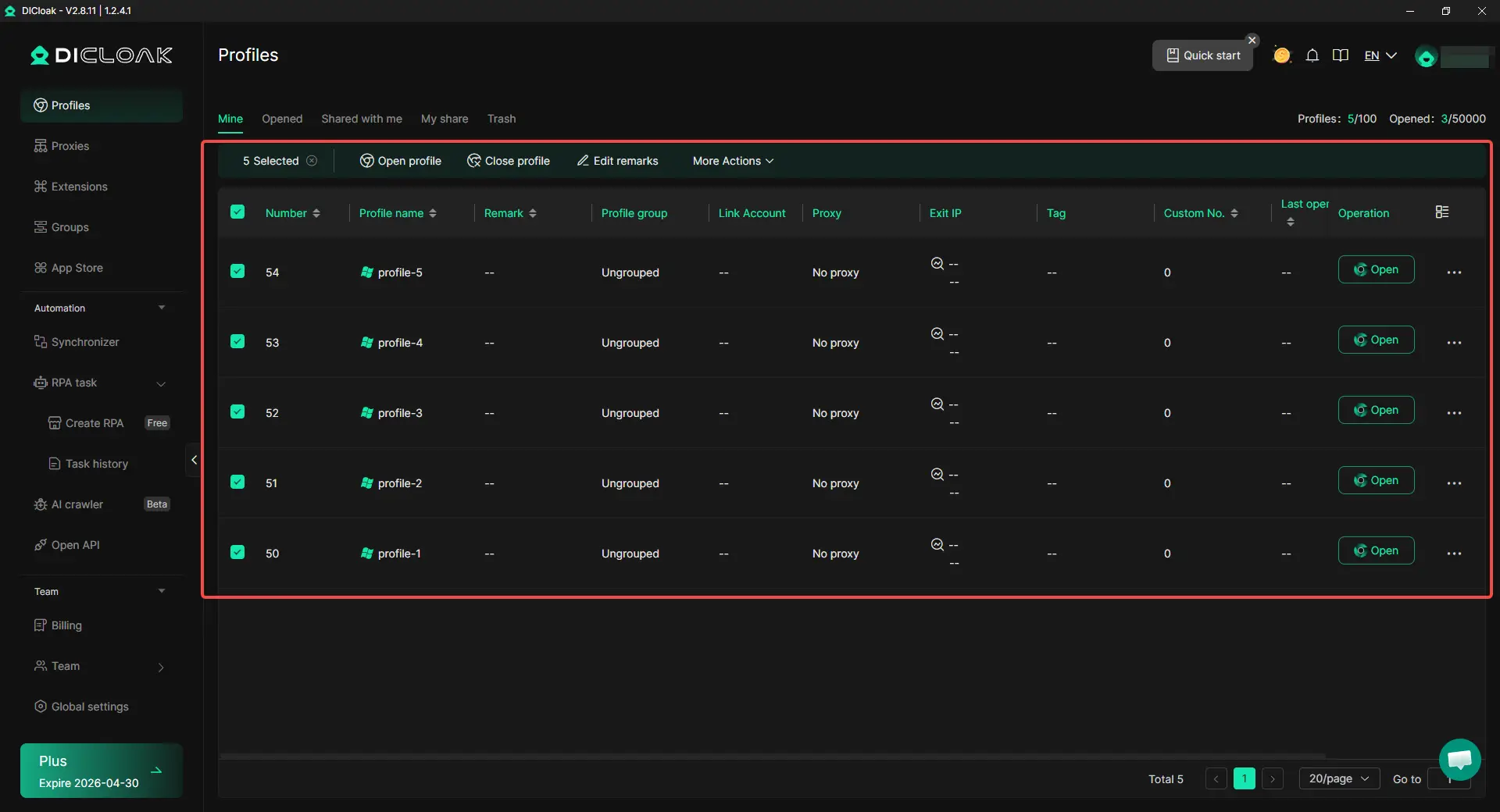
With DICloak, users can create separate browser profiles for different YouTube accounts. Each profile can have its own fingerprint and proxy settings. This helps keep cookies, sessions, and login activity from mixing together. For example, a team running several YouTube channels can manage each one in its own profile after a YouTube monetization check, instead of logging everything into one browser.
Optimizing Content with Unique Digital Fingerprints
With DICloak, users can assign different fingerprints to different profiles and customize proxy settings for each one. This creates a more separate and stable working environment for each account. Users can choose and manage proxies based on different channel needs, which makes multi-account operations more flexible and easier to control. For creators managing multiple channels, this helps keep daily work cleaner and more organized. A YouTube monetize checker helps show channel status, while separate profiles with custom proxy configuration help users manage each channel in a more structured way.

Reducing Repetitive Work with RPA and Synchronizer
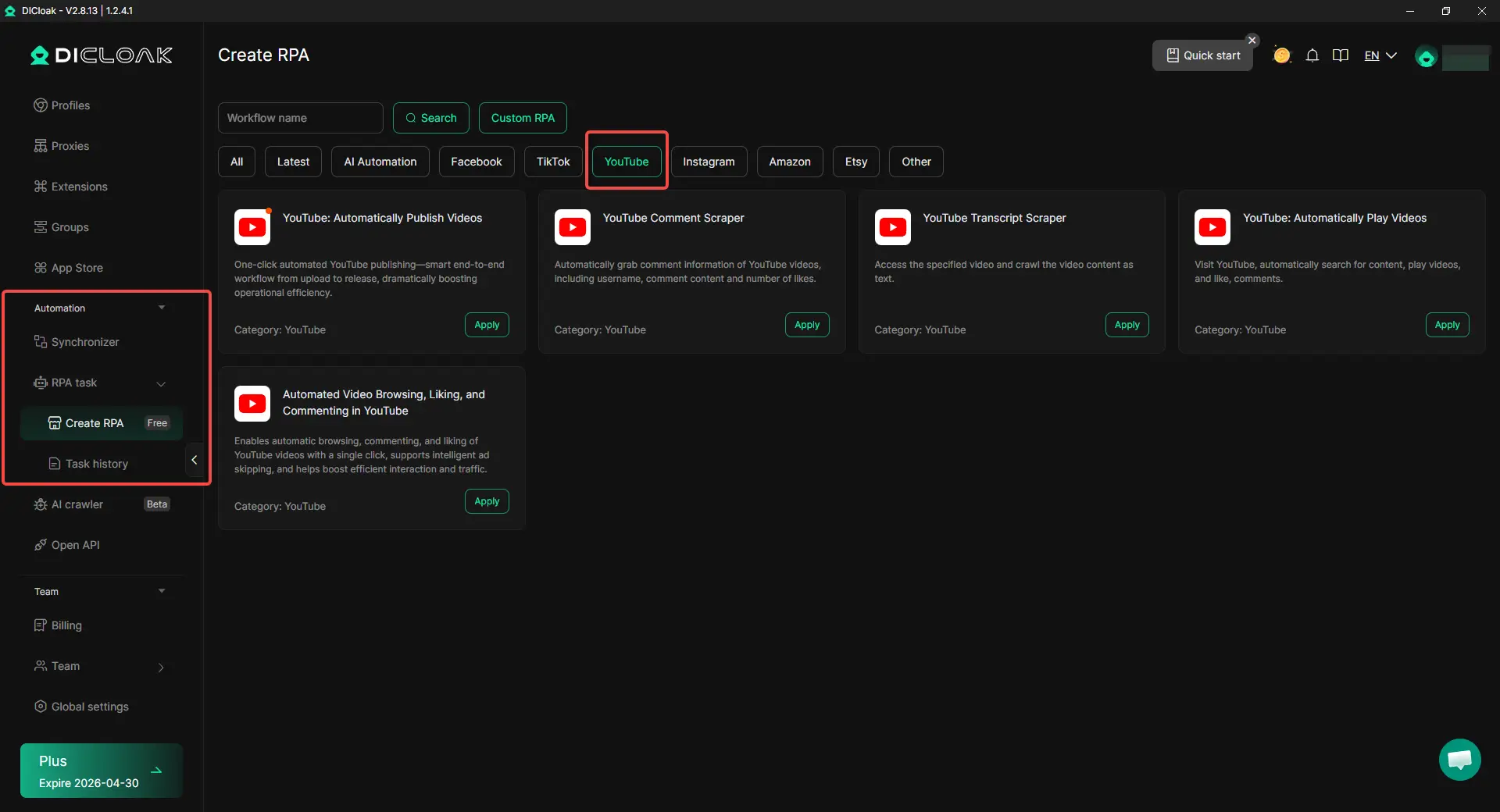
With DICloak, users can use built-in RPA and the Synchronizer to handle repeated actions across multiple profiles. This is helpful for routine tasks like opening profile groups, checking dashboards, or repeating the same steps across several accounts. It can also support YouTube-specific workflows such as automatically publishing videos, scraping comments, extracting video transcripts, automatically playing videos, and automating video browsing, liking, and commenting. After a YouTube monetization checker shows what needs attention, these tools can help users move faster and save time.
Streamlining Team Collaboration for Channel Growth
With DICloak, users can share profiles with team members and set different access permissions. With data isolation and operation logs, it becomes easier to manage uploads, comments, and account tasks in a more controlled way. This is useful for agencies, studios, and small teams that want clearer teamwork across multiple YouTube channels.

Conclusion
A YouTube monetization checker is useful because it helps people understand whether a channel or video may be earning money and what that status really means. It is not only for creators. Brands, agencies, and even viewers can also use it to better understand a channel’s growth stage, monetization signals, and possible revenue path. Still, the most reliable answer for channel owners comes from YouTube Studio, not from outside guesses alone.
As this guide shows, a good YouTube monetization checker should be used together with a clear understanding of YPP rules, monetization icons, policy requirements, and real channel signals. Reaching the numbers is important, but compliance, review status, and account setup matter too. That is why a smart monetization strategy is not just about checking status. It is also about improving workflow, protecting account operations, and managing channel growth in a more organized way.
For users handling multiple YouTube accounts or team-based channel work, better account management can support that process. With tools like DICloak, users can separate profiles, customize proxy settings, reduce repeated work, and manage collaboration more clearly. In the end, a YouTube monetization checker helps you see where a channel stands, and a better workflow helps you move forward with more confidence.
FAQs About YouTube Monetization Checkers
What is a YouTube monetization checker and how does it work?
This question matches users who still do not fully understand the tool itself. It can help explain that a YouTube monetization checker looks at channel or video monetization signals, while YouTube Studio is the best place for owners to confirm official status.
Is a YouTube monetization checker tool accurate?
This is one of the most important FAQs because many users want to know whether a third-party checker is reliable. You can explain that public tools are useful for estimates, but YouTube Studio gives the final and most accurate answer.
Can I use a YouTube monetization checker to check any channel or video?
This FAQ is valuable because users often want to check competitors, influencers, or public videos. It gives you a natural way to explain the difference between public signals and private channel-level status.
Are there any free YouTube monetization checker tools available?
Many users search with clear tool intent, and this question fits that behavior well. You can answer by explaining that some free tools exist for quick checks, but advanced platform data usually still depends on YouTube’s own system.
What should I do if my channel does not qualify after a YouTube monetization check?
This is highly useful because it connects the checker with action. You can explain practical next steps, such as improving original content, growing watch hours or Shorts views, following YPP policies, and checking YouTube Studio for missing steps.
 Web Proxy Tools
 Free Tools
 Cookie Plugin
 UA Generator
 MAC Address Generator
 IP Generator
 IP Address List
 2FA Code Generator
 World Clock
 Anonymous Check
 WebRTC Leak Test
 UUID Generator
 Free Web Proxy Site
 Proxy Checker
 FB Ad Checker
 AI Web Scraping
 Free SMM Tools
 Twitter Shadowban Checker
 Instagram Name Checker
 UTM Generator
 Username Generator
 AI Hashtag Generator
 LinkedIn Headline Generator
 Social Media Image Resizer