Have you ever tried logging into Discord only to find yourself completely locked out—not just from your account, but from the entire platform? This abrupt and frustrating experience is often the result of a Discord IP ban, the platform's most stringent enforcement action. This guide will deconstruct what a Discord IP ban is, how it functions on a technical level, and the common reasons it's implemented. For professionals who depend on Discord for marketing, development, or community management, we'll explain why conventional methods fail and introduce a definitive strategy to ensure your operations are never compromised by an unexpected ban.
What Exactly Is a Discord IP Ban?
To navigate the platform effectively, it's crucial to understand the different levels of enforcement Discord uses to maintain community safety and integrity. An account suspension is one thing, but an IP ban is the platform's most comprehensive measure, designed to address serious or repeated violations by cutting off access at the network level.
A Discord IP ban is an enforcement action where Discord blocks access not just to a specific user account, but to the entire IP address associated with it. This means that no device connected to that network—whether a computer, phone, or tablet—can access the Discord platform. Crucially, this isn't just about your network's IP address; Discord's system is more sophisticated, simultaneously targeting the unique digital "fingerprint" of your device itself.
The primary consequences of a Discord IP ban are immediate and widespread:
- Blocked Access: All attempts to connect to Discord from the banned IP address are completely blocked.
- No New Accounts: Creating new user accounts from the same network is prevented.
- Device Association: Logging in with any device that Discord has associated with that IP becomes impossible.
It is important to distinguish between different types of bans. Not all disciplinary actions on Discord are IP-level. The platform uses a tiered approach based on the severity of the violation, and an Account Ban, which only affects a specific account, is far more common. An IP ban is reserved for more serious infractions and is a powerful tool used to stop determined rule-breakers from evading platform-wide enforcement.
Understanding what an IP ban entails is the first step. Next, we'll explore the technical mechanisms Discord uses to enforce it.
The Technical Side: How a Discord IP Ban Works
Understanding the mechanics behind a Discord IP ban is critical for any user, but especially for professionals who need to reliably manage their presence on the platform. This isn't just about blocking a number; Discord employs a multi-layered system designed to make simple evasion tactics ineffective.
The process Discord uses to enforce an IP ban is more sophisticated than many realize. It involves several layers of detection working in tandem:
- IP Address Blocking: At its core, the system blocks all connection requests originating from the flagged IP address. When a user on that network tries to log in or access the service, Discord's servers simply refuse the connection.
- Device Fingerprinting: Discord looks beyond the IP address and analyzes the unique characteristics of your device. This "device fingerprint" is created from a combination of hardware and software data, such as your hardware configuration and specific browser information. Even if your IP address changes, Discord can still identify and block your device.
- Comprehensive Data Tracking: To further prevent ban evasion, Discord tracks additional data points. This includes specific browser headers, stored cookies and tokens, and user activity patterns that help identify a user trying to circumvent a ban, even with a new IP and a seemingly new account.
The implications of this multi-layered approach are significant. This advanced system is designed to effectively stop users who repeatedly violate terms of service, making it difficult for them to return to the platform using simple tricks. This technical sophistication leads to common questions about who can implement such a powerful ban.
Who Controls the Ban Hammer? A Discord IP Ban Q&A
This section addresses the most common questions and misconceptions about who has the authority to issue a Discord IP ban. Understanding the platform's power structure is key to knowing where the real enforcement capabilities lie.
Can Server Owners Issue a Discord IP Ban?
No. Server owners, administrators, and moderators do not have the ability to issue a platform-wide IP ban. Their authority is limited to their specific server, where they can ban individual user accounts. A platform-wide Discord IP ban can only be issued by Discord's own Trust & Safety team as a response to severe or repeated violations of the platform's Terms of Service or Community Guidelines.
Can You Be IP Banned from a Single Discord Server?
No, you can ban IP from a single server. IP bans are global, platform-wide actions enforced exclusively by Discord. While a server administrator can ban your account from their community, they cannot prevent your IP address from accessing the rest of the Discord platform.
Now that it's clear who controls these bans, let's explore the methods people consider for getting around them and why they often fall short.
Addressing a Discord IP Ban: Methods and Limitations
This section is provided for educational purposes to understand the common techniques used to address an IP ban. It is crucial to note that attempting to bypass a ban is a direct violation of Discord's Terms of Service and can result in a permanent, irreversible suspension.
Users often explore several methods to regain access after an IP ban, but each comes with significant limitations, primarily due to Discord's sophisticated detection systems.
- Proxies: The tools are the most common first step, as they mask your real IP address with a new one. However, they are fundamentally insufficient because they only solve a fraction of the problem.
- Verdict: Unreliable. Fails to address device fingerprinting.
- Mobile Hotspots: Using your phone's mobile data provides a different IP address, which can sometimes work temporarily. However, this is not a reliable or practical long-term solution for consistent access.
- Rebooting Your Router: This method only works for users whose Internet Service Provider (ISP) assigns a dynamic IP address, which changes upon rebooting.
- Verdict: Highly Situational and Incomplete. Only works for dynamic IPs and still leaves your device fingerprint vulnerable.
The core weakness of these methods is their one-dimensional approach. While a proxy may change your IP, it does nothing to alter the rich data that forms your browser fingerprint—from hardware specifics to browser headers—which Discord's systems are specifically designed to detect. Because these conventional bypass methods leave your device exposed, they are ultimately unreliable.
For legitimate use cases requiring stable and secure access, a more comprehensive approach is necessary.
A Smarter Solution for Multi-Account Management: DICloak
For professionals in marketing, community management, software development, or e-commerce, managing multiple Discord accounts is often a business necessity. These legitimate use cases require a stable, secure environment where the risk of an unjust Discord IP ban or account linking could disrupt critical operations. In these scenarios, avoiding detection isn't about breaking rules—it's about ensuring business continuity.
This is where a professional tool like DICloak provides a safer, more robust alternative to conventional methods.
DICloak is designed specifically for secure multi-account management by addressing the limitations of simple IP-masking tools. Its effectiveness comes from solving the core problems of detection:
- Eliminate Account Linking: DICloak's isolated browser profiles create a digital profile between each Discord account. This isolation prevents any data leakage, making it impossible for Discord to detect that they are managed from the same device.
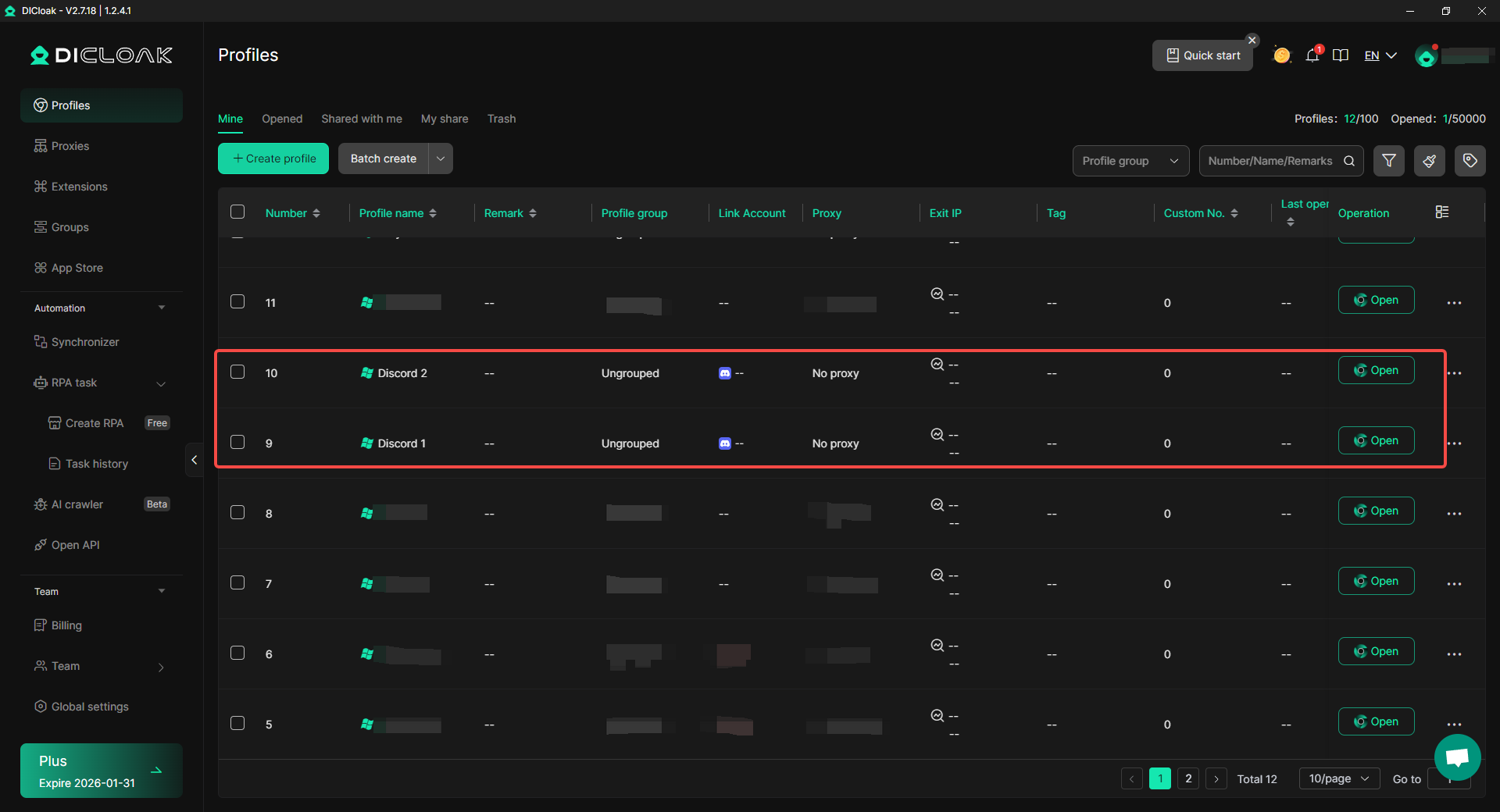
- Bypass Device Fingerprinting: For each profile, DICloak generates a unique and authentic browser fingerprint. This makes each account appear to Discord as if it is being operated from a completely different physical device, rendering device-based tracking ineffective.
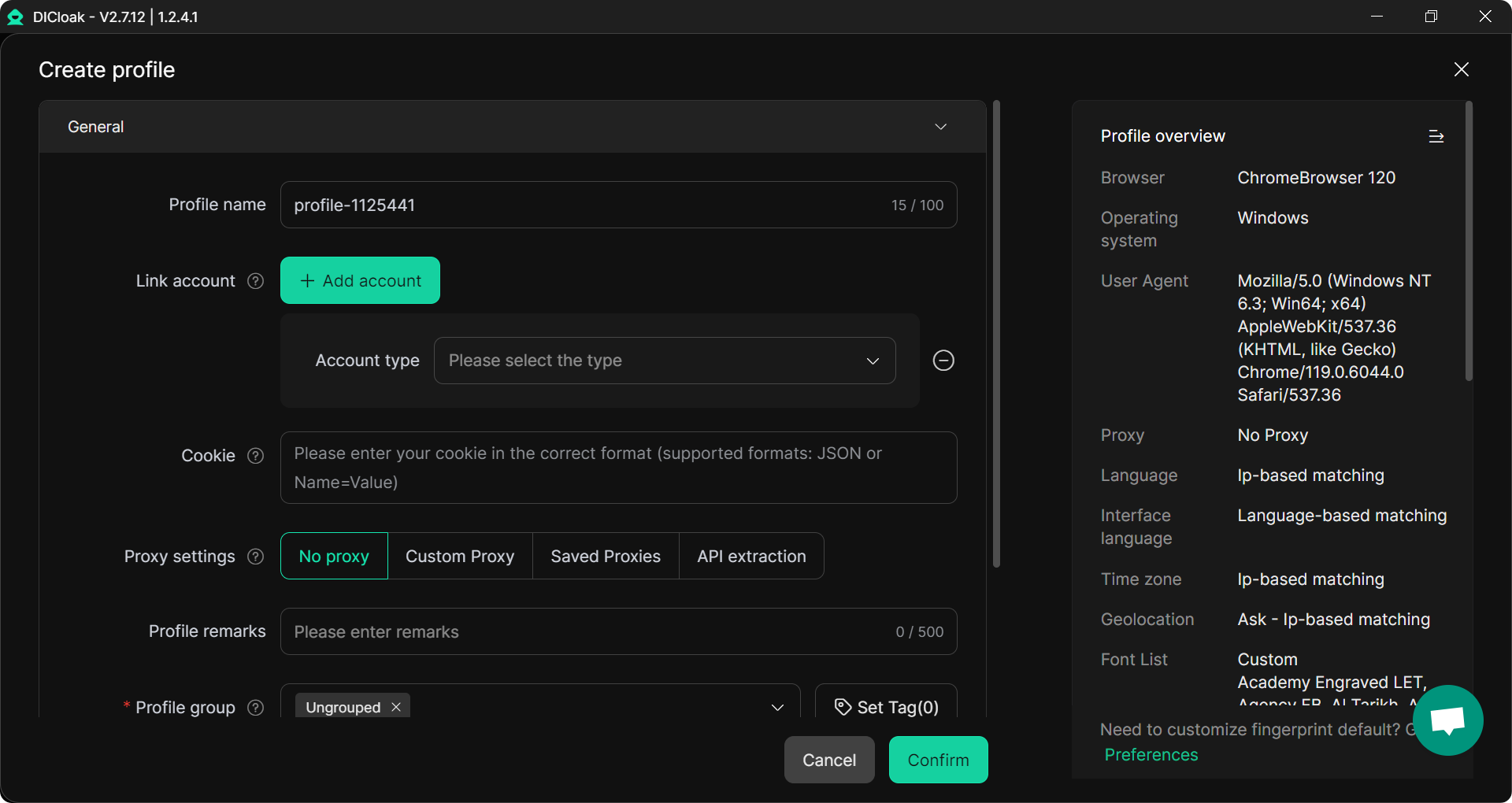
- Ensure Total Anonymity: With DICloak, you can connect each isolated profile to a unique proxy, such as a residential proxy. This ensures that every account has both a distinct IP address and a unique device fingerprint, creating a completely separate and untraceable digital identity. DICloak allows for custom proxy configurations, providing enhanced privacy protection.
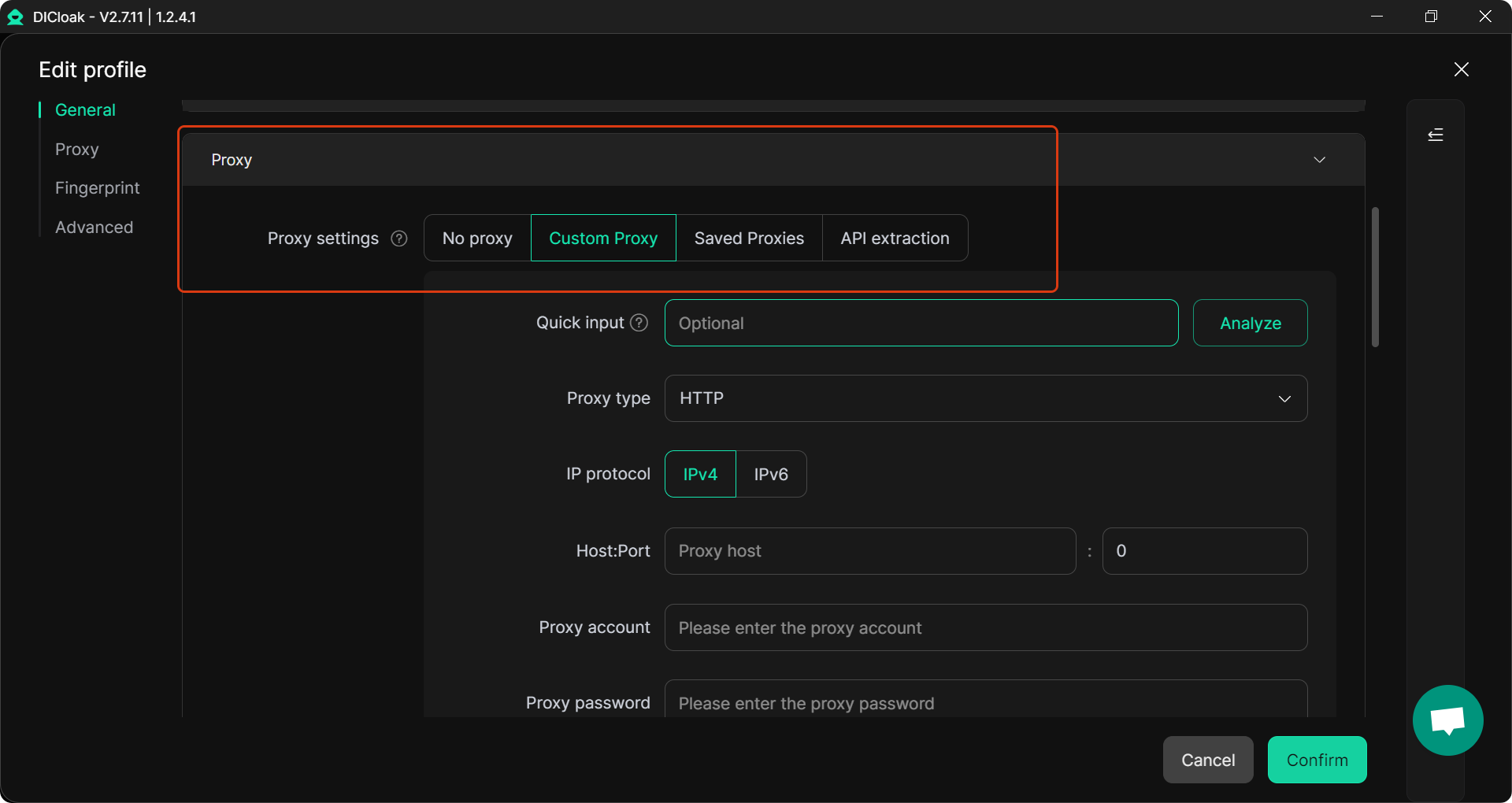
The core advantage of this approach is clear: DICloak provides full control over your digital identity. It creates a secure and undetectable environment that allows professionals to manage multiple accounts without fear of being flagged, linked, or unfairly banned.
Frequently Asked Questions about the Discord IP Ban
This section provides quick, clear answers to the most common questions people have about receiving a Discord IP ban, summarizing the key points discussed throughout this guide.
Can you really get IP banned on Discord?
Yes. Discord uses IP bans as an enforcement tool to address serious or repeated violations of its platform policies.
Does Discord ban your device or just your IP address?
It bans both. Discord combines IP address blocks with device fingerprinting to create a more effective and difficult-to-evade ban.
Can a server owner IP ban me?
No. Only Discord's internal Trust & Safety team has the authority to issue a platform-wide IP ban. Server owners can only ban accounts from their specific server.
Is using a proxy guaranteed way to bypass a Discord IP ban?
No, it is not guaranteed. While a proxy changes your IP address, Discord may still be able to identify you through your device's browser fingerprint or other behavioral data.
What is the safest way to manage multiple Discord accounts for my business?
The safest method is to use a specialized tool like DICloak, which creates isolated browser profiles with unique fingerprints for each account, making them undetectable.
Final Thoughts
Discord’s IP ban system is a robust and sophisticated tool designed to protect its communities. It goes beyond simply blocking an IP address by targeting a device’s unique digital fingerprint, making it a formidable measure against platform abuse.
For the average user, the best strategy will always be the simplest: follow Discord's Community Guidelines and Terms of Service to avoid any risk of a ban. However, for professionals such as developers, marketers, and community managers who rely on managing multiple accounts for legitimate business operations, a more powerful safeguard is essential. For these use cases, a tool like DICloak offers the necessary protection to ensure secure, uninterrupted access.
In the professional arena, control over your digital identity is not a luxury—it is a prerequisite for success. Securing it is the only way to operate without limits.
 Web Proxy Tools
 Free Tools
 Cookie Plugin
 UA Generator
 MAC Address Generator
 IP Generator
 IP Address List
 2FA Code Generator
 World Clock
 Anonymous Check
 WebRTC Leak Test
 UUID Generator
 Free Web Proxy Site
 Proxy Checker
 FB Ad Checker
 AI Web Scraping
 Free SMM Tools
 Twitter Shadowban Checker
 Instagram Name Checker
 UTM Generator
 Username Generator
 AI Hashtag Generator
 LinkedIn Headline Generator
 Social Media Image Resizer