You finish setting up a new browser profile, log in to TikTok, and within minutes see your account restricted or locked out. It’s a pattern that catches people off guard, everything looks clean, but the platform pushes back right after a fresh login. If you’re searching for answers on tiktok account restricted after login from a new browser profile, you’re not alone. Many users report tiktok account locked after new browser login and sudden tiktok restricted account after browser profile change, even when the device is safe and the password is correct.
The real frustration is that swapping browser profiles should give you a clean slate, yet it often triggers TikTok’s risk controls. Sometimes you get a warning, sometimes the account freezes without explanation. It’s easy to assume the platform flagged your IP or noticed a device mismatch, but the truth is more layered, TikTok checks for dozens of signals, not just one.
What most guides miss is the chain reaction caused by browser fingerprint inconsistencies, timezone jumps, and sudden changes in hardware ID. If you skip the details and just log in, you risk short-term restrictions or even longer lockouts. But with the right approach, you can reduce the triggers, keep your accounts stable, and move between browser profiles without getting flagged.
Let’s break down why these restrictions happen and how to fix your workflow.
Why Does TikTok Restrict Accounts After Logging In from a New Browser Profile?
A TikTok account often gets restricted right after logging in from a new browser profile because the platform spots changes in device, location, or browser fingerprint that don’t match your past login history. TikTok’s security system treats these sudden changes as warning signs for account theft or automation, so it moves fast to lock down access, even if you’re the real owner.
How TikTok Detects Unusual Login Activity
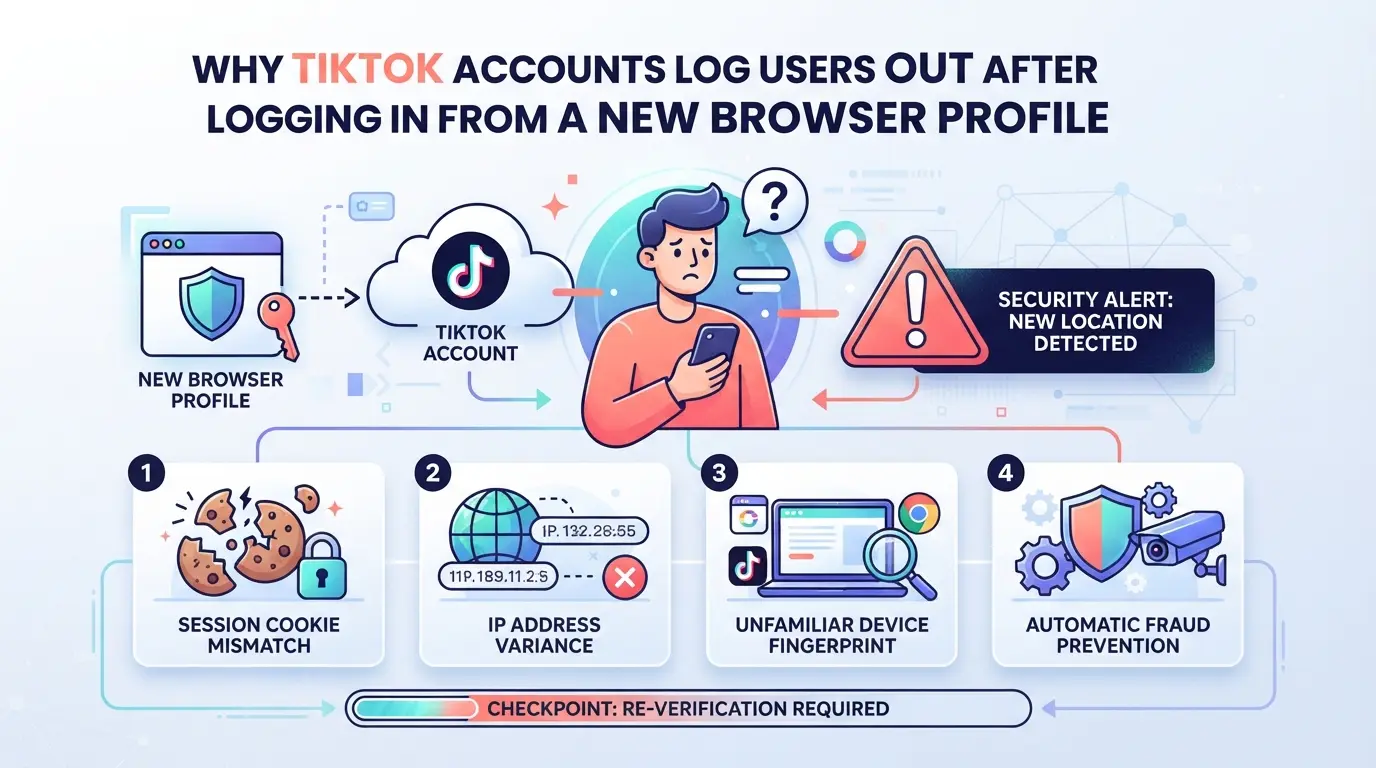
TikTok flags any login that doesn’t fit your typical device or network pattern. The platform checks your browser fingerprint, operating system, and IP location each time you sign in. If two or more of these change at once, restrictions are much more likely.
What Counts as a 'New' Browser Profile to TikTok
To TikTok, a “new browser profile” isn’t just a fresh Incognito window. It’s any environment where cookies, cached data, device settings, or fingerprint signals don’t line up with what the system expects. For example, if you’ve always used TikTok from a Chrome browser on Windows in Singapore, then suddenly log in from a browser profile that shows as Mac in Berlin, TikTok’s backend will spot the mismatch. Even less obvious changes, like a new user agent, a timezone jump, or a different font list, can trigger review. Sometimes, people think clearing cache or using a proxy is enough, but TikTok ties session trust to more than just IP or basic cookies. If your browser profile lacks the same history, TikTok won’t treat it as a trusted device. That’s when you see instant verification popups, required email/SMS codes, or the account gets flagged for review. In some edge cases, logging in with the right password but wrong session data can freeze the account until you pass extra checks or contact support.
Common Restriction Triggers After Browser Changes
- Multiple logins from different cities or countries within a short time span
- Device or OS changes, like moving from Windows to Mac or changing screen resolution
- Mismatched fingerprint signals, user agent, language, time zone, or geolocation out of sync with account history
These triggers often combine in ways that make TikTok’s system react quickly. Even if you’re careful with one signal, a gap in another can still trip a restriction. The next section covers what risks come up when switching browser profiles, and which mistakes actually lead to more account trouble.
What Are the Main Risks of Switching Browser Profiles for TikTok Accounts?
Switching browser profiles when logging into TikTok isn’t just a cosmetic change, it exposes your account to a chain of platform risk checks. The main risks? Temporary restrictions, shadowbans that cut your reach, and real headaches with recovery.
Temporary Restrictions vs. Permanent Bans
TikTok flags sudden browser changes as suspicious activity. Sometimes you get a warning and limited access, but if the mismatch looks severe, like a jump from one country to another or a shift in device type, the platform can escalate straight to a full ban. If you trigger a ban, appeals are slow and often denied.
Shadowbans and Limited Account Features
The worst part is that TikTok rarely tells you exactly what’s wrong. One day your posts go viral, then after a browser switch, engagement collapses. Typical signs include muted videos, blocked hashtags, or a drop in follower growth. If you notice you can’t message, post, or join live streams, you’re likely facing a shadowban. This punishment doesn’t come with a clear notice, the platform quietly limits your account’s reach, so even if you aren’t technically “banned,” your content is invisible to everyone but yourself. The mistake most people make is thinking a restriction means they just need to verify their phone or wait it out, but shadowbans can last weeks and may not lift even if you follow all prompts.
A concrete example: You log in from a new browser profile and suddenly see your videos stuck at zero views, despite a history of steady engagement. You test by posting at peak times, but nothing changes. This usually points to a shadowban triggered by fingerprint mismatch. If you switch back to your old browser profile, you might recover some reach, but the penalty often sticks.
Account Recovery Challenges After Browser Changes
Trying to recover a restricted TikTok account after a browser profile change is rarely straightforward. Here’s what you’ll run into:
- TikTok may ask for extra verification, like SMS codes or email confirmation, and sometimes block access until you pass all checks.
- Appeals through support can stall for days, especially if the platform suspects intentional account switching.
- You’ll need to prove ownership, if your device history looks inconsistent, TikTok may reject your request without explanation.
Getting past these hurdles takes patience and accurate information. If you rush the process or skip details, TikTok’s automated checks will keep locking you out.
If your account’s stuck after a browser switch, you need a clear fix strategy, otherwise, restrictions and shadowbans will keep stacking up.
How to Fix a TikTok Account Restricted After Logging In from a New Browser Profile
If your TikTok account gets restricted right after logging in from a new browser profile, you need to act fast. Restrictions usually follow a clear pattern, TikTok flags changes in device, fingerprint, or IP, then blocks certain actions or locks you out. Get your account back by following these steps, checking for the exact reason, and avoiding moves that can make things worse.
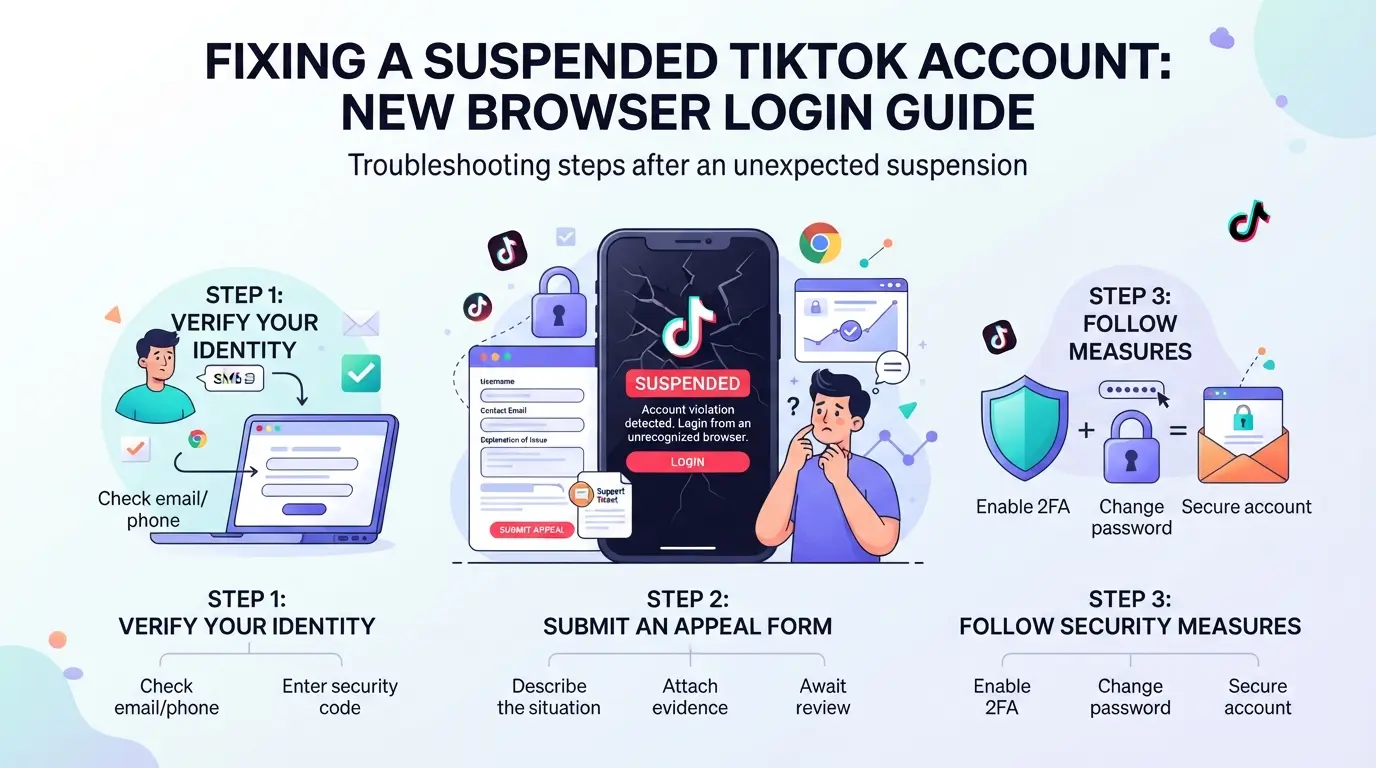
Step 1: Review TikTok’s Restriction Notification
- Open the TikTok app or web login and check for a restriction message.
- TikTok often shows a pop-up or banner explaining the lock.
- Read the notice carefully, look for keywords like "unusual login," "device mismatch," or "suspicious activity."
- These clues tell you which signal triggered the restriction.
- Take a screenshot of the notification for later reference.
- If you need to appeal, evidence speeds up review.
Step 2: Verify Your Identity and Device
- Tap the "Verify" or "Continue" button if TikTok prompts for identity checks.
- This usually starts the recovery process.
- Submit any requested ID, phone number, or email confirmation.
- The platform needs proof you own the account.
- If asked about device ownership, confirm you have access to your usual phone or browser.
- Failing this step can lock you out longer.
Step 3: Appeal the Restriction
- Click "Appeal" or "Contact Support" from the restriction screen.
- This opens TikTok’s appeal form.
- Fill out the form with clear details: mention the browser profile change and any travel or device swaps.
- TikTok reviews context, not just the signals.
- Attach your screenshot and ID if possible.
- Evidence helps your case.
Step 4: Wait for TikTok’s Response and Next Steps
- Monitor your email or TikTok inbox for updates.
- Most responses arrive within 24-72 hours, but weekends can add a day.
- If you get a rejection or no reply after four days, resend your appeal.
- Sometimes the first submission fails due to session timeouts.
- If access is restored, log in only from your confirmed device for at least three days.
- This helps rebuild trust signals.
Step 5: Avoid Further Suspicious Activity
- Do not log in from new devices or profiles while restricted.
- Each attempt adds risk of permanent lock.
- Avoid using third-party tools or automation during this period.
- TikTok’s system flags these as suspicious.
- Keep your account inactive (no posts, likes, follows) until restriction lifts.
- Activity during review can trigger escalation.
If you skip these steps or rush device changes, you can turn a temporary lock into a ban. The next section will cover common mistakes and why they matter.
What Common Mistakes Lead to TikTok Account Restrictions When Using New Browser Profiles?
Trying to log in to TikTok from a new browser profile often triggers restrictions because of simple, avoidable mistakes. These errors usually come from rushing the process or ignoring device and environment settings. If you want to avoid seeing your TikTok account restricted after login from a new browser profile, pay close attention to the issues below.
Logging in from Multiple Locations Too Quickly
Platforms like TikTok flag accounts when they see logins from distant locations within minutes or hours. Jumping between IPs in different regions or logging in from multiple devices in a day can look like account sharing or theft. If you must switch locations, wait at least 24 hours after your last login and keep your proxy or connection consistent for each profile. Changing locations too fast is the most common tripwire, pace your logins and avoid sudden jumps.
Failing to Match Device and Browser Fingerprints
- Set your OS and browser version to match your account’s previous environment.
- Align timezone and language with your usual access point.
- Check that screen resolution and hardware specs don’t jump unexpectedly.
Reusing Profiles Across Multiple Accounts
Sharing one browser profile between different TikTok accounts is a shortcut that raises red flags. Isolation matters more than speed, profiles should never overlap.
- Use a unique browser profile for each account.
- Clear cookies and cache before switching to a new account.
- Never mix account credentials within the same profile.
How to Set Up Safer Multi-Account Workflows for TikTok Using Isolated Browser Profiles and Proxies
Moving to a new browser profile can get your TikTok account restricted, especially if you miss key setup steps. Instead of hoping for the best, use strict isolation and the right proxies to cut risk.
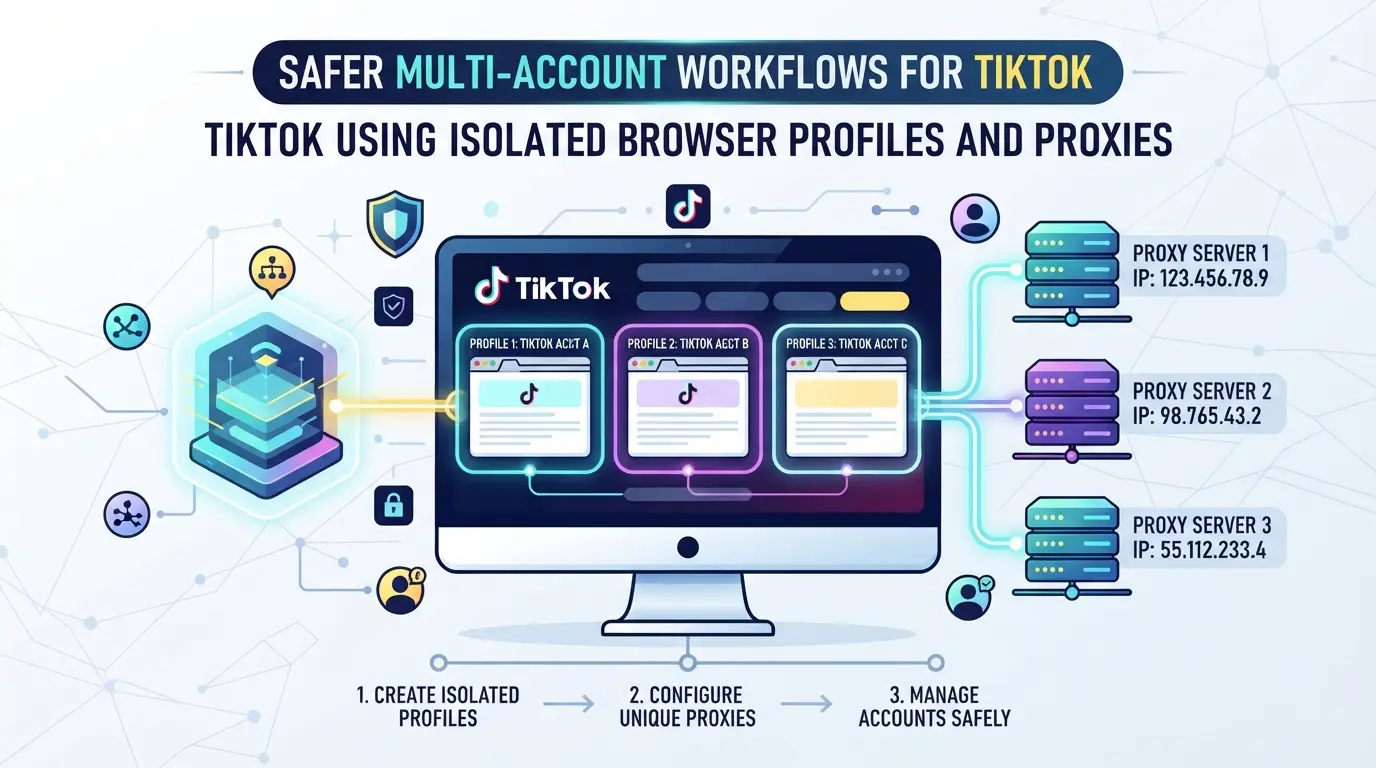
Why Isolation Matters: One Profile per TikTok Account
- Create a separate browser profile for each TikTok account, this breaks any link between accounts and stops shared fingerprints.
- Never log in to more than one TikTok account per profile. Even a single crossover can trigger platform detection.
- Keep each profile’s data, cookies, and cache separate. If you reuse a profile, you risk false connections.
Choosing and Configuring Reliable Proxies
- Assign a unique proxy to each account. Shared or recycled proxies often trigger blocks.
- Match proxy location to the account’s origin region. A mismatch, like logging in from Asia one day, Europe the next, raises red flags.
- Test your proxies before use. If a proxy leaks your real IP or drops out, TikTok may flag your session.
Maintaining Consistency in Device and Browser Signals
- Set the same OS, timezone, and browser version each time you log in. Sudden changes look suspicious.
- Lock language and geolocation to match the account’s usual activity.
- Avoid updating the fingerprint between sessions, one slip, and TikTok’s risk system gets triggered.
Regularly Auditing Profile and Proxy Usage
- Keep logs of profile use and proxy assignments.
- Check for odd patterns, like two accounts showing the same IP, or sudden location jumps.
- Audit regularly. If you spot overlap, reset affected profiles and switch to fresh proxies.
Managing Multiple TikTok Accounts with Isolated Profiles and Proxies in DICloak
Teams managing multiple TikTok accounts need more than just separate logins, they must prevent browser storage and device signals from crossing between sessions. After seeing how restrictions can hit when switching profiles, the next practical step is to use DICloak’s profile and proxy controls to set up truly isolated environments for each account.
Creating Isolated Browser Profiles with Custom Fingerprint Settings
Operators can create a dedicated DICloak browser profile for each TikTok account and configure fingerprint signals like operating system, language, time zone, and screen resolution. This means every profile can report a consistent device environment that matches the account’s login history, reducing the chance of TikTok flagging mismatched browser signals. The scope here is limited to browser profile isolation and fingerprint configuration, DICloak does not manage TikTok accounts or promise platform acceptance.

Assigning and Testing Proxies for Each Profile
A separate proxy for each profile helps keep network signals consistent with account origin. Operators assign user-owned proxies in DICloak and use the built-in proxy test to check connectivity, exit IP, and region before logging in. This step prevents accidental IP overlap or region jumps, which often trigger platform restrictions. Operators choose and test their own proxies; DICloak does not supply proxies or guarantee restriction avoidance.

This setup lets teams control browser and network environments for TikTok accounts, next, the article covers timing and signals for safe logins.
When Is It Safe to Log In to TikTok from a New Browser Profile?
If you want to avoid a tiktok account restricted after login from a new browser profile, timing and setup matter more than most people think. The safest window is when your account has no recent travel, no pending appeals, and your new browser profile’s fingerprint matches your old device as closely as possible.
Checklist Before Logging In
- Use the same type of device (Windows, Mac, mobile, etc.) and match your proxy location to the usual country or city.
- Check that time zone, language, and screen size in your new profile are consistent with your last few logins.
- Make sure browser fingerprint signals (User Agent, canvas, WebGL) don’t change all at once, one mismatch is common, but three or more is risky.
Warning Signs to Delay Login
If you see any of these, wait before logging in:
- Account just had a login from a new location
- Recent failed verification or ongoing appeal
- Unusual login alerts sent to your email or phone
How to Prevent TikTok Account Restrictions When Managing Multiple Accounts in 2026
Keep Each Account on Its Own Profile and Proxy
Mixing TikTok accounts on the same browser profile or IP almost always leads to tiktok account restricted after login from a new browser profile warnings. Keep one account per profile and per proxy, don’t reuse profiles, even if the device stays the same.
Document and Monitor All Logins and Changes
- Log every login event with timestamp and location.
- Track which device and profile each account uses.
- Set alerts for any login from a new location or device.
Stay Updated on TikTok’s Security Policies
TikTok changes account detection methods often. Always adjust your workflow when policies shift.
- Review official TikTok security updates monthly.
- Test new browser profile setups on low-risk accounts first.
- Join social channels to watch for new restriction patterns.
Frequently Asked Questions About tiktok account restricted after login from a new browser profile
Why does TikTok restrict my account after logging in from a new browser profile?
TikTok tracks your device, browser, and location each time you log in. If the system sees a new browser profile or a big change, it may flag this as suspicious. This can trigger the “tiktok account restricted after login from a new browser profile” warning to protect your account from possible hacks or unauthorized access.
How long does a TikTok restriction last after a suspicious login?
A TikTok account restriction can last from a few hours up to several days. The time depends on how TikTok reviews your case. If you quickly verify your identity or follow any instructions TikTok sends, your account may be restored sooner.
Using unique, high-quality proxies for each account and keeping browser profiles separate can help reduce the risk of TikTok login issues with new browser profiles. However, even with proxies, TikTok may still detect patterns or suspicious behavior, so this method is not foolproof.
What should I avoid when logging into TikTok from a new device or browser?
Avoid logging in from locations that change too quickly, such as different cities or countries in a short time. Don’t reuse the same browser profile for several accounts, and try to keep device details consistent. These steps lower the risk of your tiktok account restricted after login from a new browser profile.
Does using an antidetect browser like DICloak guarantee my TikTok accounts won’t get restricted?
No tool can guarantee your TikTok accounts stay unrestricted. While antidetect browsers help manage multiple profiles and proxies, TikTok’s security systems can still detect unusual patterns or violations of their rules. Always follow TikTok’s guidelines to reduce the risk of restrictions.
Consider using privacy tools or browser isolation methods to reduce the risk of account restrictions when accessing social platforms from different environments. Testing solutions that help you manage your digital footprint can offer a smoother experience and keep your accounts secure. Try DICloak For Free
 Web Proxy Tools
 Free Tools
 Cookie Plugin
 UA Generator
 MAC Address Generator
 IP Generator
 IP Address List
 2FA Code Generator
 World Clock
 Anonymous Check
 WebRTC Leak Test
 UUID Generator
 Free Web Proxy Site
 Proxy Checker
 FB Ad Checker
 AI Web Scraping
 Free SMM Tools
 Twitter Shadowban Checker
 Instagram Name Checker
 UTM Generator
 Username Generator
 AI Hashtag Generator
 LinkedIn Headline Generator
 Social Media Image Resizer