A single misstep on Tor led to a 6-month account ban for a developer posting from a public Wi-Fi, even though the goal was privacy. Stories like this have exploded on forums since 2024, as more users try to “go anonymous” without really knowing what is a tor browser or how the network actually works. The promise sounds simple: Tor browser explained as a tool that hides your IP and helps you browse without leaving tracks. But the reality is more complex, with risks that catch both tech pros and beginners off guard.
Most guides skip the real questions, like why some sites auto-block Tor, how exit nodes can leak data, or what “multi-hop routing” really protects. Even simple tasks, like logging into a cloud dashboard, can trigger a lockout if you’re on Tor. The way Tor browser works, routing your traffic through a chain of volunteer servers, means you trade some tracking for new problems, from slower speeds to unexpected restrictions.
Privacy tools keep changing, and what worked last year might get you flagged today. Before you trust Tor for private browsing or account management, it pays to know how detection works, where the biggest risks are, and when a tool like DICloak offers more control for teams. Here’s what actually matters before you launch that next session.
What Does a Tor Browser Actually Do for Your Privacy?
Tor browser is designed to hide your real IP address and make your online actions harder to trace. For people searching "what is a tor browser," what matters most is not the technical hype, but what actually happens when you browse through Tor. Every time you open Tor, your traffic moves through a special network instead of going straight from your device to a website. This means sites see the last server in the chain, not you.
How Tor Browser Routes Your Traffic
Tor browser explained simply: it uses something called "onion routing." Your data is wrapped in layers, like an onion, and sent through at least three different servers (called nodes). Each node only knows where the data comes from and where to send it next, not where it started or where it will end up. This setup makes it hard for anyone, sites, ISPs, or network monitors, to track your real location.
What makes this different from a regular proxy is the way each layer peels off at a different spot. The site you visit only sees the exit node, not your real IP. That’s why “how Tor browser works” often comes up in privacy forums. But there’s a catch: if the exit node is watched or logs activity, your browsing could still be exposed, especially if you log in somewhere.
What Makes Tor Different from Regular Browsers
Unlike Chrome or Firefox, Tor browser comes with privacy features already set up. It blocks many trackers and connects to the Tor network by default, so you don’t need extra tools to get started. The core advantage is that Tor browser privacy is built-in, not something you have to tweak. But this also means some sites will block you right away, seeing Tor as risky traffic. For some users, tools like DICloak offer more control when Tor’s one-size-fits-all setup is too rigid.
How Does Tor Browser Work? Step-by-Step for Beginners
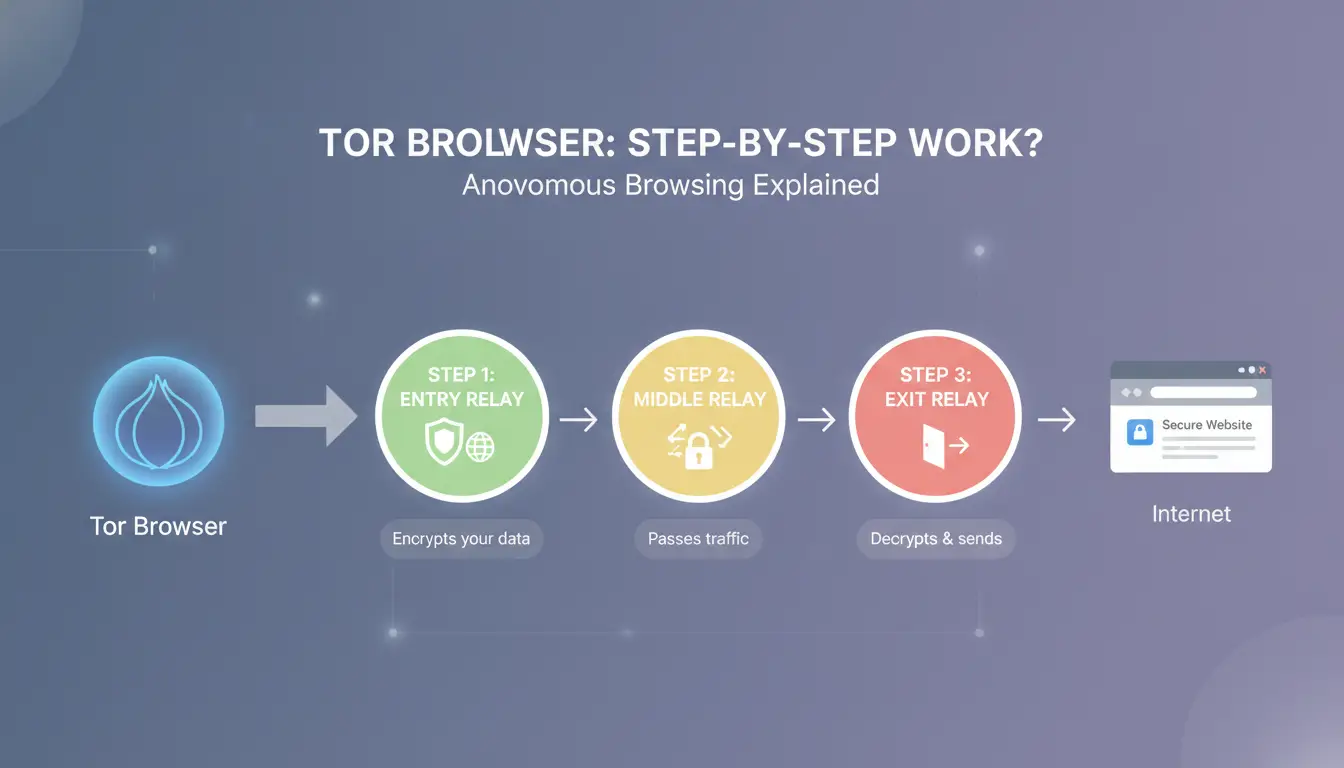
How Tor Browser Starts and Connects
When you launch Tor browser, it begins by setting up a secure connection to the Tor network. Unlike regular browsers, Tor picks a random path made of three servers: entry, relay, and exit nodes. The entry node is your first stop; it sees your IP address but not where you’re going. Relays pass your traffic deeper into the network, each layer hiding more of your details. The exit node is the last server, this is where your request leaves Tor and reaches the website. Entry, relay, and exit nodes are chosen from thousands of volunteers around the world. Each time you restart Tor, you get a new path, making tracking harder.
What Happens When You Visit a Website
Now, when you type in a site address, your request travels through those three nodes. The site you reach only sees the exit node’s IP, not your real one. This setup is called multi-hop routing, and it’s the heart of how Tor browser works. It helps mask your location and blocks direct tracking, but some sites will spot Tor exit nodes and auto-block or show extra security checks. This means you might face slow speeds or unexpected lockouts. For many users searching “what is a tor browser,” the main appeal is privacy, yet speed and access can be an issue. Most sites won’t know who you are, but they can sometimes guess you’re using Tor.
How Tor Handles Cookies, Fingerprints, and Tracking
Tor browser explains privacy features right in its interface. It blocks most trackers and forces sites to use HTTPS, but cookies and fingerprinting are still tricky. Each session runs in isolation, so cookies can’t link your visits across sites. Still, fingerprinting, like checking your device type or installed fonts, sometimes leaks clues. The biggest risk is that some websites use advanced scripts to spot Tor browser privacy tricks and flag your session anyway. For team workflows or sensitive logins, you can use DICloak to share browser profiles and control fingerprints more tightly.
What Are the Real Risks of Using Tor Browser?

When people search “what is a tor browser,” they expect privacy, but the reality is more complicated. Tor browser explained simply: it sends your web traffic through several servers, hiding your real IP address and scrambling tracking signals. But this setup brings risks you might not see coming. Here’s where users get tripped up, how Tor browser works in practice, and what can actually go wrong.
Where Tor Browser Users Get Detected or Blocked
Exit nodes are the last server in the Tor chain, sites see traffic coming from these, not your real location. The problem? Many exit nodes are public, and lists of their IPs get shared on forums like Stack Overflow and Wikipedia). Sites often auto-block these IPs, flagging Tor browser privacy users as suspicious. Common triggers include logging into accounts, sending emails, or accessing sensitive dashboards. Even if you’re careful, detection systems can spot Tor traffic by matching known exit node patterns.
What Happens If You Log Into Accounts or Use Personal Info
Using Tor browser to log into personal accounts can link your identity to Tor traffic. For example, if you sign in to an email or social profile, the service may notice you’re on a Tor exit node and trigger extra verification or bans. Some platforms, like Google, will lock your account if they think you’re hiding behind proxies or have abnormal login patterns. Accidentally entering real details while using Tor can break the privacy chain, once your info connects to Tor traffic, tracking becomes easier.
Why Some Websites Refuse Tor Connections
Many sites build anti-abuse systems to stop spam, bots, and fraud. Tor browser users often hit CAPTCHAs or complete blocks because these systems flag Tor exit node traffic as risky. For some services, every Tor session means a fresh round of puzzles or outright denial. This is common with banking, ticketing, and cloud platforms. If you need to avoid these blocks for team workflows, you can use tools like DICloak to build isolated browser profiles and handle proxy setups, giving more control than Tor browser alone. 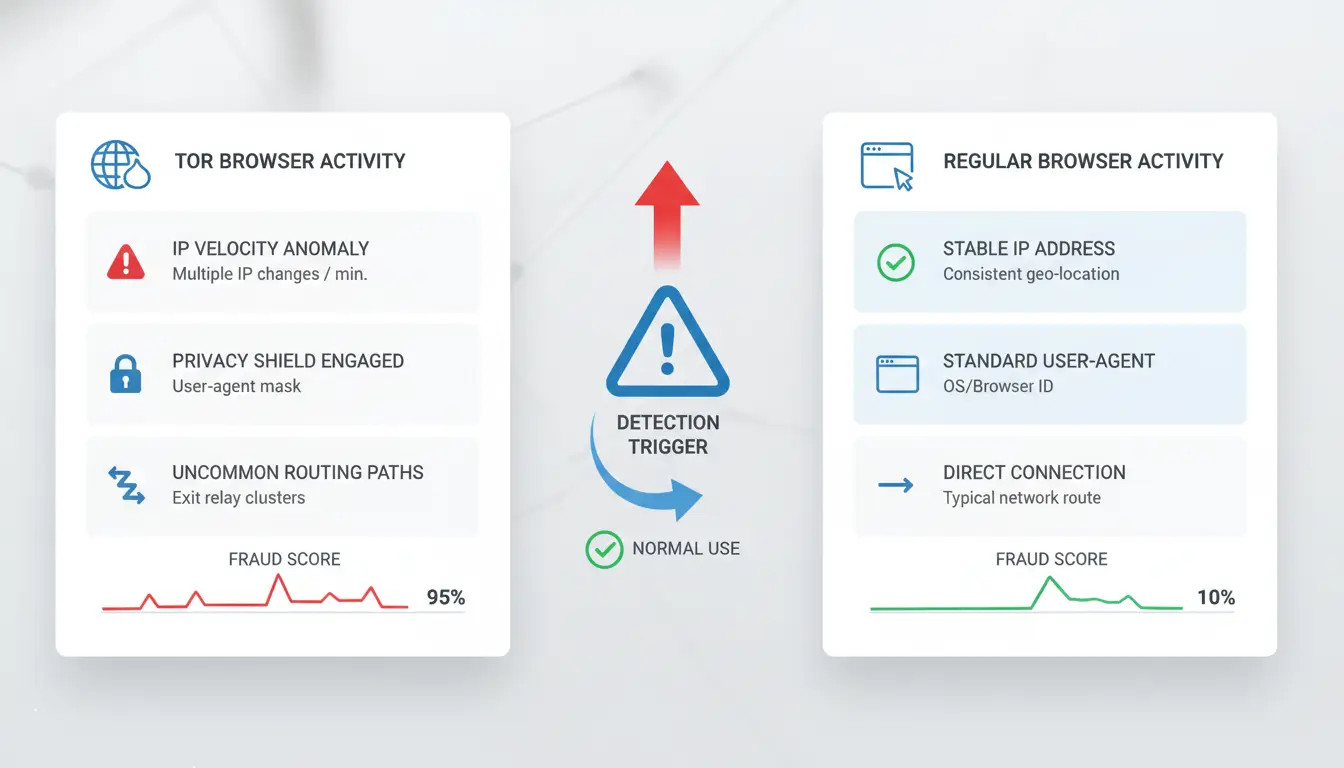
Tor Browser vs Proxies: What’s the Difference for Privacy?
Anyone searching "what is a tor browser" usually wants more than a technical definition, they’re trying to figure out if Tor promises stronger privacy than standard proxies, and whether it’s worth switching. Here’s how they stack up for private browsing and account management.
How Tor and Proxies Mask Your IP
Tor browser explained: it routes your web traffic through several volunteer-operated nodes, hiding your real IP by bouncing connections three or more times before reaching the destination. Standard proxies, by contrast, use a single server, your traffic leaves through just that exit. This single-hop setup is simpler and less anonymous than Tor’s multi-hop chain.
| Routing Type |
IP Change Method |
Anonymity Level |
Speed |
Common Use |
| Proxy (Single-hop) |
One server masks IP |
Low to Medium |
Fast |
Cloud logins, streaming |
| Tor (Multi-hop) |
Three+ nodes chain |
High |
Slow |
Research, private browsing |
Sources: Tor Project FAQ, Wikipedia: Proxy server
When a Proxy Is Safer or More Practical Than Tor
Tor browser privacy often comes at the cost of speed. Most proxies deliver faster connections and fewer issues with website blocks, especially sites suspicious of multi-hop traffic. For daily tasks like logging into SaaS dashboards or managing multiple accounts, proxies are usually more reliable. They’re also better for team workflows needing stable IPs, as seen on platforms like DICloak for group account management.
Speed and reliability matter most when you need quick access or avoid being flagged. Streaming, file transfers, and business logins can all break on Tor but work fine with the right proxy.
Why Tor Browser Is Not Always the Best Choice
How Tor browser works makes it tempting if you crave strong anonymity, but the performance hit is real. Pages load slowly, and many sites, including banks and cloud providers, auto-block Tor traffic. Sometimes, exit nodes leak info or trigger “bot” alerts, causing more headaches than help.
The real risk isn’t just getting blocked, but losing control, if privacy tools flag your activity, support may lock your accounts or ask awkward questions. Before using Tor browser for sensitive tasks, weigh the trade-offs; proxies give more flexibility without the speed and detection problems Tor carries.
How to Use Tor Browser More Safely: Practical Tips and Mistakes to Avoid
Tor browser promises privacy, but the way you set up and use it matters more than most guides admit. Many users search “what is a tor browser” hoping it solves all tracking problems. In reality, Tor browser explained is only part of the story. If you miss key steps, you can expose your identity, lose account access, or trigger site bans. Here’s how to stay safer and avoid common errors.
What to Check Before You Start Using Tor
The basics, OS hygiene and device setup, are easy to ignore but make or break privacy. Run Tor browser on a clean operating system. Remove old user profiles and clear out any apps that sync personal data. Disable autofill and stored passwords. If you log in to your main email or cloud service before opening Tor, you risk cross-leaking details. Never mix personal browsing and Tor sessions on the same device, many leaks happen this way.
For extra safety, use a separate user account or, better, a dedicated device for Tor. Double-check your MAC address and hostname. Even simple mistakes, like connecting through a Wi-Fi that logs device details, can break privacy.
How to Avoid Common Tor Browser Mistakes
One big mistake is logging into personal accounts through Tor. Sites detect “how Tor browser works” and often flag logins from exit nodes. Downloading files or plugins inside Tor can leak your real IP or compromise your device. Stick to reading or posting non-personal content. Never install browser plugins, they can bypass Tor’s protections and expose your data.
Safer Ways to Manage Multiple Accounts and Fingerprints
If you need to handle multiple accounts, use isolated browser profiles. Avoid logging in to several accounts in one session; this links them together. Using proxies with Tor browser privacy adds another separation layer. Tools like DICloak let you build isolated browser profiles, manage proxies, and keep account fingerprints fully apart for team operations.
When a Tool-Assisted Workflow Makes Tor Browsing Safer: DICloak for Multi-Account Privacy
Tor browser privacy depends on more than just routing traffic. When you handle multiple accounts, the risks stack up fast. Sites track browser fingerprints, device IDs, and IPs, so using Tor browser alone can leave gaps. Most users search for "what is a tor browser" hoping it hides everything, but fingerprint collisions and IP linkage make detection easier than expected.
Why Managing Multiple Accounts Gets Risky Without Isolation
Running several accounts through one Tor session creates overlap. If two accounts share the same browser fingerprint or device details, platforms spot connections. IP addresses from shared exit nodes can also link activity. That’s why simply knowing how Tor browser works isn’t enough for true isolation.
How DICloak Creates Safer, Isolated Browser Profiles
Tools like DICloak let you build separate browser profiles for each account. You can set custom fingerprints and assign a different proxy per profile. This means every login looks unique, no recycled device info, no shared IPs. Isolation is the single most important step to stop cross-account bans.
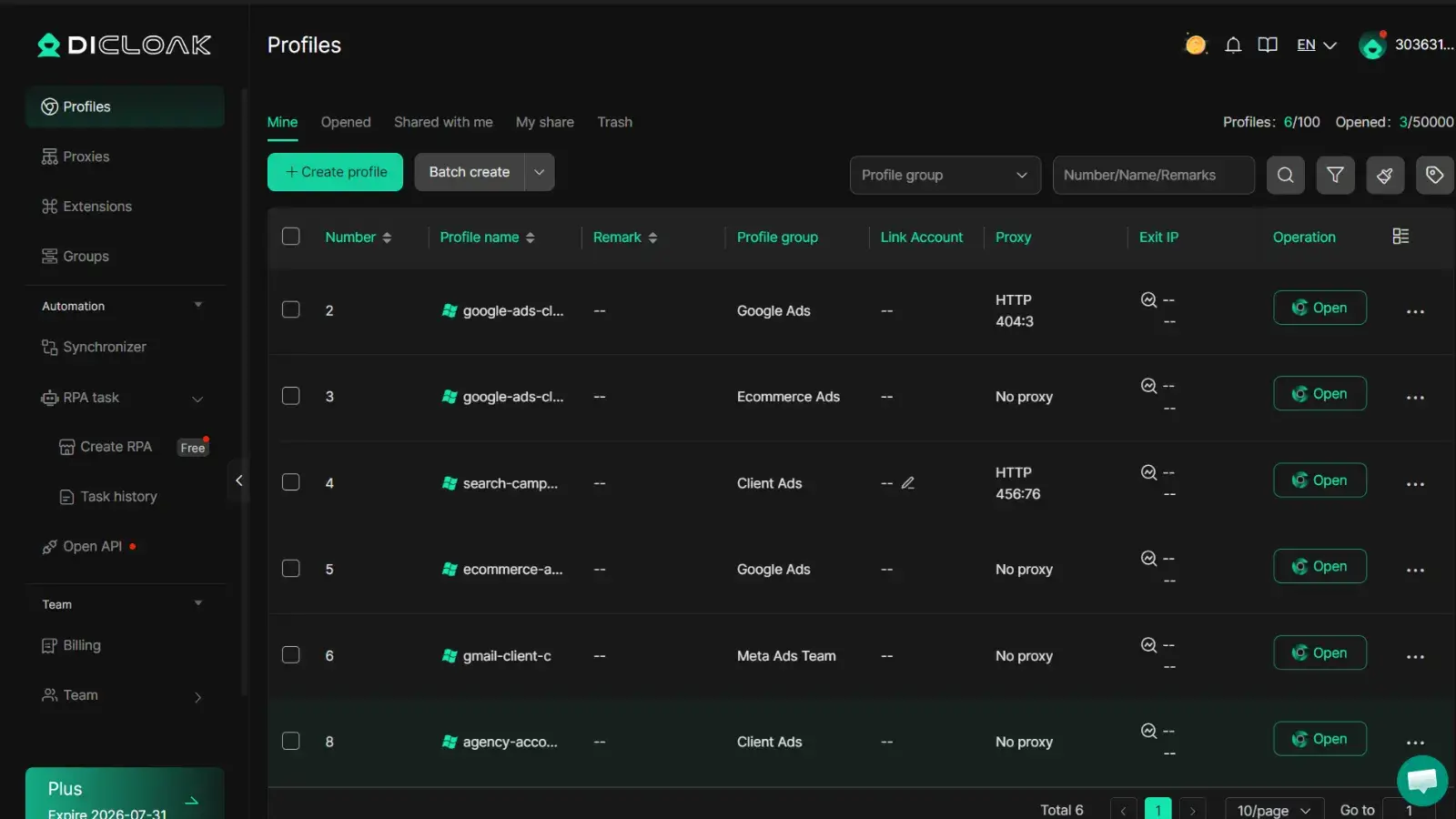
Practical Workflow: Using DICloak for Team or Business Privacy
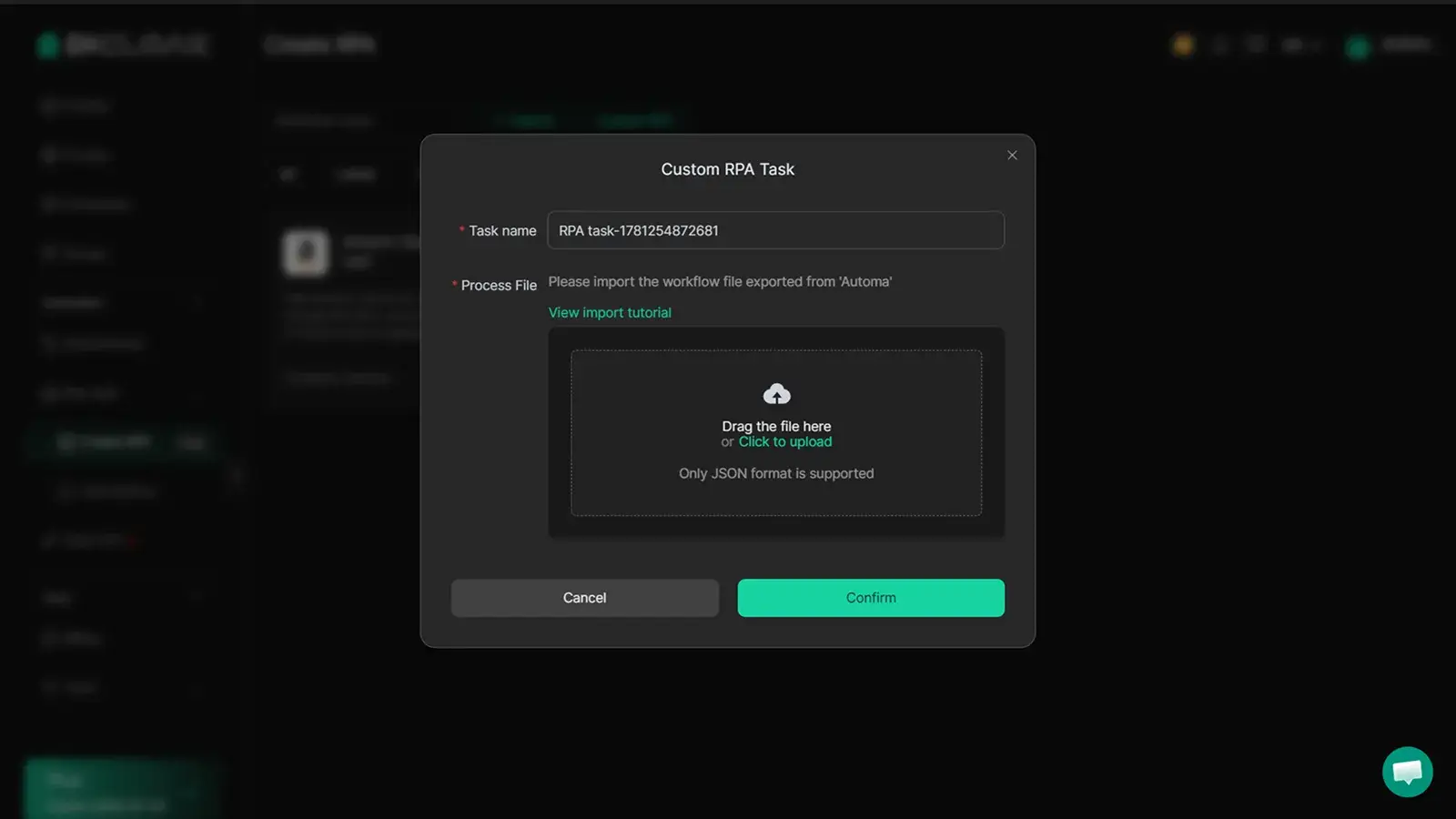
DICloak supports profile sharing and permission control so teams avoid handing out passwords. Automated RPA handles routine tasks, keeping manual errors low. For anyone managing business accounts, this setup beats default Tor browser explained guides by cutting detection risk and simplifying privacy workflows.
When Tor Browser Isn’t Enough: Alternatives and Complementary Tools for Privacy
Tor browser is often the first tool people try when searching “what is a tor browser” or wanting more privacy online. But even knowing how Tor browser works doesn’t mean you’re fully protected. There are gaps that matter, especially if you need to handle sensitive accounts, team workflows, or bypass tracking.
What Tor Browser Can’t Protect Against
Tor browser explained in most guides focuses on traffic routing and hiding your IP. That’s only part of the story. Tor browser privacy stops at the network layer, but device-level leaks can still show your real hardware info. For example, if you download files or run scripts, your device might send extra data that Tor can’t mask. Another common issue is browser fingerprinting. Sites use advanced scripts to collect unique info about your browser, extensions, screen size, and fonts, even inside Tor. This makes you stand out, not blend in.
Which Tools Help Fill the Gaps
You need more than Tor if you want real privacy. Antidetect browsers like DICloak create isolated browser profiles and change device fingerprints, making it harder for sites to track you. Secure proxies help mask your IP without relying on public exit nodes, and OS isolation tools let you run sensitive sessions separately from your main computer. When you compare features, Tor covers network privacy, but these tools add device-level protection.
| Tool Type |
What It Protects |
Typical Use Case |
| Tor Browser |
IP, traffic routing |
Anonymous browsing |
| Antidetect Browser |
Device fingerprint, browser ID |
Account management, teams |
| Secure Proxy |
IP, geo-location |
Site access, geo-bypass |
Table sources: torproject.org, dicloak.com, privacytools.io
How to Build a Safer Privacy Workflow
Combining tools gives you layered security. For solo users, start by pairing Tor with an antidetect browser, then add a secure proxy for extra masking. Teams can use DICloak to share browser profiles safely, set access controls, and keep logs of each session. The most critical step, never rely on just one tool. Mixing privacy layers reduces the risk of leaks that single tools can’t catch.
FAQ: What Most People Still Ask About Tor Browser
Is Tor Browser really anonymous?
Tor browser explained: It hides your IP by routing traffic through several servers, but sites can still spot Tor users. Some login pages auto-block Tor just for showing up. If you log into accounts or use real names, true anonymity drops fast.
Why do websites block Tor Browser?
Sites block Tor because traffic often looks suspicious or comes from known exit nodes. Many services flag Tor as risky for fraud or spam. Even if you use Tor browser privacy settings, account logins or payment pages may lock you out, see Cloudflare’s docs for why.
Can Tor Browser leak my data?
Yes, if you enter personal info or use unsafe extensions, Tor can leak data. The browser itself doesn’t block scripts or trackers by default. Using public Wi-Fi or sharing files can also expose more than you expect.
How does Tor Browser work?
Tor browser works by sending your traffic through three random servers (nodes). This process mixes your data, making it harder to trace. But slow speeds and blocked sites are common.
Should teams use Tor Browser for account management?
For safe team workflows, tools like DICloak offer browser fingerprint isolation and proxy control. Tor browser isn’t designed for multi-user account operations.
Frequently Asked Questions
Is Tor browser legal to use in my country?
Most countries allow using Tor browser. However, some places restrict or monitor its use because of privacy concerns. Before downloading, check your country’s laws about internet privacy tools. If you’re unsure, research “Tor browser explained” for your region or ask a local expert. Tor itself is legal in the US, Canada, and much of Europe.
Can Tor browser hide my identity completely?
Tor browser improves privacy by sending your data through several encrypted nodes. Still, it cannot guarantee full identity protection. If you log into personal accounts like Facebook or Gmail, your identity can leak. For better privacy, read guides on “how Tor browser works” and avoid sharing personal information on sites you visit.
Why is Tor browser so slow compared to regular browsers?
Tor browser routes your traffic through three or more random servers worldwide. This process protects your privacy but slows down your connection. Unlike Chrome or Firefox, which connect directly, Tor’s multi-node system means webpages take longer to load. If you want speed, regular browsers are faster, but lack Tor’s privacy features.
Can I use Tor browser for social media or business accounts?
Using Tor browser for social media or business accounts is risky. Platforms may flag logins from unusual locations and sometimes ban accounts accessed via Tor. Also, “Tor browser privacy” is not foolproof, browser fingerprint leaks can happen. For regular account management, dedicated browsers or proxys may be safer.
What’s the safest way to use Tor browser for multi-account management?
To safely manage many accounts, use separate browser profiles and integrate proxies. Advanced tools like antidetect browsers help prevent cross-account leaks. Always avoid logging into multiple personal accounts in the same Tor browser session. Learning “how Tor browser works” can help you make safer choices.
A Tor browser is a powerful tool for anyone who values online privacy and wants to browse the internet anonymously by routing traffic through a network of encrypted servers. While it can be used to access both the regular web and hidden services, users should be aware of its limitations and best practices for safety. Try DICloak For Free
 Web Proxy Tools
 Free Tools
 Cookie Plugin
 UA Generator
 MAC Address Generator
 IP Generator
 IP Address List
 2FA Code Generator
 World Clock
 Anonymous Check
 WebRTC Leak Test
 UUID Generator
 Free Web Proxy Site
 Proxy Checker
 FB Ad Checker
 AI Web Scraping
 Free SMM Tools
 Twitter Shadowban Checker
 Instagram Name Checker
 UTM Generator
 Username Generator
 AI Hashtag Generator
 LinkedIn Headline Generator
 Social Media Image Resizer