Many people encounter the scene of opening a video, but the screen only shows an error message that the video is not available. Clicking again a few times still doesn't work, trying to change devices or networks, but the situation has not changed much. This problem not only happens to videos on large platforms, but also appears on many small sites, making users confused: is the video faulty, or is it because the account is restricted, or maybe the video has been deleted?
What is easy to overlook is that the unavailable video error is often not simply due to a poor connection or a slow computer. In many cases, the video is restricted because of the platform's policies, account configuration, or blocked IP address, and sometimes the video still exists but is only visible to a certain group of people. If you rely solely on the error message, it is easy to mistake the cause, leading to mishandling or wasting time trying again options that don't work.
In fact, if you want to fix the error of not being able to watch the video, you need to distinguish clearly: the video has a technical problem, or is the account being restricted? In some cases, changing devices, changing proxies, or logging back into the account can help overcome the restriction. But if the video has been deleted or locked, all operations have no effect, so it is necessary to determine the next solution . Knowing the right cause from the beginning will help avoid losing the time of trying again and again without solving anything.
First, let's look at the common reasons why video isn't available and how to recognize each type of condition.
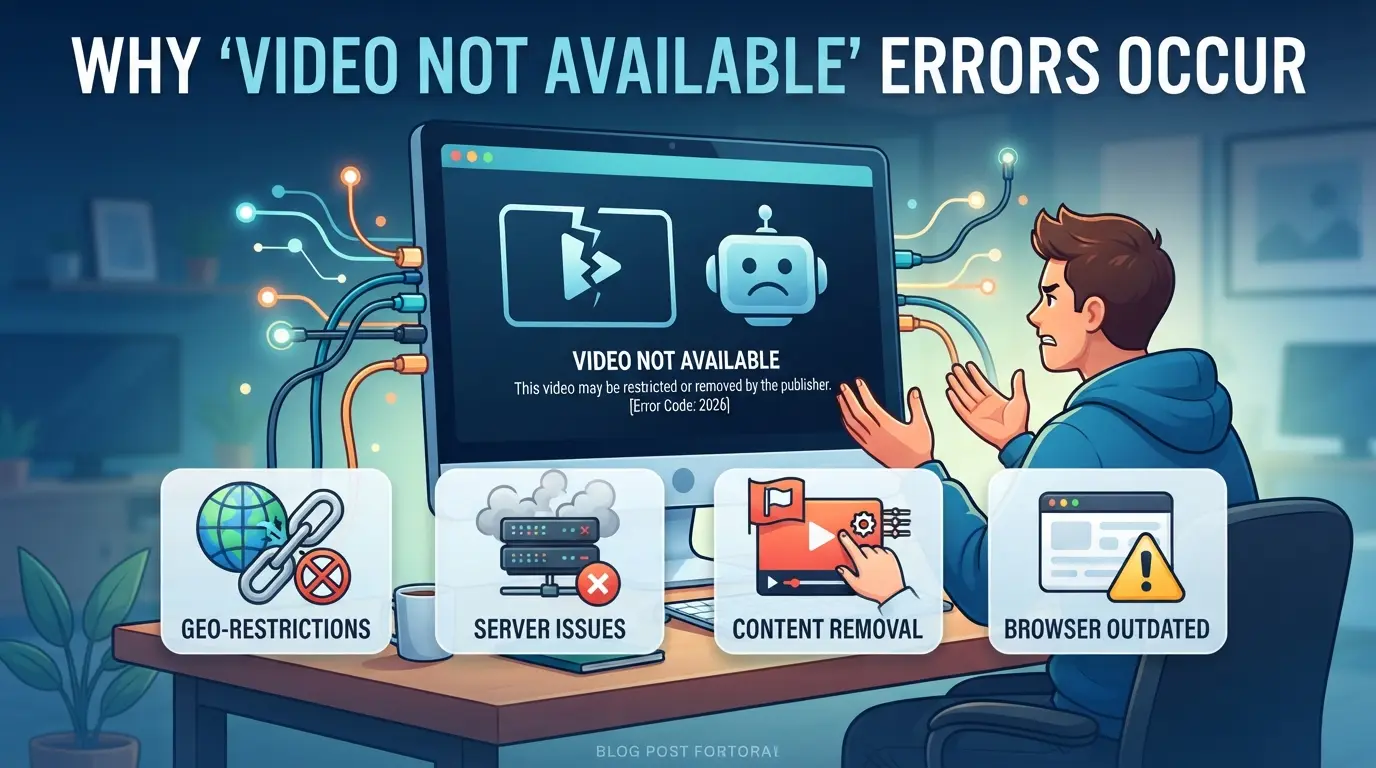
Why does the 'video not available' error appear? The most common causes in 2026
Encountering the message "video not available" is not simply that the video has disappeared. In fact, there are many different reasons why you can't watch videos on Facebook, YouTube, TikTok or other popular platforms, understanding the right reason to choose the right way to handle it.
Videos removed or hidden by the poster
If the video has been completely deleted, you'll see a message like "This video no longer exists" or a white page. If the poster goes private, the video is only visible to a few accounts; there's no way to restore it if it's not the video owner.
Geographic or country restrictions
Many platforms such as YouTube, Netflix, and TikTok rely on your IP address to determine where you are. If the video is only available to users in certain countries, you will encounter a message like "This video is not available in your country" or "This content is not available in your region". This situation appears quite often with movies, copyrighted music, or content with regional censorship. In many cases, even changing browsers or devices cannot be solved, because the system still recognizes your location via IP, even if you are logged in to the correct account. If you use an unstable proxy, the platform may detect and continue to block access or display other errors. Notably, sometimes the same video can be viewed by some people, and others are blocked, just because the IP is attached to a restricted country group.
Copyright and content moderation policies
Some videos are removed for copyright infringement of music, movies, or images. For example, on YouTube, videos that use unauthorized music are often completely hidden or only blocked in some countries. Facebook also has an algorithm that automatically censors sensitive content, which means that videos will be hidden without detailed notice.
Restricted account or incorrect login
If you're not eligible to view, such as being underage, not following the page, or having a restricted account, the platform will give you an error like "You don't have access to this content." A locked or temporarily restricted account can also result in not being able to watch the video, even if the link still works with others.
Technical errors: Network connections, browsers, apps
- The internet is flickering, causing the video to not load.
- The browser or app is outdated, lacking in updates, or having video playback errors.
- The cache saves the wrong version, resulting in an error page even though the video is still there.
Understanding the exact reason why the video is not viewable will help determine the next step in the test, avoiding the time spent trying again and again without changing the results.
How to recognize each type of 'video not available' error on popular platforms
If you want to properly handle when you can't watch a video, you must first identify the source of the error, not all platforms report the same, and each message indicates a different direction of handling. If you just look at the words "video is not available" without paying attention to the context, it is easy to try the wrong way, waste effort without solving anything.
Common error messages on YouTube, Facebook, TikTok
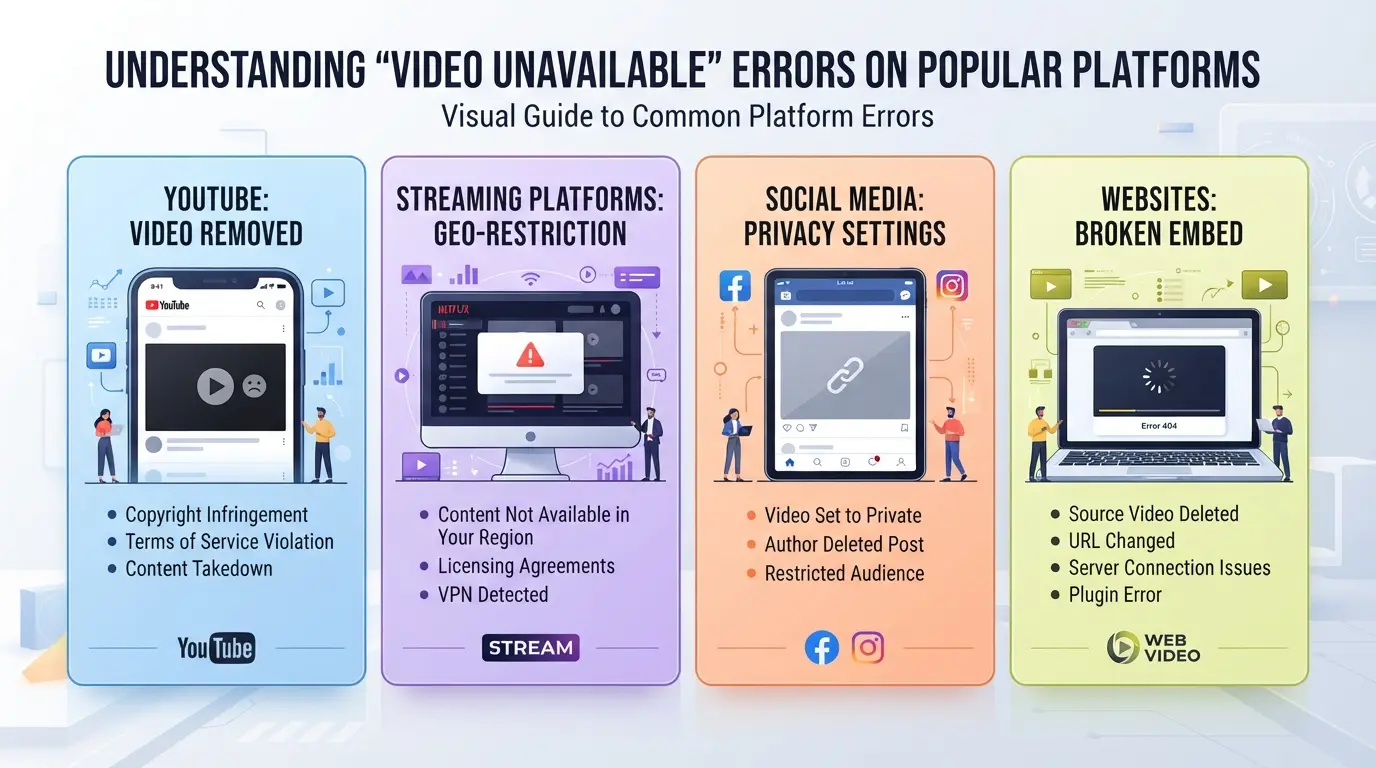
YouTube often says "This video is unavailable" or "Video has been deleted". Facebook often only shows "Video can't be displayed right now", while TikTok will mostly say "This video is not currently available". It's the same error, but the meaning is different: YouTube reports errors often indicate that videos have been removed or are region-restricted; Facebook is easily set by the account owner's privacy; TikTok often encounters errors due to violating or deleted videos.
Signs of region-restricted video
If you get a message like "This video is not available in your country" or "This video is not available in your country", you are almost certain to be blocked by IP location. Changing devices often does not solve it, even when logging back in, the error remains the same. A practical example: you try watching an international music clip on YouTube using Wi-Fi in Vietnam, reporting a regional error; switching to 4G is still problematic, but when using an American proxy, the video can be viewed immediately. In this case, if you keep trying to reload or change accounts, it will only take time and not change anything. Correctly identifying regional errors from the beginning will help you avoid wasting a lot of unnecessary retry.
Distinguish between account errors and content errors
There are times when a video says "Login required to watch" or "You need to upgrade your account," which is a sign that access is restricted by the account. On the other hand, if the message "Video was removed for policy violation" appears, the problem is the content. For example, Facebook often reports this error when a video is removed by the owner or blocked by the platform for copyright infringement.
When is the error caused by the device or browser?
- The error only appears on one device (for example, the phone can see it but the computer can't).
- Videos take an unusually long time to load or show errors but don't have a specific token.
- Change your browser or clear the cache, and the video can be viewed normally.
After distinguishing the right type of fault, you can choose the right direction of inspection and handling for each case.
Quick checks and handling when video errors are not available
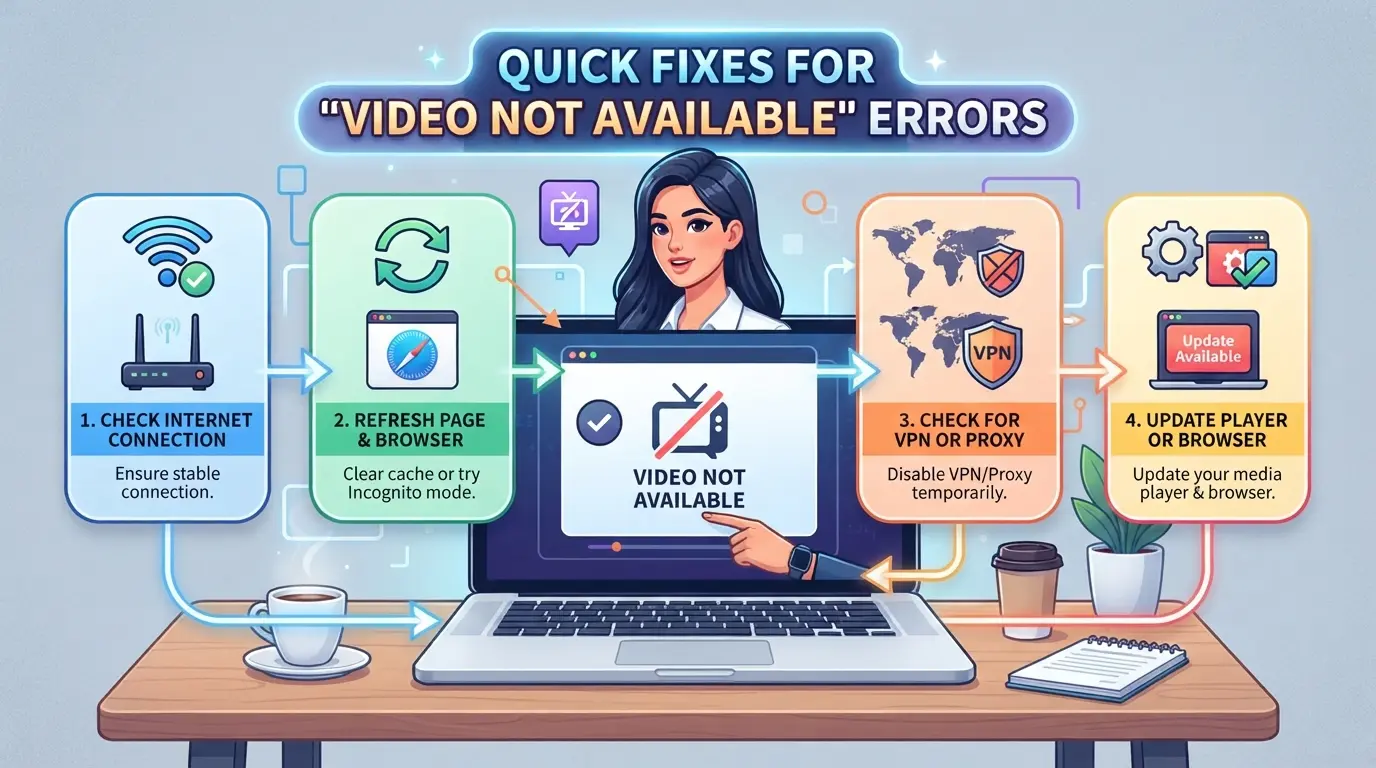
If you get the video unviewable error, it's a good idea to check each of the basic steps before trying the advanced methods. Doing it in the right order will help quickly determine if the problem is with the network, account, or device.
Check your Internet connection and network speed
- Open any website to determine if the device can still access the network.
- If the video loads slowly, try switching to a different Wi-Fi or turning mobile data on/off.
- When the network is weak, the video often stops at the loading screen or reports an unplayable error, recheck the network cable, modem, or Wi-Fi hotspot.
Log in to your account again or try a different account
- Log out of the current account and then log in again, many times the session crashes causing the loss of access to the video.
- If that doesn't work, try using a different account on the same device to rule out the cause of limited permissions.
- This helps quickly determine if the account is banned from viewing content or restricted access.
Clear cache, browser cache, or apps
- On Chrome/Safari/Firefox, go to Settings > Privacy > Clear browsing data.
- If you use an app, go to App settings > Clear cache.
- Clearing the cache eliminates temporary storage errors that make the video unavailable even though it can still be viewed on another device.
Update or reinstall apps and browsers
- Go to the App Store (iOS)/CH Play (Android) to check for updates.
- On your computer, go to your browser > Settings > About > Check for updates.
- If the update doesn't solve the problem, remove the app and reinstall it from the official store.
Try accessing the video on a different device or browser
- Use a different phone, computer, or browser to watch the video.
- If the error persists on all devices, it's most likely because the content is restricted or has been deleted.
- If the error is only on one device, focus on testing that device's software and settings.
When to Use Proxies to Access Region-Restricted Videos?
If you're experiencing a situation where the video isn't available just because the content is country-restricted, using a proxy is a possible solution, but only if the basic fixes don't work.
What are proxies and how do they work?
A proxy is an intermediary server that helps you access the Internet over a different IP address. When using a proxy, the platform "sees" that you are accessing from the region where the proxy is located, rather than the actual location. Compared to changing accounts or retriing multiple times, proxies allow for quick change of access zone without having to create a new account.
Pros and cons of using proxies to watch videos that aren't available
The most obvious advantage is that you can watch region-restricted videos without interfering deeply with the system. However, free proxies often lack security, easily expose personal information, or are injected with malicious ads, especially when accessing sensitive content.
Legal and Ethical Considerations for Using Proxies
- Only use proxies with content that doesn't violate the law.
- Do not use proxies to circumvent copyright regulations.
- Avoid using proxies when handling important data or private information.
How to Manage Multiple Social Media Accounts When Frequently Encountering Unavailable Video Errors
Risks of logging in to multiple accounts on the same device
Logging in to multiple social media accounts on a single device is susceptible to abnormal operations by the recognition system, slightly being asked to verify identity, worse than locking multiple accounts at the same time. If this error is caught, the whole set of accounts can be marked as dangerous.
How to separate the browser profile for each account
Don't use the same browser or normal mode for multiple accounts, especially if each account tries to watch videos with restricted access.
- If cookies, caches, or fingerprints coincide, the platform will be easy to connect to and suspect that you're manipulating in bulk.
- A safer solution is to isolate the browser, use incognito mode, or clear the cache between login sessions.
When to Consider a Professional Multi-Account Management Tool
If you need to use multiple accounts per day or have to switch constantly to check for restricted content, consider using a tool that divides the environment separately for each account. This way, fingerprints, proxies, and profile data are not confused, reducing the risk of the platform locking out a series of accounts at once.
Establish a secure environment when managing multiple social media accounts with DICloak
When you have to deal with multiple social media accounts to check for cases where videos cannot be viewed, the biggest risk is that the accounts are accidentally linked or locked simultaneously due to operation on the same device, the same fingerprint or duplicate IP. For a social media team or agency, a small mistake when switching accounts is enough to make a whole series of accounts "fly away". If you manage multiple accounts and have encountered videos that are restricted from accessing by region or account, separating the environment is a step that cannot be ignored. DICloak supports this operation at the profile, fingerprint and proxy levels – helping each account act as if it were on a separate device, reducing the risk of abnormal operation recognition. However, this tool does not interfere with the video status, nor does it guarantee to avoid all kinds of restrictions from the platform.
Create and configure separate profiles, set fingerprints for each account
Many people only pay attention to changing proxies and ignore the fact that the browser profile is still the same – this is the reason why accounts are linked even after changing IPs. With DICloak, each social media account can be manipulated on an independent browser profile, each profile saves fingerprints and configuration information separately, such as the operating system, user agent, interface language, time zone, and device identification signals. For example, when you need to handle three Facebook accounts to check restricted videos, the correct operation is to create three separate profiles, each profile selects a different fingerprint, and then log in to each account on that environment. As a result, accounts are not "stuck" when operating in parallel, reducing the risk of mass locking due to duplicate recognition platforms. The key is to separate both the environment and the fingerprint from the beginning, not just changing the IP is enough. The scope of operation only stops at the browser and fingerprint, does not affect the content or video status on the platform.

Set up separate proxies for each profile to control access location
After separating the environment, setting a separate proxy for each profile is the step that decides whether you can control the access location or not. Users can choose and enter proxy information for each profile, can choose a US proxy for an account that needs to watch videos that are restricted to Vietnam, or assign a Vietnamese proxy to another account to match the actual location. DICloak allows you to check the proxy right in the configuration section, see the output IP and country to make sure the proxy works as desired before logging in to social networks. This is extremely important for accounts in many different regions: if you use the same proxy for all profiles, the risk of abnormal login detection will increase significantly. Note, DICloak does not sell proxies, does not promise that proxies are suitable for all platforms; users need to check the quality of proxies themselves before using them.

Setting up the right environment and access location is a prerequisite before thinking about other unavailable video error handling steps. Most of the errors arise from the fact that the environment isn't really separate – the next section will show the most common mistakes when operating multiple accounts.
Common mistakes when handling unavailable video errors and how to avoid them
Trying to handle the error of not being able to watch the video in any way is very easy to get involved in breaches or information disclosures. Most of the locked accounts come from actions that lack separation, using floating proxies, or sharing sensitive information without control.
Logging in too many accounts on the same browser without separating
Logging in to multiple accounts at the same time on a single browser causes cookies and device traces to be mixed, and the platform can automatically link these accounts. As a result, as long as one account is locked or verified again, the rest of the accounts are also easily scanned. Only use a separate browser profile for each account to avoid chain risks.
Use free, unknown proxies
- Do not enter personal information when it is not clear whether the proxy will log the data or not
- No public, shared proxies across groups
- Prioritize paid proxies with transparent information about the owner
Share accounts or passwords over unsecured channels
Sending login credentials via regular messages, emails, or unencrypted applications increases the risk of losing your account. Only communicate through channels with secure authentication, limiting sharing with strangers.
Arbitrarily download strange software to overcome video errors
Downloading strange utilities, extensions, and software for the purpose of overcoming video errors of unknown origin often carries malicious code or tracking software.
- Double-check the domain name and software developer
- Read real reviews from users before installation
- Do not grant full browser or system access to unfamiliar software
Bottom Line: When to find another solution instead of trying to access videos that aren't available?
Identifying the risks that outweigh the benefits of trying to access video
If you still can't watch the video after many attempts, it is safer to stop than to continue changing accounts, proxies, or devices. Especially for important accounts, the more you try to exceed the limit, the easier it is to be locked, lose access, or expose personal data.
When to prioritize account safety
- Accounts used for work, transactions, or storing personal information
- Received a security alert, or is temporarily restricted
- I've tried many things but still get the same error
Alternative: find a legitimate video source, contact the poster
Finding the original on another platform, asking the poster directly, or waiting for the content to be reopened is usually less risky than trying to access it at all costs.
Frequently Asked Questions About Unavailable Videos
How do I know if a video is unavailable because it was removed or region-restricted?
Pay attention to the error message that appears. If it's "Video deleted" or "Content doesn't exist," there's a good chance that the video has been removed from the platform. If you get a message like "Video isn't available in your country," try changing your device, network, or location to check if it's region-restricted.
Should I use free proxies to watch restricted videos?
Free proxies are not recommended. These services are often insecure, prone to personal information leaks, or contain malware. The use of free proxies can also cause accounts to be marked abnormally, increasing the risk of being locked or restricted in access.
Why have I tried so many ways and still can't watch videos that aren't available?
If you've tried to change networks, devices, or accounts and still can't watch them, it's possible that the video has been permanently deleted, locked by the owner or platform, or your account is specifically restricted. In this case, the resilience of the video is very low.
Is using multiple accounts to watch restricted videos locked?
It can be locked if you don't isolate the login environment, use the same browser, or perform unusual repetitive operations. The platform often detects suspicious login behaviors and may limit or lock accounts to protect the system.
Does DICloak make it possible to watch every video that isn't available?
DICloak only supports secure multi-account management and protection. If a video has been removed or restricted by the platform, DICloak cannot interfere with or unlock the content. You will still not be able to view videos that have been removed or blocked by the platform policy.
If you're having trouble accessing content, consider using assistive tools to watch videos more conveniently. Experiencing the right solution will help you not miss out on important information. Try DICloak for Free
 Web Proxy Tools
 Free Tools
 Cookie Plugin
 UA Generator
 MAC Address Generator
 IP Generator
 IP Address List
 2FA Code Generator
 World Clock
 Anonymous Check
 WebRTC Leak Test
 UUID Generator
 Free Web Proxy Site
 Proxy Checker
 FB Ad Checker
 AI Web Scraping
 Free SMM Tools
 Twitter Shadowban Checker
 Instagram Name Checker
 UTM Generator
 Username Generator
 AI Hashtag Generator
 LinkedIn Headline Generator
 Social Media Image Resizer