The Evolving Landscape of SEO Tool Management
In 2026, the search engine optimization landscape has shifted into a high-stakes arena where access to top-tier competitive data is the ultimate competitive advantage. For modern agencies and freelancers, high-quality data is no longer a luxury—it is a mandatory fuel for growth. However, as your operations scale, managing access to these data sources becomes a significant logistical hurdle. If your Link Building or Content Strategy departments cannot access the insights they need, your entire agency growth stalls.
Professional teams typically need to Manage Multiple Ahrefs Accounts for several strategic reasons:
- Agency Scalability: Transitioning from a solo consultant to a managed team requires multiple seats for simultaneous research.
- Client Data Silos: Many high-value clients provide their own credentials to maintain data ownership, forcing your staff to juggle dozens of unique logins.
- Operational Cost Management: Ahrefs’ current fee structure adds $40 to $100 per month for every additional seat, which can quickly drain the margins of a growing firm.
Inefficient account management creates operational bottlenecks. When a strategist is forced to wait four hours for a 2FA code or gets kicked out of a session during a live audit, the impact extends beyond just wasted time—it's an opportunity cost. A team member stuck in a login loop is a team member not identifying the competitive gaps that can win clients. The need for effective management of multiple Ahrefs accounts is critical, but it’s restricted by strict platform rules and limitations. Efficient workflows and tools are essential for overcoming these barriers and maintaining productivity.
Official Rules to Manage Multiple Ahrefs Accounts in 2026
Ahrefs remains committed to a strict single-user policy to protect its premium data. For small businesses, this creates a "pay-to-play" barrier that can hinder scalability. Managing multiple Ahrefs accounts efficiently becomes a challenge under these conditions. To manage access officially, businesses must navigate Ahrefs' tiered pricing structure, which treats collaboration as a premium feature. This often forces businesses to pay for additional features that should ideally be available as part of a more flexible account management strategy.
| Plan |
Monthly Price |
Included Users |
Additional User Cost |
Fair Usage Access |
| Lite |
$129 |
1 |
$40 / month each |
No |
| Standard |
$249 |
1 |
$60 / month each |
Unlimited for non-guests |
| Advanced |
$449 |
1 |
$80 / month each |
Unlimited for non-guests |
| Enterprise |
$14,990 (Yearly) |
3 |
$100 / month seat |
Unlimited for non-guests |
Note: New Standard plans and higher now offer unlimited fair usage for every non-guest user, which is a key distinction for high-volume agencies.
Ahrefs’ Terms of Service explicitly forbid sharing one login among multiple people. Their systems are designed to flag "Suspicious Activity," such as simultaneous logins from different countries, making it difficult to manage multiple Ahrefs accounts without triggering alerts. Pro Tip: Consequences of Detection If the system detects shared credentials, it can trigger constant email verification loops or lead to immediate account suspension. This doesn't just halt your work; it puts historical project data at risk and can damage client trust if an account is flagged during a critical reporting period. To effectively manage multiple Ahrefs accounts, businesses must avoid these pitfalls by using tools designed for secure profile isolation and access management.

Technical Risks When You Manage Multiple Ahrefs Accounts Insecurely
In my experience managing six-figure SEO budgets, I've seen how modern tracking systems have become incredibly sophisticated. They no longer just look at your password; they analyze your "Digital Identity"—a complex set of data points that uniquely identify your machine.
IP Address and Geolocation Tracking
Ahrefs tracks the location of every login. If your lead strategist logs in from New York and a virtual assistant logs in from Manila three minutes later, the system flags this as "impossible travel." This is the fastest way to get an account locked or banned, especially when trying to manage multiple Ahrefs accounts under one login.
Browser Fingerprinting
A browser fingerprint is a collection of your hardware and software details, including your OS version, screen resolution, and even installed fonts. When multiple people with different fingerprints use a single login, Ahrefs sees them as separate individuals, even if they appear to be in the same city. This creates significant challenges for businesses trying to manage multiple Ahrefs accounts securely.
Session Conflicts
Sharing a single login often results in "Forced Logout" loops. Because Ahrefs typically allows only one active session per login, team members will constantly kick each other out, leading to lost work and high frustration levels across departments. The only effective way to manage multiple Ahrefs accounts seamlessly is to use dedicated logins for each user or team member, avoiding these conflicts altogether.
Evaluating Common Methods to Manage Multiple Ahrefs Accounts
Over the years, the SEO community has developed various "hacks" to share access. As an operations expert, I evaluate these based on their reliability versus their risk to your business.
- The Official Workspace Feature: This is the safest method but comes with a high financial burden. For a team of ten, the additional seat fees can double your monthly software overhead.
- The Same IP or Proxy Trick: Some teams attempt to use a shared proxy so all activity appears to come from a single location. In practice, this is unreliable because a proxy only affects the IP layer. Browser fingerprints, device characteristics, and behavior patterns remain unchanged, which can still lead to account correlation and increased detection risk, especially when proxy sessions change.
- Remote Desktop or Virtual Machines: Running Ahrefs on a central cloud computer allows many people to control one "device." While this keeps the session in one place, the performance lag is often too high for intensive SEO research, and the technical overhead of managing the server is significant.
For those who need to scale without these risks, a middle ground exists through professional profile isolation.
Why DICloak is the Best Tool to Manage Multiple Ahrefs Accounts
DICloak is the professional standard for managing multiple accounts because it uses "Profile Isolation." Instead of trying to hide who you are, it creates a unique, consistent digital identity for every account you manage.
Strategic advantages of DICloak include:
- Fingerprint Spoofing: DICloak generates virtual browser environments that spoof WebGL, Geolocation, and unique Device IDs. To Ahrefs, every profile looks like a legitimate, separate computer.
- Protected Teamwork: You can share a profile with a team member so they can access the account without ever seeing or typing the password. This prevents password leaks and keeps your data secure.
- Cost Efficiency: A DICloak subscription is significantly cheaper than paying Ahrefs' per-user add-on fees for an entire department.
By isolating each account, you remove the friction and security flags that lead to account revocation.

Step-by-Step Guide: How to Manage Multiple Ahrefs Accounts with DICloak
To maintain long-term account health, you must follow a clean setup process. This ensures that your digital footprints never cross, preventing account linking.
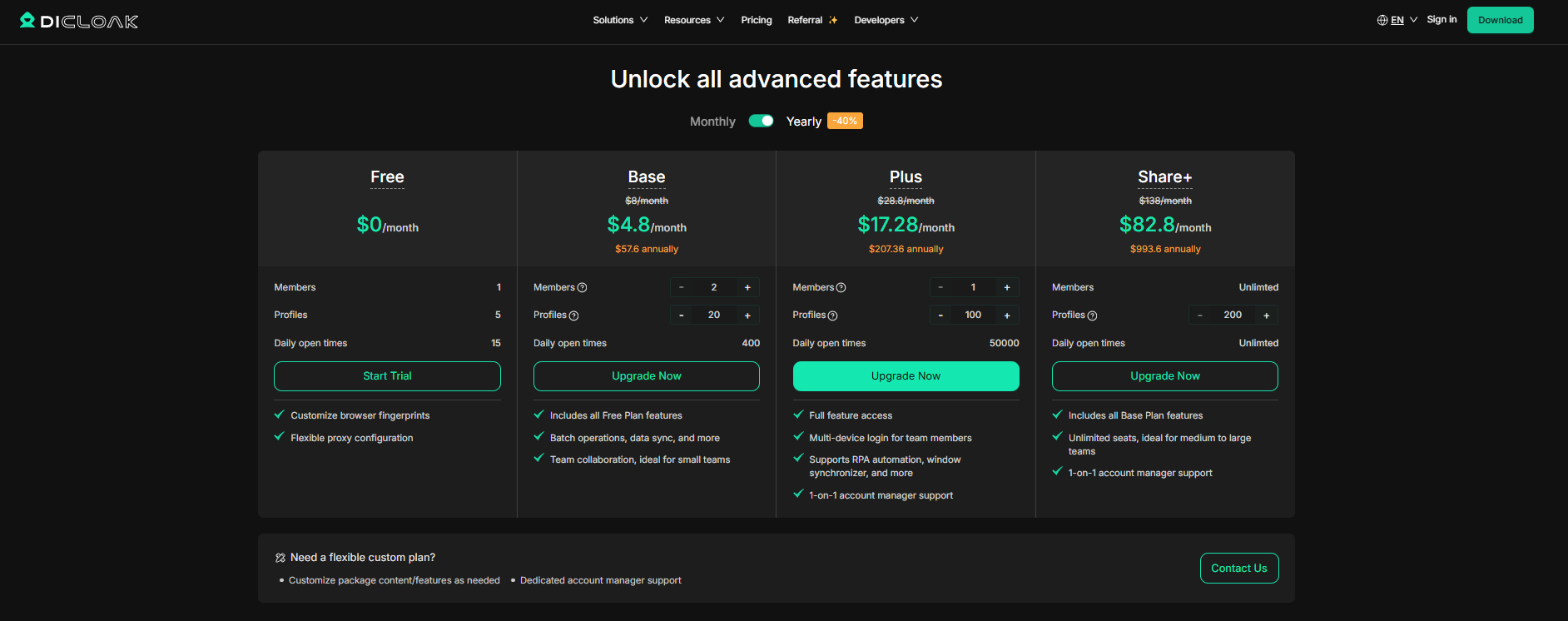
- Step 1: Setting Up DICloak: Download the app and choose a plan. The Plus or Share+ plans are usually best for agencies because they allow for more profiles and team members.
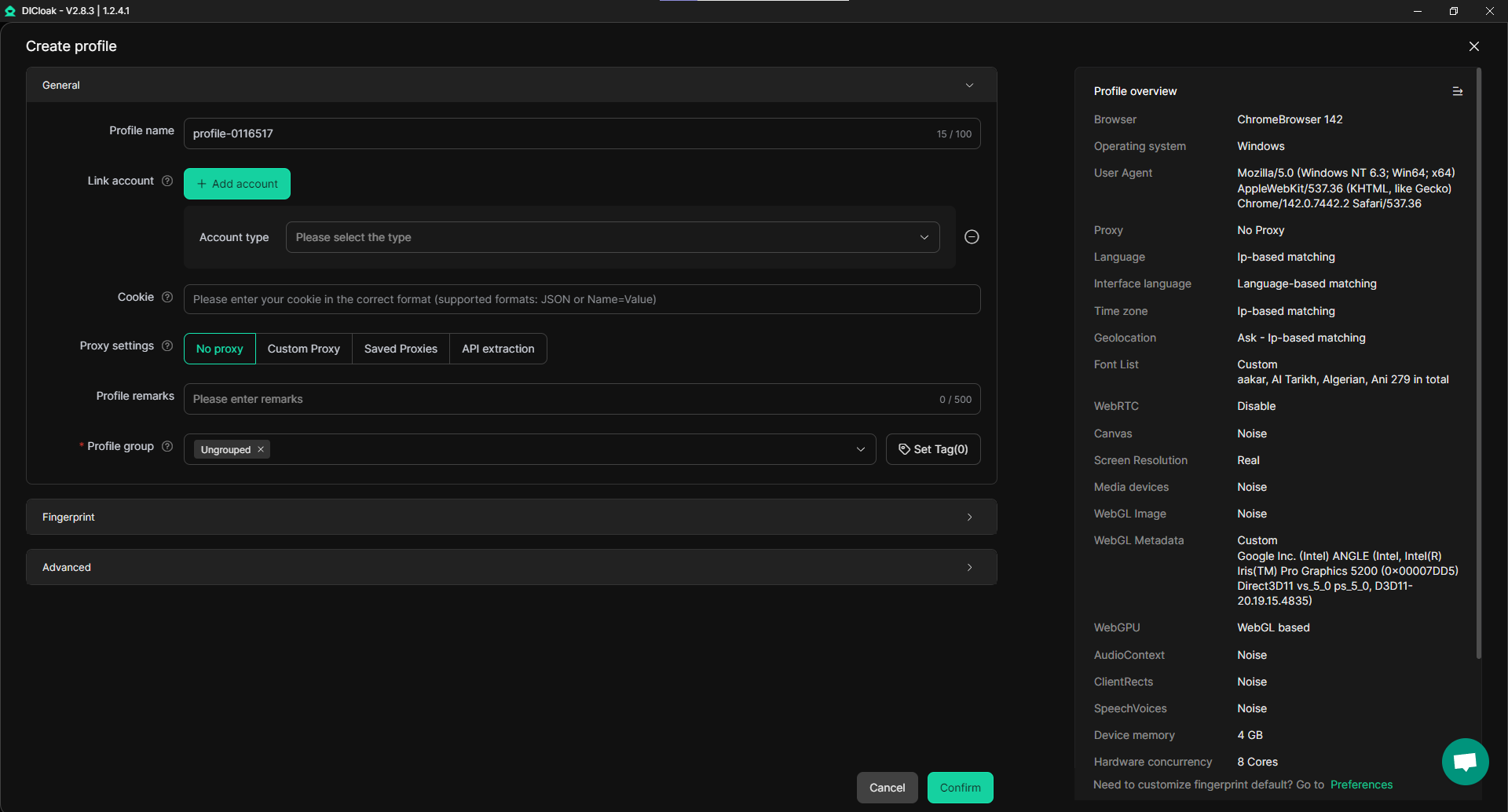
- Step 2: Creating Isolated Profiles: Create a new browser profile for each Ahrefs account. Name them clearly (e.g., "Client A - Ahrefs"). DICloak will generate a unique fingerprint for each one automatically.
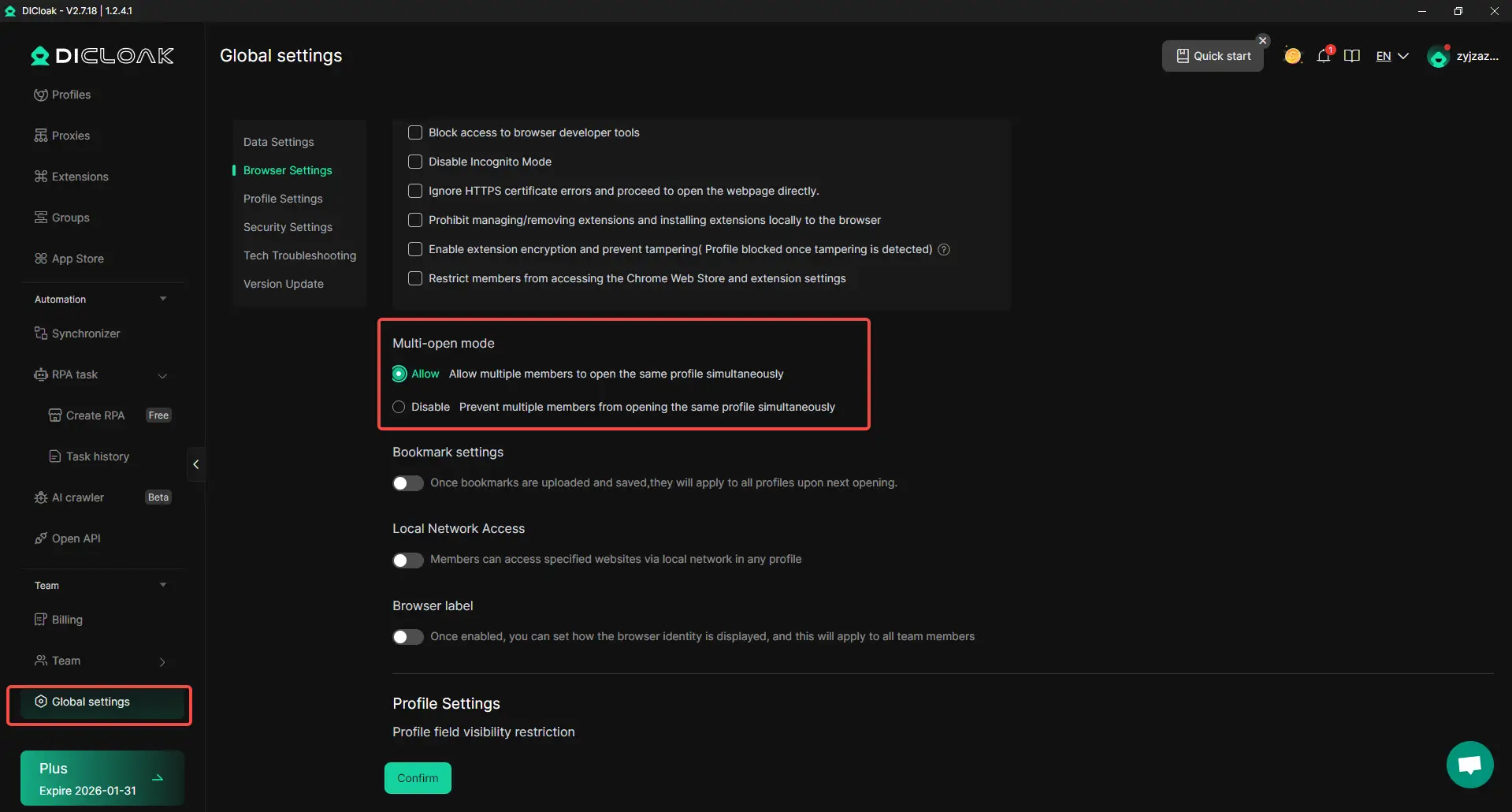
- Step 3: Enable Multi-Open: In the global settings, you must enable the "Allow Multi-Open" option. This critical step allows your team members to access the same isolated profile successfully.
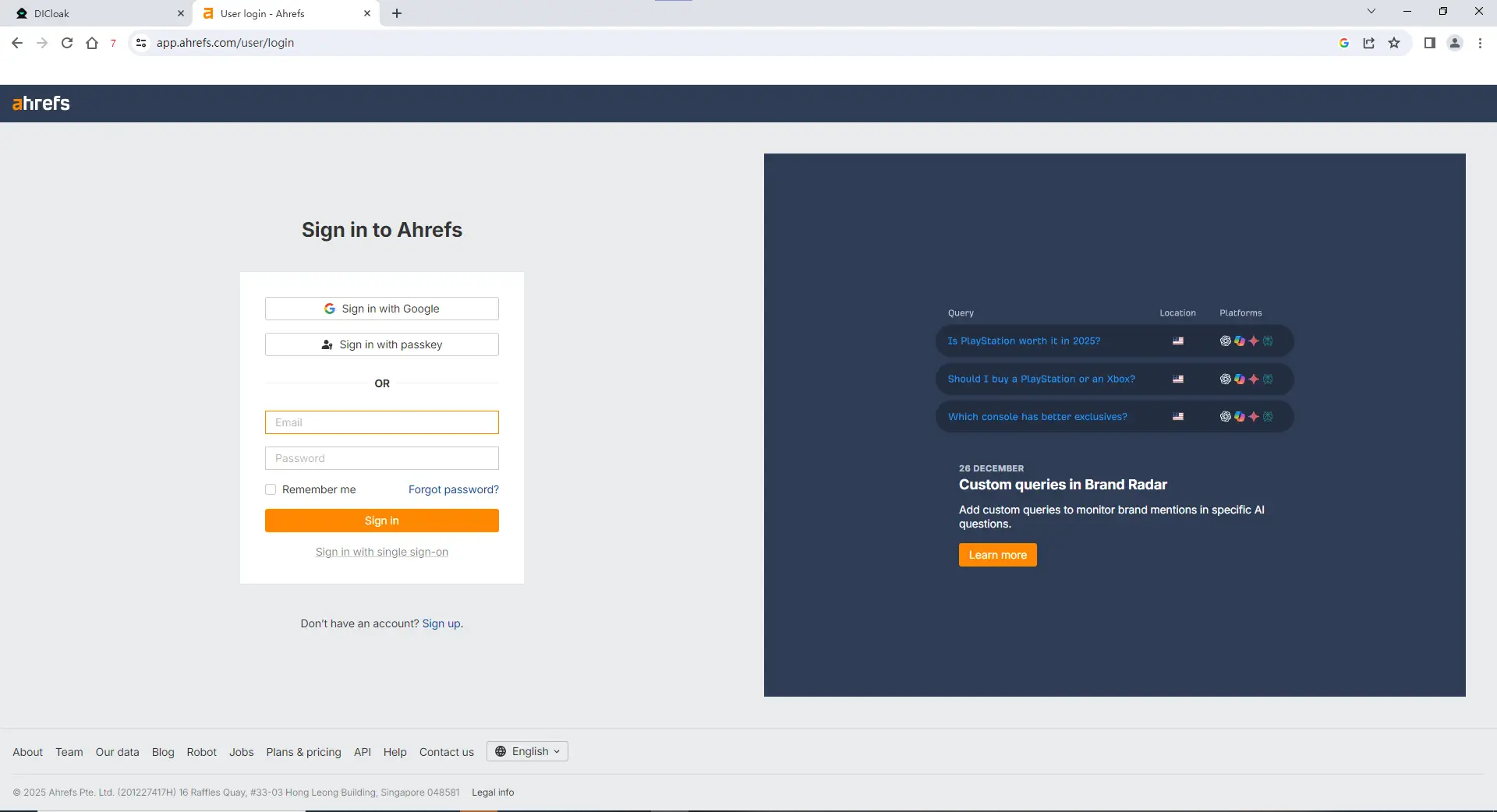
- Step 4: The One-Time Login: Open the profile, log into Ahrefs, and close the window. DICloak saves the session and cookies so you never have to log in again.
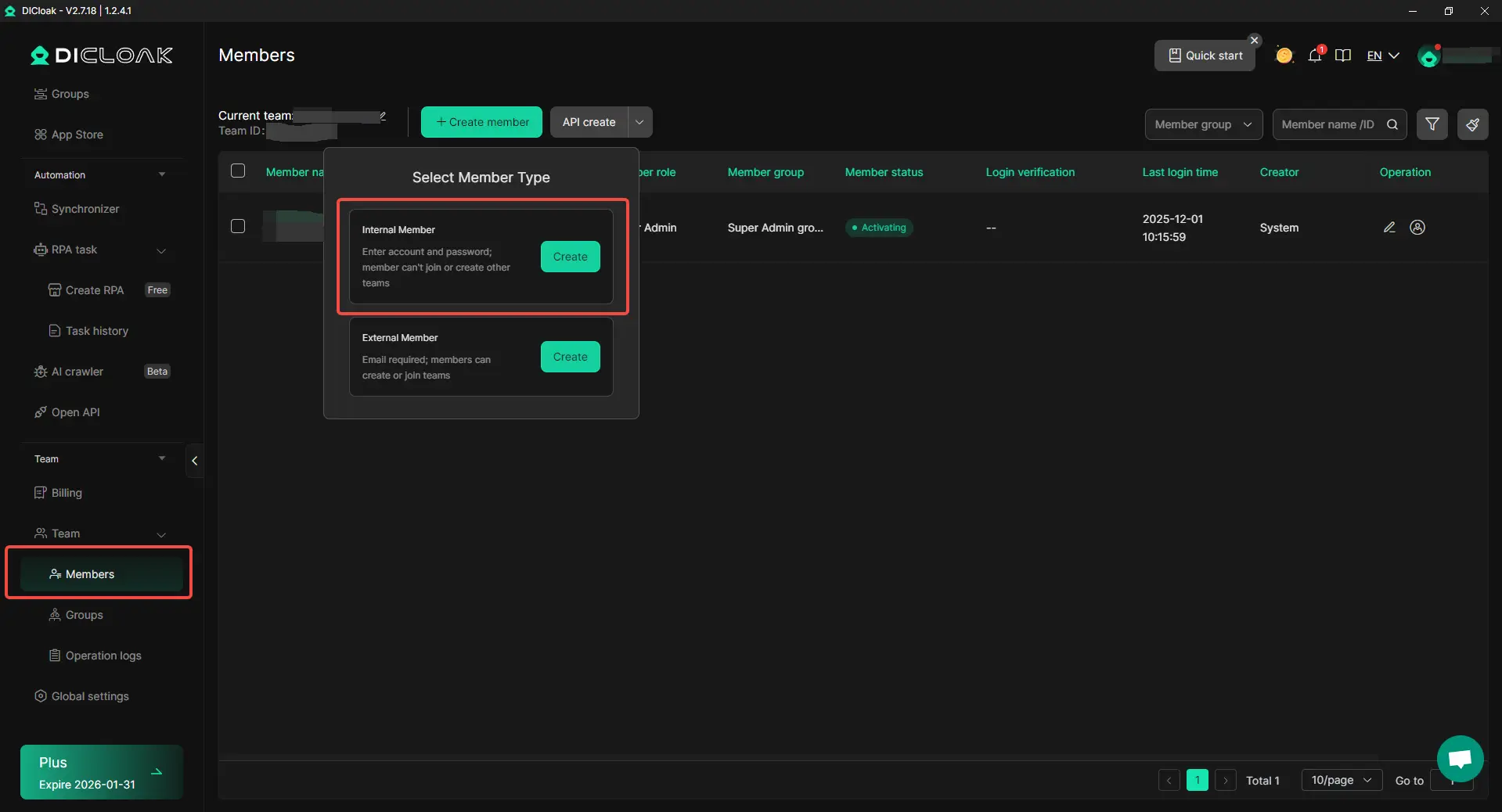
- Step 5: Secure Team Sharing: Use the "Members" tab to add your team. Grant them "Member" level access—this allows them to use the tools but prevents them from changing your billing or administrative settings.
Operational Efficiency: Beyond Your Ahrefs Accounts
Ahrefs is rarely the only tool an agency needs to share. A professional team operates in a "Multi-Account Ecosystem," and DICloak is designed to handle this entire environment:
- Freelance Marketplaces: You can delegate Upwork or Fiverr communication to a Virtual Assistant without the account being locked for "location jumping" across different IP addresses.
- Other SEO Tools: Use the same method to share access to Semrush, Similarweb, or Moz without paying for extra seats on every platform.
- Social Media Management: Manage multiple client Facebook or LinkedIn profiles from one dashboard. This prevents the "Account Linking" that often leads to all your clients being banned at once if one account has an issue.
Strategic Recommendations to Manage Multiple Ahrefs Accounts Safely
The most successful SEOs in 2026 prioritize security over shortcuts. To keep your agency running smoothly, follow these "Golden Rules" of account management:
- Consistent IP Usage: Use a high-quality proxy for each profile so the geolocation stays the same every time the browser is opened.
- Avoid Simultaneous Logins: Even with isolation, Ahrefs only allows one active session per login. Coordinate with your team so two people aren't clicking "Search" at the exact same second on the same profile.
- Perform Security Audits: Regularly review your DICloak dashboard. When a contractor or employee leaves, immediately revoke their access to your profiles to maintain operational hygiene.
- Identity Management: Use a role-based company email (e.g., seo-tools@youragency.com) to register accounts. This prevents losing access if a specific employee leaves the firm.
The Expert Verdict: Security is the foundation of scalability. Using a professional tool like DICloak is the only way to grow your team’s output while protecting your most valuable software assets.
Frequently Asked Questions about Managing Multiple Ahrefs Accounts
Is it legal to use DICloak with Ahrefs?
Yes. Using an anti-detect browser like DICloak for legitimate agency operations and team collaboration is a standard industry practice. It helps maintain privacy and efficiency. However, you must still follow Ahrefs' internal rules regarding fair data usage to ensure compliance while you manage multiple Ahrefs accounts.
Can two people use one DICloak profile at the same time?
While DICloak allows the profile to be open on two machines if "Multi-Open" is enabled, Ahrefs only permits one active session per login. To avoid conflicts while you manage multiple Ahrefs accounts, coordinating your team's schedule is essential to prevent session interruptions.
How does DICloak stop Ahrefs from seeing my real location?
DICloak masks your true digital identity and allows you to attach a specific proxy to each profile. This ensures that Ahrefs only detects the location of the proxy and the virtual device's identity, rather than revealing your actual home or office network, which is crucial when you need to manage multiple Ahrefs accounts securely.
Do I need additional network configuration when using DICloak?
In most cases, no. DICloak’s profile-based management system, with a dedicated proxy for each browser profile, offers better control over IP behavior and geographic consistency. This setup is essential when you’re looking to manage multiple Ahrefs accounts and reduce session conflicts or unexpected login issues.
What happens if I forget to log out?
DICloak automatically saves your session when you close the browser window, ensuring that your login remains secure within that isolated environment. This is especially useful when you're working across multiple profiles, as it eliminates the need for 2FA codes every time you start working while managing multiple Ahrefs accounts.
 Web Proxy Tools
 Free Tools
 Cookie Plugin
 UA Generator
 MAC Address Generator
 IP Generator
 IP Address List
 2FA Code Generator
 World Clock
 Anonymous Check
 WebRTC Leak Test
 UUID Generator
 Free Web Proxy Site
 Proxy Checker
 FB Ad Checker
 AI Web Scraping
 Free SMM Tools
 Twitter Shadowban Checker
 Instagram Name Checker
 UTM Generator
 Username Generator
 AI Hashtag Generator
 LinkedIn Headline Generator
 Social Media Image Resizer