Stable network identity has become increasingly important for many online workflows. From competitor monitoring to multi-account operations, many businesses rely on static residential proxies to maintain consistent connections and reduce interruptions.
However, choosing the right provider is not always straightforward. Some services claim to offer residential IPs but provide unstable connections. Others have limited geographic coverage or pricing models that become expensive at scale.
This guide explains how static residential proxies work, when they are useful, how they compare with rotating proxies, and which providers are worth considering in 2026. It also explores how combining static proxies with browser profile tools such as DICloak can help maintain stable sessions across multiple accounts.
What Are Static Residential Proxies
Static residential proxies are proxy connections that provide a fixed IP address issued by a legitimate Internet Service Provider (ISP).
Unlike rotating residential proxies, which frequently change IP addresses, static residential proxies maintain the same IP over time. This consistency makes them particularly useful for workflows that require persistent sessions and stable identity signals.
Common use cases include:
- social media account management
- marketplace monitoring
- advertising verification
- long-duration automation tasks
- data collection from dynamic websites
Because the IP originates from a real ISP network, traffic appears more like normal user activity compared with data center traffic.
How Static Residential Proxies Work
When using static residential proxies, your real IP address is hidden and all requests are routed through a residential ISP IP.
From the website’s perspective, the request appears to originate from a normal household internet connection rather than a cloud server.
The process usually works like this:
- Your request is sent to the proxy server
- The proxy forwards the request using a residential IP
- The website responds to the proxy
- The proxy sends the response back to you
Because the IP remains consistent, websites see stable traffic patterns.
Key Benefits of Static Residential Proxies
Higher Trust Signals
Since the IP addresses come from real ISP networks, websites often treat them as legitimate residential traffic. This reduces the chance of being flagged compared with data center proxies.
Long-Term Session Stability
Many platforms expect a consistent network identity during long sessions. Static residential proxies provide the stable IP signals required for these workflows.
Better Performance for Automation
Automation systems interacting with JavaScript-heavy websites often require persistent sessions. Static IPs reduce disruptions caused by frequent IP changes.
Accurate Geo-Targeting
Many proxy providers allow users to select specific countries or cities. This is useful for SEO monitoring, localized advertising tests, and market research.
Safer Multi-Account Operations
When multiple accounts share the same IP address, platforms may associate them with each other.
Using static residential proxies allows each account to operate with its own ISP IP, reducing the risk of account linkage.
This separation becomes even more effective when combined with isolated browser profiles in DICloak.
Static Residential Proxies vs Rotating Residential Proxies
Both proxy types use residential IP addresses but serve different purposes.
| Feature |
Static Residential Proxies |
Rotating Residential Proxies |
| IP behavior |
Fixed IP |
Frequently changing IP |
| Best use case |
Persistent sessions |
Large-scale scraping |
| Session stability |
High |
Medium |
| Detection risk |
Lower for accounts |
Lower for crawling |
| Pricing model |
Per IP |
Per bandwidth |
Top Static Residential Proxy Providers in 2026
When evaluating static residential proxies, focus on stability, geographic coverage, and reliability.
NodeMaven provides ISP-based static residential IPs designed for long-running sessions.
Best for
- social media account management
- marketplace monitoring
- persistent login workflows
Key strengths
- stable ISP IP connections
- low latency
- broad geographic distribution
These proxies can easily be assigned to separate DICloak profiles to maintain isolated sessions.
Smartproxy is widely used for automation and regional access workflows.
Best for
- automation tasks
- regional testing
- product monitoring
Key strengths
- user-friendly dashboard
- API support for automation
- large geographic coverage
Many teams combine Smartproxy with DICloak profiles to isolate account sessions.
Oxylabs focuses on enterprise-level proxy infrastructure and large-scale data collection.
Best for
- enterprise scraping
- market research
- large data operations
Key strengths
- extensive residential proxy network
- compliance-focused infrastructure
- reliable uptime
Best Static Residential Proxies Comparison Table (2026)
Choosing the right static residential proxies provider depends on stability, geographic coverage, and compatibility with multi-account workflows.
| Provider |
Best For |
Network Type |
Geographic Coverage |
Key Strength |
Works With DICloak Profiles |
| NodeMaven |
Long sessions |
ISP static IP |
Global |
Stable connections |
Yes |
| Smartproxy |
Automation workflows |
Residential + ISP |
195+ locations |
Easy integration |
Yes |
| Oxylabs |
Enterprise data collection |
Residential + ISP |
Global |
Large network |
Yes |
Many operators assign one static residential proxy per DICloak profile to keep browser identity and network identity aligned.
Managing Multiple Accounts With Static Residential Proxies and DICloak Profiles
While static residential proxies provide stable network identity, many platforms also analyze browser fingerprints, cookies, session history, and behavior signals.
If multiple accounts run in the same browser profile, those signals may still overlap even when proxies differ.
This is where DICloak becomes useful.
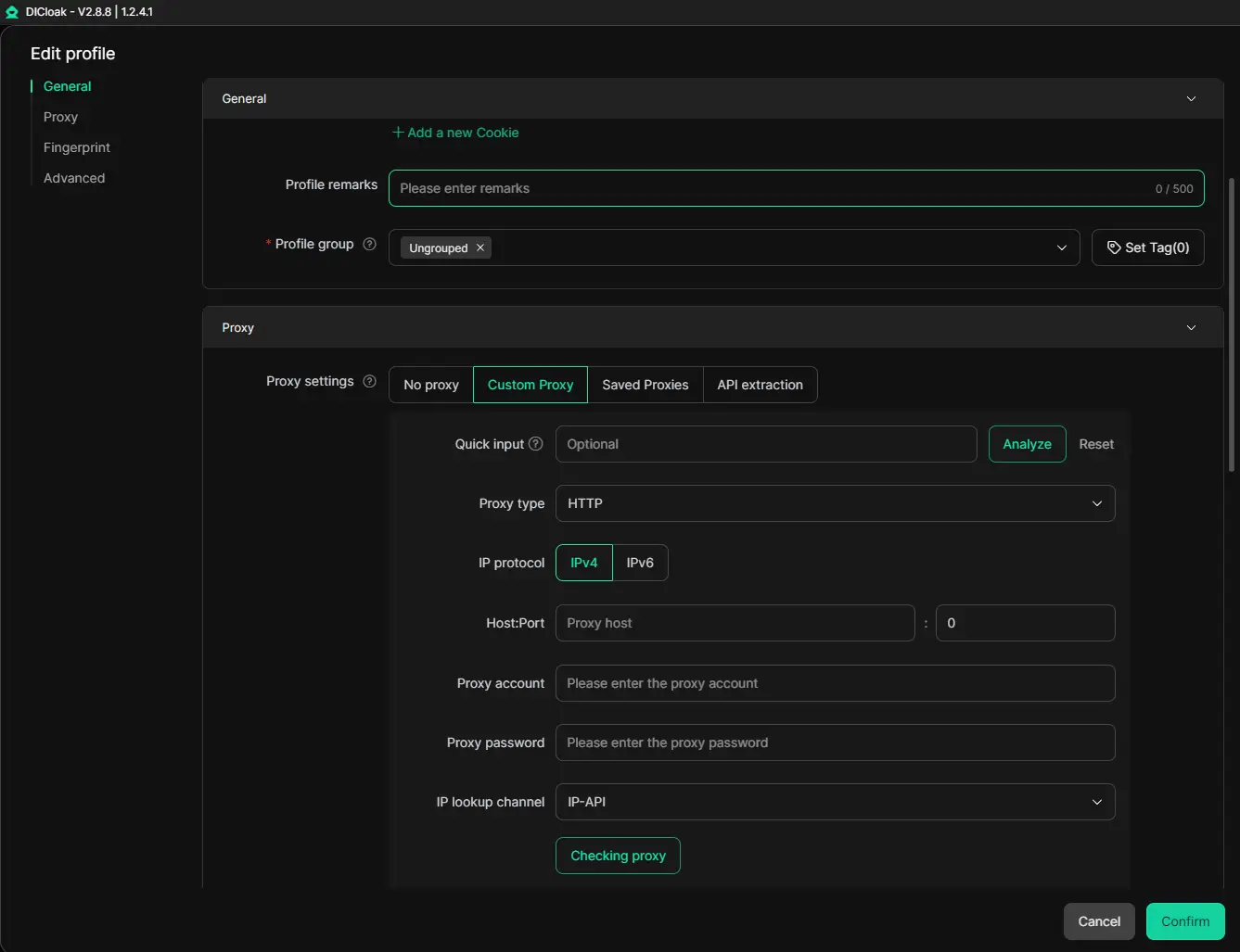
DICloak allows teams to create isolated browser profiles, where each profile maintains its own:
- cookies
- session storage
- browser fingerprint configuration
- proxy settings
Assigning a static residential proxy to each profile helps maintain a consistent identity for each account.
Recommended Setup
A commonly used workflow structure is:
1 account → 1 DICloak profile → 1 static residential proxy
This setup ensures:
- browser identity isolation
- stable ISP IP usage
- independent session history
Best Setup for Static Residential Proxies + DICloak
Using static residential proxies alone can provide a stable IP address, but long-term account operations often require additional identity isolation.
Combining static proxies with DICloak browser profiles creates a more reliable structure for multi-account workflows.
Profile and Proxy Configuration
A typical setup includes:
- one DICloak profile per account
- one static residential proxy per profile
This configuration ensures that each account maintains a consistent network identity and browser fingerprint.
Aligning Browser Signals
To maintain realistic browsing signals, it is helpful to align profile settings with the proxy location.
For example:
- US proxy → US timezone → English language
- UK proxy → UK timezone → English (UK)
This alignment helps reduce unexpected login verification.
Using Multi-Window Synchronizer for Repetitive Tasks
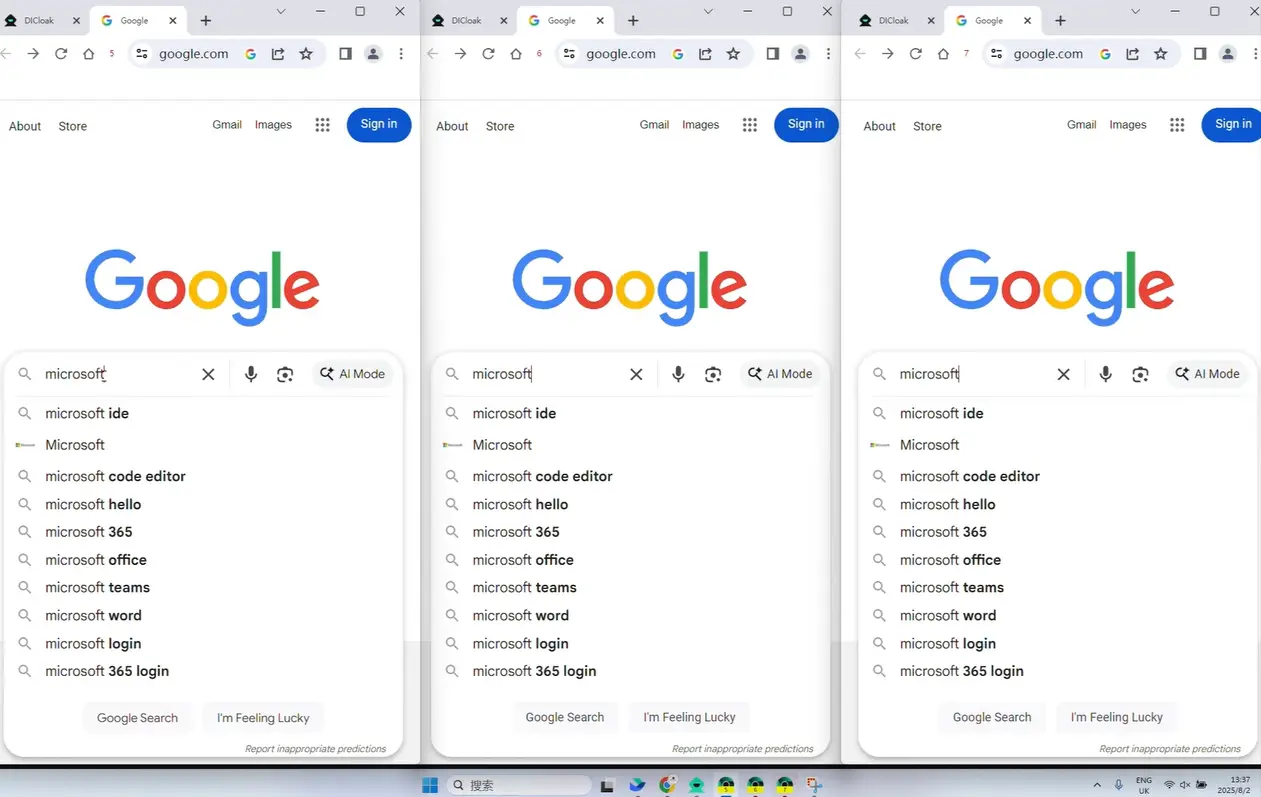
For teams managing many accounts, DICloak provides a Multi-Window Synchronizer.
This feature mirrors actions from one browser window to multiple profiles simultaneously.
Common use cases include:
- logging into multiple accounts
- publishing the same content across accounts
- performing routine account actions
- testing workflows across profiles
Instead of repeating tasks manually, the synchronizer allows operators to control many profiles at once while maintaining isolated browser profiles.
How to Choose the Right Static Residential Proxy
When selecting a static residential proxy provider, consider these factors.
ISP Authenticity
Ensure the IP addresses originate from legitimate ISP networks.
Connection Stability
Choose providers known for maintaining long-duration sessions.
Geographic Coverage
Look for proxy networks that support country or city targeting.
Profile Compatibility
If running multiple accounts, ensure proxies can be easily configured inside DICloak profiles.
Conclusion: Building Stable Workflows With Static Residential Proxies
In 2026, static residential proxies remain one of the most reliable solutions for maintaining consistent network identity. Because the IP originates from real ISP networks and remains stable, these proxies work well for monitoring, automation, and multi-account workflows.
However, IP addresses alone do not define identity. Browser fingerprints, session data, and behavior signals also affect how platforms evaluate activity.
Many teams therefore combine static residential proxies with DICloak profile-based browser isolation, assigning a dedicated proxy to each profile while keeping account sessions independent.
With the right proxy provider and a well-structured profile setup, businesses can build scalable workflows that maintain stable sessions across multiple accounts.
Frequently Asked Questions About Static Residential Proxies
What Are Static Residential Proxies
Static residential proxies provide a fixed ISP IP address used for consistent connections and long-duration sessions.
Are Static Residential Proxies Better Than Rotating Proxies
Static proxies are better for persistent account sessions, while rotating proxies are better for high-volume crawling.
Can Static Residential Proxies Reduce Account Bans
They can reduce IP-based detection risk, but platforms may still analyze browser fingerprints and behavior signals.
How Many Accounts Should Use One Static IP
Many teams use one proxy per DICloak profile to maintain isolated sessions.
 Web Proxy Tools
 Free Tools
 Cookie Plugin
 UA Generator
 MAC Address Generator
 IP Generator
 IP Address List
 2FA Code Generator
 World Clock
 Anonymous Check
 WebRTC Leak Test
 UUID Generator
 Free Web Proxy Site
 Proxy Checker
 FB Ad Checker
 AI Web Scraping
 Free SMM Tools
 Twitter Shadowban Checker
 Instagram Name Checker
 UTM Generator
 Username Generator
 AI Hashtag Generator
 LinkedIn Headline Generator
 Social Media Image Resizer