Scaling paid social sounds simple: hire more creators, plug in more editors, and add a few hungry media buyers to push winning creatives harder and faster.
But as your TikTok and Meta ad ops grow, so do the risks.
One wrong click on a phishing link, one rogue admin, or one overlooked policy violation, and suddenly your ad accounts are gone, your pages hijacked, or your spend frozen.
With almost one in five social media users targeted by hackers annually, the odds are uncomfortably high for anyone managing paid accounts.
And the bigger the team gets, the larger your attack surface becomes.
In this article, we’ll walk you through a practical, proven workflow for growing your paid social with UGC.
Along the way, we’ll show you how to keep your ad accounts locked down.
But first, let’s explore why UGC sits at the core of scalable paid social.
P.S. Want to keep your accounts safe as you scale? Start using DICloak today to manage TikTok and Meta accounts securely with isolated browser profiles and zero-risk team access.
Why UGC Scales Paid Social
User-generated content (UGC) has become one of the most powerful levers for scaling paid performance.
Why? Because it mirrors native content people actually engage with. Not polished brand ads, but raw, relatable, real-talk videos.
Studies show UGC is 22% more effective than traditional brand-created content and drives higher in-feed engagement.
*Even more compelling: 79% of consumers say UGC strongly influences their buying decisions, and 82% are more likely to convert when a brand uses it.
Based on what we’ve seen working across hundreds of paid social campaigns at inBeat, high-performing UGC ads share a few consistent traits:
https://player.vimeo.com/video/720688482?h=3ee80b8717
Source: inBeat Agency
It’s fast to produce, easy to test, and hooks better than overproduced spots, especially in short-form formats like Reels and TikToks.
When UGC clicks, the question shifts from “what works?” to “how do we scale it safely?”
And that leads us to the next section:
The Real Scaling Nottleneck: Ops + Permissions
At small spend levels, scaling is a creative problem. At a real scale, it becomes an operations and permissions problem.
Teams want speed, so they “solve” it by sharing logins, handing out admin access, or adding freelancers directly into ad accounts.
But speed without structure is fragile: nearly 38% of security breaches involve compromised credentials, and most of those failures start with overly broad or poorly managed access.
That’s why sustainable scaling isn’t just about better ads, it’s about systems.
That means a clear creative pipeline and a permission model that defines who can see, touch, and ship what.
And the rest of this article breaks down exactly how to build both, the right way.
Pro tip: Use DICloak’s Account Sharing + team permission controls to give creators/editors/media buyers access via isolated browser profiles (no password sharing, no “everyone admin”). Try it for free now.
The Golden Rule: Never Share Logins
If there’s one non-negotiable rule in ad account security, it’s this: never share passwords.
Remember: Logins should belong to individuals, not teams.
Always invite collaborators through official platform roles, enforce 2FA/2SV across every account, and limit admin access to only those who truly need it.
Convenience might feel faster in the moment, but it’s also how accounts get compromised.
TikTok Business Center explicitly recommends enabling Two-Step Verification for all members to reduce the risk of unauthorized access.
That’s the baseline. Now let’s look at how to scale UGC without breaking it.
UGC Scaling Model that Doesn’t Require Risky Access
Scaling UGC safely means turning production into an assembly line.
A secure model separates creation, editing, review, and launch into clear, repeatable steps:
- Creators deliver raw footage only. They never need access to ad accounts, pages, or Business Managers.
- Editors turn raw files into multiple ad-ready variants. They work in shared drives or project tools, not inside ad platforms.
- Reviewers check messaging, claims, and policy compliance before anything goes live. They need visibility into creatives, not publishing rights.
- Media buyers handle uploads, targeting, budgets, and optimization. They’re the only ones who need ad account access, and even then, with limited permissions.
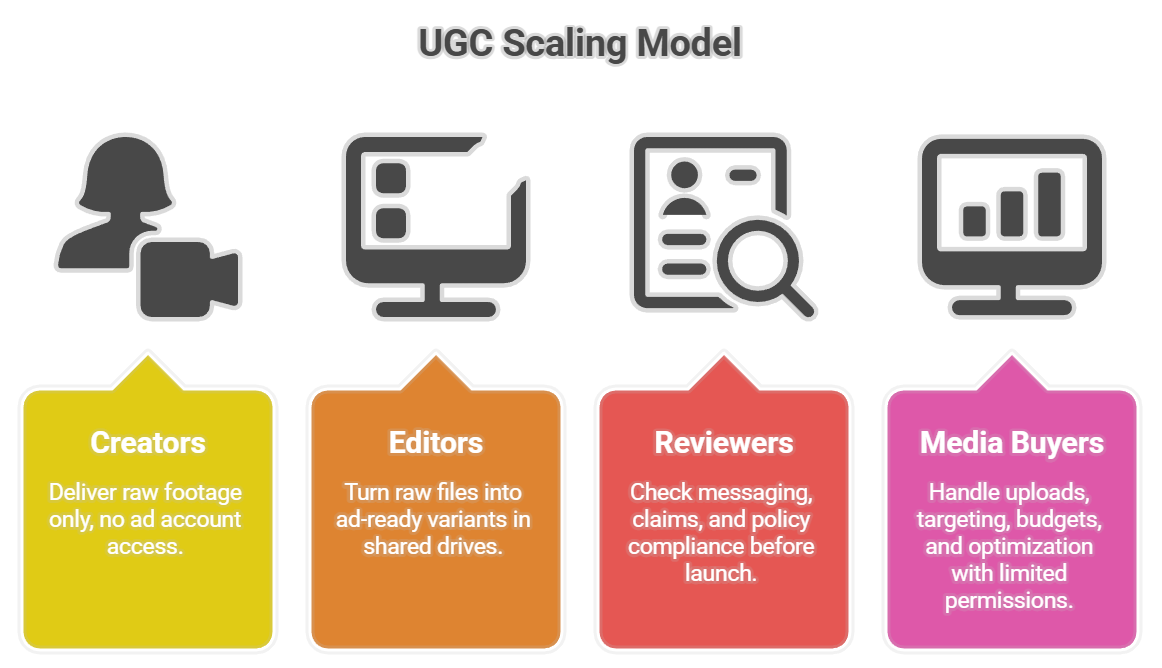
This structure keeps production fast, access minimal, and scale predictable.
Now let’s see how this model applies to TikTok and Meta, starting with Spark Ads:
TikTok: Scale with Spark Ads
Spark Ads let you scale TikTok campaigns using existing organic posts, so all likes, comments, and shares accrue to the original content instead of a dark ad.
Brands can run Spark Ads from their own posts or from creator accounts, with permission granted through TikTok (not by sharing logins).
Operationally, this is a huge win.
Creators keep control of their accounts, teams avoid risky access handoffs, and media buyers can launch and optimize without ever touching personal credentials.
Instead of adding creators to Business Centers or passing around passwords, Spark Ads create a clean, permission-based workflow that’s built for scale.
It’s faster, safer, and far more resilient as teams and spend grow.
They perform better too: TikTok reports that Spark Ads drive 142% higher engagement and 43% higher conversion rates compared to standard In-Feed Ads.
Let’s break down the exact workflow that makes this secure.
TikTok Workflow: Authorization Codes + Clear Scope
A secure Spark Ads setup relies on permissioning. The workflow is simple and repeatable:
- Creator publishes the organic video on their own TikTok account.
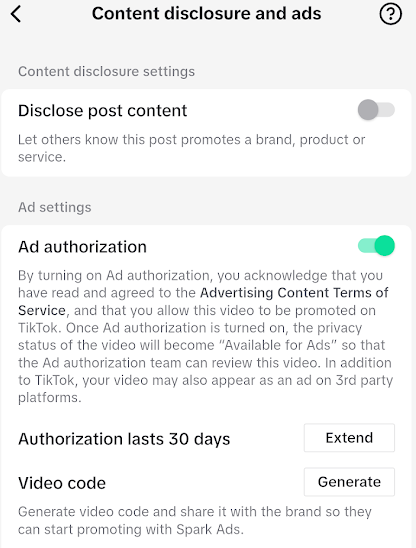
- Creator generates an authorization code inside TikTok and shares it with the advertiser. No logins are ever exchanged.
Source
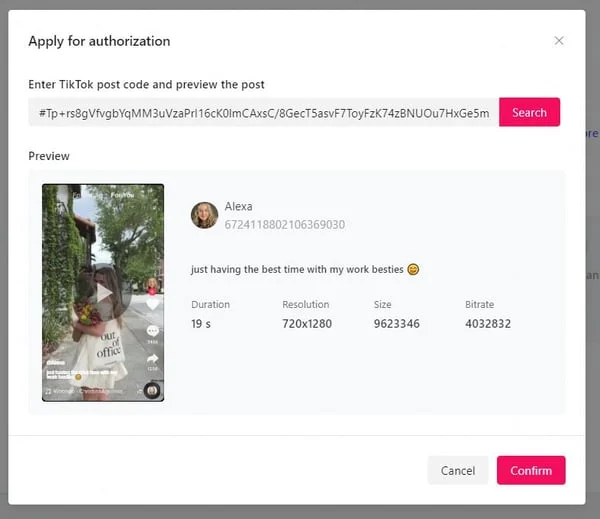
- Brand activates Spark Ads using that code inside Ads Manager.
Source: Statusphere
- Permissions are clearly scoped: define usage duration, approved geos, and whether creative edits (captions, CTAs) are allowed.
- Access is revoked automatically when the authorization expires or manually once the campaign ends.
This approach keeps creator accounts isolated, limits brand access to exactly what’s needed, and removes the temptation to “just share a login.”
With TikTok covered, next we move on to Meta.
Meta: Scale With Partnership/Branded Content Permissions
On Meta, the secure equivalent of creator whitelisting lives in branded content and partnership-style permissions.
Instead of asking creators for logins or adding them to Business Managers, brands can run ads from creator posts through approved partnerships.
Creators publish content on their own accounts and grant the brand permission to promote it, keeping ownership and access fully separated.
Media buyers get what they need: the ability to launch, test, and scale ads.
Just like on TikTok, permissions are scoped, auditable, and revocable.
In fact, this format of Meta’s Partnership Ads (formerly branded content ads) has shown up to a 53% higher click-through rate compared to standard ads.
Now let’s look at how to operationalize this on Meta.
Meta Workflow: Partnership Permissions + Scoped Access
A Meta workflow is built around partnerships. Here are the steps:
- Creator publishes content on their own Instagram or Facebook account.
- Creator enables branded content / partnership permissions for the brand. No Business Manager access is required.
- Brand requests ad authorization to promote the post through Ads Manager.
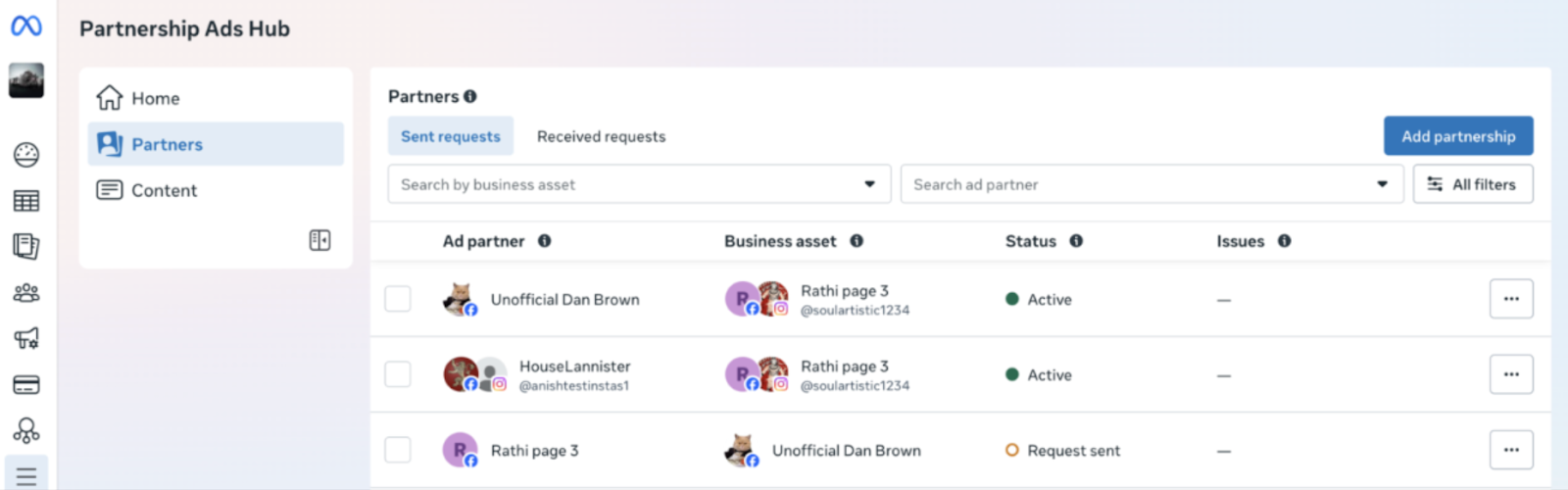
- Permissions stay scoped: the brand can run ads, but cannot edit the account, remove posts, or access messages.
- Access can be removed at any time by the creator or automatically once the partnership ends.
Just like with TikTok, Meta’s permission-based workflow allows teams to scale safely without expanding the attack surface.
But even with the right workflows, real threats still happen:
Threats That Actually Happen
Ad account failures rarely come from hackers breaking in, they come from people being tricked.
Phishing emails posing as Meta or TikTok support, fake policy violation alerts, and spoofed “account suspension” messages are common.
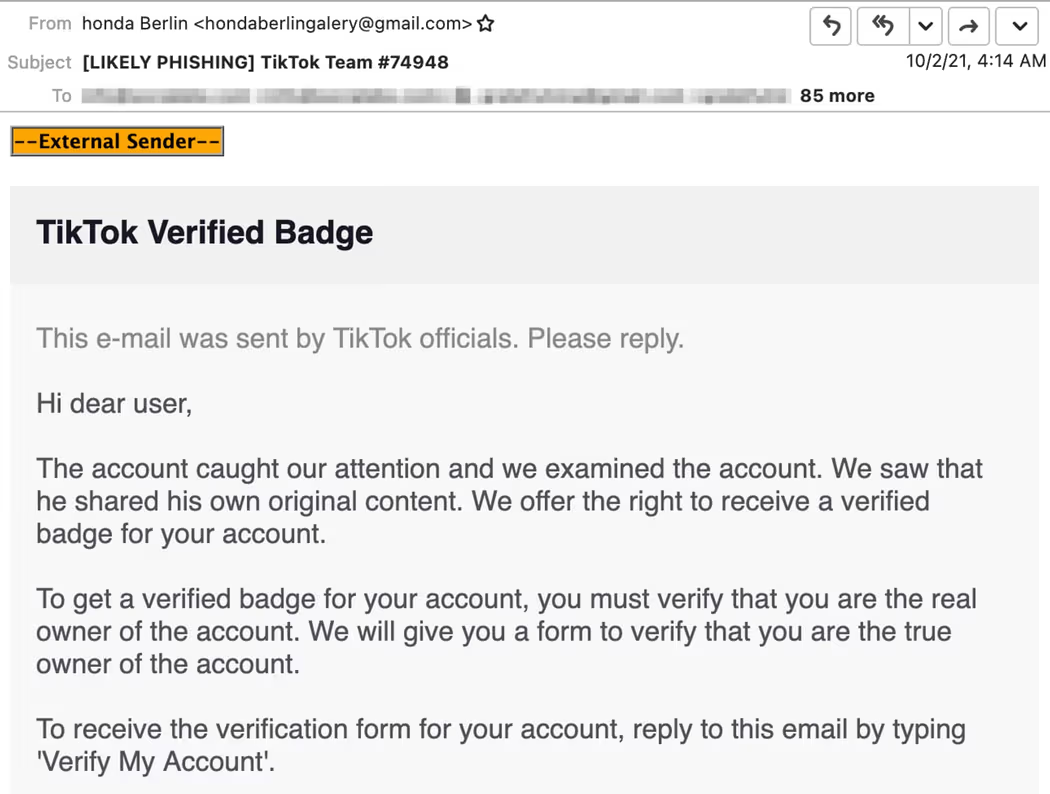
Contractors and freelancers are frequent targets, especially when access rules are unclear.
The defenses are simple but non-negotiable: always verify sender domains, never log in through emailed links, and use a password manager to avoid credential reuse.
Most importantly, give every contractor a basic security briefing before they touch anything.
Pro tip: We recommend running monthly access audits to review roles, remove unused permissions, and catch risky access before it turns into an incident.
Recovery Planning
Incidents happen, the difference is whether you’re prepared:
- Keep at least two trusted admins per account, but never more than necessary
- Ensure ownership, verification, and billing info are always current
- Document who controls what across ad accounts, pages, and Business Managers
- Maintain a simple incident runbook:
- Freeze access immediately
- Rotate passwords and credentials
- Check and secure payment methods
- Audit all users and permissions
- Contact platform support without delay
Remember: When something goes wrong, speed and clarity matter more than panic.
Conclusion: Scale Fast, Stay Secure
Scaling TikTok and Meta ads with UGC works best when creative output grows alongside strong operational discipline.
The real unlock comes from a system that cleanly separates production from access.
Creators focus on content, editors on variants, reviewers on compliance, and media buyers on launch and optimization, all within tightly scoped permissions.
With the right workflow, security becomes a foundation for scale and a long-term advantage.
Before you scale further, run this quick checklist:
- Enforce 2FA / 2SV on all accounts
- Never share logins or passwords
- Restrict admin roles to essential people only
- Use TikTok Spark Ads for creator content
- Use Meta branded content / partnership permissions
- Separate creative production from ad account access
- Run monthly access audits
- Keep ownership, billing, and recovery contacts updated
Set the rules, assign the roles, and start scaling today.
FAQs
Why is access control a scaling bottleneck for paid social?
Because more people touching ad accounts increases the risk of mistakes, breaches, and policy violations. Clear roles and scoped permissions allow teams to move fast without exposing critical access.
Should creators or editors ever have ad account access?
No. Creators only need to deliver content, and editors only need access to files. Ad account access should stay limited to trained media buyers.
How do Spark Ads improve security on TikTok?
Spark Ads let brands promote creator posts using authorization codes, so creators keep their logins and brands get permissioned access without shared credentials.
What’s the safest way to run creator ads on Meta?
Use branded content or partnership permissions. This allows brands to promote creator posts while keeping accounts separate and access tightly scoped.
How often should teams review account access
At least once per month. Regular access audits help catch outdated permissions before they turn into security incidents.
 Web Proxy Tools
 Free Tools
 Cookie Plugin
 UA Generator
 MAC Address Generator
 IP Generator
 IP Address List
 2FA Code Generator
 World Clock
 Anonymous Check
 WebRTC Leak Test
 UUID Generator
 Free Web Proxy Site
 Proxy Checker
 FB Ad Checker
 AI Web Scraping
 Free SMM Tools
 Twitter Shadowban Checker
 Instagram Name Checker
 UTM Generator
 Username Generator
 AI Hashtag Generator
 LinkedIn Headline Generator
 Social Media Image Resizer