- ResourcesOnline Tools



EN

You changed your IP, used a proxy, maybe adjusted your connection settings, and your account still got flagged. That happens more often than people expect.
The reason is simple: platforms no longer rely only on IP addresses. They also analyze browser fingerprints, cookies, device signals, time zones, language settings, session behavior, and browsing patterns. So while changing our IP can help, it does not automatically make multiple accounts appear unrelated.
That is where confusion usually starts. A proxy and an antidetect browser both improve privacy in different ways, but they solve different problems. If your goal is casual privacy, a simple setup may work. But if your goal is safer multi-account management, reducing account linking, and avoiding unnecessary bans, you need to understand the difference.
This guide explains proxy vs antidetect browser in simple terms. You will learn what each tool does, where each one falls short, and which setup makes the most sense for long-term account management.
A lot of users think this is enough:
New IP = new identity
That idea worked better years ago. Today, it is incomplete.
Modern platforms look for risk signals. If they notice multiple accounts using similar browser profiles, shared cookies, matching fingerprints, or suspicious activity patterns, they may still connect those accounts even if the IP changes.
That is why users sometimes switch networks or buy proxies and still face:
The issue is that changing an IP changing is only one layer of protection. Platforms can also evaluate:
If your setup looks inconsistent, multiple accounts may still appear connected.
So the real question is not just “How do I hide my IP?” The better question is:
“Which tool helps create a safer and more consistent environment?”
Before comparing them, it helps to define both clearly.
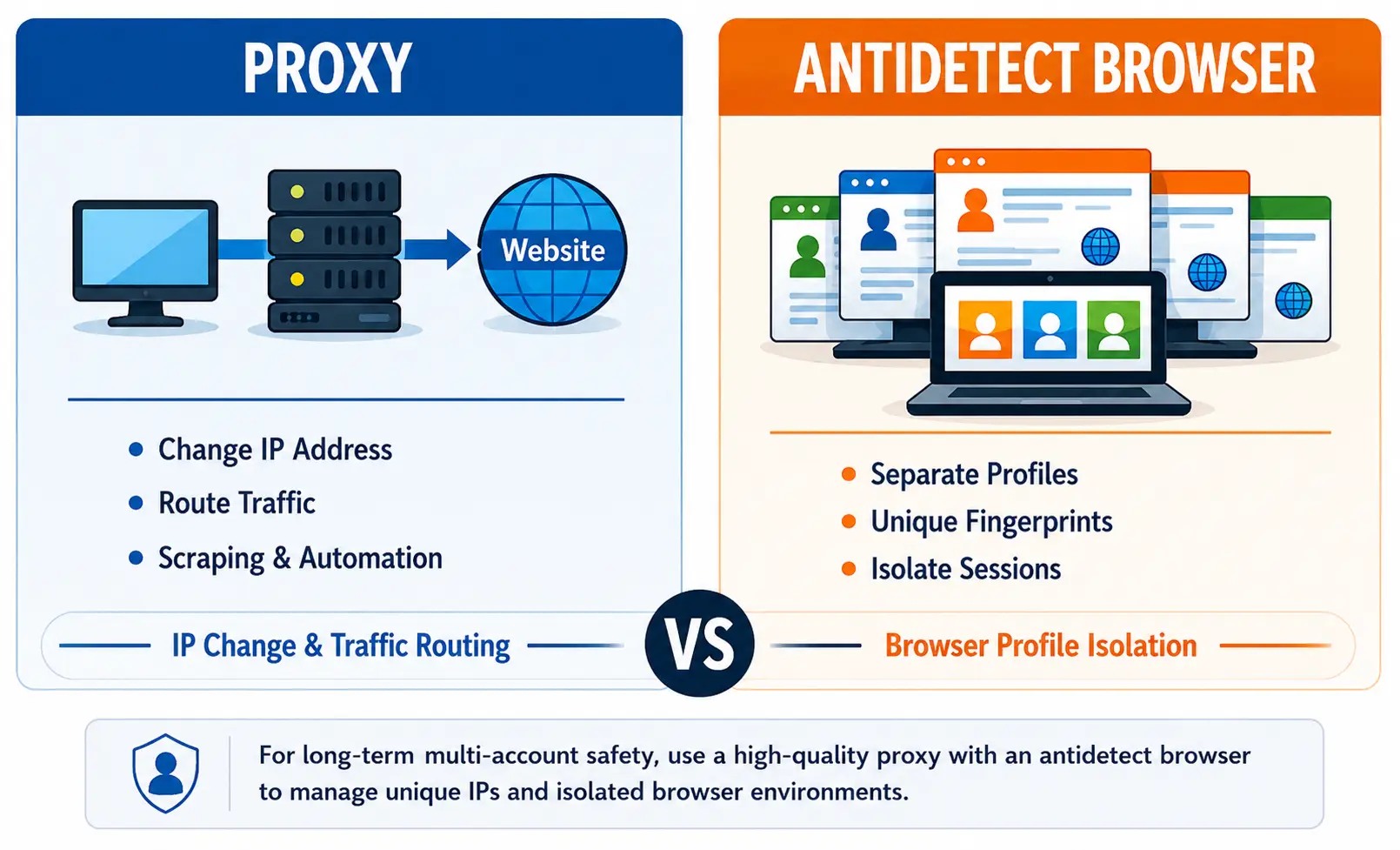
A proxy server works between your device and the website you visit. Instead of connecting directly, your traffic goes through the proxy. The website sees the proxy IP instead of your original IP.
That makes proxies useful for:
Common proxy types include:
The important point is this:
A proxy mainly changes your network identity. It does not automatically isolate your browser profile. If you use the same browser profile, cookies, and fingerprint across multiple accounts, a proxy alone may not prevent account linking.
An antidetect browser is designed for profile isolation and browser fingerprint management.
Instead of using one browser profile for every account, it creates separate browser profiles with unique cookies, storage, fingerprints, time zones, user agents, and other environment signals. This helps every account appear more isolated.
An antidetect browser is useful for:
This is the biggest difference in the comparison:
A proxy changes the visible IP address seen by the platform.
An antidetect browser does not replace the need for a proxy if you want different IPs, but it often works together with proxies to assign unique IPs to separate profiles.
Best for IP masking: Proxy
This is where the antidetect browser becomes important.
A proxy does not isolate browser fingerprints. Even with a different IP, the same browser fingerprint may still connect multiple accounts together.
An antidetect browser is specifically built to separate those environments.
Best for fingerprint isolation: Antidetect browser
If you manage:
then account separation matters more than simple IP rotation.
A proxy can provide different IPs, but an antidetect browser is usually more effective for long-term account management because it focuses on environment isolation.
Best for multi-account safety: Antidetect browser with quality proxies
A proxy is relatively simple to use for basic IP changes, although advanced setups require more configuration.
An antidetect browser has a learning curve because it involves profiles, sessions, browser fingerprints, and consistency management.
Best for simplicity: Proxy
This is the part most users care about.
If you only change your IP but continue using the same browser profile, cookies, device setup, and browsing behavior, the risk of account linking remains.
That is why an antidetect browser is often the stronger option for reducing linking risk. It addresses the browser-level signals many users ignore.
Best for reducing linking risk: Antidetect browser with stable proxy support
The answer depends on your goals.
A proxy is a good option when you need:
It helps with the network layer, but not the browser identity layer.
An antidetect browser is the better option when you need:
If your business depends on keeping accounts separated over time, this layer becomes extremely important.
For professional workflows, the best solution is usually not choosing one tool over the other. It is using the right combination.
In most multi-account situations, the strongest setup looks like this:
Why?
Because:
This combination helps reduce unnecessary overlap between accounts and creates more consistent account behavior.
It is commonly used for:
The goal is not to bypass systems unfairly. The goal is to maintain cleaner account separation and reduce avoidable risk signals.
Even with the right tools, poor setup can still create problems.
Even with different IPs, shared cookies and fingerprints can still create overlap.
Jumping between countries too often may appear suspicious. Stability matters.
Cheap or abused proxies can damage account trust quickly.
This is one of the biggest mistakes. Many users focus only on IP changes and forget browser-level tracking.
If multiple users access accounts from inconsistent environments, risk increases significantly.
Here is the short answer:
Choose a proxy if your main goal is:
Choose an antidetect browser if your main goal is:
For serious multi-account workflows, the most practical setup is usually:
That combination helps cover both important layers:
And that is exactly where many simple setups fail. They solve one layer while ignoring the other.