One “inauthentic behavior” flag on X can cut off posting, replies, follows, and ad actions within minutes, then force you into a manual review flow. If you were hit by inauthentic behavior x, you are usually dealing with a trust signal problem, not just a content problem. X enforces this under its platform manipulation and spam policy, and account status decisions connect to broader X Rules enforcement.
Most people lose time on appeals because they send emotional messages instead of evidence. A stronger appeal shows clear account ownership, normal usage intent, and a clean explanation of what triggered unusual behavior. That same evidence also helps prevent repeat flags after access returns. If a team touches one account, workflow control also affects risk, especially when logins, device fingerprints, and proxies change too fast across sessions.
You will learn how to read the suspension signal, prepare an appeal package X reviewers can verify, and fix the operation patterns that trigger a second lock. The next step is understanding what X usually treats as inauthentic behavior before you submit anything.
What does inauthentic behavior on X actually mean?
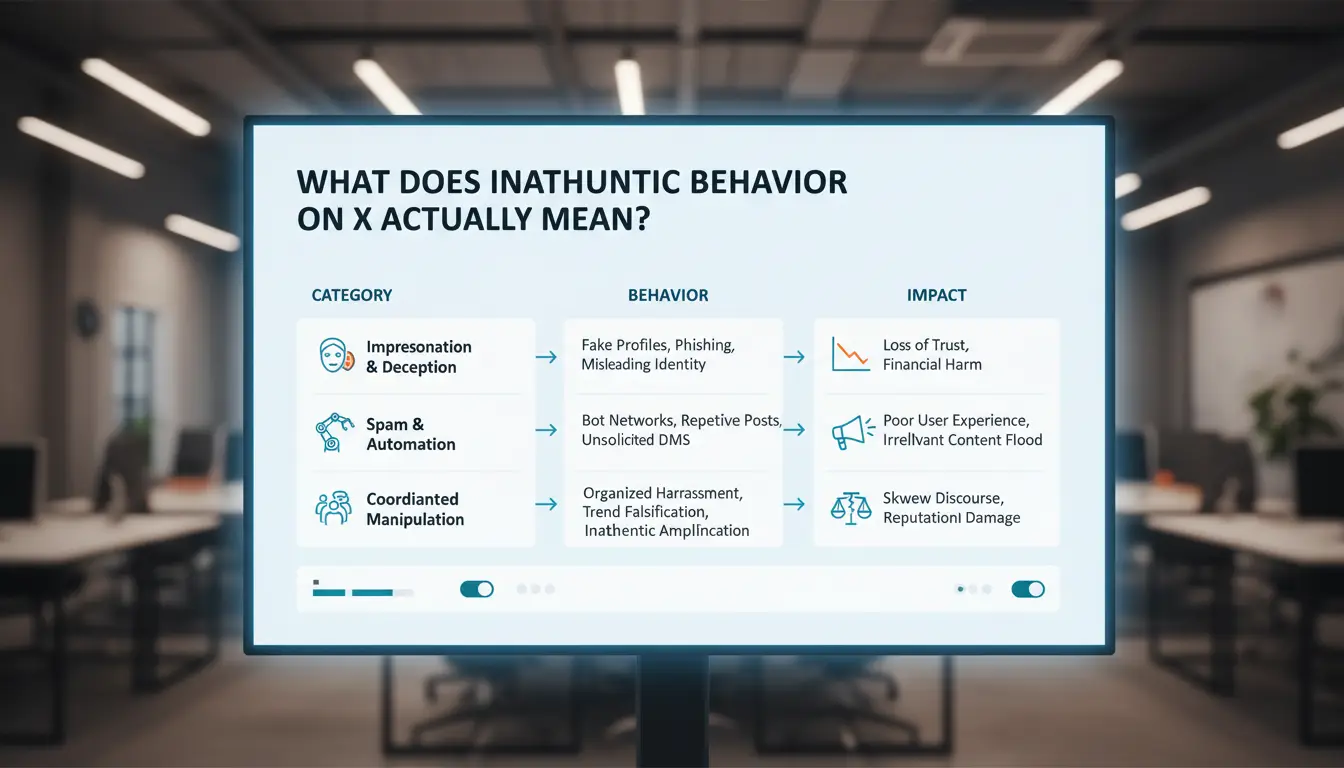
For people searching inauthentic behavior x, X usually means activity that tries to fake real interest, reach, or identity. The rule baseline sits in X Rules enforcement and the Platform Manipulation and Spam policy. The system looks less at one post and more at repeated behavior patterns over time.
How X distinguishes inauthentic behavior from normal growth
X expects uneven growth during real campaigns. What raises risk is repeated, coordinated action that looks machine-led or centrally controlled.
| Pattern |
Likely system interpretation |
| Same reply text across accounts |
Coordinated amplification |
| Fast follow/unfollow loops |
Artificial network shaping |
| Burst activity at fixed intervals |
Automation without human variation |
| Cross-account retweet rings |
Engagement manipulation |
Signals that commonly trigger detection systems
Common triggers include sharp posting velocity jumps, repeated interactions with near-identical text, and overlap between account networks. Access signals also count. If device setup, session history, and proxy location change too fast, risk scores rise. X can map these links even when profile names differ, similar to known social bot detection patterns.
False positives: why legitimate accounts still get flagged
Legitimate accounts get flagged during launches when teams schedule dense threads, bulk replies, or rapid outreach in short windows. That can resemble spam behavior. Automation itself is not always the problem. Misuse is the problem: cloned messages, nonstop loops, and synchronized actions across accounts. Responsible scheduling keeps content varied, slows interaction bursts, and keeps access patterns stable so trust signals can recover.
How can you tell if your account was flagged specifically for inauthentic behavior x?
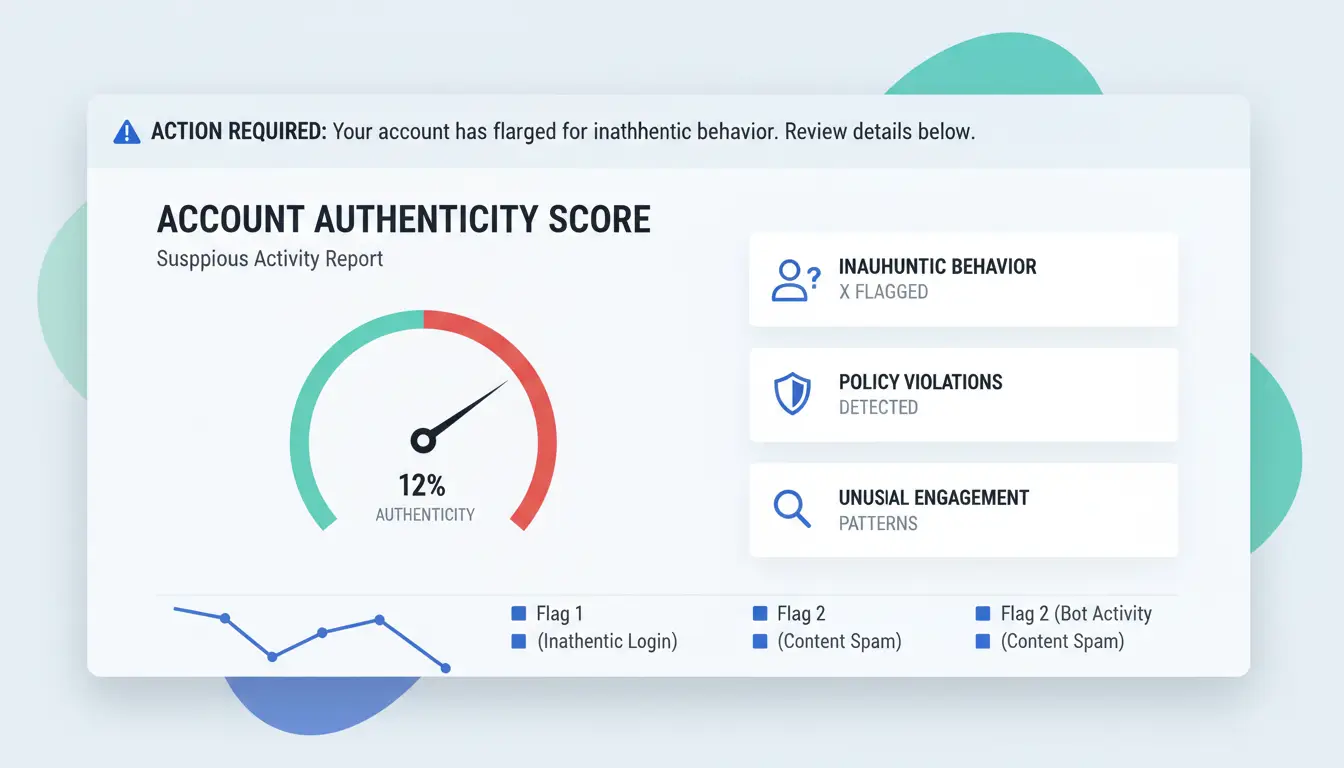
If you suspect inauthentic behavior x, do not start with an appeal draft. Start with the notice text and your account signals. Match the warning language to actual account symptoms before you submit anything.
Read the suspension notice like an investigator
Check the exact wording in your X email or in-app alert. Phrases tied to authenticity enforcement usually reference manipulation, spam patterns, or coordinated activity under X Rules enforcement and platform manipulation and spam.
| Notice level |
What it usually means |
Typical next move |
| Temporary limit |
Action throttled (post, follow, DM) |
Stop automation-like activity, collect logs |
| Lock |
Access blocked pending verification |
Complete checks, review recent login changes |
| Full suspension |
Account disabled for policy risk |
File evidence-based appeal |
Account symptoms that match inauthentic behavior enforcement
Look for a cluster, not one signal: sudden reach drop, repeated “action not allowed,” forced phone/email checks, or frequent CAPTCHA loops. Content-policy strikes usually point to specific posts. Authenticity strikes usually point to behavior patterns: rapid follows, repeated identical replies, or device/proxy switching across short sessions.
Quick evidence checklist before you take action
Pull these records before you appeal:
- Recent login locations, devices, and session times
- Connected apps and revoked permissions
- Posting and follow/unfollow timeline for the last 7–14 days
- Any team access log showing who touched the account and when
This package helps reviewers verify that your issue is tied to inauthentic behavior x, not a separate content violation.
What should you do in the first 24 hours after an inauthentic behavior x suspension?
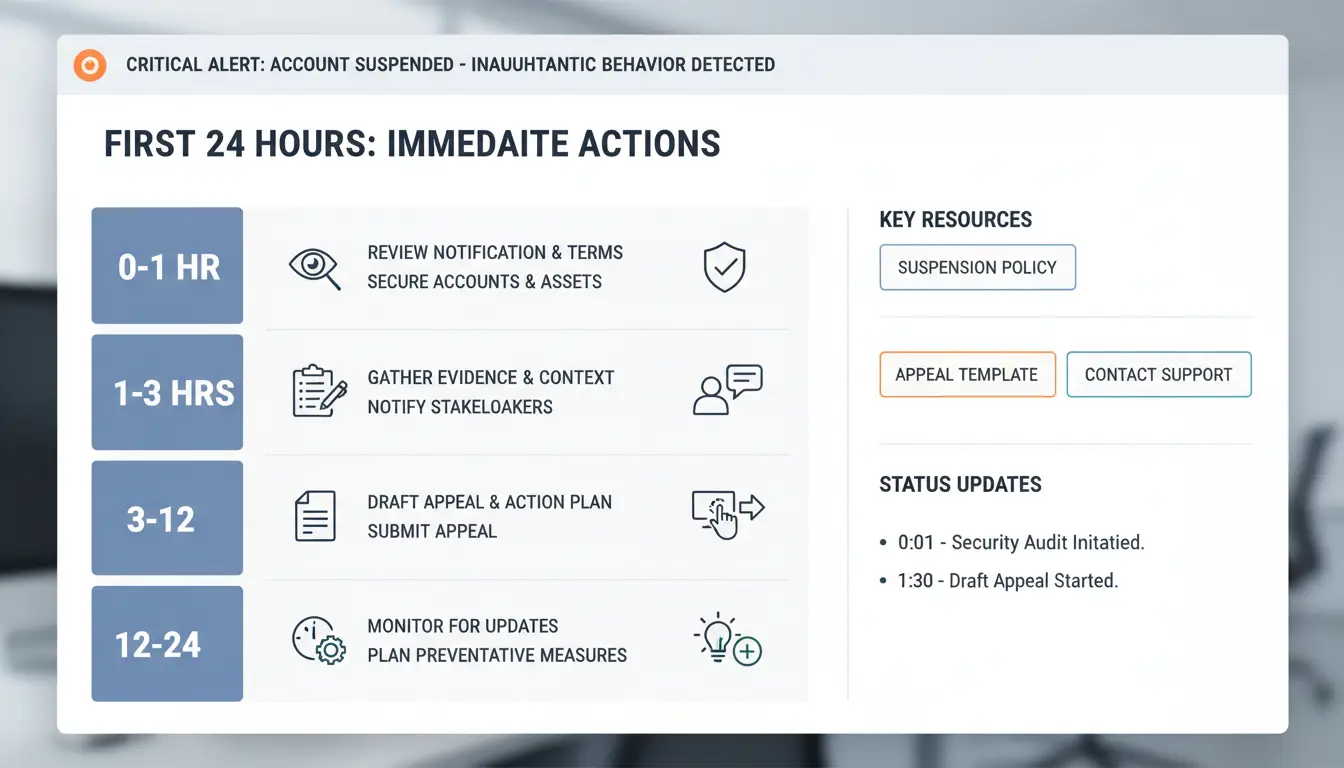
If you got an inauthentic behavior x suspension, treat the next 24 hours as evidence work, not debate. You need to lock access, preserve records, and send one clean appeal that a reviewer can verify fast.
Stabilize the account before filing anything
Change the account password, then secure the recovery email and phone linked to X. Turn on two-factor authentication on X. Revoke access for old tools or unknown connected apps from account settings. If one app posted in bulk, note that in your timeline.
Stop all posting, follow/unfollow waves, and repeated login attempts from new devices. Do not run automation while the case is open. If a team works on one account, freeze shared access until roles are clear. Keep one operator on the appeal thread to avoid mixed messages.
Collect and organize evidence for your case
Build a short timeline from 48 hours before suspension to now. Include login times, device used, IP region, posting actions, and any tool change. Keep it factual and short.
Save screenshots of the suspension notice, recent activity, connected app list, and account settings. Export any internal logs from your social workflow tool. If you manage accounts with isolated browser profiles and audit logs, keep those records ready; they help explain normal team operations.
Store files in one folder named with date and account handle. Add a one-page summary so you can paste facts quickly into the form.
Submit the first appeal with the right sequence
Use the official X account access appeal form. In your message, state ownership proof, what changed before suspension, what actions you paused, and what controls you added after review.
For inauthentic behavior x cases, one complete ticket beats repeated short tickets. Duplicate submissions can split context and slow manual review. After submitting, monitor email and X rules and policy notices, then reply only when X asks for more details.
How do you write an appeal that gives X enough context to review your case?
Use a clear appeal structure reviewers can scan quickly
Write your appeal in four short blocks:
- Event: date, time, and what you saw (lock, challenge, or suspension notice).
- Cause context: what changed before the flag (new device, new proxy location, team shift, post spike).
- Fixes done: password reset, session logout, 2FA enabled, app access removed.
- Request: ask for manual review and account restore.
Keep it under 180 words. Use plain facts, not feelings. A good line looks like this: “On 2026-04-18, my account was locked after two logins from different cities during a team handoff. I reset credentials, removed unknown sessions, enabled 2FA, and paused posting.”
If your notice mentions platform manipulation and spam policy, address that directly. For inauthentic behavior x cases, name the pattern and the fix in the same sentence.
What evidence increases trust during manual review
Attach proof reviewers can verify fast:
- Ownership: original email domain access, phone confirmation, past billing or ad account tie, prior handle history.
- Security cleanup: screenshot or log of password reset, 2FA enabled, revoked third-party tokens, session cleanup from compromised account guidance.
- Activity context: posting calendar, campaign window, team roster, and who had access during the flagged period.
If multiple people manage one account, show that you changed operations, not just the password. You can use DICloak to keep separate browser profiles, fixed proxy routes, and permission-based team access, then mention that control update in the appeal.
Common appeal mistakes that reduce approval odds
Emotional claims, vague text (“I did nothing wrong”), and mixed timelines lower trust. Do not submit repeated short appeals every few hours. That can look like low-quality spam in X account access forms. Send one clean packet, wait for response, then send one update only if new evidence appears.
Why do some accounts get flagged again after recovery, and how can you avoid it?
After reinstatement, X often tracks behavior patterns, not one isolated action. If your account returns to the same signals that caused the lock, review systems can flag it again as inauthentic behavior x. Keep the comeback phase slow, varied, and human.
The risky behaviors that trigger fast re-enforcement
Accounts get re-flagged when activity jumps from near zero to high volume in one day. Common triggers include posting every few minutes, repetitive replies, and follow/unfollow loops. Reusing the same automation pattern that failed before also raises risk. X treats these patterns as manipulation under its platform manipulation and spam policy. Do not restart old scripts until you change timing, action mix, and volume.
A 14-day warm-up plan for safer account normalization
Days 1-3: browse normally, like a small set of relevant posts, and write manual replies. Days 4-7: add 1-2 original posts daily, spaced out by several hours. Days 8-14: increase activity slowly, vary content type, and keep normal reading sessions between actions.
Use a balanced mix of posting, replies, and quiet browsing. That mix reduces repeat inauthentic behavior x signals.
How to monitor early warning signs before another lock
Track action friction: captcha prompts, failed follows, delayed visibility, or extra login checks. If these appear, pause posting for 24-48 hours and audit your workflow. If a team works on one account, you can use DICloak to isolate browser fingerprints, bind stable proxies per profile, and review operation logs before resuming.
How can teams managing multiple X accounts reduce inauthentic behavior risk at scale?
Why team workflows often trigger authenticity risks
X flags patterns, not intentions. If one team logs into several accounts from mixed devices and changing networks, activity can look coordinated under platform manipulation rules and automation guidance-automation). That is where inauthentic behavior x risk rises fast.
Permission mistakes add another risk. Two teammates can post the same template, follow the same targets, or retry failed actions at the same time. Those duplicate footprints look synthetic, even if your team had normal intent.
Use DICloak to isolate account environments and control access
One account should equal one stable environment. You can use DICloak to assign a dedicated browser profile and fingerprint per X account, which reduces profile crossover linked to browser fingerprinting. You can also bind one proxy to one profile, then lock access with role-based permissions. Give editors posting rights, keep billing or recovery settings for admins only. Operation logs create accountability. If a spike happens, you can trace who did what and when, then correct the exact workflow step.
Set repeatable team operations with less manual error
Use fixed profile sharing rules: one owner, one backup, clear handoff time. Use batch actions only for low-risk tasks like draft tagging, not live engagement bursts. For repetitive safe tasks, use RPA with timing gaps and account-specific templates so actions do not fire in the same sequence across accounts.
| Common trigger |
Team-safe setup |
| Shared browser session |
Isolated profile per account |
| Random network changes |
Fixed proxy per profile |
| Staff overlap |
Role permissions + logs |
| Repeated manual clicks |
RPA with varied timing |
What does a safer weekly workflow look like to prevent inauthentic behavior x?
Plan content and engagement cadence to look human, not scripted
Set a 7-day activity plan per account role. Keep a simple mix: original posts, replies, reposts, and passive time (reading, scrolling, bookmarking). A practical split is 2 original posts, 8–12 replies, and daily passive sessions. Avoid mirrored timing across profiles. If five accounts post the same format within minutes, risk goes up under X platform manipulation rules. Consistency beats volume when you want lower inauthentic behavior x risk.
Run a weekly risk audit for device, access, and behavior consistency
Use one checklist every week: login city history, active sessions, connected apps, post pacing, and action diversity. Remove unknown app access in X connected app settings. Tools like DICloak let you map one X account to one isolated browser profile, each with its own fingerprint and proxy. That setup reduces cross-account linkage from shared devices. You can use DICloak team permissions, profile sharing controls, and operation logs to limit who can post, who can edit settings, and who can only view. For repeated tasks, use batch actions or RPA so staff follow the same pace and click path each week.
Create escalation rules for sudden warning signs
Define triggers: unusual login alert, sudden reach drop, action block, or forced challenge. Slow posting for 48 hours, pause high-risk profiles, and keep normal behavior on clean accounts. Log each incident with timestamp, IP region, action type, and fix steps. That record speeds future appeals and prevents repeat mistakes.
When should you keep appealing vs start over with a new account strategy?
If your lock reason points to inauthentic behavior x, decide with cost, not hope. Check policy fit in X Rules enforcement and the Platform Manipulation and Spam policy.
Decision criteria: account equity, audience value, and time cost
Use this filter before sending another appeal.
| Check |
Keep appealing |
Start over |
| Account equity |
Brand handle, old posts, and mentions still bring traffic |
New handle can rebuild reach faster |
| Audience value |
Followers still reply and click |
Audience is inactive or low trust |
| Time cost |
You can wait for review after one clean appeal |
You need daily publishing now |
If two checks land on “start over,” stop repeated appeals and rebuild. Repeated tickets without new proof rarely change outcomes. Use one clear package in the suspended account process: ownership proof, access history, and normal-use intent.
If rebuilding, how to avoid repeating old risk patterns
Treat the old lock as a risk map for inauthentic behavior x. Reset device and browser profile signals, keep one proxy per account, slow posting pace, and avoid sudden follow spikes. Keep one operator per account until trust recovers.
How to protect brand continuity during transition
Tell users where the new account is through your site, email list, and pinned posts. Keep naming, tone, and posting rhythm close to the old account. Preserve media files and team approval steps so errors do not repeat.
Frequently Asked Questions
How long does an inauthentic behavior x appeal usually take?
Most inauthentic behavior x appeals are reviewed in 24–72 hours, but complex cases can take 7–14 days. Time grows when signals conflict, documents are missing, or many accounts are linked. While waiting, stop risky activity, secure the account, gather login and device records, and reply quickly to any support request.
Can inauthentic behavior x happen even if I did not use bots?
Yes. inauthentic behavior x can be triggered by human actions that look automated. Examples include posting the same text across profiles, following or unfollowing in bursts, repeating identical hashtags, or logging into many accounts from one browser session. Rapid, patterned actions can match spam signals even without bot software.
Will using proxies alone prevent another inauthentic behavior x flag?
No. Proxies reduce IP overlap, but they do not fix poor behavior quality. X still reviews timing, content similarity, device fingerprints, and account links. If your team posts cloned replies or acts on a rigid schedule, another inauthentic behavior x flag can happen even with clean proxy routing.
Is inauthentic behavior x enforcement the same in every country?
Core rules are global: fake engagement, coordination to mislead, and account farming are banned everywhere. Regional differences appear in identity checks, document types, and legal response timelines. A country may require extra verification or data handling steps, so enforcement flow can differ even when the inauthentic behavior x policy is the same.
Can one team safely handle many profiles without triggering inauthentic behavior on X?
Yes, if operations are structured. Give each profile its own browser profile, cookies, and recovery data. Limit who can post, approve high-risk actions, and map clear role permissions. Keep distinct voice and timing per profile, avoid cross-post cloning, and store audit logs so you can explain activity during an inauthentic behavior x review.
The key takeaway is that inauthentic behavior x may create short-term visibility, but it steadily erodes credibility, trust, and long-term growth. Teams that prioritize transparent communication, consistent values, and accountable practices are far more likely to build durable relationships and sustainable results. Try DICloak For Free
 Web Proxy Tools
 Free Tools
 Cookie Plugin
 UA Generator
 MAC Address Generator
 IP Generator
 IP Address List
 2FA Code Generator
 World Clock
 Anonymous Check
 WebRTC Leak Test
 UUID Generator
 Free Web Proxy Site
 Proxy Checker
 FB Ad Checker
 AI Web Scraping
 Free SMM Tools
 Twitter Shadowban Checker
 Instagram Name Checker
 UTM Generator
 Username Generator
 AI Hashtag Generator
 LinkedIn Headline Generator
 Social Media Image Resizer