Sharing your Imini account can be a great way to collaborate with others, whether you're working on a project, sharing resources, or simply helping someone out. But when you share Imini account, it's important to ensure that your data and privacy are kept safe. There are several ways to do this, and in this guide, we'll cover the benefits of sharing your account, who you can share it with, and how to do so securely. Plus, we'll show you how DICloak's features can make the sharing process safer and easier. Let’s dive into the best practices for Imini account share, so you can work together without compromising your security.
What Is an Imini Account?
An Imini account is your personal login to the iMini AI platform. iMini is an all‑in‑one AI assistant that helps with many tasks like writing, research, images, slides, and videos—all from one place. You can type simple prompts and get work done fast. It combines many tools into one user‑friendly interface.
An Imini account lets you save your settings and access your project history. You sign in with your email and password. Some people use the free plan, while others pay for more features like extra credits or priority support.
Sharing an Imini account means letting someone else access the same login details. In this article, share Imini account means you give a friend or teammate access to your Imini tools. This can be useful but must be done carefully so your data stays safe.
Benefits of Sharing Your Imini Account
Sharing your Imini account can help you and others work together. Many small teams use imini shared accounts so everyone can use the same tools without buying multiple plans. For example, two students might share one Imini Pro subscription to split cost while writing school papers. Another example is a small business owner who shares one account with an assistant to create social posts and reports together.
Here are the main benefits:
- Save money: You pay less when more people use one plan.
- Work together: Multiple people can see the same prompts and results.
- Fast help: A friend or coworker can edit or improve your work when needed.
These benefits make imini account share useful for friends, learners, and small teams. Still, it should be done in a way that protects your login details and keeps your work private.
Who Can You Share Imini Account With?
You should only share Imini account with people you trust. This could be:
- Close friends: People you know well and trust with personal info.
- Family members: Siblings or spouse who help with projects.
- Teammates: Colleagues on a school or work project who need access.
For example, a content creator might share Imini account with their editor so the editor can revise posts directly. A design student might share Imini account with a classmate to split subscription costs. But do not share with strangers, public groups, or people you don’t know well. Account sharing can risk your personal data and, in some services, may go against official rules. Always read iMini’s terms of service to understand what is allowed.
Security Considerations When Trying to Share Imini Account
Sharing your Imini account login details comes with risks. The most obvious is unauthorized access. If someone else gets your password, they can view or change your private information. For example, a shared account at school or work can be hacked if someone clicks a fake email link, giving criminals access to your account.
Another risk is identity theft. Personal details in your Imini shared account, like your email or billing info, could be used to hack other accounts. Criminals often use this information to guess other passwords.
Sharing an account also makes it harder to track who did what. If something goes wrong, like unauthorized messages or deleted files, you won’t know who is responsible.
Lastly, many platforms, including Imini, have rules against sharing account details. Violating these rules can result in a locked or banned account.
To stay safe, think carefully before sharing your Imini account. In the next section, we will cover how to share Imini account securely.
Methods to Share Imini Account
After talking about security risks of sharing your Imini account, let’s look at how some people try to share Imini account access in safer ways. Many users want to give access without losing control of their personal info. Below are common methods people use for account sharing, with real‑world examples and key tips you can learn from.
1. Use Password Manager for Secure Sharing
Instead of writing your login info in a message, some users use a password manager. A password manager stores your password securely and can share login info safely with others. Tools like Bitwarden or Keeper can let you share credentials without exposing the real password in plain text. For example, a small team at work might use a password manager so each member can open the imini account share login from their own device. This way, the password stays encrypted and hard for outsiders to see. Secure password sharing tools are often recommended by cybersecurity guides for safer account access.
2. Two‑Factor Authentication (2FA)
When you share Imini account, enabling two‑factor authentication (2FA) adds a second layer of security. With 2FA, a user needs both a password and a second proof of identity (like a code on a phone) to log in. This means even if someone gets your password, they must still provide the extra code to access the account. For instance, a freelance writer sharing an Imini login with an assistant might keep 2FA turned on. Then, every time the assistant logs in, a code is sent to the owner’s phone. This extra step protects the account even during sharing. Experts say 2FA drastically reduces account takeover risk.
3. Rotate or Update Passwords Often
Another method people use for imini account share is changing the shared password regularly. If you must share your login, make a plan to update the password every few weeks or after a project ends. For example, a group of students sharing an Imini subscription during a semester may agree to change the login password at the end of the class project. This reduces the chance unauthorized people keep access long term. While not perfect, experts say frequent updates help limit exposure when accounts are shared.
4. The safest way: Using DICloak Antidetect Browser
The safest and most efficient solution for sharing an Imini account is using an antidetect browser like DICloak. This technology is designed to manage online accounts securely, making it the perfect solution for controlled access. DICloak solves the problems of other methods: your credentials are never exposed, and the user experience is fast and secure without giving others access to your computer.
By creating one dedicated browser profile with a stable proxy and a fixed digital fingerprint, all team members appear to be the same legitimate user when they log in. This single, consistent identity prevents security alerts, forced logouts, and account bans that normally happen when multiple people access an account from different locations.
How DICloak's Features Enable Safe Imini Account Sharing
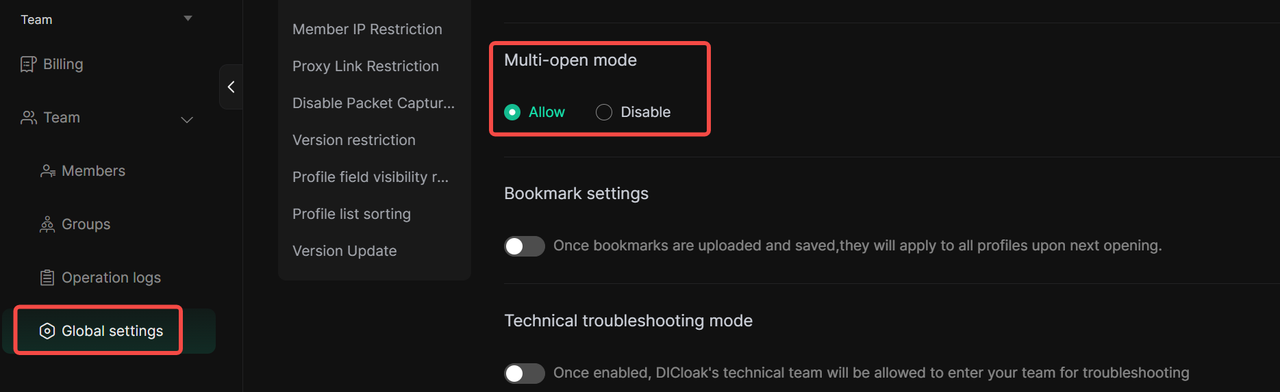
- Simultaneous Access: DICloak’s "Multi-open mode" lets multiple people use the account at the same time without kicking each other out.
- Consistent IP Address: This means that every time your team accesses Imini, it looks like they are logging in from the same computer in the same location. Think of your IP address like a house key. If you use the same key every day, your security system knows it's you. A static proxy ensures everyone on your team uses the same "key," which avoids suspicion.
- Synced Login Status: A "Data Sync" feature saves the login session, so after the first login, team members don't need the password to access the account.
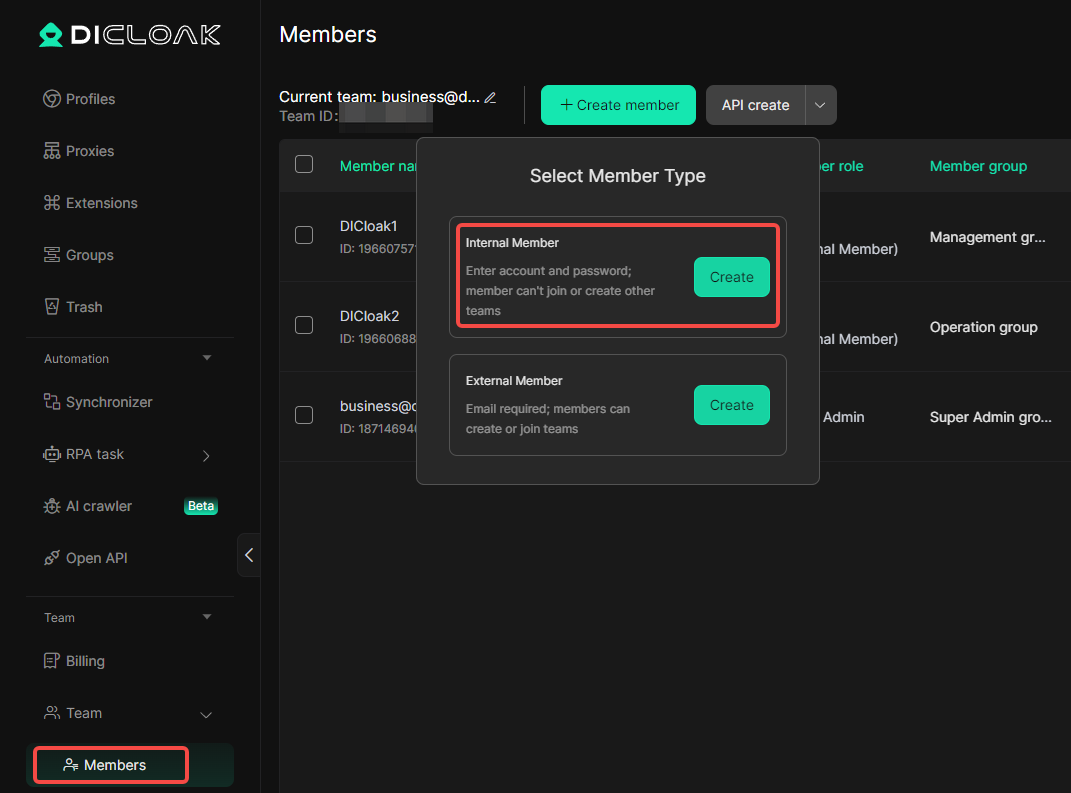
- Secure Team Management: You can create separate member accounts in DICloak and give them access only to the Imini profile, keeping your other online accounts private.
Using DICloak to Share Imini Account Safely (Step-by-Step Guide)
Step 1: Download and Install DICloak
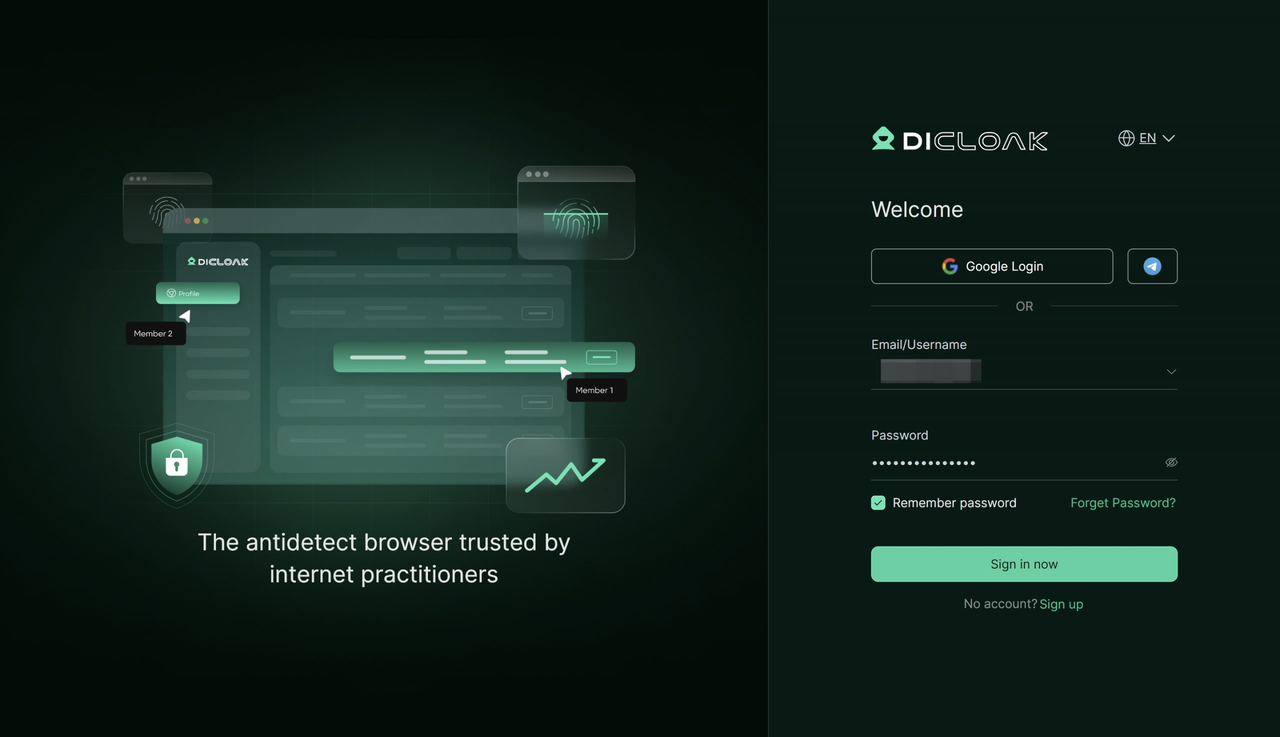
Go to the official DICloak website to register for an account, then download and install the application.
Step 2: Choose a Plan
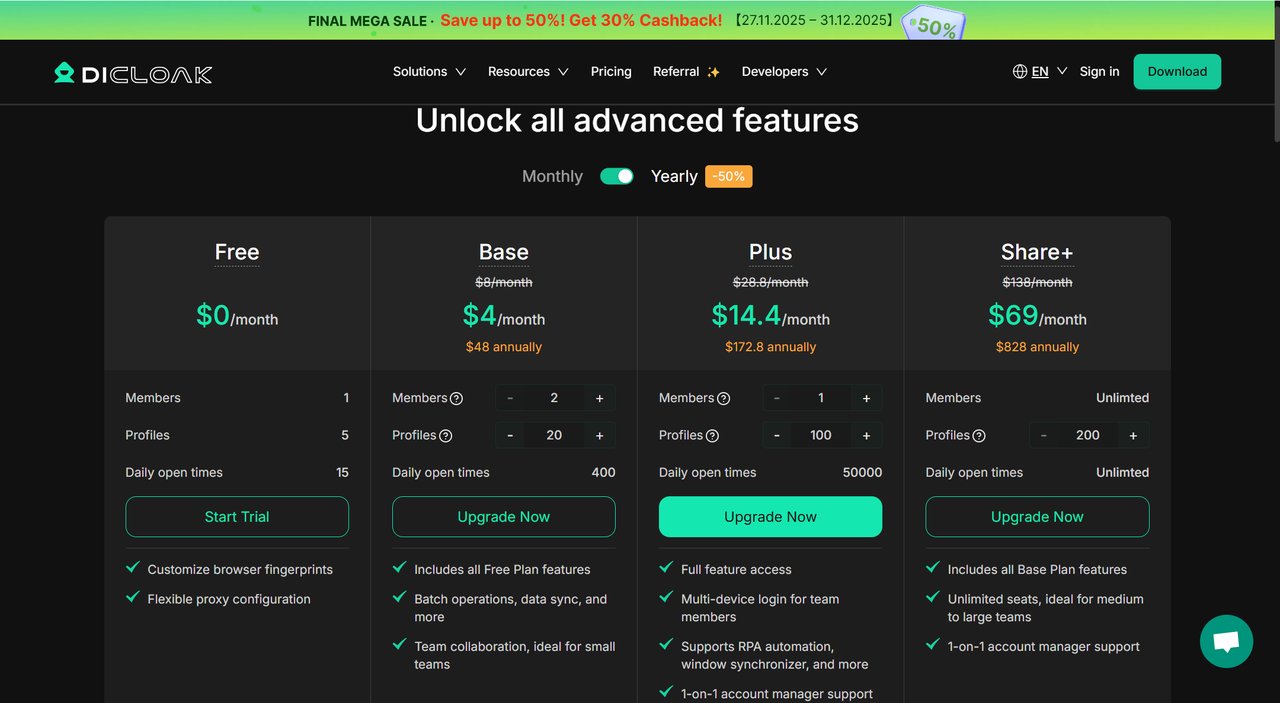
Subscribe to a plan based on your team size. The Base Plan is a good start for small teams, while the Share+ Plan is better for larger ones.
Step 3: Set Up a Static Residential Proxy
This step is highly recommended as it provides a single static residential proxy for your shared profile, which greatly reduces security risks. DICloak does not sell proxies but partners with several third-party providers to make setup easy.
Step 4: Create a New Browser Profile
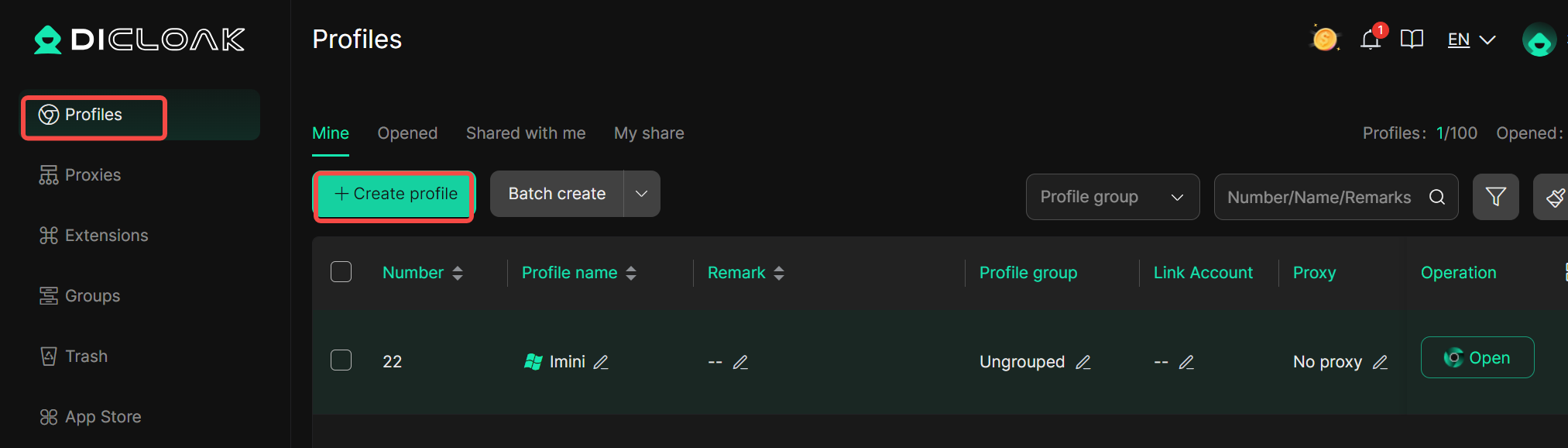
Inside the DICloak application, create a new profile that will be used exclusively for the shared Imini account.
Step 5: Enable Multi-open Mode
Go to [Global Settings], find the [Multi-open mode] option, and select [Allow]. This lets multiple people use the profile at the same time.
Step 6: Log In to Imini
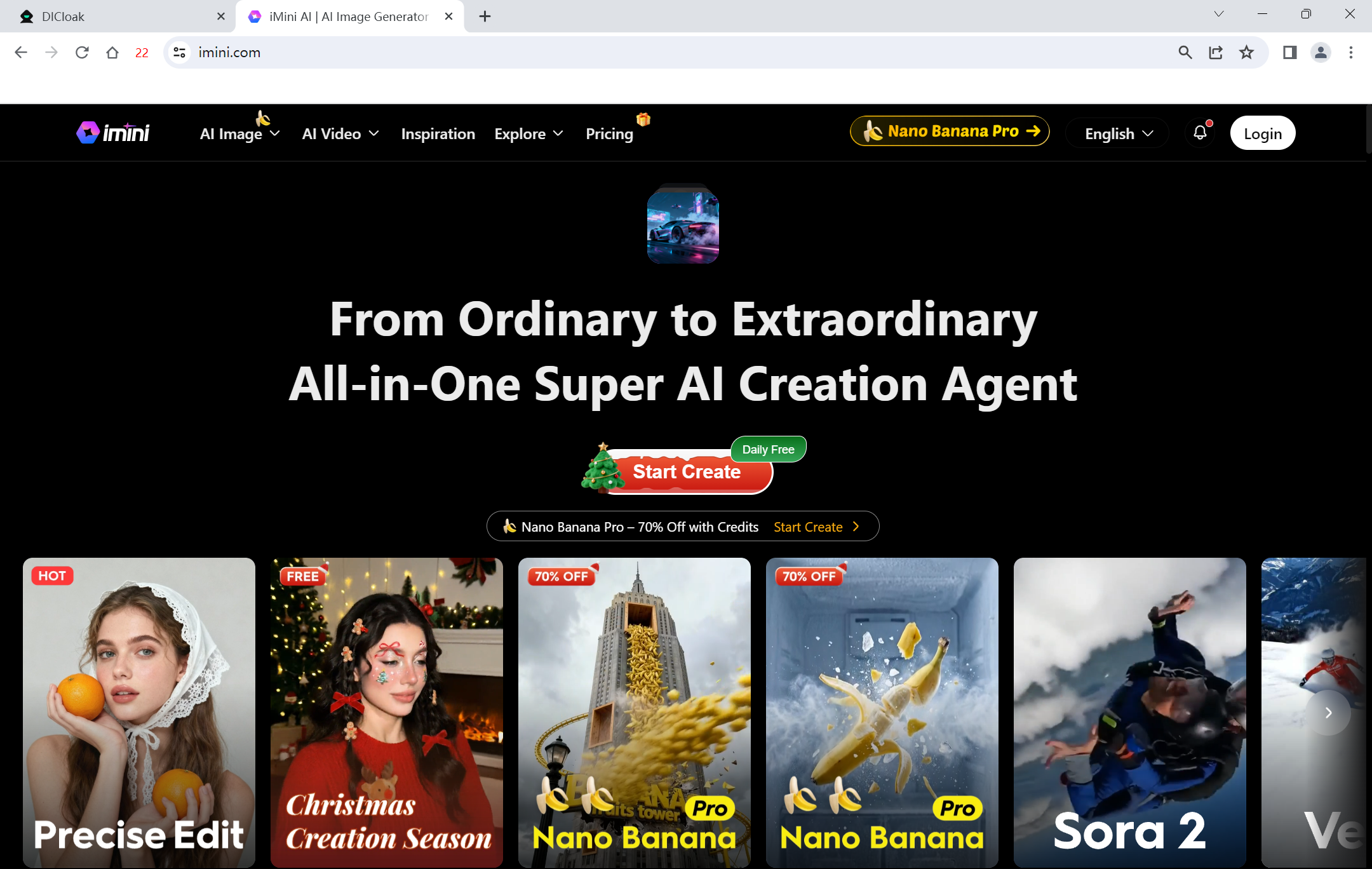
Launch the new profile you created and navigate to the official Imini website to log in.
Step 7: Share the Profile with Your Team
Use the team feature in DICloak to invite your friends or team members.
Step 8: Access the Shared Account
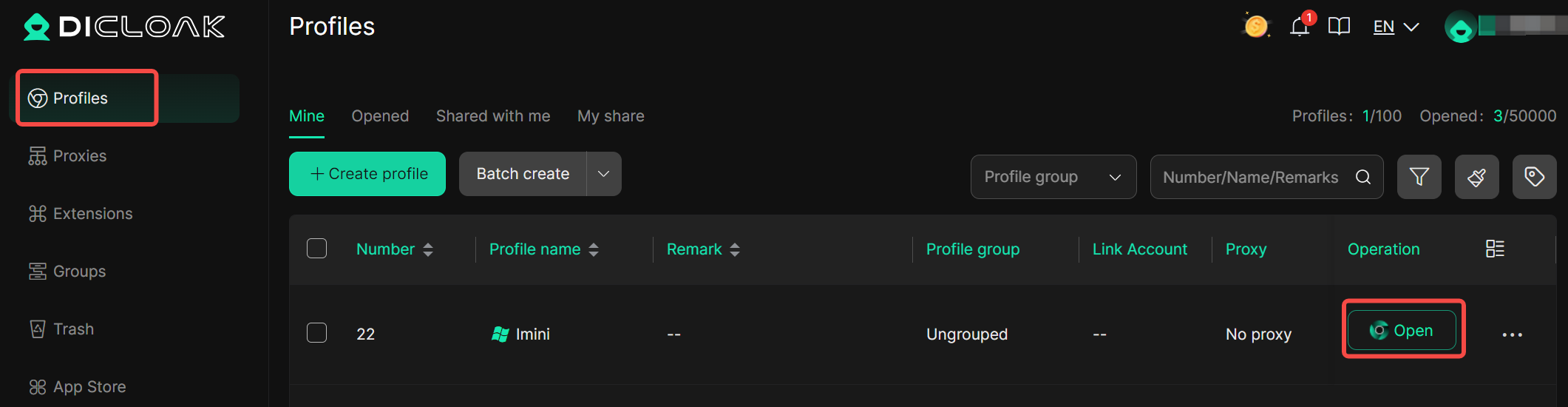
Once your teammate accepts the invitation, the shared profile will appear in their DICloak app. They can open it from their computer to get instant, logged-in access.
Advanced Controls to Protect Your Imini Shared Account
DICloak provides several security features to protect the account owner from misuse.
- Hide the Password: The built-in password manager allows users to log in with a single click without ever revealing the actual password.
- Prevent Cookie & Session Theft: You can block access to browser developer tools and stop users from installing new extensions, which are common ways to steal account data.
- Block Malicious Software: DICloak can block packet capture tools like Wireshark, which are used to spy on internet traffic, protecting your login data from being stolen.
- Restrict Website Access: You can whitelist only the official Imini URL to ensure users cannot navigate to other websites within that profile.
- Hide Sensitive Information: A special feature can hide specific parts of the Imini webpage, such as billing details or account settings, from other users.
Common Issues and Troubleshooting When trying to Share Imini Account
After learning how to use tools like DICloak to share Imini account more safely, you should also know common problems people face when they try to share access. These issues can happen even with care. Knowing how to fix them helps you keep your imini shared account stable and secure.
Account Gets Blocked or Locked
One frequent issue is that the main account gets locked when too many people use it from different devices or locations. Many services watch for unusual login activity to stop hackers. If people log in from many places in a short time, the system may think it is an attack and lock the account. This can happen even when users are trusted. To fix this, use tools like DICloak profiles so logins look consistent. If your account does get locked, follow the service’s recovery steps or contact support to unlock it.
Confusion Over Who Did What
When several people use a shared login, it can be hard to figure out who made changes or mistakes. For example, if one person deletes an important Imini project by accident, the team might not know who did it. This problem makes teamwork harder and can cause lost work. One way to fix this is to assign clear roles. Have one person log major changes and tell others ahead of time. Using a log file or note‑taking habit helps teams track actions better.
Password or Login Details Get Lost
Another issue is losing track of the login info for your imini account share. If you send passwords through email or chat without a tool like DICloak or a password manager, someone may delete the message or forget the password. That leaves the whole group stuck. A good fix is to use secure password managers or shared profile tools that store login info safely. This keeps passwords organized and easy for team members to access when needed.
Accidental Sharing Beyond the Team
Sometimes, the person you shared your login with may share it again with someone else without asking you. This spreads your login details wider than planned and raises security risks. If a password spreads too far, anyone could log into your imini shared account and misuse it. To stop this, agree rules up front about who can use the login. Setting clear boundaries and updating the password regularly helps keep access limited to the right people.
Frequently Asked Questions (FAQs)
FAQ 1: What is the best way to share Imini account safely?
To share Imini account safely, using a tool like DICloak is highly recommended. DICloak helps you create isolated profiles for each user, ensuring that everyone can access the Imini shared account without risking exposure of your personal login details. By using DICloak, you can protect sensitive information while still enabling team collaboration.
FAQ 2: Can I share Imini account with multiple people?
Yes, you can share Imini account with multiple users, but it’s important to do so securely. Use a secure sharing method, like DICloak, to ensure each user accesses the account without compromising security. Imini account share can be safe if you follow the right precautions, like limiting access and using two-factor authentication.
FAQ 3: How can I avoid security issues when sharing my Imini account?
To avoid security issues when sharing your Imini account, always use secure tools like DICloak. DICloak allows you to isolate user profiles and control what each user can access. This prevents accidental changes or data leaks and ensures your Imini shared account remains secure.
FAQ 4: What should I do if my shared Imini account gets locked?
If your Imini shared account gets locked due to multiple logins or suspicious activity, first check if you followed the correct sharing methods. If you used a secure profile manager like DICloak, try resetting your password and contact Imini’s support for assistance. Regularly updating your login details and avoiding excessive logins from different locations can help prevent this issue.
FAQ 5: Who can I trust to share Imini account with?
You should only share Imini account with trusted individuals, such as close friends, family members, or trusted colleagues. Avoid sharing your Imini account with people you don’t know well. To protect your data, use DICloak or similar tools to ensure that account access remains secure and doesn’t expose your personal information to unauthorized users.
Conclusion
Sharing your Imini account can be an efficient way to collaborate with others, but it’s essential to prioritize security. By using tools like DICloak, you can ensure that your Imini shared account remains safe while giving trusted individuals access. Whether you're working with a team or sharing with family, always follow best practices for account protection, including setting clear permissions and utilizing secure password management. By doing so, you can enjoy the benefits of Imini account share without compromising your personal data.
 Web Proxy Tools
 Free Tools
 Cookie Plugin
 UA Generator
 MAC Address Generator
 IP Generator
 IP Address List
 2FA Code Generator
 World Clock
 Anonymous Check
 WebRTC Leak Test
 UUID Generator
 Free Web Proxy Site
 Proxy Checker
 FB Ad Checker
 AI Web Scraping
 Free SMM Tools
 Twitter Shadowban Checker
 Instagram Name Checker
 UTM Generator
 Username Generator
 AI Hashtag Generator
 LinkedIn Headline Generator
 Social Media Image Resizer