What to Sell Online and Where to Sell It
Before you sell online, you need to make two important choices: what you will sell and where you will sell it. These choices are closely connected. A handmade wedding invitation may work well on Etsy, while a common household item may have a better chance on Amazon. A product with a strong brand story may be better suited to your own online store.
The goal is not to find a product that looks popular today. You need a product with real demand, enough room for profit, and a sales channel that matches how people shop for it.
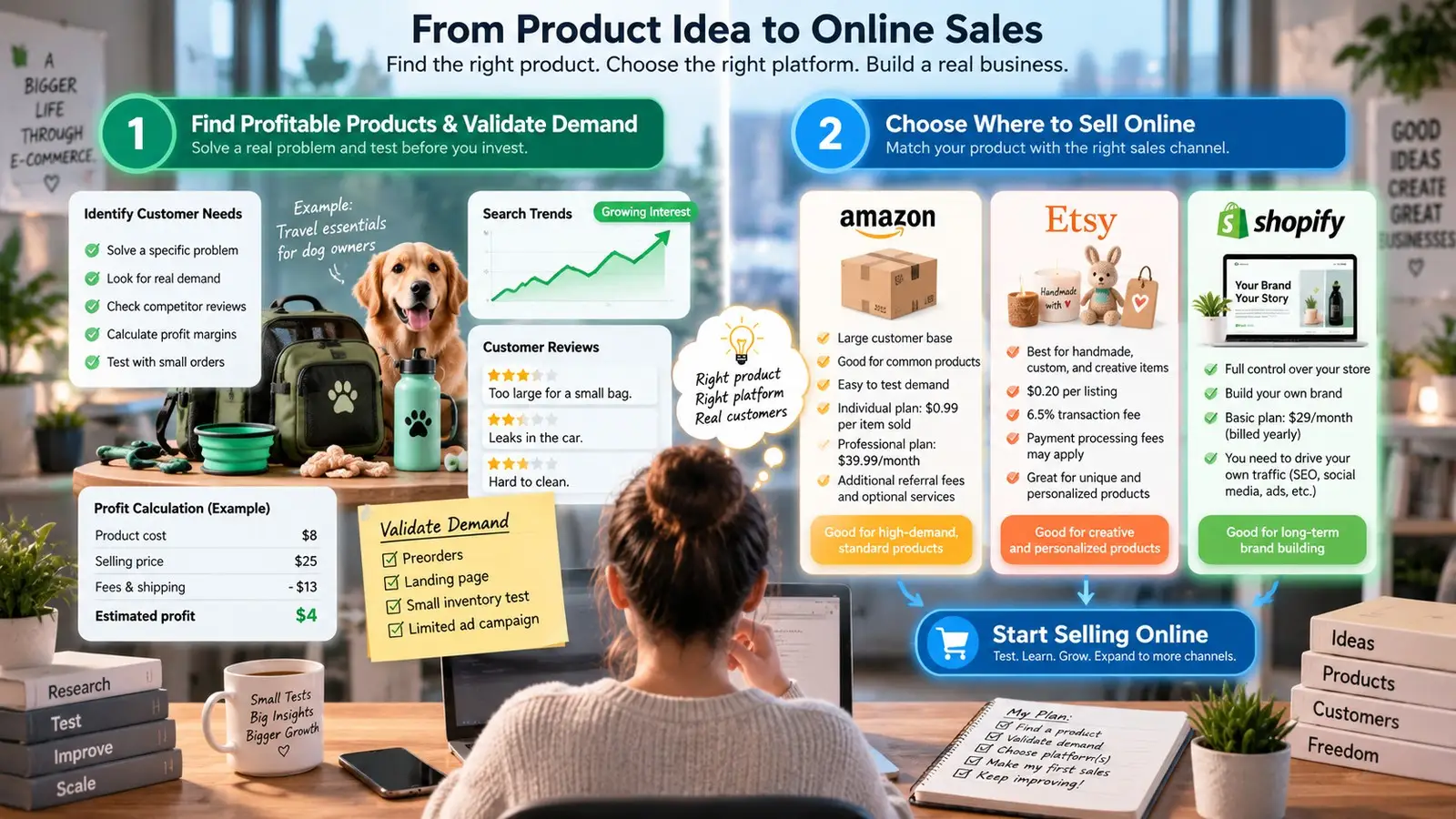
How to Find Profitable Products and Validate Demand
A good product usually starts with a real customer need. It may solve a problem, make a task easier, or serve a group of people who cannot find exactly what they want.
For example, imagine that you want to start selling online in the pet niche. Instead of choosing "pet products" because the category is popular, you could focus on a smaller problem. People who travel with dogs may need portable water bottles, compact food containers, car seat covers, or travel bags. This gives you a clearer customer and a clearer reason for them to buy.
Product research in 2026 should go beyond checking what is trending on TikTok. Shopify recommends looking at customer problems, search trends, marketplace data, competitor reviews, pricing, and profit margins before investing in inventory. Google Trends can also help show whether interest in a product is stable, growing, seasonal, or only rising for a short time.
Marketplace reviews are especially useful. Do not only look at five-star reviews. Read the three-star and one-star reviews too. They often show what current products are missing.
Suppose several popular travel water bottles receive complaints such as "too large for a small bag," "leaks in the car," or "hard to clean." That does not mean you should copy the same product. It shows that customers already buy this type of item but still have problems with it. A smaller, leak-resistant version could give you a more useful product angle.
Next, check whether the numbers make sense. A product can have strong demand and still be a poor business idea.
Imagine you can source a product for $8 and sell it for $25. At first, the $17 difference looks attractive. But you still need to pay for packaging, shipping, payment processing, marketplace fees, returns, advertising, and possibly storage. If those costs total $13, your real profit is only $4.
This is why product validation should happen before you place a large order. Shopify's 2026 product research guidance recommends small tests such as preorders, waitlists, small inventory orders, landing pages, or limited ad campaigns. The purpose is to see whether people will actually take action, not simply say that they like the idea.
For a new seller, 20 real orders can often teach more than hundreds of likes. You may learn that buyers prefer a different color, that shipping costs are too high, or that your original target customer is not the group actually buying the product.
That early data also gives you a better base for future online sales. Once you know which product, price, and customer group work together, you can increase inventory or expand into related products with less guesswork.
Marketplaces vs. E-commerce Platforms
Once you have a product idea, the next question is where to sell it. Most beginners choose between an established marketplace, such as Amazon or Etsy, and an e-commerce platform, such as Shopify.
A marketplace gives you access to people who are already shopping. This can make it easier to test a product because you do not need to build all of your traffic from zero. In return, you follow the marketplace's rules and pay its selling fees.
Amazon, for example, currently offers an Individual plan at $0.99 per item sold and a Professional plan at $39.99 per month, before referral fees and optional services such as FBA or advertising. Amazon says the Individual plan may make more sense if you expect to sell fewer than 40 items per month.
This can work well for a seller testing a common product such as kitchen accessories, office supplies, or fitness equipment. Buyers already visit Amazon to compare these products, so the seller can focus more on the listing, price, reviews, inventory, and fulfillment.
Etsy serves a different type of seller. Its current rules focus on items that are made, designed, handpicked, or sourced by the seller under Etsy's Creativity Standards. That makes it a more natural fit for products such as handmade goods, original designs, personalized gifts, craft supplies, and certain vintage items.
Costs also work differently. Etsy currently charges $0.20 for a standard listing and a 6.5% transaction fee on the total order amount. Payment processing fees and some other charges can also apply.
An e-commerce platform gives you more control. Instead of placing your product inside another company's marketplace, you build your own store, choose the design, control the customer experience, and develop your own brand.
Shopify, for example, currently lists its Basic plan at $29 per month when billed yearly, or $39 when paid monthly in the US. The plan includes a full online store and tools for managing products, orders, and customer information.
The trade-off is traffic. Opening a Shopify store does not automatically bring customers. You usually need SEO, social media, email, paid ads, creator partnerships, or other marketing channels to generate visits.
Consider a seller who makes personalized leather dog collars. Etsy could be useful at first because shoppers already search the marketplace for personalized gifts. After the seller learns which designs perform well and builds a customer base, an independent store could give the brand more control over product bundles, email marketing, repeat purchases, and the overall shopping experience.
You also do not have to choose only one channel. Many businesses start on a marketplace and later add their own store. Others use Amazon, Etsy, and a branded website at the same time.
However, every extra sales channel adds work. You need to track products, orders, inventory, customer messages, and different online seller accounts. For a solo seller with five products, this may still be simple. For a team running several stores or brands, account organization becomes much more important.
The best place to sell online therefore depends on the product and the stage of your business. A marketplace can help you reach existing shoppers and test demand faster. Your own e-commerce store gives you more control over your brand and customer relationship. Many successful sellers eventually use both rather than treating them as competing choices.
How to Set Up Your Store and Start Selling Online
Once you know what to sell and where to sell it, the next step is building an e-commerce store that people can actually use. You do not need a perfect website before you sell online. Spending months polishing small design details can delay the feedback you really need from customers. What matters more is whether someone can understand your product, trust your store, choose the right option, pay without trouble, and know when the order will arrive.
Your first version should be simple but complete. Once real buyers start using the store, their questions, abandoned carts, support messages, and orders can show you what needs improvement. This gives you a better way to improve the store than trying to guess what customers want before launch.
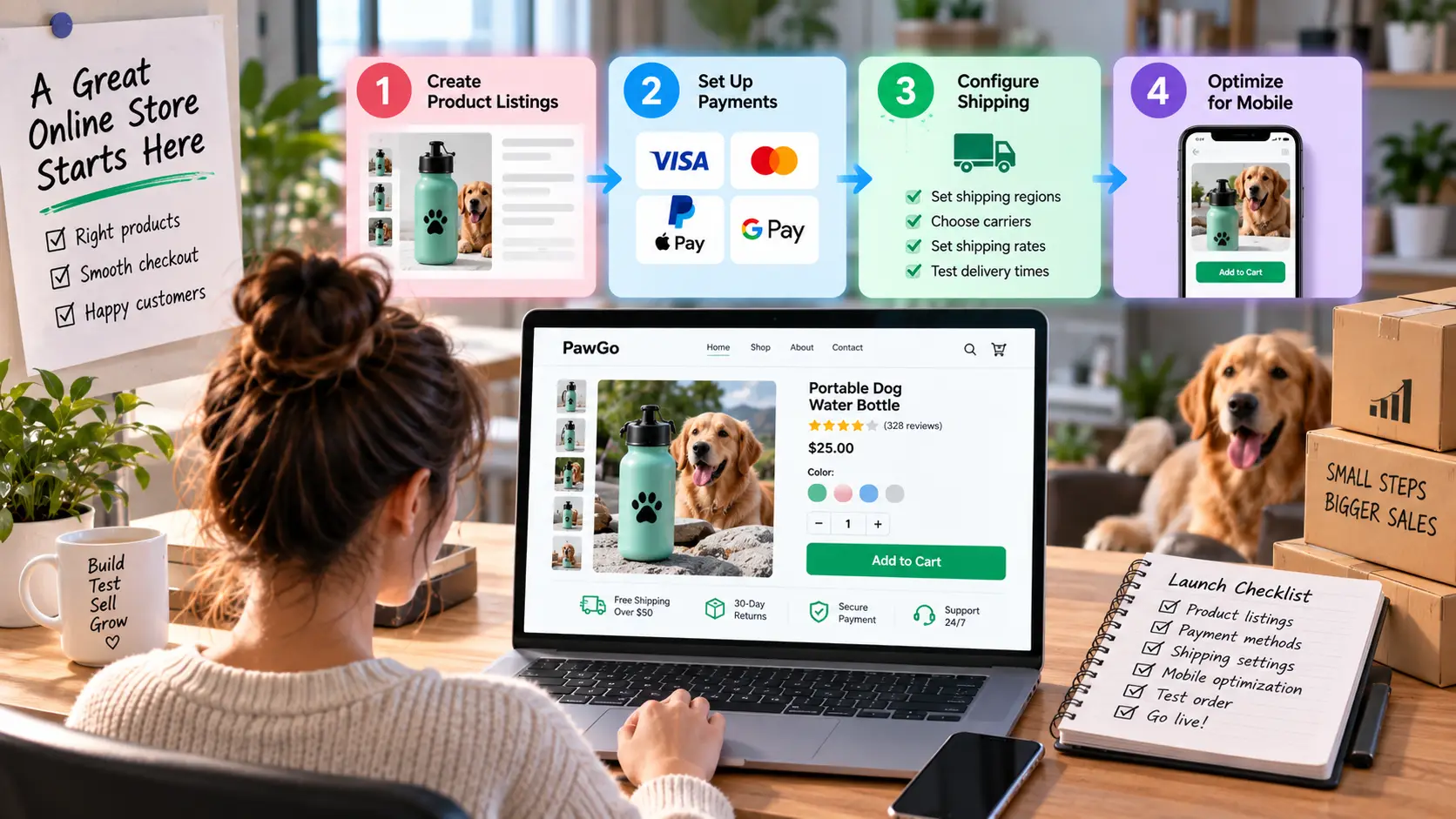
Create Product Listings, Payments, and Shipping
A strong product listing should answer the main questions a buyer may have before spending money. What is the product? Who is it for? What problem does it solve? What size is it? What is included? How much does it cost? When will it arrive? What happens if the customer wants to return it? Clear answers remove uncertainty and make it easier for shoppers to decide.
For example, a listing for a portable dog water bottle should do more than say "500 ml, available in three colors." A useful description could explain that the bottle is designed for walks and road trips, has a leak-resistant lock, fits in many car cup holders, and lets unused water flow back into the bottle. Photos could show the bottle in a backpack pocket, inside a car cup holder, and being used by a dog outdoors. That gives shoppers practical information instead of only product specifications.
Product photos deserve the same attention. Include a clear main image, several useful angles, a size comparison, and at least one real-life use case when possible. If size matters, show the measurements visually instead of hiding them deep in the description. A shopper looking at a dog travel bag, for example, may want to know whether it can hold food, a bottle, a leash, and a small towel.
You should also make key store policies easy to find. Before selling online, prepare clear information about shipping, returns, refunds, delivery times, and customer support. Buyers should not need to search through several pages just to find out whether an item can be returned or when it is expected to arrive.
Payment setup is another area that needs real testing. Depending on your platform, location, and payment provider, customers may be able to use cards, PayPal, Apple Pay, Google Pay, or local payment methods. Do not assume a payment option works simply because it appears in your settings. Place a test order and check whether the correct price appears, discounts work, tax and shipping are calculated properly, the payment is accepted, inventory updates, and the confirmation email contains the right information.
This becomes even more important when you manage several stores or online seller accounts. One wrong payment or shipping setting can affect many orders before anyone notices. A simple test before launch can save much more time than fixing customer complaints later.
Shipping should also be planned before you bring in traffic. Decide where you will ship, which carriers or fulfillment services you will use, and how customers will pay for delivery. Common choices include flat-rate shipping, free shipping above a minimum order value, and carrier-calculated rates. The right choice depends on product size, order value, and your profit margin.
Imagine your average shipping cost is $6 and your average order is $35. Offering free shipping on every order may cut too deeply into your margin. A "free shipping over $50" offer may work better because some shoppers may add another item to reach the threshold. However, you still need to test the numbers. If that second item is heavy and pushes shipping from $6 to $11, the larger order may not be as profitable as it first appears.
Product weight and package dimensions also need to be accurate. Wrong values can create incorrect shipping rates, especially when customers buy several items together. Before sending paid traffic to the store, place test orders with different products, addresses, discounts, and payment methods. Try one small item, two products together, a high-value order, and an order going to a distant region.
A soft launch is useful for finding these problems early. Ask a small group of people to complete real or test purchases and watch where they hesitate. If several people stop at the same field, cannot find shipping details, or ask the same question, that is a sign the store needs improvement before you spend more money on traffic.
Checkout friction is still a major problem for online stores. Baymard's research has found an average cart abandonment rate of around 70%, and its usability studies show that checkout design itself can cause shoppers to leave. For a new seller, fixing one confusing checkout step can sometimes have more impact on online sales than redesigning the entire homepage.
Build a Mobile-Friendly Shopping Experience
Many customers will discover your products through TikTok, Instagram, Google, email, or ads and open your store directly on a phone. That means mobile usability should not be treated as a smaller version of desktop design. A store may look polished on a large screen but still be difficult to use on a phone.
Start by opening your store on a real mobile device. Check whether the product name and price are easy to see, images are simple to swipe through, and options such as size or color are easy to select. The Add to Cart button should be large enough to tap without zooming, and important information should not be buried under long blocks of text.
Think about a real buying situation. Someone may see your portable dog water bottle in a TikTok video while riding a bus. They click the link and want to buy it before reaching their stop. If the page takes too long to load, they may leave. If they cannot tell whether the bottle is 300 ml or 500 ml, they may wait. If the Add to Cart button is hidden far below the product description, they may never reach it.
For this reason, the first part of the product page should focus on what the shopper needs to make a decision. This usually includes the product name, main image, price, key options, a short value statement, delivery information, and a clear Add to Cart or Buy button. More detailed specifications and supporting information can appear further down the page.
Page speed matters too. Large images and autoplay videos may look impressive, but they can make mobile shopping feel slow. Compress product images without making them blurry, and avoid loading several heavy videos at once. A beautiful page is not very useful if shoppers leave before it finishes loading.
Checkout deserves even more attention because typing on a phone takes effort. Every unnecessary field adds friction. Baymard's checkout research has found that some shoppers leave because checkout feels too long or complicated, so keeping forms simple can make a real difference.
Guest checkout is especially useful for first-time buyers. Do not force customers to create an account unless there is a strong reason. Someone who only wants to make one purchase may not want another password or registration step. You can always offer account creation after the order is complete.
The final price should also be clear before payment. A shopper who sees a $25 product may feel misled if the total suddenly becomes $39 after shipping and fees appear at the last step. You cannot always remove these costs, but you can explain them earlier so the customer knows what to expect.
Payment errors also need testing. Try entering an incorrect card number, leaving a required field blank, or using an invalid discount code. The error message should explain what went wrong and how to fix it. A vague message such as "Something went wrong" may leave buyers unsure whether the payment failed or whether they were already charged.
Finally, complete the whole purchase on your own phone, then ask someone who has never seen the store to test it without your help. Watch whether they can find shipping details, choose a product option, add the item to the cart, understand the total cost, and complete payment without asking questions.
These small tests matter because a store does not become easy to use just because it looks professional. When you sell online, the strongest stores remove uncertainty at every step with clear product information, predictable shipping, familiar payment methods, and a simple checkout. That creates a smoother path from product discovery to payment and gives you a better foundation for growing future online sales.
How to Get More Online Sales and Keep Customers
Once your store is ready, the next goal is simple: bring in buyers and give them a reason to return. More traffic can help, but strong online sales depend on three things working together: marketing, pricing, and customer experience.
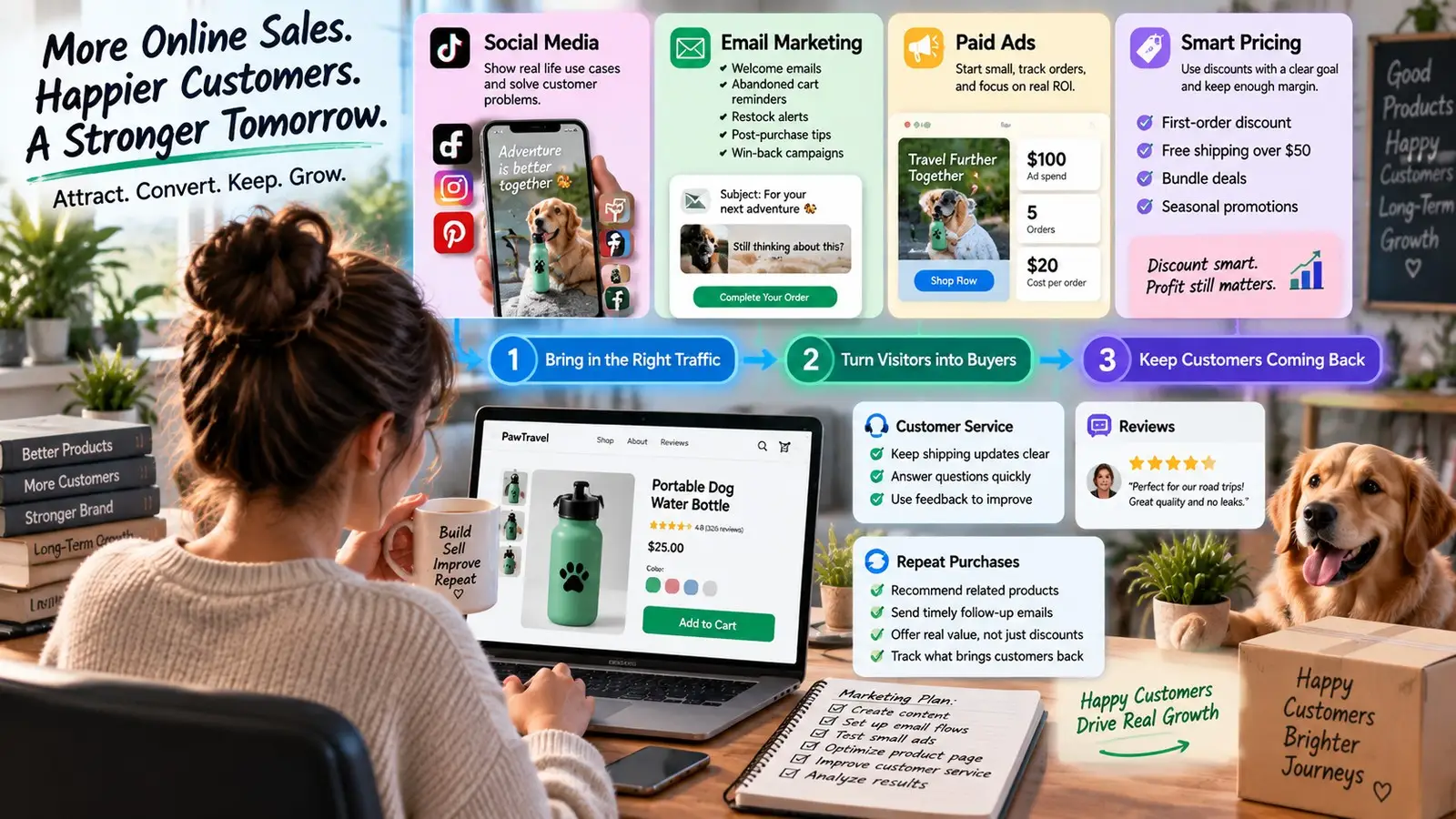
Use Social Media, Email, Paid Ads, and Smart Pricing
Social media is useful for showing how a product fits into real life. Instead of posting the same product photo again and again, create content around the problem it solves. A store selling portable dog water bottles, for example, could post a short video about preparing for a road trip with a dog. The product appears naturally as part of the solution.
Email works well for people who already know your store. You can use it for welcome messages, abandoned cart reminders, restock alerts, and post-purchase tips. Shopify's 2026 guidance also highlights automated flows such as welcome emails, cart reminders, and win-back campaigns.
Paid ads can bring traffic faster, but they only make sense when your product page and checkout already work well. Start small and track orders, not just clicks. If you spend $100 on ads and get five orders, your cost is $20 per order. Compare that with your real profit before increasing the budget.
Pricing matters just as much. Do not use discounts simply to make a product look cheaper. Use them for a clear goal. A first-order discount can help attract new buyers, while free shipping over $50 may increase order size. When you sell online, every discount still needs to leave enough margin for shipping, fees, returns, and advertising.
Handle Customer Service, Reviews, and Repeat Purchases
The first order is only the start. Good customer service can turn one buyer into a repeat customer. Keep shipping updates clear, answer problems quickly, and use customer questions to improve your store. If several buyers ask the same question, the product page may need better information.
Reviews also help future customers feel more confident. Ask buyers for honest feedback after they have had time to use the product. Avoid offers such as "leave a five-star review for a discount." The FTC's Consumer Reviews and Testimonials Rule prohibits incentives that require a review to express a particular positive or negative opinion.
Repeat purchases depend on what you sell. A skincare store may remind customers to reorder after a few weeks. A dog travel store could recommend a matching bowl or travel bag after someone buys a water bottle. Useful follow-up offers feel more natural than sending the same promotion to every customer.
As your business grows across different stores or online seller accounts, keep track of which products, channels, and offers bring customers back. Social media and ads may bring the first visit, but reliable service, useful emails, fair pricing, and honest reviews are what help build longer customer relationships.
How DICloak Helps Manage Multiple Online Seller Accounts
As your business grows, you may need to manage several stores, brands, or online seller accounts at the same time. This can become difficult when different accounts share the same browser data, network settings, or team access. DICloak helps organize these workflows by giving each seller account its own browser profile and letting teams control who can access each profile.
Keep Seller Accounts Separate with Browser Profiles and Proxies
DICloak lets you create a separate browser profile for each seller account. Each profile keeps its own browser configuration, cache, cookies, and fingerprint settings. You can also connect a different proxy to each profile. This gives each account a more consistent working environment instead of constantly switching settings in one browser.
For example, a seller may run separate stores on Amazon, eBay, and TikTok Shop. Instead of opening all three accounts in the same browser, the seller can create one DICloak profile for each store. Each profile can keep its own login session, fingerprint, and proxy configuration. DICloak's current e-commerce guide recommends this type of setup for managing multiple stores across platforms.
DICloak also added PuraRoute Proxy access in September 2026. Users can access static and dynamic proxy options and connect proxy resources to browser profiles, which can reduce the need to move between several tools when setting up account environments.
 Manage Multiple Seller Accounts More Efficiently
Once you have many profiles, organization becomes just as important as separation. DICloak lets users create Profile Groups, add notes, filter profiles, and organize accounts by business, platform, client, or other categories. Proxy Groups can also be used to organize proxy resources and assign them to multiple profiles more efficiently.
Imagine an agency managing 30 ecommerce stores. It could create separate groups for Amazon, Shopify, and TikTok Shop accounts, or group profiles by client. This makes it easier to find the right seller account without opening several browsers or checking spreadsheets first.
A clearer setup also helps reduce daily mistakes. When you sell online across several stores, opening the wrong account or using the wrong environment can waste time. Keeping each store inside a named profile gives the team a more organized workflow as online sales grow.

Manage Account Access and Team Collaboration
DICloak is also designed for teams. Admins can create members, assign roles, and decide which Profile Groups each person can access. Current DICloak controls include roles such as Admin, Manager, and Staff, along with Member Groups for more detailed permission settings.
For example, an ecommerce company may have one employee handling five client stores. Instead of giving that person access to every seller account, the admin can assign only the Profile Group containing those five stores. DICloak also supports access-time restrictions, so a member can be allowed to use specific profile groups only during set working hours.
Teams can add more controls when needed. Profile Field Visibility Restriction can limit which profile information members can see, while Concurrent Profile Limit can control how many profiles a member opens at the same time.
For businesses managing many online seller accounts, these controls make account access easier to organize. Each seller account can stay in its own profile, while team members only work with the stores and information needed for their role.

FAQs About How to Sell Online
Q1: What is the easiest way to sell online for beginners?
The easiest way to sell online is to start with one product and one sales channel. Marketplaces like Amazon or Etsy can be easier for beginners because they already have shoppers. If you want more control over your brand, you can also build your own online store with an e-commerce platform.
Q2: What products are best to sell online?
The best products to sell online usually have clear demand, enough profit margin, and a specific target customer. Before choosing a product, check search trends, marketplace reviews, competitor prices, shipping costs, and customer problems that existing products do not solve well.
Q3: Do I need a website to start selling online?
No. You can start selling online through marketplaces or social commerce platforms without building your own website. However, your own store can give you more control over branding, customer data, pricing, and repeat purchases as your business grows.
Q4: How much money do I need to start selling online?
The cost to sell online depends on your product and platform. A small seller may start with a limited inventory, marketplace fees, packaging, and a small marketing budget. Testing demand with a small order first can reduce the risk of spending too much before you know whether customers will buy.
Q5: Can I manage multiple seller accounts when selling online?
Yes, but managing several online seller accounts requires better organization. Each store may have different products, login sessions, payments, shipping settings, and team access. Tools such as separate browser profiles can help keep each seller account and working environment more organized as your online sales grow.
 Web Proxy Tools
 Free Tools
 Cookie Plugin
 UA Generator
 MAC Address Generator
 IP Generator
 IP Address List
 2FA Code Generator
 World Clock
 Anonymous Check
 WebRTC Leak Test
 UUID Generator
 Free Web Proxy Site
 Proxy Checker
 FB Ad Checker
 AI Web Scraping
 Free SMM Tools
 Twitter Shadowban Checker
 Instagram Name Checker
 UTM Generator
 Username Generator
 AI Hashtag Generator
 LinkedIn Headline Generator
 Social Media Image Resizer










-4.png?x-oss-process=image/interlace,1/format,webp/quality,q_75)