If you use TikTok, you know how smart the app is. It learns what you like to watch in just a few minutes. The recommendation system looks at every tap, scroll, and like. But sometimes, the app makes big mistakes. In 2026, millions of users ask how to reset TikTok algorithm to fix their ruined feeds. Maybe your personal interests changed recently. Maybe you spent one late night watching funny cat videos, and now your main screen shows nothing but cats.
When your feed shows the wrong videos, TikTok becomes boring and annoying. You stop having fun on the platform. You might even feel like deleting the app completely. But you do not need to delete your account. You just need a clean, fresh start. This complete guide will show you exactly how to reset your TikTok For You feed step by step. We will use simple language and easy steps that anyone can follow.
Why Resetting Your TikTok Algorithm Matters
Your TikTok For You feed (FYP) is the main screen of your app. It is the first thing you see when you open TikTok. It should show videos that entertain you, teach you new skills, or match your hobbies. When the algorithm gets confused, your entire user experience breaks down.
What happens when your feed becomes irrelevant
The TikTok algorithm tracks every single second of your watch time. If you watch a short video twice or look at the comments, the app takes a mental note. It assumes you love that topic.
Let us look at a real example. Imagine Sarah, an online business owner. She uses TikTok to learn e-commerce marketing and social media sales tips. One evening, Sarah gets sick and stays in bed. She watches three long videos about baking sourdough bread. She does not even like baking, but she was bored. The next morning, Sarah opens TikTok to find business ideas. Instead, her entire FYP is full of flour, oven tips, and bread dough. The algorithm thinks Sarah wants to become a professional baker. It completely stops showing her marketing tips. Her feed is now totally irrelevant to her real life and career goals. She is trapped on the wrong side of TikTok.
Signs your TikTok algorithm needs a reset
How do you know it is time to refresh your recommendation system? There are very clear warning signs you should watch for in your daily app routine.
First, you might find yourself scrolling super fast and skipping almost every video within the first two seconds because nothing catches your interest. Second, your feed might feel stuck in the past, showing you viral trends from six months ago that you do not care about anymore. Third, you might notice random live streams popping up that sell strange items or speak languages you do not understand. Finally, you might feel frustrated and close the app after just three minutes because the content is boring. If your daily habits change—like starting a new hobby in golf or painting—but TikTok keeps showing your old high school sports videos, your algorithm definitely needs a reset.
How a reset can improve your TikTok experience
Resetting your recommendation engine feels like getting a brand new phone with a brand new app. TikTok wipes away your old viewing history and bad signals. It starts over with a clean, empty slate.
Now, you have complete power over your screen time. You can train the app to show you exactly what you care about today. If you want your feed to focus on fitness, healthy meal prep, or digital art, you can build that feed from scratch. A full reset makes the app fun, inspiring, and useful again. You get back to enjoying your screen time instead of wasting it on boring videos.
Common Mistakes That Prevent a Successful Reset
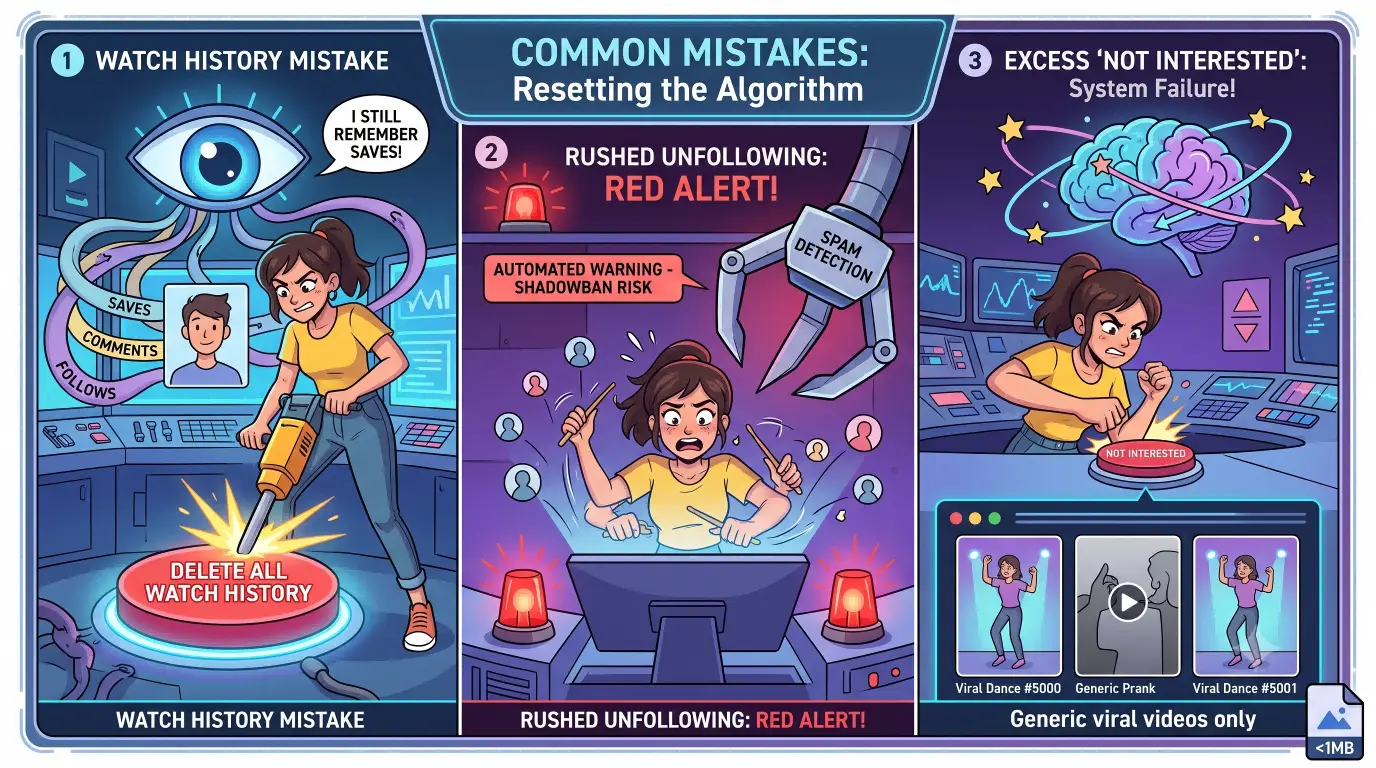
Many users try to fix their bad recommendation feed, but they fail completely. They make simple errors that keep old, unwanted videos coming back. Here are the biggest mistakes you must avoid.
Why clearing your watch history isn’t enough
A very common myth is that deleting your watch history will fix your entire feed. It does not work that way. Your watch history is simply a visual list of videos you viewed in the past.
The algorithm is much more complex than a simple viewing list. It remembers who you follow, the videos you saved to your favorites, the comments you wrote, and the profiles you visited last month. Clearing your watch history only erases the list you see on your profile. It does not delete your deep behavioral profile in the app system. Clearing history is just one small step in a larger cleanup process. It will not refresh TikTok algorithm all by itself.
The risks of unfollowing creators too quickly
When people decide to clean up their feed, they often panic. They go to their following list and start unfollowing hundreds of accounts in ten minutes. This is a big mistake.
TikTok has strict security rules to stop automated spambots. If you unfollow 100 creators in two minutes, TikTok’s automated safety system gets suspicious. The app might think you are a computer script or a spam bot. They might place a temporary shadowban on your account or lock your settings for 24 hours. You should unfollow accounts slowly and naturally. Unfollow only 10 or 15 accounts a day so your account stays completely safe.
Misusing the “Not Interested” button
The "Not Interested" button is a helpful tool, but many people abuse it. They press "Not Interested" on 30 videos in a row during one single scrolling session.
When you tap that button too many times quickly, the algorithm gets deeply confused. It knows what you dislike, but it has no idea what you actually enjoy. As a result, TikTok stops making smart predictions. It starts filling your feed with basic, generic viral videos that millions of random people watch. Use the "Not Interested" button sparingly. Only tap it for topics you truly dislike or find offensive. If a video is just plain boring, simply scroll past it instantly without tapping anything.
Step-by-Step Guide to Resetting the TikTok Algorithm
In 2026, TikTok offers official built-in features that make resetting your FYP easier than ever before. Follow these step-by-step instructions in order to get a completely fresh start.
How to clear your watch and search history
First, you must wipe away your cached memory files and old search queries. Open your TikTok app and go to your Profile page in the bottom right corner. Tap the three horizontal lines in the top right corner to open the menu, then tap Settings and privacy. Scroll down to the Cache & Cellular section and tap Free up space. Tap the Clear button next to Cache to remove temporary junk files. After that, go back to the main search bar on your home screen, tap the search bar, look at your search history, and tap Clear all. This erases your search signals so TikTok forgets what topics you searched for last week.
Using the “Not Interested” option effectively
Now, you need to clean up bad videos that slip through your feed. When an unwanted video plays on your FYP, press and hold your finger on the middle of the screen until a popup menu appears at the bottom. Tap the broken heart icon that says Not Interested. If you dislike a specific creator entirely, tap Details on that same menu and select Hide videos from this user. You can also go to Settings and privacy, select Content preferences, and tap Filter video keywords. Add specific words you hate, such as "spoilers" or "drama," and the app will automatically block videos containing those words in their captions.
Adjusting your interaction habits to retrain the algorithm
In 2026, TikTok includes an official, one-click reset button. To use it, go to Settings and privacy, tap Content preferences, and select Refresh your For You feed. Read the screen confirmation message, tap Continue, and then tap Refresh. Your feed is now officially reset to its factory state. However, your work is not done yet because you must now interact with high intent. When you see a video you genuinely love, watch it all the way to the end, tap the heart icon to like it, leave a short comment, and save it to your favorites. In 2026, saving a video to your favorites folder sends the absolute strongest signal to the algorithm.
Following new creators to shape your feed
Your fresh feed needs strong, positive data signals to build your new video stream. Do not wait for good content to land on your screen by accident. Tap the Search bar at the top of your app and type in specific keywords for your new hobbies, such as "beginner photography tips" or "easy meal prep recipes." Watch the top three search result videos completely to show high interest. Follow two or three quality creators in that search topic and like their best posts. By doing this, you instantly give TikTok clear instructions on what content to send to your new feed.
How to Reset TikTok Algorithm on iPhone vs Android
The general steps to reset your feed are similar on all mobile devices. However, iOS and Android operate differently when handling app storage and system data.
Device-specific steps for clearing app data
If you use an Apple iPhone, open your Settings app on your iPhone screen. Tap General, then tap iPhone Storage, and scroll down the list until you find TikTok. Tap on it and select Offload App, which deletes heavy app files while keeping your personal login credentials completely safe. Re-download the app from the App Store to force a clean system state. On an Android phone, open your phone Settings app, tap Apps or App Management, and find TikTok in your installed apps list. Tap Storage & Cache, tap Clear Cache first, and then tap Clear Data. Note that clearing data on Android will log you out, so make sure you remember your TikTok password before tapping it.
Differences in app settings between iOS and Android
Inside the actual TikTok app interface, the settings menus look almost identical on both iPhone and Android devices. The "Refresh your For You feed" button is located in the exact same spot under Content Preferences. The main difference lies in how deep you can clean the app background files from your phone system. Android gives you deeper access to wipe out background system data, while iOS relies more on offloading or reinstalling the app from the App Store.
Troubleshooting issues on your device
If you completed all these steps but your feed is still showing bad content or freezing, there are a few simple solutions. First, check your app version by opening the Apple App Store or Google Play Store to make sure your TikTok app is updated to the latest 2026 version. Old versions may lack the official feed refresh feature. Second, restart your mobile device by turning it off completely for one minute to clear your phone RAM memory. Third, check your network connection because weak Wi-Fi can cause TikTok to load old cached content instead of fetching new recommendations. Finally, check your account inbox to ensure your profile does not have active community guideline warnings restricting feed updates.
How Long Does It Take for TikTok to Update Recommendations?
You tapped the refresh button and cleared your cache. Now, how long do you have to wait for your feed to change? You need to be patient for a brief period.
Factors that influence the speed of algorithm changes
The speed of your feed reset depends on how active you are on the platform. The algorithm learns from active watch time rather than idle app time. If you spend 30 active minutes liking, searching, and watching new content, the feed adjusts very fast. However, if you open the app for only one minute a day and scroll past everything, the algorithm takes much longer to learn. Signal strength also matters immensely, so re-watching a 60-second video twice or sharing it via direct message sends a super-strong signal that updates your algorithm almost immediately.
What to expect during the reset process
Right after you hit the official refresh button, your For You page will look strange, basic, and generic. You will see super-popular viral videos, famous actors, massive news clips, and basic humor videos.
Do not be alarmed because this is completely normal behavior. The app is in an "exploration phase" where it tests your reactions like a science experiment. It throws broad, popular topics at you to see what you tap, what you watch, and what you skip. Scroll past the basic videos quickly and engage deeply with the topics you love to help the app narrow down your tastes.
How consistent engagement speeds up the reset
If you want a fully personalized feed fast, follow a simple three-day rule. Spend 15 minutes a day engaging with intent for three days straight. Search your target hashtags, watch top creators, save great posts, and scroll past unwanted videos in less than one second. If you stay consistent with this strategy, your TikTok FYP will be 100% customized and accurate within 48 to 72 hours.
Risks of Resetting Your TikTok Algorithm Too Often
While the official refresh tool is helpful, you should not use it constantly. Overusing the reset option can harm your user experience.
Why frequent resets can confuse the algorithm
If you hit the refresh feed button every week, the algorithm never gets enough time to understand you. It takes thousands of data points to build an accurate picture of your personal tastes. Resetting your feed repeatedly keeps your profile in a permanent state of confusion. The app will constantly show you basic, broad content because it never gets to know the real you.
How it impacts your For You page recommendations
Frequent resets prevent you from seeing rich, niche content. For example, instead of seeing detailed woodworking tutorials, high-level computer coding tips, or indie music creators, you will only see surface-level viral posts. The algorithm will refuse to show you specialized content because it lacks data on your preferences.
Signs you’re over-resetting your feed
There are clear signs that show you are resetting your account too much. Your feed will feel like you just opened a brand-new account every single day, showing only celebrity gossip and massive viral trends with millions of likes. You will almost never see smaller, creative accounts with under 10,000 followers. You might also see frequent popup polls from TikTok asking basic preference questions about your interests. If you notice these signs, stop pressing the refresh button and let the app learn naturally for a few weeks.
Tips for Maintaining a Customized TikTok Feed After Resetting
Once your FYP is clean and customized, you want to keep it that way for months. Here are smart habits to maintain a clean feed long-term.
How to engage with content that matches your interests
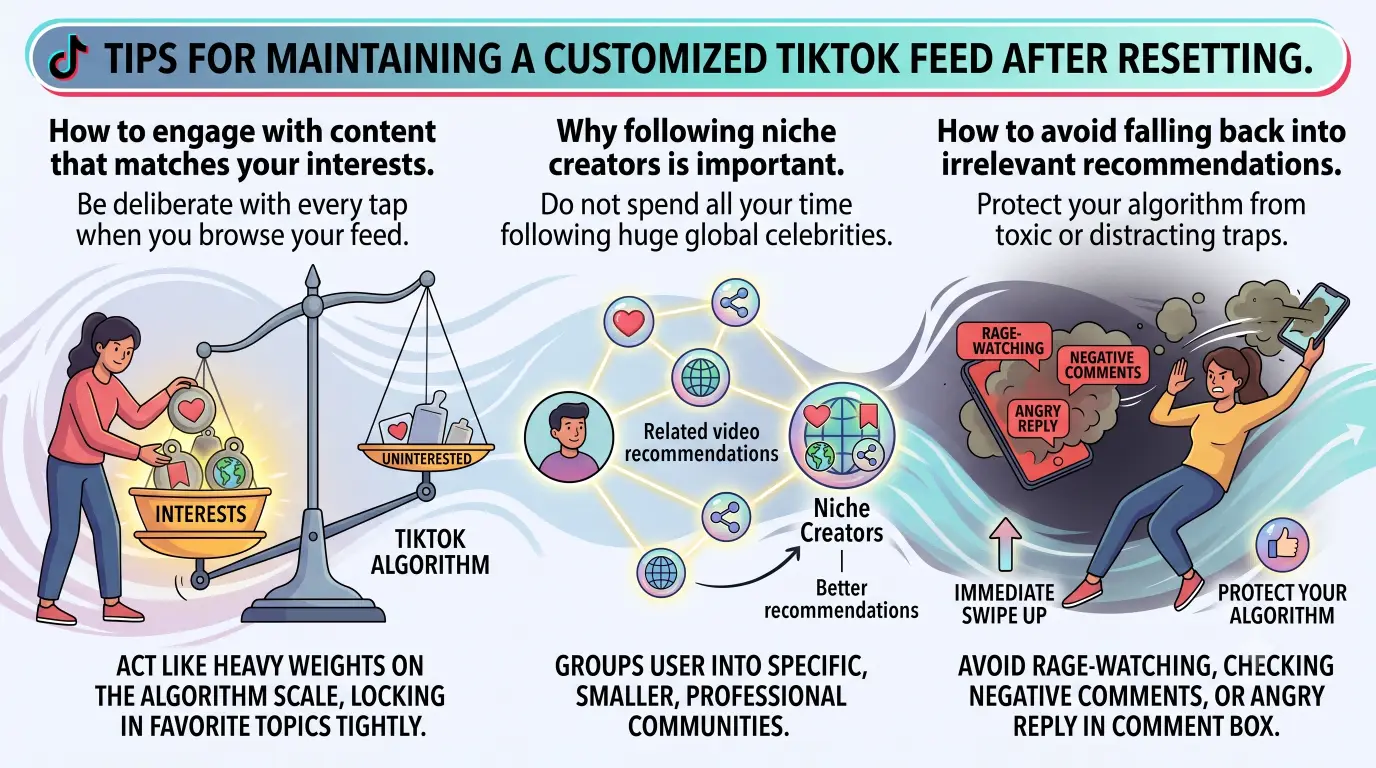
Be deliberate with every tap when you browse your feed. When a video in your target topic appears, watch it completely from start to finish to log full watch time. Tap the Like heart icon, and tap the Bookmark button to save it to an organized favorites collection. You can also share the video link with a friend or save it to your phone storage. These positive actions act like heavy weights on the algorithm scale, locking in your favorite topics tightly.
Why following niche creators is important
Do not spend all your time following huge global celebrities who post random daily vlogs. Instead, search for and follow small, dedicated creators who focus strictly on one topic, such as vegan baking, retro gaming, or personal finance.
Small niche creators have focused, dedicated communities. When you follow them, TikTok groups your account with that specific community. This brings far better, highly relevant video recommendations to your screen every single day.
How to avoid falling back into irrelevant recommendations
Protect your algorithm from toxic or distracting traps. The biggest trap is "rage-watching." If a controversial video makes you angry, do not stay on it to read the negative comments, and do not write an angry reply in the comment box.
If you spend two minutes reading angry comments, the algorithm thinks you love that topic and will flood your feed with more controversial posts. The moment you see a video you dislike or find toxic, swipe away upward in less than one second to protect your algorithm.
Advanced Techniques for Optimizing Your TikTok Algorithm
If you want to master the TikTok recommendation engine like a professional marketer, try these advanced optimization techniques.
Using hashtags to refine your feed
Do not wait passively for good content to find you. Take control of the search system using long-tail hashtags.
Instead of searching broad tags like #fitness, search hyper-specific hashtags like #calisthenicsforbeginners or #homegymsetup2026. Click on the top five videos under those specific hashtags and watch them entirely. This deep-dive tactic forces the algorithm to immediately update your feed parameters.
Interacting with specific types of content for better results
The algorithm ranks different user actions by weight. Copying the video link or sharing the video off-platform carries the absolute highest weight signal in 2026. Saving a video to your favorites or bookmarks carries a very high signal, followed by watching the full video and re-watching it. Leaving a meaningful comment provides a medium signal, while liking the video is the standard baseline signal. If you want more of a specific video type, copy its link and save it to your bookmarks to tell TikTok that the content is exceptionally valuable.
Creating a secondary account for niche interests
Many people have completely conflicting interests. For instance, you might love serious corporate finance strategies during the workday, but love watching chaotic video game memes late at night.
Mixing these two worlds on one single feed confuses the algorithm and leads to a messy recommendation mix. The best solution is to create a second, separate TikTok account. Use one account strictly for professional learning and industry trends, and use the second account for gaming, entertainment, and silly humor. This keeps both algorithms clean, focused, and effective.
If you decide to create multiple accounts—especially for business, brand marketing, e-commerce stores, or managing client profiles—doing this manually on a single smartphone can become extremely slow and frustrating. More importantly, TikTok's security algorithms might notice you switching between many different accounts on the exact same mobile device. The system could flag your accounts for suspicious activity or limit your reach. To avoid annoying bans, protect your profile reputations, and save hours of manual work, you need a safer, professional strategy to manage your multiple account setups.
How to Improve Efficiency and Safely Use TikTok with DICloak
If you run TikTok accounts for business, marketing, or agency work, relying on standard mobile app switching is too risky. You need dedicated tools designed for secure multi-account operations.
Managing multiple TikTok accounts securely and efficiently
You can use DICloak to safely manage 1,000+ TikTok accounts from one single computer. When you run different business profiles across different niches, you must keep their digital environments completely separate. You can create unique browser profiles with custom digital fingerprints inside DICloak. This ensures social platforms recognize every profile as coming from a separate, isolated real device. You can also configure different types of proxies, such as HTTP or SOCKS5, to give every single account its own isolated IP address and location setting. By doing this, you drastically reduce the risk of account suspensions and keep every account's TikTok algorithm strictly isolated.

Using automation tools to retrain the algorithm faster
You can leverage powerful automation features inside DICloak to retrain your account algorithms much faster. With the built-in Multi-Window Synchronizer, you can perform synchronized actions across dozens of different browser profiles at the exact same time. You can simulate real, natural human browsing to stay completely undetectable by platform security. You can also build RPA (Robotic Process Automation) workflows to automatically scroll through feeds, watch niche videos, and like targeted content on schedule. This lets you build and train account feeds in specific niches effortlessly, saving your team hours of tedious manual work.
Frequently Asked Questions about Resetting TikTok Algorithm
Does clearing my watch history reset the algorithm?
No, clearing your watch history does not fully reset your algorithm. It only erases your visible viewing log. TikTok still remembers your liked posts, saved favorites, account follows, and comment interactions. You must clear your cache and use the official "Refresh your For You feed" feature for a complete algorithm reset.
How often should I reset my TikTok algorithm?
You should only reset your TikTok algorithm when your feed is completely broken or your personal interests have changed drastically. Resetting once or twice a year is completely fine. Do not reset every week, or the app will never have enough time to learn your true preferences.
Can I reset the algorithm without deleting the app?
Yes, you do not need to delete or reinstall the app. You can simply go to Settings and privacy, select Content preferences, and tap Refresh your For You feed. This wipes your recommendation stream instantly without affecting your uploaded videos, saved drafts, or account followers.
Why is my For You page still showing irrelevant content?
If you recently refreshed your feed but keep seeing bad content, you might still be following old accounts that post those topics. You might also be accidentally spending too long watching unwanted videos before scrolling away. Unfollow irrelevant creators and swipe past bad videos in under one second.
Does TikTok penalize users for resetting their algorithm?
No, TikTok never penalize users for resetting their feed. The refresh tool is an official, safe feature built directly into the app settings. TikTok wants you to enjoy your feed so you spend more high-quality time using the platform.
Conclusion
Mastering how to reset TikTok algorithm in 2026 gives you complete control over your social media experience. While the app's recommendation system is powerful, it can easily get off track if your viewing habits change. By clearing your cache, using the official refresh feature, and interacting with new content with clear intent, you can fix your feed in just a few days. Always use the "Not Interested" button wisely and follow niche creators you love. If you manage multiple TikTok accounts for business or marketing, you can use professional browser solutions like DICloak to improve your operational efficiency and manage accounts safely. Take charge of your TikTok For You page today and enjoy an inspiring, customized feed built just for you!
 Web Proxy Tools
 Free Tools
 Cookie Plugin
 UA Generator
 MAC Address Generator
 IP Generator
 IP Address List
 2FA Code Generator
 World Clock
 Anonymous Check
 WebRTC Leak Test
 UUID Generator
 Free Web Proxy Site
 Proxy Checker
 FB Ad Checker
 AI Web Scraping
 Free SMM Tools
 Twitter Shadowban Checker
 Instagram Name Checker
 UTM Generator
 Username Generator
 AI Hashtag Generator
 LinkedIn Headline Generator
 Social Media Image Resizer