Why is your whoer ip address revealing more than just your location?
Your Public IPv4 or IPv6 address is the first packet of data an anti-fraud system analyzes to determine your "trust score." It functions as your digital home address, a unique identifier that allows websites to deliver localized content, enforce regional restrictions, and perform fraud prevention through TCP/IP fingerprinting. Understanding what an IP check exposes is the baseline for any professional privacy workflow.
When you run a scan on Whoer.net, the platform captures several critical data points:
- Public IP Address: Your visible network identifier.
- Location: The city and country mapped via Geo-IP databases.
- ISP & ASN: Your Internet Service Provider and Autonomous System Number.
- Hostname: The unique name assigned to your device on the network.
- DNS: The servers translating domain names, often revealing your true origin if leaked.
- Blacklist Status: Whether your IP is flagged in security databases like Spamhaus or SORBS.
Websites use these data points to build a "reputation profile" before you even attempt to authenticate. By analyzing your ASN type, a site can determine if you are a genuine residential user or a masked entity utilizing a Hosting/Datacenter ASN. If your IP is already on a blacklist, your session may be shadow-banned or subjected to aggressive CAPTCHAs before a single packet of application data is exchanged. These surface-level checks, however, are merely the entry point for modern identity intelligence.

How do modern websites use Whoer-style checks to flag your device?
Detection has evolved from simple IP logging to multi-layered "identity intelligence." Modern platforms cross-reference network signals against actual device behavior to find "red flags"—inconsistencies that suggest a user is attempting to spoof their identity.
The following table outlines the "Network Identity" signals tested by advanced anti-fraud systems:
| Signal Category |
What is Tested |
Detection Risk |
| Public IP/ASN |
Matches against known residential vs. datacenter (Hosting) lists. |
High |
| ISP Reputation |
Identifies if the network belongs to a mobile carrier, home ISP, or proxy provider. |
High |
| Geolocation Accuracy |
Physical location vs. the system's internal timezone and language. |
Medium |
| Proxy/VPN Detection |
Checks for known VPN exit nodes or proxy headers (X-Forwarded-For). |
High |
A mismatch between an IP location and the system’s internal settings is the primary trigger for anti-fraud systems. For example, if your IP indicates you are in London, but your browser's internal clock or language headers point to another region, the inconsistency triggers an immediate high-risk alert. This lack of alignment is often what prevents users from achieving a viable anonymity score.
Why won't your anonymity score hit 100% despite using a proxy?
Practitioners often fail to reach a 100% anonymity score because "anonymity" in 2026 is a calculation of environment consistency, not just the presence of a proxy. Whoer's "disguise detection" remains low when the technical signals of the browser conflict with the network identity.
System Time and Language Mismatches
The most common detection triad involves a mismatch between the IP, Timezone, and Keyboard. A classic "synthetic" profile consists of a German IP combined with an Asia timezone and US keyboard layout. This configuration is a statistical impossibility for a natural user and results in an immediate reputation penalty.
The "Do Not Track" Paradox
Disabling "Do Not Track" (DNT) or similar privacy features can ironically lower your score. Because most natural users maintain default settings, a browser that is "too clean" or has every tracking feature disabled stands out as a unique anomaly. Websites look for "natural entropy," not a perfectly sanitized environment.
Browser Fingerprinting Vectors
Beyond the IP, websites use JavaScript to collect WebGL and Canvas rendering hashes, system fonts, and screen resolution. These vectors create a unique ID regardless of your IP address. If your Canvas hash doesn't match the typical profile of a user from your IP's region, your anonymity score will plummet.
Consistency is more important than a perfect 100% score. A "synthetic" 100% achieved by aggressively hiding all signals is often more suspicious to anti-fraud algorithms than a natural 90% score. A profile that looks like a standard, slightly trackable user is far more successful at bypassing filters than a "ghost" profile.
What are the biggest mistakes when fixing DNS and WebRTC leaks?
A failure to secure the browser profile allows traffic to bypass your proxy, rendering the new IP address useless. These leaks provide a direct path for websites to see your true origin.
- DNS Routing Failures: If you do not specifically route DNS requests through the proxy, your browser may query your local ISP’s DNS servers. This creates a mismatch where your IP is in one country but your DNS resolver is in another.
- WebRTC Exposure: This technology reveals internal/local IPs even when a VPN is active. It is a primary source of leaks that reveals your real network identity to any site running a simple script.
- Cookie and Local Storage Persistence: Managing a clean identity requires clearing cookies and local storage when switching profiles. Stored data creates a permanent link between your new IP and previously flagged sessions.
The "So What?" Factor: Many users attempt to stop leaks by disabling JavaScript. While this stops WebRTC and fingerprinting, it breaks most modern website functionality and makes you look like a bot. The solution requires surgical leak prevention—routing traffic correctly rather than using a blanket "off" switch.
Which IP and fingerprint checking tools are worth using in 2026?
Relying on a single tool like Whoer is a strategic mistake in professional multi-account management. Practitioners must use a suite of tools to prevent "silent fingerprint drift."
- WhoerIP.com (The Modern Privacy Champion): A professional-grade platform with excellent mobile optimization and ad-free analysis of advanced fingerprinting.
- Whoer.to (The Minimalist Alternative): A fast, ad-free, table-based checker for those who need technical details without the clutter.
- Technical Deep-Dives: Tools like BrowserLeaks are essential for low-level inspection of Canvas, WebGL, and network headers.
- Uniqueness Testers: Services like AmIUnique compare your fingerprint against global datasets to see how much you "stand out."
- Automation Detectors: Tools like PixelScan specifically look for signals of botting or proxy inconsistencies that simpler tools miss.
Cross-checking across multiple tools is the only way to ensure your environment is stable. A tool might show 100% anonymity while another reveals a subtle WebGL leak that an advanced anti-fraud system would use to flag your account.
Why is environment consistency more important than a new IP address?
"Environment Consistency" is the total alignment of network, browser, and OS signals. If these do not align, the reputation of your IP address becomes irrelevant.
Residential vs. Datacenter (Hosting) ASNs
Datacenter IPs are flagged faster due to historical abuse. Residential and mobile IPs, which carry high-reputation ASNs, resemble normal consumer traffic. However, even a residential IP will fail if the ASN indicates a home connection while the browser fingerprint suggests a server environment.
The Risk of Profile Reuse
Logging into multiple accounts from the same fingerprint creates "linkage." Anti-fraud systems identify these account clusters instantly. Once one account in the cluster is flagged, the entire group is at risk, regardless of how many times you change your IP.
Stable sessions are superior to rapid rotation. For sensitive professional accounts, maintaining one consistent identity (aligned IP + Fingerprint) over a long period is significantly safer than constantly changing IPs, which signals instability.
How to Scale Multi-Account Setups More Clearly
When people work with multiple accounts, the challenge is often not just switching IPs. It is also keeping each browser profile consistent enough to avoid obvious overlaps in cookies, local storage, browser settings, and fingerprint-related signals. For users who are checking tools like Whoer, this matters because IP quality alone does not define the full anonymity picture.
- Isolated browser profiles: Users can place different accounts into separate browser profiles, with each profile keeping its own cookies, cache, and local storage. This makes it easier to reduce overlap between accounts instead of running everything in one browser session.

- Custom proxy and fingerprint configuration: Users can assign a different proxy to each profile and adjust fingerprint-related settings inside that profile. For people trying to improve the overall consistency of their Whoer IP address and anonymity score setup, this gives them a clearer way to match network conditions with browser conditions.

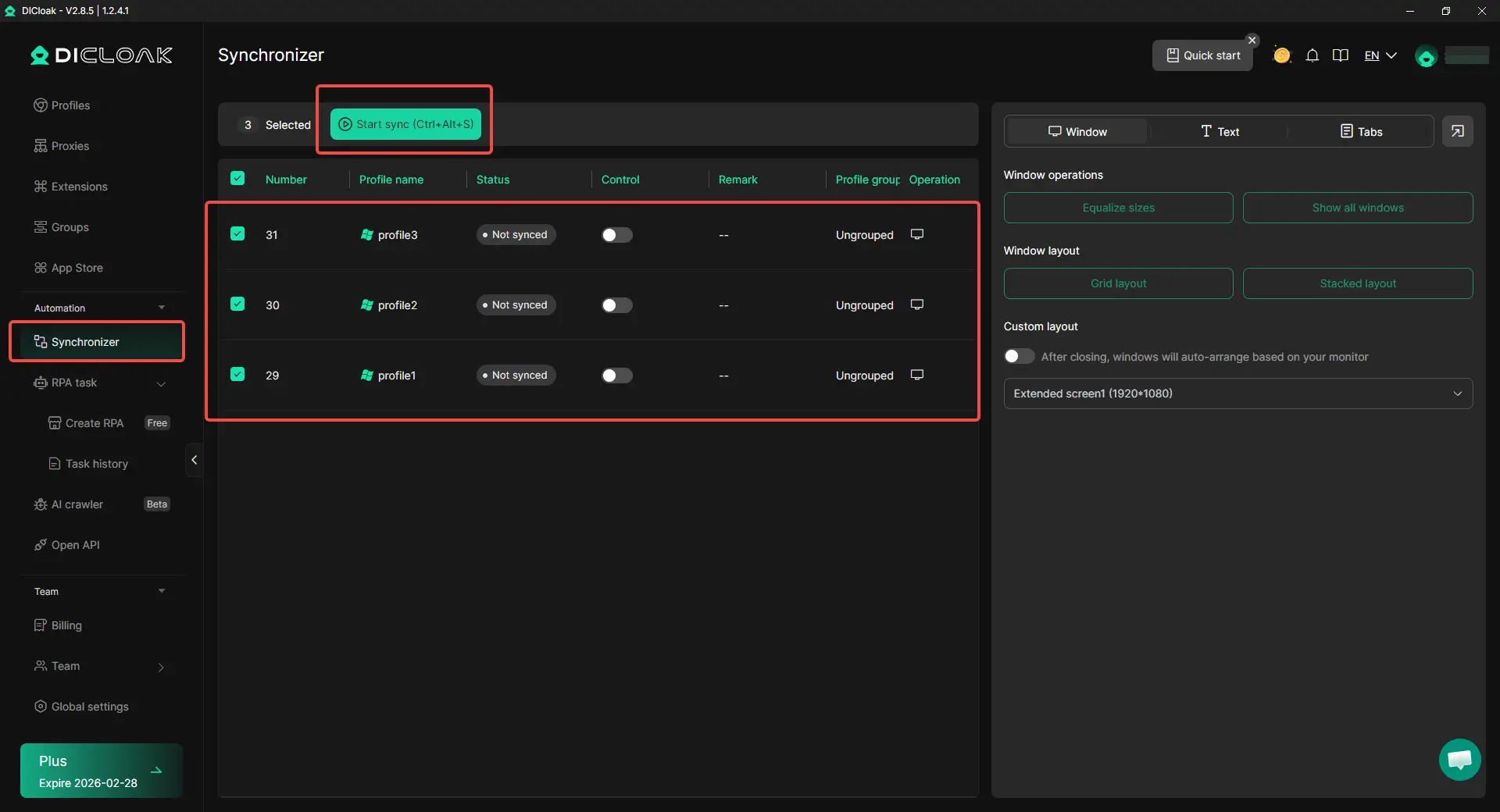
- Synchronizer and bulk management: When the same setup steps need to be repeated across multiple profiles, users can use Synchronizer and batch actions to manage those profiles more efficiently. This can make larger account setups easier to organize without adjusting every profile one by one.
What are the risks of ignoring IP reputation and blacklist status?
Ignoring "Reputation Signals" results in instant bans. If you use an IP from a range previously abused for spam, anti-fraud systems will terminate your session before you finish registering.
Blacklist Scanning
Checking public security databases such as Spamhaus, SORBS, and AbuseIPDB is a prerequisite for any new proxy. A "dirty" IP triggers immediate blocks on major platforms.
The ASN Factor
Websites use the ASN to determine if you are on a mobile carrier, a home ISP, or a hosting provider. Hosting/Datacenter ASNs are treated with extreme suspicion compared to residential connections.
Discarding "dirty" IPs early saves the long-term health of your accounts. Investing in a clean, high-reputation residential IP is always more cost-effective than losing an established professional account to a cheap, flagged proxy.
Frequently Asked Questions
How do I check my IP address on an iPhone in 2026?
Go to Settings > Wi-Fi and tap the "(i)" next to your network, or use Safari to visit a dedicated checker like WhoerIP.com, which is highly optimized for mobile devices.
Does incognito mode hide my IP address from websites?
No. Incognito mode only prevents your browser from saving local history and cookies. Your public IP address and browser fingerprint remain fully visible to websites.
Is it illegal to change my IP address for browsing?
It is entirely legal in most jurisdictions, provided you are not using the anonymity for illicit activities or fraud.
Why does Google show me results for a different country?
Google uses Geo-IP databases to map your IP. If your proxy exit-node is in another country, Google will serve content tailored to that region.
Can I 100% hide my browser fingerprint?
Attempting to hide it completely often makes you more unique and easier to detect. The goal is to "spoof" a fingerprint so you appear as a common, unremarkable user.
Final Thought
Digital privacy in 2026 is not about absolute invisibility; it is about environment consistency. By combining rigorous IP reputation testing with tools like DICloak that manage both network and device identity simultaneously, you take control of your digital footprint. Success lies in appearing natural, consistent, and remarkably average to the algorithms that govern the modern web.
 Web Proxy Tools
 Free Tools
 Cookie Plugin
 UA Generator
 MAC Address Generator
 IP Generator
 IP Address List
 2FA Code Generator
 World Clock
 Anonymous Check
 WebRTC Leak Test
 UUID Generator
 Free Web Proxy Site
 Proxy Checker
 FB Ad Checker
 AI Web Scraping
 Free SMM Tools
 Twitter Shadowban Checker
 Instagram Name Checker
 UTM Generator
 Username Generator
 AI Hashtag Generator
 LinkedIn Headline Generator
 Social Media Image Resizer