Your last three uploads can show 0–5 Home and Suggested impressions in Studio while subscriber notifications still go out. That mismatch is why creators search for a youtube shadowban checker instead of guessing. The key point: a traffic drop alone does not prove suppression. YouTube already explains how impressions are counted, and its recommendation system can shift reach fast when viewer response changes. Policy actions also matter; a Community Guidelines strike can limit what your channel can do, and that can affect visibility.
So a useful check is not a single tool score. It is a repeatable process: confirm signal patterns in traffic sources, rule out normal volatility, inspect policy and metadata risks, and test fixes in a controlled posting window. You will see how to separate “low performance” from real visibility suppression, what to change right away, and what upload habits reduce future flags. Start with the signals that most creators miss in plain sight.
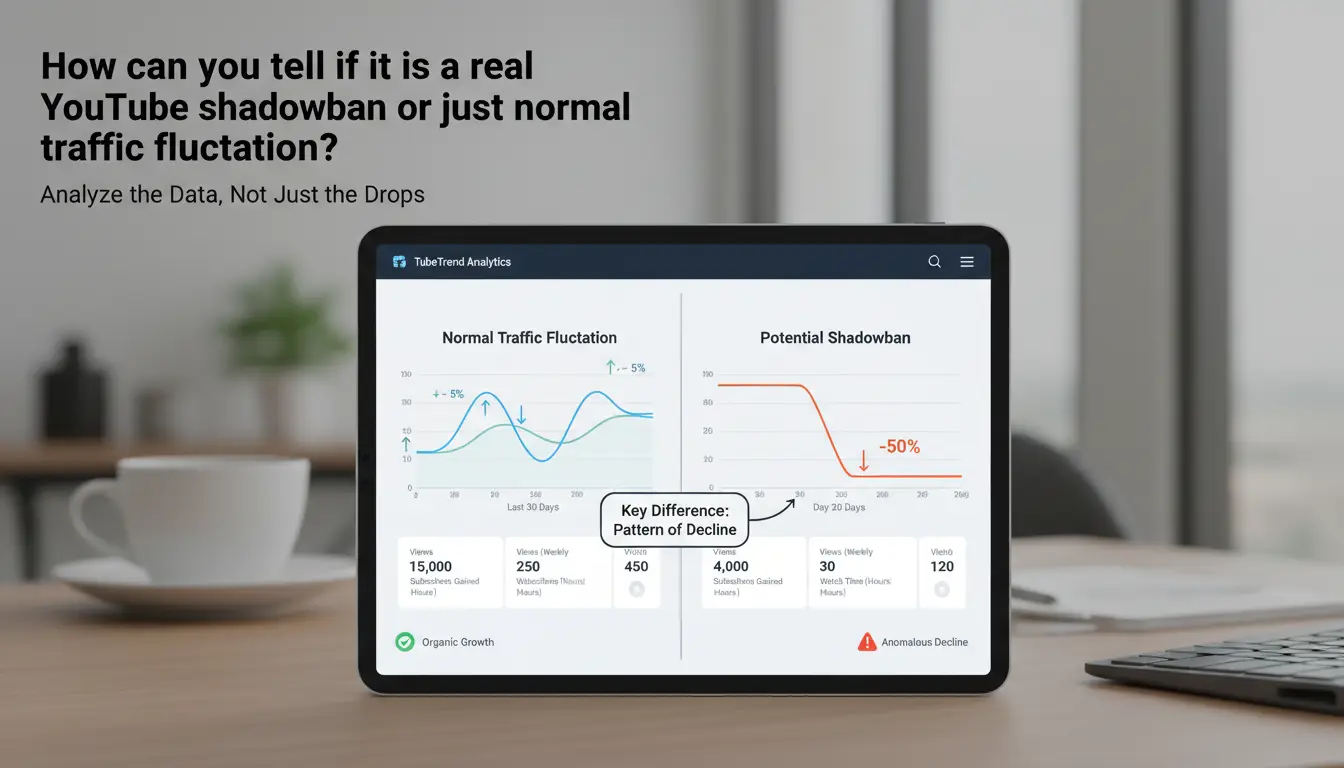
How can you tell if it is a real YouTube shadowban or just normal traffic fluctuation?
Which visibility signals matter most before you run a YouTube shadowban checker?
Do not judge from one bad day. Check a 7-day baseline in YouTube Studio, then compare the next 48-72 hours. Pattern beats single-video drops. If Search impressions fall hard while click-through rate stays close to your channel norm, distribution may be limited. For Shorts, split “shown in feed” from topic demand. If feed exposure drops fast but your topic still performs on similar channels, that is a stronger warning.
| Signal pattern |
More likely normal fluctuation |
More likely suppression signal |
| Search impressions down + CTR down |
Thumbnail/title mismatch |
|
| Search impressions down + CTR stable |
|
Possible reduced distribution |
| Shorts feed views down + topic cooling |
Demand shift |
|
| Shorts feed views down + topic still hot |
|
Possible reach restriction |
What are the strongest warning signs across Search, Shorts, and comments?
Two signs deserve immediate checks. Your video does not appear for an exact-title search after indexing time. Your comments publish for you but stay invisible to other accounts or incognito view. If both happen together, run a youtube shadowban checker and collect evidence from Search, Shorts, and comments in one log.
When should you wait, and when should you investigate immediately?
Wait if you just uploaded, changed metadata, or switched format. YouTube’s recommendation system can retest audiences for a short window. Investigate the same day if two or more uploads get near-zero impressions, exact-title search fails, and comment visibility breaks. Also check for policy actions like a Community Guidelines strike. If signals stack up, a youtube shadowban checker is justified.
How do you use a YouTube shadowban checker step by step?
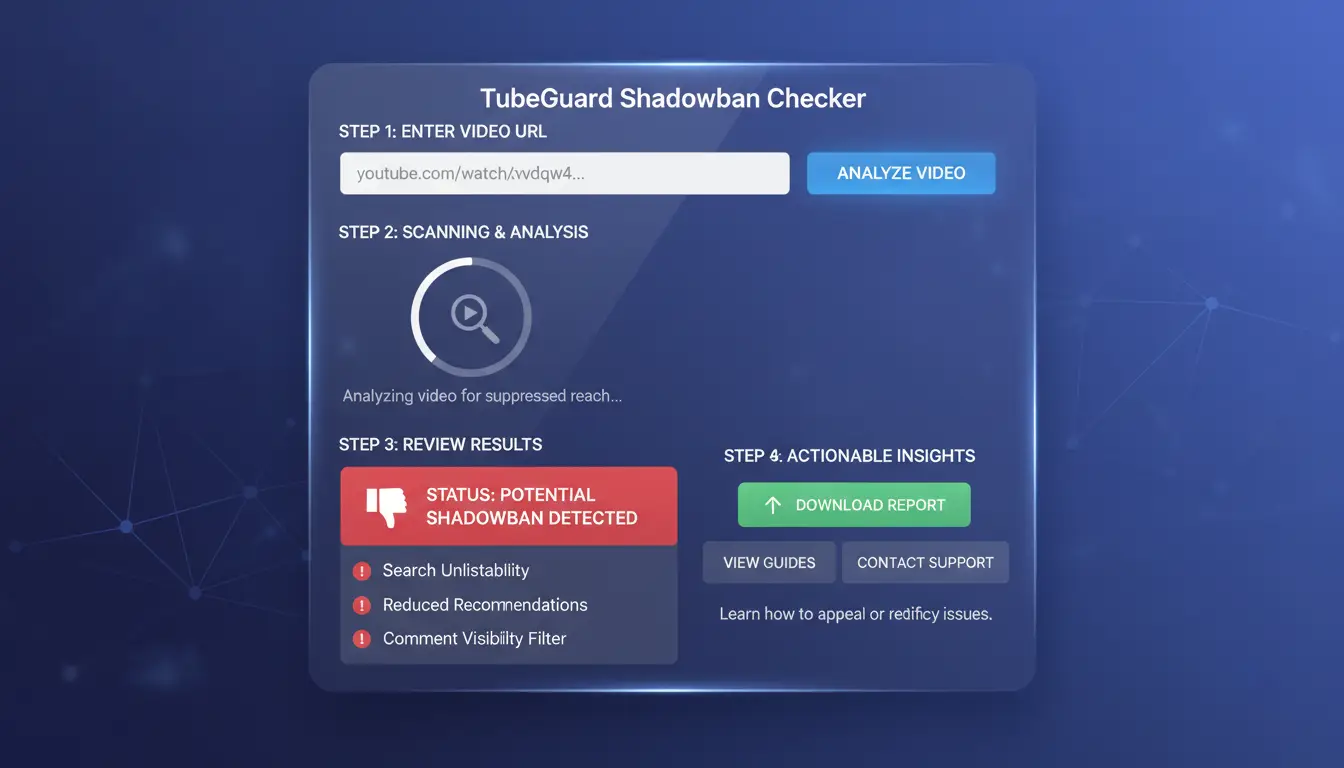
Use a youtube shadowban checker as a test workflow, not a final verdict. A scan can flag risk, but you still need to confirm with your own data in YouTube Analytics traffic sources, how YouTube recommendations work, and any Community Guidelines strike status.
What should you prepare before checking your channel status?
Prepare the same inputs every time so results stay comparable:
- Your channel URL
- 3–5 recent video links, including at least one video with normal reach and one with dropped reach
- A baseline period (use the same 28-day window each run)
- 5–10 search queries pulled from your titles and main topics
- A short log of major edits (title, thumbnail, description, tags, privacy changes)
If your baseline changes every check, you can misread normal swings as suppression.
How to run the checker test and read the output correctly
Run the youtube shadowban checker in two passes:
- Scan at channel level to catch account-wide risk patterns.
- Scan at video level to find isolated issues.
- Match tool output with YouTube metrics: search impressions, browse impressions, and suggested traffic.
Read labels with care:
- “High risk” means pattern match, not proof.
- Confidence score tells you how certain the tool is.
- Scan notes usually point to likely triggers like metadata stuffing, reused descriptions, or policy flags.
What mistakes make checker results unreliable?
Common errors:
- Testing within 48 hours after upload or right after major metadata edits
- Comparing Shorts to long-form videos
- Comparing unrelated topics with different search intent
- Ignoring region and language differences in visibility
Treat checker output as a hypothesis, then confirm in Analytics before changing your content plan.
How do you manually verify YouTube shadowban checker results?
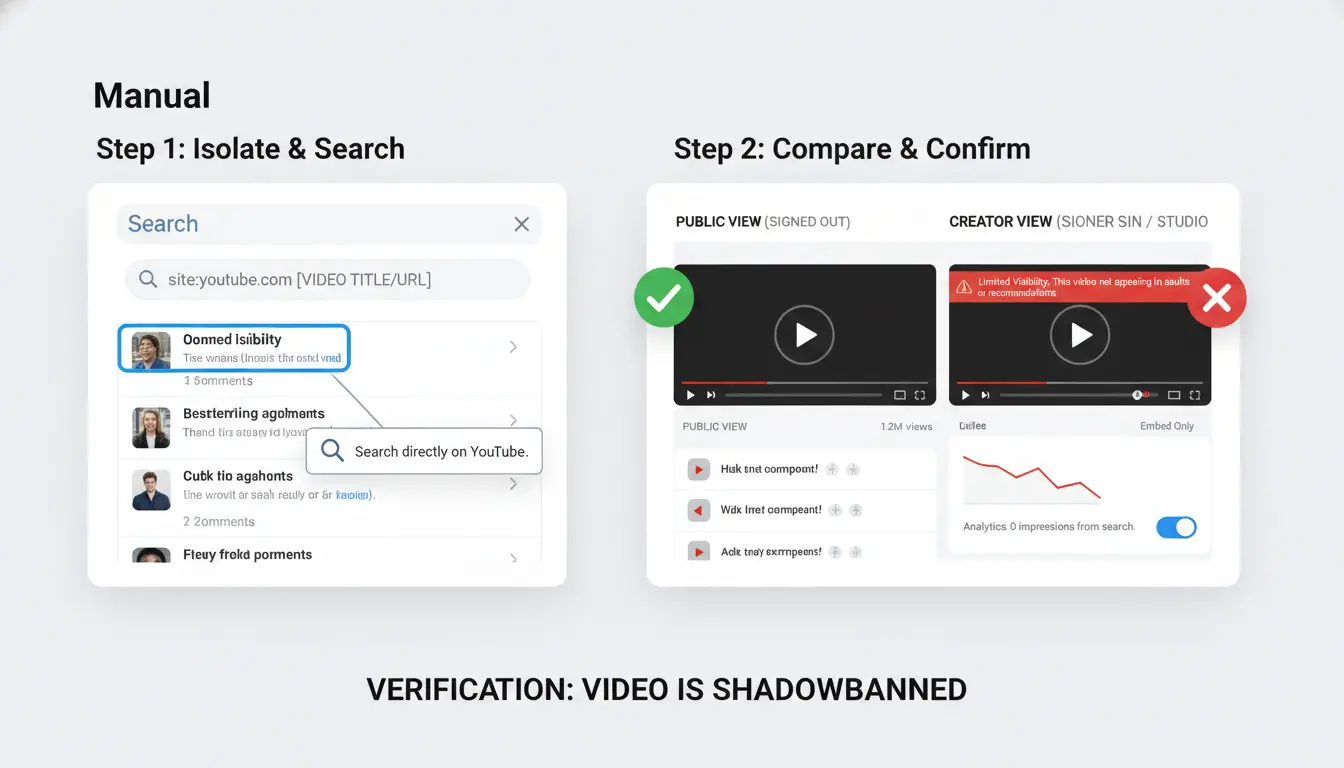
A youtube shadowban checker can flag risk, but one score is not enough. Use a repeatable check across search, comments, and Analytics so you can separate normal reach swings from real suppression.
How to check search visibility with neutral queries and exact-match titles
Pick 3 exact title phrases from recent uploads. Use logged-out search in an incognito window on two devices and note your rank at 1 hour, 24 hours, and 72 hours. Repeat with 3 related keyword variations per video.
If your video drops out of top results across all checks while topic demand stays normal, treat that as a warning signal. If ranking only drops on one query cluster, the issue is often keyword fit, not suppression.
How to test comment visibility and hidden moderation states
Post test comments from a non-owner account, then check from creator view and public view. Compare what you see:
| Check point |
Creator view |
Public view |
What it suggests |
| Comment visible |
Yes |
Yes |
Normal state |
| Comment visible |
Yes |
No |
Hidden or auto-filtered |
| Comment pending |
Hold for review |
Not public |
Moderation filter active |
Use YouTube comment settings to review held comments and spam filters. Public view is the truth test, not owner view.
Which Analytics reports confirm suppression vs weak content-market fit?
In YouTube Studio, compare last 28 days vs previous 28 days in traffic source reports. Suppression pattern: impressions drop across Browse and Suggested at the same time, while CTR stays close to baseline. Content-fit pattern: impressions stay steady, but CTR and early retention drop.
Cross-check policy status, including Community Guidelines strikes, and review how the recommendation system may shift distribution. Repeat this process before trusting any youtube shadowban checker result.
Why do channels get suppressed, and which triggers are most common?
A youtube shadowban checker can flag a reach drop, but it cannot isolate the cause by itself. You need to read pattern shifts in YouTube Analytics traffic sources, policy events, and audience response at the same time. Random channel tweaks rarely fix suppression.
Which content and metadata patterns look spam-like to the system?
Near-identical titles, thumbnails, and descriptions across uploads can look like low-value repetition. Misleading packaging hurts faster: the title promises one thing, the video delivers another, viewers leave, and reach drops. Heavy keyword stuffing in titles, tags, or descriptions can also trigger spam detection under YouTube spam policies.
How policy and trust signals affect distribution risk
A warning or Community Guidelines strike can limit channel actions and lower distribution trust. Copyright pressure can stack risk even before a full takedown. Viewer feedback also affects reach: report spikes, “not interested” signals, and watch-time drops can reduce placement in YouTube’s recommendation system.
What account-level behavior can quietly increase suppression risk?
Large account changes in a short window can look suspicious: mass metadata edits, bulk privacy flips, or deleting and reuploading batches. Aggressive bulk comments or repeated identical replies can add friction too. Use a youtube shadowban checker as one checkpoint, then audit your own edit history and test fixes in small posting windows.
What should you do in the first 7 days after a negative checker result?
A negative youtube shadowban checker result is a warning, not a verdict. Your goal in 7 days is to lower policy risk, raise watch quality, and check if reach starts to recover in YouTube Analytics traffic sources.
Day 1-2: Run a focused channel audit and freeze risky actions
Stop posting bursts for 48 hours. Repetitive uploads can add noise and hide the real issue. Also pause mass comment deletion and bulk metadata edits.
Create a short audit log:
- Videos with click-heavy titles but weak watch time in the opening 30 seconds
- Thumbnails that promise something the video does not deliver
- Any policy warning, especially a Community Guidelines strike
- Trust signals: reused clips, copied intros, or sudden topic jumps that confuse returning viewers
Day 3-5: Fix high-risk assets and rebuild recommendation signals
Edit risky titles and thumbnails on your top 5 recent uploads. Keep claims exact. Tighten intros so viewers know what they get in 10 seconds.
Publish one new video on a topic that already worked on your channel. Keep structure simple: clear hook, proof, fast pacing, clean ending. This helps reset response signals used by YouTube’s recommendation system.
Day 6-7: Re-test visibility and decide escalation path
Run the youtube shadowban checker again, then compare baseline vs post-fix data.
| Signal |
Baseline (Day 0) |
Day 7 target |
| YouTube Search impressions |
Low/flat |
Upward trend |
| Shorts feed views |
Drop after upload |
More stable in 24–48h |
| CTR + avg view duration |
Mismatch |
Closer alignment |
If exposure stays flat and policy history is clean, contact Creator Support with timestamps, affected videos, traffic-source screenshots, and your change log. This gives support a clear case to review fast.
How can you run a weekly YouTube visibility audit to prevent future shadowban scares?
A youtube shadowban checker helps, but a weekly process catches trouble earlier. In your traffic source reports, compare the last 7 days with the prior 28-day baseline.
Which 5 metrics should be tracked every week?
- Impressions by source: Browse, Suggested, Search, Shorts feed, Notifications
- Search coverage split: branded queries vs non-branded queries
- CTR by source, not channel-wide average
- Comment visibility rate (visible comments ÷ posted test comments)
- Returning viewers trend week over week
What thresholds should trigger a deeper investigation?
Use a 3-week view so normal swings do not look like suppression.
| Metric |
Warning threshold |
Likely cause |
Next action |
| Browse/Suggested impressions |
Down 30%+ for 7 days |
Recommendation pullback |
Test 2 new title/thumbnail pairs |
| Non-branded search impressions |
Down 25%+ for 14 days |
Metadata-topic mismatch |
Rewrite titles, chapters, descriptions |
| Comment visibility rate |
Under 90% on 2 videos |
Filter or moderation issue |
Check held comments and blocked words |
| Returning viewers |
Down 20%+ for 21 days |
Weak follow-up structure |
Post connected topic cluster |
How to build a simple monthly checklist for long-term channel health
Audit policy status in Community Guidelines strike rules. Recheck packaging against YouTube’s recommendation system. Keep an experiment log for thumbnails, hooks, and topic clusters. That turns your youtube shadowban checker into an early-warning system instead of a panic check.
How do teams check multiple YouTube channels safely without adding account risk?
If your team runs a youtube shadowban checker process across channels, setup quality decides if your result is usable. A noisy setup can look like suppression, even when reach changes come from normal recommendation shifts or policy limits in YouTube recommendations, view counting rules, or a Community Guidelines strike.
Why shared logins and mixed environments can distort checker results
When two people use one login in different browsers, YouTube sees unstable session patterns. Cookies change, devices look inconsistent, and location history can jump if networks differ. That noise can create false risk signals: sudden CTR drops, odd traffic source swings, or ranking checks that do not match later results.
| Check setup |
What happens during monitoring |
Risk level |
| Shared login + mixed devices |
Session overlap, cookie resets, unstable identity signals |
High |
| Isolated profile per channel + fixed proxy route |
Stable sessions and repeatable checks |
Lower |
How DICloak helps teams run cleaner channel checks
You can use DICloak to separate each channel into its own browser profile with isolated fingerprints. You can bind one proxy path per profile, set role-based access, and keep operation logs. This cuts human error during routine checks, especially when several operators audit channels in the same week.
Team workflow setup: from channel assignment to repeatable audits
Assign one owner per channel profile. Use profile sharing only through approved roles. Require a short approval step before metadata edits or thumbnail swaps. Review operation logs weekly. For repeated checks, use batch actions and RPA to run the same sequence each time.
When is a YouTube shadowban checker wrong, and what should you do next?
What changed in platform visibility signals and why tools can disagree
A youtube shadowban checker can misread normal volatility as suppression. Checkers only see public clues. They cannot access internal ranking tests in YouTube’s recommendation system. Two tools can still disagree on the same video. They may sample different regions, time windows, or traffic slices. Use checker output as a warning signal, not final proof.
Top false-positive scenarios creators confuse with shadowbans
| Pattern |
Likely cause |
Action |
| Views drop after a hot topic |
Topic fatigue or seasonality |
Compare last 28 days vs prior 28 days |
| New niche or language shift stalls |
Distribution delay to new audience |
Wait for 2-3 uploads with same angle |
| Home feed weak but search stable |
Packaging mismatch, not suppression |
Test title/thumbnail only |
Read traffic source data before you assume a ban.
Your fallback plan when tool data is inconclusive
Run a 7-day test window. Keep posting time and topic stable. Change one variable per upload.
If teams share channels, session contamination can create fake risk signals. You can use DICloak to map one channel to one isolated browser profile, bind independent proxies, and avoid account linkage during checks. Use role-based access, profile sharing, and operation logs so every test has a clear audit trail.
Tools like DICloak let you run batch checks and RPA routines, then decide: continue testing, fix assets, or escalate after reviewing strike status.
Frequently Asked Questions
Does a YouTube shadowban checker still work accurately after YouTube data and visibility changes?
A youtube shadowban checker can still help after YouTube updates, but it reads indirect signals like search position drops, browse impressions, suggested traffic, and comment reach. When APIs or visibility rules change, precision can drop. Validate each alert with logged-out search tests, YouTube Analytics traffic sources, and a 14–28 day baseline comparison.
Can a new channel look shadowbanned in a YouTube shadowban checker even when it is not?
Yes. New channels often have low trust signals, few returning viewers, and limited watch history, so YouTube tests them with small audiences first. A youtube shadowban checker can mistake this for suppression. Check for slow impression growth, not zero reach, and track whether click-through rate and retention improve over consistent weekly uploads.
How long can suppression signals last after a YouTube shadowban checker flags a risk?
Suppression-like signals may fade in a few days for minor issues, or persist for 2–8 weeks after repeated policy friction, metadata spam, or sharp engagement declines. Recovery is faster when you fix root causes: clean titles, remove risky reused clips, improve retention, and post consistently. Recheck weekly with a youtube shadowban checker and Analytics trends.
Should I delete videos if a YouTube shadowban checker reports low visibility?
Usually no mass deletion. Bulk removals can erase useful watch-time history and remove videos that still rank in search. Start with targeted fixes first: stronger thumbnails, clearer titles, better first 30 seconds, and policy-safe edits. Delete only when videos are clear violations, near-duplicates, or off-topic uploads that damage channel focus and viewer expectations.
Is it safe to connect third-party tools for a YouTube shadowban checker workflow?
It is safe when you enforce permission hygiene. Pick tools with least-access scopes, and prefer read-only YouTube Analytics access. Avoid apps that request upload, delete, or channel-management rights unless required. Review connected apps each month, revoke unused tokens, and use a separate brand account when possible. Read-only youtube shadowban checker workflows are safer.
A YouTube shadowban checker helps you quickly spot whether your videos or comments are being quietly limited, so you can focus on fixing what matters most, like policy compliance, content quality, and engagement signals. Used regularly, it gives you a clearer view of channel health and helps you make smarter publishing decisions before reach drops further.
Try DICloak For Free
 Web Proxy Tools
 Free Tools
 Cookie Plugin
 UA Generator
 MAC Address Generator
 IP Generator
 IP Address List
 2FA Code Generator
 World Clock
 Anonymous Check
 WebRTC Leak Test
 UUID Generator
 Free Web Proxy Site
 Proxy Checker
 FB Ad Checker
 AI Web Scraping
 Free SMM Tools
 Twitter Shadowban Checker
 Instagram Name Checker
 UTM Generator
 Username Generator
 AI Hashtag Generator
 LinkedIn Headline Generator
 Social Media Image Resizer