Creating a new Instagram account in 2026 sounds simple — and for many people, it is. Download the app, enter your email or phone number, choose a username, and you are in.
But for others, the process is not that smooth.
Over the past year, Instagram has quietly tightened its sign-up systems. More users are reporting sign-up blocks, verification loops, and account restrictions — especially when they try to create multiple accounts from the same device.
The issue is often not your email or phone number. Instagram now tracks browser fingerprints and sign-up patterns. If the system detects too many attempts from the same environment, it may reject your sign-up or flag your account.
This is where an anti-detect browser like DICloak can be useful. By creating isolated browser profiles with unique digital fingerprints, DICloak allows each Instagram account to appear as though it belongs to a distinct user on a separate device — even when you're managing multiple accounts from one computer.
Whether you're setting up your first Instagram profile or creating accounts for business, this guide covers everything you need to know in 2026.
What You Need Before Creating a New Instagram Account
Before you learn how to make new Instagram account, get a few things ready first. A small step here can save trouble later, especially if you want to use the account for a brand, shop, or content page.
| What You Need |
Why It Matters |
Best For |
| Email address |
Used for sign-up, login, and recovery |
Personal or business users |
| Phone number |
Helps receive verification codes |
Quick mobile sign-up |
| Username idea |
Helps people find and remember you |
Creators and brands |
| Strong password |
Protects your new account |
All users |
| Device |
Instagram works on phone, tablet, or computer |
Mobile and web users |
Do You Need an Email or Phone Number?
Yes. You can Create new Instagram account with email or Create new Instagram account with phone number. For example, a small bakery may use a business email like hello@brandname.com. A student may use a personal phone number. Pick one you can still access, because Instagram may send a code to confirm it.
Can You Use an Existing Facebook Account?
Yes. Instagram says you can create an account even without Facebook, but you can also connect Facebook if it helps. This is useful if you want to Create new Instagram account for business and later manage ads or business tools. For a personal page, email or phone is usually enough.
What Devices Are Compatible with Instagram?
You can Create new Instagram account online from a computer, phone, or tablet. The Instagram app works well for most people because it is easier to upload photos and edit your profile. If you need to Create a second Instagram account, you can also add one inside the Instagram app.
How to Create an Instagram Account on the Mobile App
Now that you know what you need, let’s see how to make new Instagram account on your phone. This is the most common way users choose today. It is fast and simple.
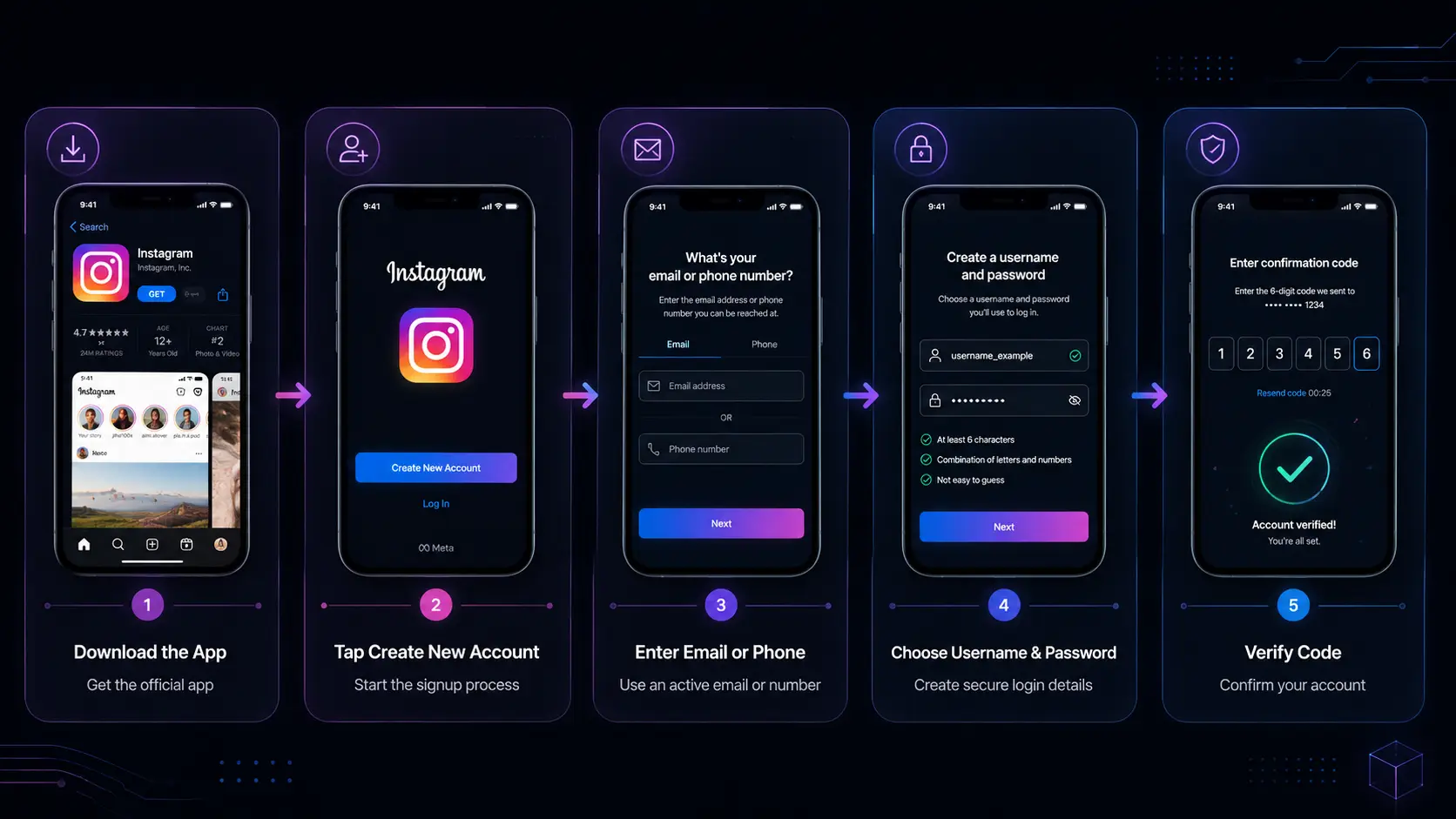
Where to Download the Instagram App
First, install the app. Go to the App Store (iPhone) or Google Play (Android). Search “Instagram” and download it. Always use the official app from Meta. This helps you avoid fake apps or login risks.
Step-by-Step Guide to Signing Up on Mobile
Open the app. Tap “Create new account.” You can Create new Instagram account with email or Create new Instagram account with phone number. For example, a small online shop owner may choose Create new Instagram account for business using a work email. Enter your name, username, and password. Then follow the screen steps. You can also Create new Instagram account online through the mobile browser, but the app is easier.
How to Verify Your Account After Signing Up
Instagram will send a code to your email or phone. Enter the code to confirm your account. This step is important for safety. Without it, your account may not be fully active. Many users who Create a second Instagram account forget this step and face login issues later. Once verified, your account is ready to use.
How to Create an Instagram Account Using a Web Browser
After learning how to make new Instagram account on mobile, many users also prefer using a computer. This is useful when you want a larger screen or manage a business page more easily. It also works well for people who want to Create new Instagram account online without installing the app.
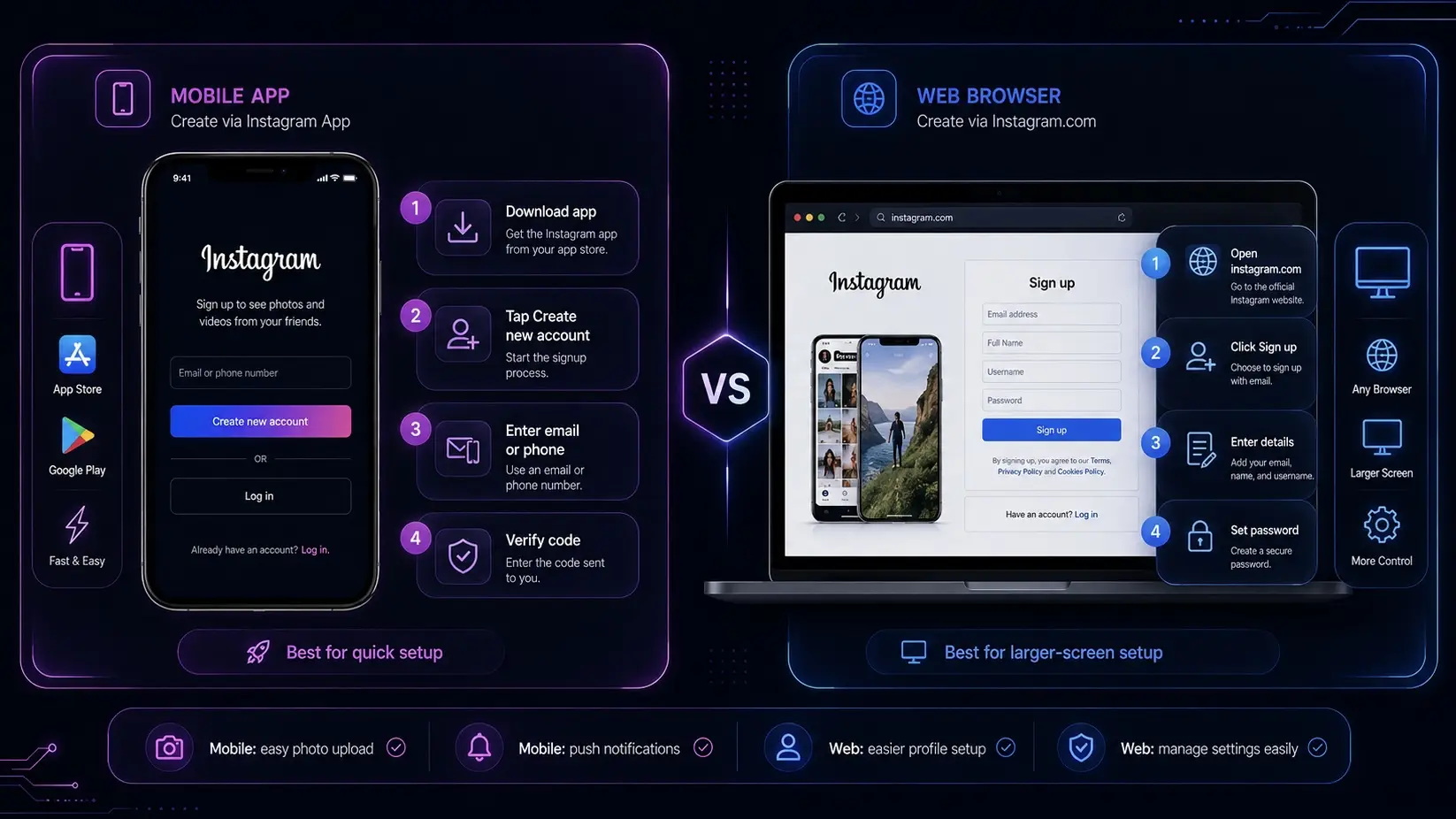
Accessing Instagram on a Computer
Open your browser. Go to www.instagram.com. You will see a clean sign-up page. This method is simple and works on Chrome, Safari, or Edge. For example, a freelancer who manages social media for clients may use a laptop to set up accounts faster and more clearly.
Signing Up with Email or Phone Number
On the page, click “Sign up.” You can Create new Instagram account with email or Create new Instagram account with phone number. Enter your details step by step. Some users prefer email because it feels more professional, especially when they Create new Instagram account for business. Others use a phone number for quick access. Instagram also lets you Create a second Instagram account if you want to manage personal and work profiles separately.
How to Set a Strong Password
A strong password is very important. Use letters, numbers, and symbols. Do not use simple words like “instagram123.” For example, a better password could mix your name and random numbers. This helps protect your account from hacking attempts.
Many people skip this step when they rush to Create new Instagram account online, but weak passwords often lead to account problems later. A secure password helps keep your profile safe, especially if you plan to grow your account or use it for business.
How to Customize Your Instagram Profile After Signing Up
After you finish how to make new Instagram account, the next step is to set up your profile. This is important. A clear profile helps people trust you faster. It also helps when you Create new Instagram account for business or personal use.
Adding a Profile Picture and Bio
First, add a profile photo. This is the small circle image people see. A real photo works best for personal accounts. For business, use a logo. For example, a small coffee shop that uses Create new Instagram account with email often uploads a clear logo so customers can recognize the brand.
Next, write a short bio. Keep it simple. Say who you are and what you do. For example: “Small bakery in New York. Fresh bread every day.” This helps when users find your Create new Instagram account online and want to understand it quickly.
Choosing a Username That Stands Out
Your username is your identity. It should be easy to read and remember. Avoid long numbers or random letters. For example, “emma.bakes” is better than “emma_83921x.”
When you Create a second Instagram account, try to keep a similar style so people can connect both accounts easily. This is useful for creators who manage both personal and work pages.
Adjusting Privacy Settings for Your Account
Instagram lets you choose public or private settings. Public means anyone can see your posts. Private means only approved followers can see them.
If you are learning how to make new Instagram account for business, public is usually better. But if you want personal space, choose private. Many users who Create new Instagram account with phone number start with private settings first, then switch later when they feel comfortable.
Privacy settings also help control who can message you and follow you. This keeps your account safe and more organized.
How to Link Your Instagram Account with Facebook
After setting up your profile, the next step in how to make new Instagram account is connecting it with Facebook. This is optional, but many users do it for easier management. It can help you grow faster, especially if you Create new Instagram account for business or manage content across platforms.
Why Linking Accounts Can Be Useful
Linking Instagram and Facebook helps you save time. You can share posts on both platforms at the same time. For example, a small online shop that used Create new Instagram account with email can post one product photo and reach both Instagram and Facebook customers.
It also helps with ads and account recovery. If you Create a second Instagram account, linking it can make login and security easier.
Step-by-Step Instructions for Linking Accounts
Open Instagram settings. Tap “Accounts Center.” Then choose “Add Facebook account.” Log in with your Facebook details. After that, confirm the connection.
This works whether you Create new Instagram account with phone number or email. The process is the same. Instagram supports linking through Meta systems, so it is safe and stable when done correctly.
How to Manage Shared Content Between Platforms
Once linked, you can choose what to share. You can post only on Instagram or share to Facebook at the same time. Many users who Create new Instagram account online use this feature to save time.
For example, a food blogger may post a photo of a meal on Instagram first, then share it to Facebook automatically. But if the content is personal, you can turn off sharing anytime.
This gives you full control and helps keep your content clean and organized across platforms.
Common Problems When Creating a New Instagram Account and How to Fix Them
When learning how to make new Instagram account, many users face small problems. This is normal. It happens even if you Create new Instagram account online or use mobile. The good news is most issues are easy to fix.
| Problem |
Why It Happens |
What You Can Do |
| Instagram rejects your sign-up |
Email, phone, or device may look risky |
Check your details and try again later |
| Verification code does not arrive |
Email delay, spam folder, or phone carrier issue |
Check spam, wait, or try another method |
| Username is already taken |
Another user already owns it |
Add a word, location, or year |
| Account needs extra verification |
Login activity may look unusual |
Use stable login details and avoid frequent changes |
| New account gets restricted |
Too many fast actions after sign-up |
Slow down and complete your profile first |
Why Instagram Might Reject Your Sign-Up Details
Sometimes Instagram blocks sign-up. This can happen if your email or phone looks risky or already used many times. For example, if someone tries to Create new Instagram account with email that was used for spam before, Instagram may reject it.
It can also happen when you try to Create new Instagram account for business with too many sign-ups in a short time. The system may think it is not a real user. In this case, wait a few hours and try again with a clean email or phone number.
What to Do If You Don’t Receive a Verification Code
Verification codes are very important. They confirm your identity. If you do not receive it, check your spam folder first. Also check your signal or internet connection.
For example, a user who tries to Create new Instagram account with phone number may not get the code if the carrier blocks short messages. In this case, try email instead, or resend the code after a few minutes.
This issue is common when people Create a second Instagram account on the same device.
How to Resolve Username Already Taken Issues
Usernames must be unique. If your name is taken, Instagram will ask you to change it. This is very common when people Create new Instagram account online with popular names.
For example, “travelblog” may already be used. You can add small changes like dots, numbers, or words, such as “travelblog.usa” or “travelblog2026.”
Try to keep it simple and easy to remember. A clear name helps your account grow, especially when you Create new Instagram account for business and want users to find you easily.
If you plan to create multiple Instagram accounts for business or content purposes, you may face sign-up blocks or verification loops. Using the same browser profile for several accounts can trigger Instagram's detection systems. Tools like DICloak can help by isolating each account in its own browser profile — which we will cover in more detail later.
How to Keep Your New Instagram Account Safe and Secure
After learning how to make new Instagram account, safety should be your next focus. Many users forget this step. But it is very important, especially when you Create new Instagram account for business or manage personal content online.
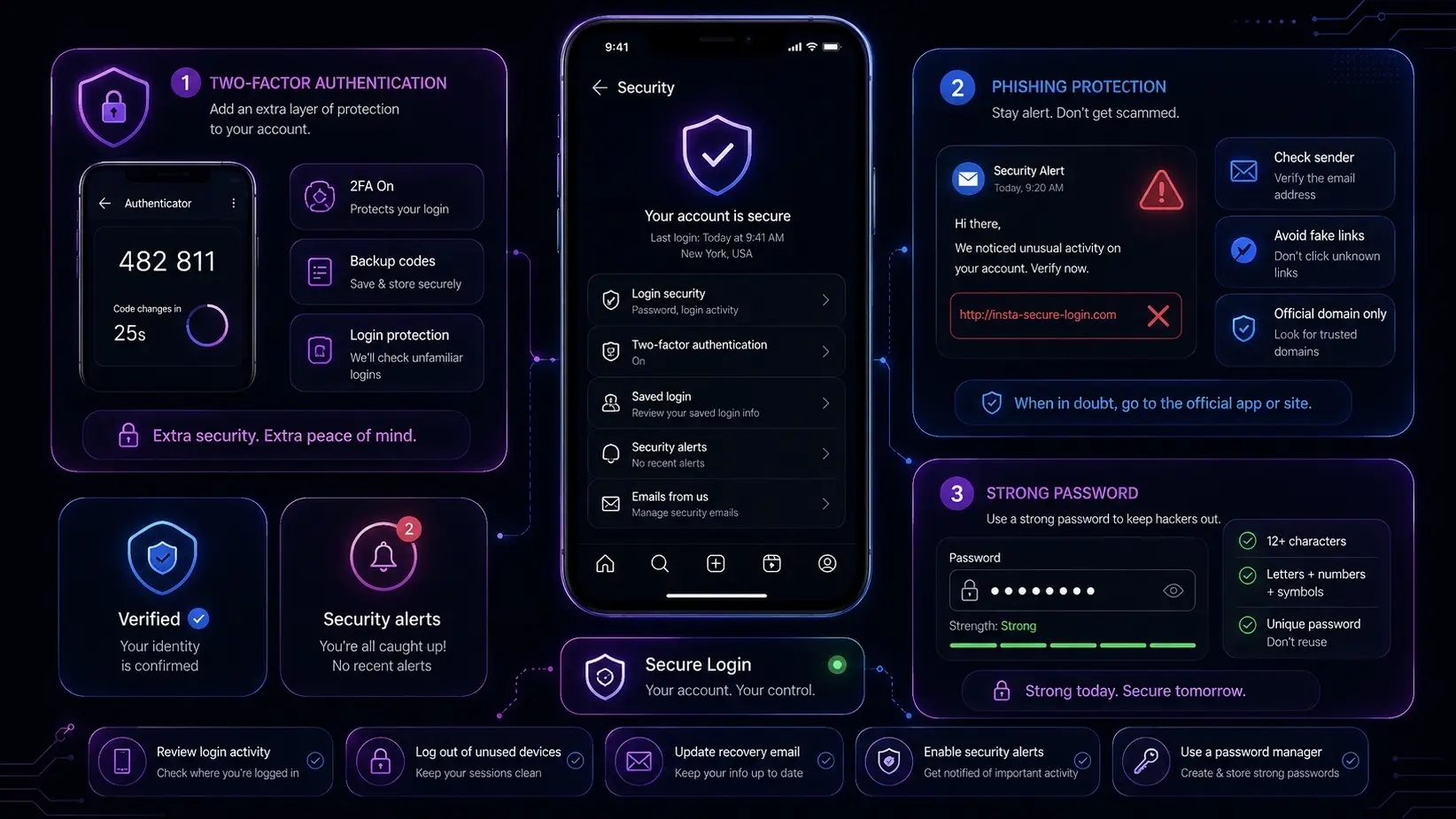
Setting Up Two-Factor Authentication
Two-factor authentication adds extra protection. It means you need a code and your password to log in. For example, if someone knows your password but not your phone, they cannot enter.
To set it up, go to Instagram settings and turn on security options. This is highly recommended when you Create new Instagram account with email or Create new Instagram account with phone number. It also helps if you Create a second Instagram account on the same device.
Recognizing and Avoiding Phishing Scams
Phishing scams are fake messages that try to steal your account. For example, you may receive an email saying “Your Instagram will be locked. Click this link.” This is not real.
Instagram will never ask for your password by email. If you see this while you Create new Instagram account online, ignore it. A small bakery owner who used Create new Instagram account for business once lost access because of a fake login page. Always check the official Instagram domain.
Tips for Creating a Strong, Secure Password
A strong password keeps your account safe. Use a mix of letters, numbers, and symbols. Do not use simple words like your name or “123456.”
For example, “Sara@2026Shop!” is much safer than “sara2026.” Many users who rush to Create new Instagram account with email or phone number use weak passwords and later face hacking issues.
A strong password is one of the most important steps when you Create new Instagram account online. It protects your photos, messages, and followers.
Enhance Instagram Account Management with DICloak
When learning how to make new Instagram account, many users face hidden problems that are not explained in official guides. These include sign-up blocks, verification limits, repeated login checks, and restrictions when managing multiple accounts.
This becomes even more difficult for users who Create new Instagram account for business, run multiple pages, or Create a second Instagram account for personal and work separation.
DICloak helps solve these problems by creating a safe, isolated, and scalable environment for Instagram account management.
Prevent Instagram Sign-Up Blocks with Isolated Browser Profiles
One of the most common problems when users Create new Instagram account online is account rejection or sudden sign-up failure.
Instagram may detect:
- repeated device fingerprints
- shared browser profile
- suspicious sign-up patterns
DICloak solves this by giving each account a fully isolated browser profile.
Each profile has:
- unique browser fingerprint
- independent cookies and cache
- separate digital identity
For example, a user trying to Create new Instagram account with email for multiple brands can run each account in a different profile. This reduces the risk of Instagram linking accounts together or blocking new sign-ups.
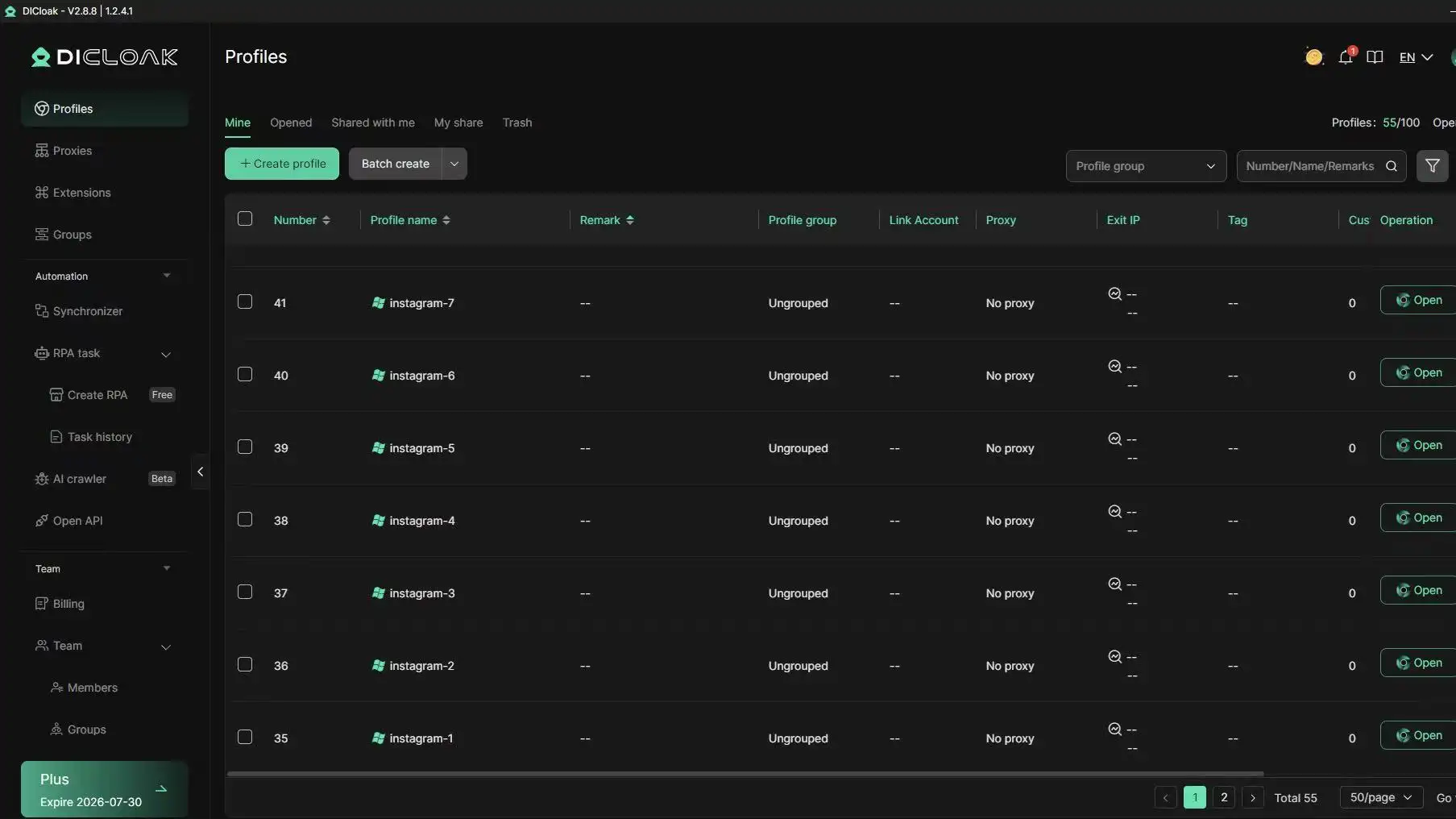
Many users who Create a second Instagram account face login issues or frequent verification requests.
This usually happens when multiple accounts are used on the same browser or device.
DICloak allows users to:
- manage 1,000+ accounts on one device
- keep each Instagram account fully isolated
- avoid cross-account detection
For example, a small agency managing several client accounts can switch between profiles safely without triggering Instagram security warnings.
This is especially useful for users doing Create new Instagram account for business at scale.
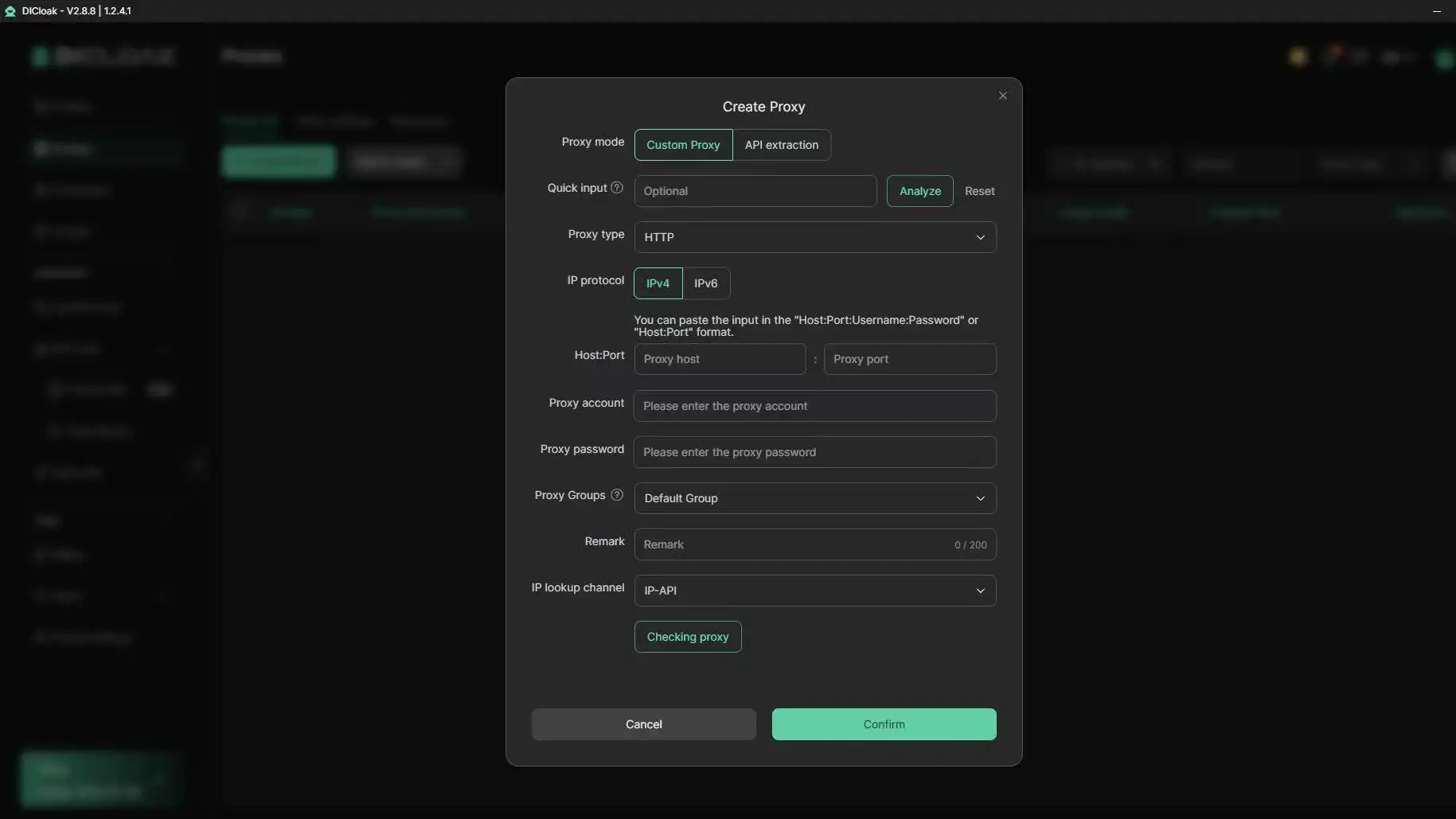
Use Proxy Integration to Reduce Verification and Login Issues
Another common issue during how to make new Instagram account is repeated verification or login challenges.
This often happens due to IP inconsistency or shared networks.
DICloak supports:
- HTTP / HTTPS / SOCKS5 proxy integration
- bulk proxy management
- dedicated IP per Instagram profile
For example, when a user tries Create new Instagram account with phone number from different locations or devices, Instagram may ask for extra verification. With stable proxy mapping, each account behaves like a real, consistent user.
This reduces verification loops and improves account stability.
Automate Instagram Operations and Scale Account Growth Safely
After users successfully Create new Instagram account online, the next challenge is managing engagement and content activity.
Doing this manually is slow and hard, especially for business users.
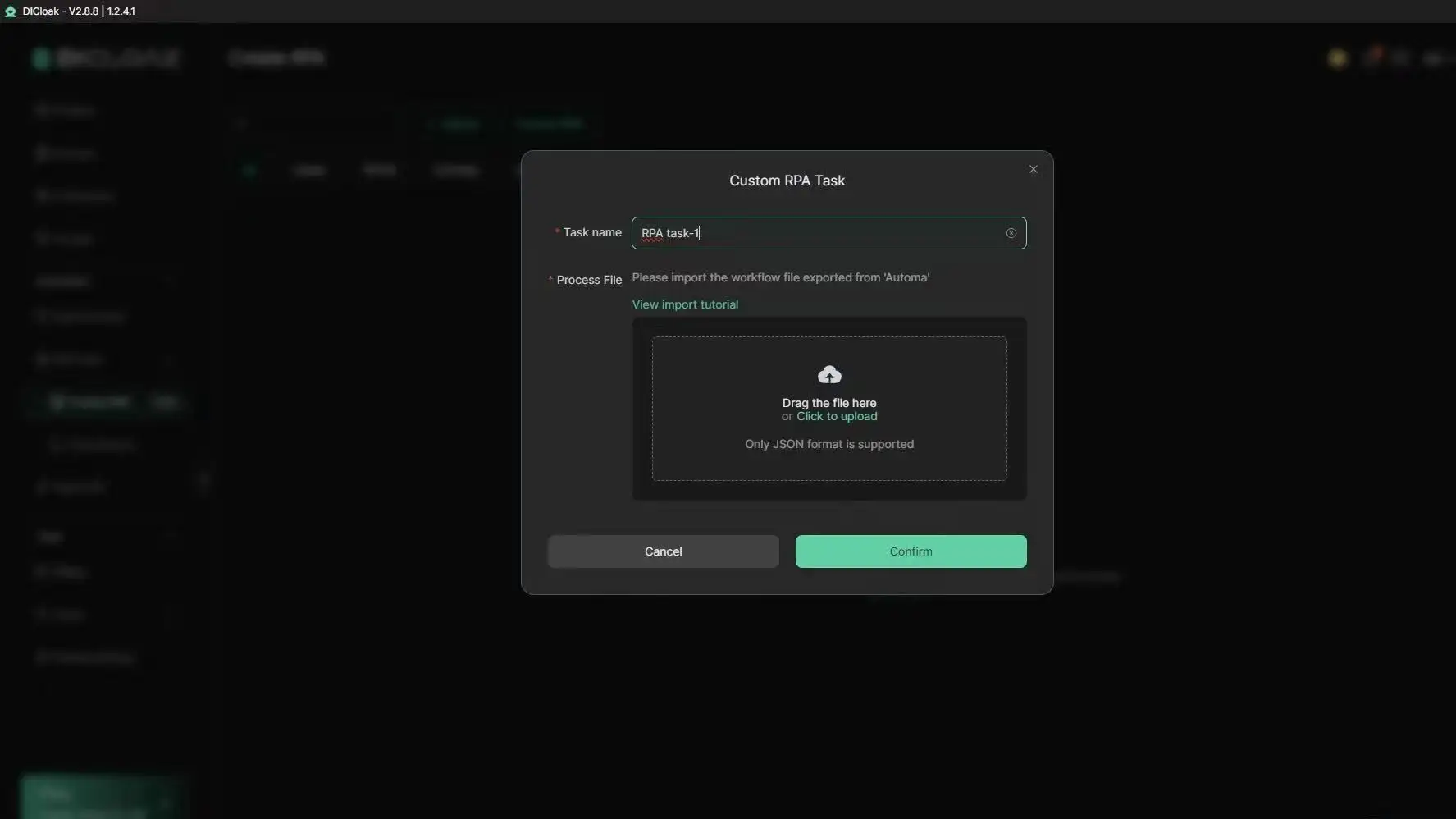
DICloak provides automation tools that help:
- automate likes, comments, and follows
- simulate real user behavior
- run multi-account actions at the same time
- reduce manual repetitive work
With built-in RPA tools and multi-window synchronizer, users can manage engagement across many Instagram accounts efficiently.
This is especially helpful for users who Create new Instagram account for business and need consistent daily activity across multiple pages.
Improve Team Collaboration for Instagram Account Management
When teams handle multiple Instagram accounts, password sharing becomes risky.
DICloak allows secure team collaboration with:
- profile sharing without password exposure
- permission control for each user
- activity logs for tracking actions
- data isolation between team members
For example, a marketing team managing Create new Instagram account campaigns can assign different roles to members without sharing sensitive login credentials.
This improves security and reduces operational mistakes.
Scale Instagram Account Creation and Management Efficiently
For users who regularly Create a second Instagram account or manage multiple brand accounts, scaling becomes a real challenge.
DICloak supports:
- bulk profile creation
- one-click account setup workflows
- multi-account management from a single device
- cross-platform compatibility (Windows, Mac, Linux, etc.)
This makes it easier for agencies, affiliate marketers, and e-commerce teams to scale Instagram operations safely and efficiently.
Ready to create and manage Instagram accounts without facing blocks or verification loops? Try DICloak For Free — all from one device.
Frequently Asked Questions about How to Make New Instagram Account
How do I make a new Instagram account in 2026?
To learn how to make new Instagram account in 2026, start with a phone number or email address you can access. Then open the Instagram app or go to Instagram on a web browser. Tap or click “Create new account,” enter your details, choose a username, set a strong password, and verify your email or phone number. After that, add a profile photo and bio so your account looks real and clear.
Can I make a new Instagram account with the same phone number?
Yes, in some cases you can use the same phone number for more than one Instagram account. But it is better to use an email or phone number that you can always access. This helps when you need a login code or password reset. If you are learning how to make new Instagram account for work or business, a business email is often a cleaner choice.
Can I create a second Instagram account on the same device?
Yes. Instagram lets users add and switch between multiple accounts in the app. This is useful if you want one account for personal use and one for work. When you learn how to make new Instagram account as a second account, keep the username, email, and profile details clear. This helps you avoid mixing up personal and business posts.
Why can’t I create a new Instagram account?
Instagram may reject a new sign-up for several reasons. Your email may already be used. Your phone number may not receive the code. Your username may already be taken. Sometimes, too many sign-up attempts from the same device or network can also cause problems. If this happens while learning how to make new Instagram account, wait for a while, check your details, and try again with a valid email or phone number.
Should I make a personal or business Instagram account?
It depends on your goal. A personal account is enough if you only want to share photos with friends. A business account is better if you want to promote a shop, brand, service, or content page. When learning how to make new Instagram account for business, start with clear brand details, a professional email, a simple username, and a public profile. You can also switch to a professional account later if needed.
Conclusion
Creating a new Instagram account in 2026 is straightforward when you have the right information and preparation. Start with a valid email or phone number, choose a clear username, set a strong password, and complete your profile with a photo and bio.
If you run into sign-up blocks or verification issues, check your details first — and consider using isolated browser profiles for multiple accounts. Tools like DICloak can help you manage several Instagram profiles safely from one device.
With the right setup, your new Instagram account will be ready to grow.
 Web Proxy Tools
 Free Tools
 Cookie Plugin
 UA Generator
 MAC Address Generator
 IP Generator
 IP Address List
 2FA Code Generator
 World Clock
 Anonymous Check
 WebRTC Leak Test
 UUID Generator
 Free Web Proxy Site
 Proxy Checker
 FB Ad Checker
 AI Web Scraping
 Free SMM Tools
 Twitter Shadowban Checker
 Instagram Name Checker
 UTM Generator
 Username Generator
 AI Hashtag Generator
 LinkedIn Headline Generator
 Social Media Image Resizer