Short videos are everywhere now, but that does not mean making a good one is easy. A lot of creators post Shorts that look fine at first, yet still get skipped. The idea may be too broad. The opening may be too slow. Or the video may not feel right for the Shorts feed. That is why learning how to make a YouTube Short in 2026 is not only about pressing record. It is about knowing how to plan, shoot, edit, and upload in a way that fits how people watch today.
The good news is that you do not need a big budget, a full camera setup, or advanced editing skills to get started. What matters more is having one clear idea, one strong first second, and one clean final video. In this guide, you will learn how to make a YouTube Short step by step, what to avoid, how to improve weak results, and how to turn old content into Shorts that are easier to watch and more likely to get views.
What Is a YouTube Short and Why Does It Matter in 2026?
If you want to learn how to make a YouTube Short in 2026, start with this: a YouTube Short is not only a short video. It is a video made for fast viewing on a phone, usually in a vertical format, and built to catch attention quickly. YouTube now treats eligible square or vertical videos uploaded after December 8, 2025 as Shorts, and YouTube also supports three-minute Shorts, so the old “under 60 seconds only” idea is no longer the full rule in 2026. That is one of the most important YouTube Shorts requirements to understand before you film or upload.
What makes a video a YouTube Short today
Today, a Short is defined by how it fits the Shorts format and how YouTube classifies it. In most cases, that means a video that is vertical or square, easy to watch on mobile, and built around one clear idea. A Short usually works best when it solves one small problem, shows one quick result, or shares one focused tip. For example, a cooking creator might post “1 easy breakfast in 20 seconds,” while a fitness creator might show “1 squat mistake and how to fix it.” That is why people searching how to make YouTube Shorts should not think only about length. They should think about clarity, speed, and format too.
How Shorts differ from regular YouTube videos
The biggest difference between Shorts and regular YouTube videos is not just length. It is how people watch them. A regular video often gives you more time to explain, build context, and warm up the viewer. A Short has to get to the point almost at once. People often find Shorts while swiping, not while sitting down to watch one topic for ten minutes. That is why the opening line, first image, and early pacing matter so much more.
Shorts also sit inside a platform that already supports long videos, which gives YouTube a special advantage over other short-form apps. A creator can post a quick Short, reach new viewers, and then push those viewers toward longer videos on the same channel. This is also why many creators look for How to upload YouTube Shorts and How to edit YouTube Shorts as part of the same workflow. On YouTube, creating, publishing, and channel growth are closely connected.
Why Shorts still help creators grow faster
Shorts still matter in 2026 because they are one of the fastest ways to get discovered. YouTube says Shorts now average 200 billion daily views, which shows how much attention this format still gets. They also help creators stay active between longer uploads. A channel may only publish one long video each week, but Shorts can keep the channel visible in between. That matters for small creators, new channels, and brands trying to test YouTube Short ideas without spending days on production. Shorts are also useful for content reuse. Instead of starting from zero every time, creators can turn one longer video into several short clips.
YouTube officially supports this through Edit into a Short, which is why How to make YouTube Shorts from existing videos has become such a practical part of many content strategies. Still, Shorts are not a shortcut for weak content. YouTube’s monetization policies make clear that repetitive or mass-produced content can be a problem, so the Shorts that work best are usually the ones that feel original, useful, and easy to understand.

How to Plan and Shoot a YouTube Short
Once you understand what makes a Short work, the next step in how to make a YouTube Short is planning before you film. This matters more than many beginners think. A Short can be quick to make, but weak planning often leads to a video that feels slow or easy to skip.
Choose one clear idea before you start filming
The best Shorts usually do one thing well. They answer one question, show one result, or teach one small step. That is why people learning how to make YouTube Shorts should start with the idea, not the gear. Strong YouTube Short ideas are simple and easy to understand fast, like “1 budgeting mistake to avoid” or “Why your sunscreen pills under makeup.”
If your topic feels too wide, it is probably too big for one Short. “How to get fit” is too broad. “One push-up mistake that hurts your shoulders” is much better. This is also why How to make YouTube Shorts from existing videos can work so well. One long video often contains several smaller ideas that can each become a clear Short.
Write a strong hook for the first seconds
After the idea comes the hook. In a Short, the opening needs to tell people why they should stay. A weak opening sounds like “Hey guys, today I want to talk about…” A stronger one gets to the point right away, like “This one setting can make your phone video look much better.”
It helps to write your first line before filming. If your Short is about coffee, do not start with the full routine. Start with the part people care about, such as “This is why your iced coffee tastes watery.” That approach also works well when reusing longer videos, because one strong line can become the center of the whole Short.
Use the right phone settings, framing, and lighting
For most beginners, a phone is enough. You do not need expensive equipment to learn how to make a YouTube Short. What matters more is whether the video is easy to watch on a phone screen. Current YouTube Shorts requirements support vertical or square video, and vertical framing is still the safest choice for the Shorts feed.
Keep the subject near the center and leave space for captions. If the frame is too tight, text can block the important part of the shot. Lighting matters too. Natural window light often works better than harsh ceiling light. Face the window if you can. If you film at night, one small lamp in front of you is often enough. A clear idea, a strong opening, and a clean shot usually matter more than fancy gear.
How to Edit a YouTube Short That People Keep Watching
Once your footage is ready, the next step in how to make a YouTube Short is editing it so it feels fast and easy to follow. This is where many Shorts lose viewers. The idea may be good, but the video still feels slow. Good editing is usually about cutting what does not help.
Cut slow parts and keep the pace tight
A Short should move quickly without feeling messy. Cut anything that slows the point down. If you filmed a coffee video, viewers probably do not need to see every small movement before the useful part starts. A better version might begin with the finished drink, then jump right to the step that changes the taste.
This matters even more when using How to make YouTube Shorts from existing videos as part of your process. A long video often has greetings, setup, or extra transitions that work in a full upload but feel too slow in a Short. Pull out the strongest part first, then build around it.
Add captions, text, and simple effects
Good editing also helps people follow the video without sound. Captions matter because many viewers watch Shorts silently at first. You do not need lots of effects. In most cases, one short caption, one highlighted word, or one quick zoom is enough.
If your Short is about phone camera tips, keep it simple. Show the setting, add a short caption like “Turn this on for better video,” and zoom in once so the viewer knows where to look. Small edits like this are easier to follow and usually work better than flashy effects.
Use beginner-friendly apps to edit your Short
For most beginners, the best app is the one that helps you finish a clean Short without slowing you down. YouTube already includes basic tools for trimming, speed changes, and text, so that is a good place to start. If you want more control, many creators use CapCut because it makes trimming, captions, and quick edits easier.
Still, no app can fix a weak video idea. Strong YouTube Short ideas, clear pacing, and easy-to-read captions matter more than the tool. If viewers can understand the point fast and follow the action easily, the Short is usually ready.
How to Upload and Optimize Your YouTube Short
Once your video is edited, the next step in how to make a YouTube Short is uploading it the right way. This part is simple, but small choices still matter. In 2026, YouTube can treat a video as a Short if it is 3 minutes or less and uploaded in a vertical or square format. These are some of the key YouTube Shorts requirements to check before you publish.
How to upload a Short on phone or desktop
If you want to know How to upload YouTube Shorts, the process is easy on both phone and desktop.
On phone:
- Open the YouTube app and tap Create.
- Choose a video from your phone, or record one inside the app.
- Add your title and description.
- Review the video, then publish it.
On desktop:
- Open YouTube Studio.
- Upload your video file.
- Add your title and description.
- Check that the video fits current YouTube Shorts requirements.
- Review everything, then publish it.
If your clip comes from a longer video, YouTube also supports Edit into a Short. That is helpful for creators learning How to make YouTube Shorts from existing videos, because it makes it easier to turn one useful part of a long video into a focused Short.
Write a title and description that support clicks
Your title should be clear first. It should match the first thing people see and hear. For example, “This Phone Setting Fixes Dark Videos Fast” is stronger than “Quick Video Tip.” A short description also helps. It can explain the topic, add context, or link the Short to a longer video on your channel. This is one reason good YouTube Short ideas make the whole process easier. A clear idea usually leads to a clear title.
What to check before you publish for better visibility
Before posting, take one last look:
- Is the video vertical or square?
- Is it 3 minutes or less?
- Does the first second get to the point fast?
- Are the captions easy to read?
- Does the title match the video?
These checks matter because better visibility usually starts with better clarity. When people search how to make a YouTube Short, they often focus on filming and editing, but publishing is where the final first impression happens.
Why Some YouTube Shorts Get Few Views
Even after you learn how to make a YouTube Short, film it, edit it, and publish it, some Shorts still get very few views. That can feel frustrating, especially when the video seemed fine at first. In most cases, the problem is not one big mistake. It is a mix of small issues. The hook may be weak. The topic may be too broad. The pacing may feel slow on a phone screen. And sometimes the video fits the idea of a Short, but still misses key YouTube Shorts requirements, such as format, length, or clear mobile-friendly presentation. YouTube is also a very crowded platform now. Shorts average 200 billion daily views, but YouTube also handles an enormous amount of content, so weak or unclear videos are easy to scroll past.
Weak hooks, unclear topics, and slow openings
A lot of Shorts lose people in the first second or two. The opening may start too softly, or the viewer may not understand what the video is about right away. A title can help, but Shorts are often judged first by what people see and hear on screen. A video called “Quick Morning Tip” is harder to care about than one that opens with “Stop making this coffee mistake.” The second version gives the viewer a reason to stay. This is why creators learning how to make YouTube Shorts should keep each Short focused on one small idea, not three or four. A single clear promise usually works better than a broad topic. That is also true when using How to make YouTube Shorts from existing videos as a workflow. A long video may contain one great clip, but if you keep too much setup around it, the Short starts to drag.
Formatting and quality problems that hurt retention
Some Shorts get skipped because they are simply harder to watch. The video may be cropped badly. The text may sit on top of the subject. The captions may be too small or inaccurate. YouTube lets creators add captions during upload and edit subtitles later in Studio, which matters because many viewers watch with sound low or off. If the words are hard to read, people leave faster. Format matters too. YouTube’s current help pages say Shorts up to 3 minutes can be uploaded, and eligible videos should be square or vertical. Vertical still works best for the Shorts experience. If the clip looks awkward on a phone, retention can drop even when the idea is good.
Common content mistakes new creators make
New creators often think more content means a better Short. In reality, too much information can make the video weaker. A better approach is to make one point clearly, then stop. Another common mistake is copying trends without adding anything original. YouTube’s monetization policy now uses the term inauthentic content for material that is repetitive or mass-produced, which is a useful warning even for small creators. Shorts do not need to be expensive or complex, but they do need to feel like they came from a real person with a real point. Good YouTube Short ideas usually come from specific problems, quick results, or one useful lesson. A short clip showing “why your video looks dark indoors” will often do better than a generic “camera tips” post because the problem is clearer. So when a Short gets few views, it is often worth checking three things before blaming the algorithm:
- Did the opening get to the point fast?
- Was the topic clear in one short sentence?
- Was the video easy to watch on a phone?
Those checks connect everything together. They affect How to edit YouTube Shorts, How to upload YouTube Shorts, and how the final video feels once it reaches the feed.
How to Repurpose Content and Improve Your Shorts Strategy
Once you know how to make a YouTube Short, the next step is using your old content more wisely. Not every good Short has to start from zero. Sometimes the best option is to pull one strong moment from a longer video and reshape it for the Shorts feed.
Turn long videos, Reels, or TikToks into Shorts
A good repurposed Short usually starts with one clear tip, one mistake, or one useful moment. If a 10-minute video has one part that stands out, that section can often work on its own. This is why How to make YouTube Shorts from existing videos has become so useful.
A long workout video, for example, can become several Shorts instead of one crowded clip. One Short can focus on a squat mistake, another on a fast warm-up, and another on knee position. The same idea can work with Reels and TikToks too, but the video should still feel right for YouTube Shorts, with a fast opening, clear captions, and one main point.
Avoid copyright and platform-specific problems
Repurposing saves time, but it also creates a few risks. First, check the format. Current YouTube Shorts requirements still focus on square or vertical video, and Shorts up to 3 minutes are supported. A video that looks fine on another platform may still feel awkward on YouTube if the framing or text placement does not fit the Shorts feed.
It is also important to check music, rights, and branding. A repurposed Short should feel like your content, not like a repost from somewhere else. This matters before you move on to How to upload YouTube Shorts, because copyright issues or platform-specific leftovers can hurt visibility and even monetization.
Use results and feedback to improve future Shorts
A better Shorts strategy usually comes from testing and adjusting over time. If one Short keeps people watching longer, look at the opening, the pacing, and the topic. If another one drops early, the hook may be weak or the idea may be too broad. That kind of review helps improve your YouTube Short ideas in a practical way.
A simple way to review your Shorts is to look at three things:
- Which Shorts keep viewers longer
- Which openings get to the point faster
- Which topics are easiest to explain in one sentence
Over time, those patterns help you make better choices. Better topics improve how to make YouTube Shorts. Better cuts improve How to edit YouTube Shorts. Better packaging improves How to upload YouTube Shorts.
How to Manage Multiple YouTube Shorts Accounts More Safely and Efficiently
Once Shorts work starts to grow, the challenge is no longer only how to make a YouTube Short. The harder part is keeping uploads, accounts, and repeated actions organized. This becomes more obvious when one person runs several YouTube channels or a small team handles editing, publishing, and comment checks across multiple accounts.
Keep accounts separated with isolated profiles and custom proxy settings
When several YouTube accounts are used on one device, overlap becomes a real problem. Login states can mix, browser data can carry over, and one wrong click can affect the wrong channel. A cleaner setup is to keep each account in its own browser profile, with separate fingerprints, cookies, and local session data. Adding a different proxy to each profile makes the setup even more stable, especially when different channels are handled by different people or used for different routines. This makes daily work easier to control for creators testing different YouTube Short ideas, managing client channels, or running several niche pages side by side.

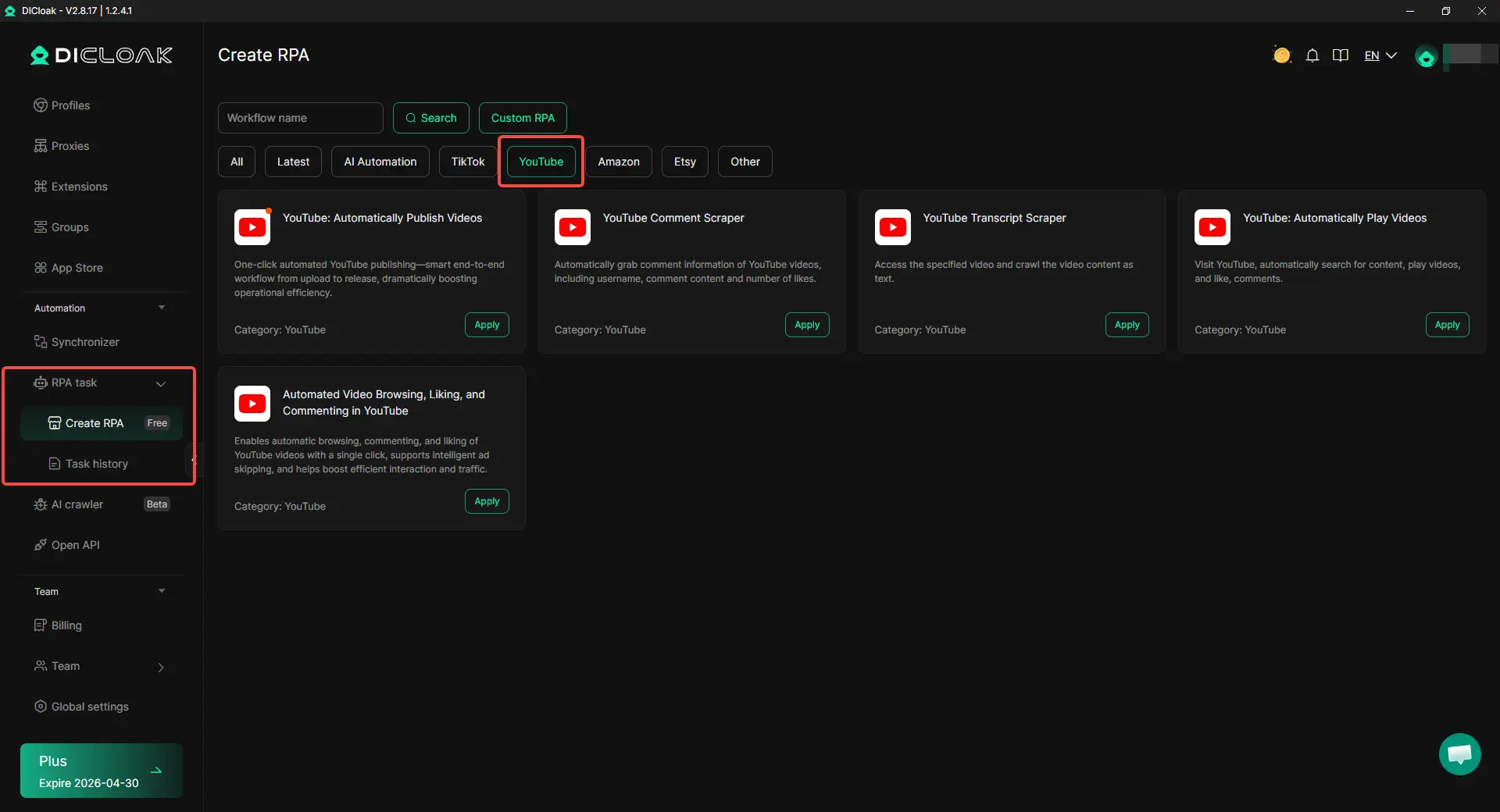
Use RPA to reduce repeated YouTube tasks
A lot of time gets lost in repeated browser actions. Uploading videos, opening profiles, checking publish settings, reviewing comments, or collecting basic channel data can quickly turn into manual repetition. This is where RPA becomes useful. For YouTube publishing, one automated process can handle the path from upload to release, which is especially useful when Shorts are posted often or when similar videos are being pushed across several channels. Repeated actions like comment scraping or transcript collection can also be handled in a more structured way, which leaves more time for stronger hooks, cleaner edits, and better upload choices.
Use Synchronizer when the same action repeats across many accounts
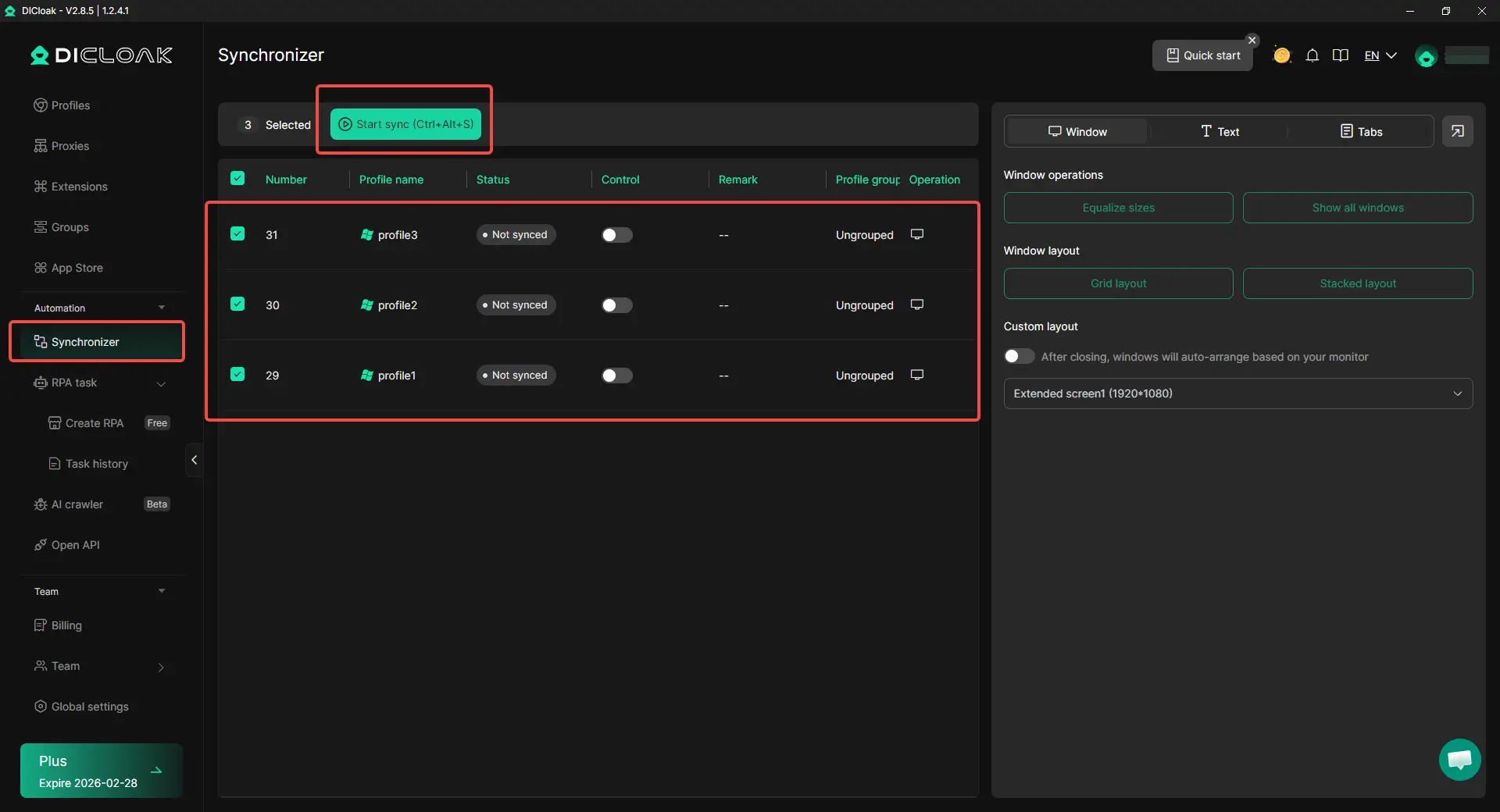
When the same step needs to happen in many profiles, Synchronizer saves a lot of time. Instead of repeating the same clicks one by one, the same action can be mirrored across several windows at once. This becomes especially useful in multi-account YouTube work, where the same setup, review step, or browser action may need to be repeated across many channels. It does not replace judgment, but it cuts down the wasted motion that slows teams down.
FAQs about how to make a YouTube Short
What are the YouTube Shorts requirements in 2026?
In 2026, a video can qualify as a Short if it is 3 minutes or less and uploaded in a vertical or square format. That is one of the biggest updates creators need to know, because many older guides still focus on the old 60-second limit.
How to make a YouTube Short from an existing video?
A simple way is to pull out one strong moment from a longer video instead of trying to reuse the whole thing. YouTube’s Edit into a Short feature lets creators select a section from an uploaded video and turn it into a Short. This works best when the clip already has one clear point, one quick lesson, or one strong hook.
How to make a YouTube Short on desktop instead of on a phone?
You can upload Shorts from a computer through YouTube Studio. Desktop uploads can qualify as Shorts when the video is up to 3 minutes and has a square or vertical aspect ratio. This is useful for creators who prefer to edit on a computer before they publish.
How to make a YouTube Short with music without copyright problems?
This is where creators need to be careful. YouTube says Shorts longer than one minute with an active Content ID claim can be blocked on the platform. Music use in longer Shorts can also vary by track, so using cleared music or royalty-free audio is usually the safer choice.
How to make a YouTube Short that gets more views?
A Short usually performs better when the idea is clear, the first second gets to the point fast, and the video is easy to follow on a phone screen. In practice, one mistake, one fix, or one quick result often works better than trying to explain too much in one clip. YouTube’s own Shorts creation guidance also puts a lot of focus on trimming, text, and quick editing tools, which shows how important clarity and pacing are.
Conclusion
Learning how to make a YouTube Short in 2026 is not just about filming a short video. It means choosing one clear idea, opening with a strong hook, editing out slow parts, and uploading in a way that fits how people really watch on YouTube. Small choices matter. A clear topic, easy-to-read captions, clean vertical framing, and a simple title can make a big difference in how your Short performs.
The good news is that you do not need expensive gear or a complicated setup to start. You can make better Shorts by keeping the message focused, reusing strong moments from older videos, and paying attention to what viewers respond to over time. When the content is useful, easy to follow, and built for quick viewing, YouTube Shorts can still be one of the fastest ways to reach new viewers and grow your channel in 2026.
 Web Proxy Tools
 Free Tools
 Cookie Plugin
 UA Generator
 MAC Address Generator
 IP Generator
 IP Address List
 2FA Code Generator
 World Clock
 Anonymous Check
 WebRTC Leak Test
 UUID Generator
 Free Web Proxy Site
 Proxy Checker
 FB Ad Checker
 AI Web Scraping
 Free SMM Tools
 Twitter Shadowban Checker
 Instagram Name Checker
 UTM Generator
 Username Generator
 AI Hashtag Generator
 LinkedIn Headline Generator
 Social Media Image Resizer