Do you want to keep your private details safe online? You are not alone. Many people want to learn how to make a Gmail account without a phone number. In the year 2026, internet privacy is more important than ever. Google checks new accounts very closely to stop fake users. They often ask for a mobile number to prove you are a real human. But you do not always have to share this personal information. You can still skip the phone test if you know the right steps.
This guide will show you simple, proven, and safe ways to build your new email address today. We will look at computer methods, mobile phone tricks, and smart browser habits. We will also talk about how you can protect your online privacy without losing access to your important messages. Whether you are a student, a small business owner, or just someone who hates spam, this guide will help you step by step.
Why Create a Gmail Account Without a Phone Number?
Sharing your personal phone number is not always a good idea. Sometimes, you just need a quick email address for a special project. You might want to sign up for shopping discounts, test a new mobile app, or separate your work life from your home life. Giving out your real number can lead to unwanted messages and a loss of privacy.
What Privacy Concerns Are Addressed?
When you hide your phone number, you stop large data tracking companies from following you. Big tech companies collect your daily data to build a giant profile about you. They track what you buy, what you watch, and where you travel. If you skip giving them your phone number, your new online life stays separate from your real identity.
Imagine you run a small local blog about cooking. You might want an email address for your readers to contact you. However, you certainly do not want strangers to find your real phone number. A private email account keeps you safe from spam calls, annoying text messages, and unwanted advertisements. It puts a strong wall between your public internet life and your private home life.
How Does It Affect Account Security?
A phone number usually helps you get back into your account if you forget your password. Without a phone number, your account faces a slightly different security situation. Google uses phone numbers to send secret text codes. These codes block hackers from stealing your account.
If you do not give a phone number, you must protect your account in other ways. You need to create a very strong, long password. You also must provide a backup email address. A backup email address does the exact same job as a phone text. If a hacker tries to break in, Google sends a warning to your backup email. This way, you still block the bad guys, but you keep your personal mobile number completely secret.
Are There Any Functional Limitations?
Usually, your basic email works perfectly fine without a phone number. You can send messages to your friends, attach large picture files, and save documents in Google Drive. For everyday reading and writing, you will not notice any difference at all.
However, you might face some strict limits if you try to use advanced Google tools. For example, if you want to start a new YouTube channel and upload very long videos, Google will ask for a phone number. If you want to run paid advertisements on Google Ads, they will also demand phone verification. Google wants to make sure business users and video creators are real people. If you only need a simple email inbox, you will not miss these extra features at all.
Steps to Create a Gmail Account Without Phone Number on PC
Using a desktop computer or a laptop is the most common way to start this process. But you need to prepare your internet browser before you type anything. Google is very smart. It remembers your computer habits and knows who you are.
Which Browser Settings Are Required?
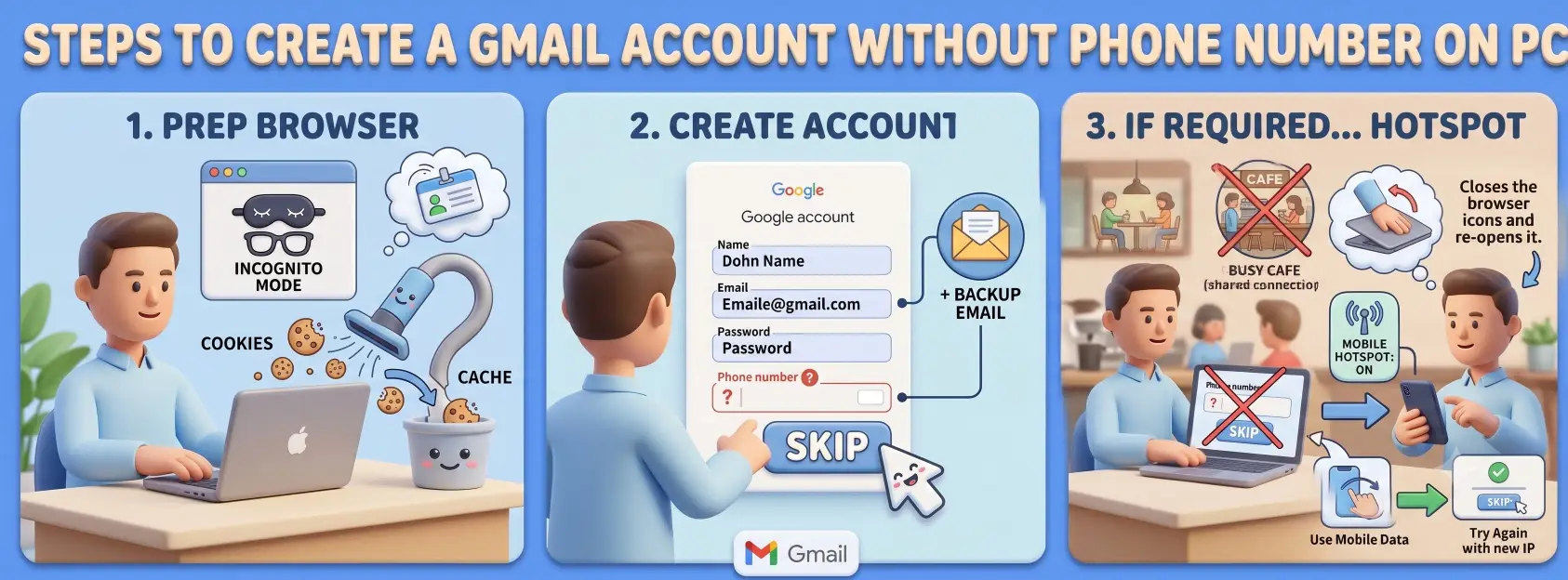
First, you need to open your internet browser in a private mode. In Google Chrome, this is called "Incognito Mode." In Microsoft Edge, it is called "InPrivate." This special mode stops the browser from sharing your old internet history.
Next, you should clear your browser cache and delete your cookies. Think of cookies like a digital nametag you wear on the internet. If you wear your old nametag, Google immediately knows who you are and where you live. If you clear your history, you throw away the old nametag. A fresh, clean browser makes Google think you are a brand-new user buying their very first computer. This fresh start is the big secret to avoiding the phone number test.
How to Bypass Phone Verification?
Now that your browser is clean, go to the official Google account creation web page. The screen will ask for your basic details. Type in a first name and a last name. Pick a brand-new email address that you want to use. Then, choose a strong password and type it twice to confirm. Click the button to go to the next page.
The next page will ask for your birth date and your gender. Fill these out normally. Below that, you will see a box asking for a mobile phone number. Look very closely at this screen. Because you used a clean, private browser, you will likely see a small "Skip" button next to the "Next" button. Click this "Skip" button to move forward without typing any numbers. Always remember to add a backup email address on this screen. Giving a backup email makes Google trust your new account much more.
What to Do If Verification Is Still Required?
Sometimes, the helpful "Skip" button hides. This usually happens if your internet connection is shared with many people. For example, if you are using free Wi-Fi at a busy coffee shop, Google might think your internet is too risky. If Google forces you to add a phone number and there is no skip button, you must stop immediately.
Do not try to guess a fake number. Just close the browser window completely. You need to change your internet network. The easiest way to do this is to pick up your mobile phone. Turn off your phone's Wi-Fi and turn on your mobile data. Then, share your phone's internet connection with your computer using a mobile hotspot. Open a new private browser window on your computer and try the steps all over again. The new internet connection often brings the "Skip" button back.
Creating a Gmail Account Without Phone Number on Mobile Devices
Mobile phones are actually your best secret weapon in 2026. Setting up an email on a phone app works very differently than using a computer browser. Google tends to trust mobile phones a lot more.
How to Set Up on Android Without a Phone Number?
Android phones have a very high success rate for this trick. This is because Android is an operating system built by Google itself. To begin, open your Android phone and go to the main Settings menu. Scroll down until you find a section called "Passwords & Accounts" or sometimes just "Users & Accounts."
Tap on "Add Account" at the bottom of the screen. A list of companies will appear. Tap on "Google." Your phone might ask for your fingerprint or your screen lock PIN to prove it is really you holding the phone. After that, tap on "Create account" and choose "For my personal use." Fill in your name, birthday, and pick a new email address. Because your Android phone is already a trusted device, the Google system treats you as a very safe user. When you reach the phone number page, you will almost always see the "Skip" button waiting for you.
What Are the Steps for iOS Devices?
If you have an Apple iPhone or an iPad, you can still do this easily. First, open the Apple App Store and download the official Gmail app. Do not use the Apple Mail app for this specific setup. Once the Gmail app finishes downloading, open it.
Tap on the profile picture circle in the top right corner. A menu will drop down. Tap on the option that says "Add another account." Next, choose "Google" from the list of email providers. The app will open a small login screen. Tap "Create account" and choose the personal use option. Just like on an Android phone, you will type in your first name, last name, and birthday. The official app usually skips the strict security checks, allowing you to bypass the mobile number requirement with a simple tap.
How Does App Version Affect the Process?
The version of your mobile app matters a great deal. Older, outdated apps might have broken links or follow old security rules that instantly demand a phone number. Before you try to make an account, always visit your app store and update your Gmail app to the newest version available.
However, you must be careful not to rush. Do not try to make five different accounts in one single afternoon. Even if you use the newest app on a brand-new phone, making too many accounts too fast will trigger a loud security alarm at Google headquarters. Google's smart computer system will think a robot is attacking their servers. If this happens, they will lock your device from making any more accounts for a long time. Take your time and make only one account per week.
Risks of Not Using a Phone Number with Gmail
We must be honest and talk about the possible dangers. Skipping the phone verification is wonderful for your daily privacy, but you do lose a very strong safety net.
Can You Recover Your Account Without a Phone Number?
Yes, you can absolutely recover your account, but you must prepare for emergencies early. If you forget your long password and you have no phone number attached to the account, you have only one way back in. You must rely on your backup email address.
Imagine you wake up and cannot remember your password. If you have no backup email and no phone number, you will lose that account forever. Google will not let you back in because they have no way to prove you are the real owner. To prevent this sad situation, always link a second, older email address that you already own. When you forget your password, Google will send a special reset link to that older backup email.
What Are the Security Implications?
Without a phone number to receive a text message code, your account might be slightly easier for a smart hacker to enter. To fight this danger, you must use other security tools.
Instead of a phone number, you can set up Google Prompt. This feature sends a simple "Yes or No" pop-up message to your trusted mobile phone screen when someone tries to log in. You can also print out physical backup codes on a piece of paper and hide them in your desk. Another great option is to download a free authenticator app. These special apps generate a new secret number every thirty seconds. These tools do the exact same security job as a text message, but they keep your private data totally secure.
How Does It Impact Account Verification?
Google tracks where you usually live and work. If you suddenly travel to a new country or a new city and try to log in, Google's security system might get scared. They usually send a quick text message to your phone to ask, "Is this really you traveling?"
If you do not have a phone number on file, Google might temporarily block your login. They will ask you to verify your identity from your home computer instead. This can be very frustrating if you are on a business trip and need to read an important message. To avoid this travel issue, always keep your main mobile phone logged into the Gmail app before you leave your house.
Alternative Methods for Gmail Account Setup
If the standard computer and mobile tricks fail for you, do not worry. You still have other creative paths to explore to get a working email.
How to Use a Custom Domain for Gmail?
You can spend a small amount of money to buy your own website name on the internet. This is called a custom domain. Think of it like buying your own digital house address. Once you own this domain, you can link it directly to the Gmail interface.
To do this, you open your existing Gmail account, click on the settings gear icon, and find the "Add another account" section. You choose the option to use an email address you already own. By setting up email forwarding from your custom domain, you can receive all your new messages right inside the familiar Gmail screen. Because you are using a domain you bought elsewhere, you completely avoid Google's strict phone number test for brand-new free accounts.
What Is the Role of Shared Inboxes?
Sometimes you do not need a brand-new personal account at all. If you work closely with a small team or run a family business, you might just need a shared space to read messages together.
You can use special software tools that turn one single, verified email account into a large shared board. You simply invite your team members or family members to log into this shared board. Everyone can read, organize, and reply to messages from the exact same address. You do not need to create ten new separate accounts for ten different people. This smart team method saves everyone from dealing with annoying phone verification headaches.
Are There Other Verification Methods?
There is one older trick that many people still use today. You can borrow a phone number just for five minutes during the very first setup. You can ask a trusted friend or a family member if they will receive one single text message for you.
You type their number into the setup screen, they tell you the secret code, and your account opens. The most important step comes next. The very minute your new account is active, you go straight into your Google account settings. You find the personal information page and you completely delete your friend's phone number from the system. Google will save the change and they will never send a text message to that number again. Your account remains open, and you regain your complete privacy going forward.
Troubleshooting Common Issues
Technology does not always work perfectly on the first try. Let us look at how to fix the most common roadblocks you might face during this process.
Why Can't I Complete the Setup?
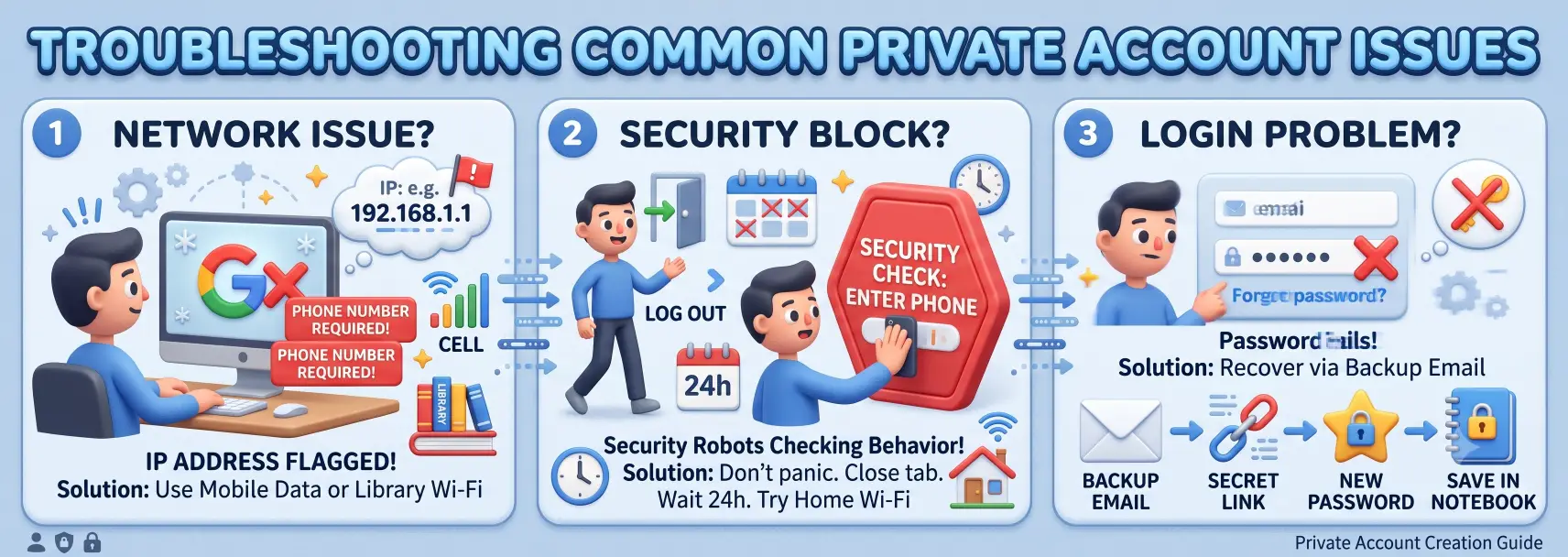
If your computer screen freezes, or if the system loudly asks for a phone number every single time you try, your internet address is likely flagged. Your internet address is a string of numbers given to your house by your internet company.
If someone else in your apartment building or on your street made too many fake accounts recently, Google marks that whole internet address as dangerous. You simply cannot move forward until you change your internet network completely. Moving to a different location, like a public library or using your mobile data, is the only way to fix a flagged network problem.
What If Google Asks for a Phone Number Again?
Sometimes, you successfully create your private account. You log out, enjoy your week, and try to log back in a few days later. Suddenly, a big red screen blocks you. Google asks for a phone number to prove you are a real human being before they let you read your mail.
If this happens, do not panic. Do not type in a number. Just close the internet tab completely. The best thing to do is to wait a full twenty-four hours. Google's security robots are just double-checking your behavior. After a day passes, open your browser and try to log in again from your normal home Wi-Fi network. Often, the scary security alert simply goes away on its own.
How to Resolve Login Problems?
If you try to log in and the password fails, you must use the recovery tools we talked about earlier. On the login screen, click the small blue text that says "Forgot password."
Google will ask to send a secret link to your backup email address. Open that second backup email inbox and look for a message from Google. Click the long link inside the message. The screen will let you type a brand-new password. Make sure you write this new password down in a safe notebook so you never get locked out again.
Evaluating the Decision to Skip Phone Verification
Is hiding your phone number the right choice for your specific life? Let us break down the facts so you can decide.
What Are the Pros and Cons?
There are several big benefits to skipping the phone test. First, you gain total privacy from large data collection systems. Your real-world identity stays hidden from online marketing companies. Second, you will never receive annoying spam text messages on your real phone from internet websites. Finally, it is a wonderful way to build clean, separate accounts for a new small business or for testing new video games.
However, there are also negative sides to consider. The biggest problem is that it becomes much harder to recover your account if you lose your password. You also face a higher risk of getting temporarily locked out if you travel to a new country. Also, you will find it very hard to set up extra Google services like video uploading channels or paid advertising campaigns.
How Does It Compare to Using a Phone Number?
Using your real phone number is incredibly easy and very fast. You type it in, Google trusts you instantly, and your account is completely secure in two minutes. If you forget a password, one quick text message saves the day.
Skipping the number takes much more time and requires a lot of patience. You have to clean your browser, use mobile data tricks, and carefully manage your backup email addresses. It is a trade-off between absolute convenience and absolute privacy.
Is It Worth the Potential Risks?
If you only want a simple, quiet email address for reading store newsletters or joining fun internet forums, it is completely worth the effort. The privacy you gain feels great.
However, if you are making a main email address for your online banking, your medical records, or your serious career, you should really give Google a phone number. Losing access to a serious, important account is far too stressful. You must match your choice to how important the new email address will be in your daily life.
If you manage a business and need to make several separate accounts safely, you might need stronger tools. You can use specialized software to help you stay private and bypass tricky security checks.
How DICloak Masks Digital Fingerprints for Privacy
Every single time you go online, your computer leaves a digital footprint. This is called a browser fingerprint. It includes information about your screen size, your system language, and your favorite fonts. Google reads this fingerprint to track exactly who you are.
You can use DICloak to carefully change your device details. Within the software, you can easily modify your screen size, change your system fonts, and adjust your operating system data. This neat trick makes you look like a completely new, unique person every single time you open a new window. Google will read the new fingerprint and treat you as a safe, first-time user.

Using Custom Proxies to Bypass Phone Verification
Your internet address tells websites exactly which city and neighborhood you live in. If you try to make a new account, and your neighborhood has a bad trust score, Google might block your screen.
You can configure custom proxies directly inside DICloak. Think of a proxy like a digital post office box in another city. It routes your internet traffic through a new location. You can configure different proxy locations in DICloak so that each browser window has a totally different city address. By using fresh, clean proxies, you hide your real location and lower the risk of triggering the annoying phone number screen. Please note that we do not provide proxies; you will need to purchase them yourself from a third-party provider.

Managing Multiple Gmail Accounts Securely
It is very hard to keep track of many different accounts at the same time. If you mix up your passwords or open them all in the same normal browser, Google will link them together and might ban them all.
You can organize separate, clean browser profiles in DICloak to solve this problem. Each digital profile holds its own special cookies, history, and saved passwords. You can open ten different windows in DICloak and log into different accounts at the exact same time. Because the profiles never share data, the accounts never touch each other. This keeps your online work perfectly safe, secure, and organized.
Frequently Asked Questions about Making a Gmail Account Without a Phone Number
Can I Add a Phone Number Later?
Yes, you absolutely can. If you change your mind next year, you can open your Google Account settings at any time. You simply navigate to the personal information section, click on the contact details, and type in your real phone number. Google will be very happy to add it for you.
Is It Legal to Create an Account Without a Phone Number?
Yes, it is perfectly legal everywhere in the world. Google officially offers the "Skip" button for users they deem low-risk. You are not breaking any laws by choosing not to share your private mobile data with a large technology company.
How Many Accounts Can I Create Without a Phone Number?
Google places strict limits on the numbers to stop automated robots. If you try to create more than two or three accounts in a single week, their smart computer system will stop you. It is best to stick to making just one or two accounts at a time and then wait a long while before making another.
Does Google Track Accounts Without Phone Numbers Differently?
Yes, they watch these specific accounts much more closely. Because you did not prove your identity with a phone text, you have a lower trust score. If you suddenly send five hundred emails in one hour, Google might think you are a dangerous robot and lock your account immediately.
Are There Any Restrictions on Account Features?
Your basic email sending and receiving works totally normally. However, you might not be able to use advanced business tools. For example, you cannot run Google Ads, and you cannot use the full YouTube creator studio tools without eventually confirming a real mobile phone number.
Conclusion
Learning exactly how to make a Gmail account without a phone number is a wonderful and powerful skill for the year 2026. You can actively protect your daily privacy and stay much safer online. By using smart mobile phone apps, strong backup emails, and fresh internet connections, you can skip the frustrating phone test easily.
Always remember the golden rule: you must add a backup email address so you never lose your account to a forgotten password. Take control of your digital footprint today. You can start building your private, secure email life right now with confidence and peace of mind.
 Web Proxy Tools
 Free Tools
 Cookie Plugin
 UA Generator
 MAC Address Generator
 IP Generator
 IP Address List
 2FA Code Generator
 World Clock
 Anonymous Check
 WebRTC Leak Test
 UUID Generator
 Free Web Proxy Site
 Proxy Checker
 FB Ad Checker
 AI Web Scraping
 Free SMM Tools
 Twitter Shadowban Checker
 Instagram Name Checker
 UTM Generator
 Username Generator
 AI Hashtag Generator
 LinkedIn Headline Generator
 Social Media Image Resizer