Running into Claude’s limit right when your work is getting good can be incredibly frustrating. One minute you are drafting an article, reviewing code, or analyzing a long PDF. The next minute, your session stops and you have to wait. That is why so many users are now searching for a Claude 5 hour limit bypass in 2026.
The good news is that you do have options. Some methods can help you extend access in a safer way. Others can help you use Claude more efficiently so you hit the limit less often. In this guide, you will learn what really causes Claude’s five-hour limit, which workaround methods still make sense in 2026, and how to build a smoother workflow without wasting time, context, or effort.
Why So Many Users Search for a Claude 5 Hour Limit Bypass
Many people search for a Claude 5 hour limit bypass because Claude can stop them in the middle of real work. This often happens during writing, coding, research, or document review. Claude uses a rolling five-hour session window, not a simple daily cap. Anthropic says usage depends on chat length, task complexity, the model you use, and any files you upload. Different plans also come with different usage levels.
What Happens When You Hit Claude’s 5 Hour Limit?
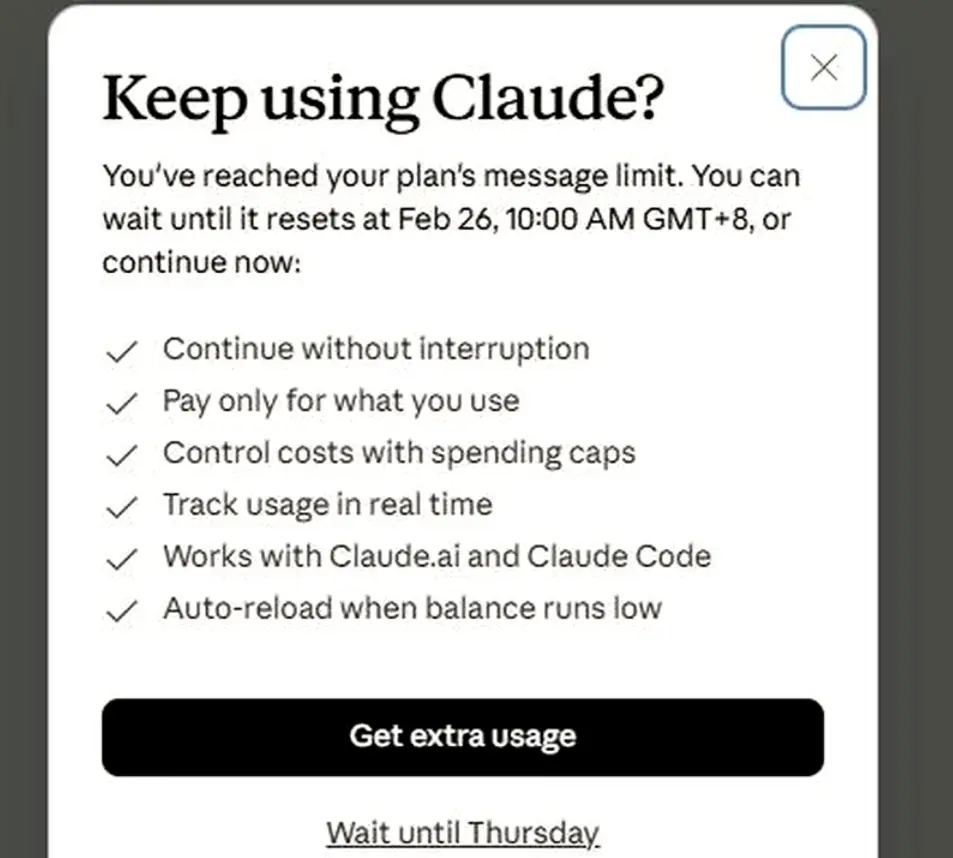
Many users first see the warning approaching 5-hour limit Claude. If they keep going, Claude shows a blocking message and tells them when access will reset. Anthropic says the free plan resets every five hours, while paid plans also follow session-based limits. Pro gives at least 5x the usage of free during peak hours, and the Claude max plan usage limits are higher still, with Max 5x and Max 20x offering 5x and 20x Pro capacity per session.
For example, a short brainstorming chat may be fine, but a long thread with rewrites, analysis, and follow-up questions can hit the wall much faster. Higher plans give more room, but they do not remove the limit.
Why Long Chats, File Uploads, and Complex Tasks Use Limits Faster
Long chats use up Claude faster because bigger conversations cost more to process. Anthropic says usage is affected by conversation length and complexity. Files can push usage up even more. The current Claude upload limit for chats is up to 30MB per file and up to 20 files per chat. Even with a large context window, users can still hit the session limit long before they fill that space.
For instance, a student might upload several PDFs, ask for summaries, then ask for comparisons and rewrites in the same thread. A developer can hit the same problem with long code blocks and repeated debugging turns. In both cases, the chat gets heavier over time, so the five-hour budget runs out faster. Anthropic recommends using Projects and cleaner workflows to reduce repeated usage.
The Real Risks Behind Trying to Bypass Claude’s Limits
Not every Claude 5 hour limit bypass method is safe or useful. Some users see a Claude rate exceeded error and think something is broken, but Anthropic says rate-limit errors and usage warnings are normal system controls.
Some workarounds can create more trouble. Random third-party tools, overloaded chats, and messy workflows may waste even more usage. A better first step is to shorten chats, manage files more carefully, and use official options like extra usage on paid plans when needed. That is usually more stable than chasing unreliable shortcuts.
Claude 5 Hour Limit Bypass Methods That Still Work in 2026
After seeing the approaching 5-hour limit Claude warning, many users start looking for a better path. The good news is that a Claude 5 hour limit bypass does not always mean using a risky trick. In 2026, the methods that still work best are the safer ones. They either move your work outside the normal chat window, or they spread your usage across a different billing and access model.
Using the Claude API for Longer and More Flexible Sessions
The Claude API is one of the clearest options when the web app feels too tight. It does not use the same five-hour chat session system as Claude.ai. Instead, the API uses spend limits and rate limits based on your usage tier. That gives advanced users more control over how they send requests, split tasks, and manage long workflows.
This matters most for people doing repeated work. For example, a developer can break one huge coding task into smaller API calls instead of keeping everything inside one long chat. A researcher can process documents in batches and store summaries outside the chat window. That often works better than pushing one thread until it fails. It also reduces the chance of hitting the same wall that appears in the main app after long chats or after reaching the Claude upload limit in a file-heavy session.
The API is not unlimited, though. If you move too fast, you can still hit a Claude rate exceeded error. Anthropic says the API returns a 429 error when you exceed a rate limit, and API use is also controlled by monthly spend limits. So this method makes sense for users who want flexibility and are comfortable managing tokens, retries, and costs.
Which Third-Party AI Tools Can Help Reduce Claude Limit Pressure?
Some third-party tools can reduce Claude limit pressure because they use a different access system from the standard Claude.ai session window. Poe is one example. Poe offers an Anthropic-compatible API, and its docs say subscribers can use their existing Poe subscription points with the API at no additional cost. Poe also lets users buy add-on points, so access can continue when normal subscription points are not enough.
Writingmate is another example. Its pricing page says it gives access to 200+ AI models under one subscription, including Claude models, with daily limits by plan. That means some users can shift part of their work there when they want model variety or when they do not want all Claude tasks tied to one chat product. This is not the same as removing Anthropic’s own limits, but it can reduce pressure on your main Claude session.
These tools are most useful when your problem is workflow continuity, not just raw message count. For instance, if Claude stops in the middle of research, a multi-model platform may help you finish summaries, outlines, or comparison work somewhere else. Still, users should check pricing, file support, and limits before moving over, especially if they work with large attachments or already run close to the Claude max plan usage limits on heavy tasks.
When Each Claude 5 Hour Limit Bypass Method Makes Sense
The best Claude 5 hour limit bypass method depends on the kind of work you do. The API is often the best fit for developers, researchers, and power users who want structured workflows and better control over long sessions. It is a stronger choice when you need automation, batching, or repeatable output.
Third-party tools make more sense for users who want less setup. They can be helpful for writers, marketers, students, or solo operators who just need another place to continue working after the approaching 5-hour limit Claude warning appears. They can also help when you want access to Claude plus other models in one workspace.
A plan upgrade can still be the simplest answer for some users. Anthropic says Pro offers at least 5x the usage of free, while Max 5x and Max 20x give much higher capacity than Pro. Even then, Claude max plan usage limits still exist, so bigger plans help most when your work is heavier but still centered inside Claude’s own ecosystem.
Smarter Ways to Make Claude Last Longer Without Forcing a Bypass
The last section looked at tools and workarounds. But many users do not need a full Claude 5 hour limit bypass every time. In many cases, they can make Claude last longer by changing how they write prompts, organize chats, and handle files. Claude’s own usage guidance focuses on better planning, concise prompts, and smarter reuse of context.
How to Write Better Prompts That Use Fewer Messages
Better prompts can save more usage than many people expect. Clear, specific instructions usually reduce follow-up questions and extra revisions. It also helps to combine related requests into one message instead of spreading them across many short turns. Structured prompts work better too, especially for longer tasks.
For example, instead of sending “summarize this,” then “make it shorter,” then “change the tone,” it is often better to ask for a short summary, key takeaways, and a simpler tone in one prompt. That kind of prompt can reduce wasted turns and lower the chance of seeing the approaching 5-hour limit Claude warning too early.
How to Manage Conversations Without Losing Important Context
Conversation management matters just as much as prompt writing. Reusing context inside the same workspace is often more efficient than repeating the same background again and again. Projects are especially useful for ongoing work because reused material can be cached, which helps reduce repeated usage.
For instance, a marketer can keep brand notes and source documents in one Project, then use separate chats for ad copy, email drafts, and campaign ideas. That is often cleaner than forcing everything into one long thread. It also helps with file-heavy work, since repeated uploads can push you closer to the Claude upload limit and use up your session faster.
What to Avoid If You Want Claude to Last Longer
Some habits make the limit show up much faster. Long messy chats, repeated uploads of the same files, and endless small follow-up edits can all drain usage. Conversation length, task complexity, features, and uploaded content all affect how quickly the budget is used. Even higher tiers need careful use, because Claude max plan usage limits are larger than Pro, not unlimited.
It also helps not to treat every warning as a system problem. A Claude rate exceeded error or a five-hour warning usually means the workflow needs to change. In many cases, it is better to slow down, retry later, shorten the task, or switch to a cleaner setup than to force a risky shortcut.
Technical Approaches to Extending Claude Usage Safely
The last section focused on better habits inside Claude. This section is for users who need more control. A technical setup can help when a normal Claude 5 hour limit bypass idea is not enough. The goal is not to force unlimited access. The goal is to reduce waste, split heavy work into smaller parts, and build a workflow that stays stable over time. Claude’s own docs make an important point here: usage limits and length limits are different, and heavy work across Claude.ai, Claude Code, and Claude Desktop can count toward the same usage pool.
How to Set Up Claude API Workflows Safely
A safe API workflow starts with small, repeatable steps. Instead of sending one huge request, it is often better to break the task into stages such as extract, summarize, rewrite, and review. This helps you track cost, catch bad outputs earlier, and avoid wasting tokens on one oversized prompt. It also helps to watch usage in the Claude Console, where Anthropic shows token charts and rate-limit charts for headroom and peak use.
Prompt caching is one of the most useful tools for this. It works well for large background context, repetitive tasks, and long multi-turn conversations. The default cache lasts 5 minutes, and Anthropic also offers a 1-hour cache option at extra cost. Cache hits are especially useful because they do not count against your rate limit. For example, if a team uses the same long system prompt for document review all day, caching that prefix can lower repeated token load and make the workflow feel much lighter.
Comparing Session-Splitting and Lightweight Automation Techniques
Session-splitting is usually the easier method. You keep one job from turning into one giant thread by dividing it into clean parts. For example, a researcher can use one step to extract facts from a paper, a second step to group findings, and a third step to draft the final summary. This is often safer than pushing one long conversation until the approaching 5-hour limit Claude warning appears. It also helps when file-heavy work gets close to the Claude upload limit, because smaller batches are easier to manage than one overloaded session. Claude’s help center also points users toward Projects and retrieval-based workflows for larger information sets.
Lightweight automation works better when the same action repeats many times. The Message Batches API is one example. It has its own rate limits and can contain thousands of batch requests in one batch, which makes it useful for large sets of similar prompts. This is a better fit for repeated classification, tagging, or summary jobs than for open-ended back-and-forth chat. For instance, a support team sorting hundreds of feedback entries can batch the first-pass summaries instead of doing them one by one.
Common Technical Mistakes That Waste Usage or Break Workflow
One common mistake is treating the API like a magic escape hatch. It is more flexible than the chat app, but it still has limits. If requests come too fast, you can still hit a Claude rate exceeded error. The platform returns a 429 response for rate-limit problems, and some modes include a retry-after header to tell you when to try again. Good retry logic matters more than spamming the same request.
Another mistake is changing too many variables at once. Prompt caching only helps when the reusable prefix stays stable. The docs note that changing tool choice or adding or removing images can invalidate the cache. That means a messy workflow can silently lose its caching benefit and use more tokens than expected. The same problem shows up when users re-upload large files again and again instead of reusing stored context. Even people on higher tiers still need to watch this, because Claude max plan usage limits are larger, not unlimited.
How to Choose the Best Claude 5 Hour Limit Bypass Method for Your Needs
By this point, the main pattern is clear. The best Claude 5 hour limit bypass method depends on what kind of work you do, how often you hit limits, and how much setup you can handle. Some users only need a cleaner workflow. Others need more capacity, more automation, or better billing control. Claude’s official plan guide frames this the same way. Free is for occasional use, Pro is for regular use, and Max 5x or Max 20x is for much heavier work.
How to Evaluate Cost, Stability, and Ease of Use
Cost should be the first filter. Pro is the lowest paid option, while Max 5x and Max 20x cost much more but raise session capacity a lot. If you only hit the approaching 5-hour limit Claude warning once in a while, a better prompt strategy or a Pro plan may be enough. If you hit the wall during long coding, research, or document jobs every week, the higher Claude max plan usage limits may be worth it. Max gives 5x or 20x more usage than Pro per session, but it is still not unlimited.
Stability matters just as much as price. A simple plan upgrade is usually the easiest path because it stays inside Claude’s own system. API workflows can be more flexible, but they also add cost tracking, rate limits, and setup work. Third-party platforms can help with continuity, but they add another layer of pricing, rules, and support. For example, extra usage on paid Claude plans lets users continue after included limits by switching to pay-as-you-go pricing, which may be simpler than moving everything to a new tool.
What to Consider Before Choosing a Tool or Setup
Start by asking what is really causing the problem. If long chats are the issue, you may not need a new tool at all. Projects, cached knowledge, and better task splitting can reduce repeated usage. That is often a better first step than chasing a risky Claude 5 hour limit bypass trick.
File-heavy work needs extra attention. If you often upload PDFs, spreadsheets, or large reports, check whether your workflow is pushing against the Claude upload limit. Claude chat uploads allow files up to 30MB each and up to 20 files per chat. In that case, using Projects or splitting the work into smaller passes may help more than changing plans.
Security and error handling matter too. API users should think about key safety, retry logic, and spend control before building anything larger. API keys can create real billing risk if they are exposed, and fast API mode can return a Claude rate exceeded error with a 429 response and retry-after header when limits are exceeded.
Which Method Works Best for Solo Users, Power Users, and Teams
Solo users usually do best with the simplest option. If the issue is occasional, Pro plus better prompting is often enough. If the work is heavier but still mostly happens inside Claude, Max may be the cleaner answer because it raises usage capacity without forcing a technical rebuild.
Power users often get more value from a mixed setup. A writer, analyst, or developer may use Claude for core work, then move repeated or structured tasks into the API. This works especially well when one long thread keeps triggering the approaching 5-hour limit Claude warning. Claude Code users should also remember that activity in Claude and Claude Code can share the same usage pool on Pro and Max, so one heavy workflow can affect the other.
Teams usually need stability and reuse more than anything else. Shared Projects, cached prompts, and batch-style workflows tend to make more sense than ad hoc chatting. If the same document set, system prompt, or task flow is used again and again, API caching and project knowledge bases can lower repeated load and make usage more predictable across the team.
Using DICloak to Support Longer and More Stable Claude Workflows
If better prompting, plan upgrades, and API workflows still do not fully solve the problem, the next issue is usually session management. Some users do not just want more time in Claude. They also want a cleaner way to run multiple accounts without mixing cookies, login states, fingerprints, or proxy settings. In that kind of setup, one Claude account can be placed in one isolated browser profile, while another account stays in a different profile with its own storage, fingerprint, and network settings. That makes long multi-account work more organized and easier to control.
Managing Multiple Claude Accounts for Longer Working Sessions
For users trying to stretch work across more than one Claude account, separation matters first. Each profile can act like a different browser profile, with its own cookies, user agent, screen resolution, WebRTC settings, hardware signals, and IP path. That makes it possible to keep one Claude login for research, another for writing, and another for testing prompts or code, instead of forcing everything through one normal browser session. The same setup is also more practical for people handling many accounts on one device.
For example, a solo operator working on content production could keep one account for outline generation, one for rewriting, and one for source summarization. A small team could split tasks the same way across shared workflows. This kind of separation is more stable than logging in and out of several Claude accounts all day in the same browser, especially when sessions need to stay active for long periods.

Keeping Access More Stable With Isolated Browser Profiles
A normal browser can mix signals across sessions more easily than people expect. Once several accounts share the same cookies, storage, or browser state, workflow stability becomes harder to keep. With isolated profiles, each Claude session can stay inside its own environment, and each profile can use its own proxy configuration with HTTP, HTTPS, or SOCKS5 support. That gives users more control when they want cleaner account separation and more consistent profile behavior across long working sessions.
This is especially useful when Claude work is repetitive and account-based. A user can keep one profile tied to one task flow, one proxy, and one login state, instead of rebuilding the session every time. Team settings such as profile sharing, permission controls, and operation logs also make it easier to keep multi-account work organized when more than one person is involved.

Using Synchronizer to Reduce Repetitive Claude Tasks
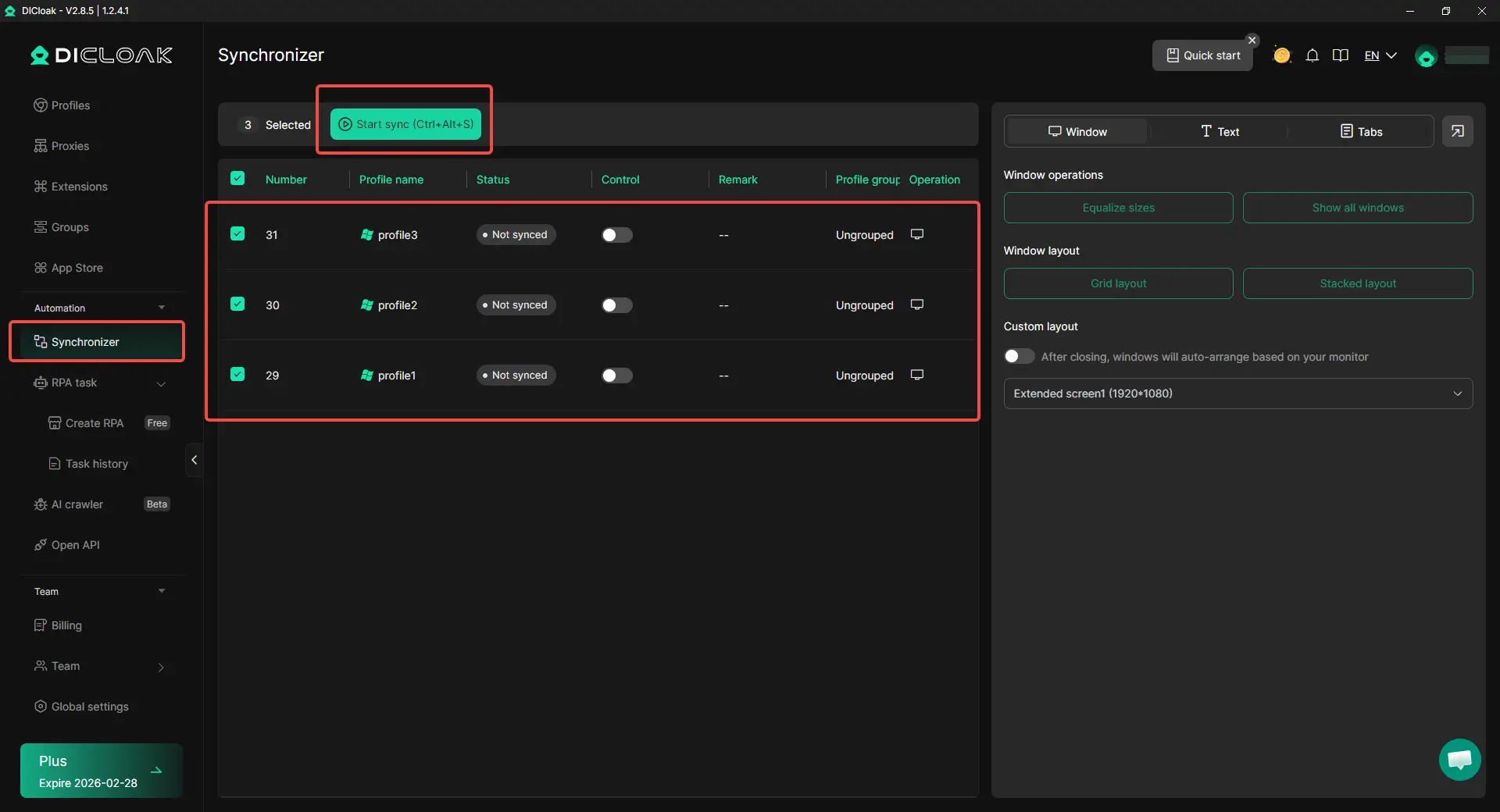
Long Claude sessions are not always spent on deep work. A lot of time can disappear into repeated actions like opening the same pages, loading the same account set, pasting the same prompt structure, or repeating the same clicks across several profiles. In that situation, bulk operations, and Synchronizer can reduce manual work. Real-time Synchronizer controls can mirror typing and clicking across multiple isolated windows from one interface, and the browser also includes RPA and automation tools for repeated workflows.
For instance, if several Claude accounts need the same starting prompt or the same setup steps, one operator can open those profiles together and repeat the base actions in parallel instead of doing everything one by one. That does not remove Claude’s own limits, but it can make multi-account workflows smoother, faster, and easier to manage.
FAQ
Is there a safe Claude 5 hour limit bypass in 2026?
Yes. The safest Claude 5 hour limit bypass methods use normal workflows, such as the Claude API, better prompt structure, or a higher plan. Risky shortcuts are less stable.
Can I reset Claude manually instead of using a Claude 5 hour limit bypass?
No. Claude uses a rolling five-hour window, so users cannot reset it by hand. Most Claude 5 hour limit bypass methods focus on reducing pressure or continuing work another way.
Is a Claude 5 hour limit bypass against the rules?
It depends on the method. Using official tools, better workflows, or paid options is usually fine. Unsafe automation or abuse can create account risk.
How do users make a Claude 5 hour limit bypass work better?
Most people get better results by using shorter prompts, splitting big tasks, and avoiding one long chat. A good Claude 5 hour limit bypass usually comes from smarter workflow design.
What is the best way to avoid needing a Claude 5 hour limit bypass?
The best way is to use Claude more efficiently. Clear prompts, smaller tasks, and better chat management can make sessions last much longer.
Conclusion
In 2026, finding a Claude 5 hour limit bypass is really about finding a smarter and more stable way to keep working. Claude’s five-hour limit can feel frustrating, especially during long writing, coding, research, or file-heavy tasks. But in most cases, the real problem is not just the limit itself. It is how quickly long chats, repeated uploads, and complex workflows use up the available session budget.
The best solutions depend on the user’s needs. Some people can go much further with better prompts, shorter chats, cleaner project setup, and better file management. Others may need a higher Claude plan, API workflows, third-party tools, or a more structured multi-account setup. For users handling multiple Claude accounts, isolated browser profiles, custom proxy settings, and automation tools can also make longer workflows more organized and efficient. In the end, the safest approach is not to chase risky shortcuts, but to choose the method that matches your workload, reduces wasted usage, and keeps your Claude sessions more stable over time.
 Web Proxy Tools
 Free Tools
 Cookie Plugin
 UA Generator
 MAC Address Generator
 IP Generator
 IP Address List
 2FA Code Generator
 World Clock
 Anonymous Check
 WebRTC Leak Test
 UUID Generator
 Free Web Proxy Site
 Proxy Checker
 FB Ad Checker
 AI Web Scraping
 Free SMM Tools
 Twitter Shadowban Checker
 Instagram Name Checker
 UTM Generator
 Username Generator
 AI Hashtag Generator
 LinkedIn Headline Generator
 Social Media Image Resizer