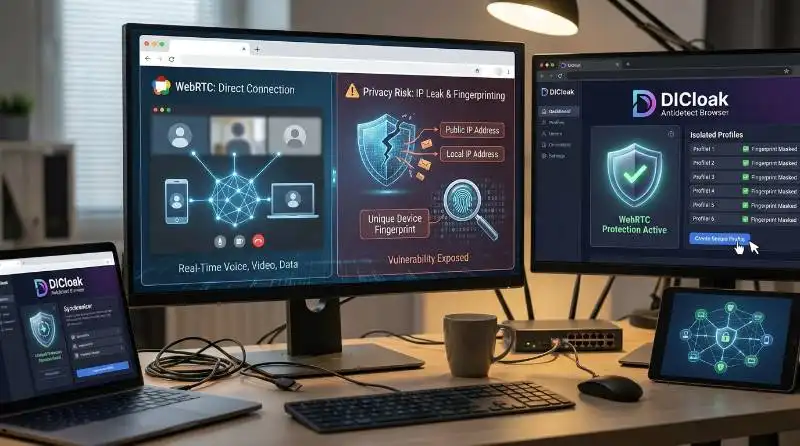
WebRTC is one of the most powerful and seamless technologies on the modern web, enabling real-time voice, video, and data communication directly within your browser. If you've ever joined a video call on Google Meet or chatted with friends on Discord, you've experienced the convenience of WebRTC. It eliminates the need for plugins and standalone apps, making the web a more connected and interactive space. However, this convenience comes with a significant privacy trade-off: the very design that makes WebRTC so efficient also creates a serious vulnerability that can expose your real IP address and contribute to a unique device fingerprint, even when you're using a proxy.
This guide will demystify What is WebRTC, explaining what it is, how it's used, and why its default behavior poses a critical security risk. Most importantly, we will explore the practical, effective methods you can use to stop these leaks and protect your digital identity using tools specifically designed for privacy and security.
Understanding What Is WebRTC and Why It Matters
In the architecture of the modern internet, WebRTC represents a strategic shift towards a more interactive and decentralized web. If you're wondering what WebRTC is, it’s a technology designed to eliminate the friction of real-time communication by removing the need for third-party plugins or separate application installations. This built-in capability has transformed browsers from simple document viewers into powerful platforms for direct, peer-to-peer connection.
WebRTC, which stands for Web Real-Time Communication, is a free, open-source project and an HTML5 specification. Initially released by Google in 2011, it quickly gained widespread support and is now a standard feature in all major browsers, including Google Chrome, Mozilla Firefox, Apple Safari, and Microsoft Edge. This universal adoption is driven by a powerful set of core benefits.
- Peer-to-Peer Connection: WebRTC allows browsers to exchange audio, video, and other data directly with each other. This bypasses centralized servers for media streaming, dramatically minimizing latency and improving the quality of real-time interactions.
- Plugin-Free: Because it is built directly into modern browsers using JavaScript APIs, WebRTC works natively without requiring users to download or install any extensions or software.
- Cost-Effective: The technology is completely free for both personal and commercial use, lowering the barrier to entry for developers and businesses looking to integrate real-time communication features.
- Platform Versatility: While its name highlights the web, WebRTC is not limited to browsers. Its underlying open-source code is portable and can be integrated into native mobile and embedded device applications.
This combination of accessibility, performance, and cost-effectiveness has made WebRTC an indispensable tool. Now, let's explore where this powerful technology appears in your everyday online activities.
What Is WebRTC Used For? Real-World Applications
While the term "WebRTC" might be unfamiliar, its applications are woven into the fabric of our daily digital lives. If you're wondering what WebRTC is used for, the technology often operates invisibly in the background, powering many of the most popular and critical online services. This section reveals the common and essential ways WebRTC is used across a variety of industries.
Video Conferencing and Collaboration
This is the most common and recognizable use case for WebRTC, where its low-latency, peer-to-peer architecture is invaluable. It enables seamless video streaming, audio synchronization, and screen sharing directly in the browser.
- Google Meet
- Discord
- Slack's browser-based calls
- Microsoft Teams (browser version)
Telemedicine and Online Healthcare
Security is paramount in healthcare, and WebRTC provides the necessary tools for confidential doctor-patient interactions. It supports end-to-end encrypted video sessions, allowing for HIPAA-compliant consultations without requiring patients to install special software.
- Doxy.me and Amwell use WebRTC for secure, browser-based telehealth appointments.
Cloud Gaming and Live Streaming
Services that demand instantaneous feedback and ultra-low latency rely heavily on WebRTC to deliver a smooth user experience. This includes cloud gaming platforms and interactive live broadcasts.
- NVIDIA GeForce NOW leverages WebRTC for real-time game streaming.
- Interactive features on YouTube Live and Twitch, such as co-streaming or two-way events, often use WebRTC to handle the real-time component.
Online Education and Remote Learning
WebRTC's browser-native functionality makes it ideal for large-scale virtual learning environments, providing the infrastructure for virtual classrooms, breakout rooms, and one-on-one tutoring.
- Video calls within Google Classroom are powered by WebRTC.
Customer Support and Identity Verification
When you click a "talk to a live agent" button on a website, the audio or video chat that follows is frequently enabled by WebRTC. It is also used in secure identity verification processes.
- Live support chats on sites for major banks or companies like Airbnb.
- Know Your Customer (KYC) processes that use a webcam for identity verification.
File Sharing and Data Transfer
Beyond media streaming, WebRTC can facilitate the direct, peer-to-peer transfer of files and other arbitrary data between users, bypassing the need to upload to a central server first.
- WebTorrent uses WebRTC to enable peer-to-peer file sharing directly in the browser.
From collaboration to healthcare, WebRTC's reach is extensive. We will now look at the underlying technology that makes these applications possible.
How Does WebRTC Work? A Simple Explanation
While the technology behind WebRTC can seem complex, its core function is straightforward: to establish a direct, secure communication channel between two browsers. If you're wondering what WebRTC is, its main purpose is to facilitate seamless, real-time communication without the need for additional software or plugins. This process involves a few key components working together to discover, connect, and exchange data. This section breaks down these components in simple, accessible terms.
Finding and Connecting Peers
Before two browsers can communicate directly, they need to find each other on the internet. This is like needing someone's home address before you can visit. WebRTC uses special servers in a process called "signaling" to exchange this information.
- STUN (Session Traversal Utilities for NAT) servers help a browser discover its own public IP address and determine if it's behind a firewall or NAT (Network Address Translator).
- TURN (Traversal Using Relays around NAT) servers act as a fallback, relaying traffic between peers if a direct connection is impossible due to restrictive firewalls.
The goal of these servers is simply to help establish the connection; they do not typically handle the actual audio or video data, which flows directly between their peers.
The Three Core APIs
WebRTC provides developers with a set of JavaScript APIs to implement real-time communication. The three main APIs are:
MediaStream (getUserMedia): This is the first step. The API asks the user for permission to access their camera and microphone. Once granted, it captures the audio and video streams from these devices.RTCPeerConnection: This is the heart of WebRTC. It establishes and manages the direct connection between users. It handles the complex tasks of encoding/decoding media, managing network conditions, and ensuring the connection is secure.RTCDataChannel: While RTCPeerConnection is for media, this API allows for the direct, peer-to-peer exchange of any type of data. This is what powers features like in-call text chat, file sharing, or real-time gaming data.
This elegant system of discovery and connection is what makes WebRTC so efficient. However, the very process of sharing network information to create these connections leads to unintended privacy consequences.
The Hidden Danger: How WebRTC Exposes Your IP Address
The same process that makes What Is WebRTC powerful and efficient—establishing a direct peer-to-peer connection—is also the source of a significant security vulnerability for anyone wishing to protect their online anonymity. If you're wondering what WebRTC is, it’s the technology enabling real-time communication between browsers. However, the need for browsers to share network details to find the fastest connection route creates an opportunity for websites to access sensitive information, often without the user's explicit awareness.
A WebRTC leak occurs when a website uses a simple script to request your network information through your browser's WebRTC API. Critically, this can happen silently in the background the moment you load a page. You do not need to start a video call or grant microphone access for a website to probe this data. This default behavior can undermine privacy tools like proxies.
A successful WebRTC query can exfiltrate several types of sensitive data, each contributing to a user's digital attack surface:
- Your Public IP Address: This is the IP address assigned by your Internet Service Provider (ISP). Even if you are using a proxy to mask your identity, a WebRTC leak can expose your true public IP, revealing your real-world location and ISP to the website.
- Your Local IP Address: This is the internal IP address of your device on your local network (e.g.,
192.168.1.100), an address that is invisible to the wider internet but fully visible to WebRTC. While this doesn't reveal your geographic location, it is a highly stable and unique piece of information about your network setup. This is an extremely valuable data point for creating a persistent device fingerprint.
- Media Device Information: In some cases, unique identifiers for your specific camera and microphone models can also be exposed, adding another layer of detail to your digital fingerprint.
For users managing multiple online accounts for e-commerce, social media, or marketing, the combination of this leaked data is a severe threat, making it easy for platforms to link all of their activities back to a single identity.
What Is WebRTC's Biggest Flaw? It Leaks Your IP Address
To be direct: yes, by default, What Is WebRTC leads to IP address leaks. This is not a bug or an oversight but an intentional feature of its design. To establish the fastest and most reliable peer-to-peer connection, WebRTC is built to discover and share all available network paths. For the average user, this is a benefit. For a privacy-conscious user, it's a critical flaw. Here’s why this behavior is so problematic.
Bypassing Proxies
Many users rely on proxies to hide their real public IP address. However, a standard proxy may only route regular HTTP/HTTPS web traffic and might not properly handle the separate STUN/TURN requests made by WebRTC. When this happens, the WebRTC request bypasses the proxy and goes out through the regular internet connection, exposing the real public IP to the requesting website.
However, it’s important to note that not all proxies behave this way—some advanced proxies can handle WebRTC traffic correctly and prevent such leaks.
Creating a Unique Digital Fingerprint
Sophisticated websites, advertising networks, and anti-fraud systems don't just look at one piece of data; they build a comprehensive "digital fingerprint" to identify and track users. The information from a WebRTC leak is a goldmine for this process. The combination of your true public IP, your stable local IP, and specific media device IDs creates a highly accurate and persistent identifier for your device. This allows trackers to bypass ephemeral protections like cookie clearing or device switching, achieving a state of near-permanent user recognition.
Linking Multiple Accounts
This is the most direct consequence for professionals managing multiple online identities. Platforms use fingerprinting to detect users operating more than one account. If all your accounts are accessed from a device with the same WebRTC-derived fingerprint, they can be easily linked together. This creates a single point of failure. A flag on one account—due to a policy change, a competitor's report, or a simple mistake—can trigger a cascading ban across all linked profiles. For an e-commerce manager or affiliate marketer, this means the potential loss of all revenue streams from that platform overnight.
Now that the problem is clearly defined, we can move from understanding the risks to exploring effective solutions.
How to Prevent WebRTC Leaks: An Evaluation of Methods
With the privacy risks of WebRTC now clear, the next logical step is to find ways to mitigate them. This section evaluates the most common methods used to stop WebRTC leaks, analyzing their effectiveness, drawbacks, and suitability for professional use. But first, for those wondering what WebRTC is, it stands for Web Real-Time Communication and is a technology designed to enable fast, peer-to-peer connections between browsers for real-time communication like video calls and file sharing.
Manually Disabling WebRTC
In some browsers, like Firefox, it's possible to disable WebRTC entirely through advanced settings. For Chrome-based browsers, third-party extensions are often required to achieve the same effect. However, this approach comes with a major, often unacceptable, drawback: it completely breaks any website or service that relies on WebRTC. This means no more browser-based video calls, voice chats, screen sharing, or other real-time collaboration tools. This "all-or-nothing" solution is only practical for users who can afford to sacrifice a huge portion of the modern web's functionality.
Using a Proxy with Leak Protection
A quality proxy is a step in the right direction and is often marketed as a solution to WebRTC leaks. A good proxy can successfully hide your public IP address from being exposed. However, this is only a partial solution. Many proxies still fail to mask your local IP address (e.g., 192.168.1.x), which, as established in Section 4.0, is an extremely valuable data point for creating a persistent device fingerprint that bypasses typical privacy measures. While better than nothing, relying solely on a proxy for WebRTC protection is not a foolproof method, as your device can still be uniquely identified.
Using an Antidetect Browser (Recommended)
For professionals who require both functionality and robust privacy, the most effective and reliable solution is an antidetect browser. These are specialized browsers built from the ground up to manage and control a browser's digital fingerprint. Instead of simply blocking or disabling WebRTC, an antidetect browser gives you granular control over what information is shared. It can mask your true IP addresses (both public and local) and replace them with realistic data that matches your desired digital identity, preventing leaks without breaking website functionality.
Leading antidetect browsers like DICloak offer advanced WebRTC protection that is far superior to other methods, providing the security needed for professional multi-account management.
What Is WebRTC Protection in DICloak Antidetect Browser?
DICloak stands as the definitive solution for managing WebRTC leaks because it addresses the root of the problem: the browser fingerprint itself. Unlike simple plugins that block functionality or proxies that offer partial protection, DICloak provides granular control over the entire browser profile. This ensures that a user's true identity is never exposed, while websites continue to function perfectly.
Spoofing Your Digital Identity
At its core, DICloak works by generating a unique, authentic-looking digital identity for every account or profile you create. It spoofs the key fingerprint elements that WebRTC can expose, replacing your real data with consistent, virtualized information. This includes masking or replacing your:
- IP address and geo-location
- Cookies and local storage
- WebGL, WebGPU, and Canvas fingerprints
Websites see a realistic and consistent fingerprint, not your true one, effectively neutralizing the threat of WebRTC leaks. This comprehensive approach solves the core issue where proxies fail, by neutralizing not just the public IP but also the local IP and other identifiers that constitute a trackable fingerprint.
Maintaining Full Functionality
The key advantage of DICloak's approach is that it allows you to maintain separate, protected identities without breaking the websites you need to use. Because DICloak provides a realistic fingerprint rather than just blocking WebRTC requests, services like Google Meet, Discord, and other collaboration tools continue to work as expected. The website receives the data it needs to function, but it's the controlled, spoofed data from DICloak, not your real information.
Isolating Each Account
Each profile created in DICloak operates within its own isolated, virtual browser profile. This is a critical feature for multi-account management. In a regular browser, websites can use your single WebRTC fingerprint to link all of your accounts. With DICloak, each account has its own unique fingerprint. This prevents cross-contamination, meaning a flag or ban on one account will not compromise the others.
Automating Tasks Securely
For professionals who need to manage accounts at scale, DICloak integrates powerful tools like AI-powered automation and a Synchronizer feature. These tools allow you to automate tasks and sync actions across multiple profiles efficiently. Crucially, this is all done while maintaining the unique fingerprint and complete WebRTC protection of each individual profile, ensuring your operations are both efficient and secure.
Why choose DICloak Antidetect Browsers for your business?
⚡The DICloak Antidetect Browser has become a global favorite for its unparalleled ability to efficiently and securely manage multiple accounts. Designed for professionals in social media management, affiliate marketing, traffic arbitrage, e-commerce, account farming, airdrops, and more, DICloak offers powerful features like RPA automation, bulk operations, and a synchronizer. Additionally, it allows you to customize fingerprints and integrate proxies for each profile, ensuring top-level security and operational efficiency. It’s the ultimate tool for seamless, secure, and scalable operations.

What Makes DICloak Stand Out?
✅ Manage 1,000+ Accounts on One Device:
Stop wasting money on extra hardware! DICloak allows you to manage multiple accounts on a single device, cutting costs and boosting efficiency.
✅ Guaranteed Account Safety, No Ban Risks:
Every account gets its own isolated browser profile with custom fingerprints and IPs, drastically reducing the risk of bans. Your accounts, your control!
✅ Flexible Proxy Configuration for Maximum Performance:
Seamlessly integrate with all major proxy protocols (HTTP/HTTPS, SOCKS5) and manage your proxy pool with bulk operations. No more struggling with IP management—DICloak has you covered.
✅ Streamlined Team Collaboration for Better Results:
Easily manage your team with advanced tools like profile sharing, permission settings, data isolation, and operation logs. Your team works smarter, not harder.
✅ Automate the Grind with RPA:
DICloak's built-in RPA saves you hours of manual work. Automate repetitive tasks, streamline workflows, and focus on what really matters—growing your business.
✅ Powerful Bulk Tools to Scale Your Operations:
Create, import, and launch multiple browser profiles in one click. DICloak makes scaling your business as easy as it gets.
✅ Compatible with All Major Operating Systems:
Based on the Chrome core, DICloak supports simulating Windows, Mac, iOS, Android, and Linux operating systems. No matter what platform you need, DICloak has you covered.
🔗 Ready to Get Started?
Visit the DICloak website to explore more details and choose the plan that’s right for you. Start for free today and experience the power of secure, efficient, and scalable multi-account management!
Conclusion: Take Control of Your Digital Privacy
WebRTC is a fundamental technology that has made the web more interactive and collaborative. If you’re asking yourself, what is WebRTC, it’s a technology that enables plugin-free, real-time communication directly in your browser. Its ability to facilitate seamless, live communication is undeniably useful. However, its default behavior—designed for performance, not privacy—creates serious risks through IP address leaks and sophisticated device fingerprinting. This inherent vulnerability can undermine your anonymity, compromise your security, and put your digital assets at risk.
For anyone who values their online privacy or professionally manages multiple accounts—from digital marketers and e-commerce entrepreneurs to social media managers—passively hoping for the best is not a viable strategy. The evidence is clear: conventional tools like proxies offer incomplete protection, and disabling WebRTC outright breaks essential web functionality.
To truly secure your digital identity, you must take proactive control. Using a professional tool like the DICloak Antidetect Browser allows you to gain full command over your WebRTC behavior and your entire digital fingerprint. This enables you to harness the power of the real-time web for communication and collaboration without sacrificing the security and privacy that are essential in today's digital landscape.
Frequently Asked Questions (FAQ) about What Is WebRTC
Here are answers to some of the most common questions about WebRTC technology.
Is WebRTC free to use?
Yes, WebRTC is completely free for both personal and commercial use. It is an open-source project that is built into all modern browsers, so there are no licensing fees required to use its core functionalities.
Do I need to install anything to use WebRTC?
No, you do not need to install any plugins or additional software to use basic WebRTC features. It works natively within modern browsers like Google Chrome, Apple Safari, and Mozilla Firefox, allowing you to join video calls or use other real-time services just by visiting a web page.
Is WebRTC safe for general use?
WebRTC is designed with strong security measures, including mandatory end-to-end encryption (using SRTP/DTLS) for all media and data streams. From a data security perspective, it is safe. However, the primary "safety" concern relates to privacy, as its default behavior is to reveal your public and local IP addresses to establish connections, which can be a significant privacy risk.
Can a Proxy Completely Stop WebRTC Leaks?
A proxy is not a foolproof solution for WebRTC leaks. While a high-quality proxy can effectively hide your public IP address, it often fails to mask your local (internal network) IP address. Websites can still access this local IP via WebRTC, which is a valuable piece of data used to help create a unique and persistent device fingerprint.
Why is controlling WebRTC important for managing multiple accounts?
Websites and platforms use WebRTC leaks as part of a sophisticated process to fingerprint your device. If you access all of your accounts from a device with the same fingerprint, the platform can easily link them together. If one account is flagged, banned, or restricted, all other associated accounts are at high risk of being penalized as well. Using a tool like DICloak to create a unique and isolated fingerprint for each account is essential to prevent this linkage and protect your assets.
 Web Proxy Tools
 Free Tools
 Cookie Plugin
 UA Generator
 MAC Address Generator
 IP Generator
 IP Address List
 2FA Code Generator
 World Clock
 Anonymous Check
 WebRTC Leak Test
 UUID Generator
 Free Web Proxy Site
 Proxy Checker
 FB Ad Checker
 AI Web Scraping
 Free SMM Tools
 Twitter Shadowban Checker
 Instagram Name Checker
 UTM Generator
 Username Generator
 AI Hashtag Generator
 LinkedIn Headline Generator
 Social Media Image Resizer