Have you ever clicked on a website and seen a message saying it is blocked or restricted? This happens more often than people expect. Schools block social media. Offices block certain tools. Public Wi-Fi blocks many websites by default. In most cases, the site is not broken. Access is simply limited by rules, filters, or tracking systems.
This is why many users start searching for how to bypass blocked sites. They are not trying to do anything wrong. They just want to read information, access a tool, or finish their work. The problem is that not all blocks are the same, and not every method works in every situation.
In this guide, you will learn why websites get blocked, how different restrictions work, and which methods actually help in real life. We will cover simple techniques for basic filters, as well as more advanced solutions for work computers and repeated blocks. Each method is explained in clear language, with practical examples, so you can choose the right approach with confidence.
If you want a clear, realistic understanding of how to bypass blocked sites safely and responsibly, this article will walk you through everything you need to know.
What Types of Sites Are Blocked**?**
Not all blocked websites are blocked for the same reason. In most situations, the block comes from a network rule rather than the website itself. Schools, offices, and public Wi-Fi networks often use web filters to control access. Understanding the reason behind the block is the first step in learning how to bypass blocked sites safely and correctly.
The most common types of blocked sites include:
- Social Media & Communication Platforms: Websites like TikTok, Instagram, Facebook, and messaging tools are often restricted in work or school environments. The goal is usually to reduce distraction and keep users focused. In many cases, a social media site works normally on home Wi-Fi but shows a restricted message when opened on an office network. This usually means the network itself is blocking access.
- Entertainment & Streaming Websites: Platforms such as YouTube, Netflix, Spotify, and online gaming sites use a large amount of bandwidth. Many networks block them to keep internet speed stable for other users. You might notice that videos play smoothly on mobile data but fail to load when connected to hotel or company Wi-Fi.
- Security-Risk Websites: This category includes anonymous proxy sites, torrent pages, and websites linked to malware or phishing activity. These sites are blocked to protect devices and users from harm. A common situation is seeing a warning page appear as soon as you try to open a download site, sometimes before the page even finishes loading.
- Competitive or Financial Data Websites: Some organizations block competitor websites, trading platforms, or financial tools to prevent data leaks or unauthorized access. In real use, a competitor’s pricing page may be unavailable on a company network but open without any issue on a personal connection.
- Website-Level or Firewall Blocks: Sometimes the block comes directly from the website. This can happen due to your IP address, location, or browser setup. This often shows up when you see an “Access denied” or firewall message, while the same link works for someone using a different network.
Each type of block points to a different cause. Once you understand what kind of site is blocked and why, it becomes much easier to decide how to bypass blocked sites in the right way. The key is to match the solution to the reason for the block, instead of trying random tools without understanding the risk.

Methods to Bypass Blocked Sites
Once you understand why a website is blocked, the next step is choosing the right method. This is especially important on work computers or managed networks, where simple tricks often stop working. Many people look for how to bypass blocked sites, but the key is using the right tool for the right type of block.
Below are common methods, starting from basic options and moving toward more advanced solutions.
Method 1: Utilizing Proxy Servers
A proxy server works as a middle layer between your browser and the website. Instead of visiting the site directly, your request goes through the proxy first.
This method can work on simple network filters, such as those used on public Wi-Fi. You open a proxy website, paste the blocked URL, and view the page through the proxy.
However, many work networks already block known proxy services. Proxies also do not isolate browser sessions, which means tracking and session flags can still happen. This limits their reliability on work computers.
Method 2: Accessing the Internet with Tor Browser
Tor Browser sends your traffic through multiple servers before reaching the website. This helps hide your location and can bypass some regional or network restrictions.
Tor is useful for privacy-focused browsing, but it is often slow. Many corporate networks block Tor connections by default. On work computers, Tor may not connect at all.
Method 3: Installing Browser Extensions
Some browser extensions promise to unblock websites by routing traffic through alternative paths or adjusting browser behavior.
These extensions are easy to use on personal devices. On work computers, they are often disabled by admin policies. Many extensions also request wide permissions, which can create security risks.
Because of these limits, extensions are usually a short-term solution, not a stable one.
Method 4: Leveraging URL Shorteners
URL shorteners convert long links into short ones. Some basic filters only block known domains, not shortened links.
This method may work on very simple filters. It does not hide your browser identity or protect your session. It is best used only for quick access to public pages.
Method 5: Using Web Archives
Web archive services store saved versions of websites. If a page is blocked now, an older version may still be available.
This method is useful for reading content or doing research. It does not allow full interaction, logins, or live updates.
Method 6: Changing Protocols (HTTP/HTTPS)
In rare cases, switching between HTTP and HTTPS can bypass a weak filter.
This only works on outdated systems. It does not bypass modern firewalls or browser-based detection. HTTPS should always be preferred for security.
Method 7: Accessing Blocked Sites via Google Translate
Google Translate can load a webpage inside its own viewer. You paste the blocked URL into the translate box and open the translated page.
Because the page loads through Google, some school or office filters allow it. This works best for reading articles, not for complex websites or accounts.
When blocks come from browser fingerprints, session linking, or repeated device behavior, basic methods are no longer enough. In these cases, an antidetect browser like DICloak offers a more reliable way to access blocked sites on work computers.
DICloak is designed to create fully isolated browser profiles. Each profile has its own digital fingerprint, cookies, storage, and settings. To the network and the website, each profile looks like a different real device.
This approach is especially useful when users are blocked due to repeated logins, shared devices, or account-related detection.
Why Use DICloak Antidetect Browser to Unblocked Websites on Work Computer
To understand why DICloak is effective for users searching how to bypass blocked sites at work, it helps to look at how modern blocks work.
Most corporate systems no longer rely only on IP rules. They also analyze browser fingerprints, session patterns, and repeated behavior. DICloak addresses these issues directly.
- Complete Browser Profile Isolation: Each DICloak profile runs in its own isolated environment. Cookies, cache, and sessions never mix. This prevents cross-session tracking, a common reason for access blocks.
- Realistic and Consistent Digital Fingerprints: DICloak assigns each profile a full, consistent device fingerprint. This helps the browser appear as a normal, real user instead of a repeated or automated session.
- Proxy Configuration and IP Control: Each browser profile allows separate proxy configuration. This makes it possible for different profiles to access websites through different network paths without overlap.
- Built for Long-Term, Stable Access: Unlike quick tricks, DICloak is designed for repeated, daily use. This makes it suitable for marketers, remote teams, and professionals working with restricted platforms.

How to Set Up DICloak in 3 Steps
Setting up DICloak is simple and does not require deep technical skills.
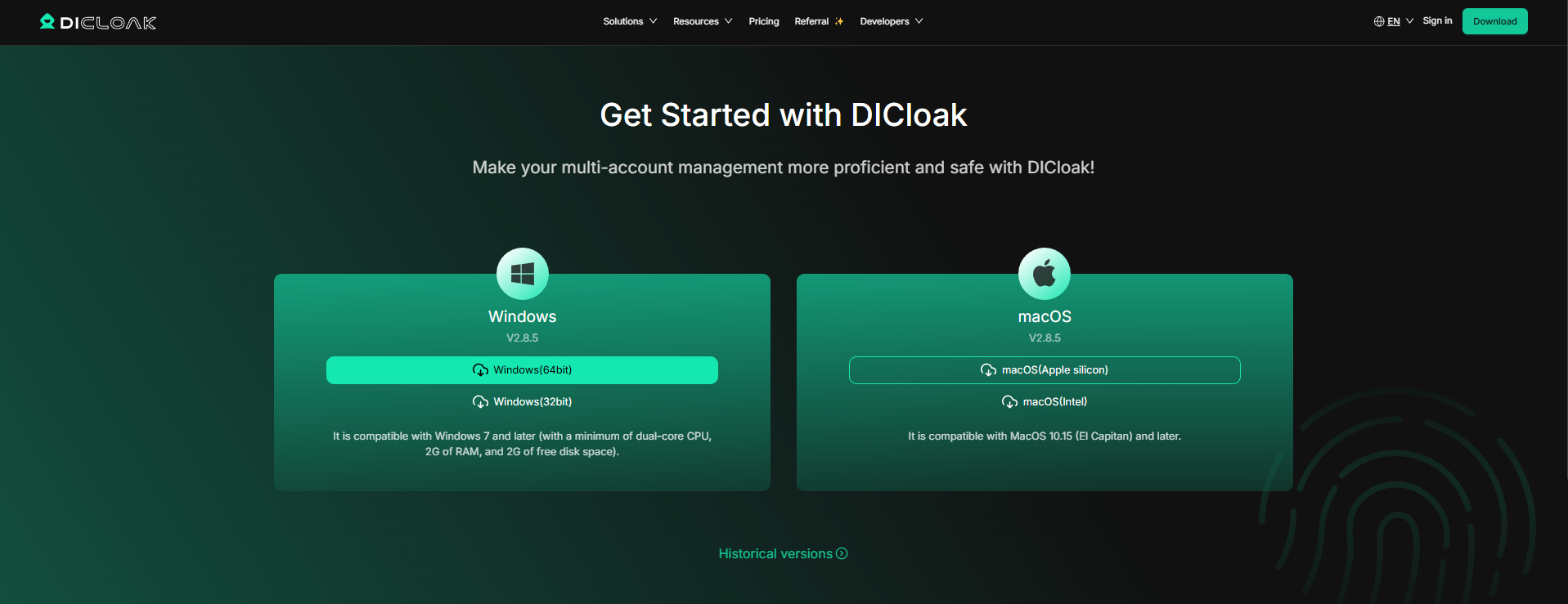
Step 1: Download and Install DICloak
Download the application and complete the installation on your computer.
Step 2: Create a New Browser Profile
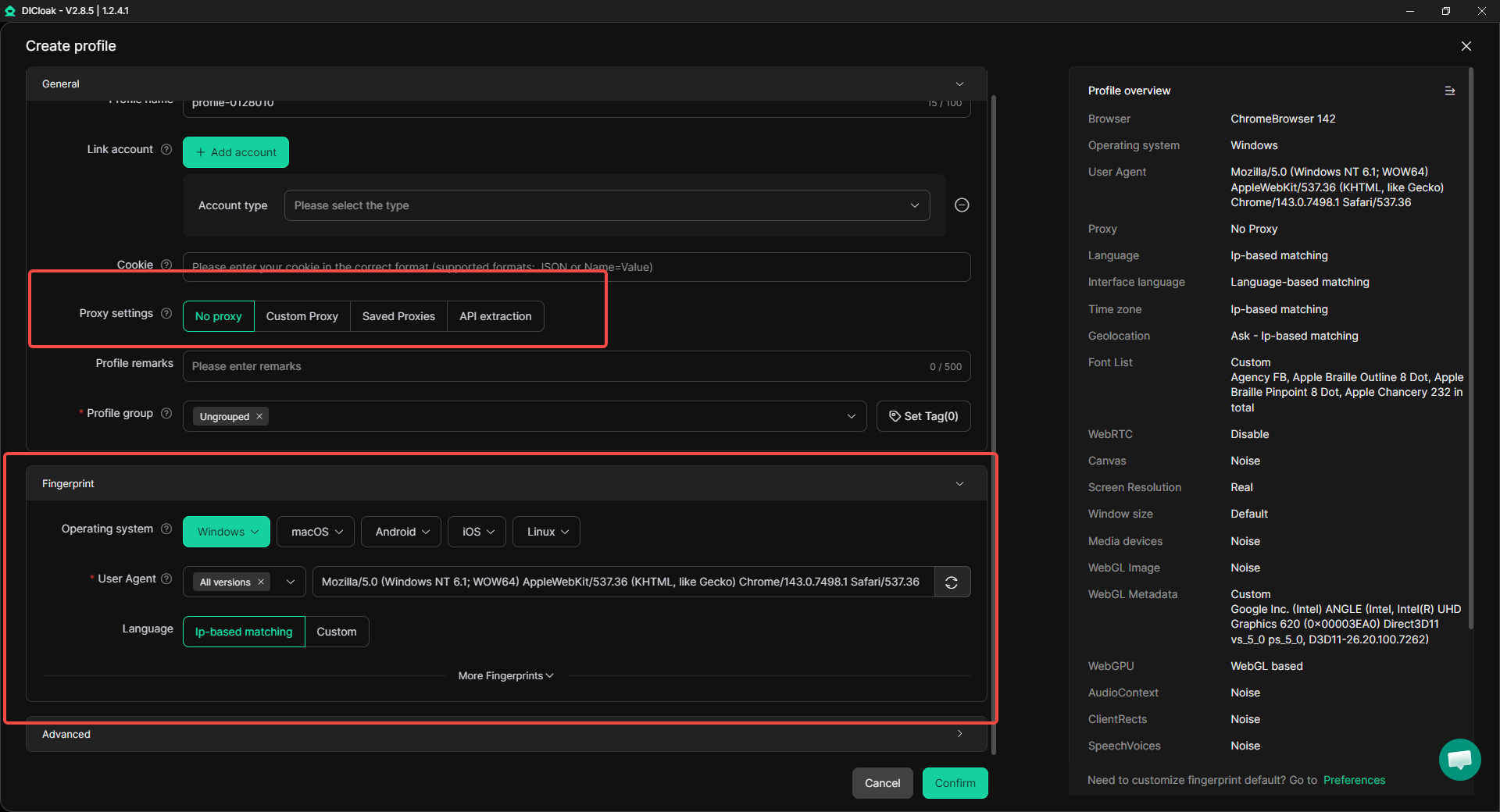
Open DICloak and create a new profile. The system generates a unique fingerprint automatically. You can assign a proxy if needed.
Step 3: Open the Profile and Access the Website
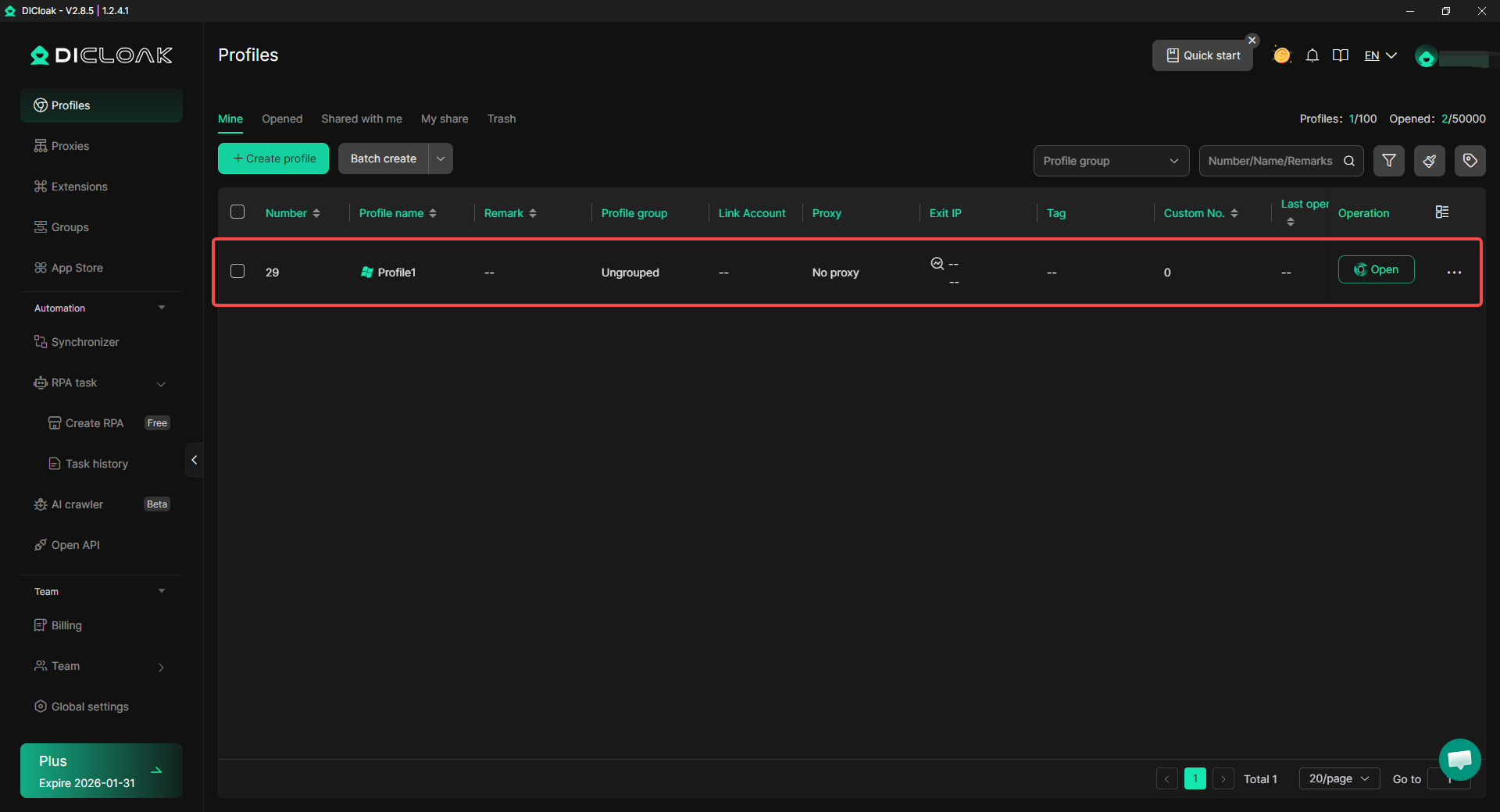
Launch the profile. A new isolated browser window opens. You can now access the blocked site within this clean environment.
Each method above offers a different way to approach how to bypass blocked sites. For simple filters, basic tools may work. For work computers and advanced detection, using an antidetect browser like DICloak provides a more stable and professional solution.
Device-Specific Instructions on How to Bypass Blocked Sites (Mobile & Desktop)
In the previous section, we explained different methods and tools. The next step is knowing how to bypass blocked sites on specific devices. Blocks often behave differently on mobile phones and desktop browsers, so the solution should match the device you are using.
Bypassing Blocks on Mobile Devices
Mobile devices usually connect through apps, mobile browsers, or public Wi-Fi. Blocks on phones and tablets are often simpler than on work computers, but they still happen.
On smartphones, many blocks come from Wi-Fi networks, not the device itself. A common situation is when a website opens normally on mobile data but fails on school or café Wi-Fi. This usually means the Wi-Fi network is filtering traffic.
For basic blocks, loading a page through Google Translate can work well on mobile browsers. The page opens inside Google’s viewer, which some filters allow. This is useful for reading articles or guides.
For research purposes, web archives also work well on mobile. If the live site is blocked, an archived version may still load and show the main content.
If blocks appear after repeated logins or account use on mobile, the issue may be related to device or session tracking. In these cases, switching to an isolated browsing environment, rather than using the default mobile browser, becomes more important.
Desktop Browser Solutions
On desktop devices, blocks are usually stricter, especially on work or school computers. Browsers like Chrome, Firefox, and Safari may all be affected by the same network rules.
In Chrome and Firefox, simple blocks may sometimes be bypassed by opening content through Google Translate or web archives, especially for text-based pages. This works because the browser loads content from a trusted third-party source.
Browser extensions can work on personal desktops, but they are often disabled on managed systems. On work computers, admin policies usually prevent changes to browser settings or extensions.
When blocks are tied to browser fingerprints, cookies, or repeated sessions, changing browsers alone does not help. Even switching from Chrome to Firefox may still trigger the same block.
In these cases, using an antidetect browser like DICloak on desktop provides a more stable solution. DICloak creates a fully isolated browser profile that looks like a separate real device. This helps when access is blocked due to shared computers, repeated logins, or long-term tracking.
The key point is this: learning how to bypass blocked sites is not just about tools. It is about choosing the right approach for your device. Mobile phones often need lighter solutions, while desktop systems—especially work computers—usually require deeper isolation to avoid repeated blocks.
Considerations When Learning How to Bypass Blocked Sites
Before using any method, it is important to understand the legal and ethical side. Learning how to bypass blocked sites is not only a technical issue. It also involves rules and responsibility.
There is no single legal answer. In many regions, using a proxy or similar tool is not illegal by itself. These tools are also used for testing and business needs. Issues usually arise when you bypass restrictions on a network or device you do not own, such as a work or school computer.
Most companies and schools have clear internet use policies. Bypassing filters can break those rules, even if the website is legal. On managed networks, activity is often monitored, and repeated attempts may lead to warnings or access limits.
A simple rule to remember is this: using your own device and network is lower risk than bypassing controls on a managed system. When learning how to bypass blocked sites, the safest approach is to respect the environment you are in and request access when it is needed for work or study.
Conclusion
Blocked websites are common on work networks, schools, and public Wi-Fi. In most cases, the restriction comes from network rules, not from the website itself. Understanding the reason behind the block is the first step in learning how to bypass blocked sites safely.
This article explained practical methods for different situations and devices. Some solutions work for simple filters, while others are better for repeated or advanced blocks. Choosing the right method depends on your device, your network, and the type of restriction.
Learning how to bypass blocked sites is not just about access. It is about using the right approach, respecting rules, and avoiding unnecessary risk. When done correctly, these methods help you reach the content you need in a clear and responsible way.
Frequently Asked Questions About How to Bypass Blocked Sites
Is it legal to learn how to bypass blocked sites?
Learning how to bypass blocked sites is not illegal by itself. The risk depends on where you are and whose network you are using. Using your own device and network is usually safer than bypassing blocks on a work or school computer, where rules and policies may apply.
Why does a website work on mobile data but not on Wi-Fi?
This often means the Wi-Fi network is blocking the site. Schools, offices, and public Wi-Fi use filters to restrict certain categories. Understanding this difference helps you choose the right way how to bypass blocked sites without guessing.
What is the safest way to bypass blocked sites on a work computer?
On work computers, basic tricks often fail because blocks are more advanced. When restrictions come from browser fingerprints or repeated sessions, using an isolated browsing environment is more reliable. This is why some users choose antidetect browsers when learning how to bypass blocked sites in professional settings.
Why do simple methods stop working after a few tries?
Many systems track repeated behavior, cookies, and browser fingerprints. After several attempts, access may be blocked again. This is common on shared devices. Knowing how to bypass blocked sites correctly means understanding that isolation matters, not just changing links.
How do I know which method to use for bypassing blocked sites?
The best method depends on the cause of the block.
- Network filters often need indirect access methods.
- Website-level blocks may require a clean browsing environment.
- Mobile and desktop devices behave differently.
Understanding the block first makes how to bypass blocked sites much easier and safer.
 Web Proxy Tools
 Free Tools
 Cookie Plugin
 UA Generator
 MAC Address Generator
 IP Generator
 IP Address List
 2FA Code Generator
 World Clock
 Anonymous Check
 WebRTC Leak Test
 UUID Generator
 Free Web Proxy Site
 Proxy Checker
 FB Ad Checker
 AI Web Scraping
 Free SMM Tools
 Twitter Shadowban Checker
 Instagram Name Checker
 UTM Generator
 Username Generator
 AI Hashtag Generator
 LinkedIn Headline Generator
 Social Media Image Resizer