Many students already use ChatGPT to help with homework, writing, and exam prep. As schoolwork becomes more demanding, students want tools that save time and reduce stress.
This is why chatgpt plus for students is getting more attention. Before talking about discounts or pricing, it is important to clearly understand what ChatGPT Plus is, how it works, and why it feels different from the free version in real study situations.
Understanding ChatGPT Plus
What Is ChatGPT Plus?
ChatGPT Plus is the paid version of ChatGPT from OpenAI. It gives users more access and stronger tools than the free plan. Many students see it as a learning upgrade rather than just a chatbot.
For example, a student can use ChatGPT Plus to rewrite an essay in clear English, explain a math problem step by step, or prepare notes before an exam. These tasks are possible with the free version too, but Plus makes the process smoother and more reliable. That is why chatgpt plus for students is often discussed as a study tool, not just a tech product.
Why Is ChatGPT Plus a Game Changer?
Students often study under time pressure. Deadlines, exams, and group projects can all happen at the same time. When the free version slows down or stops responding, learning becomes frustrating.
This is where chatgpt plus for students changes the experience. With higher limits and faster replies, students can stay focused and finish their work in one session. For many learners, this means less stress and better time control, especially during exam weeks.
Key Features of ChatGPT Plus
ChatGPT Plus is not just faster than the free version. Its real value comes from how these features help students study more effectively and with less frustration. For many learners, chatgpt plus for students feels like a stable study partner that works when it matters most.
The main advantages of ChatGPT Plus include:
- Faster response speed, even during busy hours. This helps students stay focused instead of waiting for replies.
- Higher message limits, which allow long study sessions without sudden stops or daily caps.
- More stable access, especially during exams, deadlines, and peak study times.
- Stronger writing support, including clearer rewrites, better structure, and improved grammar suggestions.
- Deeper explanations for complex topics, such as math, science, coding, and economics.
- Early access to new tools and updates, which can give students more options for learning and research.
For example, a student preparing a research paper can ask many follow-up questions in one session. A programming student can debug code step by step without hitting limits. These practical benefits explain why chatgpt plus for students is often chosen by learners who rely on AI for daily study tasks, not just casual questions.
Differences Between Free and Plus Versions
At first glance, the free and Plus versions look similar. Both let users chat with AI and ask questions. However, the difference becomes clear when students use them for serious study.
The table below shows how the two versions compare in real student use:
| Feature |
Free Version |
ChatGPT Plus |
| Monthly cost |
Free |
Paid subscription |
| Message limits |
Low and easy to reach |
Much higher limits |
| Speed |
Slower during busy hours |
Faster and more stable |
| Long study sessions |
Often interrupted |
Smooth and continuous |
| Writing and editing help |
Basic suggestions |
Deeper feedback and rewrites |
| Exam week reliability |
Limited access |
Works even when traffic is high |
For example, two students may study at the same time. The free user may need to stop after a few questions, while the Plus user can keep learning without breaks. This practical difference explains why many people consider chatgpt plus for students a useful option rather than a luxury.
Benefits of ChatGPT Plus for College Students
Instead of listing features, it helps to look at how students actually use AI in real study situations. Many college students choose ChatGPT Plus when tasks become more complex and time pressure increases. In these moments, chatgpt plus for students becomes a practical learning tool, not just a convenience.
Consider a graduate student in public health who is working on a research project about air quality. She uses ChatGPT Plus to summarize long academic papers and compare different study methods. When she struggles to design survey questions, she tests ideas with the AI and refines them step by step. This kind of support helps her move forward faster without replacing her own thinking.
Another example is a second-year engineering student managing heavy coursework and part-time work. He uses ChatGPT Plus to break down difficult problem sets and review mistakes after quizzes. When studying for exams, he uploads notes and creates simple study guides with practice questions. For him, chatgpt plus for students means better structure and less wasted time.
A final example is a senior student in marketing preparing for both final projects and job applications. She uses ChatGPT Plus to brainstorm campaign ideas, improve presentation scripts, and practice interview answers. The tool helps her feel more prepared and confident as she moves toward graduation.
Why Students Feel They Must Use AI Tools
College students today face constant pressure. Reading lists are longer, deadlines overlap, and expectations are high. Because of this, many students feel they need tools that help them keep up.
AI tools support students in practical ways. A student may use AI to summarize readings before class or to check clarity before submitting an assignment. Another may use it to practice explaining ideas in simple words. These habits explain why chatgpt plus for students is often seen as study support rather than a shortcut.
There is also concern about falling behind. When classmates use AI tools, students who avoid them may worry about missing important skills. Many students believe that learning how to work with AI now will matter later in their careers. This belief pushes students to explore tools like ChatGPT Plus even if they are unsure at first.
The Impact of ChatGPT Plus on College Education
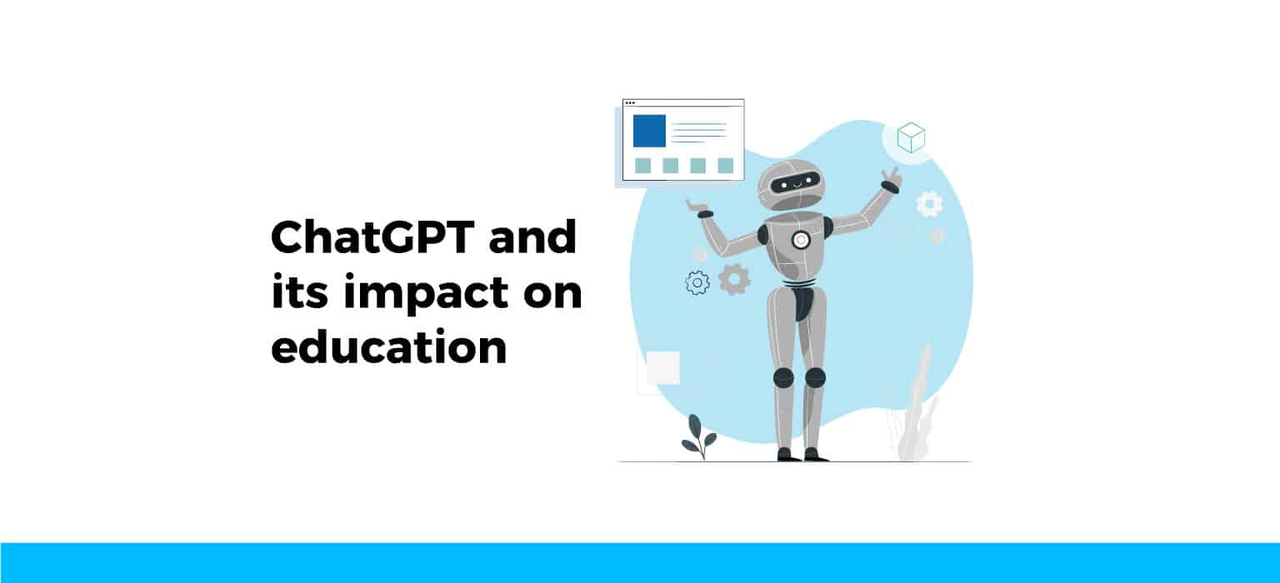
The growing use of ChatGPT Plus is changing how students approach learning. Instead of spending hours searching for information, students can focus more on understanding and applying ideas. This shift can improve confidence and reduce stress.
Students often use ChatGPT Plus to review drafts before submission and receive clear feedback. This helps them improve their work before asking a professor or tutor. For non-native English speakers and students with learning challenges, chatgpt plus for students can provide explanations that match their pace and style.
At the same time, responsible use remains important. Colleges expect students to follow academic rules and think independently. When used as a guide rather than a replacement, ChatGPT Plus can support learning and skill development. This balanced role shows how AI is becoming part of modern education, not a threat to it.
Smart AI Tools Every Student Should Know About
After deciding whether to upgrade, the next question is how to use AI tools wisely. Many students get the best results when they stop relying on one tool alone. Instead, they build a small study toolkit around chatgpt plus for students and other focused tools.
Building Your AI Study Toolkit
Different tools solve different problems. ChatGPT Plus works best as the center of a student’s AI setup. Other tools can support specific tasks like writing, note-taking, or memorization.
Here is a simple overview of how students often combine tools:
| Tool |
Main Use |
| ChatGPT Plus |
All-in-one help for research, writing, brainstorming, and coding |
| Grammarly |
Grammar, clarity, and tone checks |
| Google NotebookLM |
Research summaries and note organization |
| Quizlet / Anki |
Flashcards and exam review |
| Gemini 2.5 Pro |
General AI assistant for search and ideas |
| Aurora Slides |
Creating clear and visual presentations |
This setup helps students avoid overusing one tool. For many learners, chatgpt plus for students becomes the main thinking partner, while other tools handle specific tasks.
Prompt Tips That Actually Work for Students
Good results depend on how students ask questions. Clear prompts lead to clearer answers.
Students often get better results when they are specific. Instead of asking “help me study,” they ask for a study guide, examples, or practice questions. It also helps to request bullet points or step-by-step explanations. Students should always double-check facts and rewrite AI text in their own voice before submitting work.
A simple example prompt looks like this:
“Write a 300-word summary of this article for a college essay. Include three key points and a short source list.”
Used this way, chatgpt plus for students supports learning rather than replacing it.
Turning Ideas into Clear Presentations with AI
Presentations are where many students lose time and confidence. Turning notes into clear slides can feel harder than the research itself. This is where presentation tools can work together with ChatGPT Plus.
Aurora Slides focuses on turning rough ideas into clean presentations. A student can start by using ChatGPT Plus to organize ideas and talking points. Then, Aurora Slides can turn those ideas into a structured deck with visuals and speaker notes. This workflow helps students focus on content instead of design.
For group projects, Aurora Slides also makes collaboration easier. Students can share drafts, adjust slides quickly, and keep everything consistent. For presentation-heavy courses, this combination reduces stress and improves results without replacing chatgpt plus for students.
Is ChatGPT Plus Worth It for Students?
Many students ask the same question before upgrading. Is ChatGPT Plus really worth the cost?
For students who use AI often, the answer is usually yes. Faster replies, higher limits, and advanced features make a real difference during busy weeks. Research-heavy majors, graduate students, and coding students often save hours each week with chatgpt plus for students.
For creative majors and group work, ChatGPT Plus helps with brainstorming, structure, and feedback. That said, students who only need quick summaries or simple help may find the free version enough, especially on a tight budget.
The key factor is timing. Many students subscribe only during exams, thesis work, or major projects. Others wait until their workload grows. When used intentionally, chatgpt plus for students becomes a productivity tool, not an unnecessary expense.
Eligibility for ChatGPT Plus for Students
Is ChatGPT Plus Ever Really Free for Students?
Many students search for phrases like “GPT Plus free for students” and feel confused by mixed answers. The truth is more specific and time-based. ChatGPT Plus for students was free before, but only under clear limits and only for a short period.
There was a real student offer in the past. Verified college students in the United States and Canada could get two months of ChatGPT Plus for free. This was not a permanent plan. It was a limited promotion with strict rules that many students missed or misunderstood.
Here is what that free student offer actually included:
- It was only open to verified college students.
- It applied only in the U.S. and Canada.
- Students had to claim it during a fixed time window.
- The free access lasted two months only.
- After the two months, the normal ChatGPT Plus price applied unless the student canceled.
- Student status had to be verified through an official verification system.
- The offer could not be used with mobile app subscriptions or combined with other paid plans.
So yes, chatgpt plus for students was free before, but only for two months and only for a limited group of students. There has never been a permanent global free plan for students.
Is That Student Offer Still Available?
That specific promotion is now over. Students can no longer claim the two-month free access under the same terms. This often leads to disappointment, especially when old blog posts or videos still mention the offer as if it were active.
However, it is important to understand how these offers usually work. OpenAI and other tech companies often test short-term student programs. These programs may return in the future, but there is no guarantee. This is why students interested in chatgpt plus for students should always check current eligibility instead of relying on outdated information.
Other Real Ways Students Can Access Premium AI Tools
Even without a free ChatGPT Plus plan, students still have practical options. These options do not replace Plus completely, but they can help reduce costs while studying.
Common alternatives include:
- Using Microsoft Copilot, which gives free access to advanced AI models for writing and research tasks.
- Checking university partnerships, since some schools provide AI tools through campus accounts.
- Using student developer programs, which offer access to AI-powered tools for coding and learning.
- Watching for limited promotions, giveaways, or sponsored student plans shared in official student communities.
These methods require effort and timing, but they are real and commonly used by students. For many learners, this is a smart way to benefit from AI without paying the full price of chatgpt plus for students.
What Students Should Remember
The key point is simple. There is no permanent “free ChatGPT Plus for students” plan right now. The free access that existed before was real, but it was temporary and restricted.
Students who understand this can make better choices. They can decide whether to wait for future offers, use alternative tools, or pay for ChatGPT Plus when they truly need it. That kind of clarity is more helpful than chasing promises that no longer apply.
How Students Can Save Money on ChatGPT Plus Without Getting Banned
For many students, the monthly cost of ChatGPT Plus feels expensive. Tuition, books, rent, and daily expenses already add up fast. Adding another $20 each month is not always realistic.
Because of this, many students look for ways to share a ChatGPT Plus account with friends or classmates. The idea makes sense financially, but doing it the wrong way can quickly cause serious problems.
The most common way students share accounts is by sharing a password. This may seem easy, but it breaks OpenAI’s rules and puts the account at risk.
When multiple people log in from different devices and locations, the account can be flagged, logged out, or even banned. There is also a privacy issue. Everyone using the account can see chat history, saved files, and account settings. For students, this can expose private notes, schoolwork, or payment details.
Because of these risks, many students find that traditional account sharing creates more stress than savings.
A Safer Way for Students to Share ChatGPT Plus
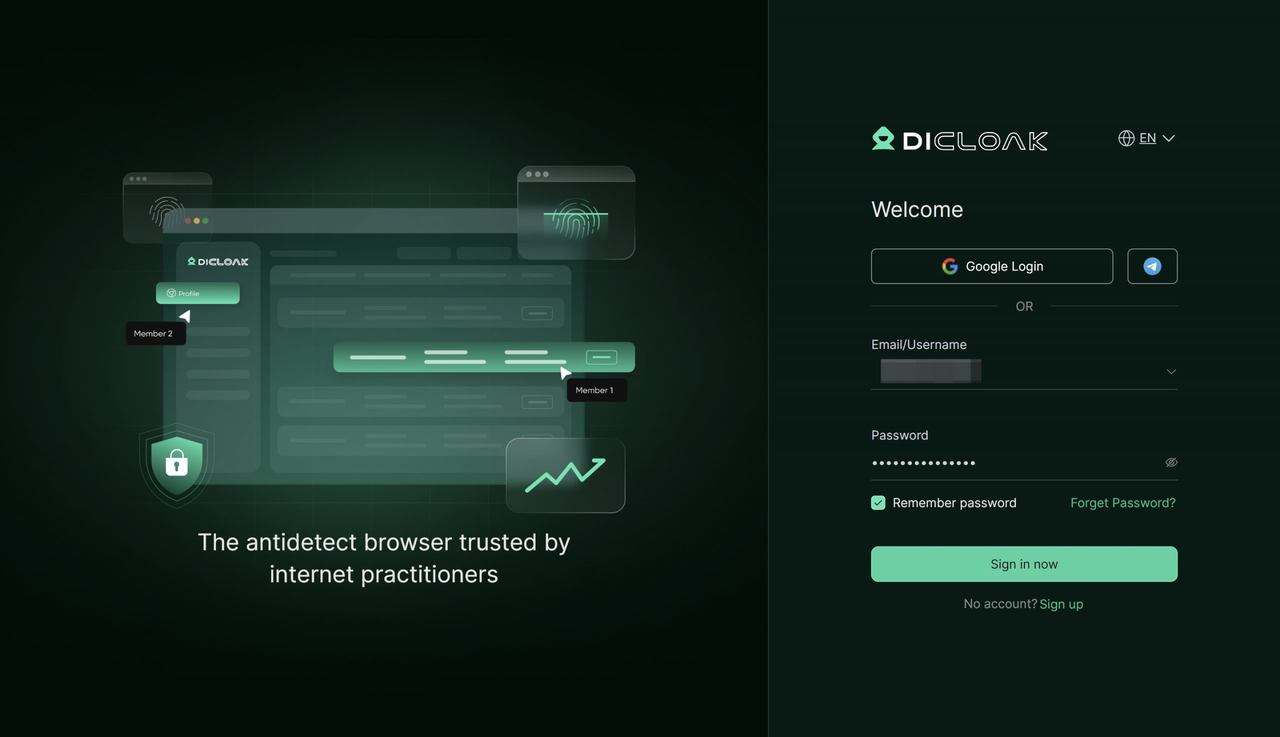
A more controlled option is to use a tool like DICloak. DICloak is an antidetect browser that allows multiple people to access the same ChatGPT Plus account without sharing the password directly.
Instead of logging in from many different environments, DICloak uses one fixed browser profile. To ChatGPT, all activity looks like it comes from one consistent user. This reduces security alerts and keeps access stable.
For students who truly need to split costs, this method is much cleaner and easier to manage.
Step-by-Step Guide to Sharing ChatGPT Plus with DICloak
The setup process is simple and student-friendly.
1.Download and Install DICloak
Visit the official DICloak website, register for an account, and download and install the application on your computer.
2. Choose the Right Plan
To share profiles with your team, you should subscribe to DICloak. The choice depends on your team size. The Base Plan is a good starting point for smaller teams, while the Share+ Plan is recommended for larger teams needing unlimited member access.
3. Set Up a Static Residential Proxy (Recommended)
While not mandatory, using a single static residential proxy is highly recommended. This provides a stable, fixed IP address for your shared profile, which prevents ChatGPT's security systems from being flagged by logins from different locations. This greatly reduces the risk of forced logouts or other security issues.
4. Create a New Browser Profile
Inside the DICloak application, create a new browser profile. This profile will serve as the dedicated, secure borwser profile for your shared ChatGPT account.
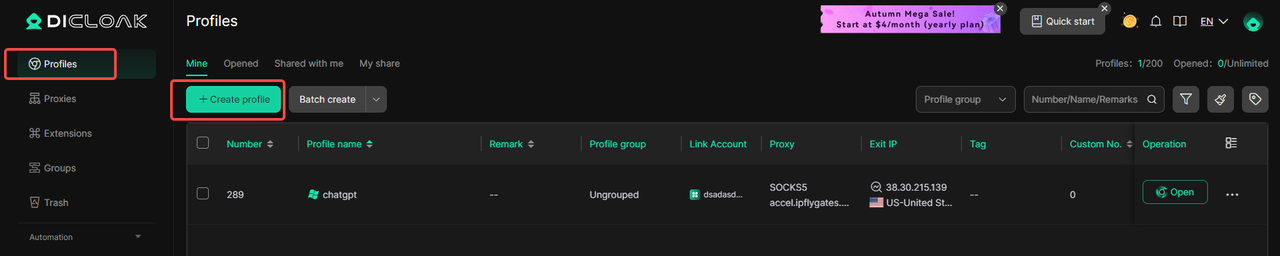
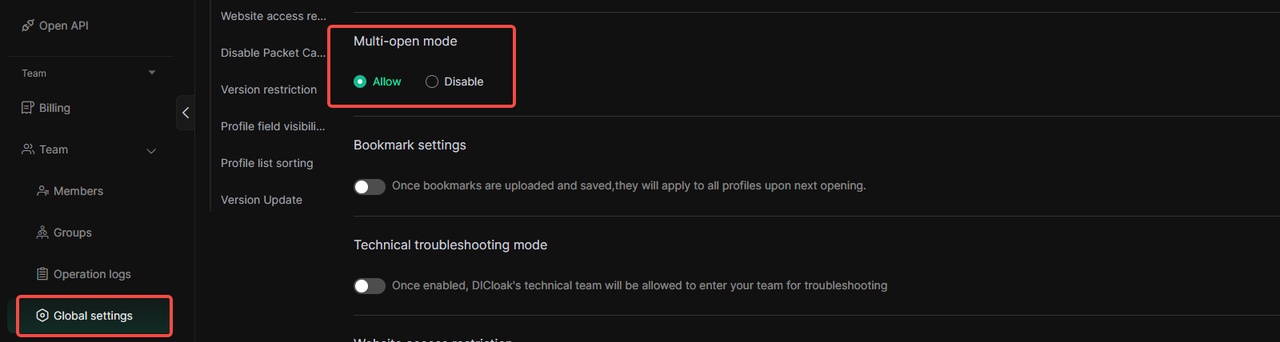
5.Enable Multi-open Mode
You shoud Go to [Global Settings], find the [Multi-open mode] option, and select [Allow].This feature allows multiple people access the same Chatgpt account at the same time.
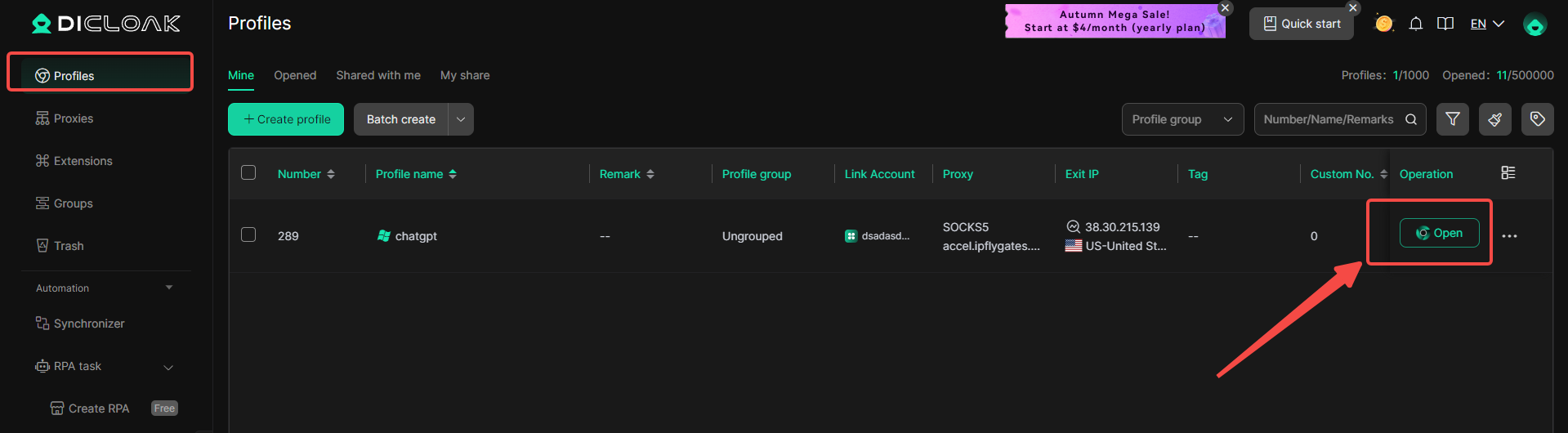
6. Log In to ChatGPT
Launch the browser profile you just created. It will open a new browser window. Navigate to the official ChatGPT website and log in with your account credentials.

7. Share the Profile with Your Team
Return to the DICloak main screen. Use the team feature to create members to invite your friends to your DICloak Team.

8. Access the Shared Account
Once your teammate accepts the invite, the shared profile will appear in their DICloak application. They can launch it from their own computer and will be automatically logged into the same ChatGPT session.
Why This Method Works Better for Students
Using DICloak avoids the most common problems students face when sharing accounts. There are fewer logouts, less risk of bans, and better privacy control.
For students who depend on ChatGPT Plus but cannot afford it alone, this approach offers a practical balance. It allows cost sharing while keeping the account stable and secure. Instead of risky shortcuts, students get a managed and predictable way to collaborate.
Alternatives for Budget-Conscious Students
After learning that there is no permanent free plan, many students start looking for other options. Not every student needs full access all the time, and not every budget can support a monthly fee. For this reason, exploring alternatives is a smart step for students who are still deciding whether chatgpt plus for students is the right choice.
Using Free or Low-Cost AI Tools
Several AI tools offer free or low-cost access that can cover many daily study needs. These tools may not fully replace ChatGPT Plus, but they work well for basic tasks.
For example, the free version of ChatGPT is still useful for simple writing, summaries, and quick explanations. Microsoft Copilot and similar tools also give students access to advanced AI features at no cost. A student can use these tools to outline an essay, check ideas, or understand a topic before class. This makes them good starting points for students who cannot yet pay for chatgpt plus for students
Content and Presentation Tools for Specific Tasks
Some tools focus on special study needs instead of general use. These tools can be helpful when students work on presentations or creative projects.
Aurora is one example. It offers a free trial and focuses on presentations and content creation. A student preparing slides for a group project can use it to save time and improve structure. While it is not an all-purpose study tool, it can replace chatgpt plus for students for specific tasks like presentations and visual content.
Writing and Tutoring Support Options
Not all help needs to come from general AI tools. Some students benefit more from focused writing or tutoring support.
Grammarly helps students improve grammar, clarity, and tone. Chegg provides tutoring and homework help that combines AI and human support. For example, a student struggling with math may prefer step-by-step human explanations. These tools work well alongside free AI tools and reduce the need to rely fully on chatgpt plus for students.
Comparing Popular Alternatives at a Glance
The table below shows how common tools compare in cost, use, and AI strength:
| Tool |
Cost |
Main Use |
AI Power |
| ChatGPT Plus |
$20/month |
All-purpose study help |
Advanced AI |
| ChatGPT Free |
Free |
General tasks |
Basic AI |
| Copilot (Bing) |
Free |
All-purpose |
Advanced AI |
| Aurora |
Free 30 days, then paid |
Presentations & content |
Proprietary AI |
| Grammarly |
Varies |
Writing support |
Niche AI |
| Chegg |
Varies |
Tutoring |
Human + AI |
This comparison helps students see that there are many paths available. Each tool fits a different need and budget.
Choosing the Right Mix for Your Budget
There is no single best solution for everyone. Some students mix free tools with short-term paid access during exams or major projects. Others rely on writing or tutoring tools instead of a full AI subscription.
By understanding these alternatives, students can make smarter decisions. Instead of feeling pressured to subscribe right away, they can build a study setup that fits both their needs and their budget. For many learners, this approach makes chatgpt plus for students a choice, not a requirement.
Conclusion
In the end, chatgpt plus for students is most valuable when schoolwork becomes heavy and time is limited. It offers faster access, higher limits, and stronger help for writing, research, coding, and presentations. Students do not need to upgrade right away. Many start with free tools and only use Plus during exams or major projects. If the monthly cost feels high, sharing one account the wrong way can lead to bans and privacy risks. A safer option is to use DICloak, which lets students share a ChatGPT Plus account in a controlled and secure way without exposing passwords. This gives students flexibility, cost savings, and peace of mind while still getting the full benefits of ChatGPT Plus.
 Web Proxy Tools
 Free Tools
 Cookie Plugin
 UA Generator
 MAC Address Generator
 IP Generator
 IP Address List
 2FA Code Generator
 World Clock
 Anonymous Check
 WebRTC Leak Test
 UUID Generator
 Free Web Proxy Site
 Proxy Checker
 FB Ad Checker
 AI Web Scraping
 Free SMM Tools
 Twitter Shadowban Checker
 Instagram Name Checker
 UTM Generator
 Username Generator
 AI Hashtag Generator
 LinkedIn Headline Generator
 Social Media Image Resizer