Running more than one Google account for work, ads, or automation sounds simple, until a day comes when every login throws up a ban or phone verification wall. The rules on Google multiple accounts policy keep changing, but the big problem stays the same: you never get clear answers on what triggers Google multiple account abuse, and once detection hits, appeals rarely work.
It’s easy to think, “If I use a new device or fresh IP, I’ll be safe.” That’s not how Google account abuse detection actually works in 2026. Matching browser fingerprints, reused recovery emails, or even patterns in your ad spend can flag you before you realize what went wrong. Sometimes, just logging in too quickly from different locations is enough to link accounts.
Real operators know the real risk isn’t just a single ban, it’s a domino effect. One flagged login can lead to a Google Ads multiple account ban for every profile in your setup. The difference between keeping accounts live and losing everything often comes down to the small workflow details: how you isolate sessions, what you reuse (or don’t), and which tools don’t leak device data. Missing one step can get all your accounts swept in an overnight wave.
To get a handle on what really triggers bans, and which habits or setups actually reduce your risk, start by understanding how Google detects abuse in the first place. Here’s where most operators get caught.
What Does Google Mean by Multiple Account Abuse in 2026?
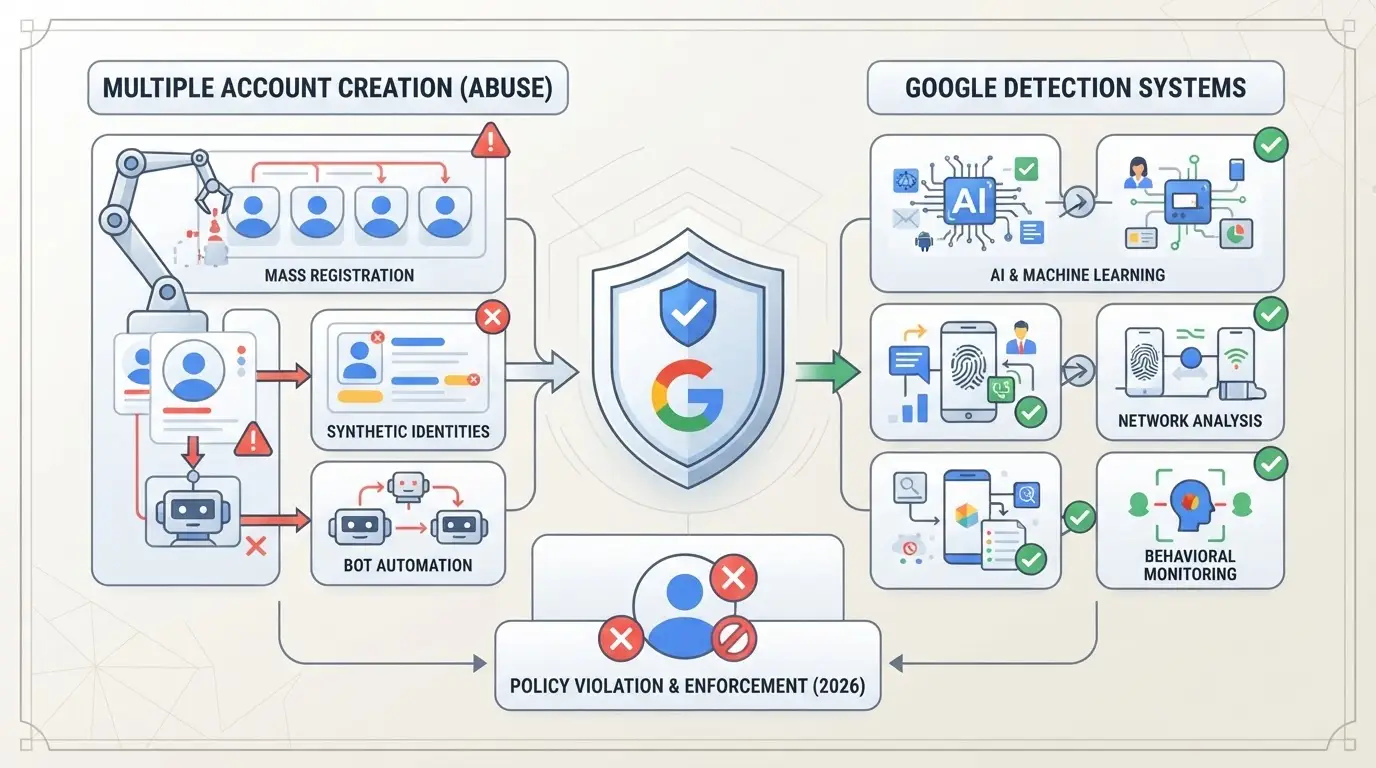
Google treats multiple account abuse as any pattern where one person or team controls, benefits from, or masks the true connection between separate Google accounts, especially if this setup bends or breaks Google’s rules. It’s not just about having extra accounts. The problem starts when those accounts are linked by device, network, payment, or user behavior in ways Google sees as an attempt to avoid limits, gain unfair advantages, or hide policy violations.
How Google Defines Multiple Account Abuse
The current Google multiple accounts policy draws a sharp line between personal multi-account use and anything that looks like evasion or manipulation. Here’s where most get flagged:
- Account stacking: Running several accounts from the same device, browser, or IP, especially if they interact with each other.
- Circumventing restrictions: Using new accounts to get around bans, limits, or previous enforcement actions.
- Coordinated actions: Linking accounts through shared payment info, recovery emails, or overlapping ownership details.
If your usage matches any point above, Google can treat your entire setup as a single operator trying to hide connections, not just a harmless user with extra logins.
Recent Changes in Google's Enforcement (2025–2026)
Since early 2025, Google has pushed AI-driven detection much deeper into its abuse prevention stack. Instead of just checking for the same IP or device fingerprint, the system now cross-references behavioral signals: login timing, browser quirks, even how you move the mouse. A single mistake, like logging into several accounts too quickly on the same device or copying cookies between browsers, can flag all linked accounts, even if the rest of your setup looks clean.
A real-world example: Teams managing Google Ads accounts saw a spike in bans after Google started correlating ad text patterns and payment profiles using machine learning. Accounts that had never shared a device still went down if they reused card info or campaign templates. The biggest shift is that even “hidden” links, like browser session artifacts or autofill data, can now be enough to trigger a mass ban.
Understanding these enforcement changes is the only way to build a safer workflow. The next step is knowing exactly what triggers a flag or ban, so you can spot risks before Google does.
Why Google Flags and Bans Accounts for Multiple Account Abuse
Google’s bans rarely come from one mistake, they’re almost always triggered by a pattern. When accounts share enough technical or behavioral signals, the system links them behind the scenes. Operators who miss these warning signs usually face a chain reaction of suspensions before they can react.
Common Triggers for Abuse Flags
You won’t get flagged just for having several accounts. The real problems start when Google’s systems spot overlap that looks like automation or coordinated control. Three signals trip the most bans:
- IP and device overlap: Logging into multiple accounts from the same IP or device, even hours apart, connects them fast.
- Browser fingerprint similarity: Details like fonts, screen size, extensions, and language combine into a unique profile. If several accounts match too closely, Google treats them as linked.
- Linked payment or recovery info: Using the same card, bank account, or recovery phone/email ties accounts together almost instantly.
Behavioral Patterns That Raise Suspicion
Technical overlap isn’t the only thing Google watches. Certain activity patterns are even more likely to raise a red flag, especially for Google Ads and business products.
If you create five fresh accounts in an hour, all from the same device, with each one setting up similar ad campaigns or sending out nearly identical emails, Google’s risk engine doesn’t see five users. It sees one operator trying to multiply presence or skirt suspension. Unnatural login spikes, like accessing several accounts from new cities within minutes, also trigger review. Even subtle moves, such as posting the same content across accounts or using shared templates, stack up as suspicious behavior.
What trips up many people is thinking slow, manual actions will fly under the radar. In reality, Google’s detection models compare years of data, if your accounts show the same daily rhythm, pause at the same steps, or interact with the same contacts, the connection stands out. Missing just one hidden link, like using an old phone as a backup for all your logins, can pull every linked account into a ban wave.
Next, you’ll see what actually happens when Google flags your profiles for multiple account abuse, and why recovery isn’t always as simple as filing an appeal.
What Happens When You're Flagged for Multiple Account Abuse
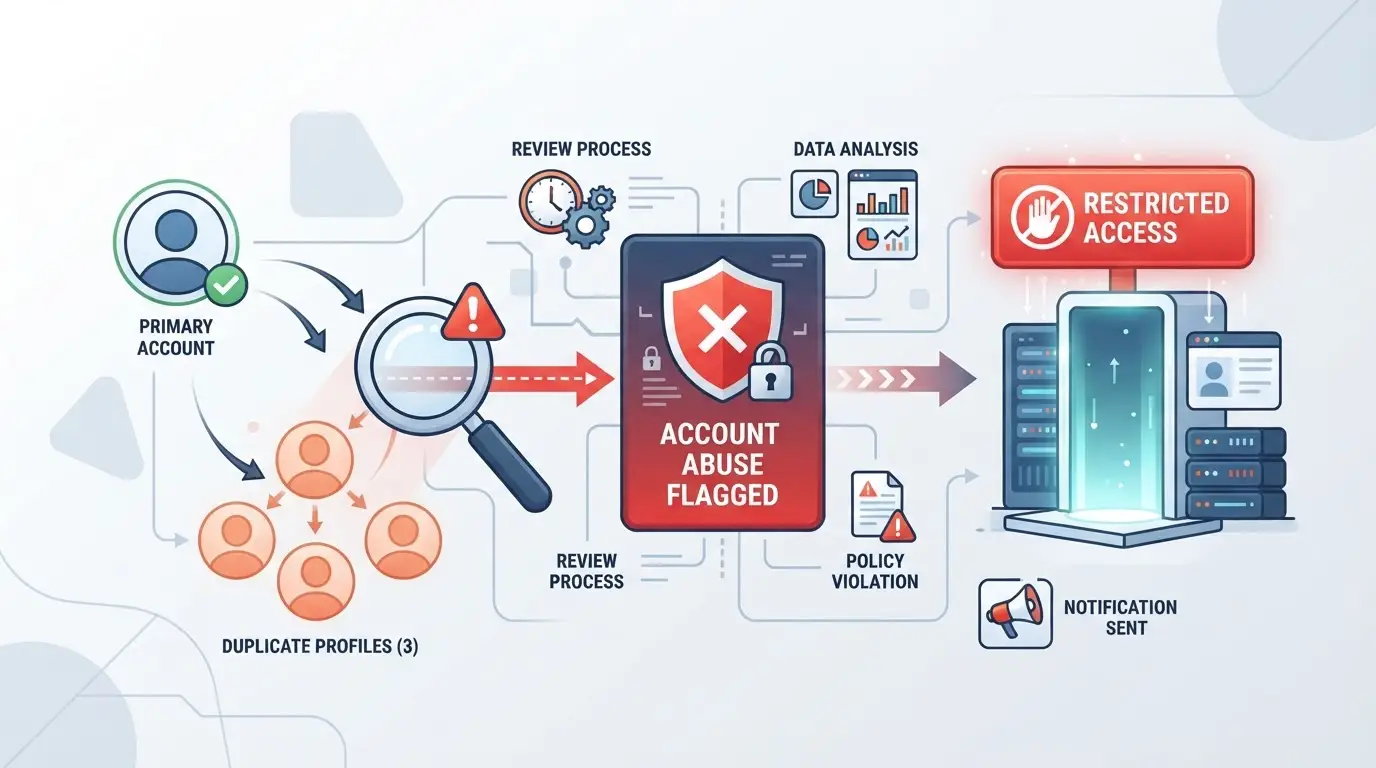
Getting flagged for google multiple account abuse means you’ll see instant consequences, not just a warning. Google’s system moves fast, if one profile trips a signal, every account tied to that login or device can get hit the same night. Expect a wave of restrictions before you even notice the first email.
Immediate Account Actions: Suspension, Restriction, or Ban
Most operators first see a suspension notice, Google locks you out and shows a red banner on login. Sometimes, you’ll get a partial restriction, like blocked Google Ads spend or disabled Gmail. Full bans show up in your inbox, but often hit other linked accounts within hours.
How to Appeal a Multiple Account Suspension
Appealing a multiple account suspension means filling out Google’s web form and waiting for a review. You need to give a clear reason why your accounts are separate, think business vs personal, or different team members. If you submit generic info or leave gaps, you’ll get a rejection notice in under 48 hours. For example, if you claim accounts are for different projects but both use the same device fingerprint, Google’s review team will spot the overlap and deny the appeal. If your appeal fails, you can submit again, but repeating the same explanation rarely works.
Long-Term Impact: Linked Account Risk and Recovery
- If one account is banned, all profiles sharing device data or login sessions face extra scrutiny.
- Recovery options shrink if Google marks your device as compromised, future accounts on that device risk instant bans.
- To reduce fallout, separate devices, clear browser fingerprints, and avoid reusing recovery emails for new accounts.
Operators who miss these details often lose entire setups, even when only one account triggers the initial flag. The domino effect is real, small mistakes can cost every account tied to your workflow.
Common Mistakes and Myths That Lead to Google Account Bans
Most bans tied to google multiple account abuse happen because of habits that look harmless but light up Google’s detection systems. Here’s what actually gets people caught, not just the rules, but the routine mistakes and false confidence that lead to a ban.
Mistakes That Trigger Detection
Logging into multiple accounts from the same device without full isolation, or using shared browsers and profiles, almost always leaves cross-account traces. Passing around logins between team members (even just one time) can link accounts in Google’s backend. Ignoring IP and device fingerprint mismatches, like switching between proxies or locations too quickly, creates clear patterns that trigger review. Skipping these details often causes a chain reaction: one flagged profile, then a sweep across everything connected.
Myths That Get People Banned
Some operators think basic tricks are enough, but these false beliefs get more accounts banned than brute-force abuse.
- Google ignores browser fingerprints , wrong. They track even minor mismatches.
- Proxies alone will keep accounts separate , actually, reused device or browser data still links you.
- Old accounts are “safe” , age helps, but one slip in workflow can get them swept too.
Small workflow errors, not technical tricks, cause most bans. If you’re not sure your setup is airtight, check every step before moving forward.
How Teams Can Manage Multiple Google Accounts More Safely: Workflow, Environment, and Proxy Setup
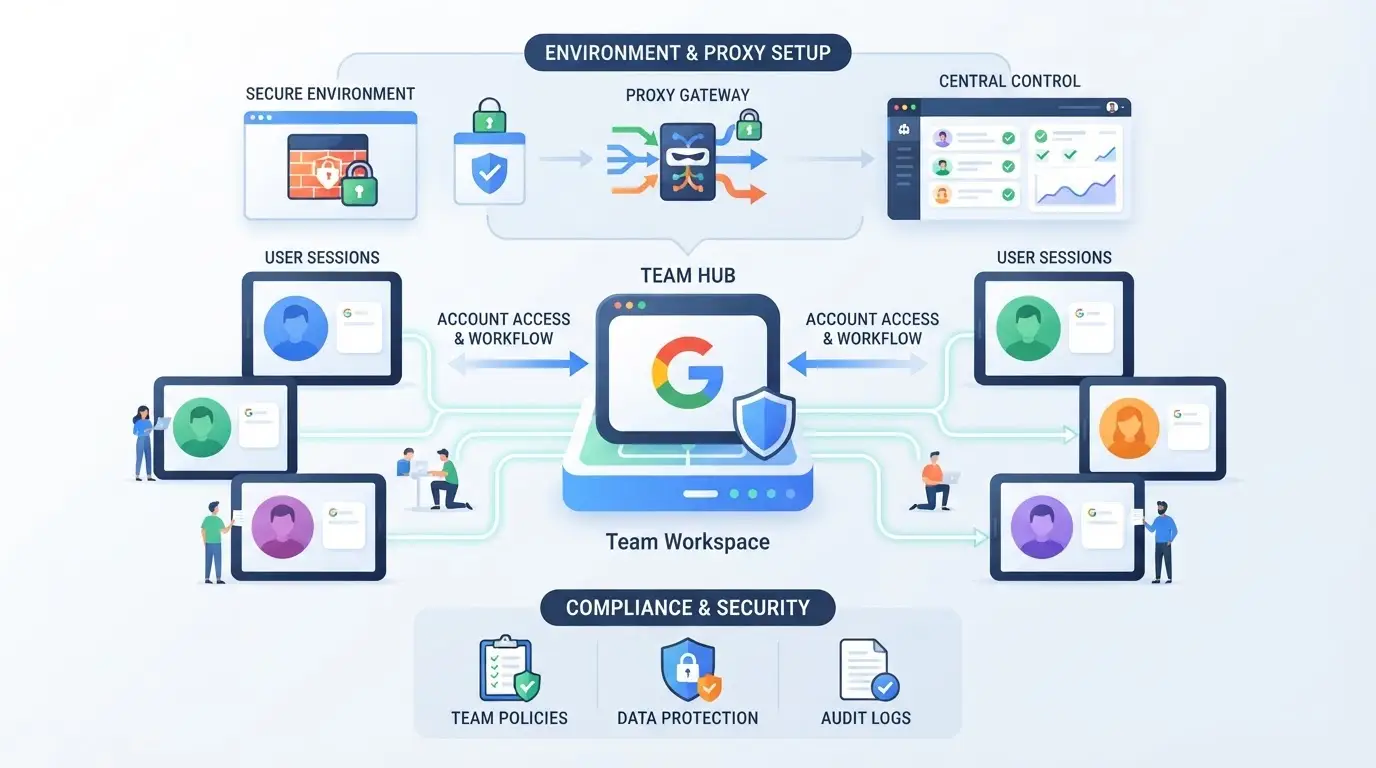
Managing multiple Google accounts in a team setup means walking a tightrope , one mistake can trigger a sweep. To stay ahead of google multiple account abuse detection, your workflow needs strict environment separation, careful proxy assignment, and operational discipline. Here’s how operators keep accounts live when bans feel random.
Separating Account Environments: Browser Profiles and Fingerprints
Isolation isn’t just a buzzword; it’s what keeps Google from connecting sessions. Real operators use browser profile tools to create a unique environment for every account.
- Create a dedicated browser profile for each account , never reuse profiles. Shared fingerprints flag accounts fast.
- Set custom browser fingerprints: change user agent, screen resolution, fonts, and time zone. If you skip this, Google links your accounts by hardware match.
- Clean cookies and cache between logins. Residual data ties sessions together and triggers linkage.
Missing fingerprint isolation is the #1 reason operators lose “unrelated” accounts in a ban wave.
Assigning Unique Proxies to Each Account
Even the best environment setup fails if your accounts share an IP. Unique proxies are non-negotiable.
- Assign a residential or mobile proxy per account. Avoid datacenter proxies; Google flags them as bulk activity.
- Test each proxy’s exit IP and region before login. A mismatch between claimed region and proxy exit often leads to instant restriction.
- Rotate proxies regularly, but never share the same proxy across accounts. Shared IPs turn minor flags into mass bans.
Operational Best Practices for Teams
Workflow discipline is where most teams slip up , especially when multiple operators touch accounts.
- Restrict user permissions: Only the operator for each account should access its profile. Shared access multiplies risk.
- Log every action: Keep a record of logins, changes, and proxy swaps. If a ban hits, you need a timeline to diagnose what triggered linkage.
- Avoid cross-account contamination: Never copy cookies, download files, or paste data between accounts. This step is simple but skips get accounts flagged.
Teams that treat every account as its own “device” see fewer bans and easier recovery. Small operational gaps, like skipping logs or having vague proxy setups, are what typically get entire teams swept. The next section covers how profile isolation and proxy control work in practice with dedicated tools.
Using DICloak to Manage Multiple Social Media Accounts Safely: Profile Isolation and Proxy Configuration
For agencies and social media teams who need to work with multiple Google accounts, getting flagged for google multiple account abuse is often a matter of sloppy environment setup. The main problem isn’t just logging in from the same device, it’s letting browser sessions, cookies, or fingerprint signals overlap between accounts. That’s where a tool like DICloak fits: it gives operators a practical way to keep each account’s environment and network connection separate, cutting down on risky cross-account leaks.
Creating Isolated Browser Profiles and Configuring Fingerprints in DICloak
Operators can create a new browser profile in DICloak for every Google account they manage. Each profile acts as a separate browser profile, storing its own session, cookies, and settings. What matters most is consistency, every fingerprint signal, from OS to User Agent, time zone, language, and screen resolution, can be set per profile. That means one account’s login doesn’t accidentally share device details with another. For most teams, this is the step that keeps accounts from being linked by shared browser signals. The scope here stops at browser-profile isolation; it does not manage Google accounts or guarantee platform outcomes.

Setting Up User-Provided Proxies for Each Profile in DICloak
Teams can assign a different proxy to every DICloak profile, controlling which IP address and region each account appears to log in from. Entering proxy details, host, port, username, password, inside the profile lets operators test the connection and see the detected exit IP and region. The responsibility for proxy quality, rotation, and compliance stays with the operator; DICloak just stores and applies the settings. Don’t treat proxy assignment as a magic fix, if you reuse an IP or get sloppy with proxy sources, Google’s detection systems can still link accounts.

This setup covers the technical layer, but separating accounts isn’t enough if your workflows or compliance signals are inconsistent. Next, the article moves into where legitimate separation can turn risky.
When Legitimate Account Separation Becomes Risky: Compliance, Intent, and Platform Signals
Most users running several Google accounts think separation alone keeps them safe. The real tipping point comes when your setup starts to look like google multiple account abuse, usually because of patterns, not just numbers.
Legitimate Use Cases vs. Abusive Patterns
| Scenario |
Typical Signals |
Platform Risk Level |
| Agency/team use (clear purpose) |
Business emails, clear roles, regular team activity |
Low if consistent |
| Solo “abuse” setups (fake IDs, churn) |
Rapid switching, shared devices, short-lived accounts |
High, flagged quickly |
| Personal/business split (one person) |
Distinct login times, separate devices, no cross-use |
Low unless signals mix |
Mixing work and “growth” accounts on the same device or IP is the fastest way to cross the line from legitimate use to a ban sweep.
Compliance Signals: What Google Looks For
Google isn’t just counting accounts, it’s watching for fake details, erratic logins, and inconsistent environments. If your purpose and behavior stay honest and transparent, you’re much less likely to trigger a Google account abuse detection sweep.
If you want a quick way to check your setup before risking a ban, keep reading for the essential pre-checklist.
Checklist: What to Review Before Managing Multiple Google Accounts in 2026
Google’s detection now ties small mistakes to instant bans across your stack. Before running any multi-account workflow, double-check the setup below, missing just one step can trigger a chain ban.
Technical Setup Review
Isolate each browser profile, never share cookies, device fingerprints, or session storage between accounts. Assign a unique, tested proxy to every profile. Rotate IPs carefully; reusing one can link accounts within minutes. The biggest miss: skipping a profile test after setup, many bans trace back to a single, unchecked fingerprint leak.
Operational and Compliance Review
- Document every account’s purpose and keep proof on hand.
- Restrict team access to only what’s needed for each account.
- Review permissions monthly; one stray login can expose your entire setup.
Frequently Asked Questions About google multiple account abuse
Is it legal to manage multiple Google accounts for business or marketing?
Managing multiple Google accounts is legal if you follow Google’s terms of service. Google bans deceptive practices like fake identities or manipulating services. For business, stay compliant with advertising policies and avoid misleading actions. Violating guidelines can lead to account suspension or legal action, especially in regulated industries.
Can Google detect if I use the same device or browser for multiple accounts?
Yes, Google uses device and browser fingerprinting to track account activity. Signals like IP address, cookies, browser type, and hardware information help Google spot linked accounts. Even if you clear cookies, device-level data can still connect multiple accounts, increasing the risk of detection.
Does using a proxy guarantee my Google accounts won't be linked or banned?
No, using a proxy alone does not fully protect your accounts. Google checks for more than just IP address, including browser fingerprints, login patterns, and device data. To avoid Google Ads multiple account ban, you must separate all aspects of your account environment, not just your network.
What should I do if my Google account is suspended for google multiple account abuse?
If your account is suspended for google multiple account abuse, review the suspension notice and Google’s policies. Gather evidence to show you followed guidelines. Submit an appeal through Google’s Help Center, explaining your situation. If denied, you may try recovery steps or create a compliant new account.
How many Google accounts can I safely manage for social media marketing?
Most marketers handle 2–5 accounts per device, but more may trigger Google account abuse detection. Use separate browsers or profiles for each account, and avoid rapid switching. Stick to consistent, authentic activity. Too many accounts on one device can raise flags and risk bans.
Taking proactive steps to manage your digital identities can help you avoid unintended policy violations and maintain the integrity of your online presence. Whether you're looking to simplify account management or safeguard your privacy, exploring secure solutions is a practical move. Try DICloak For Free
 Web Proxy Tools
 Free Tools
 Cookie Plugin
 UA Generator
 MAC Address Generator
 IP Generator
 IP Address List
 2FA Code Generator
 World Clock
 Anonymous Check
 WebRTC Leak Test
 UUID Generator
 Free Web Proxy Site
 Proxy Checker
 FB Ad Checker
 AI Web Scraping
 Free SMM Tools
 Twitter Shadowban Checker
 Instagram Name Checker
 UTM Generator
 Username Generator
 AI Hashtag Generator
 LinkedIn Headline Generator
 Social Media Image Resizer










-01-v14.png?x-oss-process=image/interlace,1/format,webp/quality,q_75)