Choosing between Etsy and Shopify isn’t just about picking a platform, it’s about how you run your business day-to-day. Sellers face a tough call: Etsy brings built-in buyers and a ready-made marketplace, but strict rules and fees. Shopify hands you full control, but you need to drive your own traffic and manage every detail yourself. The real challenge with Etsy vs Shopify is figuring out which setup actually matches your workflow, risk tolerance, and growth plans.
Many sellers get stuck on surface comparisons: fees, customizability, or how their shop looks. What trips people up is not the headline features, but the hidden friction. On Etsy, you might find your listings buried or accounts suddenly restricted for policy reasons. On Shopify, you can customize almost anything, but running ads, handling payments, and keeping up with updates is entirely on you. What works for a hobby shop won’t scale for a multi-product brand.
The practical difference comes down to how much control you need and how much platform risk you’re willing to accept. If you want hands-off buyer discovery, Etsy is faster to start. If you need to build a brand or manage multiple stores, Shopify gives you flexibility, but also more responsibility. Sellers switching platforms often don’t realize how much their day-to-day work changes, what feels easy for one type of product can turn into a headache for another.
To see which fits best, start by breaking down the core workflow differences.
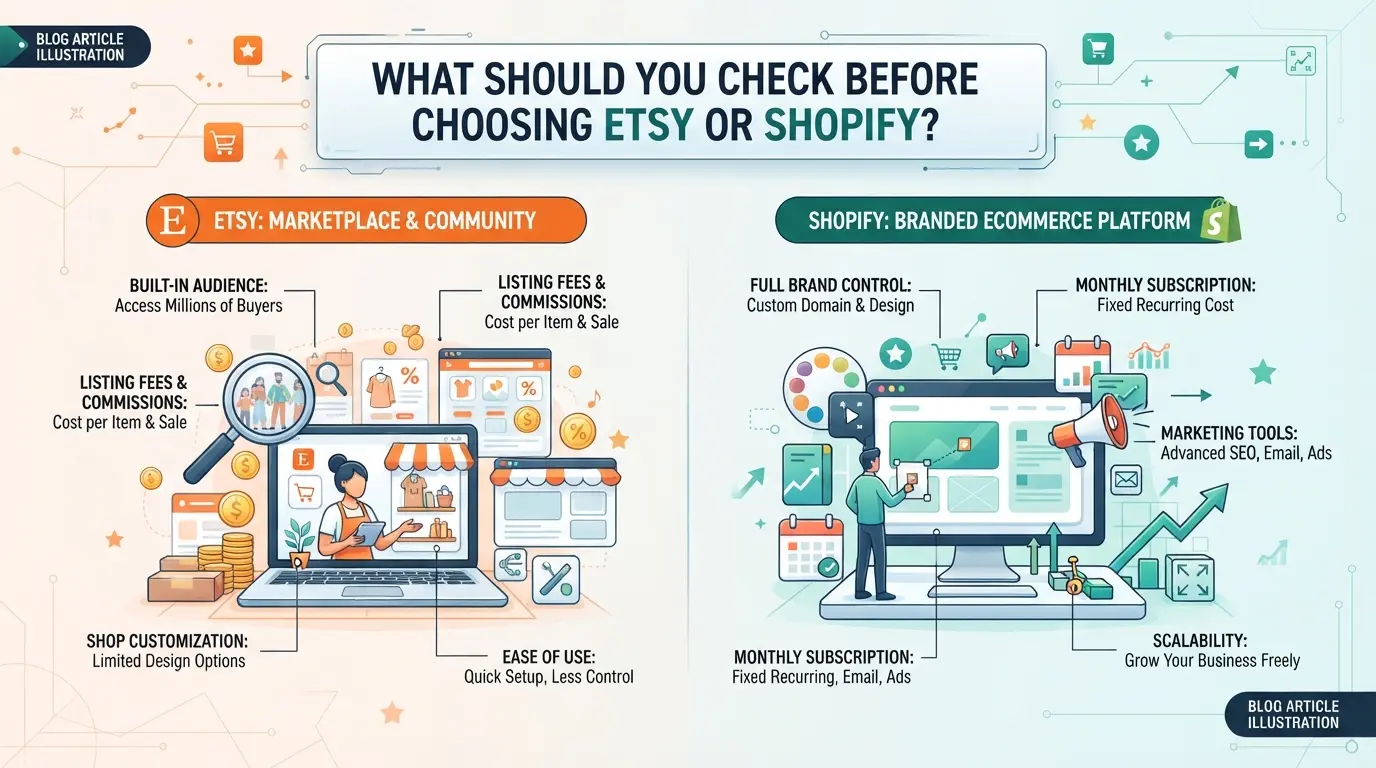
What Should You Check Before Choosing Etsy or Shopify?
Before you jump into either platform, nail down how your day-to-day will actually work. The biggest mistakes come from skipping the boring details, like who controls your customer list or how fees add up as you grow. Miss these early, and you’ll end up locked into the wrong system or scrambling to fix things after your shop is live.
What are your product types and target customers?
If you sell handmade, vintage, or custom items, Etsy’s built-in audience can send traffic your way from day one. For branded, mass-market, or highly customized products, Shopify gives you more freedom but also hands you all the customer acquisition work. Buyers on Etsy expect a marketplace experience, think browsing for gifts or unique finds, while Shopify shoppers often arrive with a brand in mind and expect a direct store feel.
How much control do you need over your brand and store?
- Can you use your own domain and fully control store design?
- Will you get direct access to customer emails and order data?
- Are there limits on what you can sell or how you present products?
Etsy locks you into their design and policy rules, custom branding is limited, and you never own the buyer relationship. Shopify lets you build your own site, collect customer info, and use any sales strategy, but you’re responsible for compliance and support.
What are your growth and scaling plans?
Selling a few items for side income feels easy on either platform. Needing multiple staff logins, handling international currencies, or running several stores gets complicated fast.
- Do you plan to sell overseas or in multiple currencies?
- Will you need to add team members or manage multiple accounts?
- Are you ready to handle your own site updates, payments, and ad accounts?
Missing these checks leads straight to headaches, like finding out mid-year that Etsy limits how you contact buyers, or that Shopify’s app costs multiply with every new feature you add. The next hurdle is understanding why sellers run into sudden restrictions or stalls.
Why Do Some Sellers Struggle or Get Restricted on Etsy or Shopify?
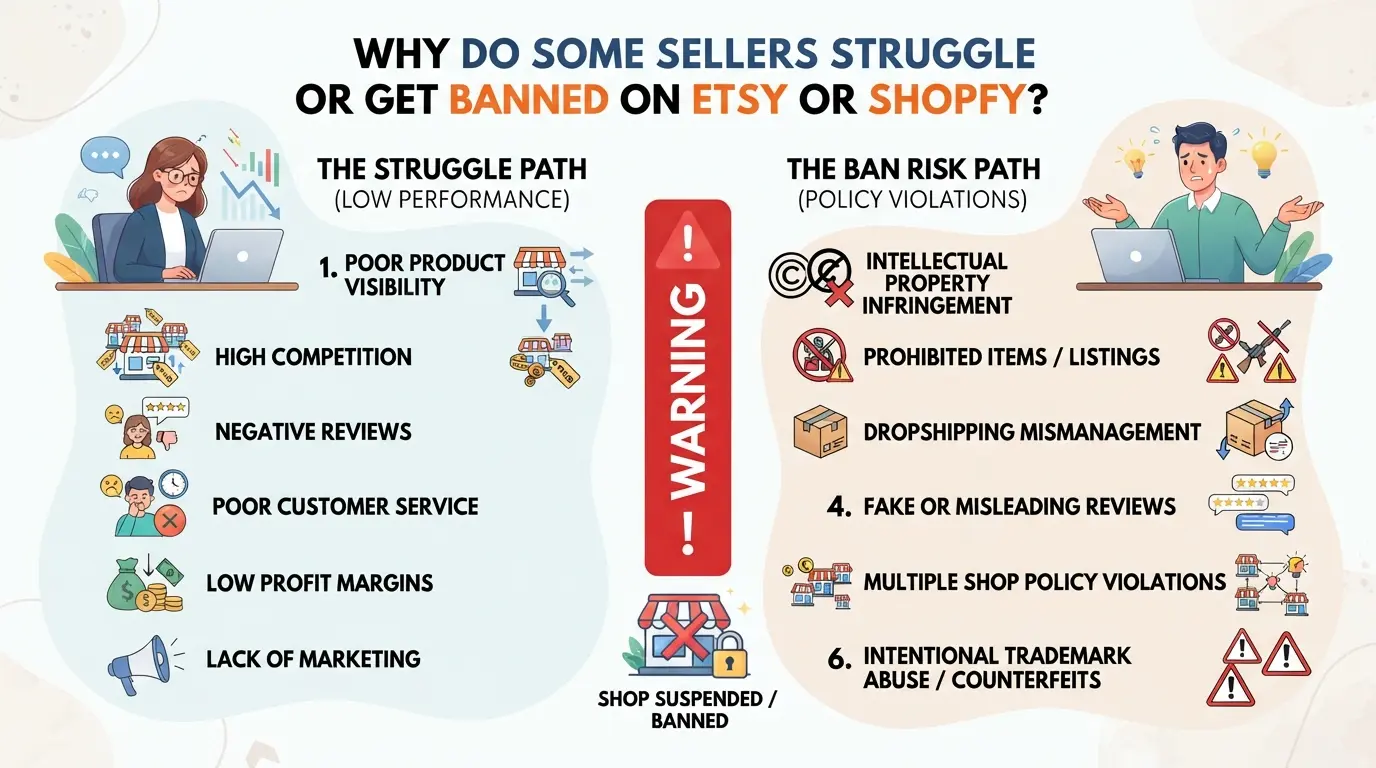
Losing access to a store or getting hit with sudden restrictions is common on both platforms, often it comes down to overlooked rules, risky shortcuts, or missing platform updates. Both new and experienced sellers can end up locked out or fighting to recover accounts because of issues that don’t show up in basic "Etsy vs Shopify" guides.
Etsy’s strict compliance and account review system
Etsy flags sellers for everything from listing handmade items that don’t meet their definition, to spikes in complaints, or failing to verify identity. High-risk categories, like digital downloads or “vintage” items, see faster account reviews.
Shopify’s payment and policy enforcement
Shopify lets you build and customize your own store, but every payment goes through their risk engine. Chargebacks, when buyers dispute a payment, raise instant flags. If you sell a product that falls into a restricted or gray area (such as supplements, “knockoff” accessories, or even some digital services), your payment gateway can freeze funds or shut down your store with little warning. One case: sellers using dropshipping apps to fulfill orders from overseas sometimes get hit with payment holds if delivery delays trigger too many refund requests. Shopify will often send a short warning first, but missed emails or failing to update your policies in time can escalate to a full shutdown. Unlike Etsy, where the main risk is from product compliance, on Shopify the big risk is payment or refund disputes that pile up too quickly. Once your payment processor freezes funds, talking your way out takes weeks, and you may lose unreleased payouts.
Mistakes that increase restriction risk on both platforms
- Running multiple stores from the same device or IP, platforms link accounts and can ban all at once.
- Failing to update branding, policies, or listings after a terms of service change.
- Copy-pasting product descriptions or photos from other sites, automated tools catch these and flag for review.
How Do Fees and Costs Really Compare Between Etsy and Shopify in 2026?
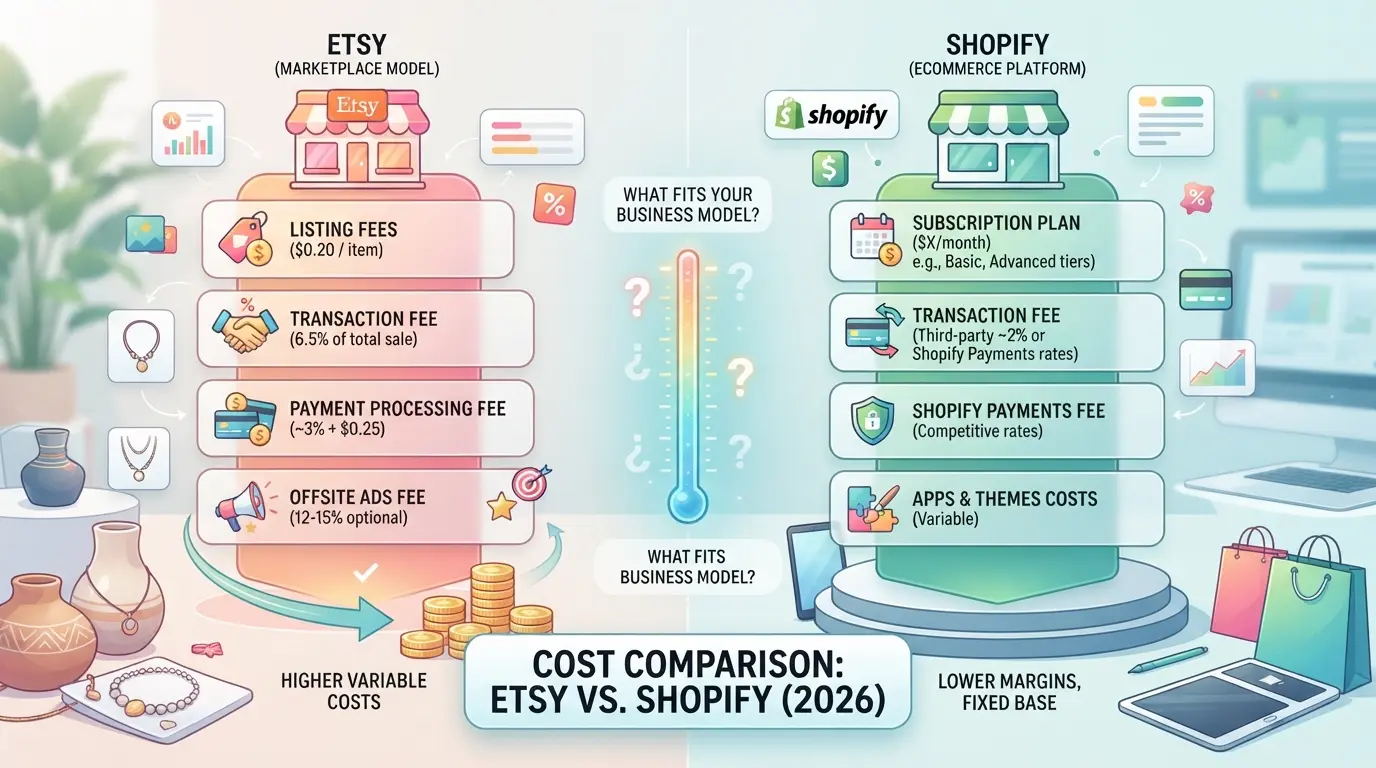
Sellers who skip the fee math end up surprised, platform costs add up fast, and what looks cheap for a single product can turn expensive at scale. The core difference: Etsy charges per listing and sale, while Shopify charges upfront and makes you handle more extras. If you’re weighing Etsy vs Shopify, here’s a breakdown that actually shows what you’ll pay.
Etsy fees: listing, transaction, payment processing, and extras
| Fee Type |
Etsy |
Shopify |
| Listing Fee |
$0.20/item |
$0 |
| Transaction Fee |
6.5% (2026) |
0% (Shopify Payments) |
| Payment Processing |
3% + $0.25/order |
2.9% + $0.30/order |
| Monthly Subscription |
$0 |
$29+ |
| Optional Apps/Extras |
Ads, Offsite Ads |
Apps, Themes |
Etsy’s fee mix means small sellers pay less upfront but lose more to each sale. Shopify’s flat monthly charge looks higher, but you avoid listing and transaction fees, unless you use third-party payments.
Shopify fees: subscription, transaction, payment, and app costs
Shopify’s basic plan starts at $29/month. You pay 2.9% + $0.30 per sale with Shopify Payments, but extra apps or themes can stack up fast. If you need more features, expect higher monthly fees and plugin costs. Missing this can eat into your margin before you notice.
Profit margin impact: which platform is cheaper for your business model?
For low-ticket products or sellers just starting, Etsy usually costs less. Once you scale or sell high-ticket items, Shopify’s fixed fees start to win, especially if you minimize paid apps. The real risk is underestimating app/plugin expenses on Shopify, which can turn a “low fee” setup into a money drain.
If you’re now weighing traffic and reach, that’s where the next difference matters most.
What Are the Real Differences in Traffic, Marketing, and Customer Reach?
Etsy brings a built-in audience but controls how shoppers find you. Shopify gives you full ownership but zero guaranteed traffic. The right choice depends on whether you want fast exposure or control over your brand and marketing.
Etsy’s built-in marketplace and discovery engine
| Traffic Source |
What You Get |
Main Risk |
| Etsy search & browse |
Immediate access to buyers |
Compete with similar shops |
| Etsy ads |
Paid boost inside platform |
Costs add up, no outside reach |
Etsy listings can show up in search results right away, if you use strong product photos and the right keywords. But you can’t target buyers directly or build your own email list. The big tradeoff is speed versus control: Etsy delivers shoppers fast, but you live by their rules and search algorithm.
Shopify’s need for external marketing and brand building
Shopify brings no audience, you have to run ads, build social profiles, or use SEO to get found. Sellers who ignore audience building usually see little traffic, even with a great-looking site.
When does it make sense to use both platforms together?
Some sellers use Etsy for fast discovery, then build a Shopify site for repeat buyers and higher margins. Running both means juggling two sets of inventory and messages, so mistakes happen if you try to automate everything without clear process limits.
How Can Sellers Manage Multiple Etsy and Shopify Accounts or Teams More Safely?
Running several stores or letting a team help can backfire fast if accounts get linked or someone slips up. Most restrictions on Etsy or Shopify come from mistakes in how logins, browsers, or team access are handled, not from product issues. If you want to scale, clean separation and clear processes aren’t optional.
Why multi-account operations get risky fast
- Use the same device or browser fingerprint twice, accounts get linked and can be closed together.
- Forget to switch proxies or profiles, one wrong login ties two shops you meant to keep apart.
- Let team members share logins or shortcuts, one person’s mistake can burn all connected stores.
- Switch between accounts too quickly, platforms log patterns and flag rapid changes as suspicious.
Best practices for separating accounts and team access
- Set up a dedicated browser profile and proxy for each store. This keeps cookies, device data, and IPs isolated.
- Assign team roles carefully, never share the master login. Each user should have their own access.
- Record who did what and when. If an issue comes up, you can trace the problem back to a single session.
- Lock down sensitive actions (like payouts or settings edits) to admins only, too many people with access is how mistakes multiply.
Signs you need a workflow tool (and what to look for)
- You can’t remember which browser or proxy goes with which shop, manual tracking fails past 3 accounts.
- Team members start using the wrong logins or ask for shared passwords, this is how cross-linking starts.
- You notice unexplained logouts, store warnings, or sudden restrictions, manual errors are slipping through.
- Look for tools that support profile isolation, proxy integration, audit logs, and easy role setup, these prevent the common mistakes that cause account loss.
How to Set Up Safer Multi-Account Workflows for Etsy and Shopify with DICloak
Sellers who run more than one Etsy or Shopify store, or manage teams that do, often run into problems when browser sessions, device details, or network settings overlap. Even a small mistake, like using the same browser session for two stores, can tangle workflows or expose team errors. For those looking to keep operations clean, DICloak supports a step-by-step workflow built for separation and control.
Create isolated browser profiles and configure fingerprint settings for each account
Operators can create a separate browser profile in DICloak for each Etsy or Shopify store, customizing browser signals like system type, user agent, language, time zone, and screen size. Each profile keeps its own cookies, cache, and fingerprint settings, so account sessions don’t cross paths, critical for teams that handle multiple stores in parallel. The scope here stops at browser session isolation; DICloak does not change anything inside the Etsy or Shopify site itself.

Assign user-owned proxies to each profile for network separation
If you need to keep each store’s network activity distinct, users can assign a user-owned HTTP, HTTPS, or SOCKS5 proxy to each DICloak profile. The proxy settings, including host, port, and login details, are tested in the profile setup, letting you confirm that connections work as intended. It’s up to each operator to choose, configure, and manage proxies for their own workflows.

Set team permissions to control who can access which profiles and actions
Admins can divide team members into groups, limiting access to only their assigned browser profiles and hiding profile details that aren’t needed for their role. This least-privilege setup reduces the risk of someone accidentally switching stores or viewing information outside their job scope. These controls apply only inside DICloak, they don’t replace permissions set inside Etsy or Shopify.

With these controls in place, teams can handle multi-store operations with fewer workflow clashes, setting a clear base before deciding whether to double down on one platform or split focus.
When Is It Better to Switch Platforms, Use Both, or Stay Put?
Most sellers know when their workflow feels stuck, but the real signal to move or expand is when platform limits start slowing growth or raising risk. Timing your switch or expansion is about catching those signs early, before extra fees or policy changes hurt your margins.
Signs you’re outgrowing Etsy or Shopify
If you hit a cap on product types, find branding options too limited, or can’t scale without higher fees, it’s time to reevaluate. Policy shifts, like stricter listing rules or sudden fee hikes, often push sellers to consider other platforms.
When using both platforms makes sense
Running stores on both platforms can help balance discovery and ownership. Etsy brings quick access to buyers searching for handmade or niche products. Shopify gives full control for branding and repeat business. For example, a shop selling custom jewelry might keep Etsy open for new customer finds, while using Shopify for newsletter signups and exclusive launches. The tradeoff: you’ll need to track inventory, orders, and customer data across both systems, mistakes here can lead to shipping errors or missed messages.
Risks and workflow challenges of switching or running both
- Migration isn’t just moving products, old reviews, search rankings, and buyer trust rarely transfer.
- Managing two platforms doubles your operational complexity: separate logins, payment flows, and support tickets.
- Hidden costs stack up fast, subscription fees, ad spend, and third-party tools can eat into profits if you don’t track them closely.
If you’re not ready for the extra workload, spreading thin can mean more problems than growth. The next section tackles common mistakes sellers make when comparing these platforms, most come from underestimating these tradeoffs.
Common Mistakes and Misconceptions When Comparing Etsy and Shopify
Assuming fees are the only factor
Focusing on "Etsy vs Shopify" fees misses how workflow, risk, and control shape your daily business. What looks cheaper can cost you more in lost time or forced migrations.
Ignoring platform updates and policy changes
- Check if your planned product is now restricted or needs new approvals.
- Review recent seller policy updates, 2026 changes have shut down entire shop categories.
- Ask sellers in forums about new algorithm shifts before committing.
Overlooking workflow and team management needs
Solo sellers can get by with manual processes. Teams hit problems fast when account access, order flow, or permissions don’t scale.
- Confirm if multi-user support matches your store size.
- Test how you’ll handle multiple shops or brands.
- Review how account restrictions impact daily work.
Frequently Asked Questions About Etsy vs Shopify
Is Shopify or Etsy better for beginners in 2026?
Etsy is easier for beginners. You can set up a shop in minutes and list products with simple steps. Shopify takes more time to build your store and customize design. For new sellers, Etsy offers built-in traffic and support. Shopify has more features, but the learning curve is steeper if you’re just starting out.
Can I sell the same products on both Etsy and Shopify?
Yes, you can list the same products, but make sure to follow each platform’s rules. Etsy has strict guidelines about handmade and vintage items. Shopify lets you sell almost anything. Cross-listing helps reach more buyers, but you must manage inventory carefully to avoid overselling and customer issues.
How do I migrate my store from Etsy to Shopify?
To move your store, export your product listings from Etsy and import them into Shopify. Prepare images, descriptions, and customer data. Watch for missing product details and check your settings. Test your new Shopify store before launching to fix errors and ensure a smooth switch for your customers.
What are the biggest risks of running multiple stores or accounts?
Managing more than one store can cause workflow mistakes, like wrong prices or inventory errors. Etsy may ban accounts if you break their rules or link shops in ways they don’t allow. Shopify also tracks account activity, so keep records clear and follow each platform’s guidelines to avoid problems.
Do I need special tools to manage multiple Etsy or Shopify accounts?
If you run several shops, special tools help track sales, inventory, and messages. Look for tools that sync listings and update stock automatically. Features like bulk editing, order management, and reporting save time and reduce mistakes, especially when selling on both Etsy and Shopify.
As you weigh your options for selling online, consider your business goals, budget, and desired level of control over your shop. Taking a closer look at your target audience and the features you need can help you make a confident decision for your next venture. Try DICloak For Free
 Web Proxy Tools
 Free Tools
 Cookie Plugin
 UA Generator
 MAC Address Generator
 IP Generator
 IP Address List
 2FA Code Generator
 World Clock
 Anonymous Check
 WebRTC Leak Test
 UUID Generator
 Free Web Proxy Site
 Proxy Checker
 FB Ad Checker
 AI Web Scraping
 Free SMM Tools
 Twitter Shadowban Checker
 Instagram Name Checker
 UTM Generator
 Username Generator
 AI Hashtag Generator
 LinkedIn Headline Generator
 Social Media Image Resizer